



Community hub
Recent from talks
Knowledge base stats:
Talk channels stats:
Members stats:
Crash (computing)
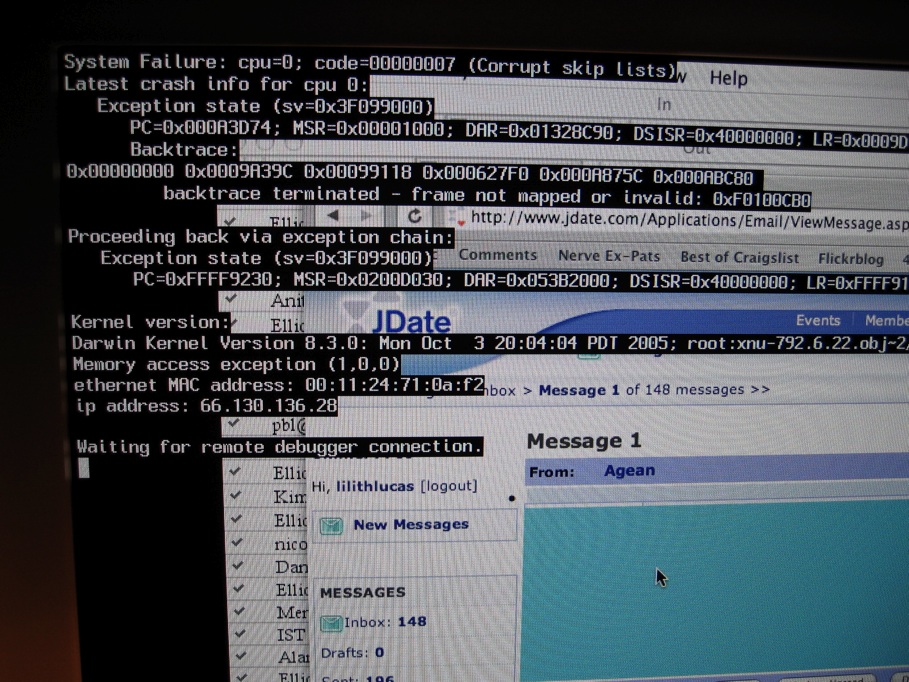
In computing, a crash, or system crash, occurs when a computer program such as a software application or an operating system stops functioning properly and exits. On some operating systems or individual applications, a crash reporting service will report the crash and any details relating to it (or give the user the option to do so), usually to the developer(s) of the application. If the program is a critical part of the operating system, the entire system may crash or hang, often resulting in a kernel panic or fatal system error.
Most crashes are the result of a software bug. Typical causes include accessing invalid memory addresses, incorrect address values in the program counter, buffer overflow, overwriting a portion of the affected program code due to an earlier bug, executing invalid machine instructions (an illegal or unauthorized opcode), or triggering an unhandled exception. The original software bug that started this chain of events is typically considered to be the cause of the crash, which is discovered through the process of debugging. The original bug can be far removed from the code that actually triggered the crash.
In early personal computers, attempting to write data to hardware addresses outside the system's main memory could cause hardware damage. Some crashes are exploitable and let a malicious program or hacker execute arbitrary code, allowing the replication of viruses or the acquisition of data which would normally be inaccessible.
An application typically crashes when it performs an operation that is not allowed by the operating system. The operating system then triggers an exception or signal in the application. Unix applications traditionally responded to the signal by dumping core. Most Windows and Unix GUI applications respond by displaying a dialogue box (such as the one shown in the accompanying image on the right) with the option to attach a debugger if one is installed. Some applications attempt to recover from the error and continue running instead of exiting.
An application can also contain code to crash after detecting a severe error.
Typical errors that result in application crashes include:
A "crash to desktop" (CTD) is said to occur when a program (commonly a video game) unexpectedly quits, abruptly taking the user back to the desktop. Usually, the term is applied only to crashes where no error is displayed, hence all the user sees as a result of the crash is the desktop. Many times there is no apparent action that causes a crash to desktop. During normal function, the program may freeze for a shorter period of time, and then close by itself. Also during normal function, the program may become a black screen and repeatedly play the last few seconds of sound (depending on the size of the audio buffer) that was being played before it crashes to desktop. Other times it may appear to be triggered by a certain action, such as loading an area.
CTD bugs are considered particularly problematic for users. Since they frequently display no error message, it can be very difficult to track down the source of the problem, especially if the times they occur and the actions taking place right before the crash do not appear to have any pattern or common ground. One way to track down the source of the problem for games is to run them in windowed-mode. Certain operating system versions may feature one or more tools to help track down causes of CTD problems.
Hub AI
Crash (computing) AI simulator
(@Crash (computing)_simulator)
Crash (computing)
In computing, a crash, or system crash, occurs when a computer program such as a software application or an operating system stops functioning properly and exits. On some operating systems or individual applications, a crash reporting service will report the crash and any details relating to it (or give the user the option to do so), usually to the developer(s) of the application. If the program is a critical part of the operating system, the entire system may crash or hang, often resulting in a kernel panic or fatal system error.
Most crashes are the result of a software bug. Typical causes include accessing invalid memory addresses, incorrect address values in the program counter, buffer overflow, overwriting a portion of the affected program code due to an earlier bug, executing invalid machine instructions (an illegal or unauthorized opcode), or triggering an unhandled exception. The original software bug that started this chain of events is typically considered to be the cause of the crash, which is discovered through the process of debugging. The original bug can be far removed from the code that actually triggered the crash.
In early personal computers, attempting to write data to hardware addresses outside the system's main memory could cause hardware damage. Some crashes are exploitable and let a malicious program or hacker execute arbitrary code, allowing the replication of viruses or the acquisition of data which would normally be inaccessible.
An application typically crashes when it performs an operation that is not allowed by the operating system. The operating system then triggers an exception or signal in the application. Unix applications traditionally responded to the signal by dumping core. Most Windows and Unix GUI applications respond by displaying a dialogue box (such as the one shown in the accompanying image on the right) with the option to attach a debugger if one is installed. Some applications attempt to recover from the error and continue running instead of exiting.
An application can also contain code to crash after detecting a severe error.
Typical errors that result in application crashes include:
A "crash to desktop" (CTD) is said to occur when a program (commonly a video game) unexpectedly quits, abruptly taking the user back to the desktop. Usually, the term is applied only to crashes where no error is displayed, hence all the user sees as a result of the crash is the desktop. Many times there is no apparent action that causes a crash to desktop. During normal function, the program may freeze for a shorter period of time, and then close by itself. Also during normal function, the program may become a black screen and repeatedly play the last few seconds of sound (depending on the size of the audio buffer) that was being played before it crashes to desktop. Other times it may appear to be triggered by a certain action, such as loading an area.
CTD bugs are considered particularly problematic for users. Since they frequently display no error message, it can be very difficult to track down the source of the problem, especially if the times they occur and the actions taking place right before the crash do not appear to have any pattern or common ground. One way to track down the source of the problem for games is to run them in windowed-mode. Certain operating system versions may feature one or more tools to help track down causes of CTD problems.