
Recent from talks
X display manager
Knowledge base stats:
Talk channels stats:
Members stats:
X display manager
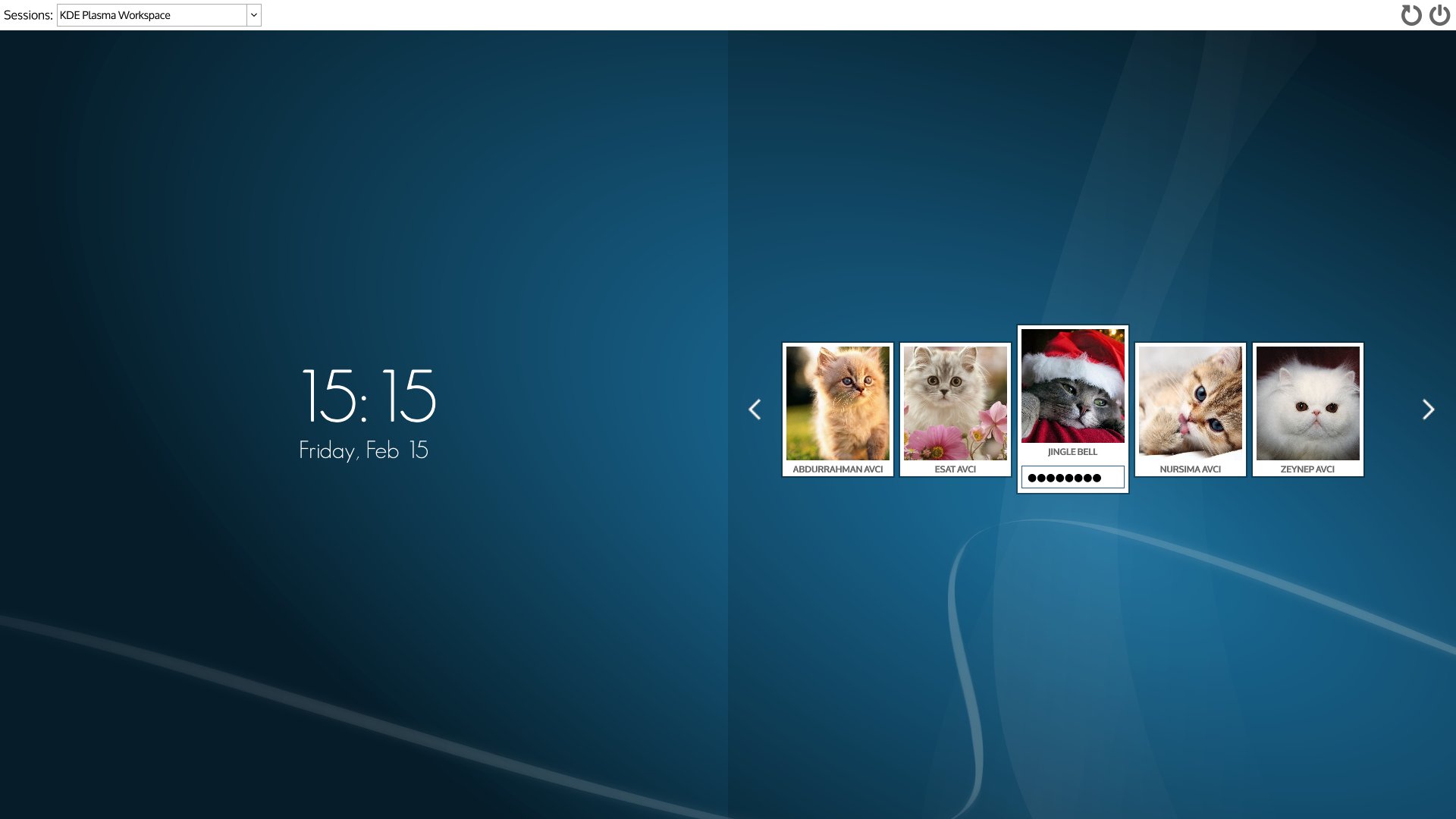
In the X Window System, an X display manager is a graphical login manager which starts a login session on an X server from the same or another computer.
An X display manager presents the user with a login screen. A session starts when a user successfully enters a valid combination of username and password.
When the X display manager runs on the user's computer, it starts the X server before presenting the user the login screen, optionally repeating when the user logs out. In this condition, the DM realizes in the X Window System the functionality of getty and login on character-mode terminals. When the display manager runs on a remote computer, it acts like a telnet server, requesting username and password and starting a remote session.
X11 Release 3 introduced display managers in October 1988 with the aim of supporting the standalone X terminals, just coming onto the market. Various display managers continue in routine use to provide a graphical login prompt on standalone computer workstations running X. X11R4 introduced the X Display Manager Control Protocol (XDMCP) in December 1989 to fix problems in the X11R3 implementation.
XDM (the X Window Display Manager) originated in X11R3. This first version, written by Keith Packard of the MIT X Consortium, had several limitations, the most notable of which was that it could not detect when users switched X terminals off and on. In X11R3, XDM only knew about an X terminal from its entry in the Xservers file, but XDM only consulted this file when it started. Thus every time a user switched a terminal off and on, the system administrator had to send a SIGHUP signal to XDM to instruct it to rescan Xservers.
XDMCP arrived with the introduction of X11R4 (December 1989). With XDMCP, the X server must actively request a display manager connection from the host. An X server using XDMCP therefore no longer requires an entry in Xservers.
An X display manager can run on the same computer where the user sits—starting one or more X servers, displaying the login screen at the beginning and (optionally) every time the user logs out—or on a remote one, working according to the XDMCP protocol.
The XDMCP protocol mandates that the X server starts autonomously and connects to the display manager. In the X Window System paradigm, the server runs on the computer providing the display and input devices. A server can connect, using the XDMCP protocol, to a display manager running on another computer, requesting it to start the session. In this case, the X server acts as a graphical telnet client while the display manager acts like a telnet server: users start programs from the computer running the display manager, while their input and output take place on the computer where the server (and the user) sits.
Hub AI
X display manager AI simulator
(@X display manager_simulator)
X display manager
In the X Window System, an X display manager is a graphical login manager which starts a login session on an X server from the same or another computer.
An X display manager presents the user with a login screen. A session starts when a user successfully enters a valid combination of username and password.
When the X display manager runs on the user's computer, it starts the X server before presenting the user the login screen, optionally repeating when the user logs out. In this condition, the DM realizes in the X Window System the functionality of getty and login on character-mode terminals. When the display manager runs on a remote computer, it acts like a telnet server, requesting username and password and starting a remote session.
X11 Release 3 introduced display managers in October 1988 with the aim of supporting the standalone X terminals, just coming onto the market. Various display managers continue in routine use to provide a graphical login prompt on standalone computer workstations running X. X11R4 introduced the X Display Manager Control Protocol (XDMCP) in December 1989 to fix problems in the X11R3 implementation.
XDM (the X Window Display Manager) originated in X11R3. This first version, written by Keith Packard of the MIT X Consortium, had several limitations, the most notable of which was that it could not detect when users switched X terminals off and on. In X11R3, XDM only knew about an X terminal from its entry in the Xservers file, but XDM only consulted this file when it started. Thus every time a user switched a terminal off and on, the system administrator had to send a SIGHUP signal to XDM to instruct it to rescan Xservers.
XDMCP arrived with the introduction of X11R4 (December 1989). With XDMCP, the X server must actively request a display manager connection from the host. An X server using XDMCP therefore no longer requires an entry in Xservers.
An X display manager can run on the same computer where the user sits—starting one or more X servers, displaying the login screen at the beginning and (optionally) every time the user logs out—or on a remote one, working according to the XDMCP protocol.
The XDMCP protocol mandates that the X server starts autonomously and connects to the display manager. In the X Window System paradigm, the server runs on the computer providing the display and input devices. A server can connect, using the XDMCP protocol, to a display manager running on another computer, requesting it to start the session. In this case, the X server acts as a graphical telnet client while the display manager acts like a telnet server: users start programs from the computer running the display manager, while their input and output take place on the computer where the server (and the user) sits.
Recent media