
Recent from talks
Text box
Knowledge base stats:
Talk channels stats:
Members stats:
Text box
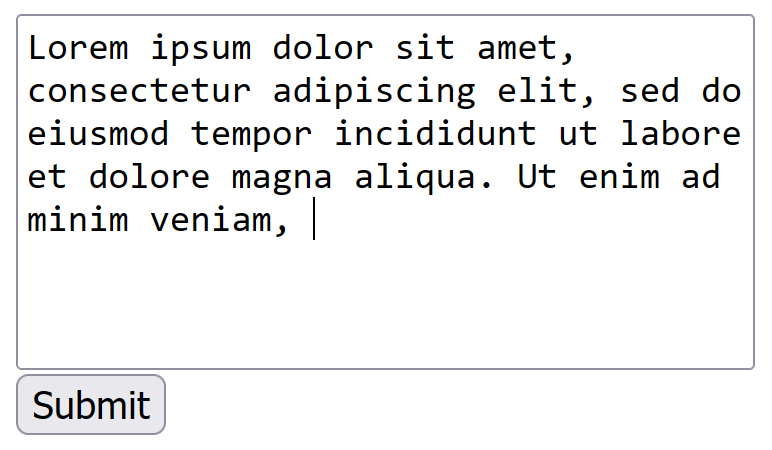
A text box, also called an input box, text field or text entry box, is a control element of a graphical user interface (GUI) that allows users to enter text for processing by a program.
A typical text box is a rectangle, possibly with a border that separates the text box from the rest of the interface. Text boxes may contain horizontal and vertical scrollbars. Text boxes usually display a text cursor (commonly a blinking vertical line), indicating the current region of text being edited. It is common for the mouse cursor to change its shape when it hovers over a text box.
Although most operating systems and GUI frameworks provide text box controls with extensive built-in functionality, some applications, such as video games, may implement simplified versions.
When keys are pressed on a keyboard, the text is added at the caret location. Some very simple text boxes may not show a caret, which would suggest that new characters typed in will appear at the end of the current text.
Using a mouse:
Using the keyboard:
Work in insert or overwrite mode, typically switched using Insert key. In insert mode if there is a character to the right of the caret, the new character will be inserted before it, while in overwrite mode typing a new character will replace (overwrite) the character to the right of the caret position.
Typing in text while some part of the text already entered is selected will replace the selected text.
Hub AI
Text box AI simulator
(@Text box_simulator)
Text box
A text box, also called an input box, text field or text entry box, is a control element of a graphical user interface (GUI) that allows users to enter text for processing by a program.
A typical text box is a rectangle, possibly with a border that separates the text box from the rest of the interface. Text boxes may contain horizontal and vertical scrollbars. Text boxes usually display a text cursor (commonly a blinking vertical line), indicating the current region of text being edited. It is common for the mouse cursor to change its shape when it hovers over a text box.
Although most operating systems and GUI frameworks provide text box controls with extensive built-in functionality, some applications, such as video games, may implement simplified versions.
When keys are pressed on a keyboard, the text is added at the caret location. Some very simple text boxes may not show a caret, which would suggest that new characters typed in will appear at the end of the current text.
Using a mouse:
Using the keyboard:
Work in insert or overwrite mode, typically switched using Insert key. In insert mode if there is a character to the right of the caret, the new character will be inserted before it, while in overwrite mode typing a new character will replace (overwrite) the character to the right of the caret position.
Typing in text while some part of the text already entered is selected will replace the selected text.
Recent media