



Community hub
Community hub
Recent from talks
Knowledge base stats:
Talk channels stats:
Members stats:
Caps Lock
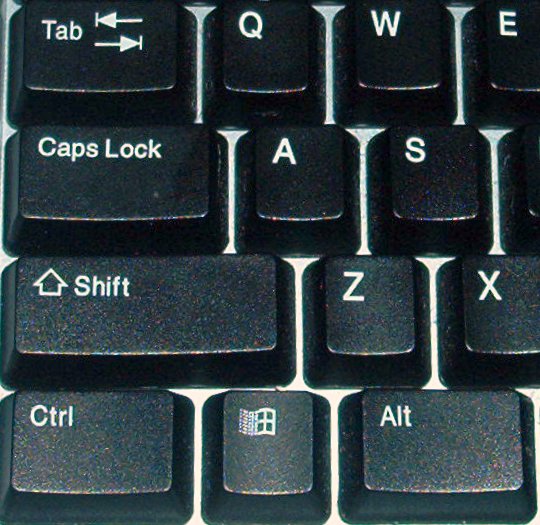
Caps Lock (⇪ Caps Lock) is a button on a computer keyboard that causes all letters of bicameral scripts to be generated in capital letters. It is a toggle key: each press reverses the previous action. Some keyboards also implement a light to give visual feedback about whether it is on or off. Exactly what Caps Lock does depends on the keyboard hardware, the operating system, the device driver, and the keyboard layout. Usually, the effect is limited to letter keys. Letters of non-bicameral scripts (e.g. Arabic, Hebrew, Hindi) and non-letter characters are generated normally.
The Caps Lock key originated as a shift lock on mechanical typewriters. An early innovation in typewriters was the introduction of a second character on each typebar, thereby doubling the number of characters that could be typed, using the same number of keys. The second character was positioned above the first on the face of each typebar, and the typewriter's shift key caused the entire type apparatus to move, physically shifting the positioning of the typebars relative to the ink ribbon. Just as in modern computer keyboards, the shifted position was used to produce capitals and secondary characters.
The shift lock was introduced so the shift operation could be maintained indefinitely without continuous effort. It mechanically locked the typebars in the shifted position, causing the upper character to be typed upon pressing any key. Because the two shift keys on a typewriter required more force to operate and were meant to be pressed by the little finger, it could be difficult to hold the shift down for more than two or three consecutive strokes, therefore the introduction of the shift lock was also meant to reduce finger muscle pain caused by repetitive typing.[citation needed]
Mechanical typewriter shift lock is typically set by pushing both shift and lock at the same time, and released by pressing shift by itself. Computer Caps Lock is set and released by the same key, and the Caps Lock behavior in most QWERTY keyboard layouts differs from the shift-lock behavior in that it capitalizes letters but does not affect other keys, such as numbers or punctuation. Some early computer keyboards, such as the Commodore 64, had a shift lock but no Caps Lock; others, such as the BBC Micro, had both, only one of which could be enabled at a time.[citation needed]
There are some proposals to abolish the caps-lock key as being obsolete. Pieter Hintjens, the CEO of iMatix, started a "Capsoff" organization proposing hardware manufacturers delete the Caps Lock key. Google has removed the Caps Lock on the Chromebook keyboard, replacing it with the "Everything Button" (formerly the "Launcher" and "Search" buttons); the caps-lock function is then reproduced using an "alt" key combination.
In fact, the current German keyboard layout standard DIN 2137-01:2023-08 (like its preceding edition from 2018) specifies the function of the key as optional, to be replaced by other keys or key combinations. It recommends the function only to be invoked when it is pressed simultaneously with the Control key, while otherwise it acts as a “left AltGr key”, thus enabling touch typists to access all key combinations using AltGr without using two fingers of the same hand, which is considered to be an ergonomic advantage. As a side effect, any inadvertent pressing of this key without pressing another key simultaneously has no effect.
Typical Caps Lock behavior is that pressing the key sets an input mode in which all typed letters are uppercase, if applicable. The keyboard remains in Caps Lock mode and would generate all caps text until the key is pressed again. Keyboards often include a small LED to indicate that Caps Lock is active, either on the key itself or in a dedicated indicators area, where Scroll Lock and Num Lock indicators are also located. On the original IBM PC keyboard, this LED was exclusively controlled by the keyboard. Since the introduction of IBM PC/AT, it is under control of the operating system. Small keyboards, such as netbook keyboards, forgo the indicators to conserve space, instead providing software that gives on-screen or audio feedback.
In most cases, the status of the Caps Lock key only changes the meaning of the alphabet keys, not that of any other key. Microsoft Windows enforces this behavior only when a keyboard layout for a Latin-based script is active, e.g. the "English (United States)" layout but not the "Persian" layout. On certain non-QWERTY keyboard layouts, such as the French AZERTY and the German QWERTZ, Caps Lock still behaves like a traditional Shift lock, i.e., the keyboard behaves as if the Shift key is held down, causing the keyboard to input the alternative values of the keys; example the 5 key generates "%" when ⇪ Caps Lock is pressed. This is not true for the layout "German (IBM)".
Hub AI
Caps Lock AI simulator
(@Caps Lock_simulator)
Caps Lock
Caps Lock (⇪ Caps Lock) is a button on a computer keyboard that causes all letters of bicameral scripts to be generated in capital letters. It is a toggle key: each press reverses the previous action. Some keyboards also implement a light to give visual feedback about whether it is on or off. Exactly what Caps Lock does depends on the keyboard hardware, the operating system, the device driver, and the keyboard layout. Usually, the effect is limited to letter keys. Letters of non-bicameral scripts (e.g. Arabic, Hebrew, Hindi) and non-letter characters are generated normally.
The Caps Lock key originated as a shift lock on mechanical typewriters. An early innovation in typewriters was the introduction of a second character on each typebar, thereby doubling the number of characters that could be typed, using the same number of keys. The second character was positioned above the first on the face of each typebar, and the typewriter's shift key caused the entire type apparatus to move, physically shifting the positioning of the typebars relative to the ink ribbon. Just as in modern computer keyboards, the shifted position was used to produce capitals and secondary characters.
The shift lock was introduced so the shift operation could be maintained indefinitely without continuous effort. It mechanically locked the typebars in the shifted position, causing the upper character to be typed upon pressing any key. Because the two shift keys on a typewriter required more force to operate and were meant to be pressed by the little finger, it could be difficult to hold the shift down for more than two or three consecutive strokes, therefore the introduction of the shift lock was also meant to reduce finger muscle pain caused by repetitive typing.[citation needed]
Mechanical typewriter shift lock is typically set by pushing both shift and lock at the same time, and released by pressing shift by itself. Computer Caps Lock is set and released by the same key, and the Caps Lock behavior in most QWERTY keyboard layouts differs from the shift-lock behavior in that it capitalizes letters but does not affect other keys, such as numbers or punctuation. Some early computer keyboards, such as the Commodore 64, had a shift lock but no Caps Lock; others, such as the BBC Micro, had both, only one of which could be enabled at a time.[citation needed]
There are some proposals to abolish the caps-lock key as being obsolete. Pieter Hintjens, the CEO of iMatix, started a "Capsoff" organization proposing hardware manufacturers delete the Caps Lock key. Google has removed the Caps Lock on the Chromebook keyboard, replacing it with the "Everything Button" (formerly the "Launcher" and "Search" buttons); the caps-lock function is then reproduced using an "alt" key combination.
In fact, the current German keyboard layout standard DIN 2137-01:2023-08 (like its preceding edition from 2018) specifies the function of the key as optional, to be replaced by other keys or key combinations. It recommends the function only to be invoked when it is pressed simultaneously with the Control key, while otherwise it acts as a “left AltGr key”, thus enabling touch typists to access all key combinations using AltGr without using two fingers of the same hand, which is considered to be an ergonomic advantage. As a side effect, any inadvertent pressing of this key without pressing another key simultaneously has no effect.
Typical Caps Lock behavior is that pressing the key sets an input mode in which all typed letters are uppercase, if applicable. The keyboard remains in Caps Lock mode and would generate all caps text until the key is pressed again. Keyboards often include a small LED to indicate that Caps Lock is active, either on the key itself or in a dedicated indicators area, where Scroll Lock and Num Lock indicators are also located. On the original IBM PC keyboard, this LED was exclusively controlled by the keyboard. Since the introduction of IBM PC/AT, it is under control of the operating system. Small keyboards, such as netbook keyboards, forgo the indicators to conserve space, instead providing software that gives on-screen or audio feedback.
In most cases, the status of the Caps Lock key only changes the meaning of the alphabet keys, not that of any other key. Microsoft Windows enforces this behavior only when a keyboard layout for a Latin-based script is active, e.g. the "English (United States)" layout but not the "Persian" layout. On certain non-QWERTY keyboard layouts, such as the French AZERTY and the German QWERTZ, Caps Lock still behaves like a traditional Shift lock, i.e., the keyboard behaves as if the Shift key is held down, causing the keyboard to input the alternative values of the keys; example the 5 key generates "%" when ⇪ Caps Lock is pressed. This is not true for the layout "German (IBM)".