Hubbry Logo
CPU multiplierCPU multiplierMain
Open search
CPU multiplier
Community hub
CPU multiplier
logo
8 pages, 0 posts
0 subscribers
Be the first to start a discussion here.
CPU multiplier
CPU multiplier
from Wikipedia

In computing, the clock multiplier (or CPU multiplier or bus/core ratio) sets the ratio of an internal CPU clock rate to the externally supplied clock. This may be implemented with phase-locked loop (PLL) frequency multiplier circuitry. A CPU with a 10x multiplier will thus see 10 internal cycles for every external clock cycle. For example, a system with an external clock of 100 MHz and a 36x clock multiplier will have an internal CPU clock of 3.6 GHz. The external address and data buses of the CPU (often collectively termed front side bus (FSB) in PC contexts) also use the external clock as a fundamental timing base; however, they could also employ a (small) multiple of this base frequency (typically two or four) to transfer data faster.

The internal frequency of microprocessors is usually based on FSB frequency. To calculate internal frequency the CPU multiplies bus frequency by a number called the clock multiplier. For calculation, the CPU uses actual bus frequency, and not effective bus frequency. To determine the actual bus frequency for processors that use dual-data rate (DDR) buses (AMD Athlon and Duron) and quad-data rate buses (all Intel microprocessors starting from Pentium 4) the effective bus speed should be divided by 2 for AMD or 4 for Intel.

Clock multipliers on AMD Ryzen CPUs are never fixed.[1] Clock multipliers on many modern Intel processors are fixed; it is usually not possible to change them. Some versions of processors have clock multipliers unlocked; that is, they can be "overclocked" by increasing the clock multiplier setting in the motherboard's BIOS setup program. Some CPU engineering samples may also have the clock multiplier unlocked. Many Intel qualification samples have maximum clock multiplier locked: these CPUs may be underclocked (run at lower frequency), but they cannot be overclocked by increasing clock multiplier higher than intended by CPU design. While these qualification samples and majority of production microprocessors cannot be overclocked by increasing their clock multiplier, they still can be overclocked by using a different technique: by increasing FSB frequency.

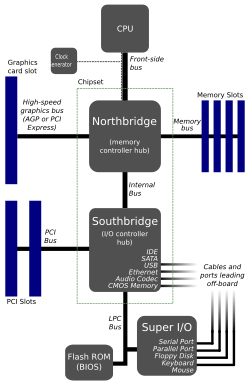
Topology of an older x86 computer. Notice the FSB connecting the CPU and the northbridge.

Basic system structure

[edit]

As of 2009, computers have several interconnected devices (CPU, RAM, peripherals, etc. – see diagram) that typically run at different speeds. Thus they use internal buffers and caches when communicating with each other via the shared buses in the system. In PCs, the CPU's external address and data buses connect the CPU to the rest of the system via the "northbridge". Nearly every desktop CPU produced since the introduction of the 486DX2 in 1992 has employed a clock multiplier to run its internal logic at a higher frequency than its external bus, but still remain synchronous with it. This improves the CPU performance by relying on internal cache memories or wide buses (often also capable of more than one transfer per clock cycle) to make up for the frequency difference.

Variants

[edit]

Some CPUs, such as Athlon 64 and Opteron, handle main memory using a separate and dedicated low-level memory bus. These processors communicate with other devices in the system (including other CPUs) using one or more slightly higher-level HyperTransport links; like the data and address buses in other designs, these links employ the external clock for data transfer timing (typically 800 MHz or 1 GHz, as of 2007).

BIOS settings

[edit]

Some systems allow owners to change the clock multiplier in the BIOS menu. Increasing the clock multiplier will increase the CPU clock speed without affecting the clock speed of other components. Increasing the external clock (and bus speed) will affect the CPU as well as RAM and other components.

These adjustments provide the two common methods of overclocking and underclocking a computer, perhaps combined with some adjustment of CPU or memory voltages (changing oscillator crystals occurs only rarely); note that careless overclocking can cause damage to a CPU or other component due to overheating or even voltage breakdown. Newer CPUs often have a locked clock multiplier, meaning that the bus speed or the clock multiplier cannot be changed in the BIOS unless the user hacks the CPU to unlock the multiplier. High end CPUs, however, normally have an unlocked clock multiplier.

The earlier motherboards may need to set CPU external frequency and CPU multiplier manually via onboard jumper. Later, in Pentium III and Pentium 4 era, many motherboards can determine CPU frequency automatically via CPUID.[2]

Clock doubling

[edit]

The phrase clock doubling implies a clock multiplier of two.

Examples of clock-doubled CPUs include:

  • the Intel 80486DX2, which ran at 50 or 66 MHz on a 25 or 33 MHz bus
  • the Weitek SPARC POWER μP, a clock-doubled 80 MHz version of the SPARC processor that one could drop into the otherwise 40 MHz SPARCStation 2

In both these cases the overall speed of the systems increased by about 75%.[citation needed]

By the late 1990s almost all high-performance processors (excluding typical embedded systems) run at higher speeds than their external buses, so the term "clock doubling" has lost much of its impact.

For CPU-bound applications, clock doubling will theoretically improve the overall performance of the machine substantially, provided the fetching of data from memory does not prove a bottleneck. In more modern processors where the multiplier greatly exceeds two, the bandwidth and latency of specific memory ICs (or the bus or memory controller) typically become a limiting factor.

See also

[edit]

References

[edit]
Revisions and contributorsEdit on WikipediaRead on Wikipedia
from Grokipedia
The CPU multiplier, also known as the clock multiplier or CPU ratio, is a configurable hardware that determines a central processing unit's (CPU) operating frequency by scaling the base clock speed (BCLK) of the , enabling the processor to execute instructions at a rate independent of the bus to optimize overall system performance. For instance, a typical BCLK of 100 MHz combined with a multiplier of 46 yields an effective CPU clock speed of 4.6 GHz, directly influencing the processor's ability to handle computational tasks. Introduced by in the early with the 80486DX2 processor, the multiplier allowed the CPU to run at twice the bus speed—such as 66 MHz on a 33 MHz bus—marking the first widespread use of this technique to decouple processor speed from limitations without requiring synchronous operation across all components. This innovation arose from the need to accelerate internal CPU operations while maintaining compatibility with slower external buses, as early processors could only synchronize with the system on every other clock cycle, necessitating internal multiplication for efficiency. By the mid-, multipliers became a standard feature in -series CPUs, where processor speeds were calculated as the product of the frequency (e.g., 60 MHz or 66 MHz) and the multiplier (e.g., 1.5x for a 90 MHz ), often set manually via jumpers for flexibility in . To curb unauthorized overclocking and prevent retailers from remarking lower-speed chips as higher ones, Intel implemented multiplier locking starting with Pentium II processors in August 1998, fusing the multiplier value directly into the CPU to restrict adjustments and ensure reliability predictions for cooling and failure rates. This shift reduced accessibility for mainstream users but spurred the development of "unlocked" variants, such as early Pentium engineering samples and later enthusiast models like AMD's multiplier-unlocked processors in the late . In contemporary , the CPU multiplier remains essential for optimization, particularly in scenarios where unlocked models—such as Intel's K-series Core processors—allow adjustments to increase the ratio beyond factory settings with adequate cooling and voltage tuning, though this risks system instability if not managed properly. Unlike base clock adjustments, which can destabilize memory and PCIe interfaces due to their system-wide impact, multiplier tweaks primarily affect the CPU, making them a preferred method for enthusiasts seeking higher throughput in gaming, , and scientific without broad hardware overhauls.

Fundamentals

Definition and Purpose

The CPU multiplier, also known as the clock ratio or bus-to-core ratio, is an integer or fractional value that determines the ratio between the processor's internal clock and the external base clock signal, such as the base clock (BCLK) or (FSB). This multiplier effectively scales the base clock to generate the CPU's operating ; for example, a multiplier of 36 applied to a 100 MHz base clock results in a 3.6 GHz internal CPU speed. The mechanism relies on a (PLL) circuit within the CPU to multiply the incoming precisely, ensuring of the processor's internal operations. The primary purpose of the CPU multiplier is to enable the processor to achieve significantly higher internal operating speeds without necessitating that the entire system bus or external components operate at equivalent frequencies, which would otherwise impose severe limitations on design scalability. By decoupling the CPU's core frequency from the slower external bus, it facilitates synchronous communication at the bus clock rate between the processor and peripherals like memory and I/O devices, while allowing the internal CPU core to operate at higher speeds for optimized performance. This approach mitigates challenges associated with high-frequency signaling across the system, including potential issues with signal integrity and electromagnetic interference that could arise if the bus were forced to match the CPU's pace. Among its key benefits, the CPU multiplier supports reduced power consumption and heat generation in external system components by maintaining them at lower clock rates, while still delivering enhanced computational performance from the CPU core. This design has been foundational for scalable processor architectures since the , beginning with early implementations like Intel's 80486DX2, and remains integral to modern CPUs for balancing speed, efficiency, and compatibility.

Clock Speed Calculation

The clock speed of a (CPU) is determined by the product of the base clock (BCLK) and the CPU multiplier, which together generate the processor's operating . The BCLK serves as the system's reference , typically set at 100 MHz in modern and architectures, though it can be adjusted within a range of approximately 90-150 MHz during to fine-tune performance. The multiplier, also known as the core , is typically an value (though fractional in some older architectures) that represents the number of BCLK cycles per processor cycle, commonly ranging from 8x in low-power configurations to 60x or higher in high-performance desktop CPUs. The fundamental equation for CPU frequency is: CPU Frequency=BCLK×Multiplier\text{CPU Frequency} = \text{BCLK} \times \text{Multiplier} For instance, a BCLK of 100 MHz multiplied by a 30x multiplier results in a 3.0 GHz CPU speed. In practical examples, an i9-14900K processor with a 100 MHz BCLK and 56x multiplier achieves a 5.6 GHz frequency during turbo boost operation (as of 2023). Similarly, an 9 7950X can reach 5.7 GHz using a 100 MHz BCLK and 57x multiplier in overclocked scenarios (as of 2022). These calculations allow for precise control over processing speed while maintaining synchronization with other system components. Precision in clock speed arises from the interaction of integer multipliers with potentially fractional BCLK values, leading to non-integer GHz results in practice. For example, a 100 MHz BCLK paired with a 33x multiplier yields 3.3 GHz (3300 MHz), a common base frequency in CPUs where the multiplier ensures whole-number cycles but the overall speed expresses as a when scaled to GHz. This approach avoids the need for sub-integer multipliers in basic configurations, though BCLK adjustments (e.g., to 99.8 MHz) can introduce fine for stability. In systems with divided buses, such as those for or PCIe interfaces, the effective is adjusted by applying a bus divider to prevent sensitive peripherals. The general equation is: Adjusted Frequency=BCLK×MultiplierBus Divider\text{Adjusted Frequency} = \frac{\text{BCLK} \times \text{Multiplier}}{\text{Bus Divider}} For , the DDR effective speed often incorporates a divider of 2 to account for operation; for example, a 100 MHz BCLK with a 32x multiplier and divider of 2 results in 3200 MT/s (DDR4-3200, common as of 2025). For PCIe, motherboards typically use dividers (e.g., 1x or 2x) to maintain the reference clock at 100 MHz regardless of BCLK changes, ensuring compatibility; a 200 MHz BCLK with a 2x divider keeps PCIe at the standard 100 MHz reference. This division isolates subsystem speeds, allowing CPU without destabilizing I/O interfaces.

Historical Development

Early Implementations

The concept of the CPU multiplier originated in the late as a means to decouple the processor's internal operating from the slower external , enabling higher performance without requiring faster bus components. The 80486DX2, introduced in 1992, marked the first commercial implementation of this feature in x86 processors, incorporating a clock multiplier supporting a 2x . This allowed the internal logic to run at double the external clock speed in supported configurations, addressing limitations in bus technology while maintaining compatibility with existing motherboards. A key transition occurred with the shift from the 80386, which lacked any multiplier and operated synchronously at the bus clock frequency, to the 80486DX2, where multipliers became a standard feature for performance scaling in later models of the family. For instance, the 80486DX2-100, operating on a 50 MHz external bus with a 2x multiplier, achieved an effective internal speed of 100 MHz, demonstrating how this innovation boosted computational throughput by approximately 50-70% over non-doubled equivalents. Early implementations like these faced significant technical challenges, including —variations in signal arrival times across the chip that could violate timing margins—and increased heat generation from the higher internal frequencies, prompting the adoption of synchronous clock distribution networks to minimize and ensure reliable operation. Subsequent developments in the 1990s expanded multiplier ratios to overcome persistent bus bottlenecks. The , released in 1993, introduced support for fractional and higher integer ratios such as 1.5x, 2x, and 3x, allowing configurations like a 75 MHz core on a 50 MHz bus to deliver enhanced integer and floating-point performance. Similarly, AMD's K5 processor in 1996 incorporated multipliers starting at 1.5x (e.g., 100 MHz core on a 66 MHz bus), positioning it as a competitive alternative to 's offerings by enabling scalable speeds up to 133 MHz equivalents. In enterprise environments, IBM's AS/400 servers during the 1990s utilized scalable processor designs for mainframe performance upgrades across models like the B10 and B60 without full hardware overhauls.

Evolution to Modern Architectures

The transition to multi-core architectures in the mid-2000s marked a significant advancement in CPU multiplier design, enabling higher ratios to achieve greater clock speeds while accommodating multiple cores. Intel's Core 2 series, launched in 2006, supported multipliers up to 14x in high-end models such as the mobile Core 2 Extreme X7900, which operated at 2.8 GHz on a 200 MHz base clock, allowing for improved single-threaded performance in dual-core configurations. Concurrently, AMD's Phenom X4 processors, introduced in 2007, featured unlocked multipliers in Black Edition variants, allowing adjustments to the uniform ratio for all cores to optimize workload distribution and power efficiency across quad-core setups. By 2008, Intel's Nehalem architecture further refined this approach with fully independent multipliers per core, as seen in the Core i7-920, which allowed heterogeneous core speeds for better thermal management and performance scaling in multi-threaded environments. This design enabled dynamic adjustments without global synchronization, a key step toward efficient multi-core operation. Post-2010 developments responded to power and thermal constraints imposed by shrinking process nodes, leading to moderated multiplier ranges prioritizing efficiency. Intel's Sandy Bridge processors, released in 2011 on a 32 nm process (with Ivy Bridge following on 22 nm in 2012), featured stock multipliers typically in the 30-35x range, such as the Core i7-2600K's base 34x ratio boosting to 38x under turbo conditions, balancing higher core counts with reduced power draw amid the "power wall." Recent trends through 2025 have pushed multipliers higher in -oriented designs while incorporating hybrid architectures. AMD's Zen 4-based 7000 series, launched in 2022, achieved 5.7 GHz boost clocks via 57x multipliers on a 100 MHz base, enhancing single-core in 5 nm processes. Intel's processors from 2021 introduced hybrid (P) and (E) cores with differentiated multipliers, where P-cores reached up to 52x for 5.2 GHz operation, while E-cores topped at around 39x for 3.9 GHz, optimizing for diverse workloads.

System Components

Integration with Base Clock and Motherboard

The base clock (BCLK) is generated by a dedicated integrated circuit on the , which produces the fundamental timing signal typically set at 100 MHz and distributes it to key system components including the CPU, , and PCIe interfaces. For instance, older Intel-compatible systems utilized chips like the ICS9EPRS525 , driven by a 14.318 MHz , to supply synchronized clocks for the CPU and . In modern designs, similar functions are handled by advanced generators such as the Skyworks SL28EB742, which ensures compliance with Intel's CK505 standards while supporting frequency ranges up to 166 MHz for CPU clocks through configurable inputs. The CPU multiplier integrates with this BCLK via the processor's internal (PLL), a feedback control circuit that multiplies the incoming BCLK frequency to achieve the desired core clock speed while isolating the external bus to prevent unintended scaling of peripheral timings. This PLL-based multiplication occurs within the CPU die, allowing the internal clock to run at rates like 4-5 GHz from a 100 MHz BCLK without altering the base signal distributed to other elements, thus maintaining system-wide . Motherboard chipset compatibility plays a critical role in BCLK and multiplier interactions, as limitations in the can restrict overclocking headroom to avoid instability in connected subsystems. For example, the Z790 supports BCLK adjustments typically up to around 125-150 MHz on high-end boards like models, with multiplier tweaks required to compensate for potential PCIe and disruptions beyond default settings. Exceeding these thresholds often necessitates additional board-specific features, such as BCLK patches, to stabilize the system. Bus division ratios further tie the multiplier settings to overall clock distribution, ensuring subsystems operate at appropriate speeds derived from the BCLK. For , a common divider ratio like 1:4 relates the (FSB) or BCLK to the DRAM clock, allowing DDR to run at effective speeds that are a fraction of the CPU core —for instance, positioning at approximately one-quarter the CPU speed in certain configurations to balance latency and bandwidth. Similarly, PCIe interfaces derive their 100 MHz reference clock from the BCLK, often using adjustable ratios such as 1x (direct) or 1.25x on platforms, which scale with BCLK changes unless decoupled to prevent data errors during multiplier-driven overclocks. Diagnostic tools like HWiNFO enable real-time monitoring of these interactions by reading BCLK values and CPU multiplier ratios directly from hardware sensors, providing insights into effective core clocks calculated as BCLK multiplied by the per-core ratio. This utility samples timings to display adjustments in components like and PCIe, helping users verify stability without invasive hardware probes.

BIOS and UEFI Configuration

To access the or firmware for CPU multiplier configuration, users typically press a designated key during system startup, such as Delete (Del) on many and motherboards or F2 on reference platforms. Once entered, navigation proceeds to the "Advanced Mode" or "OC" section, often by pressing F7, leading to submenus like "Advanced CPU Configuration" or "CPU Features." Within these menus, the CPU multiplier—commonly labeled as "CPU Ratio," "CPU Core Ratio," or "CPU Clock Ratio"—is adjusted by selecting a numerical value from a , with typical ranges spanning 8x to 60x or higher based on processor capabilities. Systems offer auto modes for dynamic adjustment by the or operating system, alongside manual modes for fixed values that provide granular control over clock speeds. After modifications, users save changes and exit via F10, prompting a to apply the settings to the motherboard's . UEFI firmware, standard on motherboards since around 2011, replaces the text-based interface of legacy BIOS with graphical elements, including mouse navigation and visual previews of settings in implementations from vendors like AMI and Award BIOS. This enables more intuitive adjustments, such as real-time displays of projected clock speeds during multiplier selection. Unstable changes, such as those causing failure to complete the Power-On Self-Test (POST), frequently arise from multiplier settings exceeding hardware limits and are commonly resolved by resetting the CMOS through a motherboard jumper, button, or battery removal to revert to factory defaults. ASUS motherboards feature the AI Tweaker menu, which includes sliders and automated guides for precise multiplier tuning, often under the "Extreme Tweaker" or "AI Optimized" options. integrates EasyTune software with configurations, allowing users to monitor and fine-tune multipliers via a graphical that syncs with firmware-set ratios for CPU control. As of 2025, 800-series chipsets incorporate AI-assisted optimization in interfaces from partners like and , using to suggest and apply stable multiplier values based on system .

Multiplier Variants

Integer vs Fractional Multipliers

Integer multipliers employ whole-number ratios, such as 30x or 45x, and were prevalent in early CPU designs owing to their straightforward hardware requirements and reduced clock jitter. These designs minimize complexity in the phase-locked loop (PLL) circuitry, enabling reliable signal generation with minimal phase noise, as the feedback divider operates solely on integer divisions. Fractional multipliers, by contrast, support decimal ratios like 35.5x or 48.75x through advanced PLL configurations that incorporate dividers for finer frequency granularity. Introduced with the processor in , supporting ratios such as 1.5x, this approach allowed for more precise clock scaling and gained widespread adoption by the late 1990s across desktop architectures. In technical terms, fractional multipliers achieve non- ratios via a numerator-denominator structure within the PLL feedback path, such as 71/2 yielding 35.5x, which mitigates quantization errors and enables smaller step sizes compared to pure modes. This dithering technique averages the division ratio over multiple cycles, producing an effective fractional value while maintaining PLL lock. Integer multipliers offer hardware simplicity and stability but result in coarser frequency adjustments, such as 100 MHz increments at a 100 MHz base clock (BCLK), limiting fine-tuning options. Fractional multipliers provide greater precision, permitting exact targets like 4.2 GHz from a standard BCLK, though they introduce added PLL complexity, higher power draw, and risks of increased or instability if not properly calibrated. Representative examples illustrate these differences: The FX-series processors from 2011 supported unlocked multipliers adjustable in 0.5x increments, allowing fractional ratios for in multi-core setups. In contrast, processors from the LGA 775 era, such as the Core 2 Quad Q9550 (2007), supported fractional multipliers down to 0.5x increments, facilitating nuanced ; however, later generations like the 13th-generation Core processors primarily use integer multipliers with per-core turbo ratios.

Locked and Unlocked Multipliers

Locked multipliers refer to fixed clock ratios imposed by CPU manufacturers on standard models to prioritize system stability and adherence to warranty conditions. These processors, such as Intel's non-K series like the Core i7-14700, are restricted to preset maximum multipliers, typically ranging from 35x to 54x depending on the generation, preventing users from increasing the ratio beyond stock turbo specifications. This locking mechanism ensures reliable operation in everyday computing scenarios and allows original equipment manufacturers (OEMs), such as , to integrate these CPUs into prebuilt systems without concerns over user-induced instability or excessive power draw. Unlocked multipliers, by contrast, permit adjustable ratios on high-end variants designed for performance enthusiasts, including Intel's K-series processors (e.g., Core i7-14700K) and AMD's X-series (e.g., 9 9950X from the 2024 Ryzen 9000 lineup). These models support multiplier increases up to 60x or beyond, configurable through / interfaces or firmware settings, often leveraging hardware signals like BSEL pins for compatibility with . To determine multiplier lock status, users can employ diagnostic software like from , which reports the processor's current multiplier and details, or test adjustability directly in the . Historically, on early chips such as the , enthusiasts unlocked multipliers through BSEL modding, a physical alteration of pin configurations to bypass manufacturer restrictions and enable higher ratios. In the market, locked multipliers dominate OEM configurations for consumer reliability, as seen in Dell prebuilt desktops, whereas unlocked options cater to aftermarket builders, exemplified by the 2025 AMD Ryzen 9000 series X3D variants optimized for gaming and customization. Modifying unlocked multipliers via software tools like ThrottleStop or BIOS access generally voids manufacturer warranties due to potential risks of instability or damage, though such practices persist widely among enthusiast communities.

Advanced Applications

Overclocking Techniques

Overclocking a CPU multiplier typically begins with unlocked processors, such as Intel's K-series or AMD's non-locked Ryzen models, which allow manual adjustments in the BIOS/UEFI interface. The fundamental technique involves incrementing the multiplier value—for instance, raising it from 45x to 50x on a base clock of 100 MHz to achieve a higher effective frequency like 5.0 GHz—while monitoring for stability. This process often requires paired voltage adjustments, such as increasing the core voltage (Vcore) by 0.1 V to maintain stability under the elevated clock speed, though excessive voltage can accelerate wear. For CPUs with locked multipliers, base clock (BCLK) overclocking serves as an alternative method, where the system base frequency is incrementally raised—such as from 100 MHz to 103 MHz—to yield approximately a 3% performance uplift across the processor without altering the multiplier ratio. This approach affects other components like and PCIe , necessitating compensatory tweaks to avoid instability. Software tools facilitate real-time adjustments outside the ; 's Extreme Tuning Utility (XTU) enables multiplier and voltage tuning for compatible chips, while AMD's Ryzen Master utility supports similar profile-based for processors, allowing users to test changes dynamically. Stability validation post-overclock requires rigorous using tools like for intensive CPU workloads or for comprehensive system stress, running for several hours to detect errors or crashes. Thermal management is critical, with recommendations to keep load temperatures below 90°C to prevent automatic throttling and ensure longevity, often achieved through enhanced cooling solutions like high-performance air or liquid coolers. Key risks include overheating, which triggers throttling to protect the hardware, and long-term degradation from in overvolted scenarios; for example, Intel's processors in the 2010s suffered accelerated failure when sustained voltages exceeded 1.4 V, leading to electromigration-induced instability within months. As of 2025, features like AI Overclocking in Armoury Crate simplify the process for Zen 5 architectures by automatically profiling the CPU and cooling to optimize settings without manual intervention, enhancing accessibility for performance gains.

Dynamic Scaling in Multi-Core Processors

In multi-core processors, dynamic scaling of CPU multipliers enables automatic adjustments to clock frequencies on a per-core or workload-specific basis, optimizing performance while respecting thermal and power constraints. This approach contrasts with static multipliers by leveraging real-time monitoring to boost active cores and throttle others as needed. Intel's Turbo Boost Technology, first introduced in November 2008 with the Nehalem microarchitecture, automatically increases per-core multipliers when thermal headroom and power budget allow, such as elevating a single-threaded workload by up to 533 MHz (equivalent to a +5x multiplier increment in some configurations) beyond the base frequency. Similarly, AMD's Precision Boost, debuted in 2017 with the Ryzen processor family, dynamically raises multipliers in 25 MHz increments based on available TDP headroom, prioritizing higher clocks for fewer active cores to enhance single-threaded efficiency. The underlying mechanisms rely on integrated on-die sensors that continuously track power consumption, temperature, and workload demands across cores. For instance, processors incorporate multiple Digital Thermal Sensors (DTS) to measure instantaneous temperatures in key areas like the IA cores and graphics unit, feeding data into firmware algorithms that adjust multipliers accordingly. These algorithms, such as 's Adaptive Boost Technology (introduced in 2021 with ), enable opportunistic boosts by reallocating power budgets, often in 100 MHz steps, to achieve higher all-core frequencies under favorable conditions. In multi-core scenarios, this leads to downclocking when all cores are loaded to maintain TDP limits; for example, an 8-core processor with a 125W TDP might sustain 4.0 GHz on a but drop to 3.5 GHz across all cores to avoid exceeding power envelopes. Hybrid architectures, like 's [Meteor Lake](/page/Meteor Lake) (launched in 2023), further refine this by assigning independent multipliers to performance cores (P-cores) and efficiency cores (E-cores), allowing E-cores to operate at lower ratios for background tasks while P-cores handle demanding threads. Practical implementations demonstrate the efficacy of these techniques in diverse systems. The chip (2023) employs dynamic multiplier scaling to reach up to 4.05 GHz on its performance cores during bursts, balancing efficiency across its hybrid 8-core design for tasks like . In Intel's Lunar Lake-based Core Ultra 200V series (2024, with 2025 updates), adaptive ratios enable boosts to 5.1 GHz on the top-end model, leveraging on-package to sustain higher frequencies in thin-and-light laptops without thermal throttling. Despite these advances, limitations persist due to environmental and hardware constraints. Intel's Thermal Velocity Boost (TVB), available since 2018, provides an additional +200 MHz on select cores only when operating below 70°C and within power limits, preventing overuse in warmer conditions. Additionally, techniques in deeper idle states (e.g., C6) completely shut off voltage to inactive cores in multi-core setups, minimizing leakage but introducing brief wake-up latencies for responsiveness.

References

Add your contribution
Related Hubs
User Avatar
No comments yet.