Hubbry Logo
Online and offlineOnline and offlineMain
Open search
Online and offline
Community hub
Online and offline
logo
8 pages, 0 posts
0 subscribers
Be the first to start a discussion here.
Online and offline
Online and offline
from Wikipedia

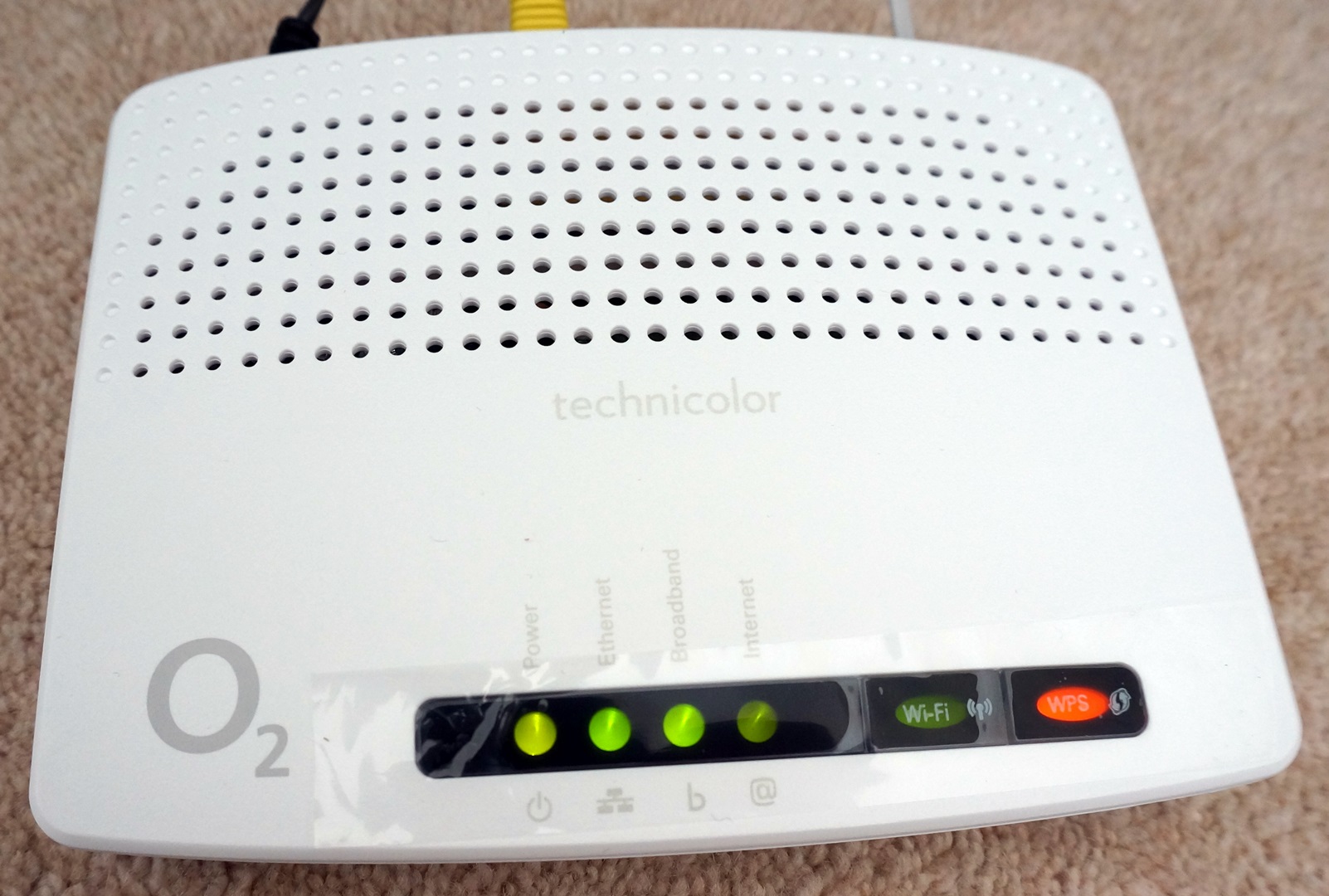
An O2 wireless box with lights showing that the router has power, an ethernet connection and a broadband connection, but that its internet connection and Wi-Fi are offline

In computer technology and telecommunications, online indicates a state of connectivity, and offline indicates a disconnected state. In modern terminology, this usually refers to an Internet connection, but (especially when expressed as "on line" or "on the line") could refer to any piece of equipment or functional unit that is connected to a larger system. Being online means that the equipment or subsystem is connected, or that it is ready for use.[1]

"Online" has come to describe activities and concepts that take place on the Internet,[2] such as online identity, online predator and online shop. A similar meaning is also given by the prefixes cyber and e, as in words cyberspace, cybercrime, email, and e-commerce.[3] In contrast, "offline" can refer to either computing activities performed while disconnected from the Internet, or alternatives to Internet activities (such as shopping in brick-and-mortar stores). The term "offline" is sometimes used interchangeably with the acronym "IRL", meaning "in real life".[4]

History

[edit]

During the 19th century, the term on line was commonly used in both the railroad and telegraph industries. For railroads, a signal box would send messages down the line (track), via a telegraph line (cable), indicating the track's status: Train on line or Line clear.[5] Telegraph linemen would refer to sending current through a line as direct on line or battery on line;[6] or they may refer to a problem with the circuit as being on line, as opposed to the power source or end-point equipment.[7]

Since at least 1950, in computing, the terms on-line and off-line have been used to refer to whether machines, including computers and peripheral devices, are connected or not.[8] Here is an excerpt from the 1950 book High-Speed Computing Devices:[8]

The use of automatic computing equipment for large-scale reduction of data will be strikingly successful only if means are provided for the automatic transcription of these data to a form suitable for automatic entry into the machine. For some applications, of which the most prominent are those in which the reduced data are used to control the process being measured, the input must be developed for on-line operation. In on-line operation the input is communicated directly and without delay to the data-reduction device. For other applications, off-line operation, involving automatic transcription of data in a form suitable for later introduction to the machine, may be tolerated. These requirements may be compared with teleprinter operating requirements. For example, some teletype machines operate on line. Their operators are in instantaneous communication. Other teletype machines are operated off line, through the intervention of punched paper tape. The message is preserved by means of holes punched in the tape and is transmitted later by feeding the tape to another machine.

Examples

[edit]

Offline e-mail

[edit]

One example of a common use of these concepts with email is a mail user agent (MUA) that can be instructed to be in either online or offline states. One such MUA is Microsoft Outlook. When online it will attempt to connect to mail servers (to check for new mail at regular intervals, for example), and when offline it will not attempt to make any such connection. The online or offline state of the MUA does not necessarily reflect the connection status between the computer on which it is running and the Internet i.e. the computer itself may be online—connected to the Internet via a cable modem or other means—while Outlook is kept offline by the user, so that it makes no attempt to send or to receive messages. Similarly, a computer may be configured to employ a dial-up connection on demand (as when an application such as Outlook attempts to make a connection to a server), but the user may not wish for Outlook to trigger that call whenever it is configured to check for mail.[9]

Offline media playing

[edit]

Another example of the use of these concepts is digital audio technology. A tape recorder, digital audio editor, or other device that is online is one whose clock is under the control of the clock of a synchronization master device. When the sync master commences playback, the online device automatically synchronizes itself to the master and commences playing from the same point in the recording. A device that is offline uses no external clock reference and relies upon its own internal clock. When many devices are connected to a sync master it is often convenient, if one wants to hear just the output of one single device, to take it offline because, if the device is played back online, all synchronized devices have to locate the playback point and wait for each other device to be in synchronization.[10] (For related discussion, see MIDI timecode, Word clock, and recording system synchronization.)

Offline browsing

[edit]

A third example of a common use of these concepts is a web browser that can be instructed to be in either online or offline states. The browser attempts to fetch pages from servers while only in the online state. In the offline state, or "offline mode", users can perform offline browsing, where pages can be browsed using local copies of those pages that have previously been downloaded while in the online state. This can be useful when the computer is offline and connection to the Internet is impossible or undesirable. The pages are downloaded either implicitly into the web browser's own cache as a result of prior online browsing by the user or explicitly by a browser configured to keep local copies of certain web pages, which are updated when the browser is in the online state, either by checking that the local copies are up-to-date at regular intervals or by checking that the local copies are up-to-date whenever the browser is switched to the online. One such web browser is Internet Explorer. When pages are added to the Favourites list, they can be marked to be "available for offline browsing". Internet Explorer will download local copies of both the marked page and, optionally, all of the pages that it links to. In Internet Explorer version 6, the level of direct and indirect links, the maximum amount of local disc space allowed to be consumed, and the schedule on which local copies are checked to see whether they are up-to-date, are configurable for each individual Favourites entry.[11][12][13][14]

For communities that lack adequate Internet connectivity—such as developing countries, rural areas, and prisons—offline information stores such as WiderNet's eGranary Digital Library (a collection of approximately thirty million educational resources from more than two thousand web sites and hundreds of CD-ROMs) provide offline access to information.[15] More recently, the Internet Archive announced an offline server project intended to provide access to material on inexpensive servers that can be updated using USB sticks and SD cards.[16]

Offline storage

[edit]

Likewise, offline storage is computer data storage that has no connection to the other systems until a connection is deliberately made. Additionally, an otherwise online system that is powered down may be considered offline.

Offline messages

[edit]

With the growing communication tools and media, the words offline and online are used very frequently. If a person is active over a messaging tool and is able to accept the messages it is termed as online message and if the person is not available and the message is left to view when the person is back, it is termed as offline message. In the same context, the person's availability is termed as online and non-availability is termed as offline.

File systems

[edit]

In the context of file systems, "online" and "offline" are synonymous with "mounted" and "not mounted". For example, in file systems' resizing capabilities, "online grow" and "online shrink" respectively mean the ability to increase or decrease the space allocated to that file system without needing to unmount it.

Generalisations

[edit]

Online and offline distinctions have been generalised from computing and telecommunication into the field of human interpersonal relationships. The distinction between what is considered online and what is considered offline has become a subject of study in the field of sociology.[17]

The distinction between online and offline is conventionally seen as the distinction between computer-mediated communication and face-to-face communication (e.g., face time), respectively. Online is virtuality or cyberspace, and offline is reality (i.e., real life or "meatspace"). Slater states that this distinction is "obviously far too simple".[17] To support his argument that the distinctions in relationships are more complex than a simple dichotomy of online versus offline, he observes that some people draw no distinction between an online relationship, such as indulging in cybersex, and an offline relationship, such as being pen pals. He argues that even the telephone can be regarded as an online experience in some circumstances, and that the blurring of the distinctions between the uses of various technologies (such as PDA versus mobile phone, internet television versus internet, and telephone versus Voice over Internet Protocol) has made it "impossible to use the term online meaningfully in the sense that was employed by the first generation of Internet research".[17]

Slater asserts that there are legal and regulatory pressures to reduce the distinction between online and offline, with a "general tendency to assimilate online to offline and erase the distinction," stressing, however, that this does not mean that online relationships are being reduced to pre-existing offline relationships. He conjectures that greater legal status may be assigned to online relationships (pointing out that contractual relationships, such as business transactions, online are already seen as just as "real" as their offline counterparts), although he states it to be hard to imagine courts awarding palimony to people who have had a purely online sexual relationship. He also conjectures that an online/offline distinction may be seen by people as "rather quaint and not quite comprehensible" within 10 years.[17]

This distinction between online and offline is sometimes inverted, with online concepts being used to define and to explain offline activities, rather than (as per the conventions of the desktop metaphor with its desktops, trash cans, folders, and so forth) the other way around. Several cartoons appearing in The New Yorker have satirized this. One includes Saint Peter asking for a username and a password before admitting a man into Heaven. Another illustrates "the offline store" where "All items are actual size!", shoppers may "Take it home as soon as you pay for it!", and "Merchandise may be handled prior to purchase!"[18][19]

See also

[edit]
  • Computer networking – Network that allows computers to share resources and communicate with each other
  • Extremely Online – Phenomenon of over-engaging with Internet culture
  • NLS – 1960s computer collaboration system, or the "oN-Line System"
  • Offline reader – Computer software
  • On the fly § Computer usage – Change to a system while the process it affects is ongoing
  • Online algorithm – Algorithm that begins on possibly incomplete inputs
  • Online and offline algorithms – Algorithm that begins on possibly incomplete inputs
  • Online editing – Software for several users to edit a file and offline editing – Post production film process – the online/outline distinction in video editing – Editing live television and video production
  • Online (magazine) – Journal
  • Online volunteering – Online volunteering
  • Open access (publishing) – Open access to scientific research
  • Presentity – Refers to an entity that has presence information associated with it
  • Website mirroring software – Computer software

References

[edit]
Revisions and contributorsEdit on WikipediaRead on Wikipedia
from Grokipedia
In computer technology and telecommunications, online and offline denote the connectivity status of devices, systems, or processes to a network, particularly the internet. Online refers to a state of active connection, enabling real-time communication, data access, and interaction with remote resources such as servers or other devices. In contrast, offline describes a disconnected or independent state, where operations rely on local storage and processing without network involvement, often for tasks like editing documents or viewing cached content. The terminology originated in the mid-20th century amid early computing developments, with "online" first appearing around 1950 to describe peripheral devices directly linked to and controlled by a central computer system, as in mainframe environments where data processing occurred under direct supervision. "Offline," its antonym, referred to devices or processes operating separately from the main system, such as batch processing on detached equipment to avoid interrupting core operations. This usage drew from earlier industrial contexts like telegraphy, where "on line" implied active transmission along a wire. By the 1970s and 1980s, as networked computing expanded through systems like ARPANET, the terms began shifting toward broader network availability, though pre-internet software like Windows 3.0 (released in 1990) still used "online" to mean locally accessible resources, such as built-in help files available directly on the machine without external connections. In contemporary usage, the distinction has become central to digital ecosystems, influencing everything from user experiences to system design. Online connectivity powers essential services like web browsing, cloud storage, video streaming, and real-time collaboration tools, fostering global information exchange but raising concerns over security, privacy, and digital divides. Offline capabilities, meanwhile, enhance reliability in low-connectivity scenarios—such as remote fieldwork or travel—through features like local data syncing in apps (e.g., email clients or mapping software) and support energy efficiency by reducing constant network polling. Many modern applications, including mobile operating systems and productivity suites, integrate hybrid modes to seamlessly transition between states, ensuring functionality persists during outages while syncing changes upon reconnection. This duality underscores the balance between ubiquitous access and autonomous operation in an increasingly networked world.

Fundamental Concepts

Definition of Online

In computing and networking, the term "online" refers to the state in which a device, system, or user is actively connected to a network, such as the internet or a local area network (LAN), enabling the exchange of data and access to remote resources. This connectivity allows for real-time interaction, where information can be transmitted, received, and processed with low latency between connected entities. For instance, being online facilitates activities like accessing web services or cloud computing, which rely on continuous communication with external servers. Key characteristics of the online state include responsiveness to network requests and a dependency on sustained connectivity for functionality. In scenarios such as streaming video or online gaming, disconnection results in immediate interruption of service, highlighting the reliance on uninterrupted data flow. The online condition contrasts with the offline state, which represents disconnection and reliance on local resources. Technically, achieving an online state involves protocols from the TCP/IP suite, which establish reliable connections through mechanisms like the three-way handshake between devices. The quality of this connectivity is measured by metrics such as latency, which quantifies the delay in data packet transmission, and bandwidth, which indicates the maximum data transfer rate. Low latency ensures quick responsiveness, while sufficient bandwidth supports high-volume data exchange. While "online" in computing specifically denotes network connectivity, the term can differ in non-network contexts; for example, in electrical engineering, an "online" device may simply mean it is powered and operational, as in an online uninterruptible power supply (UPS) that continuously processes power through its inverter. This distinction underscores the context-dependent nature of the terminology beyond digital networks.

Definition of Offline

In computing, the term "offline" refers to the operational state of a system, device, or application that functions without an active connection to a network, such as the internet or a local area network. This disconnection enables reliance on locally stored resources, including installed software, hardware capabilities, and pre-downloaded data, rather than depending on external servers for processing or content retrieval. For instance, offline web applications utilize browser caching mechanisms to store essential files, allowing users to access and interact with content independently of network availability. In contrast, the online state requires continuous network access to enable full interactivity and data exchange. Key characteristics of offline operation include its independence from remote infrastructure, which permits sustained functionality in environments lacking reliable connectivity. A common feature is delayed synchronization, where modifications performed locally—such as editing a document—are queued and reconciled with remote systems only upon reconnection, minimizing disruptions during intermittent network issues. This approach supports scenarios like drafting reports or notes on a laptop without internet access, ensuring productivity persists until synchronization can occur. From a technical perspective, offline computing emphasizes local processing, where tasks are executed using the device's onboard CPU, memory, and storage without invoking network protocols. Applications run from pre-installed executables or cached assets, bypassing the overhead of data transmission. In portable devices like smartphones or laptops, offline mode introduces considerations for battery life, as it avoids energy-intensive activities such as periodic network polling or background syncing, potentially extending operational duration in low-power scenarios. Offline operation impacts user experience by limiting real-time capabilities, such as instant collaboration or live updates, in favor of self-contained interactions. However, it enhances privacy by keeping sensitive data on the local device, reducing exposure to external interception or unauthorized access during transmission. Additionally, it bolsters reliability in unstable connection areas, allowing seamless continuation of essential tasks without dependency on fluctuating network conditions.

Historical Development

Origins in Computing

The distinction between online and offline processing emerged in the early days of electronic computing during the mid-20th century, rooted in the limitations of hardware and the need to optimize resource usage in batch-oriented systems. In the 1950s, mainframe computers like those from IBM, such as the IBM 701 introduced in 1952, primarily operated through batch processing, where jobs were compiled offline using punched cards or magnetic tapes prepared separately from the central processor. This offline mode allowed for sequential execution of non-interactive tasks, minimizing downtime on expensive hardware. In contrast, "online" processing referred to real-time interaction where peripherals, such as terminals or input devices, were directly connected to the computer, enabling immediate data entry and response without batch preparation; the term itself originated around 1950 to describe such direct connections to peripheral devices via communication lines. A pivotal advancement came in the 1960s with the development of time-sharing systems, which formalized the online-offline dichotomy by allowing multiple users to interact concurrently with a single computer. The Compatible Time-Sharing System (CTSS), implemented at MIT on a modified IBM 709 in 1961 and later upgraded to the IBM 7094, represented a key milestone; it supported online user sessions through typewriter terminals, where programmers could edit, compile, and debug code interactively in real time, as opposed to offline preparation of job decks for batch submission. This shift reduced turnaround times from hours or days to seconds, fostering collaborative computing environments and influencing subsequent systems like Multics. CTSS's design emphasized compatibility with existing batch operations while introducing online capabilities, marking a transition toward more dynamic resource allocation. The late 1960s saw telecommunications influences further refine the concepts, particularly through precursors to wide-area networks that defined online states in terms of active data transmission. Efforts by the U.S. Department of Defense's Advanced Research Projects Agency (ARPA), building on Paul Baran's 1964 packet-switching ideas at RAND Corporation, led to planning for the ARPANET in 1966–1967, where "online" denoted nodes actively linked for reliable, distributed data exchange across remote sites. These initiatives formalized online connectivity as a state of continuous, interruptible communication, contrasting with offline isolation, and laid groundwork for networked computing without delving into broader internet protocols. Terminology evolved from these mechanical and electromechanical contexts—such as early relay-based "online" calculators in the 1940s, like George Stibitz's Complex Number Calculator connected remotely via teletype in 1940—to fully digital networking paradigms by the late 1960s, emphasizing connectivity over mere peripheral attachment. This progression underscored online as synonymous with immediacy and integration, setting the stage for later expansions.

Evolution with the Internet

The advent of the internet in the 1980s and 1990s fundamentally reshaped the concepts of online and offline states, transitioning them from niche computing terms to ubiquitous descriptors of connectivity. The standardization of TCP/IP protocols in 1983 marked a pivotal moment, as ARPANET and related networks adopted this suite, enabling interoperable data transmission across diverse systems and laying the groundwork for a global network where "online" came to mean active participation in this interconnected ecosystem. This shift was accelerated by the invention of the World Wide Web in 1989 by Tim Berners-Lee at CERN, which introduced hypertext-based browsing and made online access synonymous with web navigation, while offline denoted temporary disconnections for local processing or maintenance. During this boom, offline capabilities remained essential for handling data in the absence of persistent connections, such as downloading files for later review, as internet access was still dial-up based and prone to interruptions. The 2000s brought a mobile revolution that intensified expectations of perpetual online presence, yet underscored the persistent need for offline functionality amid uneven network coverage. The launch of the first iPhone in 2007 exemplified this era, combining phone, internet, and multimedia into a single device that popularized always-on connectivity through features like Wi-Fi and cellular data, fundamentally altering user behavior toward constant access. However, the rapid adoption strained networks, leading to frequent signal drops and poor coverage in rural or congested areas, which highlighted the necessity of offline modes—such as cached emails or local app storage—to maintain usability during intermittent connections. This period saw smartphones evolve from novelty to necessity, with offline provisions becoming critical for bridging connectivity gaps, especially as global mobile penetration surged beyond 3 billion users by the decade's end. Entering the 2010s, the rise of cloud computing further blurred online-offline boundaries by prioritizing hybrid synchronization models to accommodate variable connectivity. Services like Google Drive, launched in 2012, exemplified this trend by offering seamless file access across devices with built-in offline editing and automatic syncing upon reconnection, enabling users to work productively even without internet. This era's emphasis on cloud-based applications, such as collaborative tools with local caching, addressed the challenges of intermittent access in mobile and remote environments, making offline states a deliberate feature rather than a limitation. By the mid-2010s, the pervasive integration of online life prompted a cultural reckoning, with terms like "going offline" entering mainstream lexicon to describe intentional digital detoxes aimed at mitigating constant connectivity's toll. Surveys from this period revealed that over a third of UK internet users had attempted such detoxes to reclaim time from screens, reflecting broader societal awareness of the need for offline balance amid smartphone ubiquity. This linguistic evolution underscored how internet-driven always-online norms had not only proliferated but also sparked counter-movements for deliberate disconnection.

Practical Examples

Offline Email and Messaging

Offline email and messaging refer to the capability of email clients and messaging applications to allow users to compose, edit, and queue messages for later transmission without an active internet connection, relying instead on local storage and deferred delivery mechanisms. In desktop clients such as Microsoft Outlook, users can enable offline mode to draft emails locally, which are then stored in the Outbox until reconnection, at which point they are automatically uploaded via the configured server. Similarly, Mozilla Thunderbird supports offline composition through its work offline settings, permitting users to create and save drafts or outgoing messages in local folders for synchronization upon regaining connectivity. This functionality is underpinned by protocols like the Simple Mail Transfer Protocol (SMTP), which facilitates deferred delivery by allowing messages to be queued at the sender's site or relayed servers if immediate delivery fails, ensuring eventual transmission without real-time requirements. The concept of offline email traces its roots to early computing environments in the 1970s, where systems like the PLATO network introduced rudimentary messaging features that evolved into structured email, though primarily online; subsequent developments in the 1980s with offline readers for protocols like UUCP enabled batch processing and local queuing of messages for periodic uploads. By the late 1990s and early 2000s, desktop clients standardized offline support, and web-based services followed suit—for instance, Google introduced Gmail Offline as a Labs feature in 2009, allowing users to access, read, and compose emails via Google Chrome's local storage, with a dedicated Chrome app released in 2011 to enhance offline capabilities. One key advantage of offline email and messaging is enhanced productivity in environments with intermittent or no connectivity, such as during air travel or remote fieldwork, where users can continue composing without interruption and sync upon reconnection. However, limitations include the absence of immediate delivery receipts or read confirmations, potentially delaying feedback in time-sensitive exchanges, and the risk of unsynced changes if the device is lost before upload. From a security perspective, offline storage during composition minimizes exposure to network-based threats, as drafts remain on the local device rather than being transmitted prematurely to potentially vulnerable servers. This local handling reduces the window for interception or hacking attempts that target online sessions.

Offline Media Playback

Offline media playback refers to the consumption of audio, video, and other multimedia content from files stored locally on a device, without requiring an active internet connection for real-time delivery. This approach relies on pre-downloaded or transferred files, enabling users to access entertainment independently of network availability. Devices such as dedicated MP3 players and modern smartphones facilitate this by utilizing internal storage to hold and render media, often through software interfaces designed for seamless playback. The core functionality of offline media playback emerged prominently with portable devices like the iPod, introduced by Apple in October 2001 as a compact MP3 player with 5GB of storage capacity for up to 1,000 songs and a 10-hour battery life. Users download files via tools such as iTunes, which syncs content from computers to the device over USB, allowing playback through built-in controls or headphones. In contemporary smartphones, this extends to larger libraries of audio and video, where local storage—typically flash-based—serves as the foundation for holding these files, supporting extended sessions without external power or data dependencies. Key formats underpinning offline playback include MP3 for compressed audio, developed by the Fraunhofer Society starting in the mid-to-late 1980s and standardized as MPEG-1 Audio Layer III in 1992, which significantly reduces file sizes (typically around 10:1 or more depending on bitrate) while preserving perceptual quality for efficient storage. For video, MP4 (MPEG-4 Part 14), standardized by the ISO in 2003, serves as a versatile container supporting H.264/AVC encoding, enabling high-quality playback of downloaded movies and clips on devices with limited resources. Applications like VLC Media Player, an open-source tool released in 2001, enhance this by supporting numerous formats including MP3 and MP4, allowing users to play pre-downloaded content across platforms without additional codecs or internet access. The evolution of offline media playback traces from analog cassette tapes in the late 1970s, exemplified by Sony's Walkman in 1979 which popularized portable audio via magnetic recording, to digital downloads in the 2000s driven by MP3 proliferation and devices like the iPod. This shift marked a transition to non-degradable, easily duplicatable files, contrasting with the rise of online streaming services such as Netflix, launched in 1997 but pivoting to internet-based video in 2007, which requires continuous bandwidth for on-demand access rather than local storage. By the 2010s, offline capabilities integrated into streaming apps allowed temporary downloads, but pure offline playback remains distinct for its permanence and independence from subscription models. Common use cases for offline media playback include travel entertainment, where passengers download podcasts or films beforehand to enjoy during flights or commutes without Wi-Fi, and regions with unreliable internet, ensuring consistent access in remote areas. Battery optimization is a critical factor, as local playback consumes significantly less power than streaming—avoiding data transmission and buffering—which can extend device runtime significantly (often doubling it for audio playback) during prolonged sessions, making it ideal for mobile scenarios.

Offline Web Browsing

Offline web browsing enables users to access and navigate web content without an active internet connection by relying on locally stored copies of pages and resources. This approach contrasts with traditional online browsing, which requires continuous connectivity to fetch data from remote servers. Common methods include browser-integrated caching and specialized software for pre-downloading content, allowing for continued productivity in disconnected environments. Browsers like Google Chrome incorporate built-in offline capabilities through their caching mechanisms, where users can explicitly download pages for later viewing. For example, Chrome's "Download page later" feature saves the current webpage, including associated assets, to the device's storage for offline access, ideal for scenarios like long flights. More advanced tools, such as HTTrack, facilitate full-site mirroring by recursively downloading an entire website—including HTML, CSS, images, and internal links—to a local directory, enabling complete offline exploration while converting URLs for local navigation. Read-later services like Pocket allow users to save specific articles or pages, reformatting them into a clean, distraction-free view stored locally for offline reading across devices. At the technical level, offline web content is managed via client-side storage solutions that persist HTML, CSS, JavaScript, and other assets. The IndexedDB API, with its first W3C working draft published in 2011 and early browser implementations emerging around 2010, provides a transactional database for storing complex structured data, supporting features like querying and updating that enable partial interactivity in cached web applications. This allows offline pages to retain some dynamic elements, such as form submissions queued for later synchronization, though full functionality depends on the original site's design. Offline web browsing finds practical use in fieldwork within remote areas lacking reliable internet, such as research expeditions or rural development projects, where pre-downloaded resources ensure access to references and tools. It is also valuable during air travel, where in-flight Wi-Fi may be unavailable or costly, permitting passengers to review saved materials without interruption. However, inherent limitations include the staleness of dynamic content, such as news feeds or stock prices that require live server updates, potentially rendering offline versions outdated or non-functional. Advancements in web standards have enhanced offline capabilities through the W3C's Service Workers specification, first released as a public working draft in 2014. Service Workers act as programmable proxies between the browser and network, caching resources proactively and serving them during offline periods to create seamless experiences in progressive web apps (PWAs). This enables sophisticated offline behaviors, like background synchronization, making web applications more resilient to connectivity disruptions.

Offline Data Storage

Offline data storage refers to methods of retaining digital information on physical or local devices that operate without requiring an active internet connection, ensuring data accessibility and persistence in disconnected environments. This approach emphasizes hardware-based solutions for long-term retention, providing users with direct control over their data without reliance on remote servers. Common implementations include magnetic and solid-state media that store data locally, allowing for independent read and write operations. Key types of offline data storage encompass hard disk drives (HDDs), which use spinning magnetic platters for bulk storage; solid-state drives (SSDs), employing flash memory for faster access and durability; and USB flash drives, offering portable, plug-and-play capacity for smaller-scale needs. Additionally, hybrid solutions like local folders in cloud services, such as Dropbox's offline-accessible directories, enable data to be downloaded and used without network connectivity while supporting eventual synchronization. These devices form the foundation for offline retention, with offline file systems serving as the organizational layer atop the hardware to manage data structure and retrieval. The evolution of offline storage capacity has progressed dramatically since the 1970s, when floppy disks held approximately 1 MB of data on removable magnetic media, to contemporary SSDs that routinely achieve terabyte-scale storage in compact forms. This advancement stems from improvements in material science and electronics, enabling denser data packing and higher reliability without network dependency; for instance, read and write operations on HDDs and SSDs occur via local interfaces like SATA or NVMe, independent of external connectivity. Modern offline storage thus supports vast datasets for personal and enterprise use, far surpassing early limitations. Offline storage finds critical application in scenarios such as data backups during network outages, where physical media like external HDDs or tapes ensure continuity and recovery without internet access, and secure local archiving for compliance or long-term preservation. To enhance protection against unauthorized access, encryption standards like the Advanced Encryption Standard (AES), a symmetric block cipher approved by the U.S. National Institute of Standards and Technology, are widely implemented on offline devices, safeguarding data at rest with key lengths of 128, 192, or 256 bits. Unlike online storage, which facilitates real-time sharing and collaboration across networks but exposes data to remote vulnerabilities, offline methods prioritize locality and user sovereignty, eliminating dependency on internet availability while mitigating risks from cyber threats like ransomware.

Offline File Systems

Offline file systems are designed to organize and manage data on local storage devices in environments disconnected from networks, ensuring reliable access and modification without reliance on remote resources. These systems employ hierarchical directory structures to arrange files and folders, along with access permissions to control user interactions, enabling secure local operations. Journaling mechanisms further enhance integrity by logging metadata changes during offline edits, allowing recovery from interruptions such as power failures. Prominent examples include FAT32 and NTFS in Windows environments, which support fully offline usage on local partitions. FAT32, specified by Microsoft for compatibility across devices, uses a simple file allocation table to track clusters on disk, making it suitable for standalone storage without network dependencies. Introduced in 1993 with Windows NT 3.1, NTFS provides advanced features like file-level security and compression for offline scenarios, with its journaling capability—known as the update sequence number (USN) change journal—recording file modifications to maintain consistency during disconnected use. In Linux systems, ext4 serves as a key file system for local partitioning, supporting offline operations through its extents-based allocation and journaling to safeguard against metadata corruption on non-networked volumes. To address scenarios involving previously connected resources, offline file systems incorporate adaptations for handling disconnected network drives, such as SMB shares. Windows Offline Files feature caches network share contents locally, queuing changes for synchronization upon reconnection, which allows seamless editing of files from SMB-accessible locations even when the network is unavailable. This caching mechanism treats remote files as locally available, preserving hierarchical organization and permissions in the interim. Maintenance of offline file systems relies on dedicated tools to detect and repair corruption independently of online diagnostics. For instance, the chkdsk utility in Windows scans volumes for errors in file system structures, recovering readable data from bad sectors and fixing inconsistencies on unmounted drives to ensure ongoing offline reliability. Similar tools like fsck in Linux environments perform analogous checks on ext4 partitions, verifying journal integrity and repairing metadata without network involvement.

Broader Applications

In Mobile and Embedded Systems

In mobile and embedded systems, offline capabilities are critical due to intermittent connectivity, limited battery life, and resource constraints, enabling devices to function autonomously when network access is unavailable. Smartphones running iOS and Android incorporate robust offline modes through app caching and local storage mechanisms. For instance, iOS has supported offline web application caching via the HTML5 Application Cache since iOS 4 in 2010, though deprecated in favor of Service Workers as of 2018, allowing developers to store resources like HTML, CSS, and JavaScript files locally for seamless offline access. Similarly, Core Data, Apple's framework for persistent data storage, enables apps to manage and query data offline, caching temporary or permanent information to support functionality without internet reliance. On Android, the platform's architecture promotes offline-first designs, where developers use components like Room for local databases and OkHttp for response caching, ensuring apps can operate independently by storing data on-device during connectivity lapses. Location services in mobile devices further exemplify offline utility, as GPS hardware functions without internet by relying on satellite signals, paired with pre-downloaded local maps for navigation. Apps such as Google Maps on both iOS and Android allow users to download specific map areas for offline use, providing turn-by-turn directions and point-of-interest data without real-time server queries. This approach mitigates data usage in remote or low-coverage areas, preserving battery life while maintaining core functionality. Embedded systems, including smartwatches and IoT sensors, emphasize offline operation in low-power designs to extend battery longevity and ensure reliability in disconnected environments. Devices like Fitbit wearables perform local processing of sensor data, such as heart rate and step counts, storing information on-device until Bluetooth synchronization with a paired smartphone becomes available, which supports extended offline tracking without constant connectivity. In broader IoT contexts, embedded architectures prioritize edge processing, where microcontrollers handle computations locally using minimal energy, often employing sleep modes and duty cycling to conserve power during offline periods. These designs are optimized for scenarios like remote environmental monitoring, where sensors collect and analyze data autonomously before opportunistic transmission. A key challenge in these systems is battery drain from repeated failed connection attempts, particularly in weak signal areas, where devices expend energy scanning for networks without success. To address this, opportunistic networking protocols enable mobile and embedded devices to exploit transient encounters—such as Bluetooth or Wi-Fi Direct proximity— for delayed data forwarding, reducing reliance on persistent infrastructure and minimizing power overhead. In the 5G era of the 2020s, while enhanced connectivity and edge computing lower latency for real-time applications, offline needs persist in edge scenarios with intermittent coverage, such as rural IoT deployments or mobile robotics, where local autonomy ensures operational continuity.

Synchronization and Hybrid Approaches

Synchronization mechanisms bridge the gap between online and offline states by enabling efficient merging of changes accumulated during disconnection. Protocols such as Rsync, developed by Andrew Tridgell and Paul Mackerras, use delta encoding to transmit only differences between files, minimizing bandwidth usage during reconnection; this approach detects and synchronizes modified blocks via rolling checksums and weak/strong hashes. In email clients like Outlook, delta synchronization protocols queue outgoing messages and incoming deltas during offline periods, then merge them upon reconnection to update mailboxes without full redownloads. These methods support seamless transitions in applications requiring periodic connectivity, such as file backups or collaborative editing tools. Hybrid models integrate offline functionality with online enhancements, allowing applications to operate primarily without network access while syncing improvements when connected. Progressive enhancement in web applications, exemplified by offline-first design in Progressive Web Apps (PWAs), prioritizes core features like local data storage and caching via Service Workers, with online sessions adding real-time collaboration or fresh content; this paradigm was introduced in late 2015 and gained prominence at Google I/O 2016. Such designs ensure reliability in variable connectivity environments, as seen in PWAs for e-commerce or news apps that load instantly from cache offline and update dynamically online. Key tools and standards facilitate these hybrid operations through robust offline capabilities and conflict handling. Git, a distributed version control system, allows users to create commits offline on local repositories, staging changes without network access before pushing to remote servers for merging; this enables asynchronous collaboration in software development. In note-taking applications like Evernote, the EDAM protocol employs field-by-field merge algorithms during sync, comparing modified attributes of notes or tags to integrate changes while renaming duplicates or flagging irresolvable conflicts for manual resolution. These approaches provide significant benefits, including maintained data consistency across devices and reduced latency in hybrid workflows, as demonstrated in collaborative platforms like Microsoft Office 365, where co-authoring tools automatically resolve minor edits but prompt users for complex merge conflicts in shared documents. However, they introduce risks such as merge conflicts from concurrent modifications, potentially leading to data loss if not addressed, and increased computational overhead for delta computations in large datasets. Effective implementation thus relies on user-friendly resolution interfaces to balance accessibility and integrity.

References

Add your contribution
Related Hubs
User Avatar
No comments yet.