
Recent from talks
Shareaza
Knowledge base stats:
Talk channels stats:
Members stats:
Shareaza
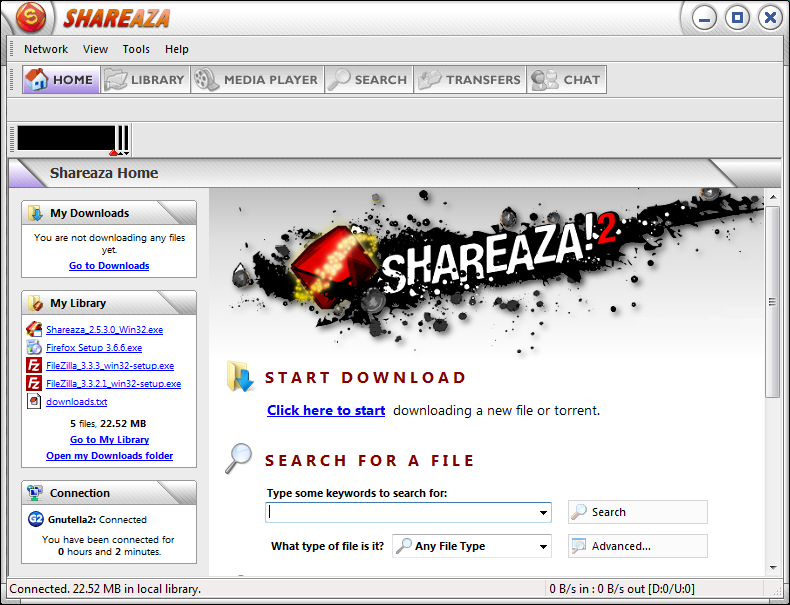
Shareaza is a peer-to-peer file sharing client running under Microsoft Windows which supports the Gnutella, Gnutella2 (G2), eDonkey, BitTorrent, FTP, HTTP and HTTPS[citation needed] network protocols and handles magnet links, ed2k links, and the now deprecated gnutella and Piolet links. It is available in 30 languages.
Shareaza was developed by Michael Stokes until June 1, 2004, and has since been maintained by a group of volunteers. On June 1, 2004, Shareaza 2.0 was released, along with the source code, under the GNU General Public License (GPL-2.0-or-later), making it free software.
Shareaza can connect to Gnutella, G2, eDonkey and BitTorrent. Shareaza hashes its files for all networks, and then distributes those hash values on G2. This allows Shareaza to download one file from several networks at once. When another client connected to G2 finds such a file, it is given the hash values for all networks and can search on the other networks with their respective hash values, which increases the number of sources and the download speed of the file. Shareaza also uses its G2 network to find more sources for torrents.
The Shareaza client has some basic content filters including a forced child and optional adult pornography filter, and some other optional filters such as a filter for files encumbered with Digital rights management (DRM). Shareaza's security filters can also be extended with user-defined keywords and/or IP addresses. Later versions of Shareaza allow for the use of regular expressions and filtering by hash. These filters increase the chances of getting the files the user wants and decrease the chance of getting malicious or fake files. The file format used for the filters is an extendable XML schema. The filters are editable inside Shareaza, and can be exported from the application to be shared with others.
Shareaza implements a framework for additional plugins. The Shareaza installer ships several plugins. Most of them are used to read and strip off built in metadata from the files being hashed and convert it to an external XML based format, or to decode multimedia files for making a preview for other G2 clients. Some others serve the need of a media player inside Shareaza, and enhancements of that media player. Third party plugins can also be used, for example, Sharemonkey, which will add a link inside Shareaza when downloading or searching copyrighted material from where it can be legally downloaded.
The client can have almost all parts of the GUI skinned. This includes bars, icons, as well as backgrounds and buttons. In that way, Shareaza can be completely changed with colors, images, new buttons, etc. A basic list of skins is contained in the Shareaza installer package. Other skins can be downloaded in the community forums or found via a search for .sks (Shareaza skin files) in the G2 network. The skins are zip archives, renamed with the extension .sks, containing icons and images, as well as an XML file which binds the images and colors with the GUI.
This feature is also used for localization. The language files are XML files, like the normal skins, but not zipped. The XML file contains the translations for a certain part of the program. This enables languages to be easily changed, updated and tested without compiling an entire binary.
Shareaza has three user modes. The first one is for normal users. This mode is the default mode and provides a clean, trimmed GUI. Users will not be able to make major changes to settings in this mode but will be able to make use of the most essential functions, like searching and downloading. The second mode is for power users. It provides more access to network and advanced settings but can also break your connection to the networks. The third mode is the windowed mode. In this mode, users can see different tabs (windows) simultaneously, providing a lot of control about the things happening. This mode also makes it possible to personalize the look of the client to perfectly fit the needs of the respective user.
Hub AI
Shareaza AI simulator
(@Shareaza_simulator)
Shareaza
Shareaza is a peer-to-peer file sharing client running under Microsoft Windows which supports the Gnutella, Gnutella2 (G2), eDonkey, BitTorrent, FTP, HTTP and HTTPS[citation needed] network protocols and handles magnet links, ed2k links, and the now deprecated gnutella and Piolet links. It is available in 30 languages.
Shareaza was developed by Michael Stokes until June 1, 2004, and has since been maintained by a group of volunteers. On June 1, 2004, Shareaza 2.0 was released, along with the source code, under the GNU General Public License (GPL-2.0-or-later), making it free software.
Shareaza can connect to Gnutella, G2, eDonkey and BitTorrent. Shareaza hashes its files for all networks, and then distributes those hash values on G2. This allows Shareaza to download one file from several networks at once. When another client connected to G2 finds such a file, it is given the hash values for all networks and can search on the other networks with their respective hash values, which increases the number of sources and the download speed of the file. Shareaza also uses its G2 network to find more sources for torrents.
The Shareaza client has some basic content filters including a forced child and optional adult pornography filter, and some other optional filters such as a filter for files encumbered with Digital rights management (DRM). Shareaza's security filters can also be extended with user-defined keywords and/or IP addresses. Later versions of Shareaza allow for the use of regular expressions and filtering by hash. These filters increase the chances of getting the files the user wants and decrease the chance of getting malicious or fake files. The file format used for the filters is an extendable XML schema. The filters are editable inside Shareaza, and can be exported from the application to be shared with others.
Shareaza implements a framework for additional plugins. The Shareaza installer ships several plugins. Most of them are used to read and strip off built in metadata from the files being hashed and convert it to an external XML based format, or to decode multimedia files for making a preview for other G2 clients. Some others serve the need of a media player inside Shareaza, and enhancements of that media player. Third party plugins can also be used, for example, Sharemonkey, which will add a link inside Shareaza when downloading or searching copyrighted material from where it can be legally downloaded.
The client can have almost all parts of the GUI skinned. This includes bars, icons, as well as backgrounds and buttons. In that way, Shareaza can be completely changed with colors, images, new buttons, etc. A basic list of skins is contained in the Shareaza installer package. Other skins can be downloaded in the community forums or found via a search for .sks (Shareaza skin files) in the G2 network. The skins are zip archives, renamed with the extension .sks, containing icons and images, as well as an XML file which binds the images and colors with the GUI.
This feature is also used for localization. The language files are XML files, like the normal skins, but not zipped. The XML file contains the translations for a certain part of the program. This enables languages to be easily changed, updated and tested without compiling an entire binary.
Shareaza has three user modes. The first one is for normal users. This mode is the default mode and provides a clean, trimmed GUI. Users will not be able to make major changes to settings in this mode but will be able to make use of the most essential functions, like searching and downloading. The second mode is for power users. It provides more access to network and advanced settings but can also break your connection to the networks. The third mode is the windowed mode. In this mode, users can see different tabs (windows) simultaneously, providing a lot of control about the things happening. This mode also makes it possible to personalize the look of the client to perfectly fit the needs of the respective user.
Recent media