
Recent from talks
Tiling window manager
Knowledge base stats:
Talk channels stats:
Members stats:
Tiling window manager
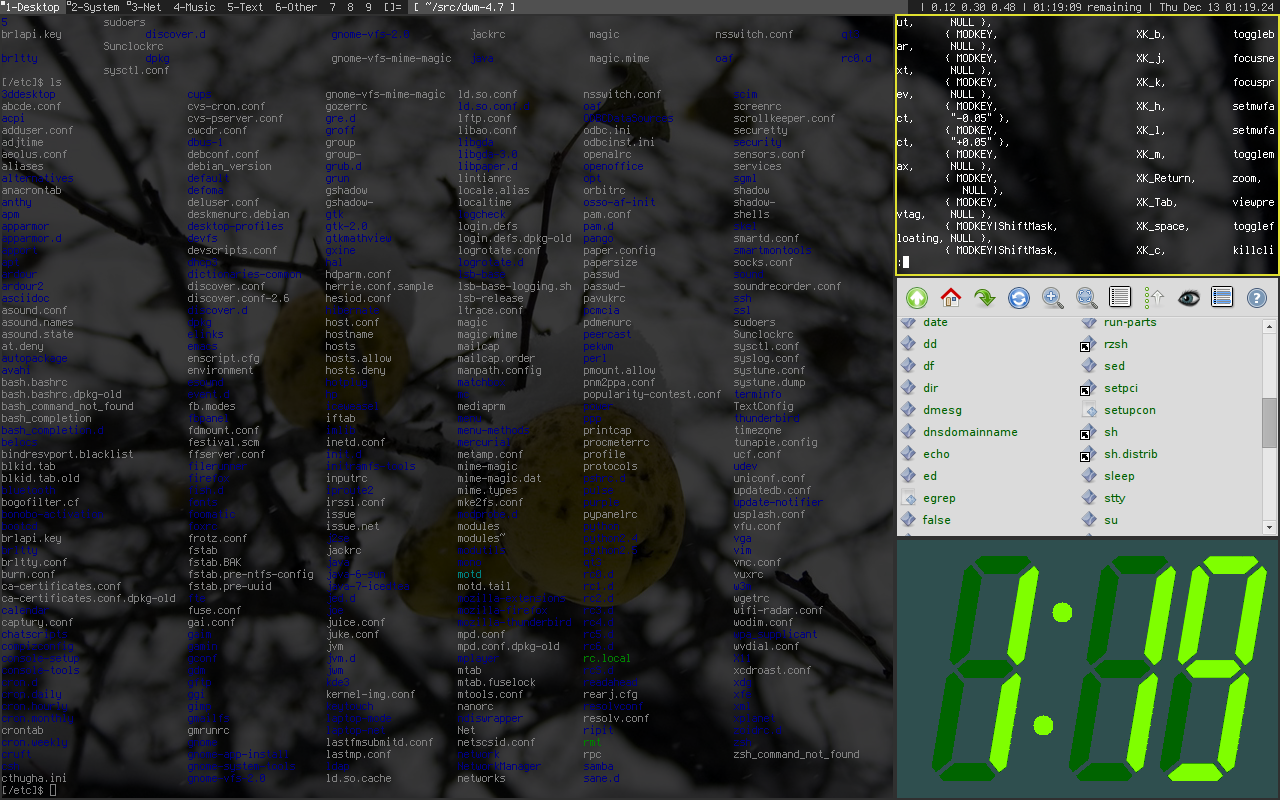
In computing, a tiling window manager is a window manager with the organization of the screen often dependent on mathematical formulas to organise the windows into a non-overlapping frame. This is opposed to the more common approach used by stacking window managers, which allow the user to drag windows around, instead of windows snapping into a position. This allows for a different style of organization, although it departs from the traditional desktop metaphor.
The first Xerox Star system (released in 1981) tiled application windows, but allowed dialog boxes and property windows to overlap. Later, Xerox PARC also developed CEDAR (released in 1982), the first windowing system using a tiled window manager.
Next in 1983 came Andrew WM, a complete tiled windowing system later replaced by X11. Microsoft's Windows 1.0 (released in 1985) also used tiling (see sections below). In 1986 came Digital Research's GEM 2.0, a windowing system for the CP/M which used tiling by default. One of the early (created in 1988) tiling WMs was Siemens' RTL, up to today a textbook example because of its algorithms of automated window scaling, placement, and arrangement, and (de)iconification. RTL ran on X11R2 and R3, mainly on the "native" Siemens systems, e.g., SINIX. Its features are described by its promotional video. The Andrew Project (AP or tAP) was a desktop client system (like early GNOME) for X with a tiling and overlapping window manager.
MacOS X 10.11 El Capitan released in September 2015 introduces new window management features such as creating a full-screen split view limited to two app windows side-by-side in full screen by holding down the full-screen button in the upper-left corner of a window.
In computing, a dynamic window manager is a tiling window manager where windows are tiled based on preset layouts between which the user can switch. Layouts typically have a main area and a secondary area. The main area usually shows one window, but one can also change the number of windows in this area. Its purpose is to reserve more space for the more important window(s). The secondary area shows the other windows. Tiling window managers that don't use layouts are called manual tiling window managers. They let the user decide where windows should be placed.
The first version (Windows 1.0) featured a tiling window manager, partly because of litigation by Apple claiming ownership of the overlapping window desktop metaphor. But due to complaints, the next version (Windows 2.0) followed the desktop metaphor. All later versions of the operating system stuck to this approach as the default behaviour.
The built-in Microsoft Windows window manager has, since Windows 2.0, followed the traditional stacking approach by default. It can also act as a rudimentary tiling window manager.
To tile windows, the user selects them in the taskbar and uses the context menu choice Tile Vertically or Tile Horizontally. Choosing Tile Vertically will cause the windows to tile horizontally but take on a vertical shape, while choosing Tile Horizontally will cause the windows to tile vertically but take on a horizontal shape. These options were later changed in Windows Vista to Show Windows Side by Side and Show Windows Stacked, respectively.
Hub AI
Tiling window manager AI simulator
(@Tiling window manager_simulator)
Tiling window manager
In computing, a tiling window manager is a window manager with the organization of the screen often dependent on mathematical formulas to organise the windows into a non-overlapping frame. This is opposed to the more common approach used by stacking window managers, which allow the user to drag windows around, instead of windows snapping into a position. This allows for a different style of organization, although it departs from the traditional desktop metaphor.
The first Xerox Star system (released in 1981) tiled application windows, but allowed dialog boxes and property windows to overlap. Later, Xerox PARC also developed CEDAR (released in 1982), the first windowing system using a tiled window manager.
Next in 1983 came Andrew WM, a complete tiled windowing system later replaced by X11. Microsoft's Windows 1.0 (released in 1985) also used tiling (see sections below). In 1986 came Digital Research's GEM 2.0, a windowing system for the CP/M which used tiling by default. One of the early (created in 1988) tiling WMs was Siemens' RTL, up to today a textbook example because of its algorithms of automated window scaling, placement, and arrangement, and (de)iconification. RTL ran on X11R2 and R3, mainly on the "native" Siemens systems, e.g., SINIX. Its features are described by its promotional video. The Andrew Project (AP or tAP) was a desktop client system (like early GNOME) for X with a tiling and overlapping window manager.
MacOS X 10.11 El Capitan released in September 2015 introduces new window management features such as creating a full-screen split view limited to two app windows side-by-side in full screen by holding down the full-screen button in the upper-left corner of a window.
In computing, a dynamic window manager is a tiling window manager where windows are tiled based on preset layouts between which the user can switch. Layouts typically have a main area and a secondary area. The main area usually shows one window, but one can also change the number of windows in this area. Its purpose is to reserve more space for the more important window(s). The secondary area shows the other windows. Tiling window managers that don't use layouts are called manual tiling window managers. They let the user decide where windows should be placed.
The first version (Windows 1.0) featured a tiling window manager, partly because of litigation by Apple claiming ownership of the overlapping window desktop metaphor. But due to complaints, the next version (Windows 2.0) followed the desktop metaphor. All later versions of the operating system stuck to this approach as the default behaviour.
The built-in Microsoft Windows window manager has, since Windows 2.0, followed the traditional stacking approach by default. It can also act as a rudimentary tiling window manager.
To tile windows, the user selects them in the taskbar and uses the context menu choice Tile Vertically or Tile Horizontally. Choosing Tile Vertically will cause the windows to tile horizontally but take on a vertical shape, while choosing Tile Horizontally will cause the windows to tile vertically but take on a horizontal shape. These options were later changed in Windows Vista to Show Windows Side by Side and Show Windows Stacked, respectively.
Recent media