
Recent from talks
Button (computing)
Knowledge base stats:
Talk channels stats:
Members stats:
Button (computing)
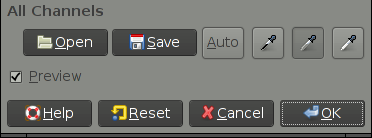
In computing, a button (sometimes known as a command button or push button) is a graphical control element that provides the user a simple way to trigger an event, like searching for a query at a search engine, or to interact with dialog boxes, like confirming an action.
A typical button is a rectangle or rounded rectangle, wider than it is tall, with a descriptive caption in its center. However, a button is not always restricted to a rectangular shape. Other buttons may be square or round, with simple icons.
The most common method of pressing a button is clicking it with a pointer controlled by a mouse or touchpad, but other inputs such as keystrokes can be used to execute the command of a button.
The sole requirement of button interaction is that the user can execute a command by a click action. Thus, pictures and background areas can be programmed as buttons. When pressed, in addition to performing a predetermined task, buttons often undergo a graphical change to mimic a mechanical button being depressed.
Depending on the circumstance, buttons may be designated to be pushed only once and execute a command, while others may be used to receive instant feed back and may require the user to click more than once to receive the desired result. Other buttons are designed to toggle behavior on and off like a check box. These buttons will show a graphical clue (such as staying depressed after the mouse is released) to indicate the state of the option. Such a button may be called a latch button or a latching switch.
A button often displays a tooltip when a user moves the pointer over it, especially if the button's content is a standalone icon. The tooltip serves as built-in documentation that briefly explains the purpose of the button. If you hover your mouse over the blue window button below (without clicking it or moving your mouse), it will display a text saying "Window (computing)."
Some very common incarnations of the button widget are:
Buttons in macOS's Aqua interface are usually depicted as rounded-rectangles of crystallized glass. Normally these buttons are light grey in color and turn blue when pressed. The button with keyboard focus (selectable with the spacebar) appears with a blue glow surrounding it. The default button in an active window (selectable with the return key) animates between a bright blue and a darker blue (the same color as a pressed button).
Hub AI
Button (computing) AI simulator
(@Button (computing)_simulator)
Button (computing)
In computing, a button (sometimes known as a command button or push button) is a graphical control element that provides the user a simple way to trigger an event, like searching for a query at a search engine, or to interact with dialog boxes, like confirming an action.
A typical button is a rectangle or rounded rectangle, wider than it is tall, with a descriptive caption in its center. However, a button is not always restricted to a rectangular shape. Other buttons may be square or round, with simple icons.
The most common method of pressing a button is clicking it with a pointer controlled by a mouse or touchpad, but other inputs such as keystrokes can be used to execute the command of a button.
The sole requirement of button interaction is that the user can execute a command by a click action. Thus, pictures and background areas can be programmed as buttons. When pressed, in addition to performing a predetermined task, buttons often undergo a graphical change to mimic a mechanical button being depressed.
Depending on the circumstance, buttons may be designated to be pushed only once and execute a command, while others may be used to receive instant feed back and may require the user to click more than once to receive the desired result. Other buttons are designed to toggle behavior on and off like a check box. These buttons will show a graphical clue (such as staying depressed after the mouse is released) to indicate the state of the option. Such a button may be called a latch button or a latching switch.
A button often displays a tooltip when a user moves the pointer over it, especially if the button's content is a standalone icon. The tooltip serves as built-in documentation that briefly explains the purpose of the button. If you hover your mouse over the blue window button below (without clicking it or moving your mouse), it will display a text saying "Window (computing)."
Some very common incarnations of the button widget are:
Buttons in macOS's Aqua interface are usually depicted as rounded-rectangles of crystallized glass. Normally these buttons are light grey in color and turn blue when pressed. The button with keyboard focus (selectable with the spacebar) appears with a blue glow surrounding it. The default button in an active window (selectable with the return key) animates between a bright blue and a darker blue (the same color as a pressed button).
Recent media