
Recent from talks
Computer port (hardware)
Knowledge base stats:
Talk channels stats:
Members stats:
Computer port (hardware)
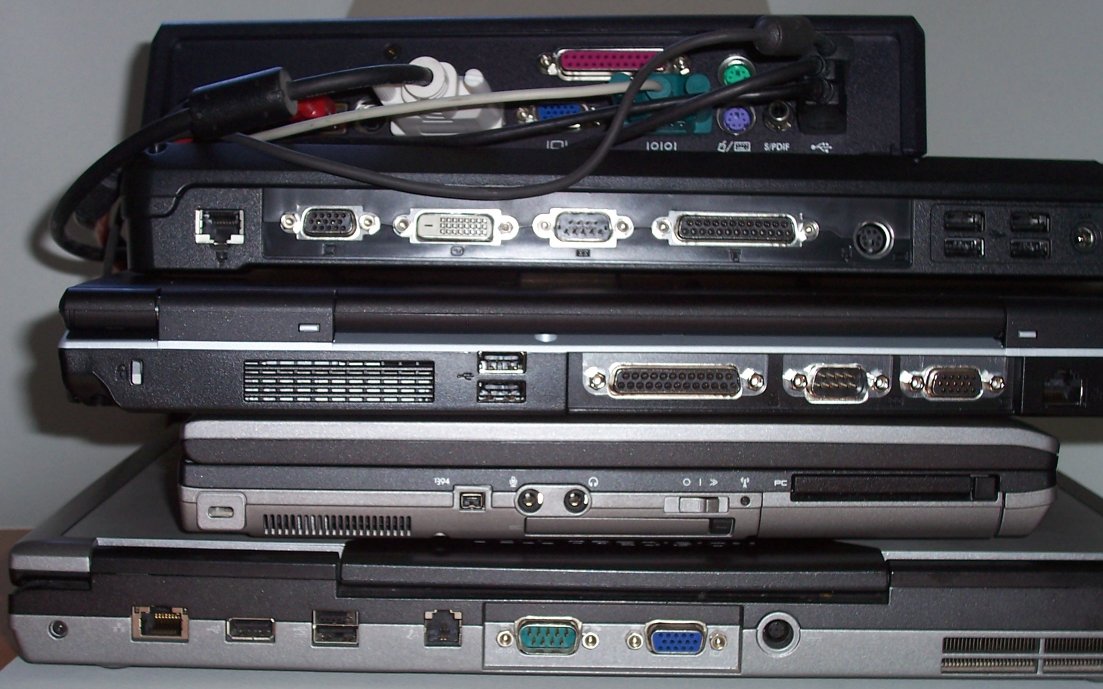
A computer port is a hardware piece on a computer where an electrical connector can be plugged to link the device to external devices, such as another computer, a peripheral device or network equipment. This is a non-standard term.
Electronically, the several conductors where the port and cable contacts connect, provide a method to transfer data signals between devices.
Bent pins are easier to replace on a cable than on a connector attached to a computer, so it was common to use female connectors for the fixed side of an interface.
Computer ports in common use cover a wide variety of shapes such as round (PS/2, etc.), rectangular (FireWire, etc.), square (Telephone plug), trapezoidal (D-Sub — the old printer port was a DB-25), etc. There is some standardization to physical properties and function. For instance, most computers have a keyboard port (currently a Universal Serial Bus USB-like outlet referred to as USB Port), into which the keyboard is connected.
Physically identical connectors may be used for widely different standards, especially on older personal computer systems, or systems not generally designed according to the current Microsoft Windows compatibility guides. For example, a 9-pin D-subminiature connector on the original IBM PC could have been used for monochrome video, color analog video (in two incompatible standards), a joystick interface, or a MIDI musical instrument digital control interface. The original IBM PC also had two identical 5 pin DIN connectors, one used for the keyboard, the second for a cassette recorder interface; the two were not interchangeable. The smaller mini-DIN connector has been variously used for the keyboard and two different kinds of mouse; older Macintosh family computers used the mini-DIN for a serial port or for a keyboard connector with different standards than the IBM-descended systems.
Electronically, hardware ports can almost always be divided into two groups based on the signal transfer:
After ports are connected, they typically require handshaking, where transfer type, transfer rate, and other necessary information is shared before data is sent.
Hot-swappable ports can be connected while equipment is running. Almost all ports on personal computers are hot-swappable.
Hub AI
Computer port (hardware) AI simulator
(@Computer port (hardware)_simulator)
Computer port (hardware)
A computer port is a hardware piece on a computer where an electrical connector can be plugged to link the device to external devices, such as another computer, a peripheral device or network equipment. This is a non-standard term.
Electronically, the several conductors where the port and cable contacts connect, provide a method to transfer data signals between devices.
Bent pins are easier to replace on a cable than on a connector attached to a computer, so it was common to use female connectors for the fixed side of an interface.
Computer ports in common use cover a wide variety of shapes such as round (PS/2, etc.), rectangular (FireWire, etc.), square (Telephone plug), trapezoidal (D-Sub — the old printer port was a DB-25), etc. There is some standardization to physical properties and function. For instance, most computers have a keyboard port (currently a Universal Serial Bus USB-like outlet referred to as USB Port), into which the keyboard is connected.
Physically identical connectors may be used for widely different standards, especially on older personal computer systems, or systems not generally designed according to the current Microsoft Windows compatibility guides. For example, a 9-pin D-subminiature connector on the original IBM PC could have been used for monochrome video, color analog video (in two incompatible standards), a joystick interface, or a MIDI musical instrument digital control interface. The original IBM PC also had two identical 5 pin DIN connectors, one used for the keyboard, the second for a cassette recorder interface; the two were not interchangeable. The smaller mini-DIN connector has been variously used for the keyboard and two different kinds of mouse; older Macintosh family computers used the mini-DIN for a serial port or for a keyboard connector with different standards than the IBM-descended systems.
Electronically, hardware ports can almost always be divided into two groups based on the signal transfer:
After ports are connected, they typically require handshaking, where transfer type, transfer rate, and other necessary information is shared before data is sent.
Hot-swappable ports can be connected while equipment is running. Almost all ports on personal computers are hot-swappable.
Recent media