


Community hub
Recent from talks
Contribute something
Nothing was collected or created yet.
| dwm | |
|---|---|
 | |
 | |
| Original author | Anselm R. Garbe[1] |
| Developer | suckless.org |
| Initial release | July 14, 2006[2] |
| Stable release | 6.6[3]  / 9 August 2025
 |
| Repository | |
| Written in | C |
| Operating system | Unix-like |
| Size | 52 KB (source code - dwm.c); 64 KB (installed binary - dwm)[4] |
| Type | Window manager |
| License | MIT[5] |
| Website | dwm |

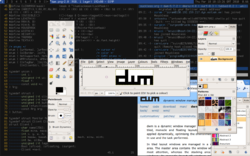
dwm is a minimalist dynamic window manager for the X Window System developed by Suckless that has influenced the development of several other X window managers, including xmonad[6] and awesome.[7][8] It is externally similar to wmii, but internally much simpler. dwm is written purely in C for performance[9] and lacks any configuration interface besides editing the source code.[10] One of the project's guidelines is that the source code is intended never to exceed 2000 SLOC, and options meant to be user-configurable are all contained in a single header file.[8]
Features
[edit]dwm supports multiple workspaces and, unlike ratpoison, allows moving and resizing windows with the mouse.[11] Older versions of dwm displayed their stdin in a status bar, along the edge of the screen. Recent versions instead display the root window's name, which can be set by independent processes. This is often used to show information that would appear in the notification area of other desktop environments—a clock, system load info, laptop battery and network status, music player information and the like. This status line is often complemented with dmenu, a textual application launcher from the same developers as dwm. dwm uses a focus-follows-mouse model and lacks any window decoration other than a border to show focus. Since dwm's configurability amounts to patching the source code, many other options are possible.[12]
dmenu
[edit]dmenu is a keyboard-driven menu utility developed as part of the dwm project. When invoked, usually by a user-configured key combination, dmenu displays a horizontal menu of its stdin stream at the top edge of the screen. This is usually used to pipe in a list of executable names from the user's $PATH, but dmenu can be used for any purpose where a menu is required. The user can start typing a program name, and dmenu will narrow the list to show only substring matches for what the user typed. The user can also use the arrow keys to navigate the menu. When a choice is made, dmenu sends the selected text to stdout, which is usually piped into a shell to launch the program. Command-line options can alter the font and colors of the menu, make the search case-insensitive, as well as switch the menu to a vertical orientation or place it at the bottom of the screen. By default, only X Font Server fonts are supported although a patch exists to enable TrueType fonts using Xft.
dmenu is similar in function to application launchers such as Katapult or GNOME Do for Linux or LaunchBar or Quicksilver for Mac OS X in that it allows quick launching of programs from a graphical environment using the keyboard.
In addition to dwm,[13] dmenu is often used with other window managers like xmonad,[14] or Openbox,[13] and other software like the uzbl web browser.[15] i3 uses dmenu as the default program launcher.
Forks and patches
[edit]dwm has been an influential project; many other window managers are based on dwm's source code or inspired by it. An extensive list of forks and patches can be found at the official site. Below is a list of a few notable examples:
See also
[edit]
References
[edit]- ^ Garbe, Anselm R. "Anselm R Garbe". garbe.us. Archived from the original on 2009-11-25. Retrieved 2011-05-15.
- ^ 0.1 Release tag
- ^ "bump version to 6.6". 9 August 2025.
- ^ "dwm dynamic window manager". dwm.suckless.org. Retrieved January 23, 2022.
- ^ "MIT/X Consortium License". suckless.org. Retrieved 2015-05-04.
- ^ Kolmodin, Lennart (April 2, 2007). "xmonad". Bits and Bytes. Retrieved 2011-05-15.
- ^ Danjou, Julien (20 Sep 2007). "Announcing 'awesome'". dwm (Mailing list). Archived from the original on 3 April 2010. Retrieved 2011-05-15.
- ^ a b Auza, Jun (August 2, 2008). "20 Most Nimble and Simple X Window Managers for Linux". TechSource.
- ^ "dwm home page".
dwm is customized through editing its source code, which makes it extremely fast and secure - it does not process any input data which isn't known at compile time
- ^ Byfield, Bruce (2007-05-31). "Keyboard-driven environments open a new window on the desktop". Linux.com. SourceForge, Inc. Archived from the original on 2022-03-27. Retrieved 2010-03-01.
- ^ "A Review And Tutorial Of The DWM Window Manager". Linux Goodies. Archived from the original on 2010-06-03. Retrieved 2012-01-30.
- ^ "patches".
- ^ a b Arch Linux Magazine Team (January 2010). "Software Review: 2009 LnF Awards". Arch Linux Magazine. Archived from the original on 16 February 2010. Retrieved 4 March 2010.
- ^ "100 open source gems - part 2". TuxRadar. Future Publishing. 21 May 2009. Archived from the original on 25 May 2009. Retrieved 3 March 2010.
- ^ Vervloesem, Koen (15 July 2009). "Uzbl: a browser following the UNIX philosophy". LWN.net. Eklektix, Inc. Retrieved 3 March 2010.
Further reading
[edit]- (in German) Tobias Walkowiak, Dynamische Fenster mit DWM. Ressourcen sparen mit dem etwas anderen Window Manager, freeX, issue 6/07, (Oct/Nov 2007) pp. 44–47
External links
[edit]config.h file, which requires recompilation but aligns with the project's philosophy of "software that sucks less" by avoiding complex runtime settings.[1]
Key features include a tagging system that allows users to assign multiple tags to windows for flexible organization across virtual desktops, a built-in status bar displaying tag status, current layout, window count, and focused window title, and keyboard-driven controls for seamless window manipulation.[1] Unlike traditional stacking window managers, dwm's tiled layout divides the screen into a master area for the primary window and a stacking area for others, promoting efficient use of screen real estate while supporting floating windows for applications needing free positioning, such as certain graphical editors.[1] The project remains actively maintained through its Git repository, with contributions from various developers over the years, and is popular among users seeking lightweight alternatives to full desktop environments.[2]
Overview and Philosophy
Description
dwm is a minimalist dynamic tiling window manager for the X Window System, written in the C programming language.[1] It is designed to manage windows efficiently on Unix-like operating systems, prioritizing simplicity and performance.[1] The software consists of a single source file, dwm.c, approximately 52 KB in size, which compiles into a compact binary.[3] dwm is licensed under the MIT License to maintain its lightweight nature.[1][2] Initially released in 2006 by Anselm R. Garbe and the suckless.org project, dwm emphasizes resource efficiency and avoids complex dependencies like Lua scripting or shell-based configuration.[1] Its core purpose is to handle window management through a tagging system, where windows are assigned tags instead of fixed workspaces, allowing flexible organization and view selection.[1] This approach enables dynamic adaptation to user needs without predefined layouts, making it suitable for low-resource environments.[1] In operation, dwm launches as an X client, connects to the display server, and enters an event loop to process window creation, movement, and other X events.[3] It scans for existing windows upon startup, applies tags and layouts dynamically, and renders arrangements such as tiled, monocle, or floating modes based on user input via keyboard shortcuts.[1] This event-driven flow ensures responsive performance while keeping the manager unobtrusive.[1]Design Principles
dwm embodies the suckless philosophy, which prioritizes minimalism, high performance, and simplicity in software design to avoid feature bloat and unnecessary abstractions. This approach views code complexity as the root of unreliable and inconsistent programs, favoring elegant, straightforward implementations that enhance reliability and maintainability.[4] By adhering to these tenets, dwm remains a lightweight dynamic tiling window manager that focuses on essential functionality without extraneous features.[1] A core tenet of dwm's design is hackability, treating the program as a modifiable "script" in C rather than relying on configuration files, graphical interfaces, or scripting languages like Lua or shell. Users customize dwm by directly editing its source code, particularly theconfig.h file, which eliminates the need to learn complex configuration formats and ensures the software stays fast and secure as a single binary.[1] This method demands familiarity with C but empowers advanced users to tailor the window manager precisely to their needs, aligning with the suckless emphasis on clarity and frugality.[4]
dwm imposes strict constraints to uphold its minimalist ethos, including no runtime configuration, minimal external dependencies limited to Xlib, and a primary focus on keyboard-driven interactions to minimize mouse dependency. These choices reflect the Unix philosophy of doing one thing well, promoting efficiency and low resource consumption over broad accessibility.[4] Influenced by this tradition, dwm reacts against bloated window managers in environments like GNOME and KDE, which prioritize extensive features at the expense of simplicity and speed.[1]
The design trade-offs in dwm sacrifice user-friendliness for greater control and efficiency, targeting experienced users who value a small, elitist userbase and low overhead. While this limits widespread adoption and requires recompilation for changes, it fosters a dedicated community that appreciates the manager's uncompromised performance and customizability.[1]
History and Development
Origins
dwm was founded by Anselm R. Garbe, who sought to address his dissatisfaction with the direction of existing window managers, particularly wmii, a project he had co-developed earlier. Garbe expressed that dwm emerged from his disagreement with co-developer Uriel's vision for wmii, which he viewed as an unending development process lacking focus on simplicity. This motivation led to the creation of dwm as a stripped-down evolution of concepts from wmii, emphasizing essential dynamic window management without the additional features like Lua scripting or 9P protocol support that had complicated wmii.[5][1] Announced on July 14, 2006, dwm was launched as a core project under the suckless.org initiative, which aimed to develop minimalistic software alternatives to the increasingly bloated desktop environments prevalent in Linux systems during the mid-2000s. The first public commits were hosted on suckless.org's repositories, marking dwm's integration into this broader effort to revive efficient, lightweight tools for X11. The initial release, dwm-1.0, followed shortly on August 24, 2006, solidifying its position as a minimalist tiling window manager.[6][7] In the post-2000s era, dwm responded to the growing complexity of Linux desktops, such as those dominated by GNOME and KDE, by prioritizing a minimal footprint and source-code-based customization to appeal to advanced users. It quickly gained traction within minimalist and hacker communities, evidenced by active discussions and patches on the dwm mailing list starting in July 2006, which highlighted its appeal for those seeking dynamic management in a concise form. This early adoption underscored dwm's role in promoting the suckless philosophy of frugal, transparent software design.[8]Key Milestones and Releases
dwm's development commenced with the release of version 1.0 on August 24, 2006, initiated by Anselm R. Garbe as a minimalist dynamic window manager for the X Window System under the suckless.org project.[6] This initial version introduced core concepts such as tagging for window organization, enabling flexible grouping without traditional workspaces, and emphasized source-code-based customization over runtime configuration.[1] Subsequent early releases, including versions up to 5.7 in 2009, focused on refining tagging mechanisms and layout algorithms, with incremental improvements to stability and X11 integration driven by community feedback via the project's Mercurial repository. Version 5.0, released in mid-2008, marked a key milestone with enhancements to layout handling, including better support for tiled arrangements and floating windows to improve user efficiency in dynamic environments.[9] By 2009, the project transitioned its version control from Mercurial to Git, hosted at git.suckless.org, which streamlined collaborative development and patch integration.[10] The shift to the 6.x series began with version 6.0 on December 19, 2011, incorporating bug fixes, code cleanups, and optimizations for better performance on contemporary hardware.[11] Maintenance has been handled by the broader suckless.org team, including contributors like Hiltjo Posthuma, with Anselm R. Garbe continuing contributions until at least version 6.2 in 2019.[12] Notable subsequent releases include 6.1 on November 8, 2015, addressing long-standing issues from the prior version; 6.2 on February 2, 2019; 6.3 on January 7, 2022; 6.4 on October 4, 2022; and 6.5 on March 19, 2024, each delivering targeted fixes for X11 compatibility and minor feature refinements such as improved mouse handling.[12] The most recent major release, version 6.6 on August 9, 2025, introduced configurable refresh rates for mouse movements and resizes, alongside memory management fixes in the drawing library for enhanced security and stability on modern X11 systems. Community discussions in 2025 have explored Wayland compatibility, leading to related projects like dwl, but dwm itself remains exclusively X11-focused with no planned protocol migration.[1] Overall, dwm's release cadence has been irregular, spanning roughly 1-3 years per major version since the 6.x series, guided by essential community-driven needs rather than fixed schedules, resulting in a total of six incremental 6.x updates emphasizing reliability over expansive changes.[13] As of November 2025, the project sees active maintenance through ongoing Git commits for bug resolutions and X11 adaptations, without indications of major overhauls.[12]Features
Window Management
dwm utilizes a tagging system to organize windows, assigning each window one or more dynamic tags from a predefined set, with a maximum of 31 tags supported through bitmask operations in the source code. Unlike traditional workspaces, tags function as flexible filters: selecting a tag displays all windows bearing that tag, while combinations allow viewing multiple groups simultaneously, enabling efficient management across overlapping categories.[3][14] The core of dwm's window management lies in its layout algorithms, which automatically arrange windows on the screen. The default tiled layout employs a master-stack paradigm, dividing the screen into a master area—a configurable portion of the screen (defaulting to 55%) for the focused window—and a stacking area for remaining windows arranged vertically or horizontally. Alternative layouts include monocle, which enlarges every window to full-screen size on the current tag, and floating, which permits manual positioning and sizing akin to traditional stacking window managers; users cycle between these layouts using keyboard shortcuts like Mod1+Space.[1][15][14] Window interactions emphasize keyboard efficiency, with Mod1 (Alt) combined with number keys (1-9 by default) to view or assign tags to the focused window. In floating mode, mouse support enables resizing by dragging the right mouse button while holding Mod1 and moving by dragging the left button. By default, dwm implements focus-follows-mouse behavior, shifting focus to a window as the cursor enters it without requiring clicks, which streamlines navigation in dynamic environments.[14][15] dwm handles window lifecycle events through direct responses to X11 protocol messages, processing configure requests for resizing and moving, map/unmap for showing/hiding, and destroy events for closing. It accommodates multiple monitors via Xinerama extension, managing each physical screen as a separate logical display with independent tag views and layouts.[1][14] Emphasizing resource efficiency, dwm operates with minimal CPU and memory overhead as a lightweight X11 client, avoiding compositing or rendering effects entirely to reduce latency. Window decorations are limited to simple borders for focus indication, with any additional styling deferred to external utilities like xsetroot for backgrounds or third-party tools for borders.[1][3]Status Bar and Integration
Status information for dwm is provided by updating the WM_NAME X11 property of the root window, which displays custom text such as clock times, battery levels, or load averages generated by external scripts.[16] This property can be set using commands likexsetroot -name "$status" or xprop -root -set WM_NAME "$status", allowing seamless integration with lightweight monitoring tools.[14] For dynamic updates, users typically employ periodic scripts, such as a simple loop that refreshes the status every few seconds with system data.[16]
Unlike traditional window managers with built-in graphical bars, dwm relies on external programs to generate the status string, which is set as the root window name and then rendered by dwm's integrated status bar.[1] Popular options include slstatus, a modular C-based monitor from the suckless project that compiles small programs for metrics like CPU load, memory usage, and battery status, outputting directly to WM_NAME for dwm.[17] Another common choice is dwmblocks, an i3blocks-inspired tool that enables independent refreshing of status "blocks" based on update intervals or signals, keeping the core dwm lightweight by offloading computation.[16]
Integration with external tools occurs primarily through hooks defined in dwm's config.h file, where users can bind keyboard shortcuts via the SHCMD macro to execute shell commands that update the status, such as adjusting audio volume with amixer and refreshing the display. dwm supports Unicode characters in the status text when using Xft fonts that include the necessary glyphs, enabling icons for elements like battery or network status across multi-monitor setups, where each screen renders its own bar but shares the global status string.[1] This design promotes modularity, as seen in common configurations pairing slstatus for general system metrics with custom scripts like volume controls that query ALSA for audio levels and append icons or percentages to the status.[16]
A key limitation of dwm's approach is the absence of a native graphical status bar, necessitating manual scripting for all dynamic updates and potentially leading to inefficiencies if scripts become overly complex or dependency-heavy; C-based alternatives like slstatus mitigate this by avoiding shell overhead.[16] In multi-monitor environments, while bars appear per screen, the status text remains unified unless patched otherwise, requiring additional configuration for screen-specific information.[1]
Configuration and Customization
Editing Source Code
The primary method of configuring dwm involves directly editing its source code, specifically theconfig.h header file, which allows users to tailor the window manager's behavior to their preferences.[18] This approach eschews graphical interfaces or configuration files in favor of C code modifications, ensuring that changes are compiled directly into the binary for optimal performance and security.[1] To begin, users copy the default config.def.h to config.h and edit the latter as a standard C file, then recompile the source with commands like make clean install.[18]
Key elements editable in config.h include keyboard bindings, color schemes, layout definitions, tag masks, and window rules. For instance, the default modifier key is set to Mod1 (Alt), which can be changed to Mod4 (Super) by altering the MODKEY macro, such as #define MODKEY Mod4Mask.[18] Color schemes are defined using hexadecimal codes for elements like window borders and focus indicators, e.g., { "#115577", "#eeeeee" } for the focused window's border and text colors.[18] Initial layout settings, such as the tiled or monocle arrangement, and tag masks for grouping windows (e.g., bitmasks like 1 << 8 for the ninth tag) are also customized here, along with rules for specific window classes, such as floating certain applications like GIMP by adding entries to the rules array: static const Rule rules[] = { /* class instance title tags mask isfloating monitor */ { "Gimp", NULL, NULL, 0, 1, -1 }, };.[18]
The typical workflow starts with cloning the repository from git://git.suckless.org/dwm using Git, which provides the latest source code.[19] After editing config.h (and optionally config.mk for compilation flags), users must install Xlib development packages (e.g., libx11-dev on Debian-based systems) as prerequisites for building.[19] Compilation occurs via make clean install, which rebuilds the executable; since dwm does not support runtime reloading, a full restart—typically by logging out or killing the process—is required for changes to take effect.[19] This process grants users complete control without intermediary abstraction layers, enabling precise tweaks like custom key bindings for layout switching.[18]
However, editing dwm's source code demands familiarity with C programming, as modifications must adhere to the language's syntax to avoid errors.[18] Syntax mistakes typically result in compilation failures rather than runtime crashes, providing a safeguard but still requiring debugging skills.[18] For example, mismatched braces or undefined macros in config.h will prevent successful builds, underscoring the need for careful editing.[18]
Applying Patches
Users extend dwm's functionality by applying community-provided patches, which are distributed as unified diff (.diff) files on the official suckless website. These patches enable features not included in the core codebase, such as system tray support or window spacing adjustments, while maintaining the software's minimalistic design.[20] To apply a patch, first download the .diff file from the patches directory, for example usingcurl -O https://dwm.suckless.org/patches/systray/dwm-systray-2023-6.4.diff. Navigate to the dwm source directory and execute patch -p1 < filename.diff to integrate the changes; if conflicts occur, resolve them manually by editing the affected files. After applying the patch, recompile dwm with make clean install to incorporate the modifications.[21][22]
Patches must be compatible with the current dwm version, such as 6.6 or later; many are maintained for recent releases like 6.5 and above, but older ones may require porting.[12] Common examples include the systray patch for embedding system trays, gaps for adding spacing between windows, alpha for enabling border transparency, and swallow for embedding child applications within parent windows. As of 2025, over 100 official patches are available, covering layout enhancements, tagging improvements, and integration features.[23][24]
Best practices for applying multiple patches involve using version control like Git to track changes, applying patches sequentially from simplest to most complex to minimize conflicts, and testing the build after each application by running make and verifying functionality. If issues arise, revert changes with git checkout . or by manually undoing the diff. Patches formalized around 2008 as a structured method to share user hacks without forking the main repository, evolving into a key aspect of dwm's customization ecosystem.[21][22]
Related Projects
dmenu
dmenu is a lightweight, keyboard-driven dynamic menu for the X Window System, designed to efficiently handle large numbers of user-defined menu items. It reads arbitrary text input from standard input (stdin), presents the items in a selectable menu, filters them in real-time based on the typed prefix using prefix matching, and outputs the selected item to standard output (stdout) upon selection or escape.[25] This minimalist design emphasizes speed and low resource usage, making it suitable for rapid application launching and command execution in resource-constrained environments. Developed by Anselm R. Garbe in 2006 as a standalone tool alongside the initial release of dwm, dmenu was created to provide a simple, efficient menu solution separated from the window manager's core functionality.[26] The project has been maintained by the suckless community, with the latest stable release being version 5.4 on August 9, 2025, incorporating minor improvements such as enhanced memory management in the drawing library.[25] As of November 2025, the codebase remains compact, resulting in a compiled binary size under 10 KB, underscoring its commitment to minimalism. In dwm, dmenu integrates seamlessly as the primary menu tool, typically launched via the default keybinding Mod1+p (Alt+p), which invokes thedmenu_run script to display executable commands from the system's PATH. Beyond basic launching, it supports advanced scripting for tasks like switching tags or performing window actions, where user input pipes into dwm's tag management functions. For repeated use, community scripts such as dmenu_cache enable caching of menu items to accelerate filtering on subsequent invocations.[27]
Customization of dmenu requires editing its source code, primarily in config.h or dmenu.c, to adjust parameters like fonts (via -fn), colors (foreground/background with -nf and -nb), and positioning (top/bottom with -b).[25] These changes necessitate recompilation, aligning with the suckless philosophy of source-based configuration for precise control without runtime overhead.
Practical usage examples include piping directory listings for file selection, such as ls ~/Documents | dmenu to choose and output a file path for further scripting, or employing dmenu_run to launch executables by filtering and executing the selected command directly.[27] This versatility extends dmenu's utility for quick, text-based interactions in dwm workflows.