



Community hub
UBlock Origin
View on Wikipedia
| uBlock Origin | |
|---|---|
 | |
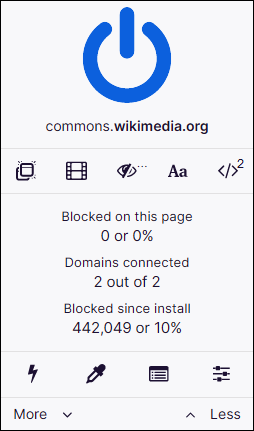
 uBlock Origin pop-up interface | |
| Original author | Raymond Hill (gorhill) |
| Developers | Current: Raymond Hill Past: Deathamns, Chris Aljoudi, Alex Vallat[1] |
| Initial release | June 23, 2014[2] |
| Stable release | 1.70.0[3]
/ 10 March 2026 |
| Written in | JavaScript |
| Operating system | Cross-platform |
| Predecessor | HTTP Switchboard and uMatrix |
| Available in | 72[4] languages |
| Type | Browser extension |
| License | GPLv3 |
| Repository | |

uBlock Origin (/ˈjuːblɒk/ YOO-blok[5]) is a free and open-source browser extension for content filtering, including ad blocking. The extension is available for Firefox and Chromium-based browsers (such as Chrome, Edge, Brave, and Opera).[6]
uBlock Origin is actively developed and maintained by its creator and lead developer Raymond Hill and the open source community.[1] As of December 2025[update], the Chrome version of uBlock Origin had over 29 million active users and the Firefox version has over 10 million active users, making it the most popular extension on Firefox.[7][8]
History
[edit]The development of uBlock Origin (uBO) came about by forking the codebase of HTTP Switchboard, an extension designed to give users control over browser requests. uBlock, which was the predecessor of uBlock Origin, was further influenced by uMatrix, another browser extension created by forking HTTP Switchboard.[9]
HTTP Switchboard
[edit]HTTP Switchboard was initially released on September 20, 2013.[10][11][12][13][14][15] It enabled users to control the types of requests made by their browser, providing a way to block specific types of web content. However, development of HTTP Switchboard ceased on May 18, 2015.[16][17]
uMatrix
[edit]Following the end of HTTP Switchboard's development, uMatrix was introduced on October 24, 2014.[18][9][19]
This extension, designed for advanced users, acted as a request firewall, allowing users to control browser requests across two main dimensions: the domains and subdomains to which requests were sent, and the types of requests (such as cookies, images, XMLHttpRequest, frames, and scripts). uMatrix retained much of the user interface from HTTP Switchboard, but significantly expanded its functionality, offering a more granular level of control over web requests.
The evolution of these extensions laid the foundation for uBlock, combining elements from both HTTP Switchboard and uMatrix while streamlining the user experience for broader accessibility.
Development of uMatrix continued for several years alongside development of uBlock Origin, with uMatrix being posed as a blocking option that was "definitely for advanced users".
In a public discussion on 2 August 2020, lead developer Raymond Hill stated that he lacked time to work on uMatrix because it was "a project large enough that [he] would be able to work on it only if [he] wasn't working on uBO." In response to a further comment, Hill stated he would never pass development to anyone after past experience, giving concerns such as monetisation and feature bloat, and he would instead "at most" archive it, offering others the chance to fork the project.[20]
Development of uMatrix ended on July 21, 2021, without announcement, with the project's GitHub repository being converted to a public archive.
uBlock
[edit]uBlock[note 1] was developed by Raymond Hill to use community-maintained block lists,[21] while adding features and raising the code quality to release standards.[22] First released in June 2014 as a Chrome and Opera extension, in 2015 the extension became available in other browsers.[citation needed]
A joint Sourcepoint and comScore survey reported an 833% growth from November 2014 to August 2015, the strongest growth among adblockers listed.[23] The report attributed the growth to the desire of users for pure blockers, outside the "acceptable ads" program operated by Adblock Plus.[24]
The development of uBlock stopped in August 2015 after its April break with uBlock Origin but there were updates again starting in January 2017.[25]
In July 2018, ublock.org was acquired by AdBlock and they resumed development.[26] From February 2019, uBlock began allowing users to participate in "acceptable ads",[27][28] a program run by Adblock Plus that allows some ads deemed "acceptable" and nonintrusive, and for which larger publishers pay a fee.[29]
uBlock Origin
[edit]On April 3, 2015, Raymond Hill transferred the uBlock project to Chris Aljoudi due to frustrations with managing increasing user requests.[30] Hill explained that it was no longer a hobby: "These projects are to me, not a full-time job. It stopped being a hobby when it felt more and more like a tedious job. I will keep maintaining my version (and share with whoever cares to use it) because it guarantees the tool will match what I want out of it."[31] On April 6, Hill created his own fork of the project, naming it uBlock Origin.[32]
Since October 2017, uBlock Origin has been completely separated from Aljoudi's uBlock.[33] Aljoudi created ublock.org to host and promote uBlock and to request donations. In response, Hill stated that "the donations sought by ublock.org are not benefiting any of those who contributed most to create uBlock Origin."[6]
uBlock Origin Lite
[edit]In 2023, Google made changes known as "Manifest V3" (MV3 in short) to the WebRequest API used by ad blocking and privacy extensions to block and modify network connections.[34][35] Following Google's implementation of Manifest V3 and the end of support for V2 (which was ultimately implemented in March 2025),[36] uBlock Origin's effectiveness is drastically reduced in Google Chrome and other Chromium-based browsers.[37][38][39]
As a result, uBlock Origin Lite was created and designed to comply with the new extension framework. uBO Lite differs from uBO in several key aspects, primarily due to the constraints and design goals associated with Manifest V3. Specifically, it lacks filter list updates outside of extension updates, and has no custom filters, strict-blocked pages, per-site switches, or dynamic filtering. Google has been criticized for implementing some of these features due to its domination (Google Ads) in the online advertising market.[40][41][42][43]
Following a dispute with Mozilla add-on administrators over perceived security flaws, Raymond Hill pulled uBlock Origin Lite from the Firefox Marketplace in August 2025.[44] The classic (MV2) version is unaffected and is still developed for Firefox, which is its preferred platform. Subsequently, community developers created a sideloaded version for Firefox via GitHub.[45]
Researchers from Goethe University Frankfurt, compared uBOL vs uBO performance and confirmed that uBOL managed to bypass most of Google's restrictions in MV3. The tested MV3 extension were found blocking as many requests to trackers and ads to their MV2 counterpart (quantitative study).[46] However, the researchers also found that cosmetic filters were over 20% less effective in the tested sample (visual study).[47] The study also found that uBOL on average blocked more trackers than AdBlock, AdGuard, and Stands extension.[47]
As of March 2026, the Chrome version of uBlock Origin Lite has over 16 million active users.[48][better source needed]
Features
[edit]Blocking and filtering
[edit]uBlock Origin supports the majority of Adblock Plus's filter syntax. The popular filter lists EasyList and EasyPrivacy are enabled by default. The extensions are capable of importing hosts files and a number of community-maintained lists are available at installation. Among the host files available, Peter Lowe's ad servers & tracking list and lists of malware domains such as uBlock Origin's own anti-malicious filter called Badware risks are also enabled as default, preventing users from visiting malicious websites such as those used for phishing, scams, malware, and more.[49] Some additional features include dynamic filtering of scripts and iframes and a tool for webpage element hiding.[citation needed]
uBlock Origin offers several features not found in the original uBlock. These include:
- Color Vision Deficiency Mode: A feature designed to assist users with color blindness.
- Dynamic URL Filtering: An option for more flexible and adaptive URL filtering.
- Logging Functionality: Allows users to view logs for better insight into the extension's activities.
- DOM Inspector: A tool for inspecting the Document Object Model of web pages.
- Block link prefetching: Prevents the browser from preloading or prefetching links.
- Block hyperlink auditing: Disables the ability of websites to track when links are clicked through a technique called hyperlink auditing.
There used to be a feature that protected against IP address leaks via WebRTC. However, this feature was removed in version 1.38 for all platforms except Android, as most browsers no longer have vulnerabilities related to WebRTC leaks.[50]
Site-specific switches to toggle the blocking of pop-ups, strict domain blocking, cosmetic filtering, blocking remote fonts, and JavaScript disabling were also added to uBlock Origin.[51] The Firefox version of uBlock Origin has an extra feature which helps to foil attempts by web sites to circumvent blockers.[52]
uBlock Origin also supports modifying the response body of a request using the =replace directive. This allows it to effectively alter and deliver the modified response directly to the browser. However, this functionality is currently supported only on Firefox and Firefox-based browsers.[53]
Performance and efficiency
[edit]Technology websites and user reviews for uBlock Origin have regarded the extension as less resource-intensive than extensions that provide similar feature sets such as Adblock Plus.[54][55][56] A benchmark test, conducted in August 2015 with ten blocking extensions, showed uBlock Origin as the most resource-efficient among the extensions tested.[57]
uBlock Origin surveys what style resources are required for an individual web page rather than relying on a universal style sheet. The extension takes a snapshot of the filters the user has enabled, which contributes to accelerated browser start-up speed when compared to retrieving filters from cache every time.[58]
Differential updates
[edit]Starting with version 1.54, uBlock Origin introduced the implementation of differential updates (delta updates), which allows the extension to fetch only changes to filter lists rather than downloading the entire list. This results in lower bandwidth consumption and more frequent updates. This change was part of uBlock Origin's efforts to reduce both requests and bandwidth usage, with the goal of not being ranked among the most bandwidth-intensive projects on jsDelivr, as reflected in public statistics.[59][60]
Environmental impact
[edit]According to a research paper, uBlock Origin was able to reduce web page load times by 28.5%, the highest efficiency compared to other ad blockers like AdBlock Plus and Privacy Badger. Its use could significantly reduce energy consumption, saving an estimated 100 hours of browsing time annually for the average global user.[61]
If widely adopted in the United States, it could save over $117 million per year in electricity costs, and globally, it could result in savings exceeding $1.8 billion. The research report also suggests that widespread use of uBlock Origin could have environmental benefits, potentially preventing pollution-related deaths caused by coal-fired power generation used to support the extra energy consumption from ads.[61]
Limitations in Chromium-based browsers
[edit]According to Raymond Hill, the creator and lead developer of the extension, uBlock Origin works best on Firefox.[62] The main reason is that uBlock Origin (uBO) faces several technical limitations when used on Chromium-based browsers compared to its performance on Firefox, and as a result, users may experience less effective ad blocking, potential exposure to unwanted content, and slower performance when using uBO on Chromium-based browsers:[63]
CNAME Uncloaking
[edit]In November 2019, a uBlock Origin user reported a novel technique used by some sites to bypass third-party tracker blocking. These sites link to URLs that are sub-domains of the page's domain, but those sub-domains resolve to third-party hosts via a CNAME record. Since the initial URL contained a sub-domain of the current page, it was interpreted by browsers as a first-party request and so was allowed by the filtering rules in uBlock Origin (and in similar extensions). The uBlock Origin developer came up with a solution using a DNS API which is exclusive to Firefox 60+.[64] The new feature was implemented in uBlock Origin 1.25, released on February 19, 2020.[65]
Chromium-based browsers lack the ability to uncloak third-party servers disguised as first-party through CNAME records. This limitation reduces the efficiency of blocking third-party trackers, a capability that uBO fully utilizes on Firefox.
Furthermore:
- IP address filtering: In version 1.60, uBO introduced the ability to block network requests based on their IP addresses. This is achieved by fetching the DNS records for a specific URL and filtering according to the IPs found. Full support is available for Firefox-based browsers, while Chromium-based browsers can only filter when an IP address is directly used in the URL instead of a hostname.
- HTML Filtering: uBO's ability to filter the response body of HTML documents before they are parsed by the browser is hindered in Chromium-based browsers. This feature, enabled by the
webRequest.filterResponseData()API, is currently only available in Firefox, limiting the effectiveness of uBO's HTML filtering on Chromium-based platforms. - Response Body Filtering: The
replace=option in network filtering, which allows for response body modification, is less effective in Chromium-based browsers. Firefox's support for this feature enables more robust content manipulation. - Browser Launch Filtering: On Chromium-based browsers, uBO may not be fully ready to block network requests from already opened tabs immediately upon browser launch. This can allow some tracker or advertisement payloads to load before uBO becomes active, which is especially problematic for users who utilize default-deny modes for third-party resources or JavaScript. While there is a mitigation setting available, it is not enabled by default and does not cover all use cases.
- Pre-fetching: In Chromium-based browsers, websites may override user settings regarding pre-fetching, potentially leading to unwanted network requests. Firefox, in contrast, reliably prevents pre-fetching when it is disabled in uBO.
- WebAssembly Usage: uBO does not use WebAssembly for core filtering code paths on Chromium-based browsers due to the additional permissions required in the extension manifest, which could complicate the extension's publication in the Chrome Web Store. This limitation can affect performance and functionality.
- Storage Compression: uBO on Chromium-based browsers cannot effectively use LZ4 compression for storing filter lists and other data due to issues with IndexedDB in incognito mode. IndexedDB instances are reset in incognito mode, causing uBO to start with out-of-date filter lists and reduced efficiency. Firefox does not face this issue, allowing for more efficient storage and retrieval of data.
Reception
[edit]uBlock Origin is a widely praised content-filtering extension, known for being less memory-intensive than similar tools.[66][67][68][69] Its primary purpose is to give users control over their content-filtering choices, particularly in blocking advertisements and enhancing privacy.[70][71]
The extension has received positive feedback from both users and academic researchers. It is frequently recognized for its effectiveness in blocking ads, improving privacy, and boosting browsing efficiency.[54][55][56] Numerous studies and scientific papers have examined uBlock Origin's impact on web performance, privacy, and user experience. These studies have contributed to a better understanding of the benefits of ad-blocking tools, with uBlock Origin often cited as one of the most comprehensive and efficient solutions. Its widespread use and inclusion in academic research highlight its importance in the broader context of digital privacy and online security.[72]
uBlock Origin is also appreciated for its commitment to remaining a non-profit project.[73] It does not accept paid advertisements and refuses donations, encouraging users to support the maintainers of block lists directly.[74] This commitment to independence helps reinforce its reputation as a privacy-focused tool without commercial interests.
Additionally, it has been praised for its positive environmental impact. By reducing web page load times, it can lead to significant energy savings. Widespread adoption of the tool could help lower energy consumption and mitigate environmental harm.[61]
Supported platforms
[edit]uBlock Origin is actively developed for applications based on two major layout engines.[21][54][75]
With Google's phaseout of Manifest V2 in favor of Manifest V3, non-Chromium browsers like Firefox are unaffected.[76] As of April 2025, Microsoft Edge supports uBlock Origin.[77] Brave, another Chromium-based browser, has announced its intent to continue supporting MV2-based extensions such as uBlock Origin.[78]
Currently supported
[edit]Chromium-based browsers
[edit]Limited support
[edit]- Google Chrome: Due to the phase-out of Manifest V2-based extensions since October 2024, uBlock Origin is marked as deprecated on the Chrome Web Store and is being remotely removed from Chrome installations.[36][79] uBlock Origin Lite has been designed as a Manifest V3-based version with reduced functionality.[80]
- Safari: Support for uBlock Origin in Safari had previously ended with macOS 10.15 Catalina because Apple deprecated the legacy Safari Extension API in favor of a restricted content blocker framework, which limited ad-blocking capabilities and was incompatible with uBO's functionality.[81][82][83][note 2] However, in 2025, development resumed after Apple introduced the necessary components to Safari, and uBlock Origin Lite is again available via the App Store,[84] allowing users to install it on both macOS and iOS.[85][86]
- Mozilla Thunderbird: In Thunderbird, uBlock Origin only affects RSS feeds, meaning that the content blocking and privacy protections provided by uBO are not possible for emails.
Previously supported
[edit]- Goanna
- Pale Moon: Previously users had to use the Firefox-legacy release, which was last updated on July 20, 2021.[87] As a result, it is no longer supported and not recommended for daily use due to potential incompatibilities, security vulnerabilities, and inefficiencies in content blocking. There is a fork that fixes numerous bugs and tries to be closer to the main uBlock branch.[88] The fork is the recommended ad-blocking extension for Pale Moon and its derivatives since early 2024 or so.[89]
- EdgeHTML
- Microsoft Edge Legacy: Edge Legacy was succeeded by Microsoft's complete rebuild of Edge, based on Chromium, on January 15, 2020. As a result, support for uBO ended shortly after, with the Chromium-based version of uBO taking its place.[90][91][note 3]
See also
[edit]

Notes
[edit]- ^ uBlock was initially named "μBlock", but it was later renamed to "uBlock" so as to avoid confusion with how the Greek letter μ (Mu/Micro) should be pronounced.[citation needed]
- ^ Unofficial release. Fork by Ellis Tsung (el1t) for Safari from the official project.
- ^ Unofficial release. Fork by Nik Rolls (nikrolls) for Microsoft Edge.
References
[edit]- ^ a b "Contributors to gorhill/uBlock". GitHub. Retrieved December 4, 2019.
- ^ "Changelog for the first versions". GitHub. Retrieved December 4, 2019.
- ^ "Release 1.70.0". Retrieved March 11, 2026.
- ^ "Completed translations". Crowdin.com. Retrieved May 16, 2024.
- ^ "uBlock Origin: README.md". uBlock GitHub Repository. December 25, 2022 – via GitHub.
pronounced you-block origin (/ˈjuːˌblɒk/)
- ^ a b "uBlock / README.md". GitHub. Retrieved December 4, 2019.
- ^ "uBlock Origin Chrome". chrome.google.com. Retrieved April 27, 2025.
- ^ "Search results for Firefox Browser add-ons". Firefox Browser Add-ons. Mozilla Foundation. Retrieved April 27, 2025.
- ^ a b "uMatrix". GitHub. Retrieved December 4, 2019.
- ^ "History for icon_128.png - gorhill/httpswitchboard". GitHub. Retrieved December 17, 2024.
- ^ gorhill. "FAQ". httpswitchboard. GitHub. Retrieved December 17, 2024.
- ^ gorhill. "HTTP Switchboard 1.0.0.2 ·". Release. GitHub.
- ^ * sn-523: uBlock Origin - Gibson Research
- ^ Hill, Raymond (December 9, 2024). "Browser session benchmarker". sessbench. gorhill/github. Retrieved December 17, 2024.
- ^ Brinkmann, Martin (June 24, 2014). "uBlock for Chrome is a resource-friendly adblocker by the HTTP Switchboard author - gHacks Tech News". gHacks. Retrieved December 17, 2024.
- ^ "Home". uMatrix wiki. GitHub. Retrieved December 17, 2024.
- ^ "Adblock Plus is probably the reason Firefox and Chrome are such memory hogs". news.ycombinator.com | Hacker News. Retrieved December 17, 2024.
- ^ Raymond Hill (gorhill). "uMatrix". chromewebstore.google.com - Chrome Web Store. Retrieved December 17, 2024.
- ^ "uMatrix – Extension for Firefox". addons.mozilla.org. Retrieved December 17, 2024.
- ^ Raymond Hill (gorhill) (August 2, 2020). "Request for a stable uMatrix release (for CNAME uncloaking)". Reddit. Retrieved May 4, 2025.
- ^ a b Brinkmann, Martin (June 24, 2014). "uBlock for Chrome is a resource-friendly adblocker by the HTTP Switchboard author". gHacks Technology News. Ghacks. Archived from the original on February 21, 2025. Retrieved February 22, 2025.
- ^ Hill, Raymond (June 4, 2018). "Changes from HTTP Switchboard". GitHub. Archived from the original on January 31, 2025. Retrieved February 22, 2025.
- ^ Levine, Barry (October 14, 2015). "The Ad Blocker Landscape: What You Need To Know Today". Marketing Land. Retrieved October 17, 2015.
- ^ "The state of ad blocking - September 2015". Sourcepoint and comScore. September 16, 2015. Retrieved October 17, 2015.
- ^ "uBlockAdmin/uBlock". github.com. Retrieved December 4, 2019.
- ^ "An update on uBlock". ublock.org. July 13, 2018. Archived from the original on July 19, 2018. Retrieved December 4, 2019.
- ^ "uBlock Incorporates Acceptable Ads". February 23, 2019. Archived from the original on November 30, 2019. Retrieved December 4, 2019.
- ^ "uBlock 0.9.5.13". GitHub. February 13, 2019. Retrieved June 26, 2020.
- ^ "About Adblock Plus". adblockplus.org. Retrieved December 4, 2019.
- ^ Hill, Raymond (April 3, 2015), "Release 0.9.3.0", gorhill/uBlock, retrieved December 8, 2023
- ^ Hill, Raymond. "Please clarify uBlock0 vs. uBlock". Github.com. Retrieved December 4, 2019.
- ^ Hill, Raymond, Update README.md, retrieved December 8, 2023
- ^ Hill, Raymond (October 21, 2017). "uBlock Origin is completely unrelated to the web site ublock.org". github.com. Retrieved December 4, 2019.
- ^ Amadeo, Ron (November 21, 2023). "Google Chrome will limit ad blockers starting June 2024". Ars Technica. Archived from the original on November 22, 2023. Retrieved November 22, 2023.
- ^ Tung, Liam. "Google Chrome could soon kill off most ad-blocker extensions". ZDNet. Archived from the original on December 19, 2020. Retrieved June 13, 2019.
- ^ a b Weatherbed, Jess (March 3, 2025). "Google's Chrome extension cull hits more uBlock Origin users". The Verge. Retrieved March 3, 2025.
- ^ "Chrome Users Beware: Manifest V3 is Deceitful and Threatening". December 9, 2021.
- ^ "uBO Lite". GitHub.
- ^ "More details on the transition to Manifest V3".
- ^ Cyphers, Bennett (August 30, 2019). "Don't Play in Google's Privacy Sandbox". Electronic Frontier Foundation. Retrieved April 25, 2024.
- ^ O'Reilly, Lara. "Google is once again dictating the future of the online ad industry and all its rivals can do is brace for impact". Business Insider. Retrieved April 25, 2024.
- ^ Cyphers, Alexei Miagkov and Bennett (December 14, 2021). "Google's Manifest V3 Still Hurts Privacy, Security, and Innovation". Electronic Frontier Foundation. Retrieved April 25, 2024.
- ^ Claburn, Thomas (September 8, 2022). "Ad blockers struggle under Chrome's new rules". The Register. Retrieved April 26, 2024.
- ^ "Popular ad blocker uBlock Origin Lite pulled from Firefox store". PCWorld. Retrieved August 17, 2025.
- ^ uBlockOrigin/uBOL-home, uBlockOrigin, September 29, 2025, retrieved September 29, 2025
- ^ Lukic, Karlo; Papadopoulos, Lazaros (2025). "Privacy vs. Profit: The Impact of Google's Manifest Version 3 (MV3) Update on Ad Blocker Effectiveness". arXiv:2503.01000v2 [cs.CY].
- ^ a b Lukic, Karlo; Papadopoulos, Lazaros (2025). "Privacy vs. Profit: The Impact of Google's Manifest Version 3 (MV3) Update on Ad Blocker Effectiveness". arXiv:2503.01000v2 [cs.CY].
- ^ "uBlock Origin Lite - Chrome Web Store". chromewebstore.google.com. Retrieved March 4, 2026.
- ^ "uAssets/filters/badware.txt at master · uBlockOrigin/uAssets". GitHub. Retrieved August 3, 2024.
- ^ "Prevent WebRTC from leaking local IP address". GitHub, gorhill/uBlock. Retrieved May 5, 2023.
- ^ "uBlock wiki". GitHub. Retrieved June 13, 2015.
- ^ "Inline script tag filtering – Overwiew". GitHub, gorhill/uBlock. Retrieved March 20, 2017.
- ^ "Implement network filter option 'replace=' · gorhill/uBlock@7c3e060". GitHub. Retrieved May 20, 2025.
- ^ a b c "uBlock ad blocker added to Mozilla's extensions site". Jim Lynch, Technology and Other Musings. Retrieved February 17, 2015.
{{cite web}}: CS1 maint: deprecated archival service (link) - ^ a b Kesari, Varun (October 28, 2017). "Adblock Plus vs uBlock Origin | Which one to Choose In 2017? | RMG". rootmygalaxy.net. Archived from the original on October 28, 2017. Retrieved October 28, 2017.
- ^ a b Harper, Christopher (May 2, 2015). "uBlock Origin - Better Than AdBlock Plus?". Make Tech Easier. Retrieved May 27, 2017.
- ^ "10 Ad Blocking Extensions Tested for Best Performance". Raymond Tech Resources. August 26, 2015. Retrieved August 26, 2015.
- ^ "Notes on memory benchmarks, selfies". uBlock GitHub documentation. Retrieved February 17, 2015.
- ^ "Release 1.54.0 · gorhill/uBlock". GitHub. Retrieved October 20, 2024.
- ^ "Usage Statistics". jsDelivr. Retrieved October 20, 2024.
- ^ a b c Pearce, Joshua M. (June 2020). "Energy Conservation with Open Source Ad Blockers". Technologies. 8 (2): 18. doi:10.3390/technologies8020018. ISSN 2227-7080.
- ^ "uBlock Origin works best on Firefox". GitHub. Retrieved October 20, 2024.
- ^ "uBlock Origin works best on Firefox". GitHub. Retrieved September 3, 2024.
- ^ "uBlock Origin Now Blocks Sneaky First-Party Trackers in Firefox". BleepingComputer. Retrieved February 26, 2020.
- ^ "uBlock Origin 1.25 Now Blocks Cloaked First-Party Scripts, Firefox Only". BleepingComputer. Retrieved February 26, 2020.
- ^ Henry, Alan (January 27, 2015). "uBlock, the Memory-Friendly Ad-Blocker, Is Now Available for Firefox". Retrieved December 4, 2019.
- ^ Brinkmann, Martin (October 10, 2014). "How to add custom filters to Chrome ad-blocking extension μBlock". gHacks Technology News. Retrieved December 4, 2019.
- ^ Schofield, Jack (January 29, 2015). "Are there any trustworthy sources for downloading software?". TheGuardian.com. Retrieved December 4, 2019.
- ^ Whitwam, Ryan (February 12, 2015). "μBlock aims to block ads without draining system resources". ExtremeTech.com. Archived from the original on March 24, 2020. Retrieved December 4, 2019.
- ^ "uBlock". github.com. GitHub. Retrieved December 4, 2019.
- ^ Gardiner, Michael (November 5, 2015). "Adblock Plus vs. Ghostery vs. Ublock Origin: Not All Adblockers Were Created Equal". International Business Times. Archived from the original on July 22, 2017. Retrieved December 4, 2019.
- ^ "Scientific papers". GitHub. Retrieved December 26, 2024.
- ^ "MANIFESTO.md". github.com. Retrieved December 4, 2019.
- ^ "Why don't you accept donations?". GitHub. Retrieved January 20, 2020.
- ^ "Apple - Safari - Safari Extensions Gallery". Apple. Archived from the original on March 10, 2016. Retrieved February 19, 2015.
- ^ Brinkmann, Martin (September 24, 2022). "Mozilla reaffirms that Firefox will continue to support current content blockers". Ghacks Technology News.
- ^ "Edge Add-ons uBlock Origin".
- ^ "About Google Chrome's "This extension may soon no longer be supported"". GitHub. Retrieved December 26, 2024.
- ^ Roth, Emma (October 15, 2024). "Google Chrome's uBlock Origin phaseout has begun". The Verge. Retrieved March 24, 2025.
- ^ Roth, Emma (October 15, 2024). "Google Chrome's uBlock Origin phaseout has begun". The Verge. Retrieved December 21, 2024.
- ^ "Catalina compatibility · Issue #156 · el1t/uBlock-Safari". github.com. Retrieved August 18, 2019.
- ^ "Explanation of the state of uBlock Origin (and other blockers) for Safari". GitHub.
- ^ "el1t/uBlock-Safari". github.com. Retrieved January 19, 2017.
- ^ "uBlock Origin Lite". App Store. August 7, 2025. Retrieved August 12, 2025.
- ^ "Safari issues to resolve for a minimally working uBOL · Issue #327 · uBlockOrigin/uBOL-home". GitHub. Retrieved May 15, 2025.
- ^ "Join the uBlock Origin Lite beta". testflight.apple.com. Retrieved May 15, 2025.
- ^ Hill, Raymond (December 9, 2024), gorhill/uBlock-for-firefox-legacy, retrieved December 26, 2024
- ^ UCyborg (January 11, 2025), UCyborg/uBlock-for-firefox-legacy, retrieved January 15, 2025
- ^ "Pale Moon Add-ons - Search results for "ublock"". addons.palemoon.org. Retrieved January 15, 2025.
- ^ Rolls, Nik (June 12, 2021), nikrolls/uBlock-Edge, retrieved July 9, 2021
- ^ Rubino, Daniel (December 11, 2016). "uBlock Origin adblocker now available for Microsoft Edge via the Store". Windows Central. Retrieved December 12, 2016.

External links
[edit]
UBlock Origin
View on GrokipediaHistory
Origins and Precursors
uBlock Origin originated from the work of developer Raymond Hill, who created the initial uBlock extension as a lightweight content blocker for Chromium-based browsers. Forked from Hill's earlier projects, including the HTTP Switchboard extension for toggling network requests and uMatrix for granular request management, uBlock was designed to leverage community-maintained filter lists like EasyList and EasyPrivacy for efficient ad and tracker blocking without the resource overhead of contemporaries such as Adblock Plus.[3][1] The extension's first release occurred on June 24, 2014, initially exclusive to Google Chrome and Opera, emphasizing declarative filtering rules to minimize CPU and memory usage.[1] Precursors to uBlock's approach include the foundational ad-blocking extensions of the mid-2000s, particularly Adblock Plus, released in 2006 for Firefox by eyeo GmbH, which popularized server-side filter lists for matching and blocking unwanted elements via CSS selectors and URL patterns. Adblock Plus's "acceptable ads" policy, which whitelisted non-intrusive advertisements by default to support publishers, drew criticism for compromising user control and efficiency, prompting alternatives like uBlock that rejected such whitelisting in favor of pure user-defined blocking. Community filter lists, such as EasyList—launched in October 2006 to target ads on English-language sites—provided the rule syntax and subscription model that uBlock adopted and extended for broader spectrum blocking, including trackers and malware domains.[6] In April 2015, facing escalating user support demands, Hill transferred the original uBlock repository to Chris Aljoudi, a former Adblock Plus contributor, whose subsequent development aligned it more closely with Adblock Plus features, including optional acceptable ads integration. To preserve the original vision of a no-compromise, high-performance blocker, Hill forked and rebranded the project as uBlock Origin later that year, expanding compatibility to Firefox and other browsers while prioritizing code modularity and runtime efficiency over monetization-friendly policies.[7][3] This divergence underscored causal tensions in ad-blocker evolution: between user privacy imperatives and industry pressures for ad revenue accommodation, with uBlock Origin favoring the former through undiluted filter enforcement and minimalistic design.[3]Core Development and uBlock Launch
uBlock was principally developed by Raymond Hill, a Canadian software developer known online as "gorhill," who aimed to produce a memory-efficient content blocker capable of supporting community-curated filter lists alongside advanced per-site filtering options.[3] Hill's design emphasized declarative rules and procedural cosmetic filtering to minimize CPU usage compared to declarative-only approaches in contemporaries like Adblock Plus, which often prioritized whitelisting mechanisms that could allow acceptable ads.[1] The extension drew conceptual influences from Hill's prior work on uMatrix, a matrix-based request blocker, and earlier tools such as HTTP Switchboard, enabling granular control over network requests without relying on external paid services for list maintenance.[3] Initial development occurred in 2014, with Hill focusing on integration with browser APIs like Chrome's webRequest for intercepting and modifying HTTP requests at the extension level.[1] This allowed uBlock to block ads, trackers, and other unwanted resources by matching URLs against compiled filter lists, which were fetched and updated dynamically to ensure low overhead.[3] The codebase was hosted on GitHub under the repository now maintained as uBlock Origin, reflecting its open-source nature under a GPLv3 license, encouraging community contributions for filter enhancements while Hill retained lead development.[1] uBlock launched publicly in June 2014 exclusively for Chromium-based browsers including Google Chrome and Opera, marking its debut as a free extension available via their respective web stores.[3] At launch, it supported core features like static network filtering and basic element hiding, distinguishing itself through efficiency metrics—such as sub-10 MB memory footprint under load—that outperformed resource-heavy alternatives, as independently benchmarked in early reviews.[8] Rapid adoption followed, with users praising its speed and lack of bundled "acceptable ads" opt-outs, though Hill cautioned against over-reliance on unvetted third-party lists due to potential false positives in blocking legitimate content.[3]Evolution to uBlock Origin
In 2014, developer Raymond Hill (known online as gorhill) released uBlock as a lightweight, open-source browser extension designed for efficient content blocking with a minimal memory footprint, initially forked from Adblock Plus filter lists but optimized to avoid the resource-intensive features of traditional ad blockers.[3] By early 2015, Hill transferred stewardship of the uBlock project to contributor Chris Aljoudi amid growing demands on his time, intending to allow continued community-driven maintenance.[9] However, subsequent changes under Aljoudi, including alterations to project credits and a shift toward integration with commercial ad-blocking entities, diverged from Hill's original emphasis on transparency, efficiency, and independence from monetization models.[10] To preserve the project's foundational principles, Hill forked and rebranded his ongoing work as uBlock Origin in April 2015, explicitly positioning it as the authentic successor to the initial uBlock codebase while distancing it from the evolving uBlock variant.[9] This transition emphasized uBlock Origin's commitment to wide-spectrum blocking—targeting not only ads but also trackers, malware domains, and resource-heavy elements—without relying on acceptably "whitelisted" ads or external revenue streams, which Hill viewed as compromising user privacy and performance.[1] The rename incorporated the subscript "Origin" (often denoted as uBlock₀) to signal its origin in Hill's unaltered vision, and the extension rapidly gained adoption for its declarative net request API utilization, enabling faster blocking compared to script-based alternatives.[11] Post-evolution, uBlock Origin underwent iterative refinements, such as expanded support for cosmetic filtering to hide intrusive elements and integration with community-maintained filter lists like EasyList and EasyPrivacy, amassing millions of users by mid-2015.[12] Unlike the uBlock project, which became affiliated with the Adblock company and introduced features like default whitelist allowances, uBlock Origin remained solely under Hill's lead development, fostering a repository that prioritized verifiable efficiency metrics—such as sub-10MB memory usage during typical sessions—and rigorous peer review via GitHub contributions.[3] This fork ensured the extension's resilience against browser ecosystem pressures, setting the stage for its dominance in privacy-focused blocking.[1]Adaptations to Browser Policy Changes
In response to Google Chrome's enforcement of Manifest V3 starting in October 2024, which deprecated the webRequest API essential for uBlock Origin's dynamic network filtering, developer Raymond Hill released uBlock Origin Lite (uBOL) as a Manifest V3-compatible variant.[13][1] uBOL relies on the declarativeNetRequest API, limiting it to static rule-based blocking without procedural script injection or real-time response modification, resulting in reduced efficacy against obfuscated ads and trackers compared to the full uBlock Origin.[14] Chrome began disabling the original Manifest V2-based uBlock Origin for select users in phases from October 2024 onward, prompting users to migrate to uBOL or alternatives.[13] Microsoft Edge, also Chromium-based, followed suit by automatically updating uBlock Origin to uBOL in its add-ons store on August 25, 2025, aligning with the same Manifest V3 requirements and imposing identical API constraints.[15] For Apple Safari, which employs a distinct content blocker framework rather than extension manifests, uBOL launched on August 5, 2025, to comply with iOS and macOS WebKit policies that restrict third-party script execution and enforce rule-based filtering, while the full uBlock Origin remains compatible only with Safari versions prior to 13.[16] Mozilla Firefox has not deprecated Manifest V2 and maintains full support for uBlock Origin's advanced features, including CNAME uncloaking via DNS resolution and HTML response body filtering through the webRequest.filterResponseData API, which Chromium browsers lack.[17] Hill has explicitly recommended Firefox for optimal uBlock Origin performance amid Chromium policy shifts, noting its delayed extension loading to prevent initial tracker requests.[18] However, uBOL's Firefox distribution ended in September 2024 following disputes over Mozilla's add-on review process, deemed overly burdensome by the developer.[19]Technical Foundations
Content Filtering Engine
The content filtering engine of uBlock Origin handles both network-level request interception and post-load document manipulation to block unwanted content such as advertisements, trackers, and invasive scripts. It operates through two primary components: static network filtering for preemptive request blocking and dynamic rules for runtime adjustments, complemented by cosmetic filtering for DOM element concealment or removal. This architecture prioritizes CPU and memory efficiency, compiling filter lists into optimized token-based structures for sub-millisecond matching times on typical requests.[20][1] Static network filtering relies on community-maintained lists like EasyList and EasyPrivacy, which are parsed and compiled at extension startup into a format supporting wildcard patterns, domain-specific exceptions, and extended syntax (e.g., resource-type matching for scripts, images, or frames). Filters are matched against request URLs, domains, and types using a trie-like or hash-optimized lookup to minimize overhead, allowing uBlock Origin to process thousands of rules without significant latency. Dynamic filtering overlays runtime rules generated via the extension's interface, such as per-site blocking of third-party frames or scripts, which override static matches and enable user-specific tweaks without reloading lists. These rules target broad categories (e.g., all remote fonts or XHR requests) and support temporary or permanent application, reducing privacy leakage from cross-site resources.[20][21] Cosmetic filtering applies after page load to hide or scriptlet-inject against elements not caught by network blocks, using CSS selectors for generic rules (e.g.,div[class*="ad-"] { display: none !important; }) and procedural filters for complex cases like dynamically generated content. Procedural cosmetics employ JavaScript-like operators (e.g., :has-text() or :matches-css()) to traverse and modify the DOM tree, targeting specific attributes or behaviors with minimal injection footprint. In Manifest V2 implementations, this leverages content scripts; Manifest V3 variants (e.g., uBlock Origin Lite) shift to declarative APIs like declarativeNetRequest for network rules while limiting procedural cosmetics to avoid sandbox restrictions.[22][1]
The engine's efficiency stems from ahead-of-time compilation and avoidance of per-request regex evaluation, with static filters loaded once and updated via background fetches (typically daily). It supports scriptlet injection to neutralize anti-adblock scripts and redirect resources for benign overrides, ensuring broad-spectrum blocking while allowing granular exceptions via domain or path modifiers. This design handles over 100,000 filters across lists without exceeding 100 MB RAM in standard use, outperforming less optimized blockers in resource-constrained environments.[1][20]
Resource Optimization Techniques
uBlock Origin employs a static network filtering engine that compiles declarative filter lists into optimized data structures for rapid request evaluation, prioritizing CPU and memory efficiency over dynamic script-based processing used in less performant blockers.[1][3] This approach processes requests at the network layer with specialized routines, avoiding resource-intensive per-request JavaScript execution and enabling blocking decisions in microseconds.[23] Hostname-based filters, such as those using the||example.com^ syntax, are stored in a compressed trie structure, which reduces matching operations to a number proportional only to the hostname's length rather than exhaustive string comparisons across all filters.[24] Pattern-matching filters leverage TypedArrays for storage, with dedicated algorithms for single-wildcard cases to bypass regex overhead; filters requiring multiple wildcards fall back to regex only when necessary, minimizing computational cost.[24] In Firefox, WebAssembly compilation further accelerates these lookups, enhancing throughput without increasing memory demands.[24]
Filter specificity optimizations, including primary narrowing options like 1p (first-party), 3p (third-party), or type specifiers (e.g., script), prune irrelevant filter evaluations early by tokenizing URLs and skipping non-matching subsets, thereby reducing overall CPU cycles per request.[24] Procedural cosmetic filtering extends this efficiency to DOM manipulation, using lightweight operators (e.g., :has() or :upward()) that target elements declaratively rather than via injected scripts, with :upward() proving faster due to single-ancestor traversal versus multi-descendant searches in :has().[24] Techniques like removeparam for query string stripping execute conditionally only when parameters are present, avoiding unnecessary operations.[24]
These mechanisms contribute to uBlock Origin's low memory footprint, typically under 10 MB even with extensive filter lists, debunking claims of excessive RAM consumption that often stem from misattributed browser or site leaks rather than the extension itself.[25] Independent analyses confirm it uses less memory than alternatives like Adblock Plus, with startup consumption around 1-2 MB in controlled tests.[26] The design's emphasis on efficiency has been quantified in studies showing ad blockers like uBlock Origin reduce device energy use, potentially saving users billions annually in electricity costs by curtailing resource-heavy ad content.[27]
Privacy and Security Mechanisms
uBlock Origin enhances user privacy primarily through declarative network request blocking, which intercepts and prevents the loading of third-party trackers and scripts known to collect browsing data without consent. By default, it subscribes to filter lists such as EasyPrivacy, which targets privacy-invasive elements like analytics beacons and fingerprinting attempts, thereby reducing data leakage to advertisers and data brokers.[1] This mechanism operates at the browser's extension level, filtering HTTP/HTTPS requests before they reach the network stack, ensuring that potentially invasive resources never execute or transmit user information.[1] For security, uBlock Origin incorporates blocklists dedicated to malicious content, including the Online Malicious URL Blocklist, which identifies and blocks domains associated with malware distribution, phishing, and exploit kits.[1] It also blocks cryptojacking scripts and pop-up windows that could serve as vectors for drive-by downloads or social engineering attacks, leveraging extended filter syntax to match specific resource types like inline scripts or iframes.[1] Unlike telemetry-reliant extensions, uBlock Origin collects no user data, as confirmed in its privacy policy, avoiding any inherent privacy risks from the tool itself.[28] Additional security layers include cosmetic filtering, which hides HTML elements that could expose user-specific data through dynamic content injection, and support for custom rules that allow blocking of specific network endpoints tied to known vulnerabilities.[1] Anti-fingerprinting is achieved indirectly via broad-spectrum blocking of canvas, font, and WebGL probes embedded in trackers, minimizing unique browser signatures without altering core browser behavior.[1] These features collectively mitigate risks from ad-delivered malware, with studies estimating significant resource savings that correlate to fewer exposure opportunities.[3]Key Features
Ad and Tracker Blocking
uBlock Origin blocks advertisements and trackers primarily through network-level request interception, denying resources before they load to minimize bandwidth usage and privacy risks. This approach contrasts with cosmetic hiding, as the extension prevents network fetches matching filter rules, thereby avoiding exposure to potentially malicious or tracking-laden content.[29][3] The core mechanism utilizes static filtering via community-maintained lists, including EasyList for identifying and blocking ad-serving domains and scripts, and EasyPrivacy for targeting tracking elements like web bugs and analytics code.[1][6] Additional default lists, such as Peter Lowe's Ad and tracking server list, expand coverage against known ad and tracking hosts.[1] These lists employ rule-based patterns—covering URLs, domains, and script behaviors—to classify and reject requests efficiently, supporting blocks of millions of elements per session with low CPU and memory overhead.[11][3] For enhanced control, uBlock Origin incorporates dynamic filtering, allowing per-element or per-site adjustments through its logger and element picker tools, which inspect and apply custom rules to ongoing page loads.[30] This hybrid static-dynamic system ensures broad-spectrum blocking while permitting user overrides to mitigate site breakages, all processed via browser APIs likewebRequest for precise request modification.[31][3]
Empirical assessments highlight its effectiveness; for instance, a 2020 study estimated that widespread use of similar efficient blockers could yield annual bandwidth savings equivalent to $1.8 billion globally by averting ad-related data transfers.[27] The open-source nature facilitates ongoing updates to counter evolving ad and tracking techniques, maintaining robustness against circumvention attempts.[1]
Customizable Filtering Rules
uBlock Origin enables users to author custom static filters through the "My filters" tab in its dashboard, supplementing subscribed filter lists with personalized network blocking and cosmetic rules. Users must first enable "My custom filters" via the Filter lists tab or directly in My filters to activate this feature. In the "Filter lists" tab, users of uBlock Origin Lite can enable built-in lists under the "Annoyances" section, such as "EasyList/uBO – Cookie Notices," to filter cookie consent banners; this complements network blocking by applying cosmetic filters to hide residual elements, activated by selecting the list and clicking "Apply changes".[32] The pane employs a CodeMirror-based editor with syntax highlighting for error detection, auto-completion via Ctrl-Space/Cmd-Space, and Tab to toggle comments prefixed by "!". Changes are applied by clicking "Apply changes," persisting across sessions.[33] Static filters adhere to a syntax compatible with Adblock Plus and EasyList standards, extended by uBlock-specific operators for enhanced precision. Network filters target requests, such as||example.com^ to block a domain and subdomains, or ||bet365.com^$all to halt all resource types including popups; options like $3p restrict to third-party origins, $removeparam=utm_source strips tracking parameters, and $important overrides exceptions. Cosmetic filters conceal or alter elements, e.g., example.com##.ad-class hides classed items or example.com##.ad:remove() fully removes them; procedural variants leverage :has(), :has-text(), or :remove() for conditional actions. Exceptions use @@ prefixes, as in @@||example.com^$script to whitelist scripts. Unique extensions include regex-based domains (e.g., /img[a-z]{3,5}\.buzz/ since version 1.46.1b15), HTML filters like example.com##^.badstuff for pre-parsing removal, conditional directives (!#if env_firefox), and scriptlet injections such as example.com##+js(nobab) to neutralize JavaScript behaviors or example.com##+js(set, state, false) using the set-constant (alias: set) scriptlet to set a global variable or window property to a predefined constant value (e.g., true, false, null, or functions like noopFunc), with trusted-set variants for complex objects such as example.com##+js(trusted-set, state, json:{"active": true}); these scriptlets run early to override page scripts.[34][35]
Dynamic filtering complements static rules with runtime controls, accessible via the extension's popup (with advanced mode enabled) or dashboard's My rules pane. Rules apply globally or per-site, overriding static blocks: "block" halts categories like 3rd-party frames: block, "allow" permits specific resources, and "noop" bypasses dynamic evaluation. Temporary rules persist via padlock icon or Ctrl-click; visual cues in the interface denote blocking status (reddish for full block, greenish for allow). This allows site-specific tweaks, such as exempting YouTube embeds on a domain while enforcing broader restrictions elsewhere.[21]
Users should enable "Allow custom filters requiring trust" judiciously for advanced scriptlets or procedural filters, as these may execute code and introduce risks; restrict to verified repositories like uBlockOrigin/uAssets to avoid malicious alterations. Tools like the element picker facilitate rule generation by selecting page components for instant filter creation and testing.[33]
Dynamic Filtering Interface
The dynamic filtering interface in uBlock Origin enables advanced users to create per-domain rules that override static filter lists, functioning similarly to network firewall controls for web requests.[21] This feature, introduced to replace dedicated extensions like RequestPolicy, allows granular blocking or allowing of resource types such as scripts, frames, images, and fonts, distinguished by first-party (1p) or third-party (3p) origins.[36] Rules take precedence over static filters, with options to block all requests by default (medium mode) or allow specific exceptions to prevent site breakage.[37] Access to the interface requires enabling advanced settings via the extension's dashboard, after which it appears in the browser popup panel through toggles labeled "Less" and "More" for resource categories.[21] In medium mode—a preset dynamic filtering configuration—the popup displays three columns: the left for resource types and hostnames with color-coded indicators (red for fully blocked, green for allowed, yellow for mixed states), the middle for global rules applying site-wide, and the right for local rules specific to the current domain.[21] Visual cues include request count badges (e.g., "-" for 1-9 requests, "--" for 10-99), a padlock icon to persist temporary rules, and gray tones for inactive (noop) states that bypass filtering.[21] Rule syntax supports commands like "block" for denying categories (e.g., "block 3p frames" to stop third-party iframes globally), "allow" to override blocks (used sparingly to avoid security risks), and "noop" to disable rules for exceptions (e.g., "noop youtube.com" for video embeds).[21] Users edit persistent rules in the dashboard's "My rules" tab, where global and per-domain entries can be manually added, committed, or exported.[21] For real-time inspection, the interface integrates with the logger tool, accessible via a list icon in the popup, which logs network requests and DOM elements in a tabular view with color-coded rows (red for blocked, green for allowed) and enables point-and-click rule creation—holding Ctrl/Cmd makes temporary actions permanent.[30] This logger supports filtering by domain or type, exporting logs, and previewing rule effects before application.[30] Dynamic filtering emphasizes caution, as broad "allow" rules can expose users to trackers or scripts bypassed by static lists; the developer recommends narrow exceptions and testing via the logger to maintain security.[21] As of uBlock Origin version 1.53.0 (released October 2024), the interface remains unchanged in core functionality but benefits from ongoing optimizations for rule evaluation efficiency.[12]Platform Compatibility
Supported Browsers and Engines
uBlock Origin maintains full compatibility with browsers based on the Gecko rendering engine, including Mozilla Firefox and its derivatives, where it leverages the extension APIs without the limitations imposed by Manifest V3 transitions.[1] The extension is available through the official Firefox Add-ons store and receives regular updates, ensuring optimal performance for content filtering.[3] Thunderbird, which also uses Gecko, supports uBlock Origin but is limited to version 1.49.2 due to add-on constraints in that email client.[1] For browsers utilizing the Blink rendering engine—predominantly Chromium derivatives such as Google Chrome, Microsoft Edge, and Opera—uBlock Origin's full implementation relies on the deprecated Manifest V2 (MV2) architecture. Google Chrome began phasing out MV2 support in 2024, with uBlock Origin's full version ceasing updates and functionality after Chrome version 139, prompting users to adopt the restricted uBlock Origin Lite, which lacks advanced dynamic filtering capabilities.[1] [13] By mid-2025, enforcement extended to other Chromium-based browsers, though some like Brave have delayed full MV3 mandates, allowing temporary MV2 compatibility for uBlock Origin.[38] Microsoft Edge and Opera followed similar timelines, with full uBlock Origin disabled in favor of MV3-compliant alternatives.[39] The developer, Raymond Hill, explicitly recommends Firefox for users seeking unrestricted uBlock Origin functionality, citing its preservation of MV2-like APIs and avoidance of MV3's webRequest API restrictions that hinder comprehensive blocking.[1] Compatibility with other engines, such as WebKit in Safari, is absent for the full uBlock Origin, as it does not provide an extension for that platform due to API incompatibilities; however, uBlock Origin Lite is available as a content blocker via the Apple App Store for Safari on macOS, iOS, and iPadOS. As of early 2026, user reports indicate that uBlock Origin Lite effectively blocks YouTube ads on Safari, including iOS, when configured properly, with recommendations to set the filtering mode to "Optimal" for balanced effectiveness or higher for more complete blocking; it is often praised as superior to alternatives like AdGuard for ad-free YouTube viewing and operates via Safari's declarative content blocking API.[3][40][41]| Browser | Engine | Support Status for Full uBlock Origin |
|---|---|---|
| Firefox | Gecko | Full, ongoing updates[1] |
| Thunderbird | Gecko | Full, version 1.49.2 only[1] |
| Chrome | Blink | Deprecated post-v139; Lite version required[1] [5] |
| Edge | Blink | Deprecated; MV3 transition enforced[39] |
| Opera | Blink | Available but phasing out MV2[3] |
| Brave (Chromium) | Blink | Temporary MV2 support; varies by version[38] |