Hubbry Logo
Burndown chartBurndown chartMain
Open search
Burndown chart
Community hub
Burndown chart
logo
8 pages, 0 posts
0 subscribers
Be the first to start a discussion here.
Burndown chart
Burndown chart
from Wikipedia
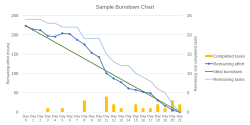
A sample burndown chart for a completed iteration. It will show the remaining effort and tasks for each of the 21 work days of the 1-month iteration.

A burndown chart or burn-down chart is a graphical representation of work left to do versus time.[1] The outstanding work (or backlog) is often on the vertical axis, with time along the horizontal. A burndown chart is a run chart of remaining work. It is useful for predicting when all of the work will be completed. It is often used in agile software development methodologies such as Scrum. However, burndown charts can be applied to any project containing measurable progress over time.

Remaining work can be represented in terms of either time or story points (a sort of arbitrary unit).[2]

Burn charts can be used to present the project's team velocity.[3] Velocity is a measure that represents the productivity rate, within a predefined interval, for which deliverables are created, validated and approved.[3]

Reading burn down charts

[edit]
A project burndown chart

A burndown chart for a completed iteration is shown above and can be read by knowing the following:[4]

X axis
The project/iteration timeline
Y axis
The work that needs to be completed for the project. The time or story point estimates for the work remaining will be represented by this axis.[3]
Project start point
This is the farthest point to the left of the chart and occurs at day 0 of the project/iteration.
Project end point
This is the point that is farthest to the right of the chart and occurs on the predicted last day of the project/iteration
Number of workers and efficiency factor
In the above example, there are an estimated 28 days of work to be done, and there are two developers working on the project, who work at an efficiency of 70%. Therefore, the work should be completed in (28 ÷ 2) ÷ 0.7 = 20 days.
Ideal work remaining line
This is a straight line that connects the start point to the end point. At the start point, the ideal line shows the sum of the estimates for all the tasks (work) that needs to be completed. At the end point, the ideal line intercepts the x-axis showing that there is no work left to be completed. Some people take issue with calling this an "ideal" line, as it's not generally true that the goal is to follow this line. This line is a mathematical calculation based on estimates, and the estimates are more likely to be in error than the work. The goal of a burn down chart is to display the progress toward completion and give an estimate on the likelihood of timely completion.
Actual work remaining line
This shows the actual work remaining. At the start point, the actual work remaining is the same as the ideal work remaining but as time progresses, the actual work line fluctuates above and below the ideal line depending on this disparity between estimates and how effective the team is. In general, a new point is added to this line each period (for example in Scrum each day for a sprint backlog or each sprint for a release backlog). Its y-value is the sum of effort of remaining work after the past period. (This is in general not equal to subtracting recently completed amount of work from the last point, but only if the total work remained constant.)

Measuring performance

[edit]
Actual work line is above the ideal work line
If the actual work line is above the ideal work line, it means that there is more work left than originally predicted and the project is behind schedule.
Actual work line is below the ideal work line
If the actual work line is below the ideal work line, it means that there is less work left than expected and the project is ahead of schedule.

This is only one way of interpreting the shape of the burndown chart. There are others.[2]

Removing variability in time estimates

[edit]

One issue that may be noticed in burndown charts is that whether or not the actual work line is above or below the ideal work line depends on how accurate the original time estimates are. This means that if a team constantly overestimates time requirements, the progress will always appear ahead of schedule. If they constantly underestimate time requirements, they will always appear behind schedule. This issue is corrected by incorporating an efficiency factor into the burndown chart. After the first iteration of a project, the efficiency factor can be recalculated to allow more accurate estimates during the next iteration. Some templates automatically calculate the efficiency as a project progresses. This can be used to identify areas/phases where inaccurate estimates consistently occur.[4]

Burnup chart

[edit]

A burnup chart, or burn-up chart, is a diagram of complete work and is sometimes used as an alternative to the burndown chart. Similar to the burndown chart, the burnup chart shows time on the horizontal axis and work completed on the vertical axis. The main difference is that the burnup chart starts on the bottom and rises as tasks are completed (opposite to the burndown chart). Another difference is that burnup charts usually have a line representing total work.[5] Similarly to burndown charts, the work can be measured in several ways, for instance, using time or story points.

See also

[edit]

Citations

[edit]
  1. ^ Project Management Institute 2021, §4.6.6 Visual Data and Information.
  2. ^ a b "Feel The Burn, Getting the Most out of Burn Charts – Better Software, Volume 11, Issue 5, pp. 26–31" (PDF). July–August 2009.
  3. ^ a b c Project Management Institute 2021, §2.7.3.3 Visual Controls.
  4. ^ a b Wenzel, Joel (December 2012). "Burn Down Chart Tutorial: Simple Agile Project Tracking". Archived from the original on 2013-07-07. Retrieved 2011-06-14.
  5. ^ Arafeen, Junaid; Bose, Saugata (September 2009). "Improving Software Development Using Scrum Model by Analyzing Up and Down Movements on The Sprint Burn Down Chart: Proposition for Better Alternatives". International Journal of Digital Content Technology and its Applications. 3 (3) – via CiteSeerX.

References

[edit]

Further reading

[edit]
Revisions and contributorsEdit on WikipediaRead on Wikipedia
from Grokipedia
A burndown chart is a graphical tool in agile project management that displays the amount of work remaining over time, typically plotting time on the horizontal axis and remaining work (measured in hours, story points, or tasks) on the vertical axis, allowing teams to visualize progress toward completion. Originating in the Scrum framework, burndown charts were invented by Ken Schwaber in 2000 while at Fidelity Investments and gained widespread adoption within the Scrum community by 2002, though they are not a mandated element of the official Scrum Guide. Instead, they serve as an optional information radiator to promote transparency and early issue detection by providing a simple, regularly updated view of project status. There are two primary types: the sprint burndown chart, which tracks progress within a single or sprint (usually 1-4 weeks) to ensure the team meets its sprint goal, and the product or release burndown chart, which monitors the overall backlog across multiple sprints toward a major release or product completion. To create one, teams establish an initial total work estimate at the start, draw an ideal straight-line trend from that total to zero by the deadline, and update the actual remaining work daily; deviations from the ideal line highlight potential delays or efficiencies, enabling adjustments during daily Scrum meetings. Key benefits include fostering team collaboration, predicting completion dates, and identifying bottlenecks early, though limitations exist, such as the chart's inability to account for scope changes or the value of completed items without additional tracking. Overall, burndown charts enhance agile practices by emphasizing empirical progress measurement and continuous improvement.

Fundamentals

Definition

A burndown chart is a graphical representation in that illustrates the amount of work remaining over time, typically depicted as a with time on the horizontal x-axis and the quantity of unfinished work—such as story points, hours, or tasks—on the vertical y-axis. It visually tracks progress by showing how the workload decreases as the project or sprint advances, providing a clear view of whether the team is on pace to complete the work by the deadline. The chart consists of two primary lines: the ideal burndown line, which is a straight diagonal line extending from the total initial work at the start to zero at the end of the project duration, assuming constant progress; and the actual burndown line, which plots the real remaining work based on daily or periodic updates, forming a series of data points connected to reflect true performance. These components allow for immediate comparison between planned and achieved progress, with the ideal line serving as a benchmark for expected completion. Burndown charts originated within agile methodologies, particularly the Scrum framework, where they were introduced in the early implementations of Scrum projects during the 1990s by and . first applied Scrum, including early forms of burndown tracking, in a project at Corporation in 1993, with contributing to its formalization by the mid-1990s. The ideal burndown line follows a linear progression, mathematically expressed as: Remaining Work=Initial Work(Initial WorkTotal Time)×Elapsed Time\text{Remaining Work} = \text{Initial Work} - \left( \frac{\text{Initial Work}}{\text{Total Time}} \right) \times \text{Elapsed Time} This equation models the steady depletion of work under ideal conditions, where the rate of completion is uniform across the timeframe.

Purpose

The primary goals of a burndown chart are to visualize toward project completion by plotting remaining work against time, identify potential early through deviations from the ideal line, and facilitate daily stand-up discussions in agile teams by serving as an accessible information radiator. Burndown charts offer several key benefits, including promoting transparency by providing all team members with a clear, up-to-date view of status and trends. They assist in completion dates by projecting future work based on historical and current burn rates, often using trend lines to account for . Additionally, these charts motivate teams by displaying tangible , which aligns efforts with sprint goals and fosters , while supporting risk assessment through analysis of deviations that reveal bottlenecks or estimation inaccuracies. In iterative development, burndown charts play a crucial role by enabling mid-project adjustments to scope or effort, as teams compare actual burn rates against planned ones to address blockers and ensure alignment with goals. The burndown chart was first described by in 2000 while working at , formalizing its application in for agile sprints as a simple tool to track team progress.

Creation and Interpretation

Steps to Create

Creating a burndown chart begins with defining the scope of work for the , such as a sprint in Agile methodologies. This involves estimating the total amount of work to be completed, typically measured in story points, hours, or task counts, by summing the estimates for all user stories or tasks in the backlog. Next, establish the timeline for the phase, such as a 14-day sprint, and set up the chart's axes: the x-axis represents time (e.g., days from 1 to 14), while the y-axis shows the remaining work units starting from the total estimated work down to zero. Then, draw the ideal burndown line as a straight diagonal from the starting point (day 0, total work) to the endpoint (final day, 0 remaining work), illustrating the expected linear progress if work is completed evenly over time. Daily, track the actual work completed by subtracting the effort finished each day from the remaining total, plotting these points to form the actual burndown line, which is updated at the end of each day to reflect progress. Burndown charts can be created manually using tools like spreadsheet software such as or even for simple sketches, or through specialized including Jira, with add-ons, and , which automate much of the plotting and updating. For example, in a 5-day sprint with a total of 10 story points, the ideal line would decrease by 2 points per day, starting at (0, 10) and ending at (5, 0), while actual points are plotted based on daily completions.

Reading the Chart

A burndown chart displays time on the horizontal axis and remaining work—typically measured in story points, hours, or tasks—on the vertical axis, allowing teams to visualize progress over a sprint or . The chart primarily consists of two lines: the ideal line and the actual line, which together reveal the team's performance against planned progress. The ideal line illustrates the assumption of linear progress, starting from the total initial work estimate at the beginning of the period and descending steadily to zero at the end, representing the expected rate of work completion if the team maintains a constant . Deviations from this line highlight overperformance or underperformance; for instance, if the actual progress outpaces the ideal, it suggests efficiency gains, while lagging behind indicates potential delays. The actual line plots the real remaining work, updated at the end of each day or work period based on completed tasks. When this line falls below the ideal line, the team is ahead of schedule, potentially allowing for buffer time or additional features; if it rises above or stays elevated, the team is behind, signaling the need for scope reduction, , or impediment resolution to realign with goals. Interpreting key patterns in the actual line provides deeper insights into dynamics. Flat segments often indicate blockers, such as dependencies or resource constraints, that stall and require immediate investigation during daily stand-ups. Steep downward drops reflect bursts of , like resolving a cluster of related tasks or overcoming a major obstacle, which can accelerate overall momentum. Conversely, upward spikes or rushes toward the end of the period may point to incomplete work being deferred, risking carryover into future iterations and highlighting estimation inaccuracies. To forecast completion, teams extrapolate the trend of the actual line, often applying to recent data points for a projected end date, enabling proactive adjustments like reprioritizing the backlog if the sprint appears at risk. This method assumes recent patterns are indicative of future , though more advanced tools may incorporate multiple regression models for refined predictions. A frequent pitfall in chart interpretation is overlooking scope changes, such as adding new tasks or refining estimates, which can distort the baseline and render the ideal line obsolete unless the chart is replotted to incorporate these updates, ensuring accurate ongoing analysis.

Applications

In Agile Project Management

In Scrum, burndown charts serve as a primary tool for daily tracking of remaining work in the sprint backlog, typically measured in story points or hours, to monitor progress toward the sprint goal over the fixed iteration period. They are commonly presented during sprint reviews to demonstrate the team's completion of backlog items and alignment with the product increment. Burndown charts integrate closely with key Scrum ceremonies to foster transparency and continuous improvement. They are updated during daily Scrum meetings, where the team reviews the chart to assess progress, identify impediments, and adjust the day's work accordingly. In sprint retrospectives, the charts are analyzed to evaluate process efficiency, spot patterns in work completion, and drive actionable improvements for future sprints. While Scrum emphasizes fixed sprints, burndown charts can be adapted for practices within agile, shifting focus from time-boxed s to continuous flow tracking of work items through the stages. In this , the chart emphasizes metrics like cycle time—the duration from task start to completion—rather than sprint boundaries, helping teams visualize bottlenecks and maintain steady throughput. For instance, a team observed an unexpected plateau in their sprint burndown chart midway through the , signaling delayed due to unresolved dependencies between features; this prompted immediate reprioritization of tasks and collaboration with stakeholders to resolve the issues before sprint end. Burndown charts evolved as a core visualization technique in agile practices influenced by the 2001 Agile Manifesto, with their first formal description by in 2000 during a at ; they gained widespread adoption by 2002 as part of Scrum's emphasis on control, though later Scrum Guides clarified they are not mandatory but valuable for progress monitoring.

Measuring Team Performance

Burndown charts provide a quantitative basis for calculating velocity, which represents the average amount of work completed per , typically measured in story points or hours. Velocity is derived from the slope of the actual burndown line, indicating the rate at which the burns through committed work, such as an average of 25 story points per sprint for a consistent . This metric helps forecast future sprint capacities and identifies whether the is maintaining a sustainable pace. The burn rate, a key derivative from the burndown chart, quantifies the team's progress by measuring work completed relative to time passed. It is calculated using the formula: Burn Rate=Initial WorkCurrent Remaining WorkElapsed Days\text{Burn Rate} = \frac{\text{Initial Work} - \text{Current Remaining Work}}{\text{Elapsed Days}} For instance, if a sprint begins with 40 story points and 20 remain after 4 days, the burn rate is (40 - 20) / 4 = 5 story points per day. This rate allows teams to assess daily efficiency and adjust efforts to align with the ideal burndown trajectory. Performance indicators from burndown charts reveal team predictability and efficiency; a consistent actual line hugging the ideal line signifies a reliable, high-performing team capable of accurate and execution. Conversely, high variability—such as erratic drops or prolonged plateaus—signals potential issues like inaccuracies or bottlenecks, often necessitating targeted training or refinements to enhance predictability. By comparing burndown charts across multiple sprints, teams can track historical performance trends, such as improving from 20 to 30 story points over successive iterations, highlighting process maturity or regressions due to external factors like scope changes. This longitudinal analysis supports discussions and long-term . Despite these benefits, burndown charts have limitations in measuring overall team performance, as they focus solely on work completion volume without evaluating quality aspects like code reliability or user satisfaction. To address this, they should be complemented with complementary metrics, such as defect rates or cycle times, for a holistic view of .

Variations and Improvements

Release and Product Burndown

Release burndown charts extend the principles of sprint burndown tracking to monitor progress across multiple sprints leading to a specific release . These charts aggregate the work from sprint backlogs into a single view, plotting the remaining effort—typically measured in story points or ideal days—on the vertical axis against the number of sprints on the horizontal axis. Unlike sprint burndown charts, which use days as the time unit, release burndown charts account for scope changes, such as added or removed features, by reflecting them in the actual remaining work line, while the ideal line remains based on the initial total scope, allowing teams to visualize the impact of through deviations. For example, in a release planned over six sprints with an initial total of 100 story points, the ideal burndown line would descend linearly from 100 to 0 across the sprints, assuming consistent of about 16-17 points per sprint. If scope adjustments occur, such as adding 20 points after the second sprint, the actual remaining work increases accordingly, causing the progress line to deviate above the ideal line, highlighting the without adjusting the baseline. This visualization helps teams predict release completion and identify deviations early. Product burndown charts provide an even broader perspective, tracking the overall over extended periods such as quarters or years, while accommodating evolving priorities through regular backlog refinements, typically by updating the actual remaining work to reflect priority shifts or new epics. The vertical axis represents the remaining work in the entire , and the horizontal axis denotes time in larger increments like months or program increments. These extended variants, including release and product burndown charts, were integrated into scaled agile frameworks like () around 2011 to support enterprise-level planning and visibility across multiple teams. In , program increment (PI) burndown charts function similarly to release burndowns, graphing planned versus actual story points across sprints in a PI, excluding innovation and planning sprints for accuracy.

Reducing Variability in Estimates

Variability in burndown charts often arises from over-optimism in initial estimates, a known as the , where teams underestimate task durations despite historical evidence. Unclear task definitions contribute further by leading to inconsistent interpretations of effort required, while external dependencies introduce unpredictable delays that skew progress tracking. To mitigate these issues, teams can leverage historical —measured as the average story points completed in past sprints—during sessions to anchor estimates in empirical data rather than intuition. itself fosters team consensus through a structured process where members independently select cards representing effort levels, then discuss discrepancies to converge on a shared estimate, thereby reducing individual biases. This method typically employs a modified (1, 2, 3, 5, 8, 13, etc.) for card values, which accounts for growing uncertainty in larger tasks by widening intervals between numbers, promoting relative sizing over absolute precision. Additional techniques include breaking complex tasks into smaller, more estimable units to enhance clarity and predictability, as smaller items exhibit less variability in completion times. Incorporating buffer time for unknowns, such as allocating 10-20% of sprint capacity for unforeseen issues, helps absorb external dependencies without derailing the overall plan. More accurate estimates resulting from these approaches produce burndown charts where the actual progress line closely tracks the ideal line, minimizing divergences and enabling earlier detection of potential overruns. Best practices from 2010s agile literature emphasize analysis of past burndown charts to identify patterns and refine future processes, such as adjusting for recurring over-optimism observed in trends.

Comparisons

Burnup Charts

A burnup chart is a graphical tool used in agile to visualize project progress by plotting the cumulative amount of work completed against the total scope of work over time. The y-axis represents the quantity of work, typically measured in units such as story points, hours, or tasks, while the x-axis denotes the timeline, such as days, weeks, or sprints. Unlike tools focused solely on remaining effort, a burnup chart features two primary lines: one tracking actual progress from zero upward and another indicating the total scope, which may rise if additional work is added to the project. The key components of a burnup chart include the actual progress line, which starts at the origin and rises incrementally as work is completed; the total scope line, which begins at the initial planned workload and adjusts upward for scope changes like new features or requirements; and an optional ideal progress line, depicted as a straight diagonal from the start to the end point, representing the steady pace needed to meet deadlines. is calculated as the cumulative completed work each period, expressed as Completed Work = \sum_{i=1}^{n} Daily Completions_i, where n is the number of time intervals. The scope line is updated as Scope = Initial Scope + \sum Changes, accounting for additions or in workload without requiring a full recalculation of the . This structure allows teams to monitor both achievement and evolving project boundaries in a single view. Burnup charts offer distinct advantages over burndown charts by explicitly displaying scope changes through upward shifts in the total line, enabling visibility into how added work impacts timelines without the need to replot or adjust baselines. They emphasize total accomplishments by focusing on what has been achieved rather than what remains, providing clearer insights into overall and helping teams forecast completion dates more accurately in variable environments. This approach promotes transparency for stakeholders, as deviations from the ideal line highlight both progress rates and external influences like . Burnup charts originated as a complementary visualization to burndown charts within agile communities in the mid-2000s, drawing from early discussions on earned value tracking in methodologies like Scrum. They gained popularity through integration into agile tools, such as VersionOne (now Digital.ai Agility), where burnup reports were implemented to monitor release-level scope variations using story points and earned value metrics.

Other Progress Tracking Tools

Cumulative flow diagrams (CFDs) serve as an alternative visualization tool in systems, employing stacked area charts to depict the volume of work items across various stages over time, thereby highlighting bottlenecks and inefficiencies in process flow. Unlike burndown charts, which emphasize remaining work in sprints, CFDs provide a broader view of work in progress (WIP) limits and cycle times to support continuous improvement in lean environments. Gantt charts offer a timeline-based representation of project schedules, illustrating tasks as horizontal bars along a axis to show start and end dates, dependencies between activities, and key milestones as markers of significant achievements. This approach excels in mapping sequential and interdependent tasks, making it suitable for detailed planning in projects with defined scopes, though it offers less emphasis on adaptive progress tracking compared to burndown methods. Earned value management (EVM) integrates scope, schedule, and cost performance through quantitative metrics, such as schedule variance calculated as SV = EV - PV, where earned value (EV) represents completed work's budgeted cost and planned value (PV) is the scheduled budget at a given point. Originating in the early with U.S. Department of Defense initiatives like PERT/Cost for complex programs, EVM contrasts with burndown charts' agile origins by providing a structured framework for variance analysis in traditional project management. Alternatives like are preferable for traditional projects featuring fixed scopes and critical path dependencies, while CFDs suit Kanban-style processes requiring visualization of workflow dynamics and bottleneck resolution.

References

Add your contribution
Related Hubs
User Avatar
No comments yet.