


Community hub
Recent from talks
Contribute something
Nothing was collected or created yet.
Histogram matching
View on Wikipedia
In image processing, histogram matching or histogram specification is the transformation of an image so that its histogram matches a specified histogram.[1] The well-known histogram equalization method is a special case in which the specified histogram is uniformly distributed.[2]
It is possible to use histogram matching to balance detector responses as a relative detector calibration technique. It can be used to normalize two images, when the images were acquired at the same local illumination (such as shadows) over the same location, but by different sensors, atmospheric conditions or global illumination.
Implementation
[edit]Consider a grayscale input image X. It has a probability density function pr(r), where r is a grayscale value, and pr(r) is the probability of that value. This probability can easily be computed from the histogram of the image by

Where nj is the frequency of the grayscale value rj, and n is the total number of pixels in the image.
Now consider a desired output probability density function pz(z). A transformation of pr(r) is needed to convert it to pz(z).

Each pdf (probability density function) can easily be mapped to its cumulative distribution function by


Where L is the total number of gray level (256 for a standard image).
The idea is to map each r value in X to the z value that has the same probability in the desired pdf. I.e. S(rj) = G(zi) or z = G−1(S(r)).[3]
Example
[edit]The following input grayscale image is to be changed to match the reference histogram.
The input image has the following histogram

It will be matched to this reference histogram to emphasize the lower gray levels.

After matching, the output image has the following histogram

And looks like this

Algorithm
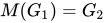
[edit]Given two images, the reference and the target images, we compute their histograms. Following, we calculate the cumulative distribution functions of the two images' histograms – for the reference image and for the target image. Then for each gray level , we find the gray level for which , and this is the result of histogram matching function: . Finally, we apply the function on each pixel of the reference image.


![{\displaystyle G_{1}\in [0,255]}](https://wikimedia.org/api/rest_v1/media/math/render/svg/fb84296b4cb741dbcb33bfba23ac7c214bcc4258)



Exact histogram matching
[edit]In typical real-world applications, with 8-bit pixel values (discrete values in range [0, 255]), histogram matching can only approximate the specified histogram. All pixels of a particular value in the original image must be transformed to just one value in the output image.
Exact histogram matching is the problem of finding a transformation for a discrete image so that its histogram exactly matches the specified histogram.[4] Several techniques have been proposed for this. One simplistic approach converts the discrete-valued image into a continuous-valued image and adds small random values to each pixel so their values can be ranked without ties. However, this introduces noise to the output image.
Because of this there may be holes or open spots in the output matched histogram.
Multiple histogram matching
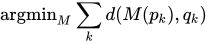
[edit]The histogram matching algorithm can be extended to find a monotonic mapping between two sets of histograms. Given two sets of histograms and , the optimal monotonic color mapping is calculated to minimize the distance between the two sets simultaneously, namely where is a distance metric between two histograms. The optimal solution is calculated using dynamic programming.[5]



See also
[edit]References
[edit]- ^ Gonzalez, Rafael C.; Woods, Richard E. (2008). Digital Image Processing (3rd ed.). Prentice Hall. p. 128. ISBN 9780131687288.
- ^ Gonzalez, R.C.; Fittes, B.A. (June 9–11, 1975). Gray-level transformations for interactive image enhancement (PDF). 2nd Conference on Remotely Manned Systems: Technology and Applications. Los Angeles, California. pp. 17–19.
- ^ Gonzalez, Rafael (2017). Digital image processing 4th Edition. London: Pearson. pp. 94–103. ISBN 978-0133356724.
- ^ Coltuc, Dinu; Bolon, Philippe; Chassery, Jean-Marc (May 2006). "Exact Histogram Specification". IEEE Transactions on Image Processing. 15 (5): 1143–52. Bibcode:2006ITIP...15.1143C. doi:10.1109/TIP.2005.864170. PMID 16671295. S2CID 16060881.
- ^ Shapira D.; Avidan S.; Hel-Or Y. (2013). "Multiple Histogram Matching" (PDF). Proceedings of the IEEE International Conference on Image Processing.
Histogram matching
View on GrokipediaFundamentals
Definition and Purpose
Histogram matching is a technique in digital image processing that adjusts the intensity values of a source image so that its histogram aligns with that of a target reference image or a desired distribution, thereby modifying the image's contrast and brightness while maintaining its underlying spatial structure.[5] This non-linear transformation maps each pixel intensity in the source to a corresponding value in the target based on their cumulative distributions, effectively transferring the statistical properties of the target's intensity profile to the source without altering the relative positions of pixels.[6] The primary purpose of histogram matching is to achieve consistent visual appearance and enhanced interpretability across images captured under varying conditions, such as different lighting or sensors. It finds widespread application in color correction for photography to mimic desired stylistic effects, normalization of grayscale or color images in medical imaging to standardize scans for diagnosis and analysis, style transfer in artistic rendering, and preprocessing in computer vision pipelines to improve feature extraction and object recognition performance.[7][8] A key benefit is its model-free approach, which relies solely on empirical histograms—representations of pixel intensity probability distributions—avoiding the assumptions of parametric techniques like gamma correction that apply a fixed power-law transformation.[9] This flexibility enables precise adaptation to arbitrary target distributions, promoting uniformity in datasets without over- or under-enhancing specific intensity ranges.[10]Histograms and Cumulative Distributions
In digital image processing, a histogram is a discrete function that quantifies the frequency distribution of pixel intensities in an image, serving as a fundamental tool for analyzing and enhancing image characteristics such as contrast and brightness.[11] When normalized, it represents a probability density function (PDF) that captures the likelihood of each intensity level occurring in the image.[12] The construction of a histogram for a digital image of size with possible gray levels begins by counting the occurrences of each intensity , where . The normalized histogram is then computed as , transforming the frequency counts into probabilities that sum to 1 across all levels.[11] This normalization is essential for statistical interpretations and subsequent transformations.[12] The cumulative distribution function (CDF) is derived from the histogram as the running sum of its values: This function accumulates the probabilities up to intensity level , providing a cumulative perspective on the intensity distribution.[13] It is particularly useful for mapping operations that redistribute intensities based on percentile rankings.[11] Key properties of the CDF include its monotonic increasing nature, starting at and reaching , which ensures a smooth progression from the lowest to the highest intensity. In discrete implementations, this enables precise, percentile-based adjustments to intensity values without gaps or overlaps in the transformed distribution.[12] These attributes make the CDF a cornerstone for probabilistic intensity transformations.[13] For histogram matching, which aims to align the intensity distribution of a source image to that of a target, the histograms of both images must first be computed and normalized to obtain their respective CDFs as the foundational step for deriving the mapping function.[11]Core Algorithm
Standard Matching Procedure
The standard histogram matching procedure transforms the intensity distribution of a source image to closely resemble that of a target image by mapping pixel values based on their cumulative distributions. This global technique operates on the entire image and assumes grayscale or single-channel intensities for simplicity, though it can extend to color channels independently.[14] The process begins by computing the histograms of both the source image, denoted as , and the target image, denoted as , which represent the frequency distributions of pixel intensities in each. These histograms are then normalized to form the cumulative distribution functions (CDFs), for the source and for the target, by accumulating the probabilities from the lowest to highest intensity levels.[15] Next, for each unique intensity value in the source image, the procedure determines the corresponding matched intensity by finding the value in the target such that the CDF value at in the source equals the CDF value at in the target, effectively applying the inverse mapping from the target's CDF to the source's CDF output. This mapping is precomputed into a lookup table for efficiency, allowing every pixel in the source image to be replaced with its matched intensity value.[14] In cases of discrete intensities, such as 8-bit grayscale images with 256 possible levels, the inverse CDF may not yield exact matches due to the finite binning, so linear interpolation between adjacent target levels or nearest-neighbor rounding is commonly applied to approximate the continuous inverse. The resulting matched image thus has an intensity histogram that approximates the target's distribution, though the match is inherently approximate owing to this discretization.[15]Mathematical Formulation
Histogram matching seeks to transform the intensity values of a source image, with cumulative distribution function (CDF) , such that the resulting distribution matches that of a target image, with CDF . The core objective is to derive a monotonic transformation function such that , ensuring the output image's intensity distribution aligns with the target's histogram while preserving the relative ordering of pixel intensities.[16] In the continuous case, the transformation is explicitly given by , where denotes the inverse CDF of the target distribution. This formulation arises from the probability integral transform, which maps the source CDF to a uniform distribution and then inverts the target CDF to achieve the desired output. For the probability densities and of the source and target, respectively, the change-of-variables formula yields the output density as , but histogram matching simplifies this to enforcing CDF equality, , for practical alignment.[16][17] The discrete case approximates the continuous inverse via linear interpolation or lookup tables, as exact inverses may not exist due to finite quantization levels. Specifically, for gray levels in the source, the mapped value is the nearest discrete level to , computed by cumulatively summing the normalized source histogram to form and inverting the target CDF stepwise. Monotonicity of is ensured if both CDFs are strictly increasing, guaranteeing a unique solution that avoids gray-level inversions and maintains order preservation.[16] Mathematically, the approach assumes uniform quantization across intensity levels and statistical independence among pixels, which can lead to distortions under noise; quantization errors and rounding in discrete mappings may introduce artifacts, particularly when moving groups of identical intensities. Theoretical bounds on accuracy are limited by these assumptions, with noise potentially altering histograms non-uniformly and reducing the effectiveness of the CDF-based transformation.[16][18]Practical Implementation
Computational Steps
Implementing histogram matching in practice requires processing discrete intensity levels, typically for 8-bit grayscale images with bins ranging from 0 to 255. The algorithm begins by initializing two histogram arrays, for the source image and for the target image, both of size . These histograms are computed by iterating over all pixels in the respective images and incrementing the corresponding bin for each pixel's intensity value, which takes time proportional to the image dimensions .[19] Next, the cumulative distribution functions (CDFs) are constructed from the histograms. The source CDF is obtained by cumulatively summing the normalized histogram entries: for to , starting with . Similarly, the target CDF is computed as , where is the total number of pixels in the target (which may differ from the source). Normalization ensures the CDFs range from 0 to 1, avoiding bias from differing image sizes.[19][15] A mapping table is then created by approximating the inverse of the target CDF for each source CDF value. For each discrete level in the source, find the smallest target level such that , often using a linear search over the bins. This mapping function produces a lookup table of size . Finally, apply the mapping to each pixel in the source image by replacing its intensity with the corresponding from the table, yielding the matched output image.[19] The following pseudocode outlines the standard procedure for an 8-bit grayscale image:function histogram_matching(source_image, target_image):
M, N = dimensions of source_image
L = 256 // Number of intensity levels
H_s = array of zeros(size L)
H_t = array of zeros(size L)
// Compute histograms
for i from 0 to M-1:
for j from 0 to N-1:
s = source_image[i][j]
H_s[s] += 1
// Repeat for target_image to fill H_t
total_t = sum(H_t)
// Compute normalized CDFs
F_s = array of zeros(size L)
F_t = array of zeros(size L)
F_s[0] = H_s[0] / (M * N)
for k = 1 to L-1:
F_s[k] = F_s[k-1] + H_s[k] / (M * N)
F_t[0] = H_t[0] / total_t
for q = 1 to L-1:
F_t[q] = F_t[q-1] + H_t[q] / total_t
// Create mapping table via inverse CDF approximation
map_table = array of size L
for k = 0 to L-1:
for q = 0 to L-1:
if F_t[q] >= F_s[k]:
map_table[k] = q
break // Take smallest q
// Apply mapping
output_image = copy of source_image
for i from 0 to M-1:
for j from 0 to N-1:
output_image[i][j] = map_table[ source_image[i][j] ]
return output_image
function histogram_matching(source_image, target_image):
    M, N = dimensions of source_image
    L = 256  // Number of intensity levels
    H_s = array of zeros(size L)
    H_t = array of zeros(size L)

    // Compute histograms
    for i from 0 to M-1:
        for j from 0 to N-1:
            s = source_image[i][j]
            H_s[s] += 1
            // Repeat for target_image to fill H_t

    total_t = sum(H_t)

    // Compute normalized CDFs
    F_s = array of zeros(size L)
    F_t = array of zeros(size L)
    F_s[0] = H_s[0] / (M * N)
    for k = 1 to L-1:
        F_s[k] = F_s[k-1] + H_s[k] / (M * N)

    F_t[0] = H_t[0] / total_t
    for q = 1 to L-1:
        F_t[q] = F_t[q-1] + H_t[q] / total_t

    // Create mapping table via inverse CDF approximation
    map_table = array of size L
    for k = 0 to L-1:
        for q = 0 to L-1:
            if F_t[q] >= F_s[k]:
                map_table[k] = q
                break  // Take smallest q

    // Apply mapping
    output_image = copy of source_image
    for i from 0 to M-1:
        for j from 0 to N-1:
            output_image[i][j] = map_table[ source_image[i][j] ]

    return output_image
Software and Tools
Several open-source libraries provide implementations for histogram matching, facilitating its use in image processing workflows. In Python, the scikit-image library includes thematch_histograms function within its exposure module, which adjusts the input image's cumulative distribution to match that of a reference image, supporting both grayscale and multichannel inputs.[5] Similarly, OpenCV offers histogram computation via the calcHist function and enables matching through the application of a lookup table (LUT) derived from cumulative distribution functions, allowing efficient processing in C++ or Python environments.[21]
Commercial software also supports histogram matching through dedicated functions. MATLAB's Image Processing Toolbox features the imhistmatch function, which transforms a grayscale or RGB image to approximate the histogram of a reference image, handling data types like uint8 and double with values normalized to [0, 1].[22] Adobe Photoshop provides the Match Color command under Image > Adjustments, which approximates histogram matching by adjusting luminance and color intensity curves between source and target images in RGB mode, useful for consistent color grading across photographs.[23]
Programming environments enable flexible workflows for histogram matching. In Python, a typical implementation combines NumPy for computing histograms and SciPy for CDF interpolation to map pixel values from the source to the reference distribution, often integrated with libraries like Matplotlib for visualization.[5] For batch processing, ImageJ and its Fiji distribution include plugins such as the HistogramMatcher class, which aligns cumulative distributions for time-series or multi-image stacks, and the Bleach Correction plugin, which applies histogram matching to correct photobleaching in microscopy data.[24]
Histogram matching integrates seamlessly into broader pipelines. Within machine learning workflows, scikit-image's match_histograms can preprocess images in scikit-learn pipelines for tasks like feature extraction, normalizing illumination variations to improve model performance on diverse datasets.[25] In GIMP, community scripts like Histogram-Match enable manual or scripted matching via curve adjustments, supporting non-destructive editing in open-source graphic design.
Recent developments extend histogram matching to cloud-based platforms for large-scale applications. Google Earth Engine implements histogram matching in JavaScript or Python APIs to harmonize multispectral remote sensing imagery, such as aligning Landsat and Sentinel bands for time-series analysis in environmental monitoring, addressing radiometric inconsistencies across acquisitions.[26]
Examples and Applications
Illustrative Example
To illustrate histogram matching, consider a hypothetical grayscale image with 256 possible intensity levels (0 to 255), simplified into 4 bins for clarity: bin 0 (0–63), bin 1 (64–127), bin 2 (128–191), and bin 3 (192–255). The source image contains 100 pixels and has a histogram skewed toward low intensities, with many dark pixels and a peak near intensity 50 (falling in bin 0), given by . The target histogram is uniform across the bins, , representing an even distribution of intensities for enhanced contrast. The procedure begins by computing the normalized cumulative distribution function (CDF) of the source histogram: , , , . The target CDF is , , , . Each source bin is then mapped to the smallest target bin such that , yielding the transformation shown in the table below.| Original Bin () | Source CDF () | Mapped Bin () |
|---|---|---|
| 0 | 0.6 | 2 |
| 1 | 0.8 | 3 |
| 2 | 0.95 | 3 |
| 3 | 1.0 | 3 |