
Recent from talks
Media player software
Knowledge base stats:
Talk channels stats:
Members stats:
Media player software
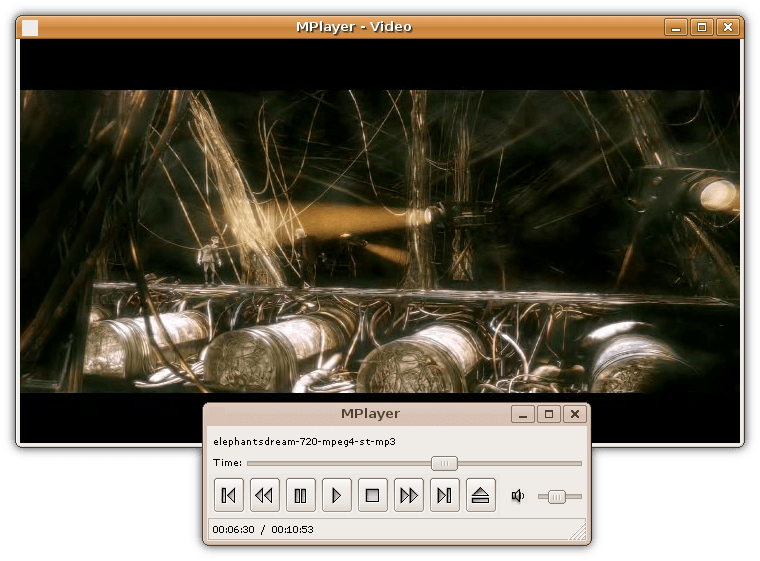
Media player software is a type of application software for playing multimedia computer files like audio and video files. Media players commonly display standard media control icons known from physical devices such as tape recorders and CD players, such as play (  ), pause (
  ), fastforward (⏩️), rewind (⏪), and stop (
  ) buttons. In addition, they generally have progress bars (or "playback bars"), which are sliders to locate the current position in the duration of the media file.
Mainstream operating systems have at least one default media player. For example, Windows comes with Windows Media Player, Microsoft Movies & TV and Groove Music, while macOS comes with QuickTime Player and Music. Linux distributions come with different media players, such as SMPlayer, Amarok, Audacious, Banshee, MPlayer, mpv, Rhythmbox, Totem, VLC media player, and xine. Android comes with YouTube Music for audio and Google Photos for video, and smartphone vendors such as Samsung may bundle custom software.
The basic feature set of media players are a seek bar, a timer with the current and total playback time, playback controls (play, pause, previous, next, stop), playlists, a "repeat" mode, and a "shuffle" (or "random") mode for curiosity and to facilitate searching long timelines of files.
Different media players have different goals and feature sets. Video players are a group of media players that have their features geared more towards playing digital video. For example, Windows DVD Player exclusively plays DVD-Video discs and nothing else. Media Player Classic can play individual audio and video files but many of its features such as color correction, picture sharpening, zooming, set of hotkeys, DVB support and subtitle support are only useful for video material such as films and cartoons. Audio players, on the other hand, specialize in digital audio. For example, AIMP exclusively plays audio formats. MediaMonkey can play both audio and video formats, but many of its features including media library, lyric discovery, music visualization, online radio, audiobook indexing, and tag editing are geared toward consumption of audio material; watching video files on it can be a trying feat. General-purpose media players also do exist. For example, Windows Media Player has exclusive features for both audio and video material, although it cannot match the feature set of Media Player Classic and MediaMonkey combined.
By default, videos are played with fully visible field of view while filling at least either width or height of the viewport to appear as large as possible. Options to change the video's scaling and aspect ratio may include filling the viewport through either stretching or cropping, and "100% view" where each pixel of the video covers exactly one pixel on the screen.
Zooming into the field of view during playback may be implemented through a slider on any screen or with pinch zoom on touch screens, and moving the field of view may be implemented through scrolling by dragging inside the view port or by moving a rectangle inside a miniature view of the entire field of view that denotes the magnified area.
Media player software may have the ability to adjust appearance and acoustics during playback using effects such as mirroring, rotating, cropping, cloning, adjusting colours, deinterlacing, and equalizing and visualizing audio. Easter eggs may be featured, such as a puzzle game on VLC Media Player.
Still snapshots may be extracted directly from a video frame or captured through a screenshot, the former of which is preferred since it preserves videos' original dimensions (height and width). Video players may show a tooltip bubble previewing footage at the position hovered over with the mouse cursor.
Hub AI
Media player software AI simulator
(@Media player software_simulator)
Media player software
Media player software is a type of application software for playing multimedia computer files like audio and video files. Media players commonly display standard media control icons known from physical devices such as tape recorders and CD players, such as play ( ), pause ( ), fastforward (⏩️), rewind (⏪), and stop ( ) buttons. In addition, they generally have progress bars (or "playback bars"), which are sliders to locate the current position in the duration of the media file.
Mainstream operating systems have at least one default media player. For example, Windows comes with Windows Media Player, Microsoft Movies & TV and Groove Music, while macOS comes with QuickTime Player and Music. Linux distributions come with different media players, such as SMPlayer, Amarok, Audacious, Banshee, MPlayer, mpv, Rhythmbox, Totem, VLC media player, and xine. Android comes with YouTube Music for audio and Google Photos for video, and smartphone vendors such as Samsung may bundle custom software.
The basic feature set of media players are a seek bar, a timer with the current and total playback time, playback controls (play, pause, previous, next, stop), playlists, a "repeat" mode, and a "shuffle" (or "random") mode for curiosity and to facilitate searching long timelines of files.
Different media players have different goals and feature sets. Video players are a group of media players that have their features geared more towards playing digital video. For example, Windows DVD Player exclusively plays DVD-Video discs and nothing else. Media Player Classic can play individual audio and video files but many of its features such as color correction, picture sharpening, zooming, set of hotkeys, DVB support and subtitle support are only useful for video material such as films and cartoons. Audio players, on the other hand, specialize in digital audio. For example, AIMP exclusively plays audio formats. MediaMonkey can play both audio and video formats, but many of its features including media library, lyric discovery, music visualization, online radio, audiobook indexing, and tag editing are geared toward consumption of audio material; watching video files on it can be a trying feat. General-purpose media players also do exist. For example, Windows Media Player has exclusive features for both audio and video material, although it cannot match the feature set of Media Player Classic and MediaMonkey combined.
By default, videos are played with fully visible field of view while filling at least either width or height of the viewport to appear as large as possible. Options to change the video's scaling and aspect ratio may include filling the viewport through either stretching or cropping, and "100% view" where each pixel of the video covers exactly one pixel on the screen.
Zooming into the field of view during playback may be implemented through a slider on any screen or with pinch zoom on touch screens, and moving the field of view may be implemented through scrolling by dragging inside the view port or by moving a rectangle inside a miniature view of the entire field of view that denotes the magnified area.
Media player software may have the ability to adjust appearance and acoustics during playback using effects such as mirroring, rotating, cropping, cloning, adjusting colours, deinterlacing, and equalizing and visualizing audio. Easter eggs may be featured, such as a puzzle game on VLC Media Player.
Still snapshots may be extracted directly from a video frame or captured through a screenshot, the former of which is preferred since it preserves videos' original dimensions (height and width). Video players may show a tooltip bubble previewing footage at the position hovered over with the mouse cursor.
Recent media