Hubbry Logo
BlueGriffonBlueGriffonMain
Open search
BlueGriffon
Community hub
BlueGriffon
logo
8 pages, 0 posts
0 subscribers
Be the first to start a discussion here.
BlueGriffon
BlueGriffon
from Wikipedia
Not found
Revisions and contributorsEdit on WikipediaRead on Wikipedia
from Grokipedia
BlueGriffon is an open-source web editor powered by the Gecko rendering engine of , enabling users to visually create and edit web pages, stylesheets, and publications without extensive coding knowledge.
Developed by French software company Disruptive Innovations SAS and its founder Daniel Glazman, BlueGriffon emerged as the successor to the discontinued Nvu editor, which itself traced its roots to Mozilla Composer and earlier tools. First released in late , it quickly gained adoption for its clean output and compatibility with modern web standards.
Key features include support for HTML5, CSS3, SVG, and EPUB 2/3 formats, along with integrated source code viewing, a professional CSS editor, and over 2,500 pre-built templates for rapid development. It also incorporates accessibility tools like and DPUB-ARIA compliance, making it suitable for professional web designers, educators, and publishers worldwide. It was available on and later, macOS 10.8 and later, and Ubuntu 16.04 (32/64-bit). BlueGriffon offered both free basic versions and paid editions with advanced EPUB functionalities, such as full metadata editing and seamless copy-paste between HTML and EPUB workflows. After 14 years of development, BlueGriffon was officially discontinued in (announced on March 24, 2024) due to technological shifts—including Mozilla's deprecation of —and the developer's personal and corporate considerations, with the source code pledged for open release to allow continuation. The final major update to the main editor was version 3.1 in December , while the EPUB Edition's version 2.2 arrived in January , though forks and archived builds remain accessible via platforms like for ongoing use.

Overview

Description

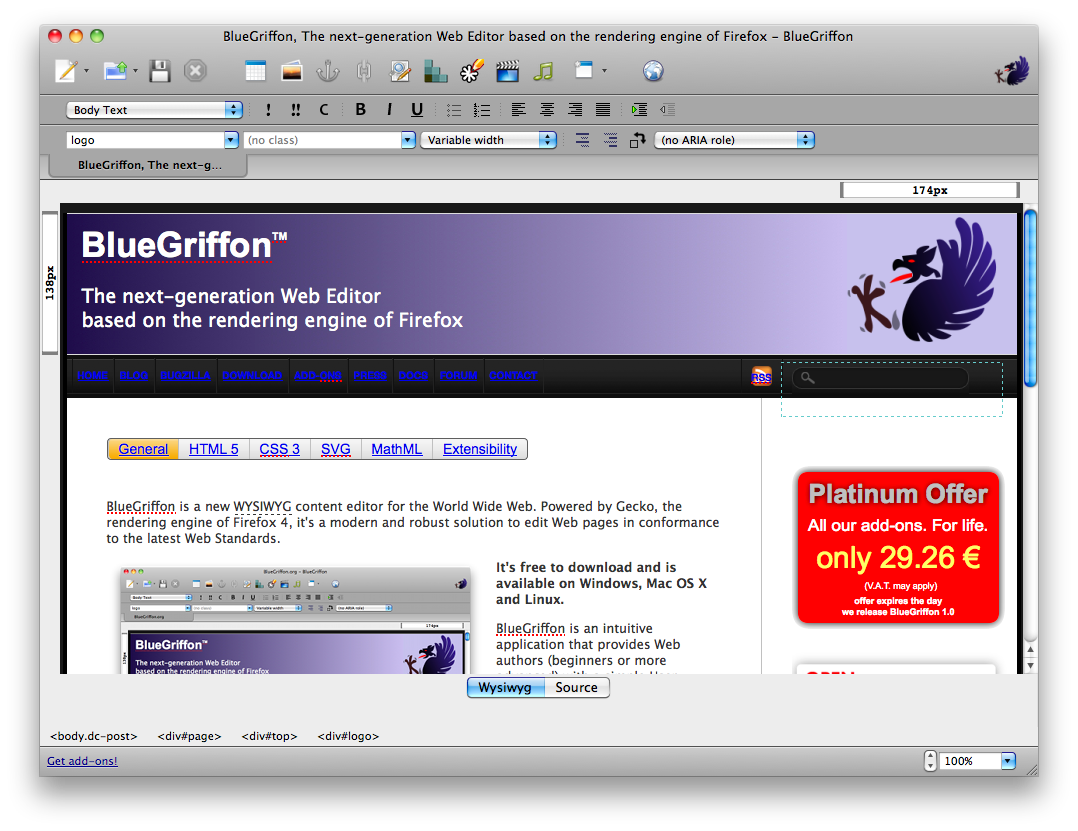
BlueGriffon was a free, open-source (What You See Is What You Get) content editor designed for creating and editing web pages. It provided an intuitive interface that allowed users to visually compose HTML-based content without requiring extensive knowledge of underlying code. The editor primarily targeted web authors, designers, and non-technical users who sought to build websites efficiently. By leveraging the rendering engine originally developed for , BlueGriffon ensured that the visual layout matched how content appeared in compatible browsers. BlueGriffon was licensed under the 2.0 (MPL-2.0), promoting open-source collaboration while most of its add-ons operated under proprietary licenses. It was available across multiple platforms, including and later, macOS 10.8 and later, and Linux distributions such as 16.04 (32/64-bit). The supported 20 languages to accommodate a global audience. Development of BlueGriffon ceased in 2024, though archived builds remain accessible.

Technical Foundation

BlueGriffon was built on the layout engine, the same rendering engine that powers Firefox, enabling precise and compliant web page rendering directly within the editing environment to support accurate previews. This foundation ensured that edits aligned closely with how content would appear in modern browsers, leveraging Gecko's robust handling of web standards for layout and styling. The editor traced its technical lineage to the component of the suite, which was forked in to create the Nvu project under the leadership of Daniel Glazman; BlueGriffon emerged as Nvu's direct successor in 2010, rewritten from scratch using the then-current mozilla-central codebase without modifications to the engine trunk. BlueGriffon was implemented primarily in C and C++ for its core engine integration, with JavaScript, CSS, XUL, and XBL handling the user interface, scripting, and extensible bindings to facilitate dynamic editing features. These Mozilla-derived technologies allowed for a modular that integrated seamlessly with Gecko's rendering . At its core, BlueGriffon maintained an open-source structure hosted on under the MPL-2.0 license, though the repository has not seen significant updates since around 2018. Disruptive Innovations incorporated proprietary extensions—such as those for support—to deliver premium functionalities without open-sourcing specialized modules. This hybrid approach balanced broad accessibility through free versions with monetized advanced tools developed by Glazman's company.

History and Development

Origins and Predecessors

BlueGriffon's lineage begins with Netscape Composer, a HTML editor integrated into the suite and first released in 1996 as part of 3.0. This tool provided basic web page authoring capabilities but was tied to the proprietary browser environment. Following the open-sourcing of 's codebase in 1998, Netscape Composer evolved into , a component of the Suite that emphasized cross-platform compatibility and integration with the rendering engine. addressed some limitations of its predecessor by incorporating early support for CSS and improving editing workflows, though it remained part of a larger suite rather than a standalone application. In 2003, Daniel Glazman, a former developer who had contributed to , initiated a known as Nvu (pronounced "N-view") under commission from Inc. Nvu was designed to rectify persistent bugs in , such as inconsistent rendering and limited feature sets, while adding enhancements like improved CSS handling and a more intuitive interface for web authoring. Released as an open-source standalone editor based on the engine, Nvu quickly gained popularity. However, development faced challenges including funding constraints and technical complexities, leading Glazman to announce the discontinuation of official support in September 2006; a community , KompoZer, emerged shortly thereafter but did not fully resolve the underlying issues. BlueGriffon emerged in 2010 as Glazman's direct successor to Nvu, launched through his company Disruptive Innovations SAS and completely rewritten from scratch using Mozilla's platform to avoid the architectural limitations of its predecessors. Unlike Nvu, which shared with Mozilla Composer, BlueGriffon prioritized extensibility and native support for emerging web technologies. This development was motivated by the growing need for a free, open-source editor that adhered strictly to modern web standards, particularly as proprietary alternatives like dominated the market with high costs and inconsistent standards compliance during the transition to and advanced CSS. By leveraging Gecko's capabilities, BlueGriffon aimed to empower a "read-write web" accessible to non-professional users without compromising on quality.

Key Releases and Evolution

BlueGriffon was initially released in 2010 by Daniel Glazman, a French web standards expert. The project emerged as a successor to Nvu, Glazman's earlier , aiming to provide a modern tool built on Mozilla's Gecko rendering engine. The first major version, 1.0, arrived in 2011 and introduced basic support for editing, enabling users to create standards-compliant web pages with improved rendering accuracy. Version 2.0 followed in 2016, focusing on enhanced CSS3 capabilities, including better handling of advanced styling features like gradients, transitions, and to meet evolving needs. In 2017, version 3.0 brought significant improvements to SVG editing, allowing more precise manipulation of within the interface for complex illustrations and animations. The final update, 3.1, was released on December 4, 2017, incorporating minor refinements such as updated CSS serialization options and fixes for validity. Development of BlueGriffon was hosted on , where Glazman served as the primary maintainer, overseeing code updates and builds across platforms. contributions remained limited, largely due to the project's reliance on add-ons for certain advanced functionalities, which restricted open-source collaboration on those components. Over time, the software evolved to incorporate premium features in later versions, such as a paid advanced CSS editor, to help sustain ongoing development efforts by Glazman's company, Disruptive Innovations. This shift allowed free access to core editing tools while monetizing extensions for professional users seeking deeper customization. After 14 years of development, BlueGriffon was discontinued in due to technological shifts, including Mozilla's deprecation of , and the developer's personal and corporate considerations. The source code was pledged for open release to allow potential continuation.

Features

Core Editing Capabilities

BlueGriffon features a robust (What You See Is What You Get) interface powered by the rendering engine, enabling users to visually edit in real time. This mode supports direct manipulation of text through formatting tools for bold, italic, alignment, and lists via the or menus, allowing for intuitive creation and styling without coding. Images can be inserted and edited with properties like source , alternative text, and dimensions, while tables are created and modified using drag-to-resize handles, cell merging, and row/column adjustments. Forms are assembled by inserting elements such as input fields, buttons, and text areas, with customizable attributes accessible through property panels. Complementing the visual editor, BlueGriffon includes a dedicated source code view with and line numbering for precise and CSS modifications. A dual view option splits the workspace to display both the preview and source code side-by-side, facilitating seamless transitions between graphical and code-based workflows. This setup ensures that changes in one view update the other instantaneously, aiding developers in verifying rendered output against markup. For multimedia integration, the editor provides tools to embed images and HTML5-compatible videos or audio files, complete with insertion dialogs for specifying sources, controls, and fallback content. Hyperlinks are added via a contextual menu or button, prompting for , target, and title attributes to ensure . Layout elements like divs and sections are inserted through the Insert menu or Layout Wizard, which generates structured containers for organizing content into columns or semantic blocks. Core productivity features include unlimited undo and redo actions accessible from the Edit menu or keyboard shortcuts, real-time spell-checking that underlines errors and offers suggestions in multiple languages, and a find-and-replace tool that operates across the entire document in both and source views. These capabilities streamline the editing process, reducing errors and enhancing efficiency for creation.

Standards Support

BlueGriffon provides comprehensive support for key web markup standards, enabling users to create documents compliant with , , , and (the XML serialization of HTML5). This adherence ensures that edited content renders consistently across browsers leveraging the rendering engine. Additionally, the editor fully supports for mathematical notation and for , allowing seamless integration of complex equations and scalable illustrations directly within documents. In terms of styling, BlueGriffon maintains full compliance with CSS 2.1, while offering partial support for CSS3 features such as advanced selectors, , and animations. This includes capabilities for 2D and 3D transformations, transitions, shadows, columns, font features, CSS variables, and grids (with minor limitations on auto-placement properties due to underlying engine constraints). These features facilitate responsive and dynamic layouts without requiring manual code adjustments in most cases. For multilingual content, BlueGriffon integrates the W3C Internationalization Tag Set (ITS) 2.0, providing a dedicated panel to apply local and global ITS rules for localization and translation workflows. This support helps maintain semantic accuracy in internationalized documents, aligning with W3C recommendations for global . To ensure output quality, BlueGriffon includes built-in validation tools, such as the Markup Cleaner, which automatically detects and corrects issues like improper nested lists or superfluous elements against W3C standards during the editing process. Users can also access real-time previews and views to verify compliance, bridging editing with standard validation.

Add-ons and Extensions

Built-in Components

BlueGriffon incorporated several built-in components that extended its core editing functionality, providing users with integrated tools for enhanced tasks without requiring additional installations. These components were pre-bundled in the application, leveraging its Gecko-based architecture to offer seamless integration within the interface. One key built-in component was the integration of , an XUL-based vector graphics editor originally developed as a add-on and adapted for BlueGriffon. This tool enabled users to create, insert, and edit (SVG) directly within the editor's browser-like interface via the Insert > SVG menu option. To edit an existing SVG, users could double-click the image, which launched the panel for modifying paths, shapes, and attributes; for HTML4 compatibility, it automatically injected necessary . This integration supported precise vector illustrations for web pages, maintaining scalability and editability without external software. The inline spell-checker provided real-time text validation across multiple languages, enhancing content accuracy during editing. Enabled through Preferences > General, it underlined potential errors in red as users type, with configurable options for the number of suggestions displayed in the context menu. A manual full-document check was available via Edit > Spellcheck, which cycled through issues and integrated with downloadable dictionaries for languages like English, French, and Spanish. This feature drew on Mozilla's spell-checking engine, ensuring compatibility with the editor's multilingual support. BlueGriffon's CSS editor offered visual tools for stylesheet management, accessible via Tools > CSS Stylesheet Editor, including property panels and a grid layout interface. The Style Properties panel organized options into sections such as General, , and Grid Layout, providing intuitive controls for properties like borders, gradients, and ; for instance, users could visually adjust CSS Grid templates while previewing changes in real-time. Available in the Pro version for advanced features like a visual CSS selector builder, it supported CSS3 elements implemented by , such as variables and @font-face rules, with limitations on certain grid auto-flow due to underlying bugs. This component aided in creating responsive designs without manual code entry.

Customization Options

BlueGriffon supported XUL-based extensions, mirroring the extension architecture of and enabling users to add scriptable functionalities through custom overlays and modules. These extensions integrated directly into the editor's interface, allowing modifications to toolbars, menus, and editing behaviors without altering the core application. Users could access a marketplace of proprietary add-ons via the official BlueGriffon website until the project's discontinuation in 2024, where developer Daniel Glazman offered commercial extensions to enhance specialized editing tasks. Following discontinuation, archived add-ons remain available via platforms like the repository. Notable examples include the CSS Pro Editor add-on, which provided advanced tools for handling CSS3 features such as , , and 2D transforms. The editor also included a licensed Responsive feature (available in Basic and editions), which enabled WYSIWYG previews and editing for responsive layouts across device breakpoints. While templates were not explicitly detailed in available add-ons, similar proprietary modules focused on layout and styling were available for purchase. The editor allowed users to disable or configure components through the Add-ons Manager and Preferences dialog, providing flexibility in managing extensions. However, the open-source extension ecosystem remained limited due to the project's focus, with most enhancements originating from Glazman rather than a broad community; this resulted in fewer third-party contributions compared to Firefox's add-on repository. Examples of user-installable add-ons include FireFTP, which facilitated secure protocols (FTP and SFTP) for uploading and managing web content to remote servers. Integrated under the Tools menu after installation, FireFTP allowed users to connect to hosting providers by entering credentials and navigating directory structures in a split-view interface. Once connected, files could be dragged and dropped between local and remote panels, with features like site profiles for repeated access and real-time transfer monitoring. This component, updated in version 3.0 for compatibility, streamlined deployment workflows directly from the editor. and tools that leveraged the integrated console for error inspection and script execution within the editing environment.

Reception and Discontinuation

Awards and Recognition

BlueGriffon earned significant recognition in the open-source community through its selection as a winner of the Open World Forum Demo Cup, an award celebrating innovative open-source projects with substantial societal and market impact. The event, held in , featured live demonstrations judged by an international panel of experts on criteria including , clarity, and presentation style. As one of five recipients—alongside projects like XWiki, Obeo, Jaspersoft, and Talend—BlueGriffon was highlighted for its potential to democratize web editing by providing a standards-compliant, user-friendly alternative built on the rendering engine. In 2013, the software's developer, Disruptive Innovations, received the META Seal of Recognition from the Multilingual Europe Technology Alliance (META), acknowledging BlueGriffon as the first web editor to fully implement the W3C's Internationalization Tag Set (ITS) 2.0. This accolade emphasized the tool's contributions to multilingual content creation, enabling better handling of localization notes, translation directives, and consistency—key features for accessibility in global . The implementation supported core ITS data categories like Translate, Localization Note, and Terminology, aligning with W3C efforts to integrate automated processing into web technologies. Tech reviews have frequently praised BlueGriffon's adherence to web standards, such as , CSS3, and W3C guidelines, distinguishing it amid alternatives like by offering robust conformance without licensing costs. For instance, evaluations noted its ability to produce clean, validated code directly in mode, reducing common issues like tags that hinder cross-browser compatibility. This focus on standards support, as detailed in the Features section, underscored BlueGriffon's role in promoting accessible and future-proof web authoring.

End of Development

Development of BlueGriffon ceased after the release of version 3.1 in December 2017, with no further updates issued. The official discontinuation was announced by its developer, Daniel Glazman, in March 2024. Key reasons for ending development included technological challenges, such as Mozilla's decision to deprecate applications, which formed the basis of BlueGriffon's architecture; Glazman's advancing age and health concerns; and the practical limitations of maintaining the project as a solo effort without sufficient funding or time. In the announcement, Glazman pledged to release the source code of the sold (paid) versions soon, enabling potential community forks or revivals. Despite its discontinuation, BlueGriffon left a notable legacy in the realm of open-source web editors, serving as a primary successor to the discontinued Nvu and providing robust support that influenced subsequent tools in the ecosystem. The project's source code and final builds remain accessible on , allowing users and developers to compile or it for continued use or revival efforts. In its wake, alternatives such as Pinegrow and the now-discontinued Brackets emerged to fill the gap for desktop-based web editing. For existing users, installations of BlueGriffon continue to function on compatible systems, but they lack patches and updates against contemporary web vulnerabilities, potentially exposing edited content to modern threats like outdated rendering engine exploits.

References

Add your contribution
Related Hubs
User Avatar
No comments yet.