



Community hub
Recent from talks
Knowledge base stats:
Talk channels stats:
Members stats:
Component video
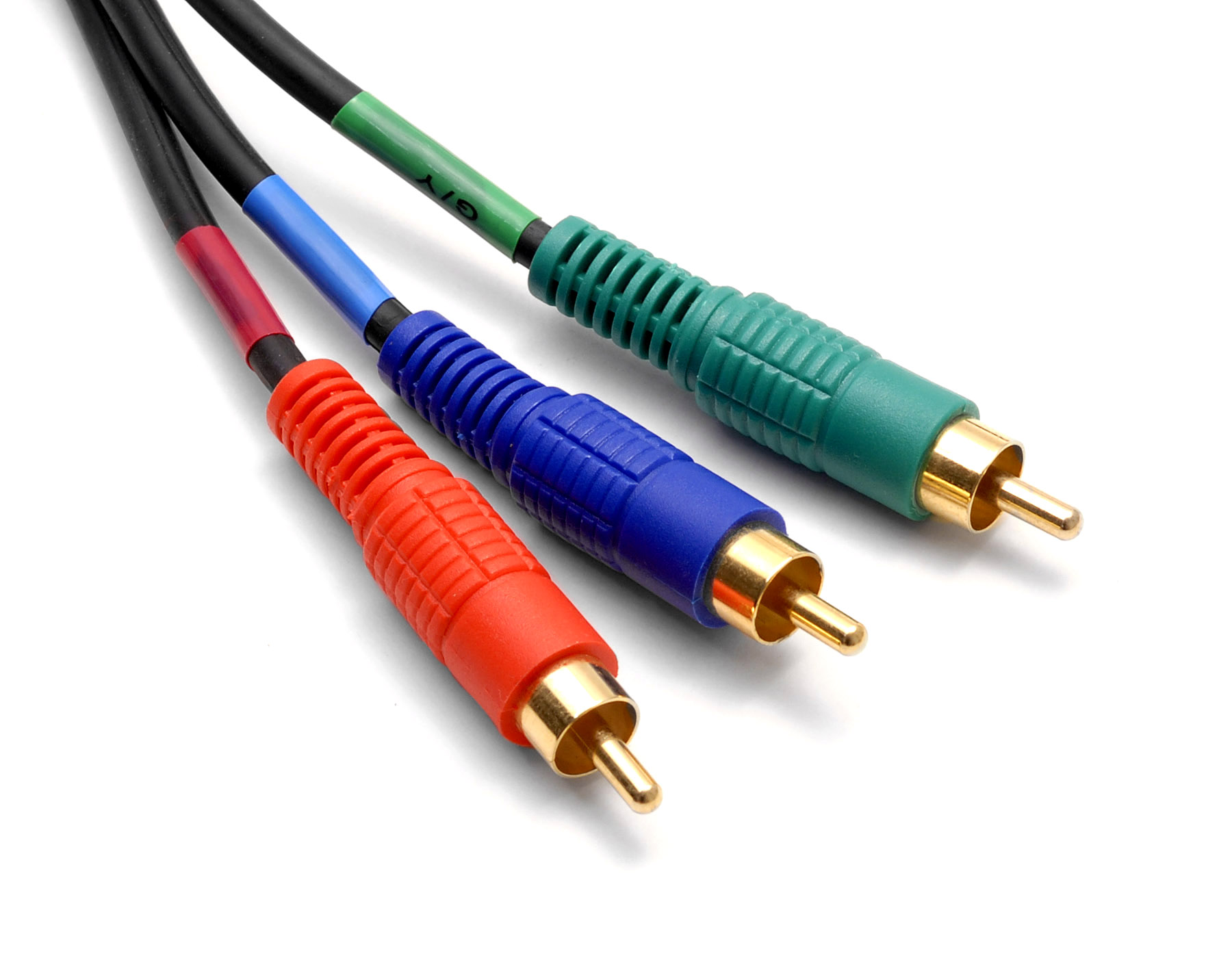
Component video is an analog video signal that has been split into two or more component channels. In popular use, it refers to a type of component analog video (CAV) information that is transmitted or stored as three separate signals. Component video can be contrasted with composite video in which all the video information is combined into a single signal that is used in analog television. Like composite, component cables do not carry audio and are often paired with audio cables.
When used without any other qualifications, the term component video usually refers to analog YPBPR component video with sync on luma (Y) found on analog high-definition televisions and associated equipment from the 1990s through the 2000s when they were largely replaced with HDMI and other all-digital standards. Component video cables and their RCA jack connectors on equipment are normally color-coded red, green and blue, although the signal is not in RGB. YPbPr component video can be losslessly converted to the RGB signal that internally drives the monitor; the encoding is useful as the Y signal will also work on black and white monitors.
Reproducing a video signal on a display device (for example, a cathode-ray tube; CRT) is a straightforward process complicated by the multitude of signal sources. DVD, VHS, computers and video game consoles all store, process and transmit video signals using different methods, and often each will provide more than one signal option. One way of maintaining signal clarity is by separating the components of a video signal so that they do not interfere with each other. A signal separated in this way is called "component video". S-Video, RGB and YPBPR signals comprise two or more separate signals and thus are all component-video signals. For most consumer-level video applications, the common three-cable system using BNC or RCA connectors analog component video was used. Typical formats are 480i (480 lines visible, 525 full for NTSC) and 576i (576 lines visible, 625 full for PAL). For personal computer displays the 15-pin DIN connector (IBM VGA) provided screen resolutions including 640×480, 800×600, 1024×768, 1152×864, 1280×1024.
The various RGB (red, green, blue) analog component video standards (e.g., RGBS, RGBHV, RGsB) use no compression and impose no real limit on color depth or resolution, but require large bandwidth to carry the signal and contain a lot of redundant data since each channel typically includes much of the same black-and-white image. Early personal computers such as the IBM PS/2 offered this signal via a VGA port. Many televisions, especially in Europe, can utilize RGB via the SCART connector.[citation needed]
In addition to the red, green and blue color signals, RGB requires two additional signals to synchronize the video display. Several methods are used:
Composite sync is common in the European SCART connection scheme (using pins 17 [ground] and 19 [composite-out] or 20 [composite-in]). RGBS requires four wires – red, green, blue and sync. If separate cables are used, the sync cable is usually colored yellow (as is the standard for composite video) or white.
Separate sync is most common with VGA, used worldwide for analog computer monitors. This is sometimes known as RGBHV, as the horizontal and vertical synchronization pulses are sent in separate channels. This mode requires five conductors. If separate cables are used, the sync lines are usually yellow (H) and white (V), yellow (H) and black (V), or gray (H) and black (V).
Sync on Green (SoG) is less common, and while some VGA monitors support it, most do not. Sony is a big proponent of SoG, and most of their monitors (and their PlayStation line of video game consoles) use it. Like devices that use composite video or S-video, SoG devices require additional circuitry to remove the sync signal from the green line. A monitor that is not equipped to handle SoG will display an image with an extreme green tint, if any image at all, when given a SoG input.
Hub AI
Component video AI simulator
(@Component video_simulator)
Component video
Component video is an analog video signal that has been split into two or more component channels. In popular use, it refers to a type of component analog video (CAV) information that is transmitted or stored as three separate signals. Component video can be contrasted with composite video in which all the video information is combined into a single signal that is used in analog television. Like composite, component cables do not carry audio and are often paired with audio cables.
When used without any other qualifications, the term component video usually refers to analog YPBPR component video with sync on luma (Y) found on analog high-definition televisions and associated equipment from the 1990s through the 2000s when they were largely replaced with HDMI and other all-digital standards. Component video cables and their RCA jack connectors on equipment are normally color-coded red, green and blue, although the signal is not in RGB. YPbPr component video can be losslessly converted to the RGB signal that internally drives the monitor; the encoding is useful as the Y signal will also work on black and white monitors.
Reproducing a video signal on a display device (for example, a cathode-ray tube; CRT) is a straightforward process complicated by the multitude of signal sources. DVD, VHS, computers and video game consoles all store, process and transmit video signals using different methods, and often each will provide more than one signal option. One way of maintaining signal clarity is by separating the components of a video signal so that they do not interfere with each other. A signal separated in this way is called "component video". S-Video, RGB and YPBPR signals comprise two or more separate signals and thus are all component-video signals. For most consumer-level video applications, the common three-cable system using BNC or RCA connectors analog component video was used. Typical formats are 480i (480 lines visible, 525 full for NTSC) and 576i (576 lines visible, 625 full for PAL). For personal computer displays the 15-pin DIN connector (IBM VGA) provided screen resolutions including 640×480, 800×600, 1024×768, 1152×864, 1280×1024.
The various RGB (red, green, blue) analog component video standards (e.g., RGBS, RGBHV, RGsB) use no compression and impose no real limit on color depth or resolution, but require large bandwidth to carry the signal and contain a lot of redundant data since each channel typically includes much of the same black-and-white image. Early personal computers such as the IBM PS/2 offered this signal via a VGA port. Many televisions, especially in Europe, can utilize RGB via the SCART connector.[citation needed]
In addition to the red, green and blue color signals, RGB requires two additional signals to synchronize the video display. Several methods are used:
Composite sync is common in the European SCART connection scheme (using pins 17 [ground] and 19 [composite-out] or 20 [composite-in]). RGBS requires four wires – red, green, blue and sync. If separate cables are used, the sync cable is usually colored yellow (as is the standard for composite video) or white.
Separate sync is most common with VGA, used worldwide for analog computer monitors. This is sometimes known as RGBHV, as the horizontal and vertical synchronization pulses are sent in separate channels. This mode requires five conductors. If separate cables are used, the sync lines are usually yellow (H) and white (V), yellow (H) and black (V), or gray (H) and black (V).
Sync on Green (SoG) is less common, and while some VGA monitors support it, most do not. Sony is a big proponent of SoG, and most of their monitors (and their PlayStation line of video game consoles) use it. Like devices that use composite video or S-video, SoG devices require additional circuitry to remove the sync signal from the green line. A monitor that is not equipped to handle SoG will display an image with an extreme green tint, if any image at all, when given a SoG input.