Hubbry Logo
DSL filterDSL filterMain
Open search
DSL filter
Community hub
DSL filter
logo
8 pages, 0 posts
0 subscribers
Be the first to start a discussion here.
DSL filter
DSL filter
from Wikipedia

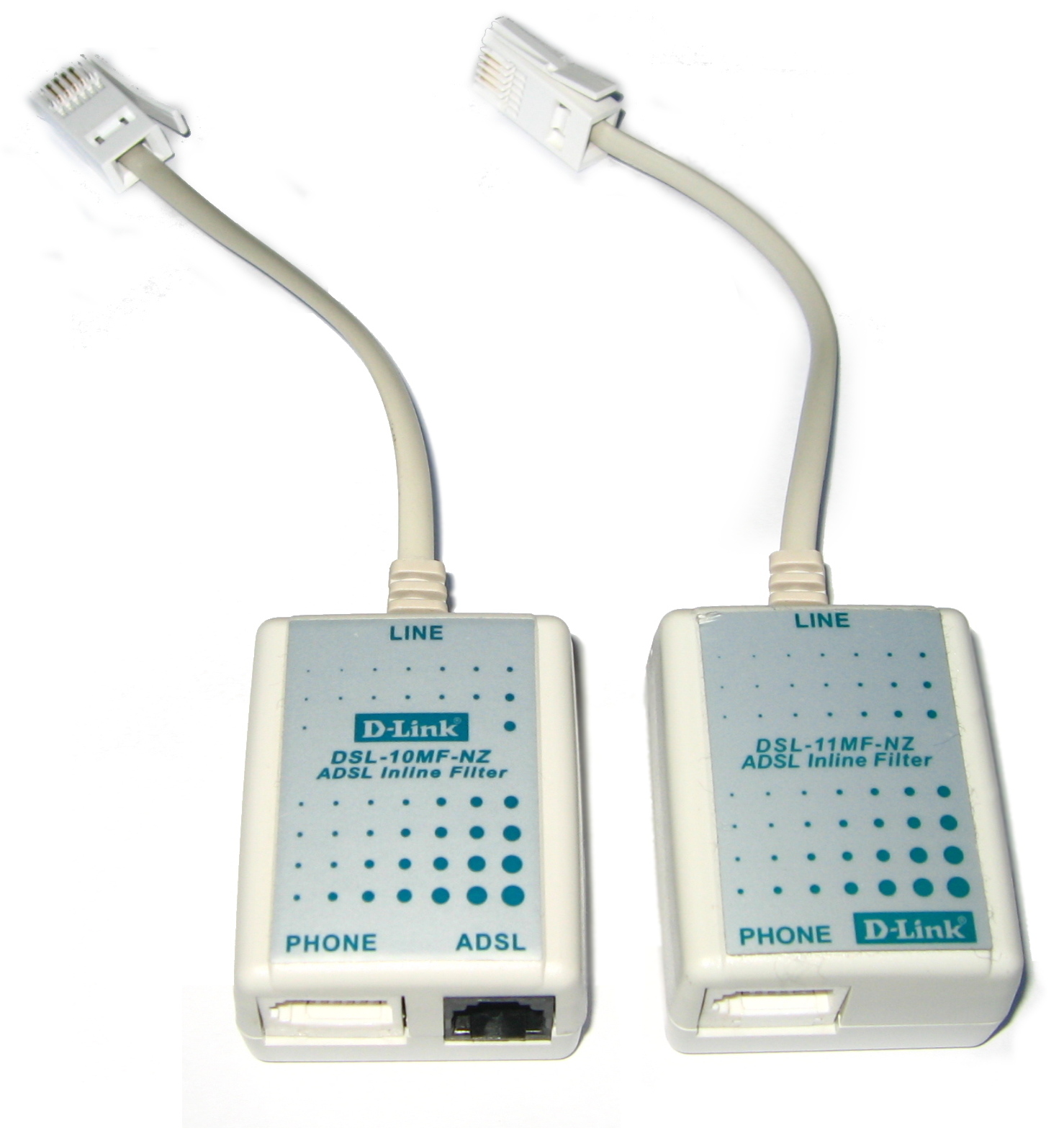
Modern ADSL filter/splitter (left) and filter (right)
Circuit of a DSL filter/splitter

A DSL filter (also DSL splitter or microfilter) is an analog low-pass filter installed between analog devices (such as telephones or analog modems) and a plain old telephone service (POTS) line. The DSL filter prevents interference between such devices and a digital subscriber line (DSL) service connected to the same line. Without DSL filters, signals or echoes from analog devices at the top of their frequency range can reduce performance and create connection problems with DSL service, while those from the DSL service at the bottom of its range can cause line noise and other problems for analog devices.

The concept of a low pass filter for ADSL was first described in 1996 by Vic Charlton when working for the Canadian Operations Development Consortium: Low-Pass Filter On All Phones.[1]

DSL filters are passive devices, requiring no power source to operate. Some high-quality filters may contain active transistors to refine the signal.

Components

[edit]

The primary distinguishing factor between high-quality and low-quality filters is the use of transistors in high-quality (and more expensive) active filters, in addition to the usual components like capacitors, resistors, and ferrite cores, while the low-quality passive filters lack transistors.

Installation

[edit]

Typical installation for an existing home involves installing DSL filters on every telephone, fax machine, voice band modem, and other voiceband device in the home, leaving the DSL modem as the only unfiltered device. For wall mounted phones, the filter is in the form of a plate hung on the standard wall mount, on which the phone hangs in turn.

In cases where it is possible to run new cables, it can be advantageous to split the telephone line after it enters the home, installing a single DSL filter on one leg and running it to every jack in the home where an analog device will be in use, and dedicating the other (unfiltered) leg to the DSL modem. Some devices such as monitored alarms and Telephone Devices for the Deaf, mainly certain older models using an acoustic coupler, may be hardwired and may not easily accept a DSL filter. Some of these devices can be successfully filtered with a DSL filter or splitter, especially if the hardwired connection is converted into a jacked connection.

If it is not practical to run new cables, it is often still possible to split the telephone line at the point of entry in some cases. If Category 3 cable, Category 4 cable, or Category 5 cable was used to wire the premises and at least one pair of wires in the cable is unused, a "whole house" DSL filter can be installed at the point of entry, usually a Network Interface Device (NID) box. Although an in-line filter could be used for this purpose, special whole-house filters are available to make the installation easier. The wire pair that connects to telephones and fax machines is connected to the telephone company feed through the filter, while the wire pair that connects to the DSL modem is connected directly to the telephone company feed, unfiltered. At the wall jack where the DSL modem is installed, a commercial 2-line splitter adapter is used that puts each line of the cable on its own jack port, connected as Line 1. The telephone, if any, is plugged into the Line 1 jack and the DSL modem is plugged into the Line 2 jack of the adapter, but is fed through the Line 1 contacts in that jack location. Due to the self-shielding nature of twisted wire pairs, this cable sharing technique works well for Category 4 and 5 cables. Since old-style Category 3 cables contain four parallel strands of wire, there is crosstalk and ADSL signal degradation between pairs, so cable sharing should be limited to 20 meters (65 ft), or so. This approach saves considerable money and labor, as the only changes to the premise wiring may occur at the NID and the only additional equipment needed is a 2-line splitter adapter. If the Line 2 wire pair was originally not connected at the wall jack where the DSL modem is to be used, it may be necessary to complete this step as well.

Some DSL modems have filtering circuitry built-in, to which the telephones and fax machines can be connected.

Modulation techniques and specifications

[edit]

See also

[edit]

References

[edit]
[edit]
Revisions and contributorsEdit on WikipediaRead on Wikipedia
from Grokipedia
A DSL filter, also known as a microfilter or splitter, is an analog device installed between analog telephone equipment and a (POTS) line to prevent high-frequency (DSL) signals from interfering with voice communications. It enables the simultaneous use of traditional voice telephony and high-speed over the same twisted-pair telephone wiring by isolating the low-frequency voice band (typically up to 3.4 kHz) from the higher-frequency DSL data band (starting above 25 kHz). The primary function of a DSL filter is to attenuate DSL frequencies that could otherwise cause audible noise, static, or echo on telephone calls, while allowing voice signals to pass unimpeded to connected devices such as phones, machines, or modems. Without proper filtering, DSL transmissions— which utilize discrete multitone modulation to encode data across a wide —can degrade voice quality and vice versa, potentially leading to connection instability or complete service disruption. At the service provider's end, a access multiplexer () performs a similar separation function for incoming lines, but end-user filters are essential to ensure clean signals throughout the premises. DSL filters come in two main configurations: inline microfilters, which are compact devices plugged into individual telephone jacks for single devices or small groups, and central splitters, which divide the incoming line at the network interface device (NID) for distribution to multiple outlets without needing filters at each endpoint. Installation typically involves no special tools, as filters connect via standard RJ-11 jacks, though one must be used for every analog device sharing the DSL line to avoid direct exposure to unfiltered signals. Developed in the late 1990s alongside ADSL technologies, DSL filters addressed the need for shared use of telephone lines for voice and data. While variants like ADSL and VDSL may require filters optimized for their specific frequency ranges, certain "lite" DSL standards (e.g., G.lite) are designed to operate without a central splitter—though microfilters may still be used for voice devices—by limiting transmit power and spectrum usage.

Introduction

Definition and Purpose

A DSL filter is an analog that separates low-frequency voice signals, typically below 4 kHz, from high-frequency DSL signals, starting from 25 kHz, on twisted-pair copper lines. This separation ensures that voice communications remain unaffected by the transmission inherent to (DSL) technology. The primary purpose of a DSL filter is to prevent interference from DSL signals with analog devices, such as telephones or machines, which can otherwise result in , echoes, static, or degraded voice quality during calls. It also protects DSL connectivity by blocking voice signal transients that could cause signal degradation or connection instability. In (POTS) environments, where voice and DSL share the same line, these filters are essential for maintaining reliable performance of both services. DSL filters facilitate self-installation of DSL services by allowing users to simply plug the device between the telephone line and analog equipment, eliminating the need for professional wiring modifications or central infrastructure changes. For instance, microfilters can be applied to individual devices to achieve this separation without affecting the overall line setup.

Historical Development

The development of DSL filters emerged in the mid-1990s alongside the commercialization of asymmetric DSL (), a technology initially conceived by Bellcore (now Telcordia Technologies) in the late 1980s to enable broadband data transmission over existing (POTS) infrastructure without interrupting voice communications. ADSL's deployment required separating the low-frequency voice signals (below 4 kHz) from the higher-frequency data signals (starting above 25 kHz), prompting the creation of filtering solutions to prevent interference and ensure reliable service. Early ADSL trials and rollouts by companies like Alcatel in 1997 highlighted the need for such devices to retrofit copper telephone lines for broadband, marking the origins of DSL filters as essential components for widespread adoption. Initial DSL deployments relied on central splitters installed at the network interface device (NID) or central office by technicians, which separated voice and data paths but involved labor-intensive "truck rolls" that increased costs and delayed consumer access. To address these challenges and facilitate self-installation, microfilters—compact low-pass filters placed at individual outlets—were developed around 1997-1998, evolving from splitter to enable end-users to deploy DSL without professional intervention. Field trials for standards like G.Lite (a splitterless variant) in the late revealed that microfilters were still necessary in approximately 80% of homes to mitigate noise and impedance issues from POTS devices, solidifying their role in residential setups. This shift reduced installation expenses significantly by eliminating many technician visits, making DSL more accessible for early service providers (ISPs). The International Telecommunication Union-Telecommunication Standardization Sector () formalized filtering needs in Recommendation G.992.1 (June 1999), which specified transceiver requirements and included appendices on splitter designs to ensure compatibility and minimal between voice and data services. By the early 2000s, the transition from central splitters to in-home microfilters became standard, supporting broader proliferation among ISPs. As DSL evolved to very-high-bit-rate DSL () in the early 2000s—standardized under G.993.1 (2001)—filters adapted to handle higher frequencies up to 12 MHz, accommodating faster data rates while maintaining POTS coexistence. Subsequent standards like VDSL2 (2006) and G.fast (2014) further extended frequencies while retaining the need for filters in POTS environments, with DSL filters still in use as of 2025 in non-fiber areas.

Types

Microfilters

Microfilters are compact, plug-and-play low-pass filters installed inline between each , , or analog and the wall jack to separate voice signals from DSL data in shared telephone lines. These devices ensure that high-frequency DSL signals do not interfere with low-frequency voice communications, allowing simultaneous use of the same pair without disrupting either service. They are particularly suited for and ADSL2+ standards, with a typically around 10-20 kHz to effectively block DSL frequency bands starting above 25 kHz while passing voice frequencies. In households with multiple voice devices connected to a single DSL line, microfilters prevent per-device interference such as , , or modem retraining, eliminating the need for extensive rewiring or professional installation. This makes them ideal for residential self-installation scenarios where users plug the filter directly into existing phone jacks, supporting reversible setups without polarity concerns. Microfilters became common in consumer kits starting around 1998, coinciding with the rollout of splitterless deployments during field trials for standards like G.Lite and full-rate G.DMT. Their advantages include low cost, often under $5 per unit, straightforward self-installation by end-users, and minimal impact on voice quality with attenuation less than 1 dB up to 4 kHz, alongside high stopband impedance exceeding 2 kΩ to avoid loading the DSL line. Unlike central splitters, which handle whole-home filtering at the network interface, microfilters provide targeted, device-level protection for simpler, decentralized setups.

Central Splitters

Central splitters are multi-port devices designed for whole-building DSL filtering, typically installed at the network interface device (NID) or where the enters the premises. These splitters separate high-frequency DSL signals, directing them to a dedicated port for connection to the , while routing low-frequency voice signals through a to the internal , allowing simultaneous use of service and without per-device filtering. Deployment of central splitters is generally handled by Internet Service Providers (ISPs) during the initial DSL service setup, ensuring compatibility across the entire premises and eliminating the need for individual filters on phones or other devices. This centralized approach supports multiple in-home lines by providing a single point of signal separation, much like microfilters but on a building-wide scale to prevent interference. Variants exist for ISDN environments, providing similar separation for digital voice services alongside DSL. The primary benefits of central splitters include superior performance through reduced cumulative noise and , achieving isolation levels of at least 30 dB between DSL and voice paths, which is particularly advantageous for larger homes or businesses with extensive wiring. They are well-suited for higher-speed DSL variants such as VDSL2, enabling reliable delivery over longer distances. Introduced in the late 1990s as POTS splitters to support early deployments, modern iterations incorporate built-in surge protection against lightning and power surges, along with compatibility for bonded DSL pairs—a feature standardized in to aggregate multiple lines for increased throughput.

Design and Operation

Key Components

The primary components of a DSL filter are inductors and capacitors arranged in an LC low-pass filter configuration, where inductors provide to high-frequency DSL signals and capacitors bypass high-frequency DSL signals to ground. This setup ensures effective separation of voice and data signals on the same twisted-pair . In the typical circuit, a series is placed on the line side for each conductor, paired with a shunt connected between the lines or to ground, resulting in a of 8-10 kHz to pass voice frequencies up to approximately 4 kHz while DSL signals starting around 25 kHz. Representative values include a 10 mH and a 0.022 µF , which achieve the desired of at least 55 dB in the band (30-1104 kHz). Additional elements may include resistors to dampen potential oscillations in the LC network and varistors for surge protection against transient voltages in certain models, along with RJ-11 connectors for interfacing with standard jacks. DSL filters employ a passive with no external power requirement, relying solely on these discrete components for reliable operation without amplification or active circuitry. The LC configuration evolved from simpler resistive-capacitive prototypes in early DSL deployments to optimized production units by the late 1990s, enhancing performance and cost-effectiveness.

Filtering Mechanism

A DSL filter operates as a designed to pass voice signals in the frequency range of 0 to 4 kHz with minimal while attenuating higher DSL frequencies, typically from 25 kHz to 1.1 MHz for , by more than 30 dB to prevent interference. This separation ensures that the low-frequency voice band remains unaffected by the data signals sharing the same twisted-pair copper line. In the signal flow, the incoming carries a combined of voice and DSL signals; the filter's capacitors shunt the high-frequency DSL components to ground, effectively blocking them from reaching the connected voice device, while inductors in series allow the low-frequency voice signals to pass through unimpeded. This shunting mechanism isolates the voice path without significantly impacting the DSL signal's journey to the . The filter's curve features a up to about 4 kHz with a typically at 8-10 kHz, followed by a slope of 40 dB per decade in the , which is characteristic of second-order LC low-pass designs; this steep prevents DSL signals from manifesting as audible or modulating the voice carrier frequencies in . In central splitters, unlike simpler microfilters, a complementary section directs the DSL frequencies to the port, enabling bidirectional separation of voice and signals across the entire line to further minimize .

Practical Application

Installation Process

The installation of a DSL filter begins with identifying the DSL line at the Network Interface Device (NID), typically located outside the home where the telephone company's line enters the building. Access to the NID may require a to open the panel, but users should ensure no live electrical components are involved and consult a professional if unsure about wiring. RJ-11 cables are essential for connections, and all work should avoid tampering with utility lines to prevent hazards. For microfilters, which are inline devices suitable for self-installation, plug one between each telephone jack and connected device, such as phones, fax machines, or answering machines, ensuring the DSL modem connects directly to an unfiltered jack. This setup prevents the DSL signal from interfering with voice services on individual lines. In contrast, central splitters are installed at the NID or main entry point, separating the DSL signal to the and routing voice lines to the home's internal wiring. Self-installation of DSL filters became feasible with the introduction of microfilters around 1998, coinciding with the development of splitterless standards like G.Lite, which allowed end users to avoid professional installation of external splitters. However, central splitter installations often require coordination with the (ISP) to ensure proper line qualification and wiring compliance. Best practices include installing filters on every voice device to eliminate daisy-chaining interference, where multiple devices share a single unfiltered line, and using a homerun wiring scheme from the splitter to the for optimal . After installation, test the setup by verifying clear voice quality on phones and confirming DSL synchronization on the , indicated by a steady light or status indicator. If issues arise, additional filters can be obtained from the ISP.

Maintenance and Troubleshooting

Maintaining DSL filters involves routine checks to ensure optimal and longevity. Users should periodically inspect filters and associated wiring for loose connections, physical , or signs of wear, such as cracked casings or corroded terminals, which can introduce into the line. These inspections help prevent gradual signal degradation over time. Microfilters, commonly used in residential setups, may require replacement over time due to the natural degradation of internal electrolytic capacitors, which lose and filtering effectiveness under continuous electrical stress and environmental factors like and . Failure to replace them can result in increased interference and unreliable service. Common issues with DSL filters include noisy voice calls, often signaling a missing or malfunctioning filter on jacks, allowing high-frequency DSL signals to bleed into audio lines and cause static or buzzing. DSL sync failures may stem from a faulty central splitter, where inadequate separation of voice and data frequencies leads to signal instability and connection drops. Additionally, a persistent hum on the phone line can indicate grounding problems in the filter installation or wiring, exacerbating . Troubleshooting begins with verifying proper filter placement: ensure a microfilter is installed between every , , or other and the wall jack, while the DSL modem connects directly to an unfiltered line. To isolate issues, bypass the filter by connecting a phone directly to the wall jack and testing for noise; if static disappears with the DSL modem off, the filter is likely faulty. Use a to check continuity and voltage across connections, looking for breaks or that could disrupt filtering. If these steps fail to resolve the problem, contact the (ISP) to inspect the Network Interface Device (NID) at the home's for external line faults. A notable concern is interference from unfiltered fax machines, which can introduce line noise that disrupts DSL synchronization and reduces speeds; this is resolved by installing dedicated filters on each fax device, as recommended in early 2000s regulatory consumer advisories to maintain service integrity.

Technical Context

DSL Signal Characteristics

Digital subscriber line (DSL) technology transmits high-speed data over existing copper telephone pairs by utilizing frequency bands above the plain old telephone service (POTS) voice spectrum, which occupies 0 to 4 kHz. DSL signals begin at approximately 25 kHz to avoid interference with voice communications, extending up to 1.1 MHz for asymmetric DSL (ADSL) and reaching 12 MHz for original very-high-bit-rate DSL (VDSL, ITU-T G.993.1) or 30 MHz for VDSL2 (ITU-T G.993.2). This separation is defined by international standards such as ITU-T G.992 for ADSL and G.993 for VDSL, ensuring that data transmission occurs in higher frequency ranges while preserving compatibility with analog voice services. DSL employs discrete multi-tone (DMT) modulation, a multicarrier technique that divides the available bandwidth into numerous subcarriers—typically 256 for and up to 4096 for VDSL2—to optimize data rates over varying line conditions. Each subcarrier operates independently, allowing adaptive bit loading to mitigate and on copper pairs, which enables downstream speeds up to 100 Mbps (or higher in VDSL2 profiles) depending on loop length and quality. However, without proper isolation, DSL signals can generate harmonics that overlap with the POTS voice band, leading to that degrades both and voice clarity on shared lines. A key feature of is its asymmetric nature, allocating a narrower upstream band (up to 138 kHz) for customer-to-network traffic and a broader downstream band (up to 1.1 MHz) for network-to-customer data, reflecting typical usage patterns where downloads exceed uploads. and VDSL2 build on this by extending into higher frequency bands, supporting symmetric or near-symmetric profiles with gigabit potential over short loops, though practical rates remain constrained by copper's at elevated frequencies. These bidirectional signals introduce noise vulnerabilities, necessitating filters to attenuate DSL ingress into voice devices and vice versa.

Performance Standards

DSL filters are evaluated based on several key performance metrics that ensure minimal interference between voice and data signals while maintaining . Insertion loss in the voice band (typically 200 Hz to 4 kHz) is specified to be less than 1 dB at 1 kHz, with distortion limited to ±1 dB relative to 1 kHz, to preserve quality without significant attenuation. attenuation in the DSL frequency range must exceed 55 dB from approximately 25 kHz to 1.1 MHz for applications (per ETSI TS 101 952-1 Option A off-hook), effectively isolating high-frequency DSL signals from voice equipment. Return loss is required to be greater than 15 dB in the low-frequency range to minimize signal reflections and impedance mismatches that could degrade performance. Compliance with established standards is essential for interoperability and reliability. DSL filters must adhere to G.992.3 for 2, which outlines requirements for splitter isolation to prevent between POTS and DSL bands. Similarly, ANSI T1.413 specifies metallic interface characteristics, including splitter performance for signals, ensuring adequate isolation (e.g., >40 dB in relevant bands). For compatibility in the United States, filters comply with FCC Part 68, which governs direct connections to the and mandates protection against network harm, including hazardous voltage handling. Performance is assessed through standardized testing protocols. In laboratory settings, network analyzers measure , , , and across specified bands using setups like those in ETSI TS 101 952-1, which include on-hook and off-hook configurations with defined impedances. Field specifications require filters to withstand ringing voltages up to 103 Vrms at 20 Hz without breakdown or excessive voltage drop (less than 2 Vrms), ensuring safe operation during ringing. Filters compliant with ADSL2+ and /VDSL2 standards provide enhanced isolation in higher frequency bands. In contrast, outdated filters designed for legacy often fail to support VDSL frequencies above 8 MHz, leading to signal degradation and incompatibility with faster services.

References

Add your contribution
Related Hubs
User Avatar
No comments yet.