


Community hub
Recent from talks
Contribute something
Nothing was collected or created yet.
Plug-in (computing)
View on Wikipedia | This article needs additional citations for verification. (September 2019) |


In computing, a plug-in (also spelled plugin) or add-in (also addin, add-on, or addon) is a software component that extends the functionality of an existing software system without requiring the system to be re-built. A plug-in feature is one way that a system can be customizable.[1]
Applications support plug-ins for a variety of reasons including:
- Enable third-party developers to extend an application
- Support easily adding new features
- Reduce the size of an application by not loading unused features
- Separate source code from an application because of incompatible software licenses
Examples
[edit]Examples of plug-in use for various categories of applications:
- Digital audio workstations and audio editing software use audio plug-ins to generate, process or analyze sound. Ardour, Audacity, Cubase, FL Studio, Logic Pro X and Pro Tools are examples of such systems.
- Email clients use plug-ins to decrypt and encrypt email. Pretty Good Privacy is an example of such plug-ins.
- Video game console emulators often use plug-ins to modularize the separate subsystems of the devices they seek to emulate.[2][3][4][5][6][7][8][9] For example, the PCSX2 emulator makes use of video, audio, optical, etc. plug-ins for those respective components of the PlayStation 2.
- Graphics software use plug-ins to support file formats and process images. A Photoshop plug-in may do this.
- Broadcasting and live-streaming software, like OBS Studio, as an open source software utilizes plug-ins for user-specific needs.
- Media players use plug-ins to support file formats and apply filters. foobar2000, GStreamer, Quintessential, VST, Winamp, XMMS are examples of such media players.
- Packet sniffers use plug-ins to decode packet formats. OmniPeek is an example of such packet sniffers.
- Remote sensing applications use plug-ins to process data from different sensor types; e.g., Opticks.
- Text editors and Integrated development environments use plug-ins to support programming languages or enhance the development process e.g., Visual Studio, RAD Studio, Eclipse, IntelliJ IDEA, jEdit and MonoDevelop support plug-ins. Visual Studio itself can be plugged into other applications via Visual Studio Tools for Office and Visual Studio Tools for Applications.
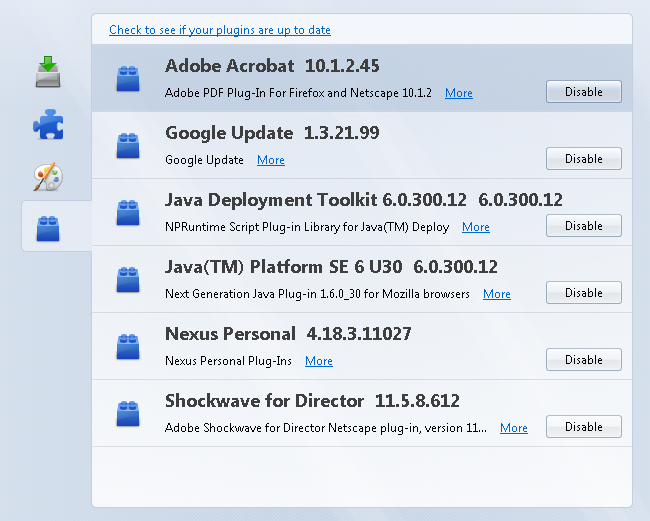
- Web browsers have historically used executables as plug-ins, though they all are deprecated. Examples include the Adobe Flash Player, a Java virtual machine (for Java applets), QuickTime, Microsoft Silverlight and the Unity Web Player. (Browser extensions, which are a separate type of installable module, are still widely in use.)
Mechanism
[edit]
The host application provides services which the plug-in can use, including a way for plug-ins to register themselves with the host application and a protocol for the exchange of data with plug-ins. Plug-ins depend on the services provided by the host application and do not usually work by themselves. Conversely, the host application operates independently of the plug-ins, making it possible for end-users to add and update plug-ins dynamically without needing to make changes to the host application.[10][11]
Programmers typically implement plug-ins as shared libraries, which get dynamically loaded at run time. HyperCard supported a similar facility, but more commonly included the plug-in code in the HyperCard documents (called stacks) themselves. Thus the HyperCard stack became a self-contained application in its own right, distributable as a single entity that end-users could run without the need for additional installation-steps. Programs may also implement plug-ins by loading a directory of simple script files written in a scripting language like Python or Lua.
Helper application
[edit]In the context of a web browser, a helper application is a separate program—like IrfanView or Adobe Reader—that extends the functionality of a browser.[12][13] A helper application extends the functionality an application but unlike the typical plug-in that is loaded into the host application's address space, a helper application is a separate application. With a separate address space, the extension cannot crash the host application as is possible if they share an address space.[14]
History
[edit]In the mid-1970s, the EDT text editor ran on the Unisys VS/9 operating system for the UNIVAC Series 90 mainframe computer. It allowed a program to be run from the editor, which can access the in-memory edit buffer.[15] The plug-in executable could call the editor to inspect and change the text. The University of Waterloo Fortran compiler used this to allow interactive compilation of Fortran programs.
Early personal computer software with plug-in capability included HyperCard and QuarkXPress on the Apple Macintosh, both released in 1987. In 1988, Silicon Beach Software included plug-in capability in Digital Darkroom and SuperPaint.
See also
[edit]- Add-on (Mozilla) – Software modules to extend Firefox web browsers
- Applet – Small software application
- Browser extension – Program that extends the functionality of a web browser
- Theme – Preset package containing graphical appearance and functionality details
References
[edit]- ^ Sterne, Jonathan. "Plug-in | software". Encyclopedia Britannica. Retrieved 2021-02-05.
- ^ "PCSX2 - The Playstation 2 emulator - Plugins". pcsx2.net. Archived from the original on 2018-01-25. Retrieved 2018-06-10.
- ^ Bernert, Pete. "Pete's PSX GPU plugins". www.pbernert.com. Retrieved 2018-06-10.
- ^ Team, Demul. "DEMUL - Sega Dreamcast Emulator for Windows". demul.emulation64.com. Retrieved 2018-06-10.
- ^ "Android Emulator Plugin - Jenkins - Jenkins Wiki". wiki.jenkins.io. Retrieved 2018-06-10.
- ^ "OpenEmu/SNES9x-Core". GitHub. Retrieved 2018-06-10.
- ^ "Recommended N64 Plugins". Emulation General Wiki. Retrieved 2018-06-10.
- ^ "Playstation plugins & utilities!". www.emulator-zone.com. Retrieved 2018-06-10.
- ^ "PS3 Homebrew Apps / Plugins / Emulators | PSX-Place". www.psx-place.com. Retrieved 2018-06-10.
- ^ Mozilla Firefox plugins – Description of the difference between Mozilla Firefox plugins and extensions under the general term add-on.
- ^ Wordpress Plug-in API – Description of the Wordpress Plug-in architecture.
- ^ "Definition of helper application". PCMAG. Retrieved 2022-10-25.
- ^ "Download Irfan using Internet Explorer 4.x or above". libweb.hawaii.edu. Retrieved 9 January 2024.
- ^ "Helper Applications and Plug-ins - Web Security, Privacy & Commerce, 2nd Edition [Book]". Web Security, Privacy, and Commerce 2nd Edition. O'Reilly.
- ^ EDT Text Editor Reference Manual, Cinnaminson, New Jersey: Unisys Corporation, 1975
| International | |
|---|---|
| National | |
| Other | |

Plug-in (computing)
View on GrokipediaFundamentals
Definition
A plug-in, also known as a plugin or add-on, is a software component that extends the functionality of an existing application or system by adding specific features, typically loaded dynamically at runtime without requiring modifications to the host program's core code.[9] This design allows the host application to remain unchanged while incorporating new capabilities through well-defined interfaces, such as APIs or extension points.[3] Plug-ins are commonly implemented as separate modules, often in the form of dynamic link libraries (DLLs) or shared objects, enabling seamless integration and removal.[2] The primary goals of plug-ins include promoting modularity, which breaks down complex applications into independent, reusable parts; extensibility, allowing the host to support ongoing enhancements via additional components; and interoperability, ensuring compatibility across different systems through standardized protocols.[9] Unlike built-in features that are hardcoded into the application during development, plug-ins are optional and frequently developed by third parties, providing flexibility for users to customize functionality without altering the original software.[1] This distinction supports a ecosystem where developers can contribute specialized extensions, such as media playback or data processing tools, to broaden the application's utility.[3] In computing, the term plug-in primarily refers to user-space extensions for end-user applications, such as web browsers, text editors, or multimedia software, rather than low-level system components like kernel modules or hardware drivers.[9] These extensions operate within the application's runtime environment, focusing on enhancing user-facing features while maintaining isolation from core system operations.[2] For instance, plug-ins enable browsers to handle diverse content types beyond native support.[1]Key Characteristics
Plug-ins in computing are characterized by their modularity, functioning as self-contained units that encapsulate specific functionality with well-defined interfaces, enabling independent development, testing, and updates without altering the core host application.[10] This design principle promotes code reuse and reduces coupling between components, allowing developers to build and maintain extensions in isolation.[11] A core trait is dynamic loading, where plug-ins can be installed, enabled, or disabled at runtime without requiring a restart of the host application, often leveraging just-in-time integration mechanisms such as runtime discovery catalogs.[10] This capability supports on-demand loading of components, enhancing resource efficiency and enabling seamless extensibility during operation.[12] Interoperability is achieved through standardized protocols, APIs, or hooks that facilitate communication between the plug-in and the host, such as the historical Netscape Plugin Application Programming Interface (NPAPI), which provided a cross-browser mechanism for embedding and interacting with native content.[13] These interfaces ensure portability and consistent behavior across environments, typically relying on contract-based exports and imports defined via metadata or attributes.[10] The advantages of this architecture include enhanced flexibility for rapid feature addition, fostering ecosystem growth through third-party contributions, and simplifying maintenance by isolating updates to individual modules.[11] However, inherent traits like potential stability risks arise from third-party code integration, which can introduce compatibility issues or runtime errors if contracts mismatch.[10][14]Examples and Use Cases
Web Browser Plug-ins
Web browser plug-ins are software components that extend the functionality of web browsers by enabling the rendering and interaction with content not natively supported by the browser's HTML engine, such as multimedia formats and interactive applications.[15] These plug-ins primarily handle non-HTML elements, including animations, video playback, and dynamic content execution, allowing early web developers to create rich internet experiences beyond basic text and images.[15] For instance, they facilitated the delivery of complex animations and interactive elements that standard HTML could not achieve at the time.[16] Notable examples include Adobe Flash Player, which supported vector-based animations, video, and audio streaming within web pages.[15] RealPlayer enabled real-time streaming of audio and video content, popular in the late 1990s and early 2000s for media delivery.[17] Microsoft Silverlight provided a framework for rich media applications, including video playback and interactive features, as a competitor to Flash.[18] Java applets allowed the embedding of platform-independent interactive applications, such as simulations and games, directly in browsers.[19] However, these technologies faced deprecation trends starting in the 2010s due to persistent security vulnerabilities and the maturation of native web standards. Adobe Flash Player reached end-of-life on December 31, 2020, with content blocked from January 12, 2021.[20] Microsoft Silverlight support ended on October 12, 2021.[18] Oracle deprecated the Java browser plug-in in JDK 9 (2017), with full removal planned for later versions.[19] RealPlayer's browser plug-in similarly faded as streaming shifted to HTML5-based solutions.[17] Integration of web browser plug-ins occurs through HTML elements like<object> and <embed>, which specify the plug-in to invoke and the content to load.[16] The <object> element, for example, uses attributes such as type to declare the MIME type (e.g., application/x-shockwave-flash for Flash) and data for the resource URL, often paired with <param> tags for configuration.[16]
<object data="example.swf" type="application/x-shockwave-flash" width="300" height="150">
  <param name="movie" value="example.swf">
</object>
<object data="example.swf" type="application/x-shockwave-flash" width="300" height="150">
  <param name="movie" value="example.swf">
</object>
<embed> tag serves a similar purpose but is less standardized, embedding external content directly.[16] For security, plug-ins typically operate in a sandboxed environment to limit access to system resources, though NPAPI-based implementations often ran with elevated privileges, exposing browsers to risks like code execution exploits.[15]
These plug-ins significantly impacted web development by enabling early rich internet applications, such as interactive media and cross-platform interactivity, but their history of security and performance issues— including frequent vulnerabilities in Flash and Java—prompted a shift to HTML5 alternatives like <video>, <canvas>, and WebGL for native multimedia support without external dependencies.[15][20] Major browsers, including Firefox, dropped NPAPI support except for Flash in version 52 (March 2017), accelerating the transition.[21]