Recent from talks
Nothing was collected or created yet.
Jenkins (software)
View on Wikipedia| Jenkins | |
|---|---|
| Original author | Kohsuke Kawaguchi[1] |
| Initial release | 2 February 2011[2] |
| Stable release | 2.534[3] |
| Repository | |
| Written in | Java |
| Platform | Java 11, Java 17, Java 21 |
| Type | Continuous delivery |
| License | MIT License[4][5] |
| Website | www |
Jenkins is an open source automation server. It helps automate the parts of software development related to building, testing, and deploying, facilitating continuous integration, and continuous delivery. It is a server-based system that runs in servlet containers such as Apache Tomcat, or by default as a stand-alone web-application in co-bundled Eclipse Jetty. It supports version control tools, including AccuRev, CVS, Subversion, Git, Mercurial, Perforce, ClearCase, and RTC, and can execute Apache Ant, Apache Maven, and sbt based projects as well as arbitrary shell scripts and Windows batch commands.
History
[edit]The Jenkins project was originally named Hudson, and was renamed in 2011 after a dispute with Oracle, which had forked the project and claimed rights to the project name. The Oracle fork, Hudson, continued to be developed for a time before being donated to the Eclipse Foundation. Oracle's Hudson is no longer maintained[6][7] and was announced as obsolete in February 2017.[8]
Around 2007 Hudson became known as a better alternative to Cruise Control and other open-source build-servers.[1][9] At the JavaOne conference in May 2008 the software won the Duke's Choice Award in the Developer Solutions category.[10]
During November 2010, after the acquisition of Sun Microsystems by Oracle, an issue arose in the Hudson community with respect to the infrastructure used, which grew to encompass questions over the stewardship and control by Oracle.[11] Negotiations between the principal project contributors and Oracle took place, and although there were many areas of agreement a key sticking point was the trademarked name "Hudson," after Oracle claimed the right to the name and applied for a trademark in December 2010. As a result, on January 11, 2011, a call for votes was made to change the project name from "Hudson" to "Jenkins." The proposal was overwhelmingly approved by a community vote on January 29, 2011, creating the Jenkins project.[12]
On February 1, 2011, Oracle said that they intended to continue development of Hudson, and considered Jenkins a fork rather than a rename. Jenkins and Hudson therefore continued as two independent projects,[13] each claiming the other was the fork. As of June 2019, the Jenkins organization on GitHub had 667 project members and around 2,200 public repositories,[14] compared with Hudson's 28 project members and 20 public repositories with the last update in 2016.[15]
In 2011, creator Kohsuke Kawaguchi received an O'Reilly Open Source Award for his work on the Hudson/Jenkins project.[16]
On April 20, 2016, version 2 was released with the Pipeline plugin enabled by default.[17] The plugin allows for writing build instructions using a domain specific language based on Apache Groovy.
Jenkins replaced Hudson since February 8, 2017 in Eclipse.[8]
In March 2018 Jenkins X software project for Kubernetes was publicly presented as a Jenkins sub-project,[18] with support for different cloud providers including AWS EKS among others.[19]. Later, Jenkins X became an independent project under the Continuous Delivery Foundation.
In March 2019, Jenkins joined the Continuous Delivery Foundation, a new subsidiary of the Linux Foundation, as a founding project [20]. In August 2020, Jenkins reached the graduated status in the foundation [21].
Builds
[edit]Builds can be triggered by various means, for example:
Plugins
[edit]Plugins have been released for Jenkins that extend its use to projects written in languages other than Java. Plugins are available for integrating Jenkins with most version control systems and bug databases. Many build tools are supported via their respective plugins. Plugins can also change the way Jenkins looks or add new functionality. There are a set of plugins dedicated for the purpose of unit testing that generate test reports in various formats (for example, JUnit bundled with Jenkins, MSTest, NUnit, etc.[22]) and automated testing that supports automated tests. Builds can generate test reports in various formats supported by plugins (JUnit support is currently bundled) and Jenkins can display the reports and generate trends and render them in the GUI.
Mailer
[edit]Allows configuring email notifications for build results.[23] Jenkins will send emails to the specified recipients whenever a certain important event occurs, such as:
- Failed build.
- Unstable build.
- Successful build after a failed build, indicating that a crisis is over.
- Unstable build after a successful one, indicating a regression.
Credentials
[edit]Allows storing credentials in Jenkins. Provides a standardized API for other plugins to store and retrieve different types of credentials.[24]
Monitoring external jobs
[edit]Adds the ability to monitor the result of externally executed jobs.[25]
SSH agents
[edit]This plugin allows managing agents (formerly known as slaves)[26] running on *nix machines over SSH.[27] It adds a new type of agent launch method. This launch method will
- Open a SSH connection to the specified host as the specified username,
- Check the default version of Java for that user,
- [not implemented yet] If the default version is not compatible with Jenkins's agent.jar, try to find a proper version of Java
- Once it has a suitable version of Java, copy the latest agent.jar via SFTP (falling back to scp if SFTP is not available),
- Start the agent process.
Javadoc
[edit]This plugin adds Javadoc support to Jenkins. This functionality used to be a part of the core, but as of Jenkins 1.431, it was split off into separate plugins.[28]
The plugin enables the selection of "Publish Javadoc" as a post-build action, specifying the directory where the Javadoc is to be gathered and if retention is expected for each successful build.[29]
Online explanation
[edit]Jenkins can be used to schedule and monitor the running of a shell script via user interface instead of command prompt.
Security
[edit]Jenkins' security depends on two factors: access control and protection from external threats. Access control can be customized via two ways: user authentication and authorization. Protection from external threats such as CSRF attacks and malicious builds is supported as well.[30]
Awards and recognition
[edit]See also
[edit]References
[edit]- ^ a b Dyer, Dan. "Why are you still not using Hudson?". Retrieved 2008-05-21.
- ^ Jenkins 1.396 released Archived 2018-12-08 at the Wayback Machine, The first release of Jenkins is posted, Kohsuke Kawaguchi
- ^ "Release 2.534". 29 October 2025. Retrieved 30 October 2025.
- ^ "LICENSE.txt".
jenkinsci/jenkins(source code repository). GitHub (published 2011-09-11). 2008-02-12. Archived from the original on 2016-10-18. Retrieved 2016-10-18. - ^ Kawaguchi, Kohsuke; et al. "Use Hudson: License". Archived from the original on February 7, 2009. Retrieved January 30, 2011.
- ^ "About Jenkins". Eclipse Wiki: Jenkins. Retrieved 6 August 2017.
- ^ "About Jenkins". Wayback Machine: Eclipse Wiki, first available on 6 August 2017. Archived from the original on 4 September 2018. Retrieved 3 September 2018.
- ^ a b "About Jenkins". Eclipse Wiki history.
- ^ Fredrick, Jeffrey. "What is the difference between Hudson and CruiseControl for Java projects?". Stack Overflow. Retrieved January 17, 2011.
- ^ Duboscq, Geneviève (2008). "2008 JavaOne Conference: Duke's Choice Awards Winners for 2008". 2008 Java One Conference. java.sun.com. Retrieved May 21, 2008.
- ^ Rodrigues, Savio (December 3, 2010). "Oracle's open source missteps continue with Hudson project". InfoWorld. Retrieved May 31, 2018.
- ^ Proffitt, Brian (February 2, 2011). "Hudson devs vote for name change; Oracle declares fork". ITWorld. Retrieved May 31, 2018.
- ^ Krill, Paul (May 4, 2011). "Oracle hands Hudson to Eclipse, but Jenkins fork seems permanent". InfoWorld. Retrieved May 31, 2018.
- ^ "Jenkins organization on GitHub". GitHub. Retrieved May 31, 2018.
- ^ "Hudson organization on Github". GitHub. Retrieved May 31, 2018.
- ^ Morris, Richard (July 17, 2012). "Kohsuke Kawaguchi: Geek of the Week". Retrieved May 31, 2018.
- ^ Hemant Jain (August 24, 2016). "What's New in Jenkins 2.0". developers.redhat.com.
- ^ "Introducing Jenkins X: a CI/CD solution for modern cloud applications on Kubernetes". Introducing Jenkins X: a CI/CD solution for modern cloud applications on Kubernetes.
- ^ "Continuous Delivery with Amazon EKS and Jenkins X". Amazon Web Services. November 7, 2018. Archived from the original on May 6, 2019. Retrieved November 23, 2018.
- ^ "Jenkins is joining the Continuous Delivery Foundation".
- ^ "CD Foundation Announces Jenkins Graduation".
- ^ "Plugins Index". plugins.jenkins.io.
- ^ "Mailer - Jenkins - Jenkins Wiki". wiki.jenkins.io. Retrieved November 26, 2017.
- ^ "Credentials Plugin - Jenkins - Jenkins Wiki". wiki.jenkins-ci.org. Retrieved November 26, 2017.
- ^ "Monitoring external jobs - Jenkins - Jenkins Wiki". wiki.jenkins.io. Retrieved November 26, 2017.
- ^ "Jenkins source code". GitHub. Retrieved 2018-05-19.
- ^ "SSH Build Agent - Jenkins Plugin". plugins.jenkins.io. Retrieved June 12, 2020.
- ^ "Javadoc Plugin - Jenkins - Jenkins Wiki". wiki.jenkins.io. Retrieved November 26, 2017.
- ^ "Generate and publish edoc in Jenkins using Javadoc plugin | Erlanger".
- ^ "Securing Jenkins". jenkins.io. Retrieved 2016-09-13.
- ^ a b "Awards - Jenkins - Jenkins Wiki". wiki.jenkins-ci.org. Retrieved 2016-09-13.
External links
[edit]Jenkins (software)
View on GrokipediaIntroduction
Definition and Purpose
Jenkins is a free and open-source automation server primarily written in Java.[11] It originated as a fork of the Hudson project in 2011 following a dispute between the Hudson community and Oracle, which had acquired Sun Microsystems.[12] As a self-contained server, Jenkins enables developers to automate various tasks in the software development lifecycle, serving as a versatile platform for managing workflows.[13] The primary purpose of Jenkins is to automate the build, test, and deployment processes within continuous integration (CI) and continuous delivery (CD) pipelines.[1] By integrating with source code repositories and other tools, it facilitates the detection of integration errors early, ensuring code changes are verified automatically before merging.[11] This automation reduces manual intervention and accelerates the software delivery cycle.[13] At a high level, Jenkins supports developers in reliably building, testing, and deploying software across diverse environments, from local development to production servers.[1] Unlike traditional build tools such as Make or Ant, which focus narrowly on compiling code or executing specific scripts, Jenkins functions as a central hub for orchestrating complex, multi-step tasks across an entire CI/CD workflow.[11] This orchestration capability allows teams to customize and extend processes through plugins, adapting to various project needs without being limited to single-purpose functionality.[13]Key Features
Jenkins offers robust support for defining continuous integration and delivery pipelines through both declarative and scripted syntax in a Jenkinsfile, enabling "Pipeline as Code" where pipeline configurations are version-controlled alongside application code.[14] This approach facilitates reproducible builds, collaborative development, and complex workflows spanning build, test, and deployment stages.[15] The platform features an extensive plugin ecosystem with over 2,000 community-contributed plugins available through the Update Center, allowing seamless integration with diverse tools such as version control systems, cloud providers, and testing frameworks.[7] These plugins enable customization for virtually any CI/CD requirement, from source code management to deployment automation.[16] Jenkins provides a web-based user interface for managing jobs and pipelines, enhanced by the Blue Ocean plugin introduced in 2016 to offer an intuitive visualization of pipeline stages and progress.[17] Blue Ocean receives limited maintenance for security issues and critical defects to ensure compatibility with Jenkins updates, but no longer receives new functionality; it emphasizes streamlined navigation and error-prone feedback to improve user experience.[18] Build automation is supported by flexible scheduling and triggering options, including polling of source code management (SCM) repositories, webhook integrations for event-driven builds, and cron-like syntax for timed executions.[14] This ensures automated responses to code changes or external events without manual intervention.[15] Built-in reporting and visualization capabilities include support for displaying test results, code coverage metrics, and archiving build artifacts, providing teams with clear insights into pipeline outcomes directly within the interface.[14] As a Java-based application, Jenkins ensures cross-platform compatibility, running on Windows, Linux, macOS, and other Unix-like systems, with native support for containerized deployments such as Docker.[19]History
Origins and Fork from Hudson
Hudson was originally developed in 2004 by Kohsuke Kawaguchi, a Sun Microsystems engineer, as an open-source continuous integration server aimed at automating software builds, tests, and deployments while emphasizing extensibility through plugins.[20] Kawaguchi created Hudson to address inefficiencies in manual build processes at Sun, enabling developers to receive rapid feedback on code changes.[20] The tool quickly gained traction within Sun and the broader Java community for its flexibility and ease of integration with various version control systems and build tools.[11] Oracle's acquisition of Sun Microsystems, announced in April 2009 and completed on January 27, 2010, introduced uncertainties about the future of open-source projects like Hudson under the new corporate ownership.[21][22] Community members, including core developers, expressed concerns over potential shifts in governance, infrastructure control, and commitment to open-source principles, as Oracle's involvement raised fears of restricted access or commercialization.[12] These tensions escalated in late 2010 when disputes arose regarding the project's hosting on java.net and decision-making authority, with Oracle proposing changes that the Hudson representatives, including Kawaguchi, viewed as unilateral and detrimental to community involvement.[23] In response, on January 11, 2011, Kawaguchi and other key contributors announced the forking of Hudson into a new project named Jenkins, explicitly to sever ties with Oracle's trademark and ownership of the Hudson name while maintaining full open-source continuity.[12] The rename to Jenkins—chosen via community vote for its neutral connotations and availability—allowed the project to establish independent governance under a dedicated Jenkins board, ensuring decisions would be driven by contributors rather than corporate directives.[24] This fork preserved the entire codebase, with no fundamental changes to functionality, but prioritized community control to foster ongoing innovation.[12] The transition was swift and largely seamless, with approximately 85% of Hudson developers and nearly all core developers and active plugin developers migrating to Jenkins within the first few months, effectively consolidating the community's efforts and momentum around the new project.[25][26] This high adoption rate underscored the fork's success in addressing governance fears without disrupting the tool's widespread use in software development workflows.[26]Major Milestones and Releases
Following the 2011 fork from Hudson, Jenkins established its independent governance structure, including the formation of the Jenkins Governance Board to oversee project decisions, budget approvals, and proposals, with CloudBees emerging as a major contributor providing enterprise support and development resources.[12][27] Jenkins maintains two parallel release branches: Long Term Support (LTS) for production stability, selected every 12 weeks from weekly releases and receiving extended bug and security fixes, and weekly releases for rapid delivery of new features and improvements. For instance, the LTS branch reached version 2.528.2 in November 2025, emphasizing reliability for enterprise users, while weekly releases advanced to 2.537 in November 2025, incorporating cutting-edge enhancements (as of November 19, 2025).[28][9][29] A pivotal milestone arrived with Jenkins 2.0 in April 2016, which integrated the Pipeline plugin as a core feature, enabling declarative "Pipeline as Code" workflows defined in Jenkinsfiles for version-controlled automation of complex build, test, and deployment processes.[30] User interface advancements began with the introduction of Blue Ocean in May 2016, a redesigned frontend built on Jenkins Pipeline to provide intuitive visualizations, reduced clutter, and streamlined navigation for monitoring pipelines. Subsequent refinements through 2023-2025 focused on accessibility and mobile responsiveness, culminating in a comprehensive UI overhaul in LTS 2.516.1 in July 2025, which reworked core elements for better usability across devices and screen sizes.[17][31] Security has been an ongoing priority, exemplified by the critical response to CVE-2024-23897 in January 2024, an arbitrary file read vulnerability in the CLI affecting versions up to weekly 2.441 and LTS 2.426.2, patched promptly via dedicated advisories; this pattern continued into 2025 with multiple updates, including September advisories on email injection and a Jetty-related denial-of-service vulnerability (CVE-2025-5115), and an October 29 advisory addressing credentials ID enumeration, along with plugin-specific issues.[32][33][34][35][36] In 2025, Jenkins enhanced integrations for modern orchestration, notably through Google Summer of Code projects advancing the Tekton Client Plugin for seamless Kubernetes-native pipeline management, alongside GitOps-aligned features in Pipeline as Code, as seen in LTS 2.516 released in June 2025.[37][29][38]Technical Architecture
Core Components
The Jenkins controller, previously known as the master, serves as the central server in a Jenkins installation, responsible for managing job scheduling, providing the web-based user interface, and overseeing plugin installations and configurations. It acts as the primary coordination point, deciding when and how builds are executed, and maintains the overall state of the system. This component runs as a standalone application, handling administrative tasks without directly performing resource-intensive build operations in larger setups. Jenkins supports various job or item types to accommodate different automation scenarios, including Freestyle projects for simple, sequential tasks; Maven projects for Java-based builds leveraging the Maven build tool; Pipeline projects for defining complex, scripted workflows using the Groovy-based Domain-Specific Language; and multi-branch projects that automatically detect and manage branches in version control systems for continuous integration across code variants. These types allow users to configure builds ranging from basic scripts to advanced, multi-stage pipelines that integrate testing, deployment, and reporting. Each job maintains a dedicated workspace directory within the Jenkins home folder, which is used for checking out source code, executing builds, and storing temporary files during the process, ensuring isolation between concurrent jobs to prevent interference. Build history is preserved per job, recording details such as execution logs, results, artifacts, and timestamps for each run, enabling users to review past builds, replay configurations, and track project evolution over time. Jenkins includes built-in integration with source code management (SCM) systems, supporting protocols like Git for distributed version control and Subversion (SVN) for centralized repositories, with mechanisms for polling repositories at intervals or triggering builds via webhooks and commit notifications. This integration facilitates automatic source code retrieval and change detection as core to the continuous integration process. As a Java-based application, Jenkins requires Java Development Kit (JDK) version 17 or higher (including Java 21), a requirement established starting with weekly release 2.463 in June 2024 and adopted in LTS releases from October 2024, with Jenkins now supporting and recommending Java 21 in addition to Java 17 for optimal performance and security as of 2025 LTS releases.[39][40] It is distributed as a Web Application Archive (WAR) file, which can be deployed directly using a servlet container like Jetty or embedded via the bundled Winstone wrapper, allowing flexible installation on various operating systems.Master-Agent Model and Distributed Builds
The Jenkins master-agent model, also referred to as the controller-agent architecture, enables the distribution of build workloads across multiple machines to enhance scalability and efficiency in continuous integration and delivery pipelines. In this setup, the Jenkins controller (formerly known as the master) serves as the central orchestrator, managing job scheduling, plugin coordination, and overall system configuration, while agents (previously called slaves or nodes) execute the actual build tasks on remote or local machines. This distributed approach allows Jenkins to handle complex, resource-intensive builds without overloading a single instance.[41] Communication between the controller and agents occurs through secure protocols designed to support both firewalled and open network environments. The primary methods include the inbound agent protocol (formerly JNLP, or Java Network Launch Protocol), where the agent initiates an outbound connection to the controller, and SSH, where the controller establishes an outbound connection to the agent. Inbound connections are preferred in restricted networks as they require only an open port on the controller side, typically TCP port 50000, while SSH offers robust authentication and is suitable for permanent agents. These protocols ensure reliable data transfer for commands, file uploads, and build artifacts.[42][43] Agents in Jenkins are categorized into permanent and ephemeral types to accommodate diverse deployment needs. Permanent agents are dedicated machines or containers that remain persistently connected, providing stable resources for consistent workloads and configured via SSH or inbound protocols. Ephemeral agents, on the other hand, are dynamically provisioned and terminated as needed, often through cloud plugins like those for AWS or Azure, allowing for on-demand scaling without manual intervention. Label-based assignment further refines resource allocation by tagging agents with labels (e.g., "linux" or "high-memory"), enabling the controller to match jobs to agents with compatible capabilities during scheduling.[41][42] In distributed build execution, the controller offloads computational tasks—such as compiling code, running tests, or deploying artifacts—to selected agents, while retaining responsibility for coordinating the workflow, aggregating logs, and storing results in its repository. Each agent operates with its own executor pool, processing assigned steps independently, which isolates failures and prevents bottlenecks on the controller. This separation ensures that the controller focuses on metadata management rather than heavy computation.[44][41] The master-agent model delivers significant scaling benefits, including parallel execution of builds across multiple agents or containers, which reduces overall pipeline duration for large projects. It also supports load balancing by distributing jobs dynamically based on agent availability and labels, optimizing resource utilization in environments with varying demand. For instance, teams can run hundreds of concurrent tests on a farm of agents, achieving throughput improvements without vertical scaling of the controller.[44] Recent enhancements in Jenkins releases from 2024 to 2025 have strengthened support for containerized and cloud-native deployments, particularly with Docker and Kubernetes. The Kubernetes plugin supports improved dynamic agent provisioning through pod templating and integration with Kubernetes 1.28 and later versions, enabling seamless scaling in cluster environments. Recent LTS releases have enhanced Docker agent support for ephemeral builds, including improved image handling and volume mounting, facilitating hybrid on-premises and cloud workflows.[9]Building and Automation
Job and Pipeline Configuration
Jenkins supports two primary types of job configurations: Freestyle projects for straightforward, GUI-driven setups and Pipeline projects for more advanced, code-defined automation workflows. Freestyle projects are ideal for simple build processes, while Pipelines enable complex, multi-stage orchestrations that can be version-controlled alongside application code.[45][15] Freestyle jobs provide a graphical user interface for configuration, allowing users to define build steps such as executing shell commands, invoking build tools like Maven or Ant, or running scripts without requiring code-based definitions. To set up a Freestyle project, users select "Freestyle project" when creating a new item in Jenkins, configure source code management (SCM) integration if needed, and specify build steps in the project configuration page. Post-build actions can then be added, including archiving artifacts, generating JUnit test reports, or sending notifications via email or other services. Parameters enable dynamic inputs, such as string values or choices, which users provide when triggering a build to customize execution, like selecting a branch or environment variable. This GUI approach simplifies initial setups for non-developers but limits scalability for intricate workflows.[45] Pipeline configurations offer greater flexibility through code, supporting both Declarative and Scripted syntaxes. Declarative Pipelines use a structured, easier-to-read format enclosed in apipeline block, defining sections like agent for node assignment, stages for sequential phases, and steps for individual actions. For example:
pipeline {
agent any
stages {
stage('Build') {
steps {
sh 'make'
}
}
}
}
pipeline {
agent any
stages {
stage('Build') {
steps {
sh 'make'
}
}
}
}
node block, such as conditional branching or loops, which suits advanced customization but can reduce maintainability. Pipelines are typically defined in a Jenkinsfile committed to the SCM repository, enabling version control and collaborative editing.[46]
Multi-branch Pipelines extend Pipeline functionality by automatically detecting and managing branches in an SCM repository, facilitating workflows like GitFlow where development occurs across feature branches, releases, and mains. Configuration involves creating a Multibranch Pipeline item, adding a branch source (e.g., Git repository URL), and specifying behaviors like filtering branches containing a Jenkinsfile. Upon saving, Jenkins scans the repository, creates sub-projects for qualifying branches, and executes their respective Pipelines independently. This supports pull request integration, providing environment variables like BRANCH_NAME for branch-specific logic. Periodic re-indexing ensures updates reflect repository changes.[47]
Build triggers and parameters enhance configurability by automating initiation and allowing customization. In Pipelines, the parameters directive defines user inputs, such as strings, booleans, or choices, prompted when manually triggering a build; for instance, parameters { string(name: 'ENV', defaultValue: 'dev', description: 'Environment') }. Triggers include SCM polling for changes or the pipelineTriggers directive for cron-based scheduling, while webhook integration—often via repository plugins—enables event-driven starts, like pushes to GitHub. Conditional execution uses the when directive in Declarative Pipelines to skip stages based on parameters, branch names, or build status, ensuring efficient resource use.[46][48]
Best practices for configuration emphasize treating automation as code to improve reproducibility and security. Store Pipeline definitions in a Jenkinsfile within the SCM repository to enable versioning, peer review, and automatic updates via Multibranch setups, avoiding manual GUI edits that hinder collaboration. Avoid hard-coding secrets by using Jenkins credentials management: define credentials (e.g., API tokens, passwords) globally or per project via the Credentials Provider, then reference them in Pipelines with withCredentials or environment variables, such as withCredentials([usernamePassword(credentialsId: 'my-creds', usernameVariable: 'USER', passwordVariable: 'PASS')]) { sh "curl -u $USER:$PASS ..." }. This encrypts sensitive data and scopes access appropriately, reducing exposure risks.[49][50]
Build Execution and Reporting
In Jenkins, the build lifecycle encompasses a series of automated stages that execute the defined workflow for a job or pipeline, typically including checkout of source code from a version control system, compilation of the codebase, execution of tests, and deployment to target environments.[15] During these stages, Jenkins captures real-time console output, logging commands, errors, and progress to a persistent log file accessible via the build's web interface, enabling developers to diagnose issues post-execution.[51] Build execution supports both synchronous (sequential) and parallel modes to optimize resource utilization; sequential execution processes stages one after another in a linear fashion, while parallel stages allow concurrent running of independent tasks, such as multiple test suites, to reduce overall build time.[46] This parallelism is particularly useful in pipelines for efficiency, as it leverages distributed agents when configured.[46] When a build encounters failures, Jenkins provides mechanisms to handle them gracefully, including options to abort the entire process immediately upon detecting an error, implement retries for transient issues via pipeline steps that wrap failing blocks, and trigger notifications through integrations like email or chat services to alert stakeholders.[52] For instance, thecatchError step allows a stage to fail without halting the pipeline, marking the build status accordingly while continuing to subsequent steps.[52]
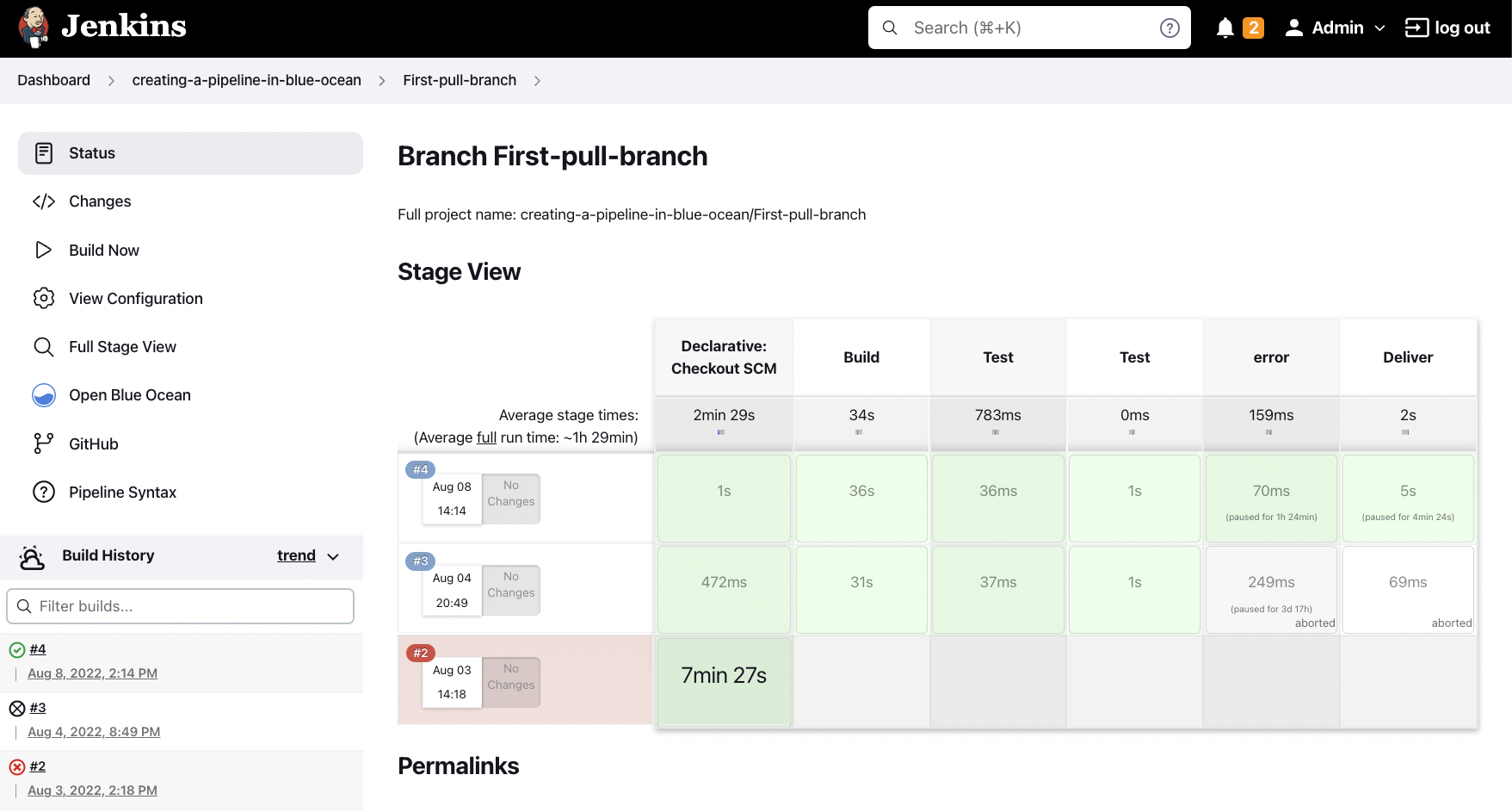
Reporting in Jenkins integrates tools to aggregate and visualize outcomes, such as the JUnit plugin, which parses XML test reports from frameworks like JUnit to display pass/fail rates, historical trends, and detailed failure breakdowns in the build summary.[53] The HTML Publisher plugin enables the attachment and display of custom HTML reports, such as coverage dashboards or static analysis results, directly on the build page for interactive viewing.[54] Additionally, build artifacts—files like executables, reports, or packages—are archived post-execution, making them downloadable and retainable for future reference or auditing.[55]
To monitor performance, Jenkins tracks key metrics including build duration for each run, which is displayed in the job's history view alongside status indicators.[15] Trend graphs visualize changes in build times and success rates over multiple executions, helping identify bottlenecks or regressions.[56] Fingerprinting further enhances traceability by generating unique hashes for artifacts and dependencies, allowing Jenkins to record and query which builds produced or consumed specific files across the ecosystem.[57]
