


Community hub
0 subscribers8 pages, 0 posts
Recent from talks
All channels
Be the first to start a discussion here.
Be the first to start a discussion here.
Be the first to start a discussion here.
Be the first to start a discussion here.
Contribute something
Welcome to the community hub built to collect knowledge and have discussions related to Ncdu.
Nothing was collected or created yet.
from Wikipedia
| NCurses Disk Usage | |
|---|---|
 | |
| Developer | Yoran Heling |
| Initial release | February 21, 2007[1] |
| Stable release | 2.9.1[2]  / 21 August 2025
 |
| Repository | |
| Written in | C (version 1.x), Zig (version 2.x) |
| Operating system | Linux, BSD, UNIX |
| Platform | POSIX |
| Type | Disk utility |
| License | MIT License |
| Website | dev |
ncdu (NCurses Disk Usage) is a disk utility for Unix systems. Its name refers to its similar purpose to the du utility, but ncdu uses a text-based user interface under the [n]curses programming library.[3] Users can navigate the list using the arrow keys and delete files that are taking up too much space by pressing the 'd' key. Version 1.09 and later can export the file listing in JSON format.
ncdu was developed by Yoran Heling to learn C and to serve as a disk usage analyzer on remote systems over ssh. Version 2.0 of the program brought a full rewrite in the Zig programming language.[4]
References
[edit]- ^ "Ncdu Release History". dev.yorhel.nl. Archived from the original on 2022-03-07. Retrieved 2022-03-07.
- ^ "Ncdu 2.x Release History".
- ^ "Heitorlessa.com". www.heitorlessa.com. Archived from the original on 3 March 2016.
- ^ "Ncdu 2: Less hungry and more Ziggy". dev.yorhel.nl. Archived from the original on 2022-10-18. Retrieved 2022-10-29.
External links
[edit] | This Unix-related article is a stub. You can help Wikipedia by expanding it. |
from Grokipedia
ncdu (NCurses Disk Usage) is a free and open-source command-line tool that provides an interactive, text-mode interface for analyzing disk usage on Unix-like operating systems, helping users identify and manage large files and directories that consume significant storage space.[1]
Developed by Yorhel as a lightweight alternative to graphical disk analyzers, ncdu was first released in 2007 and has evolved through multiple versions, with the stable 1.x series written in C and the 2.x series rewritten in the Zig programming language for improved performance and maintainability.[1] The tool is licensed under the MIT License, making it freely available for modification and distribution, and it is actively maintained via a public Git repository.[1]
Key features of ncdu include its ncurses-based interface for navigating a tree-like directory structure, support for parallel scanning to speed up analysis on multi-core systems, and the ability to export usage data in JSON or other formats for further processing.[1] It runs efficiently on resource-constrained environments like remote servers, where graphical tools are impractical, and supports a wide range of platforms including Linux distributions, macOS, FreeBSD, Solaris, and even Windows via compatibility layers.[1][2]
As of October 2025, the latest release is version 2.9.2, which includes enhancements like color-coded output and binary export options for handling very large filesystems without excessive memory usage.[1] ncdu is widely packaged in major Linux repositories and appreciated for its simplicity and speed compared to traditional command-line utilities like
du, enabling quick disk cleanup and space optimization tasks.[2][3]
Overview
Description
ncdu, short for NCurses Disk Usage, is a disk usage analyzer featuring a text-based user interface constructed using the ncurses library.[1] It serves as a curses-based equivalent to the standard Unixdu command, enabling users to interactively explore and visualize directory sizes in a hierarchical manner.[1]
The tool is primarily designed to rapidly pinpoint large files and directories that consume significant disk space, making it especially valuable for managing storage on remote servers accessed via SSH, where graphical interfaces are unavailable.[1] While optimized for such environments, ncdu remains effective on local desktops lacking dedicated disk analysis software.[1]
Technically, ncdu is POSIX-compatible and targets POSIX-like operating systems, including Linux, BSD variants, macOS, and Windows through available packages or ports.[1] Version 1.x is implemented in C, whereas version 2.x utilizes the Zig programming language, with the project released under the MIT License.[1]
In its basic operation, ncdu scans one or more specified directories—or the current directory by default—and presents the results through a navigable, full-screen ncurses interface that displays disk usage as an interactive tree view.[1] Users can traverse the hierarchy, delete files directly, and perform other actions to reclaim space efficiently.[1]
Purpose and advantages
Ncdu was developed to overcome the shortcomings of the traditionaldu command, which provides only static output and lacks interactivity, making it challenging to explore and visualize large filesystem datasets, particularly on remote systems accessed via SSH without graphical capabilities.[1] This tool addresses these limitations by offering a curses-based interface that enables real-time navigation and analysis directly in the terminal.[4]
Key advantages of ncdu include its superior scanning speed compared to du, achieved through multi-threaded processing that parallelizes directory traversal for quicker results on multi-core systems.[4] It provides an intuitive, keyboard-driven navigation system for browsing directory hierarchies, along with the ability to delete files and directories directly from the interface, streamlining cleanup operations.[1] Additionally, ncdu supports color-coded displays and graphical size representations, such as progress bars, to enhance readability and highlight space-intensive items without overwhelming the user.[4]
Ncdu is particularly valuable for system administrators tasked with troubleshooting disk space issues, identifying and removing unnecessary files on servers, or conducting filesystem usage analysis in resource-constrained, terminal-only environments like remote hosts.[1] Unlike graphical alternatives, which require a desktop environment, or the non-interactive du, ncdu delivers a portable, lightweight solution that balances high performance, ease of use, and direct action capabilities in command-line settings.[1]
History
Initial development
ncdu was developed by Yoran Heling, who is known online as Yorhel, beginning in 2007. The project originated as a lightweight tool to analyze disk usage, particularly suited for remote servers accessed via SSH in environments without graphical interfaces. It emphasized simplicity and efficiency, focusing initially on core functionalities like directory scanning and a navigable tree structure for exploring file system usage.[1] The first public version, 0.1, was released on February 21, 2007, providing a basic curses-based interface as an interactive alternative to the traditional 'du' command. This early iteration laid the groundwork for quick disk space assessment over low-bandwidth connections. From its start, ncdu was hosted in a public Git repository at g.blicky.net/ncdu.git and distributed under the MIT license, allowing broad adoption and modification.[5][6] Key milestones in the initial 1.x series marked rapid evolution. Version 1.0, released on April 6, 2007, introduced the core ncurses interface with visual graphs for size representation and a toggle for basic sorting by size or name. Subsequent releases built on this foundation: 1.1 (April 30, 2007) added file deletion capabilities and refined sorting via the 't' key; 1.2 (July 24, 2007) implemented exclusion patterns similar to 'du' for skipping directories; and by 1.3 (August 5, 2007), refresh functionality ('r' key) and toggling between apparent size and disk usage ('a' key) were included. Through 2008-2010, further 1.x versions enhanced stability, such as hard link detection in 1.6 (2009) and performance fixes, solidifying ncdu's role as a portable disk analyzer.[5]Rewrite and major versions
In 2021, ncdu underwent a significant architectural shift with the release of version 2.0 on December 21, which completely rewrote the tool from C to the Zig programming language. This rewrite was driven by the need to reduce memory overhead, address slow directory counting in large filesystems, improve overall performance, enhance memory safety, and facilitate better long-term maintainability and scalability for future features like parallel processing.[1][7] Despite the language change, version 2.0 preserved backward compatibility with the 1.x series, ensuring seamless transition for existing users.[7] The 1.x series, originally implemented in C, continues to receive long-term support (LTS) for stability in production environments, with its latest release, version 1.22, issued on March 5, 2025.[5] In parallel, the 2.x series remains the focus of active development, culminating in version 2.9.2 on October 24, 2025, which incorporates ongoing refinements to Zig-based features.[7] Notable advancements in the 2.x lineage include the introduction of parallel scanning in version 2.5 (July 24, 2024), enabling multi-threaded directory traversal via the-t or --threads option to accelerate analysis on multi-core systems.[7] Version 2.6 (September 27, 2024) further expanded export capabilities with a new binary format (-O flag), supporting built-in compression through --compress-level for efficient handling of large datasets and low-memory scenarios.[7][8]
Several user-facing refinements have iterated across versions, particularly regarding color support in the ncurses interface. Introduced experimentally in 1.13 (January 29, 2018), colors became the default in 1.17 (April 28, 2022) and 2.0 (December 21, 2021) with a 'dark-bg' scheme for better visibility.[5] However, due to reported legibility issues in varied terminal environments, defaults were reverted to off in 1.20 and 2.4 (both April 21, 2024), while retaining customizable schemes like --color=dark.[5][7] The 2.x series also enhanced JSON export/import performance (building on the format established in 1.9), added static binary builds for simplified cross-platform distribution without dependencies, and improved overall compatibility across POSIX systems.[7][9]
Maintenance efforts treat the 1.x branch as a stable LTS option for conservative deployments, while 2.x drives innovation with additions like export compression and broader platform support, including older Linux kernels in later releases.[1][7] As an open-source project, ncdu's evolution relies on community input through its issue tracker at code.blicky.net, with widespread packaging in major distributions such as Debian (version 1.22 integrated March 2025) and Fedora (version 2.9.1 updated August 2025).[10][11][12]
Features
User interface
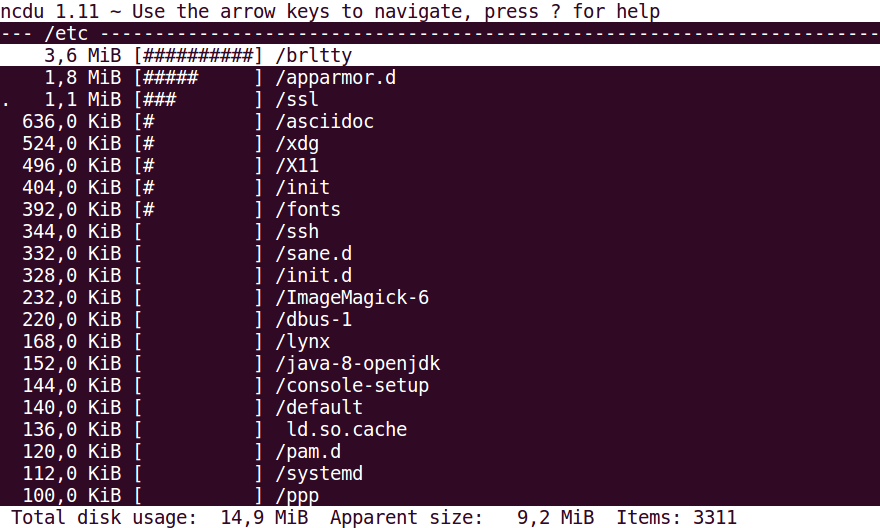
ncdu features a ncurses-based user interface that provides an interactive, text-mode display for exploring disk usage within a terminal. The core layout consists of a hierarchical tree view listing directories and files, initially sorted by disk usage in descending order to highlight space-intensive items first. Each entry displays the item name, its size in human-readable format (such as bytes, KB, MB, or GB), and a proportional graphical bar representing the relative size as a percentage of the parent directory's total. At the bottom of the screen, a summary line reports the total size of the scanned directory and the total number of items analyzed. This design enables quick identification of large consumers of storage space.[4] Navigation through the interface is exclusively keyboard-driven, ensuring compatibility with remote terminal sessions lacking graphical capabilities. Users move up and down the list using the arrow keys, or vi-style 'j' and 'k' bindings for efficiency. Pressing Enter, the right arrow, or 'l' opens the selected directory to drill down into its contents, while the left arrow, backspace, or 'h' returns to the parent directory. The 'q' key exits the application, optionally prompting for confirmation to prevent accidental closure. Deletion of the currently selected file or directory is initiated with 'd', followed by a confirmation dialog unless disabled via configuration; in read-only mode (activated with -r), this function is unavailable. Sorting can be toggled with keys such as 's' for size (disk usage or apparent size based on current display mode, toggled with 'a'), 'n' for name (alphabetical), 'C' for item count, or 'M' for modification time (requires extended mode). Additional toggles include 't' to alternate between showing directories before or after files, 'e' to show or hide hidden and excluded files from the view, 'c' to display item counts, 'm' to show modification times (requires extended mode), 'g' to switch between percentage display and graphical bars (with styles like hash marks or block characters), and 'u' to include shared size calculations. The view can be refreshed and recalculated with 'r', useful after external changes to the filesystem. A contextual help screen detailing all keys is accessible by pressing '?'.[4] Visual elements enhance usability, including a progress bar displayed during the scanning or importing process when using the full-screen ncurses mode (-2 option, with real-time updates), terminal progress bar mode (-1), or no feedback (-0). Color support, introduced in version 1.13 and configurable since version 1.17, can be enabled via the --color option set to 'dark' for light terminal backgrounds or 'darkbg' for dark ones, improving contrast and legibility over the default monochrome mode; it was temporarily disabled by default in later versions (1.20 and 2.4) due to terminal compatibility issues but remains available. Status flags appear as single characters next to entries, such as '!' for a read error in the directory, '.' for an error in a subdirectory (potentially leading to inaccurate sizes), '<' for items excluded from statistics, '>' for items on other filesystems, '^' for pseudo-filesystems, '@' for items that are not files or directories, 'H' for hard links, and 'e' for empty directories. These flags help users identify anomalies without disrupting the primary layout.[4] Customization extends to display preferences, allowing users to tailor the interface via runtime keys or a configuration file for persistent settings like color mode. For handling large datasets, ncdu optimizes redrawing through ncurses efficiency, supports multi-threaded scanning to minimize initial load times, and permits browsing of massive trees in low-memory mode by importing pre-scanned binary files (-O option), avoiding the need to reload the entire structure. The interface requires no mouse input and performs reliably in standard terminal emulators with widths of at least 80 columns, adapting to available screen space while maintaining readability. This keyboard-centric, lightweight design makes ncdu particularly effective for server environments and quick analyses.[4]Scanning and analysis tools
Ncdu employs a depth-first traversal algorithm for scanning directories, akin to the traditionaldu command, which recursively processes subdirectories before aggregating sizes upward in the tree. This approach enables efficient construction of the directory hierarchy during the initial scan phase. To provide user feedback during scanning, ncdu utilizes an ncurses-based progress indicator in full-screen mode (activated with -2), a terminal progress bar (-1), or silent operation (-0). The tool supports excluding specific patterns via the --exclude option or by reading from a file with --exclude-from, allowing users to omit irrelevant paths like temporary files or caches from the analysis. Additionally, the -x flag confines scanning to the starting filesystem, preventing cross-device traversals that could include mounted volumes unintentionally, while --cross-file-system permits such crossings when needed.[4]
Once scanned, ncdu offers real-time analysis capabilities within its interface, including sorting entries by size (default, using current display mode of disk usage or apparent size), name, item count, or modification time (requires extended mode). Filtering mechanisms allow toggling visibility of hidden or excluded files with the 'e' key or command-line options like --show-hidden or --hide-hidden. A key analytical feature distinguishes between apparent size—representing the logical file length, which is particularly relevant for sparse files where gaps are not allocated on disk—and allocated disk usage, measured in blocks; this is toggled via --apparent-size or the default --disk-usage, and can be switched in the interface with the 'a' key. Such computations aid in identifying space inefficiencies, like sparse virtual machine images that report high apparent sizes but low actual storage consumption.[4]
Performance is optimized for large filesystems through low memory footprint design, storing the directory tree compactly in RAM or via optional binary exports. In version 2.5 and later, parallel directory scanning is available using the -t option (e.g., -t8 for eight threads), accelerating the process on multi-core systems or networked storage, though it remains disabled by default to ensure compatibility. The binary export format introduced in 2.6 further enhances efficiency by supporting compressed, low-memory scanning for datasets exceeding available RAM, allowing deferred loading and browsing.[4][1]
Error handling during scanning prioritizes robustness: unreadable files or directories are skipped automatically, with issues flagged in the interface using symbols like ! for inaccessible directories or . for problematic subdirectories, ensuring the scan completes without halting. These errors are logged visibly for review without disrupting the overall process.[4]
To maintain data accuracy, ncdu detects hard links and marks them with an H indicator, counting their size only once in the total to prevent double-counting across the filesystem; however, shared size attributions may vary if links are modified post-scan. Remote scanning is facilitated by piping output from an SSH session (e.g., ssh user@host ncdu -co- /path | ncdu -f-), enabling analysis of distant systems while viewing locally, which avoids running the full ncurses interface remotely.[4]
Export and customization options
Ncdu provides several options for exporting scan results, enabling integration with scripts and other tools. The primary export format is JSON, invoked with the-o file flag, which outputs the directory tree structure to a specified file or standard output if - is used. This format includes detailed metadata such as program version, timestamp, and per-entry information like apparent size (asize), disk usage (dsize), inode numbers, and exclusion reasons, allowing for programmatic parsing of file paths, sizes, and attributes.[4][9]
Introduced in version 2.6, the binary export format uses the -O file flag and offers advantages over JSON, including built-in Zstandard compression, support for parallel scanning with reduced buffering, and efficient handling of large directory trees through cumulative size calculations. This format consists of compressed data blocks and an index, making it suitable for high-volume exports while maintaining compatibility for import via -f. Compression can be further tuned with --compress-level (1-19, default 4), and block sizes adjusted via --export-block-size (4-16,000 KiB).[1][8][4]
Customization flags allow tailoring ncdu's behavior to specific environments. Color output can be disabled with --color off, or set to dark themes (--color dark or --color dark-bg) for better visibility on various terminals. By default, ncdu crosses filesystem boundaries (--cross-file-system), but this can be disabled with -x to limit scans to the starting device. Hidden files are included by default, but can be excluded with --hide-hidden. Sessions can be saved during scans and restored later using -f file for the JSON or binary format, supporting incremental analysis. Extended mode (-e) enables additional details like modification times and ownership, at the cost of higher memory usage.[4]
For refined control, ncdu supports exclusion patterns via --exclude pattern (e.g., to skip caches or temporary files like --exclude '*/cache/*') or -X file for loading patterns from a file. Parallel scanning, available since version 2.5, uses -t num to specify thread count (default 1), enhancing performance on multi-core systems as briefly noted in scanning tools. These options extend ncdu's utility in automation, where exports can be piped from remote commands (e.g., ssh user@host ncdu -co- /path | ncdu -f-) or processed in scripts like Python for generating reports or dashboards.[4][1]
Usage
Installation
Ncdu is available through package managers on most Unix-like systems, facilitating easy installation without manual compilation. On Debian and Ubuntu, it can be installed usingapt install ncdu from the official repositories.[1] For Fedora, the command is dnf install ncdu, while Arch Linux users can run pacman -S ncdu. FreeBSD provides it via pkg install ncdu, and macOS users can install it with Homebrew using brew install ncdu.[1][13] These packages typically include version 1.x for stability, though availability may vary by distribution.[1]
For users preferring to build from source, ncdu offers options for both its 1.x (written in C) and 2.x (written in Zig) versions. To compile version 1.x, clone the repository with git clone git://g.blicky.net/ncdu.git, switch to the 'master' branch, and run make followed by make install, requiring a C compiler and ncurses development libraries.[1] Version 2.x requires the Zig compiler (version 0.14 or 0.15); after cloning and switching to the 'zig' branch, use zig build -Doptimize=ReleaseSafe and zig build install for installation.[1] Source tarballs are downloadable from the official site for releases without Git.[1]
Static binaries are provided for quick deployment on Linux architectures such as x86_64, ARM, and AArch64, eliminating dependency issues; these can be downloaded from dev.yorhel.nl/download and extracted for immediate use.[1] Binaries for other platforms, including Tru64 UNIX, are also available.[1]
Ncdu natively supports Unix-like systems including Linux distributions, BSD variants (FreeBSD, OpenBSD, NetBSD, DragonFlyBSD), AIX, Solaris, and macOS.[1] There is no official native Windows port, but it runs on Windows via environments like Cygwin or Windows Subsystem for Linux (WSL).[1]
For version selection, the 1.x series (latest LTS: 1.22) is recommended for production environments due to its maturity and wide package availability, while 2.x (latest: 2.9.2) offers newer features but requires the Zig toolchain for building.[1] Users should check their distribution's repositories for the bundled version before opting for source or binary methods.[1]
Basic operation
To invoke ncdu for basic disk usage analysis, run the commandncdu in the terminal to scan the current directory, or specify a path such as ncdu /path/to/scan to target a particular location.[4] Upon execution, ncdu initiates an initial scan of the selected directory tree, displaying a progress indicator as it calculates disk usage for files and subdirectories.[4] This process typically completes quickly for most systems, after which the tool loads an interactive, full-screen curses-based interface showing the total size of the scanned directory at the bottom of the screen, along with a sorted list of its largest subdirectories and files by default.[4]
In the core workflow, users navigate the directory structure using keyboard controls: the up and down arrow keys (or j and k) to cycle through items in the list, the right arrow key, Enter, or l to enter a selected subdirectory for deeper exploration, and the left arrow key or h to return to the parent directory.[4] The interface presents both absolute sizes (in human-readable formats like KB, MB, or GB) and relative percentages of the total usage for each item, with the percentage view toggleable via the g key if needed.[4] To exit the tool at any point, press q, which quits the program without saving any data unless previously configured otherwise.[4]
For simple cleanup during analysis, select an item with the navigation keys and press d to mark it for deletion; ncdu prompts for confirmation (typically requiring a y response) before proceeding, ensuring accidental removals are avoided.[4] After deletion, the tool automatically refreshes the in-memory view of the directory to reflect the updated sizes and structure, allowing continued exploration without restarting the scan.[4] Upon quitting, ncdu displays summary statistics of the overall scan, such as the total disk usage, but does not persist any files or reports by default.[4]
Advanced commands
Ncdu provides several command-line options for handling complex scanning scenarios, such as excluding specific patterns or limiting the scope of analysis. The--exclude option allows users to skip files or directories matching a given pattern, which is useful for ignoring temporary files or version control directories during scans; for example, ncdu --exclude '*.tmp' /path will omit all files ending in .tmp. Similarly, -X or --exclude-from reads exclusion patterns from a file, enabling reusable configurations like those stored in ~/.ncduexcludes. To restrict scanning to a single filesystem and avoid crossing mount points, the -x or --one-file-system flag is employed, as in ncdu -x / for analyzing only the root filesystem.[4]
For performance optimization in ncdu version 2.x and later, the -t or --threads option enables multi-threaded scanning, specifying the number of threads to utilize; for instance, ncdu -t 4 /path leverages four threads to accelerate the process on multi-core systems. Saved scans can be loaded into the interactive interface using -f followed by the savefile path, such as ncdu -f previous-scan.ncdu, allowing reuse of prior analyses without rescanning the filesystem. Input can also be piped from standard input in JSON format via -f -, facilitating integration with other tools that generate compatible data.[4]
Remote disk usage analysis is supported through SSH by executing ncdu on a distant host and piping the output back locally, for example, ssh user@host ncdu -co- /path | ncdu -f-, where -c enables compression and -o- exports to stdout in JSON for efficient transfer. Alternatively, running ssh user@host ncdu /path directly invokes the interactive interface on the remote system if ncdu is installed there. For automation, ncdu can export scans to JSON format with -o report.json /home, producing structured output suitable for parsing in scripts; this can be scheduled via cron for periodic monitoring, such as 0 2 * * * ncdu -0x -o /var/log/disk-report.json / to run nightly while suppressing interactive output with -0.[4]
Troubleshooting options address environmental issues, including --color off to disable colors in terminals that do not support them properly, ensuring compatibility in scripts or remote sessions. While there is no built-in depth limit, selective exclusion patterns can approximate depth control by targeting deeper subdirectories. For integration with alerting systems, scripts can parse the JSON export to check for directories exceeding size thresholds, triggering notifications when usage surpasses predefined limits, such as integrating with tools like awk or jq for automated reports.[4]