


Community hub
Recent from talks
Contribute something
Nothing was collected or created yet.
| ZYpp | |
|---|---|
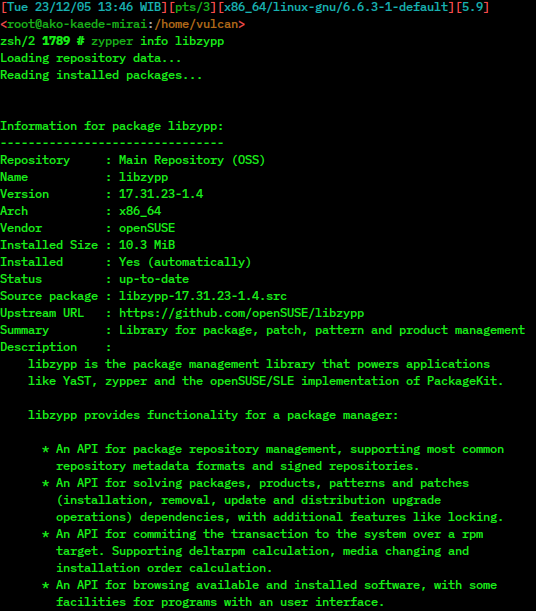
 A zypper info command showing information of libzypp | |
| Initial release | January 14, 2006[1] |
| Stable release | 17.37.17  1.14.93
/ 11 August 2025 18 July 2025 1.14.93
/ 11 August 2025 18 July 2025 |
| Repository | https://github.com/openSUSE/libzypp https://github.com/openSUSE/zypper |
| Written in |
|
| Operating system | Linux |
| Type | Package manager |
| License | GNU General Public License |
| Website | en |
ZYpp (or libzypp; "Zen / YaST Packages Patches Patterns Products"[2]) is a package manager engine that powers Linux applications like YaST, Zypper and the implementation of PackageKit for openSUSE and SUSE Linux Enterprise.[3] Unlike some more basic package managers, it provides a satisfiability solver to compute package dependencies.[4] It is a free and open-source software project sponsored by SUSE and licensed under the terms of the GNU General Public License v2 or later. ZYpp is implemented mostly in the programming language C++.
Zypper is the native command-line interface of the ZYpp package manager to install, remove, update and query software packages of local or remote (networked) media. Its graphical equivalent is the YaST package manager module. It has been used in openSUSE since version 10.2 beta1. In openSUSE 11.1, Zypper reached version 1.0. Zypper is also part of the mobile Linux distributions MeeGo, Sailfish OS, and Tizen.
History
[edit]Purpose
[edit]
zypper dup, showing available updates to installFollowing its consecutive acquisitions of Ximian and SuSE GmbH in 2003, Novell decided to merge both package management systems, YaST package manager and Red Carpet, in a best of breed approach, as the two solutions so far were used at Novell. Looking at the extant open source tools and their maturity available back in 2005, none fulfilled the requirements, and were able to work smoothly with the extant Linux management infrastructure software developed by Ximian and SUSE, so it was decided to get the best ideas from extant pieces and to work on a new implementation. Libzypp, the resulting library, was planned to be the software management engine of the SUSE distributions and the Linux Management component of the Novell ZENworks Management suite.
Early days
[edit]The Libzypp's solver was a port from the Red Carpet solver, which was written to update packages in installed systems. Using it for the full installing process brought it to its limits, and adding extensions such as support for weak dependencies and patches made it fragile and unpredictable.[5] Although this first version of ZYpp's solver worked satisfactorily, on the company enterprise products with the coupled ZMD daemon, it led to an openSUSE 10.1 release which came out in May 2006 with a system package not working as expected. In December 2006, the openSUSE 10.2 release corrected some defects of the prior release, using the revisited ZYpp v2. ZMD was subsequently removed from the 10.3 release and reserved for only the company Enterprise products. While ZYpp v3 provided openSUSE with a relatively good package manager, equivalent to other existing package managers, it suffered from some flaws in its implementation which greatly limited its speed performance.
SAT solver integration
[edit]An area where libzypp needed improvement was the speed of the dependency solver. libsolv is being written and released under the revised BSD license.[6]
Projects like Optimal Package Install/Uninstall Manager (OPIUM)[7][8] and MANCOOSI[9] were trying to fix dependency solving issues with a SAT solver. Traditional solvers like Advanced Packaging Tool (APT) sometimes show unacceptable deficiencies. It was decided to integrate SAT algorithms into the ZYpp stack; the solver algorithms used were based on the popular minisat solver.[10]
The SAT solver implementation as it appears in openSUSE 11.0 is based on two major, but independent, blocks:
- Using a data dictionary approach to store and retrieve package and dependency information. A new solv format was created, which stores a repository as a string dictionary, a relation dictionary and then all package dependencies. Reading and merging multiple solv repositories takes only milliseconds.
- Using satisfiability for computing package dependencies. The Boolean satisfiability problem is a well-researched problem with many exemplar solvers available. It is very fast, as package solving complexity is very low compared to other areas where SAT solvers are used. Also, it does not need complex algorithms and can provide understandable suggestions by calculating proof of why a problem is unsolvable.
After several months of work, the benchmark results of this fourth ZYpp version integrated with the SAT solver were more than encouraging, moving YaST and Zypper ahead of other RPM-based package managers in speed and size.[11][12]
Front ends
[edit]Typically, YaST has served as the graphical front end for ZYpp in SUSE.[13] ZYpp is also supported by PackageKit.[14]
A new Qt-based front end known as Myrlyn is being developed to replace YaST on openSUSE Leap 16.0.[13]
See also
[edit]
References
[edit]- ^ Earliest known changelog
- ^ "Acronyms - openSUSE Wiki".
- ^ "Libzypp documentation".
- ^ "Libzypp project homepage".
- ^ "Michael Schroeder, History of satsolver". GitHub. 26 November 2021.
- ^ "libsolv on github". GitHub. 26 November 2021.
- ^ Tucker, Chris; Shuffelton, David; Jhala, Ranjit; Lerner, Sorin (2007), "OPIUM: OPtimal Package Install/Uninstall Manager" (PDF), 29th International Conference on Software Engineering, ICSE'07.
- ^ EDOS Project Workpackage 2 Team (March 2006), "Report on formal management of software dependencies", EDOS Project Deliverable Work Package 2, Deliverable 2, archived from the original on 2006-06-19, retrieved 2009-06-06.
{{citation}}: CS1 maint: numeric names: authors list (link) - ^ Le Berre, Daniel; Parrain, Anne (2008), "On SAT Technologies for dependency management and beyond" (PDF), ASPL 2008, Limerick, Mancoosi.org.
- ^ "Minisat.se".
- ^ "yum and ZYpp speed / memory usage". 16 May 2008. Retrieved 23 October 2008.[permanent dead link]
- ^ "Sneak Peeks at openSUSE 11.0: Package Management, with Duncan Mac-Vicar". 6 June 2008. Retrieved 15 October 2017.
- ^ a b "Formerly Known As YQPkg, Myrlyn Package Manager GUI Adds Repository Configuration". Phoronix.com. Retrieved 2025-05-06.
- ^ "Frequently asked questions". packagekit.org. Archived from the original on 19 March 2008. Retrieved 10 July 2009.
External links
[edit]
 openSUSE package (P7788) (see uses)

| dpkg | |
|---|---|
| RPM | |
| Embedded systems |
|
| Distribution-agnostic | |
| Others (binary) | |
| Others (source) | |
| Front-ends | |
| Related topics | |
Italics = inactive or discontinued
| |


| People |  | ||||
|---|---|---|---|---|---|
| Products |
| ||||
| Related | |||||
Overview
Definition and Role
ZYpp, also known as libzypp, is a C++ library that serves as the backend engine for package management in openSUSE and SUSE Linux Enterprise distributions.[1][7] Its primary role involves handling the installation, updates, removal, and querying of RPM packages, along with repository management and dependency solving.[1][7] This functionality enables efficient software management by providing APIs for repository access, dependency resolution using a SAT solver integration, and transaction commits to RPM targets.[7] Unlike user-facing tools, ZYpp operates as the underlying engine, powering applications such as YaST and Zypper without direct user interaction.[1][7] It supports features like signed repositories, media abstraction for various protocols, and browsing of available and installed software, ensuring robust and secure package operations across SUSE-based systems.[1]Key Features
ZYpp employs a custom "solv" binary format for repository metadata, which stores package and dependency information using a dictionary-based approach to enable fast loading, querying, and minimal memory usage.[8] This format converts raw metadata into an efficient structure during repository refresh, facilitating rapid access for dependency resolution and package management operations.[9] The library supports management of multiple repositories through a media abstraction layer that handles diverse access methods, including local files, HTTP, FTP, ISO images, and NFS.[1] Automatic repository refresh is integrated, along with GPG signature verification to ensure the authenticity of metadata from signed repositories.[1][10] ZYpp performs transaction-based operations for package installation, updates, and removals, committing changes atomically to the RPM target while supporting features like delta RPM calculation, media handling, and optimized installation sequencing.[1] Multilingual support is provided through translated texts embedded in solv files and locale-aware handling, allowing package descriptions and messages to adapt to the system language.[11] Extensibility is achieved via a plugin system that allows external scripts in any language to hook into core functionality without modifying the library code, including custom URL resolvers for media handlers and service plugins for repository management.[12] ZYpp is free and open-source software, licensed under the GNU General Public License version 2 or later, with an exception for OpenSSL linking.[1]History
Origins and Early Development
ZYpp, also known as libzypp, was developed by the openSUSE project in collaboration with Novell to serve as a modern package management library for RPM-based distributions, particularly within the SUSE Linux ecosystem.[13] Following Novell's acquisitions of Ximian and SUSE GmbH in 2003, the project sought to consolidate disparate package management tools, including the YaST backend and Ximian's Red Carpet (which powered the rug frontend), into a unified solution.[14] This initiative addressed key limitations in existing open-source alternatives like rug and smart, which struggled with efficient dependency resolution, repository management, and integration into enterprise-level Linux infrastructures.[13] The primary motivation was to create a robust, performant library that could handle complex RPM operations while supporting both command-line and graphical interfaces seamlessly.[14] Development began in earnest in 2005 as a prototype rewrite of the YaST package manager backend, aiming to leverage the strengths of prior systems while overcoming their shortcomings in speed and dependency handling.[13] The first commits to the libzypp codebase occurred in late 2005, marking the start of active implementation under the openSUSE project's open development model.[13] Initial efforts focused on core functionalities such as package installation, removal, and querying, without incorporating advanced dependency solving algorithms at the outset.[14] This foundational work enabled libzypp to replace older backends like rug and smart in SUSE environments, providing a more efficient foundation for RPM-based systems.[13] Libzypp made its debut integration in SUSE Linux 10.1, released on May 11, 2006, where it powered initial package management tasks and demonstrated improved performance over predecessors.[15] By December 2006, with the release of openSUSE 10.2 on December 7, libzypp reached version 2.0, incorporating refinements to basic operations and early fixes for identified issues.[16][13] This version emphasized a clean C++ API and support for multiple repositories, setting the stage for broader adoption while prioritizing conceptual simplicity in package handling.[13]Major Milestones
A pivotal milestone in ZYpp's evolution occurred in 2008 with the release of version 4.0, integrated into openSUSE 11.0, which introduced the SAT solver based on libsolv for handling Boolean satisfiability in complex dependency scenarios.[17][18] This enhancement significantly improved dependency resolution speed and accuracy, replacing earlier mechanisms and enabling more robust package management.[19] During the 2010s, ZYpp expanded to support mobile platforms including MeeGo (2010–2011) and later Tizen (2012 onward), adapting its library for embedded and device-oriented environments.[20] Concurrently, improvements to the solv format optimized repository storage and querying efficiency, reducing file sizes and accelerating metadata processing through advanced dictionary-based structures.[21] Key version releases marked further advancements: version 10 in 2012 enhanced plugin support, allowing greater extensibility for custom hooks and integrations without core modifications.[22][23] The version 16 series, first released in 2017, incorporated enhanced security features such as improved verification of repository metadata and mitigation of vulnerabilities in dependency solving in updates including in 2020.[24][25] Development progressed to version 17.37.18 on September 22, 2025, focusing on stability and compatibility refinements.[26] Recent developments emphasize ongoing maintenance via the official GitHub repository, exemplified by the Zypper 1.14.94 release on September 23, 2025, which included bug fixes for repository handling and integration stability.[27][28] This front-end update complements ZYpp's backend, including brief adoption in tools like PackageKit for broader ecosystem compatibility.[29]Architecture
Core Components
libzypp serves as the central C++ library in the ZYpp system, offering a comprehensive API for handling package objects, accessing repositories, and managing transactions. It abstracts the complexities of package management, enabling applications to perform operations such as installing, updating, and removing software while ensuring dependency consistency and system integrity. This library integrates with various metadata formats and provides a unified interface for software management tasks across openSUSE and SUSE Linux Enterprise distributions.[1] The media handler component facilitates access to installation media from diverse sources, including local filesystems, HTTP, FTP, CD/DVD drives, and other protocols like NFS or ISO images. It employs an abstraction layer through classes such as MediaHandler and MediaManager to manage media attachment, file retrieval, and progress tracking during downloads or mounts. For instance, MediaCurl handles network-based access with support for authentication and proxy configurations, ensuring reliable data transfer with error recovery mechanisms. In 2025, libzypp introduced a new media backend supporting parallel package downloads, which became the default and can reduce fetch times significantly.[30] This modular design allows seamless switching between media types without altering core application logic.[31][32][33] ZYpp's plugin architecture enables extensibility by allowing external programs to hook into key operations without modifying the core codebase. Plugins are external scripts or binaries placed in directories like /usr/lib/zypp/plugins/, supporting both stateless (stdin/stdout) and stateful (via STOMP protocol) interactions for tasks such as custom URL resolution, repository metadata verification, or post-commit actions. This design accommodates vendor-specific extensions, like applying patches during transactions or integrating third-party dependency resolvers, and can be implemented in any programming language using helpers like zypp-plugin-python.[12][23] The database backend in libzypp manages the local package database by interfacing directly with the RPM database (rpmdb) to track installed packages, their versions, and dependencies. It provides query and update capabilities through abstractions like the resolver pool, maintaining an efficient, structured representation of the system's software state without relying on separate storage like SQLite. Repositories, in contrast, utilize the solv format for metadata storage, as detailed in key features.[1] Error handling and logging in libzypp are integrated through dedicated mechanisms that support transaction rollback on failures and detailed diagnostic output. The logging system, configurable via environment variables like ZYPP_LOGFILE and ZYPP_FULLLOG, outputs messages to files or stderr with levels from debug to error, aiding in troubleshooting via classes like LineWriter. This ensures robust recovery, such as aborting incomplete commits and preserving system consistency during operations.[34][35]Dependency Resolution
ZYpp employs a Boolean satisfiability (SAT) solver to model and resolve package dependencies as logical clauses, enabling the computation of conflict-free installation sets.[36] Dependencies such as requirements, conflicts, and obsoletes are expressed using literals where a positive literal (A) indicates a package is installed and a negative literal (-A) indicates it is not; for instance, a requirement for package A to have at least one of B1, B2, or B3 is modeled as the clause (-A ∨ B1 ∨ B2 ∨ B3).[37] Conflicts are represented as binary clauses like (-A ∨ -B), ensuring mutual exclusion, while obsoletes are treated similarly to conflicts.[36] The dependency problem is formulated by translating these relations into conjunctive normal form (CNF), a conjunction of disjunctive clauses suitable for SAT solver input, to find an assignment of truth values that satisfies all clauses while minimizing changes to the system.[37] User requests, such as installing or removing packages, generate unary clauses like (A) for forced installation or (-A) for erasure, integrated into the CNF alongside repository data.[38] The solver then seeks a minimal, conflict-free set of packages, prioritizing system stability by avoiding deinstallations or downgrades through additional policy clauses, such as (A ∨ A2 ∨ A3) to allow only upgrades for an installed package A.[36] ZYpp supports multiple resolver modes to handle varying scenarios. The standard mode serves as the default, automatically resolving dependencies to maintain a consistent system state.[38] In job-based mode, users specify targeted actions like installing particular packages, which generate corresponding rules in the solver queue for precise resolution.[38] Auto-resolution mode incorporates vendor priorities, using weighted rules to prefer packages from higher-priority sources during updates or conflict resolution.[38] Performance optimizations ensure efficient handling of large repositories with thousands of packages. Incremental solving via unit propagation processes clauses iteratively, setting literals to true when a clause reduces to a single option and propagating implications without restarting the entire computation.[37] Caching mechanisms, including a watch array for tracking relevant clauses and the SOLV format for repository data, reduce redundant evaluations and enable rapid querying of available versions.[38] For example, resolving a dependency like "package X requires libfoo >= 1.0" involves creating clauses that check available libfoo versions against the constraint; if versions 1.1 and 2.0 are present, the solver selects the highest compatible one (e.g., (-X ∨ libfoo_1.1 ∨ libfoo_2.0)) while verifying no conflicts, ultimately assigning true to the chosen version if X is installed.[37]Interfaces
Command-Line (Zypper)
Zypper serves as the primary command-line interface (CLI) to the ZYpp package management library, enabling users to manage software packages on SUSE Linux Enterprise and openSUSE distributions through a text-based, scriptable environment.[39] It provides subcommands for core operations such as installing, removing, updating, and searching for packages, leveraging the underlying libzypp engine for dependency resolution and repository handling.[40] Released alongside libzypp, Zypper emphasizes efficiency and automation, making it suitable for server environments or headless systems without graphical interfaces.[41] Package management in Zypper revolves around straightforward subcommands that handle installation, removal, and updates. For installation, theinstall or in subcommand is used, as in zypper install <packagename>, which resolves and installs the specified package along with its dependencies.[40] Removal is achieved via remove or rm, for example zypper remove <packagename>, optionally with --clean-deps to purge unneeded dependencies post-removal.[40] Updates are managed through update or up to refresh all installed packages, patch for security and bug fixes, or dist-upgrade (alias dup) for full distribution upgrades, ensuring system consistency.[40]
Repository management allows users to add, modify, and refresh sources dynamically. The addrepo or ar subcommand adds a new repository with zypper addrepo <[URL](/page/URL)> <alias>, where the URL points to the repository metadata and the alias provides a shorthand identifier.[40] Modifications are handled by modifyrepo or mr, such as zypper modifyrepo <alias> --enable 1 to activate a repo, while refresh or ref updates metadata from all enabled repositories with zypper refresh.[40]
Query functions facilitate package discovery and inspection without altering the system. The info or if subcommand displays details for a package, like zypper info <packagename>, including version, size, and dependencies.[40] For capability-based searches, what-provides or wp identifies packages providing a specific file or feature, though it is deprecated in favor of search --provides --match-exact <capability>.[40] Pattern searches, useful for software bundles, are performed with search --type pattern <string> or pattern-info <pattern>.[41]
Zypper supports scripting and automation through non-interactive modes and standardized exit codes. The --non-interactive flag enables batch operations without prompts, defaulting to yes for confirmations, as in zypper --non-interactive install <packagename>.[41] Exit codes indicate success (0), errors like unmet dependencies (100-106), or repository issues (107-110), allowing integration into shell scripts or CI/CD pipelines.[39]
The latest version of Zypper, 1.14.94, was released on September 23, 2025, incorporating enhancements to parallel downloads for faster package fetching during updates.[29] These improvements build on experimental parallel download support introduced earlier in 2025, reducing bottlenecks in metadata and file retrieval.[30]
Graphical (YaST and Others)
YaST, or Yet another Setup Tool, served as the primary graphical front-end for ZYpp in openSUSE and SUSE Linux Enterprise distributions until its deprecation in 2025.[42] In earlier versions, its software management module enabled users to browse repositories, search for packages, and perform installations or removals through an intuitive GUI, automatically resolving dependencies via the ZYpp backend.[43] A key feature was support for "patterns," which are predefined groups of related packages—such as desktop environments or server tools—allowing users to install comprehensive software sets with a single selection, streamlining complex setups like base system configurations.[44] The workflow in YaST integrated ZYpp seamlessly for backend operations, featuring step-by-step wizards that guided users through tasks like pattern-based installations or repository management, reducing the risk of configuration errors in graphical environments.[42] For instance, the Online Update module used ZYpp to fetch and apply security patches or updates in a controlled manner, with visual progress indicators and rollback options. Historically, YaST included ncurses-based text interfaces for non-graphical sessions, but its core strength lay in the Qt-based GUI for desktop users.[45] As of openSUSE Leap 16 (released October 2025) and SUSE Linux Enterprise Server 16, Myrlyn has replaced YaST as the primary graphical package manager for ZYpp. Developed during openSUSE Hack Week in 2024 and initially known as YQPkg, Myrlyn is a standalone Qt-based interface that provides streamlined package management, including intuitive updates, repository handling, and transaction history views. It supports patterns and integrates directly with libzypp for dependency resolution. Myrlyn is now available in openSUSE Tumbleweed and Leap 16, serving as the default GUI for software management in these distributions.[46][47][48] PackageKit provides another graphical layer atop ZYpp through its backend implementation, offering a D-Bus interface that enables integration with desktop environments such as GNOME Software and KDE Discover.[49] This abstraction allows these tools to handle package searches, installations, and notifications uniformly across distributions, leveraging ZYpp's resolver for dependency handling without direct user interaction with low-level commands.[1] ZYpp's adaptability extends to mobile ecosystems, where simplified modules derived from YaST have been incorporated into platforms like Tizen and Sailfish OS, supporting RPM-based package operations in constrained environments.[50] In Sailfish OS, for example, ZYpp powers core package handling akin to desktop uses, enabling efficient software deployment on devices.[51]Integrations
In SUSE Ecosystems
In openSUSE, ZYpp serves as the foundational library powering all package management operations, enabling seamless installation, updates, and removals through front-end tools like Zypper. By default, fresh installations configure essential repositories out of the box, including the Main Repository (OSS) for open-source software and the Main Repository (Non-OSS) for proprietary components, ensuring immediate access to a comprehensive software ecosystem without manual setup.[52][53] Within SUSE Linux Enterprise, ZYpp is deeply integrated for robust enterprise patching and deployment, particularly via SUSE Manager, which utilizes ZYpp through Zypper to handle package installations, upgrades, and verifications across managed clients. This setup supports Long Term Service Pack Support (LTSS), allowing organizations to subscribe to extended repositories for sustained security and stability updates beyond standard service pack lifecycles, managed directly with Zypper commands likezypper addrepo for LTSS channels.[54][55]
ZYpp's behavior is customized via the primary configuration file /etc/zypp/zypp.conf, which governs global parameters such as solver preferences—for instance, enabling solver.onlyRequires = true to limit installations to strictly required dependencies—and download strategies to balance speed, parallelism, and delta compression for efficient repository synchronization.[56]
Security is bolstered by ZYpp's support for automated updates through the zypper dup command, which performs comprehensive distribution upgrades and applies patches to maintain system integrity against vulnerabilities. In SUSE environments, AppArmor operates by default, with security profiles for applications managed and enforced during package installations to confine newly installed applications and prevent unauthorized access.[53][57]