


Community hub
Recent from talks
Contribute something
Nothing was collected or created yet.
Slackware
View on Wikipedia
| Slackware | |
|---|---|
 | |
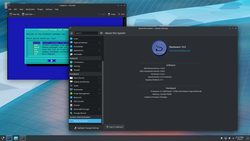
 Slackware 15.0 with KDE Plasma 5 as the desktop environment | |
| Developer | Patrick Volkerding |
| OS family | Linux (Unix-like) (based on Softlanding Linux System) |
| Working state | Current |
| Source model | Open source |
| Initial release | 17 July 1993[1] |
| Latest release | 15.0[2]  [3][4] / 2 February 2022 [3][4] / 2 February 2022 |
| Available in | Multilingual |
| Update method | pkgtool, slackpkg |
| Package manager | pkgtool, slackpkg |
| Supported platforms | IA-32, x86-64, ARM |
| Kernel type | Monolithic (Linux) |
| Userland | GNU |
| Default user interface | CLI |
| License | GNU General Public License |
| Official website | www |
Slackware is a Linux distribution created by Patrick Volkerding in 1993. Originally based on Softlanding Linux System (SLS),[5] Slackware has been the basis for many other Linux distributions, most notably the first versions of SUSE Linux distributions, and is the oldest distribution that is still maintained.[6]
Slackware aims for design stability and simplicity and to be the most "Unix-like" Linux distribution.[7] It makes as few modifications as possible to software packages from upstream and tries not to anticipate use cases or preclude user decisions. In contrast to most modern Linux distributions, Slackware provides no graphical installation procedure and no automatic dependency resolution of software packages. It uses plain text files and only a small set of shell scripts for configuration and administration. Without further modification, it boots into a command-line interface environment. Because of its many conservative and simplistic features, Slackware is often considered to be most suitable for advanced and technically inclined Linux users.[8][9][10][11][12][13]
Slackware is available for the IA-32 and x86_64 architectures, with a port to the ARM architecture. While Slackware is mostly[14] free and open-source software, it does not have a formal bug-tracking facility or public code repository, with releases periodically announced by Volkerding. No formal membership procedure exists for developers, and Volkerding is the primary contributor to releases.
Name
[edit]The name "Slackware" stems from the fact that the distribution started as a private side project with no intended commitment. To prevent it from being taken too seriously at first, Volkerding gave it a humorous name, which stuck even after Slackware became a serious project.[15]
Slackware refers to the "pursuit of Slack", a tenet of the Church of the SubGenius, a parody religion. Certain aspects of Slackware graphics reflect this,[16] e.g. the pipe that Tux is smoking, as influenced by the image of J. R. "Bob" Dobbs' head.
A humorous reference to the Church of the SubGenius can be found in many versions of the install.end text files, which indicate the end of a software series to the setup program. In recent versions, including Slackware release 14.1, the text is ROT13 obfuscated.[17][18]
History
[edit]Birth
[edit]
Slackware was originally derived from the Softlanding Linux System (SLS),[19] the most popular of the original Linux distributions and the first to offer a comprehensive software collection that comprised more than just the kernel and basic utilities,[20] including an X11 graphical interface, TCP/IP, UUCP networking, and GNU Emacs.[21]
Patrick Volkerding started with SLS after needing a LISP interpreter for a school project at the then-named Moorhead State University (MSU). He found CLISP was available for Linux and downloaded SLS to run it. A few weeks later, Volkerding was asked by his artificial intelligence professor at MSU to show him how to install Linux at home and on some of the computers at school. Volkerding had made notes describing fixes to issues he found after installing SLS, and his professor and he went through and applied those changes to a new installation. This took almost as long as it took to just install SLS, though, so the professor asked if the install disks could be adjusted so the fixes could be applied during installation. This was the start of Slackware. Volkerding continued making improvements to SLS - fixing bugs, upgrading software, automatic installation of shared libraries and the kernel image, fixing file permissions, and more. In a short time, Volkerding had upgraded around half the packages beyond what SLS had available.
Volkerding had no intentions to provide his modified SLS version for the public. His friends at MSU urged him to put his SLS modifications onto an FTP server, but Volkerding assumed that "SLS would be putting out a new version that included these things soon enough", so he held off for a few weeks. During that time, many SLS users on the internet were asking SLS for a new release, so eventually Volkerding made a post titled "Anyone want an SLS-like 0.99pl11A system?", to which he received many positive responses. After a discussion with the local system administrator at MSU, Volkerding obtained permission to upload Slackware to the university's FTP server.[15] This first Slackware release, version 1.00, was distributed on July 17, 1993, at 00:16:36 (UTC),[1] and was supplied as twenty-four 3+1⁄2" floppy disk images.[22] After the announcement was made, Volkerding watched as the flood of FTP connections continually crashed the server. Soon afterwards, Walnut Creek CDROM offered additional archive space on their FTP servers.[15]
Development
[edit]The size of Slackware quickly increased with the addition of included software, and by version 2.1, released October 1994, it had more than tripled to comprise 73 1.44 MB floppy disk images.[23]
In 1999, Slackware had its version jump from 4 to 7. Slackware version numbers were lagging behind other distributions, and this led many users to believe it was out of date, though the bundled software versions were similar. Volkerding made the decision to bump the version as a marketing effort to show that Slackware was as up-to-date as other Linux distributions, many of which had release numbers of 6 at the time. He chose 7, estimating that most other distributions would soon be at this release number.[24]
In April 2004, Patrick Volkerding added X.Org Server packages into the testing/ directory of -current as a replacement for the XFree86 packages currently being used, with a request for comments on what the future of the X Window System in Slackware should be. A month later, he switched from XFree86 to X.Org Server after stating that the opinions were more than four to one in favor of using the X.org release as the default version of X. He stated the decision was primarily a technical one, as XFree86 was proving to cause compatibility problems. Slackware 10.0 was the first release with X.Org Server.[25]
In March 2005, Patrick Volkerding announced the removal of the GNOME desktop environment in the development ChangeLog. He stated this had been under consideration for more than four years, and that other projects already provided a more complete version of GNOME for Slackware than what Slackware itself provided. Volkerding stated future GNOME support would rely on the community.[26] The community responded and as of October 2016, several active GNOME (and GNOME fork) projects were available for Slackware, including Cinnamon, Dlackware, Dropline GNOME, MATE, and SlackMATE. The removal was deemed significant by some in the Linux community due to the prevalence of GNOME in many distributions.[27]
In May 2009, Patrick Volkerding announced the public (development) release of an official x86_64 variant, called Slackware64, maintained in parallel with the IA-32 distribution.[28] Slackware64 is a pure 64-bit distribution in that it does not support running or compiling 32-bit programs, but it was designed as "multilib-ready". Eric Hameleers, one of the core Slackware team members, maintains a multilib repository that contains the necessary packages to convert Slackware64 to multilib to enable running of 32-bit software.[29] Hameleers started the 64-bit port as a diversion from the pain of recovering from surgery in September 2008. Volkerding tested the port in December 2008, and was impressed when he saw speed increases between 20 and 40% for some benchmarks compared to the 32-bit version. To minimize the extra effort of maintaining both versions in parallel, Slackware's build scripts, called SlackBuilds, were slowly transitioned to supporting either architecture, allowing for one set of sources for both versions.[30] Slackware64 saw its first stable release with version 13.0.
Between the November 2013 release of 14.1 and June 2016, Slackware had a 31-month gap between releases, marking the longest span in release history. During this time, the development branch went without updates for 47 days. On April 21, 2015, though, Patrick Volkerding apologized on the ChangeLog for the absence of updates and stated that the development team used the time to get "some good work done". Over 700 program changes were listed on that ChangeLog entry, including many major library upgrades. In January 2016, Volkerding announced the reluctant addition of PulseAudio, primarily due to BlueZ dropping direct ALSA support in v5.x. while various other projects were, in turn, dropping support for BlueZ v4.x. Knowing some users would not be happy with the change, he stated, "Bug reports, complaints, and threats can go to me." These changes culminated in the release of Slackware 14.2 in June 2016.[31]
Historical documentation
[edit]David Cantrell worked as a core member of the Slackware team between 1999 and 2001, and described that period on the Slackware ARM Vlog.[32] Patrick Volkerding provided further information about the time period in two interviews.[33][34]
Design philosophy
[edit]The design philosophy of Slackware is oriented toward simplicity, software purity,[35] and a core design that emphasizes lack of change to upstream sources. Many design choices in Slackware can be seen as a heritage of the simplicity of traditional Unix systems and as examples of the KISS principle.[36] In this context, "simple" refers to the simplicity in system design, rather than system usage. Thus, ease of use may vary between users; those lacking knowledge of command-line interfaces and classic Unix tools may experience a steep learning curve using Slackware, whereas users with a Unix background may benefit from a less-abstract system environment.[citation needed] In keeping with Slackware's design philosophy and its spirit of purity, most software in Slackware uses the original configuration mechanisms supplied by the software's authors; for some administrative tasks, though, distribution-specific configuration tools are delivered.
Development model
[edit]No formal issue tracking system and no official procedure is needed to become a code contributor or developer. The project does not maintain a public code repository. Bug reports and contributions, while being essential to the project, are managed in an informal way. All the final decisions about what is going to be included in a Slackware release strictly remain with Slackware's benevolent dictator for life, Patrick Volkerding.[37][38][39]
The first versions of Slackware were developed by Patrick Volkerding alone. Beginning with version 4.0, the official Slackware announce files list David Cantrell and Logan Johnson as part of the "Slackware team".[40] Later announce statements, up to release version 8.1, include Chris Lumens.[41] Lumens, Johnson and Cantrell are also the authors of the first edition of "Slackware Linux Essentials", the official guide to Slackware Linux.[42] The Slackware website mentions Chris Lumens and David Cantrell as being "Slackware Alumni", who "worked full-time on the Slackware project for several years."[38] In his release notes for Slackware 10.0 and 10.1 Volkerding thanks Eric Hameleers for "his work on supporting USB, PCI, and Cardbus wireless cards".[43][44] Starting with version 12.0 there is, for a second time, a team building around Volkerding. According to the release notes of 12.2, the development team consists of seven people. Future versions added people.[45] Since version 13.0, the Slackware team seems to have core members. Eric Hameleers gives an insight into the core team with his essay on the "History of Slackware Development", written on October 3–4, 2009 (shortly after the release of version 13.0).[37]
Packages
[edit]Management
[edit]
Slackware's package management system, collectively known as pkgtools, can administer (pkgtool), install (installpkg), upgrade (upgradepkg), and remove (removepkg) packages from local sources. It can also uncompress (explodepkg) and create (makepkg) packages. The official tool to update Slackware over a network or the internet is slackpkg. It was originally developed by Piter Punk as an unofficial way to keep Slackware up-to-date. It was officially included in the main tree in Slackware 12.2,[46] having been included in extras/ since Slackware 9.1.[47] When a package is upgraded, it will install the new package over the old one and then remove any files that no longer exist in the new package. Once a package has been installed with slackpkg it can be managed with pkgtool or other package management commands.[48] When running upgradepkg, it only confirms that the version numbers are :different", thus allowing downgrading the package if desired.
Slackware packages are tarballs compressed using various methods. Starting with 13.0, most packages are compressed using xz (based on the LZMA compression algorithm), using the .txz filename extension.[49] Prior to 13.0, packages were compressed using gzip (based on the DEFLATE compression algorithm), using the .tgz extension. Support for bzip2 and lzip compression was also added, using the filename extensions .tbz and .tlz, respectively, although these are not commonly used.
Packages contain all the files for that program, as well as additional metadata files used by the package manager. The package tarball contains the full directory structure of the files and is meant to be extracted in the system's root directory during installation. The additional metadata files, located under the special install/ directory within the tarball, usually include a slack-desc file, which is a specifically formatted text file that is read by the package manager to provide users with a description of the packaged software,[50] as well as a doinst.sh file, which is a post-unpacking shell script allowing creation of symbolic links, preserving permissions on startup files, proper handling of new configuration files, and any other aspects of installation that can not be implemented via the package's directory structure.[51] During the development of 15.0, Volkerding introduced support for a douninst.sh uninstall script that can be launched when removing or upgrading a package.[52] This allows package maintainers to run commands when a package is uninstalled.
The package manager maintains a local database on the computer, stored in multiple folders. On 14.2 and older systems, the main database of installed packages was maintained in /var/log/, however, during the development of 15.0, Volkerding moved two of the directories to a dedicated location under /var/lib/pkgtools/ to prevent accidental deletion when clearing system logs.[52] Each Slackware installation will contain a packages/ and scripts/ directory in the main database location. The former is where each package installed will have a corresponding install log file (based on the package name, version, arch, and build) that contains the package size, both compressed and uncompressed, the software description, and the full path of all files that were installed.[53] If the package contained an optional doinst.sh post-installation script, the contents of that script will be added to a file in the scripts/ directory matching the filename of the corresponding package in the packages/ directory, allowing the administrator to view the post-installation script at a future point. When a package is removed or upgraded, the old install logs and scripts found under packages/ and scripts/ are moved to removed_packages/ and removed_scripts/, making it possible to review any previous packages and see when they were removed. These directories can be found in /var/log/ on 14.2 and earlier, but were moved to /var/log/pkgtools/ during the development of 15.0. On systems supporting the douninst.sh uninstall script, those scripts will be stored in the /var/lib/pkgtools/douninst.sh/ directory while the package is installed. Once removed, the douninst.sh script will be moved to /var/log/pkgtools/removed_uninstall_scripts/.
Dependency resolution
[edit]The package management system does not track or manage dependencies; however, when performing the recommended full install, all dependencies of the stock packages are met. For custom installations or 3rd-party packages, Slackware relies on the user to ensure that the system has all the supporting system libraries and programs required by the program. Since no official lists of dependencies for stock packages are provided, if users decide to install a custom installation or install 3rd-party software, they will need to work through any possible missing dependencies themselves. Since the package manager doesn't manage dependencies, it will install any and all packages, whether or not dependencies are met. A user may find out that dependencies are missing only when attempting to use the software.
While Slackware itself does not incorporate official tools to resolve dependencies, some unofficial, community-supported software tools do provide this function, similar to the way APT does for Debian-based distributions and yum does for Red Hat-based distributions. They include
- slapt-get is a command line utility that functions in a similar way to APT. While slapt-get does provide a framework for dependency resolution, it does not provide dependency resolution for packages included within the Slackware distribution. However, several community package sources and Slackware based distributions take advantage of this functionality. Gslapt is a graphical interface to slapt-get.
- Swaret is a package management tool featuring dependency resolution. It was originally included in Slackware version 9.1 as an optional package, but did not contain dependency resolution at that time.[54] It was removed from the distribution with Slackware 10.0 and turned over to the community. It eventually added dependency resolution and roll-back functionality; however, as of May 2014, there are no active developers.[55]
- NetBSD's pkgsrc provides support for Slackware, among other Unix-like operating systems. pkgsrc provides dependency resolution for both binary and source packages.[citation needed]
Repositories
[edit]There are no official repositories for Slackware. The only official packages Slackware provides are available on the installation media. However, there are many third-party repositories for Slackware; some are standalone repositories and others are for distributions that are Slackware-based but retain package compatibility with Slackware. Many of these can be searched at once using pkgs.org, which is a Linux package search engine. However, mixing and matching dependencies from multiple repositories can lead to two or more packages that require different versions of the same dependency, which is a form of dependency hell. Slackware itself won't provide any dependency resolution for these packages, however some projects will provide a list of dependencies that are not included with Slackware with the files for the package, commonly with a .dep extension.
Due to the possibility of dependency issues, many users choose to compile their own programs using community-provided SlackBuilds. SlackBuilds are shell scripts that will create an installable Slackware package from a provided software tarball. Since SlackBuilds are scripts, they aren't limited to just compiling a program's source; they can also be used to repackage pre-compiled binaries provided by projects or other distributions' repositories into proper Slackware packages. SlackBuilds that compile sources have several advantages over pre-built packages: since they build from the original author's source code, the user does not have to trust a third-party packager; furthermore the local compilation process allows for machine-specific optimization. In comparison to manual compilation and installation of software, SlackBuilds provide cleaner integration to the system by utilizing Slackware's package manager. Some SlackBuilds will come with an additional file with metadata that allows automated tools to download the source, verify the source is not corrupt, and calculate additional dependencies that are not part of Slackware.[56] Some repositories will include both SlackBuilds and the resulting Slackware packages, allowing users to either build their own or install a pre-built package.
The only officially endorsed[57] SlackBuilds repository is SlackBuilds.org, commonly referred to as SBo. This is a community-supported project offering SlackBuilds for building software not included with Slackware. Users are able to submit new SlackBuilds for software to the site and, once approved, they become the "package maintainer". They are then responsible for providing updates to the SlackBuild, either to fix issues or to build newer versions provided by upstream. To ensure all programs can be compiled and used, any required dependencies of the software not included with Slackware are required to be documented and be available on the site. All submissions are tested by the site's administrators before being added to the repository. The administrators intend for the build process to be nearly identical to the way Slackware's official packages are built, mainly to ensure Volkerding was "sympathetic of our cause". This allows SlackBuilds that Volkerding deems worthy to be pulled into regular Slackware with minimal changes to the script. It also prevent users from suggesting Volkerding to change his scripts to match SBo's.[58] SBo provides templates[59] for SlackBuilds and the additional metadata files and they encourage package maintainers to not deviate unless necessary.[60]
Two Slackware team members, Eric Hameleers and Robby Workman each have their own repository of pre-compiled packages along with the SlackBuilds and source files used to create the packages. While most packages are just additional software not included in Slackware that they felt was worth their time to maintain, some packages are used as a testbed for future upgrades to Slackware, most notably, Hameleers provides "Ktown" packages for newer versions of KDE.[61] He also maintains Slackware's "multilib" repository, enabling Slackware64 to run and compile 32-bit packages.[29]
Releases
[edit]
Slackware's release policy follows a feature and stability based release cycle, in contrast to the time-bound (e.g., Ubuntu) or rolling release (e.g., Gentoo Linux) schemes of other Linux distributions. This means there is no set time on when to expect a release. Volkerding will release the next version after he feels a suitable number of changes from the previous version have been made and those changes lead to a stable environment. As stated by Patrick Volkerding, "It's usually our policy not to speculate on release dates, since that's what it is – pure speculation. It's not always possible to know how long it will take to make the upgrades needed and tie up all the related loose ends. As things are built for the upcoming release, they'll be uploaded into the -current tree."[62]
Throughout Slackware's history, they generally tried to deliver up-to-date software on at least an annual basis.[37] From its inception until 2014, Slackware had at least one release per year. Release activity peaked in 1994, 1995, 1997 and 1999, with three releases each year. Starting with version 7.1 (June 22, 2000) the release progression became more stable and typically occurred once per year. After that point, the only years with two releases were 2003, 2005 and 2008. However, since the release of Slackware 14.1 in 2013, new releases have slowed down drastically. There was a more than 2-year gap between 14.1 and 14.2 and over a 5 year gap to 15.0.[52] Upon the release of 15.0, Volkerding stated that Slackware 15.1 will hopefully have a far shorter development cycle since the "tricky parts" were resolved during the development of 15.0.[63]
Slackware's latest 32-bit x86 and 64-bit x86_64 stable releases are at version 15.0 (released on February 2, 2022), which include support for Linux 5.15.19.[64]
Volkerding also maintains a testing/developmental version of Slackware called "-current"[65] that can be used for a more bleeding edge configuration. This version will eventually become the next stable release, at which point Volkerding will start a new -current to start developing for the next release of Slackware. While this version is generally known to be stable, it is possible for things to break, so -current tends to not be recommended for production systems.[66]
| Version | Release date | End-of-life date | Kernel version | Notable changes |
|---|---|---|---|---|
| 1.00[1] | 1993-07-17 | No EOL specified | 0.99.11 Alpha | |
| 1.1 | 1993-11-05 | No EOL specified | 0.99.13 | |
| 1.2 | 1994-03-19 | No EOL specified | 1.0.8 | |
| 2.0 | 1994-07-02 | No EOL specified | 1.0.9 | |
| 2.1 | 1994-10-31 | No EOL specified | 1.1.59 | |
| 2.2 | 1995-03-30 | No EOL specified | 1.2.1 | |
| 2.3 | 1995-05-24 | No EOL specified | 1.2.8 | |
| 3.0 | 1995-11-30 | No EOL specified | 1.2.13 | Transitioned from a.out to Executable and Linkable Format (ELF); first release to be offered on CD-ROM[67] |
| 3.1 | 1996-06-03 | No EOL specified | 2.0.0 | Named "Slackware 96", an allusion to Windows 95[68][69] |
| 3.2 | 1997-02-17 | No EOL specified | 2.0.29 | |
| 3.3 | 1997-07-11 | No EOL specified | 2.0.30 | |
| 3.4 | 1997-10-14 | No EOL specified | 2.0.30 | Introduced ZipSlack[70] |
| 3.5 | 1998-06-09 | No EOL specified | 2.0.34 | |
| 3.6 | 1998-10-28 | No EOL specified | 2.0.35 | |
| 3.9 | 1999-05-10 | No EOL specified | 2.0.37pre10 | |
| 4.0 | 1999-05-17 | No EOL specified | 2.2.6 | First release to require 1 GB of space for full install and added KDE[39] |
| 7.0 | 1999-10-25 | No EOL specified | 2.2.13 | |
| 7.1 | 2000-06-22 | No EOL specified | 2.2.16 | Added GNOME[39] |
| 8.0[71][failed verification] | 2001-07-01 | No EOL specified | 2.2.19 | Added Mozilla Browser and optional Linux 2.4 |
| 8.1 | 2002-06-18 | 2012-08-01[72] | 2.4.18 | Switched package naming from 8.3 to name-version-arch-build.tgz and evolved hdsetup to pkgtools |
| 9.0[73][74] | 2003-03-19 | 2012-08-01 | 2.4.20 (patched to 2.4.21)[75] |
|
| 9.1[76] | 2003-09-26 | 2012-08-01 | 2.4.22 (patched to 2.4.26)[47] |
Switched from OSS to ALSA[77] |
| 10.0[78] | 2004-06-23 | 2012-08-01 | 2.4.26 | Switched from XFree86 to X.org Server |
| 10.1[79][80] | 2005-02-02 | 2012-08-01 | 2.4.29 | |
| 10.2[81][82] | 2005-09-14 | 2012-08-01 | 2.4.31 | Removed GNOME desktop environment |
| 11.0[83] | 2006-10-02 | 2012-08-01 | 2.4.33.3 | First release offered on DVD |
| 12.0[84] | 2007-07-01 | 2012-08-01 | 2.6.21.5 | Switched from Linux 2.4 to 2.6, added support for HAL and removed floppy disk installation support (except for PXE) |
| 12.1[85] | 2008-05-02 | 2013-12-09[86] | 2.6.24.5 | |
| 12.2[87] | 2008-12-10 | 2013-12-09[88] | 2.6.27.7 (patched to 2.6.27.31)[88] |
|
| 13.0[89][90] | 2009-08-26 | 2018-07-05[91] | 2.6.29.6 | Added 64-bit version, switched from KDE 3.5 to 4.x and switched from gzip to xz compressed packages |
| 13.1[92] | 2010-05-24 | 2018-07-05[93] | 2.6.33.4 | Added PolicyKit and ConsoleKit and switched to the libata subsystem |
| 13.37[94][95][96] | 2011-04-27 | 2018-07-05[97] | 2.6.37.6 | Added support for GPT and utilities for the Btrfs filesystem |
| 14.0[98] | 2012-09-28 | 2024-01-01[99] | 3.2.29 (patched to 3.2.98)[100] |
Added NetworkManager and removed HAL as its functionality was merged into udev |
| 14.1 | 2013-11-04 | 2024-01-01[101] | 3.10.17 (patched to 3.10.107)[102] |
Added support for UEFI hardware and switched from MySQL to MariaDB. |
| 14.2[103] | 2016-06-30 | 2024-01-01[104] | 4.4.14 (patched to 4.4.301)[105] |
Added PulseAudio and VDPAU and switched from udev to eudev and from ConsoleKit to ConsoleKit2 |
| 15.0 | 2022-02-02 | No EOL announced | 5.15.19 (patched to 5.15.187)[106] |
Switched default encoding from ASCII to UTF-8, ConsoleKit2 to elogind, and KDE4 to Plasma5; migrated to Python 3; moved package database from /var/log/packages/ to /var/lib/pkgtools/; added lame, vulkansdk, SDL2, FFmpeg, PAM, and Wayland to core system[52] |
| -current | development | — | 6.12.25[52] | |
Legend: Unsupported Supported Latest version Preview version | ||||
Support
[edit]Currently, Slackware has no officially stated support term policy. However, on June 14, 2012, notices appeared in the changelogs for versions 8.1,[107] 9.0, 9.1, 10.0, 10.1, 10.2, 11.0, and 12.0 stating that, effective August 1, 2012, security patches would no longer be provided for these versions. The oldest release, version 8.1, was released on June 18, 2002 and had over 10 years of support before reaching EOL. Later, on August 30, 2013, announcements were made on the changelogs of 12.1[108] and 12.2 stating their EOL on December 9, 2013. It was stated in the changelog entries that they had at least 5 years of support. On April 6, 2018, versions of 13.0, 13.1 and 13.37[109] were declared reaching their EOL on July 5, 2018. It was stated in the changelog entries that they had at least 7 years of support (13.0 had been supported almost 9 years). On October 9, 2023 the changelog for 14.2 stated that 14.0, 14.1 and 14.2 will be EOL effective January 1, 2024.[110]
While there have been no official announcements for versions prior to 8.1, they are no longer maintained and are effectively EOL.
Hardware architectures
[edit]Historically, Slackware concentrated solely on the IA-32 architecture and releases were available as 32-bit only. However, starting with Slackware 13.0, a 64-bit x86_64 variant is available and officially supported in symmetrical development with the 32-bit platform. Prior to the release of Slackware64 users wanting 64-bit were required to use unofficial ports such as slamd64.
Slackware is also available for the IBM S/390 architecture in the form of Slack/390 and for the ARM architecture under Slackware ARM (originally known as 'ARMedslack'). Both ports have been declared "official" by Patrick Volkerding.[111][112] However, the S/390 port is still at version 10.0 for the stable version and 11.0 for the testing/developmental version, and has had no updates since 2009.[113][114] Also, on May 7, 2016, the developer of Slackware ARM announced 14.1 will be EOL on September 1, 2016 and development of -current will cease with the release of 14.2, however support for 14.2 will be maintained for the foreseeable future.[115] The EOL announcement for 14.1 was added to the changelog on June 25, 2016,[116] and the EOL announcement for 14.2 was added to the changelog on December 21, 2022.[117]
In July 2016, the developer of Slackware ARM announced that the development and build tools had been enhanced to reduce the manual effort involved in maintaining the ARM port, and proceeded to announce that a 32-bit hardware floating port was in development. The port was released in August 2016 in "current" form.[118]
On 28th December 2020 work began on porting Slackware to the 64-bit ARM architecture (known as 'AArch64'), with the initial Hardware Model targets being the PINE64's RockPro64 and Pinebook Pro. It was functionally complete by May 2021, and has many improvements over the original design and implementation of the ARM port - particularly in regards to the management and enablement of new Hardware Models by the Slackware ARM community. Additionally, the boot and installation processes were improved significantly - making the installation process far easier and more streamlined.
On Mar 29th 2022 Slackware AArch64 was publicly released in -current (development) form with support for the RockPro64, Pinebook Pro and Raspberry Pi 3 & 4, with online installation documentation and video installation guides. Also the unofficial slarm64 project[119] has a port for AArch64, and an additional port for riscv64 architecture.
In March 2022 official development of the ARM 32-bit port of Slackware ceased, with future development concentrated solely on the AArch64/ARM64 port. This was because the 32-bit hardware was unable to keep pace with the development of Slackware and was inhibiting development, and the limitations of the hardware became a blocker to the adoption of the latest technologies. Additionally since most of the other mainstream distributions ceased support for 32-bit ARM, some of the applications failed to build and were no longer supportable. There is however the unofficial Slackware port BonSlack[120] that provide both soft (ARMv5) and hard float (ARMv7) ports for 32-bit ARM, with development and updates (from 14.2) aligned with official Slackware. This project also provides ports for Aarch64 (ARM64), Alpha, HPPA (PA-RISC 1.1), LoongArch (64 bit), MIPS (32/64-bit), OpenRISC, PowerPC (32/64-bit), RISC-V (64-bit), S/390x, SH-4, SPARC (32/64-bit), and x86 (32-bit with 64-bit time_t) architectures.
On Dec 21 2022, Slackware ARM 14.2 had its EOL (End of Life) declared as 1st March 2023.
Slackintosh is a port of Slackware Linux for the Macintosh New World ROM PowerPC architecture, used by Apple's Power Macintosh, PowerBook, iMac, iBook, and Xserve lines from 1994 until 2006. The last version of Slackintosh was 12.1, released on Jun 7, 2008.[121] Slackintosh's website is still active and version 12.1 is available for download[122] for those who have older PowerPC Macintosh computers. The project developers announced in February 2012 that development was frozen and 12.1 would be able to receive security patches for one month.[123] The next month, it was announced that the stable release is frozen and won't receive any further updates unless someone else decides to take over.[124] This never happened and Volkerding officially declared the project dead in July 2021.[52]
Distribution
[edit]Slackware 14.2[125] CD sets, single DVDs, and merchandise were available from the third-party-controlled Slackware store,[126] but due to underpayment, Patrick Volkerding, "told them to take it down or I'd suspend the DNS for the store".[127][128][129][130][131][132][133]
Slackware ISO images (2.6 GB)[134] for installation can be downloaded for free at the Slackware website via BitTorrent, FTP mirrors, and HTTP mirrors.[135]
Slackware port for IBM S/390 (EOL: 2009)[136] can be downloaded, and installs from a DOS Partition or from floppy disk.[137]
Slackware port for ARM[138] architecture can be downloaded,[139] and installed via a network, using Das U-Boot and a TFTP boot server[140] or from a mini-root filesystem.[141]
Slackware ARM can also be installed on a PC running QEMU[142] using the same technique.[143]
Slackware AArch64 (ARM64) is installed directly from SD card images in a similar fashion to installing Slackware x86 off a DVD. It's also available as a generic bootable EFI ISO.


References
[edit]- ^ a b c Volkerding, Patrick J. (July 17, 1993). "ANNOUNCE: Slackware Linux 1.00". Newsgroup: comp.os.linux. Usenet: 227gd4$jtq@usenet.INS.CWRU.Edu. Archived from the original on May 13, 2011. Retrieved December 5, 2014.
- ^ "Slackware 15.0 release notes". February 2, 2022.
- ^ "Slackware Release Announcement". The Slackware Linux Project. February 2, 2022.
- ^ Volkerding, Patrick (February 2, 2022). "Slackware 15.0 released". The Slackware Linux Project. Retrieved February 3, 2022.
- ^ Want an SLS like .99pl11A system?
- ^ Distrowatch.com. "Top Ten Distributions". Archived from the original on April 2, 2013. Retrieved July 22, 2017.
- ^ "The Slackware Linux Project: General Information". Slackware.com. Archived from the original on July 11, 2017. Retrieved July 22, 2017.
- ^ Slackware Inc. "Slackware FAQ: Slackware Linux has a reputation for being tough for newbies. Is this true?". Archived from the original on September 5, 2015. Retrieved October 8, 2015.
- ^ Datamation. "Top Linux Distros For Every Level User". Archived from the original on November 18, 2015. Retrieved October 8, 2015.
- ^ Linux.org. "Which Distro is Right for Me?". Archived from the original on October 9, 2015. Retrieved October 8, 2015.
- ^ Tech Radar. "Power user Linux distros: 5 reviewed and rated". Archived from the original on November 2, 2015. Retrieved October 8, 2015.
- ^ IT Pro (January 18, 2010). "Slackware Linux - Less is more". Archived from the original on November 19, 2015. Retrieved October 8, 2015.
- ^ PC World. "A Guide to Today's Top 10 Linux Distributions". Archived from the original on October 11, 2015. Retrieved October 8, 2015.
- ^ "FreeSlack". FreeSlack.net. Archived from the original on July 27, 2017. Retrieved July 22, 2017.
- ^ a b c Hughes, Phil (April 1, 1994). "Interview with Patrick Volkerding". Linux Journal. Archived from the original on June 2, 2007. Retrieved July 3, 2007.
- ^ "Slackware Graphics and Link Banners". Slackware.com. Archived from the original on July 16, 2017. Retrieved July 22, 2017.
- ^ "install.end" (TXT). Archived from the original on March 6, 2016. Retrieved August 31, 2024.
- ^ "install.end" (TXT). Archived from the original on March 5, 2016. Retrieved August 31, 2024.
- ^ Want an SLS like .99pl11A system?
- ^ Klemmer, Joe (June 30, 2004). "A Short History of Linux Distributions". Linux Weekly News. Archived from the original on June 23, 2018. Retrieved July 22, 2017.
- ^ Strobel, Stefan; Elling, Volker (January 1, 1997). LINUX. Springer. pp. 82–83. ISBN 978-0-387-94880-5. Retrieved August 4, 2013.
- ^ "The Slackware Linux Project: Slackware Release Announcement". Slackware.com. July 16, 1993. Archived from the original on June 29, 2012. Retrieved July 22, 2017.
- ^ "README.210 Slackware Release 2.1". Mirror.slackware.com. Retrieved July 22, 2017.
- ^ "The Slackware Linux Project: Frequently Asked Questions". Slackware.com. Archived from the original on January 8, 2007. Retrieved July 22, 2017.
- ^ "Changelog.txt" (plain text). Archived from the original on March 18, 2014. Retrieved August 31, 2024.
- ^ "Changelog.txt" (plain text). Archived from the original on March 18, 2014. Retrieved August 31, 2024.
- ^ "Gnome Removed From Slackware". Slashdot. March 27, 2005. Archived from the original on October 18, 2016. Retrieved October 14, 2016.
- ^ "Changelog.txt" (TXT). Archived from the original on December 21, 2018. Retrieved August 31, 2024.
- ^ a b "Index of /~alien/multilib". Slackware.com. Archived from the original on July 20, 2017. Retrieved July 22, 2017.
- ^ "Interview with Eric Hameleers: Why You Should Try Slackware". Linux Magazine. Archived from the original on July 20, 2010.
- ^ "This update contains security fixes and improvements" (TXT). Slackware.cs.utah.edu. Archived from the original on February 8, 2018. Retrieved July 22, 2017.
- ^ "S03E39 - David Cantrell on Slackware Linux history - the late 90's, early 2000s". YouTube. April 5, 2024.
- ^ "Linux Today – Slackware Commercial Distribution Left in Doubt as Developers Are Laid off". Archived from the original on March 18, 2014.
- ^ "The Linux distribution that's always in the black". The Age. October 4, 2002.
- ^ "Slackware Philosophy". Docs.slackware.com. Archived from the original on November 5, 2018. Retrieved November 7, 2018.
- ^ "Slackware Linux Basics, Chapter 2" (PDF). Rlworkman.net. Retrieved July 22, 2017.
- ^ a b c "History of Slackware Development" (PDF). Connie.slackware.com. Archived (PDF) from the original on August 7, 2011. Retrieved July 22, 2017.
- ^ a b "Slackware Alumni". Slackware.com. Archived from the original on May 30, 2018. Retrieved September 20, 2014.
- ^ a b c "Stories of Linux: A Look at Slackware Linux". Linux.com. Archived from the original on October 30, 2014. Retrieved September 20, 2014.
- ^ "Announcement of Slackware 4.0". Archived from the original on June 3, 2016. Retrieved August 11, 2011.
- ^ "Announcement of Slackware 8.1". Archived from the original on May 19, 2016. Retrieved August 11, 2011.
- ^ "The Revised Slackware Book Project". Slackbook.org. Archived from the original on September 15, 2008. Retrieved May 26, 2015.
- ^ "Archived copy". Retrieved August 12, 2011.
- ^ "Archived copy". Retrieved August 12, 2011.
- ^ "Slackware 12.0 release notes" (TXT). Archived from the original on December 2, 2013. Retrieved August 31, 2024.
- ^ "This file documents the instructions for upgrading to Slackware 12.1, the packages added, removed, renamed, and/or split during the development cycle from Slackware 12.1 through 12.2, and some potential "gotchas" that users can avoid by arming themselves with a little knowledge" (TXT). Slackware.mirrors.tds.net. Retrieved July 22, 2017.
- ^ a b "Fixed incorrect type (int copy should be png_size_t copy) in png_inflate() : (fixes CVE-2011-3045)" (TXT). Slackware.cs.utah.edu. Archived from the original on February 25, 2021. Retrieved July 22, 2017.
- ^ Kenlon, Seth (September 1, 2012). Slackermedia. Lulu.com. ISBN 978-0-9847842-2-6.
- ^ "Fixes security issues including : External entity infinite loop DoS" (TXT). Slackware.cs.utah.edu. Archived from the original on April 7, 2018. Retrieved July 22, 2017.
- ^ "Slack-desc - SlackWiki". Slackwiki.com. Archived from the original on April 3, 2017. Retrieved July 22, 2017.
- ^ "Doinst.sh - SlackWiki". Slackwiki.com. Archived from the original on April 8, 2017. Retrieved July 22, 2017.
- ^ a b c d e f "The Slackware Linux Project: Slackware ChangeLogs". slackware.com. December 20, 2023. Archived from the original on June 29, 2022. Retrieved May 1, 2025.
- ^ "slackware:package_management_hands_on - SlackDocs". Docs.slackware.com. Archived from the original on November 7, 2016. Retrieved July 22, 2017.
- ^ "The Slackware Linux Project: Slackware Release Announcement". Slackware.com. Archived from the original on June 11, 2015. Retrieved May 26, 2015.
- ^ "SWareT / Discussion / Open Discussion:Is swaret dead?". Sourceforge.net. Archived from the original on May 27, 2016. Retrieved March 29, 2016.
- ^ websightdesigns.com, WebSight Designs -. "SlackBuilds.org". Slackbuilds.org. Archived from the original on January 16, 2017. Retrieved January 15, 2017.
- ^ "Slackware 14.2 is coming, but will the slackbuilds will also be updated accordingly?". Linuxquestions.org. Archived from the original on March 22, 2016. Retrieved March 19, 2016.
- ^ "Ten years of SlackBuilds.org". Alien.dslackbook.org. June 10, 2016. Archived from the original on August 3, 2017. Retrieved July 22, 2017.
- ^ "Index of /templates". Slackbuilds.org. Archived from the original on January 18, 2017. Retrieved January 15, 2017.
- ^ "WebSight Designsm". Slackbuilds.org. Archived from the original on January 16, 2017. Retrieved January 15, 2017.
- ^ "Index of /ktown". Alien.slackbook.org. Archived from the original on December 31, 2016. Retrieved January 15, 2017.
- ^ "The Slackware Linux Project: Frequently Asked Questions". Slackware.com. Archived from the original on January 8, 2007. Retrieved May 26, 2015.
- ^ "15.0 ChangeLog.txt". Slackware.com. Retrieved February 8, 2022.
- ^ "The Slackware Linux Project: Slackware Release Announcement".
- ^ "The Slackware Linux Project: Slackware ChangeLogs". Slackware.com. Archived from the original on May 6, 2015. Retrieved May 26, 2015.
- ^ "slackware:current - SlackDocs". Docs.slackware.com. Archived from the original on June 28, 2017. Retrieved July 22, 2017.
- ^ "CDROM.txt file in the Slackware 3.0 repository". Slackware.cs.utah.edu. Retrieved July 22, 2017.[permanent dead link]
- ^ "Changelog.txt" (plain text). Archived from the original on December 21, 2018. Retrieved August 31, 2024.
- ^ Linux Slackware 96: The Internet's Favorite 32-Bit Operating System. Walnut Creek. 1996. ISBN 978-1-57176-150-7.
- ^ "zipslack/: Added a super-easy to install UMSDOS installation -- zipslack.zip, a 33 megabyte complete Linux system as a Zip file. The installation will fit on a FAT formatted Zip disk, or works on any FAT or FAT32 filesystem in a \LINUX directory. This is based on the soon-to-be-released Slackware 3.5-beta, with 2.0.33, egcs-1.0.2, libc-5.4.44" (TXT). Slackware.cs.utah.edu. Archived from the original on December 21, 2018. Retrieved July 22, 2017.
- ^ "Slackware Linux – Back to Basics". DistroWatch. December 11, 2003. Archived from the original on June 18, 2018. Retrieved February 25, 2019.
- ^ "ChangeLog.txt" (plain text). Archived from the original on December 21, 2018. Retrieved August 31, 2024.
- ^ "Confessions of a Slacker". OSNews. Archived from the original on February 26, 2019. Retrieved February 25, 2019.
- ^ "Mini Review of Slackware Linux 9.0". OSNews. Archived from the original on February 25, 2019. Retrieved February 25, 2019.
- ^ "Changelog.txt" (plain text). Archived from the original on December 21, 2018. Retrieved August 31, 2024.
- ^ "Get to Know Slackware 9.1". OSNews. Archived from the original on February 26, 2019. Retrieved February 25, 2019.
- ^ "Release Notes for Slackware 9.1". Mirrors.slackware.com. Archived from the original on March 4, 2016. Retrieved July 22, 2017.
- ^ "Slackware 10: First Impressions". OSNews. Archived from the original on February 26, 2019. Retrieved February 25, 2019.
- ^ "Slackware 10.1 Review". OSNews. Archived from the original on February 25, 2019. Retrieved February 25, 2019.
- ^ Brockmeier, Joe 'Zonker' (February 9, 2005). "A look at Slackware 10.1". LWN.net. Archived from the original on June 18, 2018. Retrieved February 25, 2019.
- ^ Bodnar, Ladislav (September 21, 2005). "A Look at Slackware Linux 10.2". LWN. Archived from the original on June 18, 2018. Retrieved February 25, 2019.
- ^ "Slackware 10.2". Tux Machines. Archived from the original on October 4, 2019. Retrieved February 25, 2019.
- ^ "Venerable Slackware 12 gets a sporty new wardrobe". Linux.com. July 10, 2007. Archived from the original on June 18, 2018. Retrieved February 25, 2019.
- ^ "Slackware 12: The anti-'buntu". Tux Machines. Archived from the original on June 18, 2018. Retrieved February 25, 2019.
- ^ "Upgrading to Slackware 12.1". Linux.com. June 3, 2008. Archived from the original on June 25, 2018. Retrieved February 25, 2019.
- ^ "12.1 ChangeLog.txt". Mirrors.slackware.com. Archived from the original on December 21, 2018. Retrieved February 25, 2019.
- ^ "Revised Slackware keeps it simple". Linux.com. December 23, 2008. Archived from the original on June 22, 2018. Retrieved February 25, 2019.
- ^ a b "12.2 ChangeLog.txt". Mirrors.slackware.com. Archived from the original on December 21, 2018. Retrieved February 25, 2019.
- ^ Martin, Caitlyn. "Slackware Linux 13.0 – the oldest Linux distro gets a major overhaul". DistroWatch. Archived from the original on July 30, 2019. Retrieved February 25, 2019.
- ^ Vervloesem, Koen (September 2, 2009). "Slackware 13.0: now officially 64-bit". LWN.net. Archived from the original on June 18, 2018. Retrieved February 25, 2019.
- ^ "13.0 ChangeLog.txt". Mirrors.slackware.com. Archived from the original on December 21, 2018. Retrieved February 25, 2019.
- ^ "Spotlight on Linux: Slackware Linux 13.1". Linux Journal. Archived from the original on August 8, 2019. Retrieved February 25, 2019.
- ^ "13.1 ChangeLog.txt". Mirrors.slackware.com. Archived from the original on February 2, 2019. Retrieved February 25, 2019.
- ^ Smith, Jesse. "First impressions of Slackware Linux 13.37". DistroWatch. Archived from the original on December 22, 2018. Retrieved February 25, 2019.
- ^ "A Slackware Review Ten Years In The Making". Linux.com. May 9, 2011. Archived from the original on June 18, 2018. Retrieved February 25, 2019.
- ^ Brockmeier, Joe 'Zonker' (March 22, 2011). "Slackware 13.37: Linux for the fun of it". LWN.net. Archived from the original on June 18, 2018. Retrieved February 25, 2019.
- ^ "13.37 ChangeLog.txt". Mirrors.slackware.ocm. Archived from the original on April 7, 2018. Retrieved February 25, 2019.
- ^ Smith, Jesse. "Slackware Slackware 14.0". DistroWatch. Archived from the original on July 30, 2019. Retrieved February 25, 2019.
- ^ "Slackware 14.0 ChangeLog". Slackware. Retrieved October 11, 2023.
- ^ "Changelog.txt" (plain text). Archived from the original on November 27, 2020. Retrieved August 31, 2024.
- ^ "Slackware 14.1 ChangeLog". Retrieved October 11, 2023.
- ^ "Changelog.txt" (plain text). Archived from the original on December 21, 2018. Retrieved August 31, 2024.
- ^ Smith, Jesse. "The saga continues with Slackware 14.2". DistroWatch. Archived from the original on July 30, 2019. Retrieved February 25, 2019.
- ^ "Slackware 14.2 ChangeLog". Slackware. Retrieved October 11, 2023.
- ^ "ChangeLog.txt". mirrors.slackware.com. Archived from the original on August 7, 2020. Retrieved January 14, 2020.
- ^
"ChangeLog.txt". slackware.com. The Slackware Linux Project. December 26, 2023. Archived from the original on September 14, 2022. Retrieved January 1, 2024.
These updates fix various bugs and security issues. Thanks to jwoithe for the PCI fix!
- ^ "Changelog.txt". Archived from the original on December 21, 2018. Retrieved August 31, 2024.
- ^ "Changelog.txt" (TXT). Archived from the original on March 18, 2014. Retrieved August 31, 2024.
- ^ "Changelog.txt" (TXT). Archived from the original on April 7, 2018. Retrieved August 31, 2024.
- ^ "Slackware 14.2 changelog.txt". Retrieved October 21, 2023.
- ^ "The Slackware Linux Project: Slackware Ports". Slackware.com. Archived from the original on May 8, 2015. Retrieved May 26, 2015.
- ^ Stuart Winter. "Slackware ARM". Slackware.com. Archived from the original on May 27, 2015. Retrieved May 26, 2015.
- ^ "Change log of Slack390". Ftp.nluug.nl. Archived from the original on July 14, 2014. Retrieved July 22, 2017.
- ^ "Change log of Slack390x". Ftp.nluug.nl. Archived from the original on March 3, 2016. Retrieved July 22, 2017.
- ^ "Slackware ARM 14.1 and -current End of Life Announcement". Linuxquestions.org. Archived from the original on August 16, 2016. Retrieved June 29, 2016.
- ^ "END OF LIFE FOR SLACKWARE ARM v14.1". Retrieved December 23, 2022.
- ^ "IMPENDING EOL (END OF LIFE) FOR SLACKWARE ARM v14.2". Retrieved December 23, 2022.
- ^ "Hard float port now available". Linuxquestions.org. Archived from the original on March 29, 2017. Retrieved March 28, 2017.
- ^ "slarm64". slarm64.org. Retrieved December 23, 2022.
- ^ "BonSlack unofficial porting of Slackware GNU/Linux to ARM, DEC Alpha, HPPA, LoongArch, MIPS, OpenRISC, PowerPC, RISC-V, S/390x, SH4, SPARC, x86". bonslack.org. Retrieved May 15, 2023.
- ^ "DistroWatch.com: Slackintosh". distrowatch.com. Distribution Watch. December 3, 2019. Archived from the original on June 29, 2020. Retrieved June 28, 2020.
- ^ "Slackintosh Linux home page". slackintosh.workaround.ch. Slackintosh Linux. August 7, 2007. Archived from the original on July 11, 2020. Retrieved June 28, 2020.
- ^
"ChangeLog.txt". slackintosh.workaround.ch. Slackintosh Linux project. February 17, 2012. Archived from the original on March 21, 2022. Retrieved September 14, 2022.
Slackintosh-current has not received any update in the last 15 months: it's time to close this branch and give it up to maintenance to anyone who will eventually step up.
- ^
"ChangeLog.txt". slackintosh.workaround.ch. Slackintosh Linux project. March 18, 2012. Archived from the original on March 21, 2022. Retrieved September 14, 2022.
Hi again community, the time has finally come. I really enjoy working on the Slackintosh project but the grace period of one month has passed so it's time to close even the -stable branch.
- ^ "Slackware Linux". store.slackware.com. Archived from the original on March 14, 2019. Retrieved January 12, 2022.
- ^ "The Linux distribution that's always in the black". The Sydney Morning Herald. October 4, 2002. Archived from the original on November 24, 2018. Retrieved July 20, 2021.
Slackware started in early 1993, but it wasn't until the middle of 1994 that I was contacted by Michael Johnston of Morse Telecommunications and asked if I was interested in having them publish Slackware commercially...Since then, Slackware has always made enough money through publishing arrangements to be my full time job. I didn't stay with Morse long because they were only giving me $US1 per copy sold. When the initial six-month agreement expired, I moved on to Walnut Creek CDROM since they were better established and were willing to give Slackware a fair share of the profits. Their founder, Robert Bruce, is my current partner in Slackware Linux, Inc.
- ^ "[SOLVED] Donating to Slackware". LinuxQuestions.org. Archived from the original on April 7, 2019. Retrieved July 20, 2021.
- ^ jake. "Financial woes for Slackware's Patrick Volkerding". LWN.net. Retrieved July 20, 2021.
Patrick Volkerding, who is the founder and benevolent dictator for life of the Slackware Linux distribution, posted a note at LinuxQuestions.org detailing some financial problems. It appears they mostly stem from a deal that he made with the Slackware Store that has gone badly awry....Note that there is at least one person out there soliciting Bitcoin who is not affiliated with Volkerding, in what looks like a scam of some sort; it is particularly sad because that is similar to what he alleges has happened with Slackware Store as well.
- ^ Varghese, Sam (July 25, 2018). "Slackware creator in strife, claims store has not paid him". iTWire. Retrieved July 20, 2021.
Volkerding said he had discovered how bad things were in 2017 when he managed to get some numbers out of the people running the store. "I thought the sales were just that bad, and was really rather depressed about it. Another side note – the ownership of the 60% portion of the store changed hands behind my back. Nobody thought they needed to tell me about this. At that point I'd say things got considerably worse for me." The commercialisation of Slackware was initially undertaken with Michael Johnston of Morse Telecommunications in 1994. After that, Volkerding moved to a venture with the founder of Walnut Creek CDROM, Robert Bruce. Later, Volkerding teamed up with Bruce to set up a Slackware company. iTWire has written to the Slackware store, seeking comment on Volkerding's claims.
- ^ Baader, Hans-Joachim. "Patrick Volkerding in finanziellen Schwierigkeiten". Pro-Linux (in German). Retrieved July 20, 2021.
- ^ Schürmann, Tim (July 27, 2018). "Geldnöte: Slackware-Erfinder Patrick Volkerding um Einnahmen betrogen". Linux-Magazin (in German). Retrieved July 20, 2021.
- ^ "Slackware's finances". DistroWatch. July 25, 2018. Retrieved July 20, 2021.
- ^ "Slackware seeks support through Patreon". DistroWatch. August 14, 2019. Retrieved July 20, 2021.
- ^ "Index of /Slackware/Slackware-iso/Slackware64-14.2-iso".
- ^ "Index of /Slackware/Slackware-iso".
- ^ "The Slack/390 Linux Project". slack390.org. Archived from the original on August 9, 2018. Retrieved January 12, 2022.
- ^ "Search results for "slack390"". Distro.ibiblio.org. Archived from the original on June 1, 2009. Retrieved May 26, 2015.
- ^ "Slackware ARM / AArch64 Linux Project". arm.slackware.com. The Slackware project. August 24, 2022. Archived from the original on September 14, 2022. Retrieved September 14, 2022.
- ^ Stuart Winter. "Slackware ARM: Get Slack". Arm.slackware.com. Archived from the original on May 27, 2015. Retrieved May 26, 2015.
- ^ "Slackware Arm: Installation". Arm.slackware.com. Archived from the original on April 29, 2015. Retrieved May 28, 2015.
- ^ "README.txt file for mini-root filesystem, Slackware ARM". Archived from the original on April 5, 2019. Retrieved May 19, 2013.
- ^ .
"Qemu Support in Slackware ARM". slackware.com. The Slackware project. Archived from the original on June 18, 2022. Retrieved September 14, 2022.
Welcome to the Slackware Documentation Project
- ^ "Slackware ARM & AArch64 Installation Documentation". slackware.com. The Slackware project. Archived from the original on June 5, 2022. Retrieved September 14, 2022.
External links
[edit] Definitions from Wiktionary
 Media from Commons
 Textbooks from Wikibooks
 Data from Wikidata


Slackware
View on GrokipediaHistory
Founding and Early Development
Slackware was founded in 1993 by Patrick Volkerding, a computer science student at Minnesota State University Moorhead, who sought to create a more reliable Linux distribution amid the early chaos of the ecosystem.[5] Volkerding initially encountered Linux through the Softlanding Linux System (SLS), one of the first complete distributions, but found it plagued by bugs and inconsistent updates that hindered usability.[6] Motivated by these shortcomings, he began forking and improving SLS by fixing installation scripts, enhancing package organization, and addressing core instabilities, distributing his patches via the university's FTP server to assist other users.[7] These efforts culminated in the first public release of Slackware 1.0 on July 17, 1993, announced the previous day on comp.os.linux.[8] The distribution was built around Linux kernel 0.99.11 (an alpha release) and included basic support for the X Window System via XFree86 version 1.3, along with essential tools like the GNU Compiler Collection (GCC) 2.4.5 and libraries such as libc 4.4.1.[8] Organized into disk series (A for base system and X for graphics), it emphasized straightforward floppy-based installation but lacked automated dependency resolution, requiring users to manually select and configure packages to avoid conflicts.[7] This manual approach, while challenging for newcomers, aligned with an early philosophy of granting users full control over their system setup.[9] Early adoption faced hurdles typical of nascent Linux efforts, including limited hardware compatibility—such as no initial support for 5.25-inch floppies or SCSI drives—and reliance on community feedback for refinements.[8] Volkerding's project transitioned from an academic endeavor to an independent one following his graduation in 1993, as he relocated and continued development solo from his home in Sebeka, Minnesota, solidifying Slackware's grassroots origins.[5] This shift marked the distribution's shift toward long-term sustainability under Volkerding's sole stewardship.[6]Major Milestones and Evolution
Slackware's evolution since its early days has been marked by deliberate advancements in kernel support, desktop environments, and architectural compatibility, reflecting a commitment to stability over rapid feature adoption. One significant early milestone was the release of Slackware 2.0 on July 2, 1994, which included Linux kernel 1.0.9 (stable) or 1.1.18 (development) and began preparations for the transition to glibc by utilizing libc5 while anticipating the shift from the older a.out binary format. This version enhanced installation processes and hardware compatibility, setting the stage for broader adoption in the mid-1990s Linux ecosystem.[10] Subsequent releases built on this foundation with targeted innovations. Slackware 7.0, released on October 25, 1999, introduced robust USB support through kernel 2.2.13, enabling better integration with emerging peripherals like keyboards, mice, and storage devices, alongside the first official CD-ROM distribution for easier access. This marked a key step in modernizing hardware handling without compromising the distribution's minimalist ethos. Similarly, Slackware 10.0, launched on June 23, 2004, incorporated KDE 3.2.3 as the primary desktop environment, including KOffice and networking tools, which improved graphical user experiences while maintaining compatibility with kernel 2.4.26.[11][12] A pivotal architectural shift occurred with Slackware 10.1 on February 2, 2005, which enabled 64-bit support via community-driven ports to the x86_64 architecture, allowing users to leverage AMD64 processors for enhanced performance in memory-intensive tasks, even as the official release remained 32-bit focused with kernel 2.4.29. This development expanded Slackware's appeal to power users seeking long-term stability on modern hardware. Later, Slackware 14.0, released on September 28, 2012, adopted Linux kernel 3.2.29 with SMP capabilities and explicitly committed to avoiding systemd, opting instead for traditional SysV init scripts to preserve simplicity and user control in system initialization.[13][14] The most recent major stable release, Slackware 15.0 on February 2, 2022, celebrated the project's 25th anniversary with Linux kernel 5.15.19 (an LTS series for extended support), KDE Plasma 5.23.5 (the 25th Anniversary Edition featuring Wayland session support), and PipeWire integration for low-latency multimedia handling, replacing elements of PulseAudio and JACK in audio/video workflows. This version also added UEFI boot support and over 100 new packages, underscoring Slackware's adaptation to contemporary computing needs.[15][16][17] As of 2025, Slackware continues its evolutionary path through ongoing security patches for the 15.0 stable branch, addressing vulnerabilities in components like the kernel (now at 5.15.193 as of September 2025) and applications such as curl and samba, without announcing a new stable release; development efforts remain focused on the -current branch for testing future enhancements. This measured approach ensures sustained reliability for long-term users.[18][19]Historical Documentation
Slackware has maintained comprehensive changelogs since its inception in 1993, documenting every package update, security fix, and system change across all releases. These logs are hosted on the official Slackware website and updated frequently, with archives accessible via FTP mirrors, allowing users and researchers to trace the evolution of individual components like kernel patches or library revisions.[20] Release notes accompany each major version of Slackware, providing detailed overviews of kernel versions, key software inclusions such as desktop environments or compilers, and resolutions for known issues like hardware compatibility or installation quirks. For instance, the notes for Slackware 14.0 highlight optimizations in package compression and updates to core utilities, while emphasizing the distribution's commitment to stability over frequent changes. These documents are preserved on the official site, serving as primary references for understanding version-specific configurations.[21][22] Historical archives from Slackware's early years, including the original FAQ and installation handbooks dating back to the mid-1990s, underscore the distribution's emphasis on manual-based learning and self-reliance. The Slackware FAQ, first compiled around the time of version 1.0 in 1993, addressed common setup challenges like partitioning and X Window configuration, promoting hands-on troubleshooting without automated wizards. These resources, now digitized and maintained in community repositories, reflect the era's focus on educating users through textual guides rather than graphical interfaces.[23] Community-driven documentation efforts have further enriched Slackware's historical record, notably through the Slackbook authored by Alan Hicks in the early 2000s. Originally released as "Slackware Linux Essentials" starting in 1998 and revised through 2005, this guide offers in-depth tutorials on system administration, package building, and kernel customization, drawing directly from Slackware's minimalist philosophy. Subsequent editions, expanded by contributors like Chris Lumens and David Cantrell, continue to serve as authoritative manuals, freely available online and updated to align with evolving releases.[24][25] The preservation of legacy ISOs and mirrors ensures ongoing access to historical versions for research, compatibility testing, and archival purposes. Official mirrors, such as those operated by universities and research institutions, retain downloadable ISO images for releases as far back as Slackware 12.2 (2008), complete with checksums for verification. This practice supports developers in replicating past environments or studying long-term stability, with sites like mirrors.slackware.com coordinating global distribution to prevent data loss.[26]Design Philosophy
Core Principles of Simplicity and Stability
Slackware's design philosophy is fundamentally rooted in the KISS (Keep It Simple, Stupid) principle, which prioritizes straightforward implementation over added layers of complexity to ensure reliability and ease of understanding for users and maintainers alike.[27] This approach manifests in the avoidance of unnecessary abstractions, such as advanced init systems beyond the traditional SysVinit, favoring readable shell scripts for system startup to maintain transparency and control.[28] By adhering to KISS, Slackware eschews trends that introduce potential points of failure, like intricate service managers, thereby preserving the Unix ethos of doing one thing well.[27] Stability is a cornerstone of Slackware, achieved through conservative package selection and the practice of recompiling software directly from upstream vendor sources with minimal modifications to preserve authenticity and reduce integration risks.[27] Packages are chosen for their proven reliability rather than novelty, with updates introduced only after thorough testing by the development team and community to avoid regressions.[28] This methodical process, often involving full rebuilds when dependencies shift, ensures that the system remains robust even as upstream changes occur, prioritizing long-term dependability over rapid feature adoption.[27] To foster deep user understanding and customization, Slackware encourages manual configuration through plain text files, eschewing graphical tools in favor of simple, well-commented scripts or direct edits that demystify system administration.[27] Defaults align with this by resisting automatic dependency resolution, which could propagate upstream instabilities; instead, users handle such matters explicitly, preventing unintended breakage and empowering informed decision-making.[28] This philosophy of "if it works, don't change it" underpins extended support for mature versions, enabling compatibility with older hardware and software configurations without forced obsolescence.[27] These tenets subtly shape Slackware's package management by emphasizing user-driven installation and verification over automated processes.[27]Minimalism and User Control
Slackware's base installation is intentionally limited to essential components, such as the core system packages in the A series, which include the kernel, basic utilities, and foundational tools, enabling users to create lightweight systems without unnecessary bloat.[29] This approach allows for minimal setups as small as approximately 265 MB by selectively installing from required series like A, AP, and N during the setup process, while skipping optional disk sets for graphical interfaces or applications.[30] Users can thus build custom environments tailored to specific needs, such as servers or embedded systems, promoting efficiency and resource conservation.[29] Unlike many distributions, Slackware provides no default desktop environment, requiring users to manually select and configure X11 or Wayland components post-installation for a personalized graphical setup.[31] The installation process offers the X disk set as optional, and tools likexwmconfig enable users to choose from available window managers or full environments such as KDE or XFCE only after installation, ensuring complete control over the graphical stack without pre-imposed defaults.[31] This manual configuration fosters tailored systems, from lightweight window managers for older hardware to comprehensive desktops, aligning with Slackware's emphasis on user-driven customization.[27]
The distribution places strong emphasis on user control over boot processes through editable scripts in the /etc/rc.d directory, which follow a BSD-style initialization rather than automated service managers.[32] Scripts such as rc.S for system preparation and rc.local for custom commands can be directly modified or disabled by removing execute permissions, avoiding hidden or automatic service handling and allowing precise management of startup behaviors.[32] This structure supports runlevels from single-user mode (1) to multiuser graphical (4), giving administrators granular oversight without reliance on complex daemons.[32]
Central to Slackware's design is a philosophy of transparency, where all system behaviors are defined in plain, user-editable text files with extensive comments, eschewing graphical configuration tools or abstracted mechanisms.[27] Packages deliver unmodified upstream software, preserving original configurations for clarity, while the KISS (Keep It Simple, Stupid) principle ensures straightforward, text-based administration that empowers users to understand and alter every aspect of the system.[27] This approach avoids layers of obfuscation, making the operating system accessible for direct intervention and learning.[27]
These elements yield benefits such as easier debugging, as the minimal and transparent structure allows users to trace issues through readable scripts and configurations without navigating automated black boxes, and enhanced portability across diverse hardware, including ARM platforms, due to the lean base and manual adaptability as seen in 2025 implementations like Slackware ARM.[27][33] The resulting systems are robust for specialized deployments, from servers to portable devices, while maintaining stability through user oversight.[27]
Development Model
Release Cycle and Processes
Slackware employs an infrequent release cycle, typically spanning two years or longer between stable versions, prioritizing stability over a fixed schedule. This approach ensures that each release undergoes extensive testing and refinement before finalization, as exemplified by Slackware 15.0, which emerged from years of development in the -current branch following the 2016 release of version 14.2.[23][15][34] The release process is overseen by founder and chief maintainer Patrick Volkerding, who serves as the project's Benevolent Dictator for Life (BDFL) and makes final decisions on inclusions. Packages are built from source code, with Slackware providing the necessary scripts and sources in dedicated directories like./source and ./extra/source, allowing integration of upstream fixes while maintaining compatibility and simplicity.[23][7][23]
Development culminates in freeze periods where feature inclusions are halted to focus on stabilization, followed by beta testing through the -current branch, which acts as a rolling development tree for community validation. Once deemed stable, -current is rebranded as the new numbered release, splitting off a fresh -current for the next iteration.[16][35]
Post-release, stable versions receive security patches without version increments, delivered via the /patches/packages/ directory on mirrors, enabling indefinite support as long as updates remain feasible.[23][36]
As of November 2025, no announcement for Slackware 15.1 has been made, with efforts centered on ongoing maintenance of 15.0 through regular security and critical updates.[4][37]
Community Contributions and Governance
Slackware's development operates under a centralized governance model led by Patrick Volkerding, who has served as the project's Benevolent Dictator for Life (BDFL) and chief maintainer since its founding in 1993.[27] This structure emphasizes minimal delegation, with Volkerding making major decisions on package inclusion, release timing, and core philosophy to ensure stability and simplicity.[27] The model prioritizes a closed development process where changes are rigorously vetted before integration, reflecting Volkerding's commitment to a "vanilla" approach with few modifications to upstream software.[27] Community contributions play a vital role in Slackware's evolution, primarily through volunteer feedback and testing that informs updates to the development branch known as Slackware-current. Users submit bug reports, test kernel versions, and propose fixes via dedicated forums, which Volkerding reviews for potential inclusion in future releases.[16] The LinuxQuestions.org Slackware forum serves as a key hub for this collaboration, where participants discuss issues, share patches, and provide input that has directly influenced bug fixes and feature integrations across multiple release cycles.[16] For instance, over 400 Linux kernel versions were built during the development of Slackware 15.0, contributing to its stability.[16] Third-party maintainers handle architecture-specific ports, such as ARM and AArch64, in coordination with the core project to extend Slackware's reach without altering the main distribution. The ARM port, for example, is led by Stuart Winter and relies on community-driven efforts through a dedicated mailing list for contributions like hardware model integrations and testing.[38] These ports maintain lockstep with Volkerding's updates, using official packages as a base while adapting for emerging architectures, with volunteers reporting issues and providing feedback via forums like LinuxQuestions.org.[39] Volunteers are encouraged to contribute through documentation at docs.slackware.com, SlackBuilds scripts, and forum support, complementing the centralized model. This approach ensures the project's continuity while preserving its foundational principles.[27]Package Management
Package Format and Installation Tools
Slackware packages utilize a straightforward compressed archive format, primarily the TXZ extension since the release of Slackware 13.0 in 2009, which employs tar archives compressed with xz (LZMA2 algorithm) for superior compression ratios compared to the earlier TGZ format using gzip. This format encapsulates the complete filesystem tree of binaries, libraries, documentation, and configuration files, along with optional installation scripts such asdoinst.sh for post-installation tasks like creating symlinks or updating configuration files. Unlike more complex packaging systems, Slackware packages do not include embedded metadata for automatic dependency tracking, instead relying on optional plain-text files like slack-required for suggested prerequisites and slack-suggests for non-essential additions, which users must review manually to ensure compatibility.
The naming convention for Slackware packages follows a consistent structure: name-version-arch-build.extension, where name identifies the software (e.g., kernel-generic), version denotes the upstream release (e.g., 5.15.19), arch specifies the target architecture (e.g., x86_64), build indicates the packager's revision (e.g., 1), and the extension is typically .txz for modern packages. This scheme provides essential information at a glance without requiring separate database queries, emphasizing simplicity in package identification.
Core package handling is performed via script-based tools included in the pkgtools collection. The installpkg utility extracts and installs package contents to the root filesystem, logging details in /var/log/packages/ for tracking; for example, running installpkg kernel-generic-5.15.19-x86_64-1.txz deploys the kernel files and executes any install scripts. Updates are managed by upgradepkg, which removes the existing version before installing the new one to avoid conflicts, as in upgradepkg --install-new bind-9.16.37-x86_64-1.txz. Removals use removepkg, which reverses the installation by deleting files and running uninstall scripts if present, invoked simply as removepkg kernel-generic. These tools operate solely on local files and do not interact directly with remote repositories, though higher-level utilities like slackpkg can download and verify packages before invoking them.
Package integrity is verified through checksums provided in official distribution files, such as CHECKSUMS.md5 or the more secure CHECKSUMS.sha256, which users can compare manually using tools like md5sum or sha256sum; slackpkg automates this process during updates from official mirrors. Slackware further supports transparency by distributing full source code and SlackBuild scripts alongside binary packages, enabling users to inspect, modify, or rebuild packages from scratch for custom needs.
Dependency Resolution Approach
Slackware's dependency resolution is fundamentally manual, requiring users to identify and install prerequisite packages in the proper sequence before proceeding with the target package, typically using theinstallpkg command from the pkgtools suite. This approach places the responsibility on the system administrator to ensure compatibility, fostering a deeper understanding of the system's components. Unlike automated systems in other distributions, Slackware does not embed dependency metadata within its packages, avoiding any built-in enforcement that could lead to unintended installations or conflicts.[40][41][42]
To support this process, Slackware packages often include optional post-installation scripts, such as doinst.sh or an INSTALL file in the package's install/ directory, which may offer hints about required dependencies or configuration steps but do not perform checks or resolutions. These scripts execute after extraction to handle tasks like updating library caches or enabling services, yet they remain non-mandatory and user-driven. This contrasts sharply with dependency solvers like APT in Debian or DNF in Fedora, which automatically compute and fulfill requirements, potentially introducing unverified code or version mismatches.[43][41][44]
The philosophy underpinning this manual method emphasizes simplicity, stability, and user autonomy, arguing that automatic resolution could compromise security by pulling in packages without verification and might resolve conflicts in ways that alter system behavior unpredictably. By design, it promotes explicit control, reducing the risk of bloat from unnecessary dependencies and encouraging administrators to tailor installations precisely to their needs. For instance, a full Slackware installation typically satisfies core dependencies for official packages, minimizing issues for standard setups.[45][44][23]
Official tools like slackpkg assist by querying repositories; the install-new command, for example, lists recently introduced packages, which may include new dependencies added to Slackware, but dependency resolution remains manual, requiring users to identify and install prerequisites themselves using commands like slackpkg install <package>. This keeps the process transparent and aligned with the distribution's minimalistic ethos. For third-party software, common practices involve tools such as sbopkg, which integrates with SlackBuild scripts from SlackBuilds.org to optionally automate dependency resolution during compilation and installation, allowing users to build custom packages while maintaining oversight. These methods, including consulting README files in SlackBuilds for prerequisite lists, enable flexible handling without deviating from core principles.[40][42][45]
Repositories and Update Mechanisms
Slackware maintains official repositories hosted on mirrors worldwide, which synchronize with the primary build server managed by Patrick Volkerding at ftp.slackware.com using rsync for efficient incremental updates.[46] These mirrors provide access to both stable release trees (e.g., slackware-15.0) and the development branch (slackware-current), including directories for patches, source code, and installation media. Users typically select a geographically close mirror via configuration files or tools to download packages, ensuring low-latency access to the full package tree.[47] The primary tool for repository management and updates is slackpkg, an official utility included since Slackware 13.0 in the 'ap' package series, which automates package installation, upgrades, and verification over the network.[47] Slackpkg supports full system upgrades by comparing local installations against the remote PACKAGES.TXT file and applying changes via underlying pkgtools like upgradepkg, while also enabling selective security patch application through commands such asslackpkg update followed by slackpkg check-updates.[48] It prioritizes security fixes by flagging available patches from the official patches/packages directory, allowing users to install them without broader system changes.[42]
Third-party repositories, such as Slacky.eu, extend Slackware's offerings with additional pre-built packages not included in official trees, often for multimedia, desktop environments, or niche software.[49] These can be integrated into slackpkg via extensions like slackpkg+, which adds support for multiple repository sources through custom configuration in /etc/slackpkg/slackpkg.conf, enabling seamless searches and installations alongside official content.[50]
Updates in Slackware emphasize manual control, with pkgtools providing low-level options for verifying and applying individual packages from downloaded sources, while slackpkg offers semi-automated workflows focused on security over feature additions.[43] As of November 2025, Slackware 15.0 receives patch-only updates via the official patches repository, addressing vulnerabilities and critical fixes without introducing new features, whereas slackware-current serves as the testing ground for upcoming enhancements leading toward the next stable release.[51]
Releases
Stable Versions
Slackware's stable versions are the numbered releases that represent mature, tested distributions suitable for production use. These releases maintain a conservative approach, incorporating established software components to ensure reliability and compatibility. The first stable release, Slackware 1.0, debuted in July 1993, marking the beginning of a series that has evolved gradually over three decades. Note that after version 4.0, Slackware skipped stable releases numbered 5.0 and 6.0, with 7.0 as the subsequent major version.[7] Major stable releases span from version 1.0 to 15.0, with key milestones including the introduction of the GNU C Library (glibc) in version 7.0 (October 25, 1999), which replaced the older libc5 and improved internationalization support. Another significant update occurred in Slackware 10.2 (September 14, 2005), which provided the Linux kernel 2.6.13 as an optional but fully supported alternative to the default 2.4.31 series, enabling better hardware compatibility and performance features like improved SMP support. The following table summarizes the major stable releases, their release dates, and notable kernel versions:| Version | Release Date | Default Kernel |
|---|---|---|
| 1.0 | July 17, 1993 | 0.99.11 |
| 2.0 | July 2, 1994 | 1.0.9 |
| 3.0 | November 30, 1995 | 1.2.13 |
| 4.0 | May 17, 1999 | 2.2.6 |
| 7.0 | October 25, 1999 | 2.2.13 |
| 8.0 | July 1, 2001 | 2.4.10 |
| 9.0 | March 18, 2003 | 2.4.20 |
| 9.1 | September 26, 2003 | 2.4.22 |
| 10.0 | June 23, 2004 | 2.4.26 |
| 10.1 | February 7, 2005 | 2.4.29 |
| 10.2 | September 14, 2005 | 2.4.31 (2.6.13 optional) |
| 11.0 | October 3, 2006 | 2.6.16.26 |
| 12.0 | July 4, 2007 | 2.6.21.5 |
| 12.1 | May 2, 2008 | 2.6.24.7 |
| 13.0 | August 28, 2009 | 2.6.29.6 |
| 13.1 | May 24, 2010 | 2.6.33.4 |
| 13.37 | April 27, 2011 | 2.6.37.6 |
| 14.0 | September 28, 2012 | 3.2.29 |
| 14.1 | November 7, 2013 | 3.10.17 |
| 14.2 | July 1, 2016 | 4.4.14 |
| 15.0 | February 2, 2022 | 5.15.19 |
Development Branch (Slackware-current)
Slackware-current functions as the primary development branch of Slackware Linux, serving as a testing environment where new packages, kernel updates, and software enhancements are continuously integrated to prepare for future stable releases. Unlike the fixed stable versions, it operates in a manner akin to a precursor for rolling-release distributions, allowing developers to experiment with upstream changes while preserving Slackware's emphasis on minimalism and Unix-like simplicity. This branch enables beta testing of features that will eventually stabilize, with detailed changelogs maintained to record all modifications, such as the adoption of Python 3.12.12 in October 2025.[35][60][61] The branch's role extends to validating compatibility and resolving issues before they reach production-ready states, but its ongoing evolution means it is not intended for everyday or critical use. Potential instability arises from unpolished integrations or regressions, prompting official warnings against deployment in production systems; instead, users are strongly recommended to maintain backups prior to any upgrades to safeguard data and configurations. This precautionary approach underscores Slackware-current's position as a developer-oriented testbed rather than a reliable daily driver.[35] Users access Slackware-current through the same international mirrors that host stable releases, simplifying distribution without dedicated infrastructure. Tools like slackpkg streamline the process by handling updates, verifying packages, and generating changelogs locally after mirror synchronization—typically involving an initial stable installation followed by reconfiguration of/etc/slackpkg/mirrors to point to a -current endpoint. This setup ensures seamless tracking of the branch's rapid changes.[35][20]
As of November 2025, Slackware-current has focused on incorporating modern desktop advancements, including updates to Wayland up to version 1.24.0 for improved compositing and input handling, thereby testing these without advancing toward an immediate stable milestone like 15.1. This incremental integration highlights the branch's value in bridging legacy stability with emerging technologies.[35][62]
Supported Architectures
x86 and x86_64 Platforms
Slackware has provided native support for the x86 architecture since its inception with the release of Slackware 1.0 on July 16, 1993, targeting 32-bit Intel 80386 and compatible processors.[2] Early releases through Slackware 15.0 (February 2022) utilized a 32-bit i686 baseline for broad compatibility with Pentium-era and later hardware, ensuring minimal requirements while supporting essential features like PAE for extended memory addressing on systems up to 64 GB.[34] This approach maintained viability for legacy x86 systems without aggressive optimization for newer instruction sets, prioritizing stability over performance gains.[63] The x86_64 architecture was officially introduced with Slackware 13.0 on August 28, 2009, marking the distribution's first 64-bit port alongside continued 32-bit development.[64] By Slackware 15.0, x86_64 became the primary architecture, with the 32-bit x86 variant available separately but the 64-bit edition serving as the default for modern installations. To enable 32-bit application compatibility on x86_64 systems, Slackware incorporates multilib support through third-party repositories maintained by developer Eric Hameleers (Alien Bob), allowing seamless execution of legacy binaries via 32-bit libraries installed alongside 64-bit ones.[15][65] Slackware's kernel configurations for both x86 and x86_64 platforms include generic and huge variants, each optimized for common hardware setups. The generic kernel compiles most drivers as loadable modules, facilitating dynamic loading for specific hardware and reducing the core kernel size for better memory efficiency and boot times on diverse systems. In contrast, the huge kernel embeds a comprehensive set of modules directly into the binary, providing out-of-the-box support without an initrd but at the cost of larger size and potential conflicts on specialized hardware. Both variants are tuned for typical desktop and server use, incorporating optimizations such as symmetric multiprocessing (SMP) support in dedicated -smp builds to handle multi-core CPUs, HyperThreading, and multi-processor configurations effectively.[66][15] This modular design ensures broad x86 hardware compatibility through on-demand module loading via tools like modprobe, avoiding bloat while accommodating peripherals from network cards to storage controllers.[63] As of November 2025, Slackware maintains a strong focus on x86_64 with ongoing security updates to the Linux kernel (version 5.15 LTS in Slackware 15.0) and core packages, ensuring continued viability on contemporary PCs featuring Intel and AMD processors.[18] These updates address vulnerabilities and enhance stability, with the x86_64 branch receiving priority in the stable repository while preserving parallel support for 32-bit x86 installations.[34]ARM and Emerging Architectures
Slackware's ARM port originated in the early 2000s, evolving from the community-driven ARMedslack project initiated in 2002 to provide Slackware compatibility on ARM hardware, before becoming an official endeavor under the Slackware project in 2009 with the first stable release for 32-bit ARM in 2007.[67] The dedicated arm.slackware.com website, maintained by Slackware's ARM Platform Architect Stuart Winter, hosts builds and resources, with the 64-bit AArch64 port beginning development in July 2016 to target modern ARMv8 hardware.[39][68] As of 2025, the ARM port remains in an experimental phase through the Slackware-current development branch, which synchronizes closely with the mainline x86_64 -current but focuses on AArch64 for devices such as the Raspberry Pi 4 and 5, RockPro64 single-board computer, Pinebook Pro laptop, and HoneyComb LX2 tablet, as well as server-oriented ARM systems.[39][69] Installer images for these platforms are regularly refreshed, with the November 2025 update incorporating the latest package sets and kernel version 6.12, enabling native bootloaders like the Raspberry Pi's for simplified deployment on embedded and edge computing hardware.[70][71] Community updates in 2025 outline a roadmap emphasizing hardware integration enhancements, including full support for the Raspberry Pi 5 through custom kernel forks and EFI-based installation media, alongside expansions to additional models via reduced reliance on U-Boot for booting.[72][73] These developments aim to accelerate broader ARM ecosystem adoption, though 32-bit ARM support has been maintenance-only since the Slackware 15.0 stable release in 2022, with no new features added.[72] Key challenges persist in the port's maturity, including a limited selection of officially packaged software compared to the primary x86 architectures, necessitating cross-compilation workflows and community-contributed ports for specialized applications.[39] Hardware testing constraints further complicate validation, as seen in ongoing Raspberry Pi 5 optimizations tested primarily on prior models like the Pi 4.[74] Looking ahead, the ARM port holds potential for wider hardware compatibility in embedded, mobile, and server environments, driven by ongoing installer refinements and paravirtualization support for platforms like Apple Silicon, yet official stable integration for AArch64 lacks a defined timeline, prioritizing incremental stability over rushed releases.[72][39]Community and Support
Official Resources and Maintenance
The official website for Slackware, located at slackware.com, serves as the primary hub for the project, providing direct access to ISO downloads, package repositories, detailed changelogs for stable releases and the development branch, and subscription information for announcement lists.[4] Changelogs are maintained separately for x86 and x86_64 architectures, documenting updates, patches, and security fixes applied to the distribution.[20] Slackware's communication infrastructure includes moderated mailing lists hosted on the official site, such as slackware-announce for new version releases, major updates, and general project information, and slackware-security for timely advisories on vulnerabilities affecting the distribution.[75] These lists are low-traffic but widely used by the community, with archives available for historical reference dating back through multiple years.[76] Maintenance of Slackware is led by founder and primary developer Patrick J. Volkerding, who funds the project personally through donations and a Patreon account established to support ongoing development and hosting costs, supplemented by volunteer contributions for package testing and patch integration.[77][78] The project emphasizes long-term stability, with security patches regularly issued for older releases like Slackware 15.0, including fixes for critical vulnerabilities in components such as Python3, GNUTLS, and BIND throughout 2025.[19][79][80] Documentation is integrated directly into Slackware packages and installation media, featuring comprehensive README files for each package set, the UPGRADE.TXT guide outlining procedures for transitioning between stable releases, and standard man pages for command-line tools and system utilities.[81][82] As of 2025, the project remains active with ongoing security maintenance for Slackware 15.0, alongside public appeals for donations to ensure continued sustainability amid volunteer-driven efforts.[77]Third-Party Ecosystems and Derivatives
The third-party ecosystem surrounding Slackware has flourished through community-driven initiatives that extend the base distribution's capabilities without altering its core philosophy. A prominent example is SlackBuilds.org, an independent project that maintains a vast repository of SlackBuild scripts—shell scripts designed to automate the compilation and packaging of third-party software from source code into native Slackware formats. These scripts enable users to install applications not included in official repositories, ensuring compatibility and control over the build process. As of recent updates, the repository contains thousands of such scripts across various categories, maintained by a dedicated team of volunteers who enforce quality guidelines for reliability.[83] To streamline the use of these scripts, tools like SBOPKG have emerged as essential utilities. SBOPKG serves as a command-line and dialog-based frontend for the SlackBuilds.org repository, allowing users to synchronize the local mirror, search for packages, download sources, and build them with minimal manual intervention. It supports features such as queue management for batch installations and blacklist options to skip unwanted packages, though it does not handle dependency resolution—a deliberate choice aligning with Slackware's manual approach. This tool has become a staple for power users seeking to expand their systems efficiently.[84] Slackware's influence extends to several derivatives that build upon its foundation while addressing perceived limitations in usability or modernity. Salix OS, for instance, is a lightweight distribution fully backwards compatible with Slackware, optimized for desktop environments with fast installation modes and high-quality third-party repositories that include dependency support. It emphasizes simplicity and speed, offering variants like full, basic, and core installs that can complete in under five minutes on modern hardware, making it an accessible entry point for newcomers while retaining Slackware's stability. Another historical derivative, VectorLinux, focused on lightweight variants tailored for older hardware, providing a streamlined experience with graphical installers and pre-configured environments, though its active development has waned in recent years.[85][86] PorteuX is a more recent derivative, released in version 2.4 on November 9, 2025, featuring Linux kernel 6.17 and modern desktops such as COSMIC and LXQt 2.3, designed for portability and efficiency.[87] Slackel further exemplifies this ecosystem by combining Slackware's core with enhancements from Salix, delivering a more user-friendly experience reminiscent of Debian's package management. It includes dedicated repositories for seamless updates, a graphical installer, and live ISO options that support installation to external drives, reducing the manual configuration often required in pure Slackware setups. This approach allows users to benefit from Slackware's Unix-like simplicity while incorporating conveniences like automated dependency handling in its repos, bridging the gap for those transitioning from more automated distributions.[88] Community forums and resources play a vital role in troubleshooting and sharing knowledge within this ecosystem. The Alien Pastures blog, authored by long-time Slackware contributor Eric Hameleers, offers in-depth articles on package building, system updates, and custom configurations, serving as a go-to for advanced problem-solving. Complementing this, the Reddit community r/Slackware and LinuxQuestions.org forums provide dynamic spaces for users to discuss installation issues, kernel tweaks, and software compilation challenges, with threads often resolving common pitfalls like missing dependencies or boot problems through peer advice.[89][90] In 2025, discussions around Slackware's future highlight ongoing concerns about its resistance to modern automations, such as dependency resolvers, prompting greater reliance on derivatives like Salix, Slackel, and PorteuX to incorporate contemporary features without compromising the original's ethos. Community threads note that while Slackware remains stable for servers and learning, these extensions fill gaps in desktop usability and package availability, ensuring the ecosystem's vitality amid evolving Linux landscapes.[91]Installation and Distribution
Installation Procedures
Slackware installation typically begins by booting from an official ISO image, available in full or minimal variants, which can be burned to a DVD or written to a USB drive using tools like dd. Upon booting, the system prompts for kernel parameters; pressing Enter loads the default kernel, after which users log in as root without a password and invoke thesetup command to launch the menu-driven installer. This process supports both BIOS and UEFI systems, with UEFI requiring an EFI System Partition (ESP) created during partitioning and selection of ELILO or GRUB as the bootloader instead of the default LILO.[92][29][93]
Partitioning precedes the main setup and is performed manually using tools like fdisk or cfdisk to create at least a swap partition (type 82) and a root partition (type 83, marked bootable). The setup program then guides users through selecting a keyboard map, activating swap, choosing the target root partition, and formatting it with supported filesystems such as ext2, ext3, ext4, or Btrfs via mkfs commands integrated into the menu. Users specify the installation source, such as the mounted ISO or DVD, before proceeding to package installation.[29][94]
During package selection, the installer offers a "full" option for beginners, installing all available series, or allows selective installation from tagged series including A (base system essentials), AP (core applications), D (development tools), E (internationalization and libraries), KDE (Plasma desktop), L (console tools), N (networking), T (TeX), X (X11), and Y (extra utilities). Following installation, the setup configures the bootloader—LILO for BIOS (simple mode for single-OS setups or expert for multi-boot) or alternatives like GRUB for UEFI—sets the timezone, and initializes networking via netconfig for DHCP or static IP assignment (including hostname, gateway, and DNS).[29][95]
Post-installation requires manual steps outside the setup script: create a non-root user with the adduser command for security, and configure the X Window System by running xorgconfig to generate /etc/X11/xorg.conf or testing with startx followed by xwmconfig to select a window manager like KDE or Fluxbox. Users may then enable graphical login by setting the default runlevel to 4 in /etc/inittab. For testing without commitment, the Liveslak edition—available since Slackware 14.2 in 2016—provides a bootable live environment from ISO, allowing hardware verification and optional hard drive installation via the setup2hd script. As of 2025, the setup program includes enhanced support for UEFI booting and modern filesystems like Btrfs, reflecting updates in the development branch (Slackware-current).[29][96][97][94]