


Community hub
Recent from talks
Contribute something
Nothing was collected or created yet.
Box blur
View on Wikipedia
A box blur (also known as a box linear filter) is a spatial domain linear filter in which each pixel in the resulting image has a value equal to the average value of its neighboring pixels in the input image. It is a form of low-pass ("blurring") filter. A 3 by 3 box blur ("radius 1") can be written as matrix
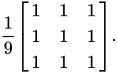
Due to its property of using equal weights, it can be implemented using a much simpler accumulation algorithm, which is significantly faster than using a sliding-window algorithm.[1]
Box blurs are frequently used to approximate a Gaussian blur.[2] By the central limit theorem, repeated application of a box blur will approximate a Gaussian blur.[3]
In the frequency domain, a box blur has zeros and negative components. That is, a sine wave with a period equal to the size of the box will be blurred away entirely, and wavelengths shorter than the size of the box may be phase-reversed, as seen when two bokeh circles touch to form a bright spot where there would be a dark spot between two bright spots in the original image.
Extensions
[edit]- Gwosdek, et al. has extended Box blur to take a fractional radius: the edges of the 1-D filter are expanded with a fraction. It makes slightly better gaussian approximation possible due to the elimination of integer-rounding error.[3]
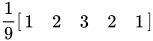
- Mario Klingemann has a "stack blur" that tries to better emulate gaussian's look in one pass by stacking weights: [4][5] The triangular impulse response it forms decomposes to two rounds of box blur.[3]
- Stacked Integral Image by Bhatia et al. takes the weighted average of a few box blurs to fit the gaussian response curve.[3]
Implementation
[edit]The following pseudocode implements a 3x3 box blur.
Box blur (image)
{
    set newImage to image;

    For x /*row*/, y/*column*/ on newImage do:
    {
        // Kernel would not fit!
        If x < 1 or y < 1 or x + 1 == width or y + 1 == height then:
            Continue;
        // Set P to the average of 9 pixels:
           X X X
           X P X
           X X X
        // Calculate average.
        Sum = image[x - 1, y + 1] + // Top left
              image[x + 0, y + 1] + // Top center
              image[x + 1, y + 1] + // Top right
              image[x - 1, y + 0] + // Mid left
              image[x + 0, y + 0] + // Current pixel
              image[x + 1, y + 0] + // Mid right
              image[x - 1, y - 1] + // Low left
              image[x + 0, y - 1] + // Low center
              image[x + 1, y - 1];  // Low right

        newImage[x, y] = Sum / 9;
    }

    Return newImage;
}
The example does not handle the edges of the image, which would not fit inside the kernel, so that these areas remain unblurred. In practice, the issue is better handled by: [3]
- Introducing an alpha channel to represent the absence of colors;
- Extending the boundary by filling in values, ranked by quality:
- Fill in a mirrored image at the border
- Fill in a constant color extending from the last pixel
- Pad in a fixed color
A number of optimizations can be applied when implementing the box blur of a radius r and N pixels:[6]
- The box blur is a separable filter, so that only two 1D passes of averaging 2 r + 1 pixels will be needed, one horizontal and one vertical, for each pixel. This lowers the complexity from O(Nr2) to O(Nr). In digital signal processing terminology, each pass is a moving-average filter.
- Accumulation. Instead of discarding the sum for each pixel, the algorithm re-uses the previous sum, and updates it by subtracting away the old pixel and adding the new pixel in the blurring range. A summed-area table can be used similarly. This lowers the complexity from O(Nr) to O(N).
- When being used in multiple passes to approximate a Gaussian blur, the cascaded integrator–comb filter construction allows for doing the equivalent operation in a single pass.[7]
See also
[edit]References
[edit]- ^ Wojciech Jarosz. 2001. Fast Image Convolutions.
- ^ W3C SVG1.1 specification, 15.17 Filter primitive 'feGaussianBlur'.
- ^ a b c d e Getreuer, Pascal (17 December 2013). "ASurvey of Gaussian Convolution Algorithms". Image Processing on Line. 3: 286–310. doi:10.5201/ipol.2013.87. (code doc)
- ^ "Stackblur and Quadratic Stackblur". observablehq.com. 12 November 2018.
- ^ "How to Blur an Image on Android". Medium. 10 February 2020.
- ^ Kutsvir, Ivan. "Fastest Gaussian Blur (in linear time)". Retrieved 4 April 2020.
- ^ Sitaker, Kragen. "Hmm, aside from my note about how the family of kernels Costella discovered are precisely the uniform cardinal B-splines..." Hacker News.
 | This photography-related article is a stub. You can help Wikipedia by expanding it. |
Box blur
View on GrokipediaFundamentals
Definition
Box blur is a spatial domain linear filter in digital image processing, where each pixel in the output image is computed as the average value of the pixels within a rectangular neighborhood surrounding the corresponding input pixel.[5] This neighborhood, often square-shaped, gives the filter its name due to the uniform "box" region it considers.[6] Unlike weighted blur filters such as Gaussian blur, box blur assigns equal weight to every pixel in the kernel, resulting in a simple uniform averaging operation that smooths the image by reducing high-frequency details.[5] For instance, in a one-dimensional case, a box blur with a kernel size of three would replace each pixel value with the average of itself and its two immediate neighbors, effectively blending adjacent intensities to soften transitions.[7] Box blur emerged as a foundational convolution-based filtering technique in the early development of digital image processing during the 1960s and 1970s, particularly in applications like space exploration imagery at institutions such as the Jet Propulsion Laboratory, where basic linear filters were adapted from one-dimensional signal processing methods.[8] It lacks a specific inventor, instead representing a straightforward extension of averaging principles in nascent computational imaging systems of that era.[8] The underlying operation relies on convolution, which slides the filter across the image to compute localized averages.[9]Basic Principles
Box blur functions as a low-pass filter in image processing, attenuating high-frequency components while preserving lower-frequency details, which results in smoothing the image by reducing sharp transitions between pixels.[1] This filtering effect averages pixel values over a rectangular neighborhood, effectively dampening rapid intensity changes that correspond to edges and fine textures.[1] Visually, box blur produces a uniform softening of edges across the image due to its equal weighting of neighboring pixels, which helps reduce noise by suppressing high-frequency variations often associated with sensor artifacts or grain.[10] When implemented with square kernels, box blur exhibits isotropic behavior in the horizontal and vertical directions, applying the same averaging extent equally along the cardinal axes.[11] Repeated applications of this square kernel filter tend to produce blur patterns that approximate circular shapes, as the cumulative effect diffuses intensities more evenly in all directions. The repeated application of box blur serves as a foundational approximation for more natural blurring effects, conceptually drawing from the central limit theorem, where successive convolutions with a uniform kernel converge toward a Gaussian distribution.[12]Mathematical Formulation
Kernel Representation
The box blur kernel, also known as a uniform or average filter kernel, is defined as a rectangular matrix filled with identical values, each equal to the reciprocal of the total number of elements in the matrix to ensure normalization. For a square kernel of size , where and is the blur radius, the kernel consists of elements, each set to . This uniform weighting averages the pixel values within the kernel's neighborhood, producing an equal contribution from each covered pixel.[13] A representative example is the 3×3 kernel corresponding to a radius of 1, given by This structure maintains the kernel's sum at 1, preserving the overall image intensity during convolution.[13] Rectangular variants extend this to non-square dimensions, such as width and height , where each of the elements is . These allow for anisotropic blurring, applying stronger smoothing along one axis (e.g., horizontal or vertical) by adjusting the respective dimensions independently.[14] For computational efficiency in practical implementations, the kernel is often represented using integer arithmetic rather than floating-point values. In this approach, the matrix contains all 1's without pre-division, enabling simple integer summation of neighboring pixels followed by a single division by the element count, which reduces multiplication overhead and leverages fixed-point operations on hardware.Convolution Process
The convolution process for box blur applies the uniform box kernel to an image by computing a weighted average of neighboring pixels for each output pixel, effectively smoothing the image through local averaging. To illustrate, consider a one-dimensional analogy first: for a signal , the output at position is obtained by averaging the values over a window of radius , given by where the uniform weights sum to 1 for normalization.[15] This 1D operation highlights the core mechanism of sliding a uniform filter and computing the mean within the window.[15] In two dimensions, the process extends separably to images, where the box kernel—defined previously as a matrix of uniform values—is applied first horizontally and then vertically, or vice versa, to achieve the full 2D effect. For an input image and a kernel of size (with all ), the output image at position is where for odd , and the sum is normalized by the kernel's total weight to preserve intensity averages.[9] The step-by-step application involves positioning the kernel center at each output pixel, multiplying the kernel values (all equal for the box filter) by the corresponding input pixel intensities, summing these products, and dividing by the number of kernel elements to yield the blurred value. This sliding window repeats across the entire image grid.[15][1] Boundary effects arise near image edges, where the kernel may extend beyond the valid pixel domain, leading to incomplete windows and potential artifacts or pixel cropping. Common handling methods include zero-padding, which sets out-of-bounds values to zero (reducing intensity at borders); replication, which copies the nearest edge pixel; or mirroring, which reflects values across the boundary for smoother transitions.[15] These techniques ensure the convolution can be computed for all positions without data loss, though they introduce slight biases depending on the method chosen.[15]Properties
Computational Complexity
The naive implementation of the box blur applies a direct 2D convolution using a uniform square kernel of side length , where is the blur radius. For an image with pixels, this requires computing the sum of input values for each output pixel, resulting in a time complexity of .[16] The box filter is separable, meaning the 2D kernel can be expressed as the outer product of two 1D kernels of length . This allows the convolution to be performed in two passes: a horizontal 1D convolution followed by a vertical 1D convolution (or vice versa). Each pass has a time complexity of , yielding an overall time complexity of .[17][16] In terms of space complexity, the standard separable implementation requires additional space to store an intermediate image after the first pass and the final output image. In-place processing of individual rows or columns during the passes can reduce this to additional space beyond the input and output buffers, though careful handling is needed to avoid artifacts from overlapping computations.[16] For large values of , the linear dependence on in the separable time complexity leads to significant performance degradation, particularly for high-resolution images where is large, making real-time applications challenging without further algorithmic improvements.[17]Frequency Domain Characteristics
The frequency response of the box blur kernel is obtained through its discrete-time Fourier transform (DTFT), which for a one-dimensional uniform kernel of length yields a Dirichlet kernel approximating the sinc function: where is the normalized angular frequency.[18][19] This form exhibits a central main lobe centered at zero frequency, followed by oscillating sidelobes that decay inversely with frequency.[20] The sinc-like response features zeros at frequencies (or normalized ) for nonzero integers not multiples of , marking complete attenuation at these discrete harmonics.[21] These nulls, combined with the linear phase term and negative values in the sidelobes, introduce phase reversals in the passband edges and beyond, contributing to distortion in filtered signals.[22] As a low-pass filter, the box blur attenuates high spatial frequencies primarily through its main lobe, providing relatively uniform gain near zero frequency before the first zero at . However, the persistent sidelobes cause incomplete suppression of higher frequencies, leading to ringing artifacts—oscillatory overshoots and undershoots—particularly near sharp edges in images.[23][22] In two dimensions, for a square kernel, the frequency response is the separable product of two one-dimensional sinc functions, , resulting in an approximately isotropic response with a near-circular cutoff in the low-frequency region, though higher-frequency behavior shows cross-like patterns along the axes due to separability.[18] This approximates an ideal low-pass filter conceptually, but the sidelobes induce Gibbs phenomenon-like ringing, where edge discontinuities exhibit amplified oscillations up to about 9% overshoot, unlike the sharp rectangular cutoff of an ideal filter.[23][20]Implementations
Naive Approach
The naive approach to implementing box blur relies on direct 2D convolution, where each output pixel is computed as the average of the input pixels within a rectangular neighborhood defined by the box kernel. This method uses nested loops to iterate over every pixel in the image and, for each one, sums the weighted contributions from the corresponding kernel positions, then normalizes by the kernel's total weight (which is 1 for a uniform box kernel).[24] To handle image boundaries in this straightforward manner, zero-padding is typically applied, treating pixels outside the image borders as having zero intensity. This simple extension avoids complex interpolation but can introduce minor artifacts near edges, such as darkened borders for positive-valued images. The following pseudocode illustrates the process for a grayscale image:function box_blur_naive([image](/page/Image), kernel_size):
height, width = size([image](/page/Image))
output = zeros(height, width)
half_k = kernel_size // 2
num_pixels = kernel_size * kernel_size
for i in 0 to height-1:
for j in 0 to width-1:
sum = 0
for di in -half_k to half_k:
for dj in -half_k to half_k:
ii = i + di
jj = j + dj
if 0 <= ii < height and 0 <= jj < width:
sum += [image](/page/Image)[ii][jj]
# else: sum += 0 (zero-padding implicit)
output[i][j] = sum / num_pixels
return output
function box_blur_naive([image](/page/Image), kernel_size):
    height, width = size([image](/page/Image))
    output = zeros(height, width)
    half_k = kernel_size // 2
    num_pixels = kernel_size * kernel_size

    for i in 0 to height-1:
        for j in 0 to width-1:
            sum = 0
            for di in -half_k to half_k:
                for dj in -half_k to half_k:
                    ii = i + di
                    jj = j + dj
                    if 0 <= ii < height and 0 <= jj < width:
                        sum += [image](/page/Image)[ii][jj]
                    # else: sum += 0 (zero-padding implicit)
            output[i][j] = sum / num_pixels
    return output
# Example 4x4 [grayscale](/page/Grayscale) [image](/page/Image) (values 0-255)
img = [
    [100, 150, 200, 50],
    [80, 120, 180, 90],
    [60, 110, 160, 70],
    [40, 90, 140, 30]
]

# Apply 3x3 box blur (output will be 4x4 with zero-padding effects at edges)
half_k = 1
num_pixels = 9
output = [[0 for _ in range(4)] for _ in range(4)]

for i in range(4):
    for j in range(4):
        total = 0
        for di in range(-1, 2):
            for dj in range(-1, 2):
                ii, jj = i + di, j + dj
                if 0 <= ii < 4 and 0 <= jj < 4:
                    total += img[ii][jj]
                # else: total += 0
        output[i][j] = total / 9.0  # Zeros dilute edge sums

# Sample output at [1][1]: average of 9 pixels around it (full window)
# Pixels: 100,150,200; 80,120,180; 60,110,160 → sum=1160, avg≈128.89
# Example 4x4 [grayscale](/page/Grayscale) [image](/page/Image) (values 0-255)
img = [
    [100, 150, 200, 50],
    [80, 120, 180, 90],
    [60, 110, 160, 70],
    [40, 90, 140, 30]
]

# Apply 3x3 box blur (output will be 4x4 with zero-padding effects at edges)
half_k = 1
num_pixels = 9
output = [[0 for _ in range(4)] for _ in range(4)]

for i in range(4):
    for j in range(4):
        total = 0
        for di in range(-1, 2):
            for dj in range(-1, 2):
                ii, jj = i + di, j + dj
                if 0 <= ii < 4 and 0 <= jj < 4:
                    total += img[ii][jj]
                # else: total += 0
        output[i][j] = total / 9.0  # Zeros dilute edge sums

# Sample output at [1][1]: average of 9 pixels around it (full window)
# Pixels: 100,150,200; 80,120,180; 60,110,160 → sum=1160, avg≈128.89
Optimized Techniques
One key optimization for box blur leverages its separability, as the uniform rectangular kernel can be decomposed into two one-dimensional convolutions: one horizontal and one vertical. This approach reduces the computational complexity from O(N²K²) for a naive 2D convolution on an N×N image with K×K kernel to O(N²K), where K is the kernel dimension, by performing two linear passes instead of a full 2D operation.[27] The horizontal pass applies a 1D box filter along each row, averaging K pixels centered on the current position. Pseudocode for this step, assuming a grayscale imageinput of size height × width and kernel size K (odd for simplicity), is as follows:
for y in 0 to height-1:
    for x in 0 to width-1:
        row_sum = 0
        half = K // 2
        for dx in -half to half:
            xx = x + dx
            if 0 <= xx < width:
                row_sum += input[y][xx]
            # else: row_sum += 0 (zero-padding implicit)
        output[y][x] = row_sum / K
for y in 0 to height-1:
    for x in 0 to width-1:
        row_sum = 0
        half = K // 2
        for dx in -half to half:
            xx = x + dx
            if 0 <= xx < width:
                row_sum += input[y][xx]
            # else: row_sum += 0 (zero-padding implicit)
        output[y][x] = row_sum / K
Comparisons
Versus Gaussian Blur
The box blur, also known as a uniform or mean filter, applies equal weights to all pixels within its kernel, resulting in a simple average of neighboring values.[1] In contrast, the Gaussian blur employs a kernel derived from the Gaussian distribution, where weights decrease radially from the center according to a bell-shaped curve, emphasizing central pixels more heavily and providing a more gradual falloff.[31] This difference in weighting leads to distinct blurring behaviors: the uniform approach of the box blur produces a more abrupt transition in pixel intensities, often yielding a blockier appearance with preserved sharp edges but potential artifacts like flat regions.[32] Gaussian blur, however, achieves a smoother, more natural diffusion of intensities, better attenuating high-frequency details without introducing such blockiness or ringing effects.[1] Computationally, the box blur benefits from its uniform kernel, enabling efficient separable implementation via horizontal and vertical passes, achieving O(N r) complexity where N is the image size and r the radius.[33] Gaussian blur shares separability but requires generating or precomputing the weighted kernel, which can increase overhead; direct 2D convolution would be O(N r^2), though practical implementations approximate it separably for similar efficiency, making box blur generally faster for equivalent radii.[1] An important relation arises from the central limit theorem: repeated applications of a box blur converge toward a Gaussian blur, as the convolution of uniform distributions approximates the normal distribution with increasing iterations.[1] For instance, binomial filters—obtained by successive box convolutions—closely mimic Gaussian kernels, allowing box blurs to serve as a computationally lightweight proxy for Gaussian effects in scenarios requiring multiple passes.[1]Versus Median Blur
Box blur operates as a linear filter by computing the uniform average of pixel values within a rectangular kernel, resulting in smooth, uniform blurring across the image that treats all pixels equally regardless of their intensity distribution.[34] In contrast, median blur is a non-linear filter that sorts the pixel intensities in the kernel and replaces the central pixel with the median value, which effectively mitigates impulsive noise like salt-and-pepper artifacts while better preserving sharp edges and fine details.[35] This non-linearity allows median blur to handle outlier pixels without diluting their impact across neighboring regions, unlike the averaging approach in box blur that distributes noise evenly.[36] A key difference in artifact generation arises from their handling of noise: box blur integrates anomalous pixels (such as bright salt or dark pepper spots) into the local average, potentially spreading the noise and creating hazy transitions around affected areas.[37] Median blur, however, isolates and removes these outliers by selecting the median, which clusters unaffected pixels and prevents noise propagation, leading to cleaner denoising without introducing blurring artifacts in uniform regions.[34] These distinctions drive divergent use cases: box blur excels in general-purpose smoothing tasks where uniform diffusion is desired, such as preliminary image softening or anti-aliasing preparation.[32] Median blur is preferred for denoising scenarios requiring edge preservation, particularly in medical imaging or photography corrupted by impulsive noise, where maintaining structural integrity outweighs uniform smoothness.[35] In terms of computational complexity, the naive box filter requires O(N r²) operations for an image of N pixels and kernel radius r, as each pixel demands processing a window of size proportional to r². The naive median filter, however, requires O(N r² log r²) operations due to the sorting step needed to determine the median value for each window, making it more computationally demanding than the simple summation and division in box blur, though optimizations like histogram-based methods can mitigate this for median implementations.[38][39]Applications
In Image Processing
In image processing, box blur serves as a fundamental tool for softening images by averaging pixel values within a defined rectangular kernel, which reduces sharpness and creates artistic effects such as diffused highlights or subtle gradients. This technique is particularly useful in professional software like Adobe Photoshop, where the Box Blur filter applies a uniform average to neighboring pixels, allowing artists to achieve a smooth, non-directional softening without the weighted falloff of more complex blurs.[40] For instance, it enables retouching portraits or landscapes to mimic atmospheric haze, preserving overall structure while minimizing harsh edges.[41] Box blur also plays a key role in anti-aliasing during rendering pipelines, where it pre-blurs jagged edges caused by discrete pixel sampling to produce smoother transitions in computer-generated imagery. By convolving the image with a simple box kernel—essentially averaging values across a pixel area—it acts as a low-pass filter that attenuates high-frequency aliasing artifacts before final sampling, a method commonly employed in graphics education and implementation for its computational simplicity.[42] This approach is especially effective in real-time graphics systems, where it helps mitigate moiré patterns or stair-stepping on diagonal lines without requiring supersampling.[43] For noise reduction in photography post-processing, box blur functions as a basic mean filter that suppresses random pixel variations by averaging intensities over a local neighborhood, effectively lowering variance in uniform areas like skies or shadows. This makes it a starting point for denoising workflows, where it smooths salt-and-pepper or Gaussian noise while retaining broader scene details, though it may inadvertently blur fine textures if the kernel size is too large.[32] In real-time applications like video games, box blur facilitates efficient motion blur simulation by rapidly averaging frames or pixel trails to convey speed and dynamism, capitalizing on its low computational overhead for separable implementations that process rows and columns independently. This enables developers to approximate the streaking effect of fast-moving objects on modern GPUs without taxing performance, enhancing immersion in racing or action titles where full per-object motion vectors might be prohibitive.[44] Its uniform kernel ensures quick integration into post-processing pipelines, often as a building block for more advanced blur effects.[45]As Blur Approximation
Box blur serves as an efficient surrogate for more sophisticated blurring operations, particularly in scenarios where computational resources are limited. By applying a box blur repeatedly, its uniform averaging can approximate the smoother, bell-shaped response of a Gaussian blur through the central limit theorem, which states that the convolution of multiple identical distributions tends toward a Gaussian as the number of iterations increases. Specifically, performing iterations of a box blur with radius yields a kernel whose variance approximates that of a Gaussian with standard deviation , enabling near-Gaussian results with controlled error. Error bounds for this approximation are typically , where is the grid spacing, and practical accuracy is achieved with as few as 5 iterations for a range of standard deviations.[46] This repeated application provides significant efficiency gains in real-time systems, such as interactive graphics rendering, where direct Gaussian convolution—requiring operations per pixel—would be prohibitive. Instead, optimized box blurs can be implemented in linear time relative to image size , independent of radius, making them suitable for resource-constrained environments like mobile graphics pipelines. For instance, in post-processing pipelines, stacked box filters reduce the per-pixel cost to a constant number of operations, facilitating real-time frame rates without specialized hardware.[46][47] Beyond Gaussian simulation, box blur approximates other effects in computer graphics, such as motion blur and depth-of-field. For motion blur, a 1D box filter along the direction of linear motion averages pixel contributions over the displacement path, providing a uniform streak effect in constant time via separable shearing and filtering techniques. Similarly, for depth-of-field, box filters model defocus as rectangular spreading of pixel intensities in an intermediate buffer, enabling artifact-free approximations at cost per pixel regardless of blur radius. These uses leverage the filter's simplicity for spatially varying blurs in rendering pipelines.[47] However, box blur's limitations as an approximator stem from its uniform kernel, which in a single pass produces blocky artifacts unsuitable for smooth gradients, necessitating multiple iterations for fidelity to target distributions like Gaussian. Stacking mitigates this but increases passes, trading off against the very efficiency that makes it attractive.[46]Extensions
Fractional Radius
The fractional radius extension to box blur enables sub-pixel precision by allowing non-integer kernel sizes, providing finer control over blur intensity without discrete quantization artifacts. This approach, introduced by Gwosdek et al., modifies the standard uniform box filter through weighted averages at the kernel edges to approximate a continuous box kernel with an arbitrary radius Λ, decomposed into an integer part and a fractional component.[46] In the algorithm, the radius is split into an integer length L and a fractional offset handled via interpolation weights, where the kernel applies uniform averaging over the integer span but adjusts the endpoints with fractional weights proportional to the offset (e.g., w = α/Λ, where α is the fractional part). This is implemented separably in horizontal and vertical passes, leveraging the sliding window technique for efficient computation: each pixel update incorporates the added or subtracted contributions from neighboring pixels, modified by the fractional weights to simulate sub-pixel shifts. The process maintains the O(n) linear runtime of the base box filter while achieving higher-order consistency (O(h²) error as grid spacing h approaches zero).[46] This method yields smoother transitions between blur levels compared to integer-only radii, making it particularly suitable for animations, sub-pixel rendering in graphics, and applications requiring variable blur strengths without abrupt changes. For instance, it supports precise Gaussian approximations via multiple iterations, with mean squared error as low as 0.030 for σ = 0.5 after five passes. Implementation introduces minor additional complexity in the update equations due to the fractional terms but remains highly efficient and parallelizable, often using boundary reflection for edge handling.[46]Stacked Variants
Stacked variants of box blur involve applying multiple box blur operations sequentially or using algorithmic structures that simulate stacking to achieve more sophisticated effects, such as approximating a Gaussian blur while maintaining computational efficiency.[48] By the central limit theorem, the repeated convolution of an image with a uniform box filter results in a kernel that broadens and converges toward a Gaussian distribution as the number of iterations increases, providing a smoother, more natural blur than a single box application.[48] This approach leverages the separability of box filters, typically performing horizontal and vertical passes in each iteration, to reduce complexity from per pixel in a single large box to more manageable multiple smaller operations. A prominent stacked variant is the Stack Blur algorithm, developed by Mario Klingemann in 2004, which employs a virtual stack data structure to weight pixel contributions during the blur process, emulating a Gaussian-like effect without full kernel convolution.[49] In this method, the algorithm scans the image line by line, maintaining a "stack" or tower of pixel colors where the central pixel receives the highest weight, and edge pixels are progressively de-emphasized; as the scan advances, pixels are added to one end and removed from the other, with linear interpolation adjusting the stack's values to preserve smoothness.[49] This results in a blur that is visually comparable to Gaussian filtering but executes faster on CPUs, often by an order of magnitude for large radii, due to avoiding explicit multiplications and full neighborhood summations.[49] Implementations of stacked box blurs, including Stack Blur, are widely used in real-time applications like web rendering and mobile graphics, where they balance quality and performance; for instance, multiple iterations of a small box filter (e.g., 3x3 kernel) can approximate a Gaussian with standard deviation increasing approximately as σ ≈ 0.8 √k, where k is the number of iterations (e.g., σ ≈ 1.4 for k=3 and σ ≈ 1.8 for k=5),[50] while larger stacks enable higher σ values up to 50 or more without excessive aliasing. These variants extend the basic box blur's utility by mitigating its uniform averaging artifact, producing results that are less blocky and more isotropic, though they may introduce minor directional biases in finite iterations compared to true Gaussian kernels.[48]References
- The box filter is not a perfect blurring filter. A blur filter should attenuate high spatial frequencies with stronger attenuation for higher spatial ...