



Community hub
DSL modem
View on Wikipedia
 | This article needs additional citations for verification. (September 2013) |

A digital subscriber line (DSL) modem is a device used to connect a computer or router to a telephone line which provides the digital subscriber line (DSL) service for connection to the Internet, which is often called DSL broadband. The modem connects to a single computer or router, through an Ethernet port, USB port, or is installed in a computer PCI slot.
The more common DSL router is a standalone device that combines the function of a DSL modem and a router, and can connect multiple computers through multiple Ethernet ports or an integral wireless access point. Also called a residential gateway, a DSL router usually manages the connection and sharing of the DSL service in a home or small office network.
Different DSL routers and modems support different DSL technology variants: VDSL, SDSL, and ADSL.
Description
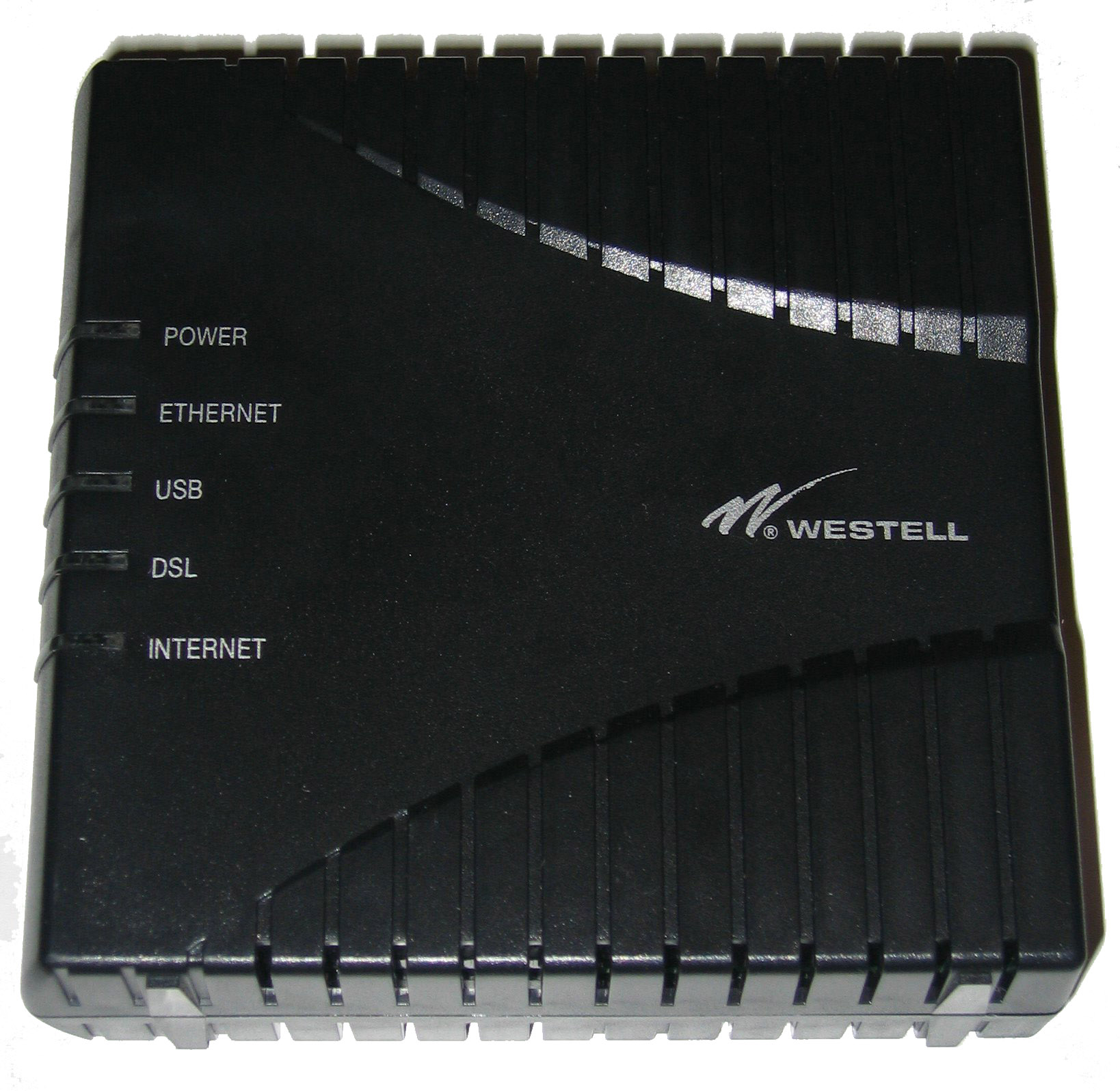
[edit]A DSL router consists of a box with an RJ11 jack to connect to a standard subscriber telephone line. It has several RJ45 jacks for Ethernet cables to connect it to computers or printers, creating a local network. It usually also has a USB jack which can be used to connect to computers via a USB cable, to allow connection to computers without an Ethernet port. A wireless DSL router also has antennas to allow it to act as a wireless access point, so computers can connect to it forming a wireless network. Power is usually supplied by a cord from a wall wart transformer.
It usually has a series of LED status lights which show the status of parts of the DSL communications link:
- Power light - indicates that the modem is turned on and has power
- Ethernet lights - there is usually a light over each Ethernet jack; a steady (or sometimes flashing) light indicates that the Ethernet link to that computer or device is functioning
- DSL light - a steady light indicates that the modem has established contact with the equipment in the local telephone exchange (DSLAM) so the DSL link over the telephone line is functioning; newer modems that support ADSL2+ bonding will have one light for each line[1]
- Internet light - a steady light indicates that the IP address and DHCP protocol are initialized and working, so the system is connected to the Internet
- Wireless light - (only in wireless DSL modems) indicates that the wireless network is initialized and working
Many routers provide an internal web page to the local network for device configuration and status reporting. Most DSL routers are designed to be installed by the customer for which a CD or DVD containing an installation program is supplied. The program may also activate the DSL service. Upon powering the router it may take several minutes for the local network and DSL link to initialize, usually indicated by the status lights turning green. There are also PCI DSL modems, which plug into an available PCI card slot on a computer.
Technology
[edit]DSL concept
[edit]The public switched telephone network, the network of switching centers, trunk lines, amplifiers and switches which transmits telephone calls from one phone to another, is designed to carry voice frequency signals, and is therefore limited to a bandwidth of 3.4 kHz. Before DSL, voice-band modems transmitted information through the telephone network with audio frequencies within that bandwidth, which limited them to a data rate of about 56 kbit/s. However, the copper wires that connect telephones with the local switching center (telephone exchange), called the subscriber loop, are actually able to carry a much wider band of frequencies, up to several megahertz.[2] This capacity is unused in normal phone service. DSL uses these higher frequencies to send digital data between the DSL modem and the local switching center, without interfering with normal telephone service. At the local switching center the data is transferred directly between the customer's phone line and internet lines, so DSL signals do not travel through the telephone network itself. It is not necessary to dial a telephone number to initiate a connection; the DSL connection is "on" whenever the modem is on.
Data transmission
[edit]The device at the local switching center which communicates with the DSL modem is called a Digital Subscriber Line Access Multiplexer (DSLAM), which is connected directly to the Internet.[2] The local switching center must be equipped with these devices to offer DSL service.
With ADSL, the modem and the DSLAM communicate by a protocol called discrete multitone modulation (DMT), which is a form of frequency division multiplexing.[2] The modem only uses frequencies above 8 kHz, to avoid interfering with normal phone service. The bandwidth of the line between 8 kHz and about 1 MHz is divided into 247 separate channels, each 4 kHz wide.[2] A separate carrier signal carries information in each channel. Thus the system acts like 247 separate modems operating simultaneously. The bits of the incoming digital data are split up and sent in parallel over the channels. Each data stream is sent using an error-correcting code to allow minor bit errors due to noise to be corrected at the receiving end. Most of the channels are unidirectional, carrying download data from the DSLAM to the modem, but some on the low frequency end are bidirectional, to carry the smaller quantity of upload traffic. The modem constantly monitors the transmission quality on each channel, and if it is too impaired it will shift the signal to other channels. The modem is constantly shifting data between channels searching for the best transmission rates.[2] Thus interference or poor quality lines will generally not interrupt transmission, but only cause the data rate of the modem to degrade.
For example, when downloading a web page, the packets of web page data travel over optical fiber Internet lines from the server computer directly to the DSLAM at the neighborhood telephone exchange. At the DSLAM they are split into as many as 247 parallel data streams. Each is modulated onto a separate carrier signal and sent through a separate frequency channel over the subscriber's telephone line to the DSL modem. The modem demodulates the carrier, extracting the data stream from each carrier signal, performs error correction, puts the data together again in the proper order, and sends it to the computer over the Ethernet line, or for a wireless (Wi-Fi) network by radio signals.
Data rates and access
[edit]Most consumer DSL lines use one of several varieties of Asymmetric DSL (ADSL).[2] The "asymmetric" means that more of the bandwidth of the line is dedicated to downstream (download) data than upstream (upload) data, so, download rates are faster than upload rates, because most users download much larger quantities of data than they upload. Because the telephone lines were never designed to carry such high frequency signals, DSL is distance-sensitive. The farther away from the switching center the modem is, the longer the telephone wires, the weaker the signal, and the lower the data rate that the modem can achieve. Users in cities, close to switching centers, may have access to higher rate service, up to 24 Mbit/s.[2] The distance limit for ADSL is 18 000 feet (5.5 km or 3.4 miles).[2] However, other devices installed in telephone lines by the phone company, such as loading coils and bridge taps, block the signal, and may disqualify a given phone line from DSL service.
Filters
[edit]To prevent the DSL signal from entering the phone lines into telephones, answering machines, faxes and other devices where it could cause interference, DSL modems come with low pass filters which must be plugged into the phone lines going to all voiceband devices on the same line. The filter blocks all frequencies above 4 kHz, so it blocks the DSL signal while allowing voice frequency signals through. A filter must not be inserted in the phone line going to the DSL modem, because it would block the communication between the modem and switching center.
Comparison to voice-band modems
[edit]A DSL modem modulates high-frequency tones for transmission to a digital subscriber line access multiplexer (DSLAM), and receives and demodulates them from the DSLAM. It serves fundamentally the same purpose as the voice-band modem that was a mainstay in the late 20th century, but differs from it in important ways.
- DSL modems transfer data at a rate which is at least 10 to 20 times that of a voice-band modem.
- DSL does not interfere with normal telephone calls on the telephone line, and does not require dialing a telephone number to initiate a connection, it is always "on". A voice-band modem dials a telephone number to initiate a connection, and while it is connected the telephone line cannot be used for normal telephone service.
- DSL routers, the most common form of DSL modem, are external to the computer and wired to the computer's Ethernet port or its USB port, whereas voice-band modems are usually internal devices installed in the computer itself in a PCI interface slot in the back. Internal DSL modems are rare but available.
- Microsoft Windows and other operating systems regard voice-band modems as part of the hardware of the computer, and similarly to other parts of the computer's hardware such as the mouse or hard disk are configured through the Windows Control Panel. In contrast, DSL routers are regarded as separate nodes in the LAN (local area network). DSL modems rarely require manual configuration or attention, but when they do, they can be accessed using a web browser. Routers usually have a webpage, accessed by typing an IP address given in the router's manual into the browser's address bar, with which various technical changes can be made, such as changing the wireless network's password, and adjusting the router's firewall.
- For external DSL modems connected by USB, Microsoft Windows and other operating systems generally recognize these as a Network interface controller.
- For internal DSL modems, Microsoft Windows and other operating systems provide interfaces similar to those provided for voice-band modems. This is based on the assumption that in the future, as CPU speeds increase, internal DSL modems may become more mainstream.
- DSL modems use frequencies from 25 kHz to above 1 MHz (see Asymmetric Digital Subscriber Line), in order not to interfere with voice service which is primarily 0–4 kHz. Voice-band modems use the same frequency spectrum as ordinary telephones, and will interfere with voice service - it is usually impossible to make a telephone call on a line which is being used by a voice-band modem. Because a single phone line commonly carries DSL and voice, DSL filters are used to separate the two uses.
- DSL modems vary in data speed from hundreds of kilobits per second to many megabits, while voice-band modems are nominally 56K modems and actually limited to approximately 50 kbit/s.
- DSL modems exchange data with only the DSLAM to which they are wired, which in turn connects them to the Internet, while most voice-band modems can dial directly anywhere in the world.
- DSL modems are intended for particular protocols and sometimes won't work on another line even from the same company, while most voice-band modems use international standards and can "fall back" to find a standard that will work.[citation needed]
Most of these differences are of little interest to consumers, except the greater speed of DSL and the ability to use the telephone even when the computer is online.
Hardware components
[edit]
As technology advances, functions that are provided by multiple chips can be integrated onto one chip. Higher levels of integration have benefited DSL just as they benefited other computer hardware. A DSL modem requires the following for its operation; exactly what is on the circuit card and how it is arranged can change as technology improves:
- Power supply
- Data connection and power circuitry (for example, USB, Ethernet, PCI)
- DSL digital data pump
- DSL analog chip and line driver
- Microcontroller
- Filter
Service features
[edit]Apart from connecting to a DSL service, many modems offer additional integrated features, forming a residential gateway:
- An 802.11n or 802.11ac wireless access point
- DNS (Domain Name System) caching, a relay or proxy DNS cache which queries DNS servers on the Internet
- Dynamic Host Configuration Protocol (DHCP) server
- Router functionality that includes Network Address Translation (NAT) to share a single IPv4 address.
- A built-in switch (typically 4 ports)
- Voice over Internet Protocol functionality including quality of service (priority control for data flows between users)
- Virtual Private Network termination
See also
[edit]References
[edit]External links
[edit] Media related to ADSL modems at Wikimedia Commons
DSL modem
View on GrokipediaIntroduction
Definition and Purpose
A DSL modem is a device that modulates and demodulates digital subscriber line (DSL) signals, converting digital data from a user's computer or network into analog signals for transmission over twisted-pair copper telephone lines, and vice versa.[6] This process enables the delivery of high-bandwidth data, such as internet traffic, without requiring new cabling infrastructure.[6] The primary purpose of a DSL modem is to provide high-speed broadband internet access by leveraging existing telephone lines, allowing simultaneous voice and data services without interference between them.[6] Unlike traditional dial-up connections limited to around 56 kbps and requiring line occupation during use, DSL modems offer always-on connectivity, supporting persistent internet sessions for applications like web browsing and email.[6] This makes DSL a cost-effective solution for residential and small business users seeking speeds beyond dial-up limitations. In operation, the DSL modem serves as a bridge between the end-user's local network—such as a computer, router, or Ethernet device—and the internet service provider's network, specifically interfacing with a digital subscriber line access multiplexer (DSLAM) at the provider's central office.[7] Data flow can be asymmetric, with higher downstream speeds for downloading (common in variants like ADSL for consumer web use) or symmetric for balanced upload and download needs, depending on the DSL technology employed.[6] DSL modems were initially deployed in the early 1990s to meet rising demand for faster internet access amid the limitations of dial-up modems.[8]Historical Development
The roots of DSL modem technology trace back to research in the 1980s by Bell Labs and AT&T, which explored leveraging existing twisted-pair telephone lines for data transmission beyond voice services.[8] In 1988, AT&T Bell Labs filed a patent on the foundational DSL concept, enabling high-speed digital signals over copper wires without disrupting analog phone service.[9] This work built on earlier efforts like the Integrated Services Digital Network (ISDN), introduced in the 1980s as a digital upgrade to analog lines, providing basic packet-switched data at rates up to 144 kbit/s and serving as a key precursor to full DSL implementations.[10] A pivotal advancement came in 1989 when Joseph Lechleider, an engineer at Bellcore (later Telcordia), proposed the asymmetric DSL (ADSL) concept through mathematical analysis demonstrating the feasibility of higher downstream bandwidth for consumer applications like video-on-demand, while keeping upstream modest to suit typical usage patterns.[11] Lechleider's insight, patented and prototyped by 1991, fundamentally shaped DSL by optimizing spectrum allocation above voice frequencies.[12] Commercialization accelerated in the 1990s amid surging demand for broadband internet. ANSI's T1E1.4 committee released the first ADSL standard, T1.413, in August 1995, defining metallic interface specifications for up to 6 Mbit/s downstream over short loops.[13] Companies like Paradyne and Westell emerged as leaders, with Paradyne developing early ADSL chipsets and Westell deploying the first commercial ADSL systems for Bell Atlantic (now Verizon) in 1998, enabling video-on-demand trials.[14] The ITU-T formalized global interoperability through Recommendation G.992.1 in June 1999, adopting discrete multitone (DMT) modulation for full-rate ADSL up to 8 Mbit/s downstream.[15] Standards bodies played crucial roles: ITU-T led physical layer specifications via its G-series recommendations, ETSI harmonized European adaptations, and the Broadband Forum (formerly DSL Forum) issued deployment guidelines like TR-058 for network architecture.[16] These efforts fueled widespread adoption, with DSL subscriptions peaking in the early 2000s as the primary broadband technology and overall broadband reaching over 50% of U.S. households by 2007.[17][18] Subsequent innovations addressed speed limitations and competition from cable and fiber. VDSL emerged with ITU-T G.993.1 in November 2001, targeting up to 52 Mbit/s over shorter distances for triple-play services (voice, video, data).[19] VDSL2 followed in February 2006 under G.993.2, enhancing efficiency with improved coding and bonding for downstream rates exceeding 100 Mbit/s, widely adopted by carriers like AT&T and BT.[20] To counter fiber's rise, G.fast was approved by ITU-T in December 2014 via G.9701, delivering up to 1 Gbit/s over very short loops (under 100 meters) using higher frequencies up to 106 MHz.[21] DSL peaked globally in the mid-2000s but declined post-2010 as fiber-to-the-home (FTTH) and cable modems offered superior speeds; by 2020, DSL held only 10-15% of U.S. broadband market share, concentrated in rural areas where infrastructure costs deter fiber deployment.[22] As of 2025, urban DSL phase-outs accelerate via copper network retirements, with the FCC streamlining approvals in March 2025 to facilitate transitions to IP-based services, while AT&T plans to end new copper DSL orders starting October 2025 and, as of October 15, 2025, implemented a freeze on new orders, completing retirements by 2029—though rural persistence ensures DSL's role in bridging digital divides.[23][24][25]Technical Principles
Core DSL Concept
Digital Subscriber Line (DSL) technology fundamentally relies on frequency-division multiplexing (FDM) to enable simultaneous transmission of voice and data over the same unshielded twisted-pair copper telephone lines. The plain old telephone service (POTS) voice signals occupy the low-frequency band from 0 to 4 kHz, while data signals utilize higher frequencies starting above approximately 25 kHz and extending up to 1.1 MHz or more, depending on the DSL variant. This separation prevents interference between voice and data, allowing both services to operate concurrently without disrupting traditional analog telephony. DSL variants are categorized by their symmetry in upload and download speeds. Symmetric DSL technologies, such as High-bit-rate Digital Subscriber Line (HDSL) defined in ITU-T Recommendation G.991.1 and Single-pair High-speed Digital Subscriber Line (SHDSL, also known as SDSL) in G.991.2, provide equal bandwidth in both directions, making them suitable for applications like leased lines or video conferencing that require balanced bidirectional performance. In contrast, asymmetric variants like Asymmetric DSL (ADSL) under ITU-T G.992 series and Very-high-bit-rate DSL (VDSL) under G.993 prioritize higher downstream speeds for consumer internet access, such as web browsing and streaming, with lower upstream rates to optimize the typical usage patterns over residential connections. To facilitate line sharing, a POTS splitter is typically installed at the customer premises, acting as a passive filter that isolates the low-frequency voice path to the telephone and directs high-frequency data signals to the DSL modem. This device ensures that voice calls remain unaffected by data traffic and vice versa, complying with specifications in ITU-T G.995.1 for DSL overview and splitter functionality. Operation of DSL requires existing unshielded twisted-pair copper lines extending from the service provider's central office to the customer premises, where signal quality is influenced by factors like wire gauge and length. At the provider end, a Digital Subscriber Line Access Multiplexer (DSLAM) aggregates multiple subscriber lines, converting DSL signals to higher-speed backbone formats for routing. The basic architecture forms an end-to-end path from the customer DSL modem through the local loop to the DSLAM, where loop attenuation— the progressive weakening of high-frequency signals due to resistance and capacitance in the copper pairs—limits achievable distances and speeds, typically to under 5 km for effective performance. This attenuation effect underscores the importance of proximity to the central office in DSL deployment.Modulation and Encoding
DSL modems employ Discrete Multi-Tone (DMT) as the primary modulation technique for asymmetrical DSL (ADSL) and very-high-bit-rate DSL (VDSL) standards, dividing the transmission bandwidth into numerous orthogonal subcarriers known as tones, each modulated independently using quadrature amplitude modulation (QAM). In ADSL, this typically involves 256 downstream tones spanning frequencies from approximately 25 kHz to 1.1 MHz, with each tone capable of carrying up to 15 bits via QAM constellations ranging from 4-QAM to 32768-QAM, depending on channel conditions.[26] The tone spacing is defined as , where is the useful symbol duration of approximately 231.75 s, yielding kHz; this spacing ensures orthogonality among subcarriers, minimizing inter-carrier interference. For VDSL, the number of tones extends beyond 256—up to 4096 in some profiles—to support higher frequencies and data rates while maintaining similar principles. To enhance reliability, digital data undergoes several encoding processes before modulation. Reed-Solomon forward error correction (FEC) codes are applied, typically as RS(255,239) over groups of bytes, to detect and correct burst errors caused by line noise. Trellis coding, an optional convolutional coding scheme integrated with QAM, provides additional inter-symbol redundancy to improve resistance against Gaussian noise, effectively increasing the coding gain by 3-5 dB without expanding bandwidth.[27] Interleaving rearranges the order of Reed-Solomon codewords across multiple DMT symbols, spreading impulse noise impacts over time to prevent uncorrectable error bursts in any single codeword; interleaving depth can vary from 1 (no interleaving) to 256 or more, trading latency for robustness. Modem initialization includes a training sequence where the transmitter sends known pilot tones and synchronization signals, allowing the receiver to estimate channel attenuation, noise profile, and signal-to-noise ratio (SNR) for each subcarrier.[28] Based on these measurements, bit loading is negotiated using algorithms akin to water-filling, which optimally allocates power and bits to tones with favorable SNR to maximize total throughput while respecting power constraints and error rate targets.) The number of bits loaded onto the -th tone is given by , where represents the SNR gap incorporating noise margin, coding gain, and margin for errors; the aggregate bit rate is then the sum of across all active tones, multiplied by the symbol rate.[29] Alternative modulation schemes include Carrierless Amplitude/Phase (CAP) modulation, an older single-carrier technique used in early ADSL proposals and HDSL systems, which modulates data onto in-phase and quadrature components without an explicit carrier, effectively mimicking QAM but with simpler filtering. In symmetric DSL (SDSL), single-carrier methods predominate, often employing pulse amplitude modulation (PAM) with trellis coding to achieve equal upstream and downstream rates over shorter distances, avoiding the multi-tone complexity of DMT.Signal Transmission over Lines
DSL signals are transmitted over twisted-pair copper telephone wires, typically consisting of two insulated conductors of 24 AWG gauge, which serve as the primary medium for digital subscriber line (DSL) technology. These pairs utilize differential voltage signaling, where the transmitted signal is represented as the voltage difference between the two wires, effectively reducing electromagnetic interference and crosstalk from external sources. This configuration allows DSL to leverage existing plain old telephone service (POTS) infrastructure without requiring new cabling, supporting simultaneous voice and data transmission through frequency separation.[30] Signal propagation over these lines is characterized by significant attenuation that escalates with both frequency and distance, primarily due to resistive losses and the skin effect in the copper conductors. At higher frequencies relevant to DSL (e.g., up to 1 MHz for ADSL), attenuation typically reaches about 15 dB/km for 24 AWG wire, limiting achievable data rates over longer loops. Dispersion causes signal spreading, while crosstalk—particularly near-end crosstalk (NEXT), which couples signals between adjacent pairs at the transmitter end, and far-end crosstalk (FEXT), which affects the receiver end after propagation—represents the dominant impairments in multi-pair binder cables. These effects degrade signal-to-noise ratio, necessitating advanced mitigation techniques to maintain reliable transmission. The skin effect, where alternating currents concentrate near the conductor surface, contributes to frequency-dependent loss modeled approximately asSystem Components
Internal Hardware Elements
The core of a DSL modem's functionality is provided by its chipset, typically a DSL transceiver integrated circuit (IC) that manages modulation, demodulation, and line interfacing. Manufacturers like Broadcom offer single-chip solutions such as the BCM63178, which integrates a DSL transceiver with an analog front-end (AFE) for direct connection to the twisted-pair telephone line, handling signal conversion between digital and analog domains.[36] Similarly, Lantiq (acquired by Intel) chipsets, such as the PEF22827, incorporate a digital data transceiver with an integrated AFE to support VDSL standards, including QAM encoding and line driving capabilities.[37] These ICs are designed for low power consumption and high integration, often including digital signal processing elements to optimize data transmission over copper lines, with modern variants supporting advanced features like vectoring and G.fast for higher speeds. A microcontroller, commonly ARM-based, oversees protocol management, configuration, and overall system control within the DSL modem. ARM processors are widely used in networking devices like DSL modems due to their efficiency in handling embedded tasks such as PPPoE session establishment and error correction.[38] For instance, Texas Instruments' ADSL chipsets integrate an ARM processor core alongside memory controllers for real-time operations.[39] Accompanying this is memory infrastructure, including DRAM for buffering incoming data packets and Flash memory for storing firmware and configuration settings; as of 2025, typical capacities in entry-level models range from 64 MB DRAM and 8 MB Flash to support stable operation without excessive latency.[40] Power management in DSL modems involves an internal DC-DC converter circuit that steps down voltage from a standard 12V external adapter to lower rails like 3.3V and 1.8V required by the chipset and processor.[41] Surge protection is incorporated via components such as varistors, which clamp transient voltages from lightning or power fluctuations to safeguard sensitive electronics.[42] This setup ensures reliable operation across varying input conditions while minimizing heat generation. Connectivity is facilitated through standardized ports: an RJ-11 jack for the DSL line input from the telephone wall outlet, RJ-45 Ethernet ports for local area network (LAN) connections, and sometimes a USB port for legacy direct computer attachments or configuration.[43] In modem-router hybrids, an optional Wi-Fi module—often based on 802.11 standards—enables wireless distribution of the broadband signal.[44] DSL modems typically adopt a compact external box form factor, weighing 200-300 grams, with passive cooling via heatsinks attached to high-heat components like the transceiver IC to dissipate thermal load without fans.[45] Front-panel LED indicators provide status feedback, such as power, DSL sync, internet connectivity, and LAN activity, allowing users to monitor operation at a glance.[46]Filters and Splitters
In DSL systems, filters and splitters are essential external devices that separate the high-frequency data signals from the low-frequency voice signals on the same twisted-pair copper line, preventing mutual interference and ensuring clear voice quality while maintaining data integrity. These components implement frequency-based isolation, where voice signals occupy the band up to approximately 4 kHz, and DSL data uses frequencies from about 25 kHz upward.[47][48] Low-pass filters are deployed on voice devices, such as telephones or fax machines, to attenuate frequencies above 4 kHz and block DSL signal bleed into the audio path, which could otherwise cause noise or humming. A typical design is a low-pass filter with a cutoff frequency up to 4 kHz, providing roll-off to preserve voice intelligibility while suppressing higher DSL tones.[47][48][49] POTS splitters are passive devices installed at the network interface device (NID), featuring a low-pass section for the phone line (cutoff up to 4 kHz) and a high-pass section for the DSL line (cutoff around 10-25 kHz), which effectively isolates the signals and reduces crosstalk noise by 20-40 dB or more in the respective bands. This central placement minimizes signal degradation across the entire home wiring, offering superior performance compared to distributed solutions, and supports simultaneous POTS and DSL operation without compromising either service.[47][50][49] Microfilters, also known as inline or distributed filters, are low-cost, low-pass adapters (typically 2- or 3-pole designs with a 10 kHz cutoff) plugged directly into individual phone jacks or devices, providing basic attenuation of DSL frequencies for that outlet alone. While economical and easy for users to install, they are less effective in multi-device households than a single central POTS splitter, as they do not fully eliminate impedance mismatches or noise propagation through unfiltered wiring branches.[47][50] Design considerations for these devices include capacitor-inductor (LC) networks to achieve the required filtering, with careful impedance matching to 100 ohms on the DSL side to prevent reflections and ensure compatibility with modem transceivers. They must also handle POTS transients like ringing voltages (up to 80 Vrms) and comply with standards such as ITU-T G.992 for attenuation (>55 dB in the ADSL band) and longitudinal balance (>52 dB in voice frequencies) to avoid electromagnetic interference.[49][48] In modern VDSL setups, splitters are often unnecessary due to the technology's use of higher frequency bands (starting above 25 kHz) with greater inherent separation from voice signals, allowing "naked DSL" deployments without POTS coexistence hardware in many cases.[48][47]Performance and Limitations
Data Rates and Speeds
Digital Subscriber Line (DSL) modems support a range of data rates depending on the specific standard and variant employed. Asymmetric Digital Subscriber Line (ADSL) standards, such as ITU-T G.992.1 (ADSL1), achieve downstream rates up to 8 Mbps and upstream rates up to 1 Mbps over twisted-pair copper lines. Enhanced versions like ADSL2 (ITU-T G.992.3) extend these to approximately 12 Mbps downstream and 1.3 Mbps upstream, while ADSL2+ (ITU-T G.992.5), incorporating annex extensions for improved reach, supports up to 24 Mbps downstream and 3 Mbps upstream. Very high-speed DSL (VDSL) and its successor VDSL2 (ITU-T G.993.2) deliver higher throughput over shorter loop lengths, with capabilities up to 100 Mbps downstream and 50 Mbps upstream in asymmetric configurations. For even greater speeds, G.fast (ITU-T G.9700 and G.9701) targets ultra-broadband delivery, achieving up to 1 Gbps symmetric rates over distances as short as 100 meters on existing copper infrastructure. Symmetric DSL variants provide balanced upload and download speeds suited for applications requiring equivalent bidirectional performance; Single-pair Symmetric DSL (SDSL) supports up to 2.3 Mbps in both directions, while High-bit-rate DSL (HDSL) facilitates T1 (1.544 Mbps) or E1 (2.048 Mbps) services symmetrically across multiple wire pairs. Actual throughput in DSL systems is influenced by protocol overheads and aggregation techniques. Encapsulation methods like PPPoE over ATM introduce overhead of approximately 5-10%, reducing effective payload rates from the gross line speed due to headers, padding, and error correction. Line bonding, as defined in ITU-T G.998 standards, aggregates multiple DSL lines to increase total bandwidth, enabling combined rates that exceed single-line limits for enhanced performance. In discrete multitone (DMT) modulation schemes used across many DSL variants, the aggregate data rate $ R $ is calculated as the sum over all subcarriers (tones) of the bits carried per tone times the tone spacing:Distance and Signal Quality Factors
The performance of DSL modems is significantly influenced by the physical distance between the customer's premises and the central office or digital subscriber line access multiplexer (DSLAM), known as the loop length. For asymmetric DSL (ADSL), effective operation is typically limited to loops up to 5.5 km (18,000 ft), where downstream speeds around 1 Mbps can be achieved under standard conditions.[51] In contrast, very-high-bit-rate DSL (VDSL) variants, such as VDSL2, support higher speeds like 50 Mbps but over shorter distances, generally up to 1.5 km, due to increased signal degradation at higher frequencies.[52] Attenuation in twisted-pair copper lines follows an exponential model, with higher frequencies experiencing greater attenuation as the signal weakens, limiting the usable bandwidth for data transmission.[53] Various noise sources further degrade signal quality over these loops. Crosstalk from adjacent lines in the same cable bundle, particularly far-end crosstalk (FEXT), introduces interference that reduces the signal-to-noise ratio (SNR). Radio frequency interference (RFI) from external sources like AM radio broadcasts and impulse noise from household appliances, such as motors or switches, also disrupt the signal. These impairments are quantified through the SNR margin, which measures the excess signal strength above the noise floor; industry targets typically range from 6 to 10 dB to ensure reliable operation with a bit error rate below 10^{-7}.[54][34] Acceptable SNR margins are categorized as: Excellent: >20 dB; Good: 11–20 dB (stable sync); Acceptable: 6–10 dB (works but sensitive to interference); Poor/Unstable: Below 6 dB (frequent drops or no sync). A minimum margin of at least 6 dB is required for reliable ADSL/VDSL connections.[55][56][57] Line quality issues, such as bridged taps—unused sections of wire connected in parallel to the main loop—exacerbate these problems by causing signal reflections that mimic echoes, distorting the received waveform. These irregularities can significantly reduce effective loop reach and lower achievable data rates, especially in high-frequency bands used by VDSL. Diagnostics at the DSLAM level, including time-domain reflectometry, help identify and locate such faults for remediation.[58] To counteract these factors, DSL modems incorporate line equalization techniques, such as adaptive filters in discrete multi-tone (DMT) systems, which compensate for frequency-dependent attenuation and phase distortions to flatten the channel response. Advanced mitigation like vectoring, standardized in ITU-T G.993.5 (G.vector), coordinates multiple lines at the DSLAM to actively cancel crosstalk through precoding and postcoding, potentially boosting speeds by 2-5 times in dense bundles by approaching the theoretical background noise limit.[34] Key quality metrics for assessing DSL reliability include error rates, such as cyclic redundancy check (CRC) errors, which indicate uncorrectable packet losses due to noise or impairments, as defined in ITU-T G.997.1 for physical layer management. Uptime standards, outlined by the Broadband Forum, aim for at least 99.9% availability to ensure consistent service delivery, with metrics tracking erasures and severe errors to maintain quality of service.[59][60]Deployment and Operation
Installation and Setup
Installing a DSL modem typically begins with establishing the physical connection from the network interface device (NID), which serves as the demarcation point between the service provider's line and the customer's internal wiring, to the modem using an RJ-11 telephone cable.[47] The modem should be placed near a telephone wall jack connected to the NID's customer side to minimize signal degradation over long phone lines, while avoiding proximity to sources of electrical noise such as fluorescent lights, power outlets, or appliances that could introduce interference.[61] A screwdriver may be required to secure wall mounts if the modem is to be fixed in place, and a cable tester can verify line integrity by checking for continuity and shorts in the RJ-11 wiring.[62] Common pitfalls include reversed tip/ring polarity in the wiring, where the red (ring) and green (tip) wires are swapped, potentially preventing synchronization; this can be resolved by swapping the wires at the jack or using a polarity tester.[63] Once physically connected, power the modem by plugging in its AC adapter to a standard outlet, ensuring the power light illuminates to confirm operation.[64] For configuration, connect a computer to the modem via Ethernet or its built-in Wi-Fi if available, then access the modem's web interface by entering its default IP address, such as 192.168.0.1 or 192.168.1.254, into a browser.[65] Log in with default credentials (often admin/admin or admin/password), and enter the PPPoE username and password provided by the ISP to establish the internet connection; this step authenticates the modem with the provider's network.[64] To integrate splitters for simultaneous voice and data use, install a central POTS splitter at the primary entry point from the NID if multiple devices are involved, separating the DSL signal to the modem and voice to the phone line, or attach microfilters to individual phone jacks for voice devices to block high-frequency DSL signals while preserving dial tone.[47] Test the setup by picking up a phone to ensure a clear dial tone without interference, and verify no DSL signal leaks into voice calls by checking for noise during internet use.[64] Activation involves powering on the modem, which initiates synchronization with the DSL Access Multiplexer (DSLAM) at the provider's central office; this training process typically takes 1-5 minutes as the modem negotiates line parameters.[66] Monitor LED indicators on the modem: a solid power light confirms supply, a blinking then solid DSL light indicates successful link establishment with the DSLAM, and activity lights show data transmission once connected.[67] If the DSL light remains off or flashing, power cycle the modem by unplugging it for 15 seconds and replug, or check wiring for issues.[68]Service Features and Protocols
DSL modems facilitate various encapsulation protocols to transport data over the subscriber line to the service provider's network. Early DSL deployments primarily utilized Asynchronous Transfer Mode (ATM) encapsulation with ATM Adaptation Layer 5 (AAL5), employing Logical Link Control/Subnetwork Access Protocol (LLC-SNAP) or Virtual Circuit Multiplexing (VC-MUX) modes to carry IP packets, as specified in Broadband Forum Technical Report TR-124.[69] Modern DSL services have shifted toward Ethernet-based encapsulation, supporting Point-to-Point Protocol over Ethernet (PPPoE) or IP over Ethernet (IPoE), with PPPoE commonly using a Maximum Transmission Unit (MTU) of 1492 bytes to prevent fragmentation due to the 8-byte PPPoE header.[69] Authentication in DSL services occurs primarily through PPP mechanisms when using PPPoE, where the modem negotiates credentials with the provider using Password Authentication Protocol (PAP) or Challenge-Handshake Authentication Protocol (CHAP). PAP transmits credentials in clear text during a two-way handshake, while CHAP employs a three-way handshake with hashed challenges for enhanced security against replay attacks.[70] Many DSL modem-routers incorporate built-in firewall and Network Address Translation (NAT) capabilities to secure the local network, alongside optional VPN passthrough for protocols like IPsec to enable secure tunneling without decryption at the device.[71] Quality of Service (QoS) and remote management features enable efficient DSL operation and maintenance. The TR-069 protocol, defined by the Broadband Forum as the CPE WAN Management Protocol (CWMP), allows service providers to remotely provision, configure, and diagnose DSL modems via a bi-directional RPC mechanism over HTTP/S.[72] Dynamic Rate Adaptation (DRA) adjusts transmission rates in real-time based on line conditions such as noise or attenuation, optimizing performance without manual intervention, as implemented in advanced DSL line cards and modems.[73] Value-added features extend DSL modem functionality for modern applications. Dual-stack IPv4/IPv6 support enables simultaneous operation of both protocols, facilitating a smooth transition to IPv6 as per RFC 4213, and is mandatory in Broadband Forum-compliant residential gateways.[71] VoIP integration is common in DSL modem-routers with embedded telephony adapters, allowing voice traffic prioritization via QoS to ensure low-latency calls over the broadband connection.[74] Port forwarding configurations in the modem-router's NAT settings direct incoming traffic on specific ports to local servers, enabling services like web hosting or remote access.[75] Provider-specific service elements customize DSL offerings, particularly for business users. Static IP addresses can be provisioned by ISPs for consistent addressing in enterprise environments, contrasting with dynamic allocation via DHCP. Bandwidth caps may be enforced by providers to manage network resources, often monitored through traffic shaping at the DSL Access Multiplexer (DSLAM). In enterprise setups, Simple Network Management Protocol (SNMP) enables centralized monitoring of DSL modem performance metrics, such as interface statistics and error rates, using Management Information Bases (MIBs) defined in RFC 1213.[76]Comparisons
Versus Voice-Band Modems
DSL modems represent a significant advancement over traditional voice-band modems, primarily through their exploitation of the unused frequency spectrum in telephone lines. Voice-band modems, governed by standards such as ITU-T V.92, are constrained to the 4 kHz audio band allocated for voice transmission, achieving maximum downstream speeds of approximately 56 kbps and upstream speeds up to 48 kbps due to the inherent limitations of analog signaling over twisted-pair copper wires.[77] In contrast, DSL modems employ higher frequency bands—typically starting above 25 kHz and extending to over 1 MHz for technologies like ADSL—allowing data rates in the megabits per second range without encroaching on the voice channel, thus enabling simultaneous voice and data services through frequency division multiplexing.[78] This spectral separation, facilitated by modulation techniques such as discrete multi-tone (DMT) in DSL versus the pulse-code modulation (PCM) upstream enhancements in V.92 dial-up modems, results in substantially lower error rates for DSL; voice-band modems rely on request-based error correction like V.42 LAPM, which can introduce latency, while DSL incorporates forward error correction (FEC) to proactively mitigate noise-induced errors over longer distances.[79][80] The operational paradigms of these technologies further diverge in connection methodology and reliability. Voice-band modems operate on a circuit-switched basis, requiring users to dial an ISP's access number via the public switched telephone network (PSTN), which monopolizes the phone line for the duration of the session and incurs per-minute charges from carriers.[81] DSL modems, however, provide an always-on, packet-switched connection that integrates with IP networks, eliminating the need for dialing and allowing uninterrupted phone use alongside internet access, with flat-rate pricing that avoids usage-based fees.[82] This shift from session-based analog connections to persistent digital links in DSL dramatically improved user experience by reducing setup times from minutes to instantaneous and enabling seamless browsing without line contention. Historically, DSL modems supplanted voice-band modems in the late 1990s as broadband demand surged with the expansion of the World Wide Web, transitioning households from the constrained era of static web pages and email to more dynamic content delivery that defined Web 1.0.[83] By the early 2000s, widespread DSL deployment had marginalized dial-up for most urban and suburban users, though voice-band modems persist in remote or underserved rural areas lacking DSL infrastructure. As of 2023, an estimated 163,000 U.S. households relied on them for basic connectivity, though this number has declined following the discontinuation of major services like AOL's in August 2025.[84] In terms of deployment costs and infrastructure, voice-band modems require minimal investment beyond a basic device compatible with existing PSTN lines, often costing under $50 with subscription fees around $20–$30 monthly in their heyday.[85] DSL, while necessitating a dedicated modem (typically $50–150) and line qualification to assess copper pair condition for signal integrity, demands central office upgrades like digital subscriber line access multiplexers (DSLAMs), leading to higher initial carrier investments but long-term savings through scalable broadband service.[86] This infrastructure barrier initially limited DSL to areas within 5–18 km of exchanges but facilitated broader internet adoption compared to the ubiquitous but speed-capped dial-up ecosystem.Versus Other Broadband Technologies
DSL modems utilize existing copper telephone lines to deliver broadband internet, providing dedicated bandwidth per subscriber line for stable performance, though speeds degrade with distance from the central office. In contrast, cable modems transmit data over coaxial cables shared among multiple users in a neighborhood, enabling higher potential speeds up to 10 Gbps but subject to bandwidth contention during peak usage times, which can reduce individual rates.[87][88] Compared to fiber-optic technologies like Gigabit Passive Optical Network (GPON) and Ethernet Passive Optical Network (EPON), DSL is inherently limited by copper wire constraints, with even advanced variants like G.fast achieving a maximum of 1 Gbps over short loops of under 500 meters. GPON offers asymmetric speeds up to 2.5 Gbps downstream and 1.25 Gbps upstream, while EPON provides symmetric 1 Gbps or higher in 10G variants, delivering lower latency and greater reliability without distance-based degradation; however, fiber requires dedicated optical infrastructure, unlike DSL's leverage of legacy phone lines.[89][90][91] DSL outperforms fixed wireless options like 4G/5G in indoor reliability, as its wired connection avoids signal interference from weather, buildings, or spectrum congestion associated with radio transmission, which often necessitates auctions for licensed bands. Fixed wireless can achieve faster speeds in rural areas where line deployment is challenging, but it remains vulnerable to environmental factors such as rain fade or foliage obstruction, potentially disrupting service.[92][93][94] As of 2023, DSL held approximately 22% of fixed broadband subscriptions in OECD countries, maintaining a stronger presence in developing regions due to widespread telephone infrastructure, while urban areas increasingly phase it out in favor of fiber expansions.[95]| Aspect | DSL Pros | DSL Cons | Other Technologies' Advantages |
|---|---|---|---|
| Infrastructure | Economical reuse of phone lines; widely available. | Asymmetric speeds; limited by loop distance. | Cable/fiber offer higher scalability for streaming/gaming; wireless enables quick rural deployment. |
| Performance | Dedicated bandwidth ensures consistency. | Capped at ~1 Gbps max. | Fiber provides symmetric 10 Gbps+ with low latency; cable up to 10 Gbps; 5G faster in underserved areas. |
| Suitability | Reliable for basic/home use in legacy setups. | Less ideal for high-demand applications. | Others better for bandwidth-intensive tasks like 4K video or VR.[91][96] |