



Community hub
File comparison
View on Wikipedia
Editing documents, program code, or any data always risks introducing errors. Displaying the differences between two or more sets of data, file comparison tools can make computing simpler, and more efficient by focusing on new data and ignoring what did not change. Generically known as a diff[1] after the Unix diff utility, there are a range of ways to compare data sources and display the results.
Some widely used file comparison programs are diff, cmp, FileMerge, WinMerge, Beyond Compare, and File Compare.
Because understanding changes is important to writers of code or documents, many text editors and word processors include the functionality necessary to see the changes between different versions of a file or document.
Method types
[edit]The most efficient method of finding differences depends on the source data, and the nature of the changes. One approach is to find the longest common subsequence between two files, then regard the non-common data as an insertion, or a deletion.
In 1978, Paul Heckel published an algorithm that identifies most moved blocks of text.[2] This is used in the IBM History Flow tool.[3] Other file comparison programs find block moves.[clarification needed]
Some specialized file comparison tools find the longest increasing subsequence between two files.[4] The rsync protocol uses a rolling hash function to compare two files on two distant computers with low communication overhead.
File comparison in word processors is typically at the word level, while comparison in most programming tools is at the line level. Byte or character-level comparison is useful in some specialized applications.
Display
[edit]The optimal way to display the results of a file comparison depends on many factors, including the type of source data. The fixed lines of programming code provide a clear unit of comparison. This does not work with documents, where adding a single word may cause the following lines to wrap differently, but still not change the content.
The most popular ways to display changes are either side-by-side, or a consolidating view that highlights data inserts, and deletes. In either side-by-side viewing, code folding or text folding, for the sake of efficiency, the interface may hide portions of the file that did not change and show only the changes.[clarification needed]
Reasoning
[edit]There are various reasons to use comparison tools, and tools themselves use different approaches. To compare binary files, a tool may use byte-level comparison. Comparing text files or computer programs, many tools use a side-by-side visual comparison.[5] This gives the user the chance to choose which changes to keep or reject before merging the files into a new version.[6] Or perhaps to keep them both as-is for later reference, through some form of "versioning" control.
File comparison is an important, and integral process of file synchronization and backup. In backup methodologies, the issue of data corruption is important. Rarely is there a warning before corruption occurs, this can make recovery difficult or impossible. Often, the problem is only apparent the next time someone tries to open a file. In this circumstance, a comparison tool can help to isolate the introduction of the problem.[7]
Historical uses
[edit]Prior to file comparison, machines existed to compare magnetic tapes or punch cards. The IBM 519 Card Reproducer could determine whether a deck of punched cards were equivalent. In 1957, John Van Gardner developed a system to compare the check sums of loaded sections of Fortran programs to debug compilation problems on the IBM 704.[8]
See also
[edit]- Comparison of file comparison tools
- Computer-assisted reviewing – Text-comparison software
- Data differencing – Method for compressing changes over time
- Delta encoding – Type of data transmission method
- Document comparison – Computer document process
- Edit distance – Computer science metric of string similarity
References
[edit]- ^ "diff", The Jargon File
- ^ Heckel, Paul (1978), "A Technique for Isolating Differences Between Files" (PDF), Communications of the ACM, 21 (4): 264–268, doi:10.1145/359460.359467, S2CID 207683976, retrieved 2011-12-04
- ^ Viégas, Fernanda B.; Wattenberg, Martin; Kushal, Kushal Dave (2004), Studying Cooperation and Conflict between Authors with history flow Visualizations (PDF), vol. 6, Vienna: CHI, pp. 575–582, retrieved 2011-12-01
- ^ Liwei Ren; Jinsheng Gu; Luosheng Peng (18 April 2006). "Algorithms for block-level code alignment of software binary files". Google Patents. USPTO. Retrieved 10 May 2019.
- ^ MacKenzie, David; Eggert, Paul; Stallman, Richard (2003). Comparing and Merging Files with Gnu Diff and Patch. Network Theory. ISBN 978-0-9541617-5-0.
- ^ "File comparison software: vc-dwim and vc-chlog". www.gnu.org. Retrieved 2023-04-16.
- ^ "SystemRescue - System Rescue Homepage". www.system-rescue.org. Retrieved 2023-04-16.
- ^ John Van Gardner. "Fortran And The Genesis Of Project Intercept" (PDF). Retrieved 2011-12-06.
External links
[edit]
Years, where available, indicate the date of first stable release. Systems with names in italics are no longer maintained or have planned end-of-life dates. | ||||||
| Local only |
|  | ||||
| Client–server |
| |||||
| Distributed |
| |||||
| Concepts | ||||||
File comparison
View on Grokipediadiff utility, demonstrated linear time complexity in practice for real-world data by using techniques like hashing and dynamic programming to align files while minimizing reported edits.[3] Subsequent advancements, such as patience sorting and histogram diffing, have refined these methods to better capture moved or rearranged content, improving accuracy in complex scenarios.[4]
File comparison plays a critical role in software development through version control systems like Git, where it tracks code evolution and facilitates merging of changes across branches.[4] Beyond programming, it supports data synchronization in backups, plagiarism detection in academic texts, and quality assurance in document management by highlighting discrepancies in reports or configurations. Tools implementing these techniques range from command-line utilities like diff and cmp to graphical interfaces in integrated development environments, ensuring broad applicability across computing tasks.
Fundamentals
Definition and Scope
File comparison is the process of analyzing two or more files to identify and display differences or similarities in their content, metadata, or structural elements. This involves computing variances such as added, deleted, or modified sections, often to facilitate version control, debugging, or data synchronization in computing environments.[5][6] The scope of file comparison encompasses a range of file types, including text-based files like source code, binary files such as images or executables, and structured formats like XML documents or database exports. It focuses on software-level analysis of file data and attributes, such as timestamps or permissions in metadata, but excludes hardware-related aspects like physical storage allocation in file systems. For instance, comparing source code files might highlight line-level changes, while binary comparisons for images or executables detect byte-level discrepancies without interpreting the data semantically.[7][8][9] Key terminology in file comparison includes hunks, which refer to contiguous groups of differing lines or sections identified during the analysis of text files. Patches are formatted outputs that describe these changes, enabling the application of modifications to an original file to produce an updated version. Additionally, delta encoding represents the differences between files as compact encodings relative to a reference file, rather than storing full copies, to optimize storage and transmission.[10][11] In software development, file comparison plays a crucial role in tracking revisions and ensuring consistency across codebases.[7]Key Concepts
File equivalence refers to two files being byte-for-byte identical, meaning their binary contents match exactly without any discrepancies in data representation or order. This strict criterion is fundamental for verifying file integrity and duplication in storage systems. In contrast, semantic similarity assesses files as functionally equivalent if they achieve the same purpose or output, even with structural variations, such as differently formatted source code files that compile to identical executables; this approach is particularly relevant in software engineering for evaluating code reuse or requirement alignment.[12] Similarity metrics provide quantitative ways to gauge file differences beyond visual inspection. Exact matching compares contents directly, either byte-by-byte for binaries or line-by-line for text, confirming identity with zero divergence. Edit distance, such as the Levenshtein metric, offers a high-level overview by estimating the minimum number of basic operations—insertions, deletions, or substitutions—required to align two sequences, thus highlighting the scale of changes in textual content. Hash-based methods, exemplified by MD5, compute a compact 128-bit digest from the entire file, enabling efficient preliminary checks where identical hashes indicate probable equivalence due to the algorithm's collision resistance.[13][14] File attributes extend comparison beyond raw content to include metadata that contextualizes usage and history. File size denotes the total byte count, serving as a quick initial filter for potential matches. Timestamps—covering creation, last modification, and access times—track lifecycle events, allowing detection of updates even in identical content. Permissions, specifying access controls like read, write, or execute rights, ensure security alignment across files or systems, treated as secondary to content but critical for operational equivalence.[15] Text file comparisons face challenges from inconsistencies like whitespace variations, where equivalent content appears different due to spaces, tabs, or trailing blanks, and line ending disparities such as CRLF versus LF conventions across platforms. Encoding differences further complicate matters, as the same characters may be stored variably (e.g., UTF-8 multi-byte sequences versus single-byte ASCII), resulting in apparent mismatches without proper normalization. These issues are mitigated conceptually by preprocessing to standardize representations, ensuring meaningful similarity assessments.[16]Comparison Techniques
Text-Based Methods
Text-based methods for file comparison treat files as sequences of characters, typically processing them line by line to identify differences such as insertions, deletions, and modifications. This approach breaks each file into discrete lines based on newline delimiters and computes the minimal set of edits needed to align one file with the other, often by finding the longest common subsequence of lines.[1] The seminal diff algorithm, developed for the Unix operating system, exemplifies this by outputting a concise summary of changes, such as "1a2" to indicate an insertion after the first line.[1] For more precise analysis, text comparison can extend to word-level or character-level granularity, where differences within lines are highlighted rather than treating entire lines as atomic units. This finer resolution reveals intra-line edits, such as substitutions or transpositions, while incorporating surrounding context lines—typically three before and after a change—to aid comprehension of the modifications. Such methods build on core techniques like the longest common subsequence, which are explored in greater detail under algorithms for efficiency.[17] Variations in text encoding and formatting are commonly addressed to reduce spurious differences. Case sensitivity can be toggled, with tools ignoring distinctions between upper- and lower-case letters by converting to a uniform case during comparison. End-of-line characters, such as carriage return-line feed (CRLF) in Windows environments versus line feed (LF) in Unix-like systems, are normalized to ensure consistent line breaking. Whitespace handling includes options to ignore trailing spaces, treat multiple spaces or tabs as equivalent, or disregard all whitespace except newlines, preventing minor formatting discrepancies from appearing as changes. Common output formats for text diffs prioritize both readability and applicability. The unified diff format, a compact evolution of earlier styles, presents changes in "hunks" prefixed by "@@" lines indicating line ranges in the original and modified files, with "-" for removed lines, "+" for added lines, and unmarked lines for unchanged context. For example, comparing two simple files might yield:--- old.txt 2025-11-14 10:00:00
+++ new.txt 2025-11-14 10:01:00
@@ -1,3 +1,3 @@
Line one remains the same.
-Line two has been modified.
+Line two is now updated.
Line three is unchanged.
*** old.txt	2025-11-14 10:00:00
--- new.txt	2025-11-14 10:01:00
***************
*** 1,3 ****
  Line one remains the same.
! Line two has been modified.
  Line three is unchanged.
--- 1,3 ----
  Line one remains the same.
! Line two is now updated.
  Line three is unchanged.
Binary and Structured Methods
Binary file comparison typically involves byte-by-byte analysis to identify differences in non-textual data such as executables, images, or compressed archives. This method examines files sequentially from the start, reporting discrepancies at specific byte offsets to pinpoint exact locations of changes, which is essential for debugging compiled software or verifying integrity in media files. Tools like the Unixcmp command perform this comparison by outputting the offset and differing byte values for the first mismatch, while tools like hexdump or xxd piped into diff can highlight multiple differences across the entire file by converting binary data to hexadecimal dumps for side-by-side visual inspection of offsets and values.[19]
Structured file comparison extends beyond raw bytes by parsing hierarchical formats like XML, JSON, or databases, treating them as trees to detect meaningful edits such as node insertions, deletions, or updates. In XML documents, tree-based algorithms model the structure as an ordered or unordered tree and compute minimum edit scripts using operations like insert, delete, and update on subtrees, often leveraging node signatures or persistent identifiers to match unchanged portions efficiently. For instance, the X-Diff algorithm uses an unordered tree model to generate optimal transformations, handling insertions and deletions of nodes or entire subtrees while minimizing the cost of changes.[20] Similarly, for JSON, which shares a tree-like structure of objects and arrays, methods like the JSON Edit Distance (JEDI) define edit operations to measure structural differences, enabling detection of added or removed keys and values in nested hierarchies.[21] Practical implementations include libraries like jsonpatch for JSON, which apply similar tree-edit principles to generate and apply patches.
Database comparisons often incorporate schema awareness to align evolving structures before diffing data, mapping tables, columns, and relationships to identify discrepancies in records or metadata. Tools like SmartDiff employ schema-aware mapping and type-specific comparators to handle insertions, deletions, or updates across relational schemas, ensuring accurate synchronization for large-scale databases.[22] Specialized tools such as Graphtage facilitate semantic diffs for configuration files in formats like YAML or TOML by treating them as graphs, performing minimum weight matching on unordered elements to highlight contextual changes rather than superficial ones.[23]
A key limitation of binary diffs is their tendency to produce large, incompressible outputs, as even minor changes can propagate across compressed or encoded data, resulting in extensive byte-level alterations that are difficult to summarize or patch efficiently. This contrasts with structured methods, where tree edits allow more concise representations of changes, though parsing overhead can increase complexity for deeply nested files.[24]
Visualization Approaches
Textual Displays
Textual displays of file comparisons present differences in a non-graphical, readable format suitable for console output or markup processing, emphasizing clarity for human review or automated parsing. Standard formats include side-by-side views, which align corresponding lines from two files in parallel columns to facilitate direct visual alignment of similarities and discrepancies, and inline highlighting, which embeds markers directly within the text to denote changes such as additions (+), deletions (-), or modifications (~ in extended word-level diffs). Console tools like the Unixdiff utility generate textual outputs in various styles, including the normal format that prefixes differing lines with < for content unique to the first file and > for the second, providing a straightforward line-by-line summary of edits. The context format adds surrounding unchanged lines (typically three) for reference, marked by *** for the first file's section and --- for the second, while the unified format merges these into a single block with @@ hunk headers, using + and - prefixes for added and removed lines, respectively, to produce more compact output. Options such as --brief (-l) yield summaries listing only files with differences without details, whereas verbose modes like -c or -u include adjustable context lines (e.g., -C 5 for five lines) to balance detail and brevity.
Markup languages extend textual displays for enhanced readability or integration. HTML diffs, generated by libraries such as Python's difflib.HtmlDiff, produce tables with side-by-side or inline views where changes are highlighted via CSS styling (e.g., red for deletions, green for additions), allowing intra-line differences to be marked precisely without altering the underlying text structure.[25] RCS patches, designed for the Revision Control System, output differences in a script-like format using commands such as a (add), d (delete), and c (change) followed by line numbers and content, enabling direct application to files in version control workflows.[26]
Customization in textual displays allows users to tailor output for specific needs, such as suppressing context with -U0 in unified format to focus solely on changed lines, or using --ignore-space-change (-b) to ignore whitespace variations and reduce noise in comparisons. Tools may also limit output to designated file sections via input filtering, ensuring relevance in large-scale analyses.
Graphical Interfaces
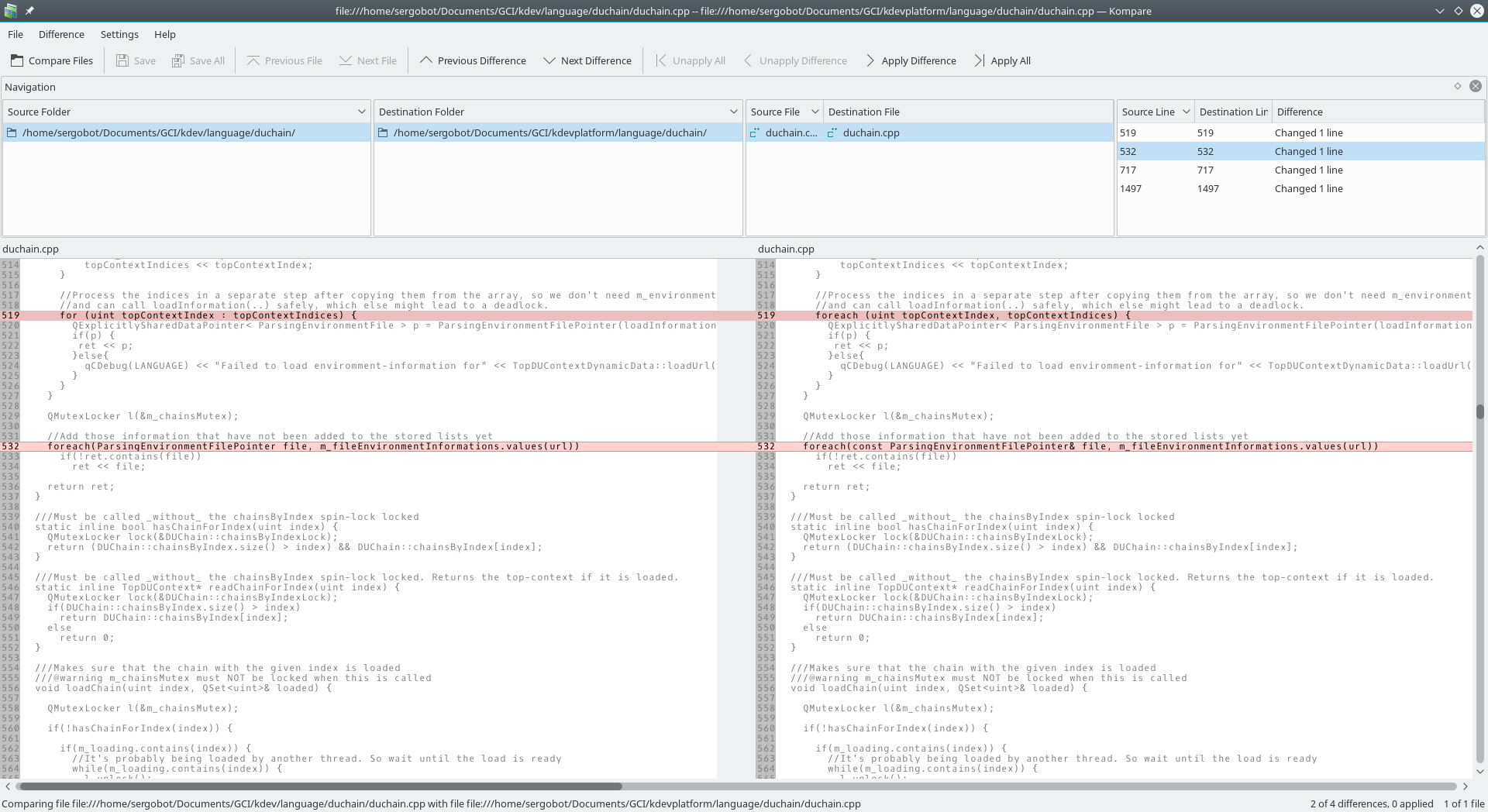
Graphical user interfaces (GUIs) for file comparison leverage visual elements such as color coding, alignment indicators, and interactive layouts to make differences between files more intuitive and easier to navigate than plain text outputs. These interfaces often employ side-by-side views to display original and modified content simultaneously, allowing users to scroll synchronously and spot discrepancies at a glance. Tools like Beyond Compare provide multifaceted viewers for text, images, and binary data, using color overlays to highlight insertions (typically green), deletions (red), and modifications (blue or yellow), which enhances comprehension of changes without requiring manual line-by-line scanning.[7][27] Meld, an open-source visual diff and merge tool, similarly supports side-by-side file and directory comparisons with synchronized scrolling and inline color annotations for changed lines, facilitating efficient review of code or document revisions.[28] For directory-level analysis, graphical tools incorporate tree views to represent file hierarchies, where folders are depicted as expandable nodes with icons indicating status—such as unique files, mismatches, or orphans—enabling users to visualize the propagation of changes across nested structures. WinMerge, for instance, presents folder differences in a tree-based layout alongside file contents, allowing drill-down into specific subdirectories while maintaining an overview of the entire hierarchy.[29] DirEqual extends this with side-by-side tree views on macOS, using visual cues like bold text for modified items to streamline synchronization tasks.[30] Advanced graphical features address complex scenarios, such as three-way merges for integrating changes from branching versions in version control systems. KDiff3 offers a dedicated interface for comparing and merging up to three files or directories, displaying them in aligned panes with automated conflict highlighting and manual resolution options via drag-and-drop or keyboard shortcuts. For binary files, some tools visualize differences through colored hexadecimal dumps or overlaid representations rather than raw bytes; Beyond Compare's hex compare mode, for example, uses alignment and color to denote byte-level variations, providing a graphical alternative to textual binary diffs. Web-based graphical interfaces democratize file comparison by integrating it into collaborative platforms without local installations. GitHub's diff viewer supports split and unified layouts for pull requests and commit comparisons, with collapsible sections for functions or code blocks to focus on relevant changes while hiding unchanged context, improving readability for large files.[31] This approach, combined with inline comments and rendering for non-text files like images or PDFs, allows distributed teams to interactively explore differences across repository states.[32] As of 2025, extensions like Git Diff in Visual Studio Code integrate AI to analyze and visualize git changes, providing intelligent insights into code modifications.[33]Algorithms and Efficiency
Core Algorithms
The longest common subsequence (LCS) algorithm forms a foundational technique in file comparison for identifying the longest sequence of characters or elements present in both files while preserving their relative order, without requiring contiguity. This approach relies on dynamic programming to construct a matrix that tracks the lengths of LCS for prefixes of the two input sequences, say strings A of length m and B of length n. The recurrence relation defines the LCS length as follows: if A[i] equals B[j], then LCS(i, j) = LCS(i-1, j-1) + 1; otherwise, LCS(i, j) = max(LCS(i-1, j), LCS(i, j-1)). The base cases are LCS(0, j) = 0 and LCS(i, 0) = 0 for all i and j. This yields a time and space complexity of , making it suitable for moderate-sized files but quadratic in the worst case.[34] To recover the actual subsequence, backtracking through the matrix identifies matching elements along the diagonal where increments occur, with deletions or insertions inferred from horizontal or vertical moves. Pseudocode for the length computation is:function LCS_length(A, B):
m, n = len(A), len(B)
dp = [[0] * (n + 1) for _ in range(m + 1)]
for i in 1 to m:
for j in 1 to n:
if A[i-1] == B[j-1]:
dp[i][j] = dp[i-1][j-1] + 1
else:
dp[i][j] = max(dp[i-1][j], dp[i][j-1])
return dp[m][n]