


Community hub
Recent from talks
Contribute something
Nothing was collected or created yet.
Pop-up ad
View on Wikipedia | This article has multiple issues. Please help improve it or discuss these issues on the talk page. (Learn how and when to remove these messages)
|


Pop-up ads or pop-ups are forms of online advertising on the World Wide Web. A pop-up is a graphical user interface (GUI) display area, usually a small window, that suddenly appears ("pops up") in the foreground of the visual interface. The pop-up window containing an advertisement is usually generated by JavaScript[1] that uses cross-site scripting (XSS), sometimes with a secondary payload that uses Adobe Flash.[2] They can also be generated by other vulnerabilities/security holes in browser security.
A variation on the pop-up window, the pop-under advertisement, opens a new browser window under the active window. Pop-unders do not interrupt the user immediately but appear when the user closes the covering window, making it more challenging to determine which website created them.
History
[edit]Pop-up ads originated on the Tripod.com webpage hosting site in the late 1990s. JavaScript provided the capability for a web page to open another window. Ethan Zuckerman claims he used that capability to launch advertisements in separate windows as a response to complaints from advertisers about their ads appearing on pages with sexual content.[3] Zuckerman later apologized for the unforeseen nuisance pop-up ads had evolved into.[4]
Pop-up blocking
[edit]Web development and design technologies allow an author to associate any item on a pop-up with any action, including with a cancel or innocent-looking button. Because of bad experiences and apprehensive of possible damage that they may cause, some users do not click on or interact with any item inside a pop-up window whatsoever,[5] and may leave the site that generated them or block all pop-ups.
Opera was the first major browser to incorporate tools to block pop-up ads; the Mozilla browser later improved on this by blocking only pop-ups generated as the page loads.[citation needed] In the early 2000s, all major web browsers except Internet Explorer let users block unwanted pop-ups almost completely. In 2004, Microsoft released Windows XP SP2, which added pop-up blocking to Internet Explorer.[6] Most modern browsers provide pop-up blocking tools; third-party tools add other features, such as ad filtering.
Fake close buttons
[edit]Users of websites and web applications continuously experience unwanted pop-up ads throughout the course of their normal interaction with a web browser.[7] Ordinarily, users respond by dismissing the pop-up through the "close" or "cancel" feature of the window hosting the pop-up. Because this is a typical response, some authors of pop-up advertising depend on this and create on-screen buttons or controls that look similar to a "close" or "cancel" option. When the user chooses one of these "simulated cancel" options, the button performs an unexpected or unauthorized action (such as opening a new pop-up or downloading an unwanted file on the user's system).[5]
Circumventing pop-up blockers
[edit]A hover ad or in-page pop-up uses JavaScript to combine a banner ad, and a pop-up window that appears in front of the browser screen. JavaScript imposes an advertisement over a webpage in a transparent layer. This advertisement can appear in a variety of forms. For example, an advertisement can contain an animation that links to the advertiser's site. An advertisement can also look like a normal window. Pop-up blockers cannot block the ad because it is a part of the webpage, but it can be blocked with third-party ad blockers such as AdBlock and Adblock Plus, or by using custom style sheets.
URL redirection
[edit]URLs are sometimes redirected to advertisement pages by URL redirection.
URLs are sometimes opened in a new tab and then the content of the old background tab will be replaced with an advertisement page by URL redirection, other times it switches the tab the user is on to the advertisement tab. Adblock Plus[8] and NoScript[citation needed] cannot block these redirects.
Techniques
[edit]"Pop-ups"
[edit]- Certain types of downloaded content, such as images, free music, and others, can cause pop-ups, and therefore should not be trusted, especially pornographic sites' pop-ups (known as a "pornado" or "porn-storm", as coined by John C. Dvorak.)[9] Also, the pop-ups sometimes look like ordinary web pages, and the name of the site shows up in a search bar.
- Many websites use pop-ups to display information without disrupting the page currently open. For example, they may provide needed extra guidance when filling in a form on a web page, without causing the loss of any information already entered into the form. Most pop-up blockers allow this kind of pop-up. Some, however, reload the page, losing any information the user entered.
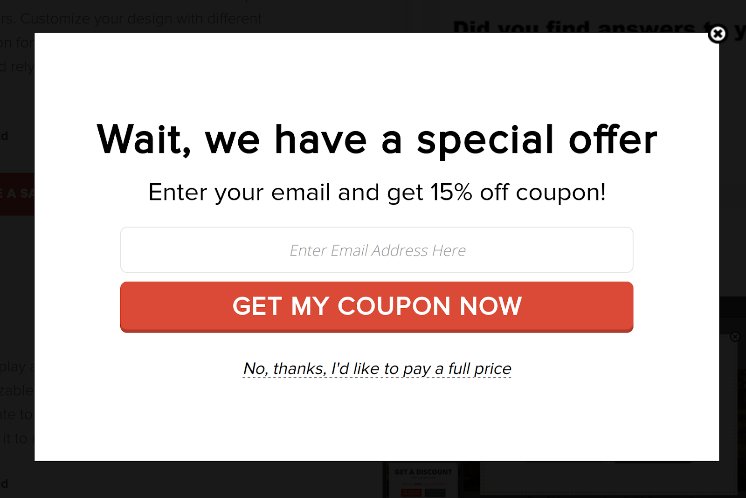
- Some online shops use exit intent popups, for example offering discounts, in an attempt to retain users.[10]
- Some web based installers, such as that used by McAfee, use a pop-up to install software.
- On many web browsers, holding down the ctrl key while clicking a link makes it bypass the popup filter.[11]
- Clicking (even accidentally) on one pop-up may open other pop-up ads.
Pop-under ads
[edit]Pop-under ads are similar to pop-up ads, but the ad window appears hidden behind the main browser window rather than superimposed in front of it. As pop-up ads became more widespread and intrusive, often taking up the whole computer screen, many users would immediately close the pop-up ads that appeared over a site without looking at them. Pop-under ads do not immediately impede the view of content, but remain unnoticed until the user closes or minimizes the main browser window.
Pop-under ad technology
[edit]A pop-under ad involves two JavaScript functions introduced in 1995 with the Netscape 2.0b3 browser. Modern web publishers and advertisers use it to create a window in front of the user's screen, load an advertisement, and then send it behind the screen.
// create a new window in front of the current site
window.open(URL, windowName[, windowFeatures]);
// push the loaded advertisement back behind the browser
window.focus();
Most modern browsers allow window.open to execute only if it was called by a user interaction (e.g., a mouse click) event handler. Any non-interactive calls (timer callback, load events, etc.) to window.open result in the new window being blocked.
To bypass this restriction, most pop-under ads trigger on a mouse click event listener attached directly to the document or the document's body. This enables catching all mouse click events that were not consumed by other click event handlers, and calling window.open without being blocked. For example, when the user selects a text, the mouse click triggers the mouse click handler attached to the document and a pop-under opens using the above code. Other techniques to bypass the window.open call restriction do so by "hijacking" mouse clicks.
Hover ad
[edit]Hover ads, more commonly called in-page pop-ups, are a special type of pop-up ads created using Dynamic HTML, JavaScript and similar web browser technologies. Because they do not scroll with the web page, they appear to "hover" over the page, usually obscuring the content. Hover ads tend to be very hard to block by pop-up blocking software, because the hover ad window is an integral part of the HTML content of the web page. Thus software filtering the content has no algorithmic means of recognizing and removing parts of the content, either descriptive or procedural, that create, populate and manipulate the hover ad's window.
Patent controversy
[edit]ExitExchange.com filed for a patent in 2000 on a subset of pop-under advertising called an exit pop. After years of controversy and numerous articles on the pop-under patent, the patent was awarded by the United States Patent and Trademark Office (USPTO) in April and June 2008.[12] The respective patent numbers are U.S. patent 7,386,555 ('555) and U.S. patent 7,353,229 ('229). '555 is related to the method of opening an exit pop from a toolbar or software application on a computing device, whereas '229 covers the method used to open an exit pop from an embedded script found within a media file (e.g., JavaScript code on a web page).
Copyright issues
[edit]Copyright aspects of pop-up advertising are discussed in the Wikipedia articles on derivative works and transformativeness. Both articles contain illustrations and links to examples of pop-up advertising.
See also
[edit]- 1-800 Contacts, Inc. v. WhenU.com, Inc., lawsuit between 1-800 Contacts and WhenU SaveNow over pop-up ad placement
- Ad serving
- Adware and Spyware
- Dark pattern
- Direct marketing
- In-session phishing
- Interstitial webpage
- List of pop-up blocking software
- Malvertising
- Malware
- Messaging spam
- Modal window
- Ransomware
- Technical Support Scam
Notes
[edit]- Adams, Cecil. "What's up with popup ads?". The Straight Dope. October 15, 2004 [dead link].
- Zabunov, S. "From Annoyance to Pleasure - The Artistic Popup Approach". May 12, 2006.
- US Patent 7,386,555 "Post-session internet advertising system"
- US Patent 7,353,229 "Post-session internet advertising system"
References
[edit]- ^ "How To Create Popups". www.w3schools.com. Retrieved 26 October 2019.
- ^ "NoScript :: Add-ons for Firefox". Mozilla Add-ons. Mozilla.
- ^ Zuckerman, Ethan (August 14, 2014). "The Internet's Original Sin: It's not too late to ditch the ad-based business model and build a better web". The Atlantic. Retrieved June 7, 2019.
- ^ O'Toole, James. "Pop-up ad creator: 'I'm sorry'". money.cnn.com. Retrieved August 15, 2014.
- ^ a b "Pop-ups". Smart Computing. September 2004. Archived from the original on 2010-05-22.
- ^ Naraine, Ryan (March 18, 2004). "Windows XP SP2 Turns 'On' Pop-up Blocking". Retrieved 8 August 2013.
- ^ Wegert, Tessa (14 March 2002). "Pop-Up Ads, Part 1: Good? Bad? Ugly?". Incisive Interactive Marketing LLC. Retrieved March 14, 2002.
- ^ "#2095 (Prevent background redirects)". Adblock Plus Issue Tracker.
- ^ "Ubiquitous Porn: Alive on the Net". PCMAG. Retrieved 21 January 2015.
- ^ "19 Exit Intent Popup Examples to Increase Conversions in 2022".
- ^ "How to disable popup-blockers". Archived from the original on 2013-08-08. Retrieved 2013-08-08.
- ^ "Patents".
External links
[edit]
Pop-up ad
View on GrokipediaOverview
Definition and Characteristics
A pop-up ad is a form of online advertising that displays a graphical advertisement in a new browser window or tab, typically appearing unsolicited and overlaying or obstructing the user's current webpage.[8][1] This format separates the ad from the main content, often emerging suddenly in the foreground to capture attention.[9] Key characteristics of pop-up ads include their compact size, usually manifesting as a small window ranging from a modest banner-like display to a more prominent overlay covering part of the screen.[9] They are commonly triggered by events such as page loading or user interactions like clicks, and are built using technologies including HTML for structure, JavaScript for dynamic generation and control, and historically Flash for enhanced animations in earlier implementations.[8][10][11] Unlike banner ads, which are embedded directly within the webpage's content as static or animated elements, pop-up ads operate as independent floating windows that do not integrate into the host page's layout.[8] They also differ from interstitial ads, which typically fill the entire screen between page transitions rather than appearing as smaller, separable overlays.[12] The pop-up ad was invented by Ethan Zuckerman in late 1996 or early 1997 while working at Tripod.com, where it was developed as a method to isolate advertisements from users' editorial content using a vertically oriented window that included both the ad and navigation aids.[13]Purpose in Digital Advertising
Pop-up ads serve several primary purposes in digital advertising, primarily from the advertiser's viewpoint to enhance engagement and achieve specific marketing goals. They are designed to capture immediate user attention by overlaying content on the active webpage, often triggered by events such as page loads or user interactions via JavaScript mechanisms. This interruption helps drive traffic to external sites by directing users to promotional landing pages or e-commerce platforms. They are particularly effective for promoting time-sensitive offers, such as limited-time discounts or flash sales, creating a sense of urgency that prompts quicker responses. By 2025, due to widespread browser blocking, pop-up ads have evolved toward less intrusive overlays to maintain relevance.[2] The strategic advantages of pop-up ads include their high visibility, which stands out against static elements like banners, potentially leading to elevated engagement metrics. By interrupting the user's normal browsing flow, they have historically achieved click-through rates (CTRs) higher than traditional display ads, with early implementations in the late 1990s and early 2000s outperforming banner ads that suffered from declining response rates around 0.5%.[14] This format remains cost-effective for small advertisers, offering affordable entry into display networks with low cost-per-click models compared to premium channels like search or video ads. When optimized, pop-ups can yield conversion rates averaging 4.65% as of 2025, significantly above the 0.57% benchmark for general display advertising.[15][16] In the context of marketing funnels, pop-up ads play a key role in lead generation by capturing contact information from site visitors at critical touchpoints, such as exit intent or cart abandonment, though traditional intrusive variants focus more on direct traffic driving. They support e-commerce upsells by presenting complementary product recommendations during the shopping process and encourage newsletter sign-ups to nurture long-term customer relationships. These applications help move users from awareness to consideration stages, boosting overall funnel efficiency. As part of the broader display advertising ecosystem, pop-up ads contribute to the global digital ad market, projected to reach $843.48 billion in 2025.[17]History
Origins in Early Web Development
Pop-up ads originated in the late 1990s as a solution to the challenges of monetizing user-generated content on early web platforms. In 1997, Ethan Zuckerman, a developer at Tripod.com—a free web hosting service—created the first pop-up ad to display advertisements without embedding them directly into users' pages. This approach aimed to isolate commercial elements from community-driven content, preventing layout disruptions and avoiding potential brand mismatches, such as an automotive ad appearing alongside unrelated or controversial user material. Zuckerman's innovation stemmed from Tripod's need to generate revenue while preserving the site's communal feel, as direct banner placements often clashed with the diverse, uncurated nature of hosted pages.[18][19] Technically, pop-up ads relied on JavaScript'swindow.open() function, which enabled the creation of new browser windows separate from the main page. This feature was introduced in Netscape Navigator 2.0 in March 1996, marking JavaScript 1.0's debut and providing developers with tools for dynamic window management. Zuckerman combined this client-side scripting with server-side Perl code to trigger ad windows upon page load, ensuring ads loaded independently without altering the underlying HTML structure of user sites. At the time, such techniques represented a novel use of emerging browser capabilities in an era when web development was rapidly evolving from static pages to interactive elements.[20][18]
Early adoption quickly followed among similar free web hosting platforms seeking monetization strategies amid limited advertising alternatives, primarily static banners. Sites like GeoCities reused Zuckerman's code within weeks of its implementation at Tripod, integrating pop-ups to fund operations without compromising user layouts. Other services, such as Xoom, which offered unlimited free hosting starting in 1996, embraced comparable ad delivery methods in the burgeoning free web hosting landscape, where community sites proliferated but revenue options were scarce. This period highlighted pop-ups as an innovative means to delineate commerce from creative expression, allowing platforms to sustain growth while users focused on content creation.[18][21]
Initially, pop-up ads were regarded as a clever advancement in web advertising, effectively bridging the gap between advertiser needs and site integrity before user frustration became widespread. By compartmentalizing promotions, they enabled early internet communities to thrive economically without overt commercialization encroaching on personal spaces, a separation that was praised for upholding the web's participatory ethos.[22][19]
Rise and Widespread Adoption
The proliferation of pop-up ads accelerated dramatically between 1998 and 2003, particularly on websites in the adult entertainment, online gaming, and e-commerce sectors, where they became a staple for monetization amid declining effectiveness of traditional banner ads.[23] These ads were especially common on resource-constrained sites seeking quick revenue streams, with estimates indicating that around 11.3 billion pop-up impressions were served in 2002 alone, representing a significant portion of online ad inventory.[24] By the early 2000s, their ubiquity stemmed from the ease of implementation via JavaScript, allowing even small publishers to integrate them without advanced infrastructure.[25] Key drivers of this widespread adoption included the dot-com bubble's influx of venture capital, which fueled aggressive experimentation in digital advertising during the late 1990s, followed by the post-2000 bust that pushed websites toward cost-effective alternatives as banner click-through rates plummeted by over 30%.[23] Low-barrier ad networks like ExitExchange, founded in 1998 and launching its pop-under variant in 2000, played a pivotal role by enabling easy syndication across a network of over 12,000 sites, allowing publishers to barter or sell ad space with minimal upfront costs.[25] This model democratized access to pop-up delivery, amplifying their spread as broadband adoption in the early 2000s made dynamic web experiences more feasible for users.[23] At their peak around 2004, pop-up ads contributed substantially to the broader industry's recovery from the dot-com crash. Overall U.S. internet ad spending reached $9.6 billion that year, up 33% from 2003, with interstitial formats like pop-ups capturing a growing share due to their higher visibility compared to static displays.[26] Their cultural footprint was marked by increasing media scrutiny, with outlets like The New York Times highlighting their role in the evolving porn industry and broader web economy, often criticizing their intrusiveness while acknowledging their ubiquity in the broadband era.[27] Articles from the period portrayed pop-ups as emblematic of the internet's commercial excesses, fueling public frustration that would later drive technological countermeasures.[28]Decline and Technological Evolution
The backlash against pop-up ads reached its peak in the early 2000s, driven by widespread user frustration with their intrusive nature, culminating in the widespread adoption of blocking technologies. In 2004, Mozilla released Firefox 1.0, which included built-in pop-up blocking as a core feature to address user complaints about unsolicited windows interrupting browsing.[29] Microsoft responded with Windows XP Service Pack 2 in August 2004, which added a pop-up blocker to Internet Explorer 6; Internet Explorer 7 in 2006 incorporated enhancements that further empowered users to control their online experience.[30] This period marked a turning point, as consumer revolt prompted major internet companies like Google, Yahoo, and EarthLink to integrate similar tools.[5] By 2010, pop-up ad usage had declined significantly due to these technological countermeasures and shifting advertiser preferences, with estimates indicating a sharp reduction in their prevalence as users increasingly relied on blockers.[31] Concurrently, digital ad revenue pivoted toward search engine advertising and emerging social media platforms, which offered more targeted and less disruptive alternatives; for instance, search ads accounted for nearly half of the $26 billion in total U.S. internet ad spending that year.[32] In the 2010s, surviving forms of pop-up ads underwent substantial evolution to mitigate user annoyance, transforming into "polite" overlays and modals that activate only on user interactions like clicks or scrolls, rather than appearing unbidden.[33] These formats, often mobile-optimized to suit the growing dominance of smartphone traffic, emphasized consent-based displays and integrated seamlessly with site content, allowing for better engagement without overwhelming the viewer. A resurgence occurred in the 2020s, particularly through pop-under variants in affiliate marketing, where a new window opens beneath the active tab to avoid immediate disruption while driving traffic to promotional offers in verticals like gaming and finance.[34] As of 2025, pop-up ads continue to incorporate AI-driven targeting to personalize content based on user behavior, enhancing relevance while navigating regulatory constraints.[35] However, frameworks like the EU's GDPR and California's CCPA mandate explicit consent for data use in ads, compelling publishers to minimize intrusive pop-ups through transparent banners and opt-in mechanisms, thereby curbing their aggressive deployment.[36]Types and Variants
Standard Pop-up Ads
Standard pop-up ads represent the classic and most disruptive form of online advertising, appearing in new browser windows or tabs that launch in the foreground and often overlay or fully obscure the user's current webpage. These ads typically display promotional content, such as product offers or calls to action, in a separate graphical user interface that interrupts the browsing experience. Unlike less intrusive formats, standard pop-ups are designed to capture immediate attention by positioning themselves prominently on the screen, sometimes resizing to full-screen dimensions upon activation.[37][38] The mechanics of standard pop-up ads rely on simple scripting, commonly JavaScript, to trigger their appearance based on specific events during a user's session. Common implementations include automatic launching upon entering a website, which immediately greets visitors with an ad; exit-intent triggers that detect mouse movements toward the browser's close or back button to retain potentially departing users; and post-submission displays following actions like completing a contact form, aiming to guide users toward the next step in a conversion funnel. These triggers allow advertisers to time the interruption strategically, though poor timing can exacerbate user frustration.[39][40][41] In practical use cases, standard pop-up ads are frequently deployed in e-commerce settings to promote discounts, flash sales, or limited-time offers, thereby boosting immediate sales conversions. They also serve newsletter opt-ins by prompting users to subscribe in exchange for incentives like exclusive content or coupons, helping businesses expand their email marketing lists. During the early 2000s, such ads gained notoriety through heavy use by casino and dating websites, which leveraged their visibility to drive traffic to high-engagement verticals like gambling and matchmaking services.[42][43][44][45] While standard pop-up ads offer high interruption value that can enhance engagement by breaking browsing patterns and compelling interaction, this same intrusiveness often leads to immediate closures, with users dismissing them swiftly to resume their original task. This dual nature results in strong initial visibility and potential click-through rates when timed well, but it risks alienating audiences and increasing bounce rates if perceived as overly aggressive. Compared to background variants like pop-unders, standard pop-ups prioritize forceful engagement over subtlety, amplifying both their effectiveness and backlash.[46][47][48]Pop-under Ads
Pop-under ads represent a variant of pop-up advertising designed for subtlety, opening a new browser window or tab positioned behind the user's active window, which becomes visible only upon closing the foreground page.[49] This approach contrasts with more disruptive formats by deferring visibility until the end of the user's session on the primary site.[50] Technically, pop-under ads rely on JavaScript to initiate the ad window prior to loading the main content, ensuring the advertisement remains concealed beneath the active browser interface. This method was patented by ExitExchange in 2003 as part of post-session advertising systems, enabling automated delivery without immediate user interruption.[51] As an evolution from standard pop-up ads, pop-unders prioritize non-intrusive engagement to mitigate user frustration.[52] In practice, pop-under ads are commonly employed in affiliate marketing for driving traffic to offers in sectors like adult content redirection and high-volume gaming verticals, where they facilitate conversions through delayed exposure. For instance, in 2025, affiliate campaigns targeting gaming audiences have leveraged pop-unders to achieve notable ROI, such as 64% returns in targeted non-mainstream setups.[53] Their application in adult affiliate programs often involves redirecting users to specialized networks, capitalizing on the format's ability to handle sensitive traffic without overt disruption.[54] The primary advantages of pop-under ads include reduced user annoyance compared to foreground interruptions, fostering a seamless experience that encourages prolonged site interaction. Industry analyses in 2025 highlight their higher view-through and conversion potential, with non-intrusive delivery leading to improved engagement metrics over traditional pop-ups.[50][49]Hover and Interactive Ads
Hover and interactive ads constitute a subset of digital advertising that activates through user-initiated actions, such as mouse hovering or touch gestures, featuring expansions or animations like floating layers and slide-ins without creating new browser windows. These formats deliver content dynamically within the existing webpage, often providing contextual enhancements like product details or multimedia previews upon interaction. As alternatives to traditional window-based pop-ups, they prioritize seamless integration to maintain user flow.[55][56] Techniques for these ads leverage CSS transitions to enable fluid animations, such as scaling or fading elements on hover, while JavaScript handles more intricate behaviors like conditional content loading or gesture recognition. This mimicry of native page interactivity renders them challenging to isolate from legitimate content, as they embed directly into the document object model rather than operating as overlays. In practice, e-commerce platforms commonly use hover previews to display enlarged images or specifications when users cursor over thumbnails, and video auto-plays initiate brief clips on interaction to capture attention without full commitment. Originating in the early 2010s, these ads adapted to mobile contexts by incorporating swipe gestures for carousel-style navigation, aligning with the proliferation of touch-enabled devices.[57][58][59][60] In 2025, hover and interactive ads increasingly incorporate augmented reality (AR) and virtual reality (VR) elements, transforming static interactions into immersive simulations, such as virtual try-ons or 3D explorations within social media feeds. This evolution enhances engagement, with AR-integrated formats yielding 35-40% higher interaction rates and 94% improved conversion compared to non-interactive counterparts, while boosting social sharing by up to 300%. Such advancements underscore their role in fostering deeper user connections in platform-native advertising ecosystems.[61][62][63]Mobile Overlay and "Publicity" Pop-ups
Mobile overlay ads, sometimes termed "publicity" pop-ups in certain linguistic contexts (derived from translations of "publicidad" in Spanish or "publicité" in French, both meaning "advertising"), refer to unwanted promotional overlays that appear suddenly on Android device screens, often outside of apps or browsers. These intrusive ads can manifest as full-screen promotions, floating banners, or interactive elements that cover other content, including the home screen or during use of unrelated applications.[64] They are typically caused by third-party applications abusing the "Display over other apps" (also known as "Draw over other apps") system permission, which enables apps to draw content atop other screens. Intended for legitimate features such as chat bubbles or accessibility tools, this permission is frequently exploited by adware or aggressively monetized free apps to deliver persistent advertising.[65] Distinct from traditional browser-based pop-up ads, which are limited to web browsing environments and mitigable via browser blockers or extensions, mobile overlay "publicity" pop-ups operate at the system level, interrupting activities across the device regardless of context. Their intrusive nature often results in significant user disruption, battery drain, performance degradation, and potential security risks including phishing or malware exposure.Implementation Techniques
Core JavaScript Mechanisms
The primary mechanism for creating pop-up ads in JavaScript relies on thewindow.open() method, which opens a new browsing context—such as a window or tab—by loading a specified URL into it. This function accepts three main parameters: the URL to load (url), an optional name for the window (name), and a string of features (specs) that control attributes like size, position, scrollbars, and resizability (e.g., "width=300,height=200,scrollbars=no"). For instance, a basic invocation might appear as window.open('https://example.com/ad', 'adWindow', 'width=400,height=300,top=100,left=100'), which spawns a new window displaying the ad content at a defined position and size without browser chrome elements, though modern browsers may override these for security.[66]
Pop-up ads are typically triggered by user or page events to align with browser policies that block unsolicited openings. Common triggers include the onload event, which fires after the page fully loads; onclick, activated by direct user interaction like button clicks; and onunload, which executes as the user navigates away from the page.[67][68] These events help evade basic popup blockers, as browsers generally permit window.open() only within direct user-initiated handlers like onclick.[69] For example, a script might attach to the body element: <body onload="window.open('ad-url', '_blank', 'specs')">, though this onload usage has been widely abused for intrusive ads and is now often restricted.[70][71]
Browser compatibility for window.open() traces back to Netscape Navigator in the mid-1990s, where it was introduced as part of early JavaScript implementations to enable dynamic window management. Over time, standards evolved through ECMAScript and WHATWG specifications, with modern browsers like Chrome and Firefox supporting it via the HTML Living Standard, though with enhanced restrictions on asynchronous calls to prevent abuse.[66] For cross-origin communication in pop-up scenarios—such as verifying ad loads or exchanging data between the parent and child windows—developers increasingly use the Window.postMessage() API, which allows secure message passing without direct access to the other window's DOM.
Integration of these mechanisms into websites often occurs via inline <script> tags embedded directly in HTML, where the code executes immediately upon parsing, or through external JavaScript files referenced by <script src="ad-script.js"> attributes. Ad networks may facilitate asynchronous script tags for ad delivery, ensuring ads load without blocking page rendering while tracking impressions and clicks, though major networks like Google AdSense prohibit pop-up formats.[72][73] This approach allows third-party scripts to integrate seamlessly, though it raises performance concerns due to potential delays in external file fetches.[74]
Advanced Delivery Methods
Advanced delivery methods for pop-up ads leverage sophisticated techniques to improve targeting, persistence, and adaptability across devices and networks, often building on core JavaScript mechanisms like event handling.[75] Techniques like AJAX facilitate asynchronous triggers by enabling JavaScript ad calls that fetch and display content without full page reloads, compatible with browsers like IE 6.0+ and Firefox 2.0+, thus enhancing user experience while delivering dynamic ads.[75] Server-side redirects, often managed through traffic distribution systems (TDS), route users via chained HTTP 3xx responses to ad landing pages and can precede pop-up displays in malvertising scenarios, bypassing some client-side detection by handling logic on the server.[76] These systems, common in illicit networks, match traffic from sources like streaming sites to advertisers using pay-per-redirect models, with studies identifying over 930,000 pages collected from approximately 78,000 unique webpages involved in such distributions.[76] For mobile adaptations, full-screen modals utilize CSS media queries to adjust pop-up dimensions based on screen size, such as@media (max-width: 768px) { .modal { width: 100vw; height: 100vh; } }, ensuring immersive displays on smaller devices like smartphones without overflow issues.[77] In progressive web apps, these modals mimic native notifications, triggered responsively to maintain engagement on touch interfaces.
As of November 2025, network-level personalization for pop-up ads relies on alternatives to deprecated third-party cookies, such as Google's Privacy Sandbox APIs (e.g., Topics API for interest-based targeting) and geolocation APIs to time displays, such as showing region-specific offers during peak local hours via time-zone adjustments.[78][79] For instance, exit-intent pop-ups can be delayed or customized based on IP-derived location data, combining with page targeting for relevant delivery.[79]
As of 2025, AI-optimized triggers analyze user behavior in real-time—such as scroll depth or session history—to predict and execute pop-up timing, with tools enabling dynamic personalization through A/B testing and predictive analytics. Examples include delayed execution via setTimeout(), where setTimeout(() => { /* pop-up code */ }, 5000) postpones ad appearance by 5 seconds to align with user engagement patterns, reducing immediate dismissals.[80]
Blocking and Evasion
Browser and Software Blockers
Modern web browsers incorporate built-in mechanisms to prevent pop-up ads from disrupting user experience. Google Chrome, for instance, includes a default setting accessible via Settings > Privacy and security > Site settings > Pop-ups and redirects that blocks unsolicited new windows and automatic redirects, a feature enabled by default since the browser's initial release in 2008.[81] Users can manage this by ensuring the option is set to "Don't allow sites to send pop-ups or use redirects" by default and removing any suspicious allowed sites from the exceptions list to enhance protection.[82] This protection intercepts JavaScript calls likewindow.open() that attempt to spawn unauthorized tabs or windows, reducing intrusive interruptions without requiring user intervention.
Mozilla Firefox employs Enhanced Tracking Protection (ETP), introduced in 2017 and significantly updated in the 2020s, to block third-party trackers often associated with pop-up ad delivery.[83] These updates, including stricter default blocking in Firefox 109 (2023) and beyond, prevent ad networks from loading scripts that trigger pop-ups, enhancing privacy by limiting cross-site data collection that fuels targeted advertising.[84] While ETP primarily targets trackers, it indirectly mitigates many pop-up ads by denying resources to malicious or ad-heavy domains.[85]
On mobile platforms, Apple's Safari for iOS features Intelligent Tracking Prevention (ITP), which limits cross-site tracking and cookie storage to curb ad personalization, thereby reducing the incidence of pop-up ads served via trackers.[86] Complementing this, Safari's dedicated Block Pop-ups toggle in Settings > Safari explicitly prevents new windows, a standard enabled by default since iOS 7.[87] For Android users, Google Chrome's Enhanced Safe Browsing includes protection against intrusive ads on sites known to show them, warns against and prevents dangerous downloads or redirects tied to pop-up campaigns.[88]
Third-party browser extensions provide more customizable and robust pop-up blocking through filter-based interception. AdBlock Plus and uBlock Origin, two widely used tools, leverage community-maintained lists like EasyList to identify and block ad-related scripts, including those invoking window.open() for pop-ups.[89][90] However, as of 2025, Google's transition to Manifest V3 has disabled the full version of uBlock Origin in Chrome, leading to the adoption of uBlock Origin Lite with some reduced filtering capabilities, or users switching to browsers like Firefox that continue supporting Manifest V2 extensions.[91] uBlock Origin, in particular, uses the browser's webRequest API to halt requests before they load, effectively neutralizing pop-up attempts at the network level without impacting site performance.[92] These extensions allow users to subscribe to specialized filters, such as those targeting pop-unders or modal overlays, for comprehensive coverage.[93]
By 2025, browser and extension-based blockers achieve high effectiveness against traditional pop-up ads through ongoing updates to filter lists and browser APIs, though advertisers occasionally attempt evasion via obfuscated scripts, as detailed in related strategies.[94]
Evasion Strategies
Advertisers have employed various techniques to circumvent pop-up blockers, which typically monitor for unsolicited window openings via JavaScript methods likewindow.open(). One common method involves fake close buttons that mimic standard "X" icons but instead trigger redirects to additional ad pages rather than closing the window.[95] These deceptive elements exploit user expectations, leading to unintended interactions that load more content without violating blocker heuristics for new windows. Similarly, URL redirection techniques, such as meta refresh tags or HTTP 302 status codes, allow ads to reload or navigate to promotional content in the existing tab, bypassing rules that target separate pop-up creation.[96]
Advanced evasion strategies include mimicking user-initiated actions by associating pop-up triggers with legitimate user clicks, such as button presses or form submissions, which browsers permit to avoid blocking essential functionality like payment modals.[97] Additionally, canvas fingerprinting enables detection of ad blockers by rendering hidden images or text on the HTML5 canvas element and hashing the output to identify unique browser configurations, including the presence of blocking extensions; upon detection, advertisers can serve alternative ad formats or non-blocked content.[98] These approaches target the mechanics of blockers that rely on script monitoring or request filtering, creating an ongoing cat-and-mouse dynamic.[99]
Historically, in the early 2000s, advertisers used JavaScript scripts to generate multiple pop-up windows with randomized attributes, such as window names or sizes, to overwhelm basic blockers that matched fixed patterns.[100] By the mid-2010s, techniques evolved to include tab-unders, where clicking a legitimate link redirects the underlying tab to an ad, evading pop-up-specific filters.[101] In 2025 trends, WebAssembly (Wasm) is increasingly utilized for obfuscating ad delivery code, compiling scripts into binary format that resists static analysis by blockers and enables evasion of JavaScript detectors.[102]
Despite these innovations, evasion prevalence is declining due to enhanced browser protections; for instance, approximately 31.5% of global internet users employ ad blockers as of 2024, prompting networks to shift toward compliant formats, though pop-up variants persist in niche ad ecosystems.[103] Techniques like local frame exploitation via iframes with inherited origins continue to affect up to 56% of websites, allowing blockable ad requests to slip through tools such as uBlock Origin Lite and Safari Content Blocking.[104]