


Community hub
Recent from talks
Contribute something
Nothing was collected or created yet.
Split screen (computing)
View on Wikipedia
 | This article needs additional citations for verification. (June 2023) |

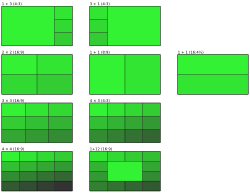
Split screen is a display technique[1] in computer graphics that consists of dividing graphics and/or text into non-overlapping adjacent parts, typically as two or four rectangular areas. This allows for the simultaneous presentation of (usually) related graphical and textual information on a computer display. TV sports adopted this presentation methodology in the 1960s for instant replay.[2]
Non-dynamic split screens differ from windowing systems in that the latter allowed overlapping and freely movable parts of the screen (the "windows") to present both related and unrelated application data to the user. In contrast, split-screen views are strictly limited to fixed positions.
The split screen technique can also be used to run two instances of an application, potentially allowing another user to interact with the second instance.
In video games
[edit]
The split screen feature is commonly used in non-networked, also known as couch co-op, video games with multiplayer options.
In its most easily understood form, a split screen for a multiplayer video game is an audiovisual output device (usually a standard television for video game consoles) where the display has been divided into 2-4 equally sized areas (depending on number of players) so that the players can explore different areas simultaneously without being close to each other. This has historically been remarkably popular on consoles, which until the 2000s did not have access to the Internet or any other network and is less common today with modern support for networked console-to-console multiplayer. In competitive split-screen games, it is customarily considered cheating to look at another player's screen section to gain an advantage.[3][4]
History
[edit]Split screen gaming dates back to at least the 1970s, with games such Drag Race (1977) from Kee Games in the arcades being presented in this format. It has always been a common feature of two or more player home console and computer games too, with notable titles being Kikstart II for 8-bit systems, a number of 16-bit racing games (such as Lotus Esprit Turbo Challenge and Road Rash II), and action/strategy games (such as Toejam & Earl and Lemmings ), all employing a vertical or horizontal screen split for two player games.
Xenophobe is notable as a three-way split screen arcade title, although on home platforms it was reduced to one or two screens. The addition of four controller ports on home consoles also ushered in more four-way split screen games, with Mario Kart 64 and Goldeneye 007 on the Nintendo 64 being two well known examples. In arcades, machines tended to move towards having a whole screen for each player, or multiple connected machines, for multiplayer. On home machines, especially in the first and third person shooter genres, multiplayer is now more common over a network or the internet rather than locally with split screen.
See also
[edit]References
[edit]- ^ David Pogue (October 13, 2005). "Split Screen Magic at Two in the Morning". The New York Times.
- ^ Peter Morris (2006). A Game of Inches: The Stories Behind the Innovations That Shaped Baseball. Ivan R. Dee. p. 554. ISBN 9781566636773.
- ^ Simon Eriksson (October 19, 2018). "Split-Screen Gaming: What Happened?". The Games' Edge. Retrieved November 10, 2019.
- ^ "Why Split-Screen Gaming is Dying (And Why We Should Mourn It)". Highsnobiety. September 9, 2015. Retrieved November 10, 2019.
Split screen (computing)
View on GrokipediaCore Concepts
Definition and Functionality
Split screen in computing is a display technique that divides a single monitor or screen into multiple non-overlapping, adjacent sections, each presenting independent or semi-independent content such as graphics, text, or application windows simultaneously.[1][5] This partitioning allows for the simultaneous rendering of diverse visual elements without interference between sections, treating them as distinct viewports on the same physical display.[1] The core functionality of split screen supports parallel viewing and user interaction across divided areas, enabling the management of multiple data streams or interfaces on one screen.[6] It achieves this by allocating dedicated portions of the display to separate windows or processes, where inputs and outputs can be directed independently to each section, thus streamlining access to related or contrasting information.[5] For example, users can resize, scroll, or edit content in one pane while monitoring another, fostering efficient workflow integration.[6] Primary purposes of split screen include boosting multitasking capabilities by permitting side-by-side operation of applications, aiding comparative analysis of datasets or documents, and supporting local multiplayer interactions in gaming environments.[6][5] In video games, it facilitates local multiplayer by assigning each player a dedicated screen section for their viewpoint on the same device.[7] At its foundation, split screen operates through basic mechanics like window management protocols that snap or tile interfaces to screen edges, virtual desktop layering to simulate partitioned spaces, or graphical APIs that define and render bounded display regions.[5][6] These approaches divide the available screen real estate proportionally or equally, ensuring each section functions as a self-contained unit while sharing the underlying hardware resources.[1]Related Display Techniques
Split screen techniques differ from picture-in-picture (PiP) modes, where a secondary content window is overlaid as a smaller, resizable inset within the primary display area, often used for video playback without fully partitioning the screen. In contrast, split screen divides the display into non-overlapping regions, typically of equal or adjustable sizes, allowing simultaneous full visibility of multiple applications or sources without hierarchical layering.[8] This tiled arrangement promotes balanced multitasking on a single screen, whereas PiP prioritizes a dominant main view with a subordinate overlay, commonly implemented in mobile operating systems like Android for seamless media consumption during app switching. Unlike multi-monitor setups, which extend the desktop across separate physical displays to create a continuous workspace spanning multiple hardware panels, split screen operates entirely within one physical monitor using software to partition the available resolution. Multi-monitor configurations leverage graphics hardware to treat each screen as an independent extension, enabling drag-and-drop interactions across bezel gaps and supporting higher total pixel counts for immersive workflows, but requiring additional cables, power, and desk space. Split screen, by relying on a single display's native resolution, avoids hardware duplication but limits overall workspace to the monitor's boundaries, making it ideal for portable devices or constrained environments where adding monitors is impractical.[9] Virtual desktops provide an alternative to split screen by enabling users to create and switch between multiple full-screen environments, each containing a complete set of windows and applications, rather than displaying content simultaneously on one view.[10] In systems like Windows or macOS, switching virtual desktops hides the previous workspace entirely, reducing visual clutter through temporal separation instead of spatial division, which suits task isolation such as work versus personal use.[11] Split screen maintains all divided content in persistent view on the active desktop, facilitating direct comparison or cross-referencing, but can overwhelm limited screen real estate compared to the expansive, non-simultaneous nature of virtual desktops.[10] Hybrid approaches blur these boundaries, as seen in modern operating systems' resizable split views, which combine tiling with flexible proportions. For instance, Windows Snap Assist suggests and automates window arrangements after initial snapping, allowing users to adjust divisions beyond fixed halves via drag gestures for up to four quadrants on larger displays.[12] These features integrate split screen principles with user-driven resizing, offering overlaps with PiP in overlay scenarios or virtual desktops in multi-layout persistence, but remain anchored to a single physical screen for unified interaction.[12]Technical Aspects
Implementation Methods
Split screen functionality in computing is primarily achieved through software methods that manage window placement and rendering. Window managers, such as the i3 tiling window manager for Linux, implement split screens using a tree-based structure of containers where windows are automatically arranged without overlap. In i3, users preselect split orientations—horizontal (side-by-side) via thesplit h command or vertical (stacked) via split v—before opening new windows, allowing recursive partitioning of the screen into grids.[13] Similarly, graphics APIs like DirectX enable split screen rendering by defining multiple viewports on a single render target. Developers use the ID3D11DeviceContext::RSSetViewports method to bind an array of D3D11_VIEWPORT structures, each specifying coordinates for distinct screen regions, which supports efficient rendering of separate scenes without additional hardware swaps.[14][15]
Algorithmic partitioning divides the screen resolution into grids by mapping coordinates to predefined ratios, ensuring non-overlapping regions for each viewport or window. For a symmetric 50/50 split on a screen of width and height , the left region might use coordinates while the right uses , calculated via simple arithmetic on device resolution. Asymmetric ratios, such as 70/30, adjust widths proportionally (e.g., and ) while maintaining full height, often implemented through viewport structs in APIs to transform 3D projections onto 2D screen subsets. This coordinate-based approach scales to multi-grid layouts, like quadrants, by iteratively subdividing the total resolution.[15]
Splits can be static or dynamic, differing in flexibility and user interaction. Static splits employ fixed layouts defined at initialization, such as predefined grid ratios in tiling managers, where partitions remain constant without runtime adjustments to optimize for consistent performance in resource-constrained environments. Dynamic splits, in contrast, support user-resizable divisions through event handlers that respond to gestures like dragging a divider; for instance, GUI frameworks monitor mouse or touch events to recalculate viewport bounds in real-time, enabling adaptive layouts.[16]
Cross-platform implementations vary due to operating system architectures, affecting how splits are enforced and managed. On macOS, Split View creates a dedicated full-screen space for exactly two apps in a side-by-side configuration, activated via the window's green button and resizable by dragging a central divider, with the system handling menu bar and Dock visibility transitions. As of macOS Sequoia (version 15, released 2024), enhancements allow smoother transitions and better support for more app types in Split View.[17] Android's split-screen mode, introduced in API level 24, allows multiple apps to share the screen in resizable adjacent layouts via the resizeableActivity manifest attribute, supporting side-by-side or stacked orientations on devices meeting minimum dimension thresholds (e.g., 600dp), with lifecycle adjustments for multi-resume states. These differences stem from macOS's space-based windowing versus Android's activity-focused multitasking, requiring developers to use platform-specific APIs for compatibility.[18][19]