Hubbry Logo
Use case diagramUse case diagramMain
Open search
Use case diagram
Community hub
Use case diagram
logo
8 pages, 0 posts
0 subscribers
Be the first to start a discussion here.
Use case diagram
Use case diagram
from Wikipedia
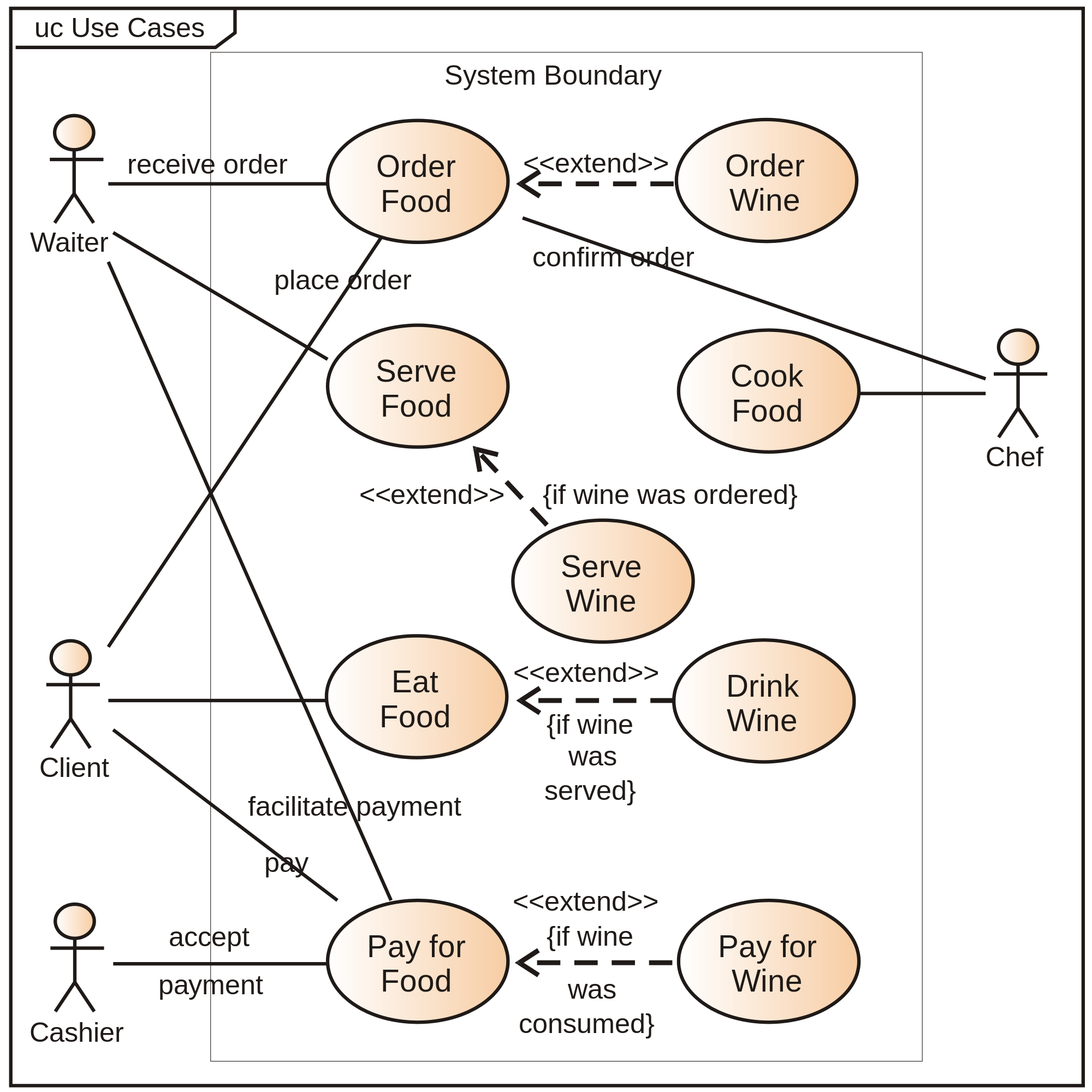
A UML use case diagram for the interaction of a client (the actor) within a restaurant (the system)

A use case diagram[1] is a graphical depiction of a user's possible interactions with a system. A use case diagram shows various use cases and different types of users the system has and will often be accompanied by other types of diagrams as well. The use cases are represented by either circles or ellipses. The actors are often shown as stick figures.

Application

[edit]

While a use case itself might drill into a lot of detail about every possibility, a use-case diagram can help provide a higher-level view of the system. It has been said before that "Use case diagrams are the blueprints for your system".[2][3]

Due to their simplistic nature, use case diagrams can be a good communication tool for stakeholders. The drawings attempt to mimic the real world and provide a view for the stakeholder to understand how the system is going to be designed. Siau and Lee conducted research to determine if there was a valid situation for use case diagrams at all or if they were unnecessary. What was found was that the use case diagrams conveyed the intent of the system in a more simplified manner to stakeholders and that they were "interpreted more completely than class diagrams".[4]

See also

[edit]

References

[edit]

Bibliography

[edit]
Revisions and contributorsEdit on WikipediaRead on Wikipedia
from Grokipedia
A use case diagram is a behavioral diagram in the (UML) that provides a graphical representation of the functional requirements of a system, illustrating the interactions between external entities known as actors and the system's use cases, which specify units of useful functionality. Part of the UML standard, which was developed by , , and James Rumbaugh and standardized by the (OMG), it serves primarily to capture and communicate high-level system behavior during the requirements analysis phase of software and . The diagram consists of key elements including ovals representing use cases, stick figures for actors (which can be human users, other systems, or hardware devices), and lines denoting associations between them. Relationships such as include (for mandatory sub-functionality shared across use cases), extend (for optional or conditional extensions), and generalization (for inheritance-like hierarchies among use cases or actors) further refine the model's structure, enabling a clear depiction of how the system responds to stimuli from its environment. Unlike more detailed behavioral diagrams like sequence or activity diagrams, use case diagrams focus on "what" the system does rather than "how," making them essential for stakeholder alignment and traceability to implementation. In practice, use case diagrams support iterative development methodologies by facilitating the identification of system boundaries and non-functional requirements indirectly through scenarios. They are widely adopted in , often integrated with tools like Enterprise Architect or Visual Paradigm, and remain a core component of the UML 2.5.1 specification, ensuring consistency in modeling distributed and complex systems.

Overview

Definition

A use case diagram is a behavioral diagram defined in the (UML) that provides a graphical representation of the functional specifications of a system, illustrating the interactions between external entities known as actors and the system's use cases to demonstrate observable behaviors of value. It captures the high-level requirements by focusing on what the system should accomplish from an external viewpoint, without specifying the internal implementation details or processes. The primary role of a use case diagram is to model system functionality in terms of end-user goals, enabling stakeholders to understand and validate the system's intended behaviors early in the development process. By depicting use cases as units of useful functionality performed in collaboration with actors, the diagram highlights the external perspective on the system's capabilities, distinguishing it from structural diagrams like class diagrams that focus on internal components and relationships. At its core, the basic structure of a use case diagram includes a system boundary that encloses the use cases representing the system's services, with positioned outside this boundary to signify their role in initiating or participating in those use cases through defined relationships. This structure emphasizes the black-box view of the system, prioritizing functional requirements and external interactions over sequence of events or data flows seen in other UML behavioral diagrams such as activity or sequence diagrams.

History and Standards

The concept of use cases originated in the late 1980s through the work of , a Swedish at , who developed textual and visual modeling techniques for specifying system behaviors from a user's perspective. In 1987, Jacobson presented these ideas at the conference, laying the groundwork for use case methodology in object-oriented analysis. This approach was further formalized in his 1992 book, Object-Oriented Software Engineering: A Use Case Driven Approach, which introduced use cases as a core practice for capturing functional requirements in . The use case diagram emerged as part of the (UML) in the mid-1990s, driven by the collaboration of Jacobson with and James Rumbaugh—known as the ""—at . Their efforts unified various object-oriented modeling notations, incorporating Jacobson's use cases into a standardized graphical representation. UML version 1.0 was submitted to the (OMG) in January 1997, with version 1.1 adopted as the first official standard in November 1997, where use case diagrams were defined as a key behavioral diagram for depicting system interactions with actors. UML evolved through subsequent revisions to enhance expressiveness and clarity in use case modeling. The major update in UML 2.0, released in July 2005, refined use case diagrams by improving support for relationships and stereotypes, making them more suitable for complex systems. Further iterations culminated in UML 2.5.1, adopted by OMG in December 2017, which remains the current standard and details use case diagrams in its superstructure specification under behavioral diagrams (sections 15–18). These standards are maintained by the OMG to ensure interoperability in software engineering practices.

Components

Actors

In use case diagrams, actors represent external entities that interact with the system, such as human users, other software systems, hardware devices, or even abstract entities like time that trigger events. These actors embody roles rather than specific individuals or instances, allowing them to encapsulate the perspective from which the system is utilized or affected. According to the (UML) 2.5 specification, an actor is defined as a kind of classifier that specifies a coherent set of roles that users of an entity can play when interacting with the entity, and actors may be connected to use cases through associations to denote interactions. Actors are graphically depicted as simple stick figures in UML notation, consisting of a head, body, and limbs to symbolize human-like roles, though alternative icons may be used for non-human actors like systems or devices to enhance clarity. This representation emphasizes their external nature, distinguishing them from internal system elements. The stick figure notation has been standard since early UML versions and facilitates quick identification in diagrams. Actors are classified into primary, secondary, and generalized types based on their interaction patterns with use cases. Primary actors are those that initiate a use case to achieve a goal and directly benefit from its outcome, representing the main stakeholders driving system functionality. For instance, a "Customer" in an e-commerce system acts as a primary actor by initiating actions like placing an order. Secondary actors, also known as supporting actors, do not initiate use cases but provide essential services or resources to enable them, often appearing on the right side of diagrams for convention. An example is a "Payment Gateway" external API that processes transactions on behalf of the e-commerce system. Generalized actors involve inheritance relationships, where a more specific actor (e.g., "Registered Customer") inherits properties from a general one (e.g., "Customer"), allowing reuse and specialization of roles without redundancy. These type distinctions, while not formally mandated in UML, are widely adopted in practice to clarify responsibilities and improve diagram readability. In the diagram, are positioned outside the system boundary—a enclosing the use cases—to underscore their external status, and they connect to relevant use cases via solid lines called associations, which may include multiplicity or to specify interaction details. This placement and connection mechanism highlights how drive or support system behavior without delving into internal implementation. For example, in an automated teller machine (ATM) system, the "Bank Customer" primary associates with use cases like "Withdraw Cash," while the "Bank " secondary associates with "Validate Account" to provide backend support.

Use Cases

In UML use case diagrams, a use case represents a unit of useful functionality provided by the system, encapsulating a sequence of actions that yields an observable result of value to one or more actors. This functionality is specified from an external perspective, focusing on what the system does rather than how it achieves the result internally. Use cases are characterized as atomic units of behavior, though they may incorporate sub-use cases through relationships to handle variations or common steps. They are typically named using a verb-noun phrase to clearly indicate the action and its target, such as "Withdraw Cash" for an ATM system or "Place Order" in an e-commerce application. This naming convention ensures clarity and aligns with the goal-oriented nature of use cases, as originally emphasized by Ivar Jacobson in his foundational work on object-oriented analysis. Use cases should be phrased as goal-oriented descriptions from the user's perspective, avoiding implementation-specific or UI-oriented terms (for example, prefer "Authenticate User" over "Login"). Improper naming, such as using implementation details instead of user goals, is a common mistake that can lead to lower scores in academic grading or professional evaluations. Within the use case diagram, use cases are positioned inside the system boundary to denote the functionalities offered by the system as a , abstracting away implementation details like algorithms or data structures. This placement highlights the system's external interface, where interactions with actors occur via associations that connect actors to the relevant use cases. The scope of use cases is limited to functional requirements, describing the observable behaviors and outcomes without addressing non-functional aspects such as , , or metrics. This focus ensures that use cases serve as a high-level model for , prioritizing the "what" over the "how" or "how well."

System Boundary

In UML use case diagrams, the system boundary is depicted as a rectangular box that encloses all the use cases of the system under consideration, with the name of the system typically placed in the top-left corner of the rectangle. This graphical element serves as a visual , clearly distinguishing the internal functionalities represented by the use cases from the external environment, thereby defining the scope of the system being modeled. The primary purpose of the system boundary is to establish the conceptual limits of the subject—often the system itself—by grouping related use cases within it while positioning and other external elements outside. Only the use cases that pertain to the system's observable behaviors are placed inside this boundary; , which interact with the system but are not part of it, remain external to reinforce the separation between the system and its surroundings. This enclosure does not imply formal ownership in the model but rather indicates the applicability of the enclosed use cases to the specified subject. In more complex diagrams, variations may include multiple system boundaries to represent subsystems or modular components, each enclosing a of use cases relevant to that subsystem while maintaining the overall system's scope. Such boundaries can be styled with adjustable opacity or dividing lines for clarity, but they remain non-UML model elements used solely for diagrammatic organization.

Relationships

Association

In use case diagrams, an association represents the fundamental relationship between an and a , depicted as a solid line connecting the actor's symbol to the use case oval, signifying direct interaction or communication between them. This notation, as specified in the UML standard, indicates that the actor either initiates the use case or participates in its execution, without implying any specific sequence or conditionality. Semantically, the association conveys that instances of the can invoke or engage with the to achieve a , modeling the structural link in behavioral terms rather than detailed flow. It is the simplest form of relationship in use case modeling, often bidirectional by default to reflect mutual communication, though an open arrowhead may be added at the use case end to denote unidirectional initiation by the actor if the interaction direction is explicitly constrained. Multiplicity can be annotated at the ends of the line (e.g., 1..* for multiple actor instances per use case), but basic associations typically omit such details unless needed for clarity. For basic usage, no such as <> are required, as the plain association suffices to establish the connection; this keeps diagrams straightforward while allowing extension to more modular relationships like include or extend for . Constraints limit associations to binary links between and use cases (or subjects), preventing direct actor-to-actor ties within the .

Include and Extend

In diagrams, the include and extend relationships enable the modularization of use cases by allowing common or optional behaviors to be factored out and d, promoting clarity and reducing duplication in the model. These relationships are directed dependencies between use cases, distinct from associations with , and are essential for representing complex system interactions without inflating individual use case descriptions. The include relationship specifies that the behavior of one use case (the included use case) is inserted into another use case (the base use case), making the included behavior mandatory for the base to complete successfully. This is particularly useful for factoring out common subprocesses shared across multiple use cases, such as authentication steps that appear in various login scenarios. Semantically, the base use case depends on the included use case to execute its full behavior sequence, and the inclusion occurs at a specific point defined in the base use case's flow. The notation consists of a dashed arrow pointing from the base use case to the included use case, labeled with the stereotype <>. For example, a "Login" use case might include an "Authenticate User" use case to handle credential verification, ensuring this step is always performed without redundant specification. In contrast, the extend relationship allows one (the extending use case) to optionally augment the behavior of another (the base use case) under certain conditions, inserting additional functionality at predefined extension points without altering the base's core flow. This models conditional or exceptional behaviors that may or may not occur, enhancing flexibility in representing real-world variability. Extension points are explicitly named in the base use case's description to indicate where the extension can insert its behavior, such as during a specific step or alternative flow. The notation is a dashed pointing from the extending use case to the base use case, labeled with the stereotype . For instance, a "Checkout" use case in an system could be extended by an "Apply Discount" use case if a promotional code is provided, triggered only when the condition is met. Both relationships contribute to model maintainability by minimizing redundancy—common steps are defined once via include, while optional variations are isolated via extend—thus improving reusability and easing updates to shared behaviors. According to the UML specification, these mechanisms support behavioral composition without implying , focusing instead on dependency for . A common mistake in applying these relationships is misusing <> for optional or conditional behaviors (which should use <>) or using <> for mandatory behaviors (which should use <>). Such errors, along with incorrect arrow directions or misunderstanding dependencies, violate UML standards and are frequent causes of point deductions in academic grading rubrics for use case diagrams. Correct usage is essential for clearly representing user goals and system interactions from an external perspective, ensuring the diagram's clarity, modularity, and adherence to UML conventions.

Generalization

In UML use case diagrams, is a taxonomic relationship that enables between classifiers, specifically allowing one actor or use case to specialize another, forming an "is-a" . This relationship is graphically represented by a solid line terminating in a hollow triangle arrowhead at the more general (parent) element, similar to generalization in class diagrams. For instance, a "VIP Customer" actor may generalize a "" actor, indicating that the VIP Customer is a specialized type of Customer. When applied to actors, means the inherits all associations and relationships of the parent , including connections to s. This allows the to participate in all use cases associated with the parent without needing explicit links, promoting model reuse while maintaining clarity in roles. For example, if a "" is associated with a "Place Order" , a specializing "Wholesale Customer" automatically inherits that association and may add further specializations. However, between actors and use cases is not permitted, as it would violate the in the diagram. For s, the generalization relationship indicates that the child use case inherits the behavior, properties, and associations of the parent use case, potentially refining or overriding aspects of that behavior to provide more specific functionality. The child use case thus represents a specialized variant, inheriting any associations from the parent. This supports by allowing common behaviors to be defined once in the parent and specialized as needed, such as a " Credit Card Payment" use case generalizing from a broader " Payment" use case. In practice, generalization is employed to model hierarchical refinements but is used judiciously, as overuse can introduce complexity and reduce the diagram's readability in simpler systems.

Notation

Graphical Symbols

The graphical symbols in use case diagrams, as defined in the official Object Management Group (OMG) Unified Modeling Language (UML) 2.5.1 specification, provide a standardized visual vocabulary for depicting actors, use cases, system boundaries, and relationships between them. These symbols ensure consistency and clarity in representing system interactions. Actors are visually represented as a stick figure (the conventional and preferred form) or as a rectangle containing the actor's name with the stereotype <>. Actors are placed outside the system boundary to denote external entities (human or otherwise) interacting with the system. Use cases, encapsulating units of system functionality observable by actors, are symbolized by an oval (ellipse) with the name inscribed inside. This shape distinguishes use cases and emphasizes their role as behavioral units. In some notations, use cases may alternatively be shown as rectangles, though the oval is the standard and preferred form. Use cases are placed inside the system boundary. The system boundary, defining the scope of the system under consideration, is depicted as a large rectangle enclosing all relevant use cases, with the system's name positioned in a dedicated compartment at the top. This boundary clearly separates internal use cases from external actors. Relationships employ distinct line styles: associations (interactions between actors and use cases) are shown with solid lines, optionally with arrows to indicate navigability; generalizations (inheritance-like relationships) are represented with solid lines ending in a hollow triangle arrowhead pointing to the parent element; include relationships (mandatory sub-use cases) are shown by a dashed line with an open arrow labeled <> pointing from the including (base) use case to the included use case; extend relationships (optional extensions) are represented by a similar dashed line with an open arrow labeled <> pointing from the extending use case to the base use case. These conventions highlight the nature of the dependencies.

Diagram Conventions

In use case diagrams, layout follows established conventions to enhance readability. Actors are typically positioned on the left or right side outside the system boundary, while use cases are placed inside the rectangle to visualize the separation between external participants and system behaviors. Relationship lines should be drawn to minimize crossings and maintain an uncluttered appearance. Naming conventions emphasize consistency and descriptiveness. Use cases are named with a verb-object structure starting with a strong action verb (e.g., "Process Order" or "Validate Payment") to indicate functionality. Actor names use descriptive nouns reflecting roles (e.g., "Customer" or "System Administrator"), with the first letter capitalized per UML classifier guidelines. Stereotypes for relationships, such as <> and <>, are denoted using guillemets (or << >> in plain text) placed near the dashed arrows to distinguish their semantics clearly. Compliance with UML standards ensures portability. Tools like PlantUML, Lucidchart, Microsoft Visio, and StarUML implement notations adhering to UML 2.5.1, including standard shapes, stereotype labels, and line routing. In academic contexts, particularly graduation theses (especially in Chinese academic settings), use case diagrams must strictly adhere to the OMG UML 2.5.1 specification to meet requirements for clarity, correctness, and professionalism. Diagrams should be created using professional tools such as Visio, StarUML, or PlantUML, numbered sequentially (e.g., Figure 1), and accompanied by captions below. They are often supplemented with detailed textual use case descriptions specifying the use case name, actors, preconditions, main flow, alternative flows, exceptions, and postconditions. Non-standard elements should be avoided to ensure academic rigor and acceptance.

Development Process

Steps to Create

Creating a use case diagram follows a structured process derived from UML standards, beginning with and progressing to validation. This sequential approach ensures the diagram accurately captures the system's interactions with external entities without delving into implementation details. Step 1: Identify actors from stakeholders and external systems. Actors represent entities outside the system boundary that interact with it, such as human users, other software systems, or hardware devices. Begin by reviewing project requirements, conducting stakeholder interviews, and analyzing system context to list potential actors; for instance, in an system, actors might include "" and "Bank Administrator." Prioritize primary actors who initiate interactions and secondary ones that support them. This identification establishes who drives the system's functionality. Step 2: List main use cases based on user goals. Use cases encapsulate the system's observable behaviors or goals that actors aim to achieve, phrased as verb-noun pairs like "Withdraw Cash" or "Process Payment." Derive these from actor goals by brainstorming scenarios, functional requirements, and user stories, ensuring each use case provides value and remains at a high level of abstraction. Avoid decomposing into sub-steps here, as that belongs to textual use case descriptions. Aim for a focused set of primary use cases initially to maintain clarity. Step 3: Draw the system boundary and place use cases inside. Represent the system as a labeled with its name, enclosing all use cases to delineate the scope of functionality. Position outside this boundary, typically on the left or as stick figures, to visually separate internal behaviors from external initiators. This step clarifies what the system does versus what it interfaces with, preventing . Step 4: Add associations, then include, extend, and relationships as needed. Draw solid lines connecting to relevant use cases to indicate direct interactions, specifying multiplicity if an actor participates in multiple instances. Subsequently, incorporate relationships among use cases: use dashed arrows for "include" (mandatory sub-use cases, e.g., included in ) and "extend" (optional extensions, e.g., applying fees); employ arrows for between actors or use cases. These elements, as defined in UML, refine the diagram without altering the core structure. Step 5: Validate against requirements for completeness. Review the diagram by cross-checking against original requirements, ensuring all actors, use cases, and relationships align with stakeholder needs and cover edge cases without omissions or redundancies. Iterate with team feedback to confirm the diagram communicates the system's functional scope effectively; tools like traceability matrices can aid this verification. This final check upholds the diagram's role as a reliable requirements artifact.

Best Practices

To ensure clarity and maintainability in use case diagrams, practitioners should limit the number of use cases in a single diagram to avoid visual overload, typically keeping it focused and simple; for more complex systems, employ hierarchies through subsystems, packages, or multiple interconnected diagrams to organize content without sacrificing overview. Use case diagrams must focus exclusively on external interactions between actors and the system, avoiding any depiction of internal implementation details, algorithms, or data flows, which could confuse stakeholders and shift attention from functional requirements to design concerns. For enhanced precision and completeness, always pair use case diagrams with detailed textual descriptions of scenarios, including preconditions, postconditions, main success paths, and alternative flows, as the diagram serves primarily as a high-level visual summary while the narrative provides the substantive elaboration necessary for development and validation. Iterative review is essential, involving stakeholders such as end-users, domain experts, and developers in regular validation sessions to refine the diagram, ensuring it accurately reflects intended behaviors and addresses ambiguities early in the process. Generalization relationships should be applied judiciously, only when there is clear of that adds meaningful and —such as a specialized "VIP Checkout" inheriting from a general "Customer Checkout"—to avoid unnecessary complexity that could obscure the primary functional structure.

Common Mistakes to Avoid

Several common errors in UML use case diagrams can lead to lower scores in academic grading or professional reviews, typically due to incorrect notation, lack of clarity, incomplete coverage of requirements, or violation of UML standards such as wrong arrow directions for include/extend relationships.
  • Focusing on internal system processes instead of user goals and interactions: Use cases should describe what the system does from the user's (actor's) perspective, emphasizing goals and interactions (the "what"), rather than internal mechanisms or processes (the "how"). This error shifts the diagram toward design or implementation details, undermining its role as a requirements tool and often resulting in deductions for lack of user-centric focus.
  • Incorrect use of <> and <> relationships: Examples include using <> for optional behavior (which should use <>) or <> for mandatory behavior (which should use <>), as well as incorrect arrow directions (include arrow points to the included use case; extend arrow points to the extending use case). Such mistakes violate UML conventions and commonly lead to grading penalties for improper notation.
  • Naming use cases with implementation details or simple verbs instead of goal-oriented phrases: Using names like "Login" instead of "Authenticate User" or including technical details reduces clarity and fails to capture the user's goal. Use cases should be phrased as goal statements, typically verb-noun combinations from the actor's viewpoint.
  • Treating the system as an actor or including non-human actors incorrectly: The system itself cannot be an actor; actors are always external entities (human users or other systems) interacting with the system. Incorrectly including the system as an actor or misclassifying non-human entities confuses the diagram scope and boundaries.
  • Overloading the diagram with too many use cases, relationships, or unnecessary details: Excessive elements cause visual clutter, reduce readability, and obscure key interactions. Diagrams should remain simple and focused, with decomposition handled via packages or multiple diagrams for complex systems.
  • Missing system boundary or not clearly identifying actors: Failing to draw the system boundary or clearly label and position actors outside it leads to ambiguity about scope and interactions, a frequent source of grading deductions.
  • Confusing use cases with sequence diagrams or detailed flow of events: Use case diagrams provide a high-level overview of functionality and interactions, not detailed sequences, steps, or internal flows. This confusion results in inappropriate levels of detail and detracts from the diagram's purpose.

Applications

In Software Engineering

Use case diagrams play a central role in the requirements elicitation and analysis phases of software engineering. They are instrumental in identifying what the system must do without delving into implementation details, thus supporting iterative refinement as requirements evolve. In agile frameworks such as Scrum, use case diagrams complement user stories by providing a higher-level, visual overview of system functionality that user stories alone may lack in terms of scope and relationships. This integration allows teams to map user stories to broader use cases, ensuring alignment between sprint planning and overall system goals, while also serving as input for deriving detailed sequence diagrams that illustrate dynamic behaviors. By visualizing actor-system interactions, these diagrams foster clearer communication in cross-functional teams. In modern practices, diagrams can aid in defining system boundaries and dependencies, supporting in distributed systems.

Real-World Examples

One common real-world application of diagrams is in modeling an Automated Teller Machine (ATM) system, where the diagram captures interactions between users and the banking infrastructure. In this example, the primary actors are the , who initiates transactions, and the , which processes backend operations. Key use cases include Withdraw Cash, which incorporates the Authenticate use case to verify user identity before dispensing funds; Check Balance, allowing the customer to view account details; and an extending use case Report Issue, which optionally activates if a transaction encounters an , such as a malfunction, to log complaints with the bank. A textual representation of the ATM use case diagram layout might depict the Customer actor connected via associations to the Withdraw Cash and Check Balance ovals within a system boundary labeled "," with a dashed arrow from Authenticate to Withdraw Cash indicating inclusion (<>), and a dashed arrow from Report Issue to Withdraw Cash showing extension (<>). The Bank System actor associates with underlying processes like fund transfers. This structure highlights the modular breakdown of secure financial transactions. Another illustrative example appears in websites, where use case diagrams outline interactions for online purchasing. Here, actors include the User, representing shoppers, and the , handling secure transactions. Prominent use cases are Browse Products, enabling item searches and views; Place Order, which includes Validate Cart to confirm item availability and totals before proceeding; and an extension via Apply Coupon, which optionally modifies the Place Order process if a discount code is entered, potentially altering or eligibility. In a pseudo-graphic sketch of the diagram, the User actor links to Browse Products and Place Order ovals inside an "E-commerce Website" boundary, with Validate Cart connected by a <> dashed to Place Order, and Apply Coupon linked via a <> to the same base use case. The associates specifically with the order finalization. These examples demonstrate how diagrams delineate scope by focusing on external behaviors and promote through include and extend relationships, allowing reusable components like or validation across scenarios without redundancy.

Advantages and Limitations

Benefits

Use case diagrams facilitate visual communication of , making it easier for non-technical stakeholders to comprehend functionalities compared to purely textual specifications. Their graphical nature simplifies the representation of interactions between and the system, bridging the gap between technical developers and end users. This enhanced interpretability has been empirically demonstrated, with studies showing that use case diagrams are interpreted more completely than other UML diagrams like class diagrams. By delineating actors, use cases, and their relationships, use case diagrams clarify the project's scope early in development, identifying key functionalities and potential gaps before implementation begins. This proactive approach helps mitigate project risks, such as scope creep or overlooked requirements, by serving as a central mechanism for risk reduction during the elaboration phase. The include and extend relationships in use case diagrams promote reusability by allowing common behaviors to be factored out and shared across multiple use cases, reducing redundancy and enhancing model consistency. For instance, an "include" relationship can encapsulate mandatory shared steps, like authentication, while "extend" adds optional extensions, improving maintainability without duplicating elements. Use case diagrams support by linking requirements to downstream artifacts, such as test cases and user acceptance criteria, ensuring comprehensive coverage and verification of system behaviors. This mapping enables systematic validation that all specified interactions are tested, facilitating impact analysis during changes.

Challenges

While use case diagrams provide a valuable visual representation of system interactions, they present several challenges in their creation and application within . One primary issue is the absence of a strict formal standard for use cases, which often results in inconsistencies and subjective interpretations among modelers, leading to debates over what constitutes an effective diagram. This lack of can complicate and in team environments. Another significant challenge lies in the diagram's limited ability to convey detailed structural, geometric, or temporal information, making it difficult to accurately represent flows or sequences of events. For instance, diagrams excel at high-level overviews but struggle to depict intricate interactions, such as abnormal or unforeseen events, without supplementary textual descriptions, which can lead to incomplete or ambiguous models. Additionally, the process of developing these diagrams is often time-intensive, particularly for large systems, and is hampered by insufficient support from automated tools, further exacerbating development efforts. Use case diagrams also face issues with scalability and clarity when overloaded with elements. Including numerous use cases or excessive relationships—such as include, extend, or generalize—can result in cluttered visuals with unreadable text, obscuring the intended behavior and confusing stakeholders. Misapplication of the notation for purposes beyond functional requirements, like architectural or modeling, introduces elements that dilute the diagram's focus on actor-system interactions. Furthermore, these diagrams inherently overlook non-functional requirements, such as or constraints, and fail to account for user motivations or experiences, which are crucial for analysis. The ambiguity in notations often necessitates additional documentation, and transforming use case diagrams into other UML artifacts, like or class diagrams, poses challenges due to incomplete semantic capture. In specialized contexts, such as cross-device systems, standard diagrams lack mechanisms to model device-specific interactions or variabilities, requiring extensions or alternative approaches. As of 2025, empirical analysis of open-source projects indicates low overall adoption of UML diagrams, including diagrams, with only about 4.2% of analyzed repositories containing them. However, there has been a resurgence since driven by text-based diagramming tools like and , which improve and integration into code but still face limitations in layout control and visual expressiveness.

References

Add your contribution
Related Hubs
User Avatar
No comments yet.