Hubbry Logo
Contact listContact listMain
Open search
Contact list
Community hub
Contact list
logo
8 pages, 0 posts
0 subscribers
Be the first to start a discussion here.
Contact list
Contact list
from Wikipedia
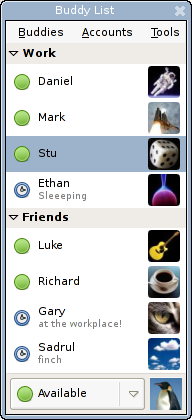
A contact list in Pidgin 2.0

A contact list is a collection of screen names.[1] It is a commonplace feature of instant messaging, Email clients, online games and mobile phones.[1] It has various trademarked and proprietary names in different contexts.[1]

Contacts lists' windows show screen names that represent actual other people.[2] To communicate with someone on the list, the user can select a name and act upon it, for example open a new E-mail editing session, instant message, or telephone call. In some programs, if your contact list shows someone, their list will show yours. Contact lists for mobile operating systems are often shared among several mobile apps.[citation needed]

Some text message clients allow users to change their display name at will, while others only allow them to reformat their screen name (add/remove spaces and capitalize letters). Generally, it makes no difference other than how it is displayed.[citation needed]

With most programs, the contact list can be minimized to keep it from getting in the way, and is accessed again by selecting its icon.[citation needed]

The style of the contact list is different with the different programs, but all contact lists have similar capabilities.[citation needed]

Such lists may be used to form social networks with more specific purposes. The list is not the network: to become a network, a list requires some additional information such as the status or category of the contact.[citation needed] Given this, contact networks for various purposes can be generated from the list. Salespeople have long maintained contact networks using a variety of means of contact including phone logs and notebooks.[citation needed] They do not confuse their list with their network, nor would they confuse a "sales contact" with a "friend" or person they had already worked with.[citation needed]

See also

[edit]

References

[edit]
Revisions and contributorsEdit on WikipediaRead on Wikipedia
from Grokipedia
A contact list, also known as an or contact group, is an organized collection of contact information for individuals, organizations, or groups, typically including details such as names, addresses, numbers, physical addresses, job titles, and company affiliations, designed to facilitate communication and relationship management. This compilation serves as a centralized repository for personal, professional, or business interactions, enabling quick access to relevant details for outreach via , phone calls, or messaging. In digital contexts, contact lists are commonly integrated into software applications, devices, and platforms to streamline correspondence and automate group communications. The concept of contact lists has evolved from physical analogs like the —a rotating card file invented in the 1950s for organizing business cards and addresses—to digital formats emerging in the 1980s with early contact management software such as ACT! and email clients. Today, they are ubiquitous in environments, stored on smartphones, computers, and services, where they support features like auto-completion in messaging apps and bulk emailing. In personal use, contact lists help individuals maintain social networks by storing details for family, friends, and acquaintances, often synced across devices for seamless access. Professionally, they underpin sales, marketing, and operations, allowing teams to track interactions and personalize outreach. Modern contact lists increasingly integrate with platforms and AI tools for enhanced management and suggestions as of 2025. Maintaining an accurate contact list is crucial for and compliance, as outdated or incomplete can hinder communication efforts, while robust lists enhance relationship building and efficiency. In contexts, well-managed lists contribute to higher rates and conversions by enabling targeted campaigns, though they must adhere to data protection regulations to safeguard . For instance, contact lists in CRM tools like those from or allow segmentation for tailored communications, underscoring their role in modern digital workflows.

Definition and Overview

Core Concept

A contact list is defined as a curated collection of contact information, such as names, addresses, numbers, or other identifiers, associated with individuals or entities to enable efficient access and initiation of communication. In digital contexts, it organizes these details for users to connect with known contacts across various applications, including clients, phone apps, (CRM) systems, and platforms. The primary purpose of a contact list is to facilitate personal, social, or professional interactions by storing essential details, including names, communication identifiers, and sometimes additional information like job titles or company affiliations. This setup allows users to quickly locate and engage with contacts, streamlining the process of sending messages or calls without needing to repeatedly input or search for details. Contact lists and address books are often used interchangeably, with the level of detail varying by or purpose; while some emphasize comprehensive records including physical , others focus on actionable entries for digital outreach.

Key Components

A contact list fundamentally consists of structured data fields that capture essential information about individuals or entities, enabling efficient storage and retrieval. Standard fields typically include the contact's name (often broken down into first name, last name, and a formatted display name), a such as a username or phone number for unambiguous referencing, and multiple contact methods like email addresses, phone numbers, and social media handles. These core elements form the basis of entries in most digital , ensuring that contacts can be quickly identified and reached across various channels. Beyond basic identifiers, contact lists incorporate metadata elements to provide contextual insights and facilitate organization. These may include availability status (e.g., or offline indicators in messaging-integrated lists), timestamps for the last interaction (such as the date of the most recent call or message), and grouping tags like "favorites," "family," or "work colleagues" to categorize contacts logically. Such metadata enhances usability by allowing users to prioritize or filter contacts based on recency or relationship type, without altering the core . Contact lists are typically structured as databases or portable files to support consistency and interoperability. The format, defined in RFC 6350, serves as a widely adopted standard for this purpose, representing contacts as text-based files with properties like BEGIN:VCARD, FN (formatted name), and END:VCARD for minimal entries, while extended versions can include additional details such as URLs or photos. A minimal vCard might contain only name and , whereas an extended one could encompass addresses, multiple phone types (e.g., home, mobile), and even geographic coordinates, promoting portability across devices and applications. To accommodate diverse user needs, contact lists support customization through user-defined fields, such as personal notes, profile photos, or custom categories, which extend beyond standard attributes while maintaining overall adaptability. For instance, users can attach images or add bespoke notes to entries, allowing the list to evolve with specific relational or professional contexts. This flexibility ensures that contact lists remain practical tools for auto-populating messages in communication applications.

Historical Development

Pre-Digital Forms

Pre-digital forms of contact lists primarily consisted of physical, manual systems designed to organize personal and professional contacts through paper-based media. In the 19th century, paper address books emerged as common tools for recording names, addresses, and sometimes telephone numbers once they became widespread after the invention of the telephone in 1876. These books, often bound in leather or cloth and featuring alphabetical sections, were produced by stationery manufacturers and used by individuals for maintaining social and business networks. Similarly, index cards, which originated in the late 18th century with naturalist Carl Linnaeus for taxonomic organization, were adapted in the 19th and early 20th centuries for personal contact management, allowing users to jot down details on standardized 3x5-inch or 4x6-inch cards stored in boxes or files. A significant advancement came in 1956 with the invention of the , a rotating wheel file system developed by Danish engineer Hildaur Neilsen while employed by Zephyr American, a company founded by Arnold Neustadter in 1938. The held removable index cards in a circular , enabling quick flipping to access contacts alphabetically via tabs, and it became a staple in offices for storing business cards and addresses. These analog systems offered basic functionality through manual sorting and static entries limited to essential details like names, addresses, phone numbers, and occasional notes, primarily serving environments for networking and correspondence. However, they were inherently limited by the absence of real-time updates, requiring handwritten revisions that were time-consuming and error-prone, and they were susceptible to physical loss, damage, or obsolescence as contacts changed. In professional etiquette, maintaining such lists symbolized connectivity and status, with the "little black book"—a compact, leather-bound —gaining cultural prominence in the mid- as a discreet repository for social and romantic contacts. The rise of increasing personal and business mobility during this period, driven by post-World War II and travel, highlighted these limitations and spurred the eventual shift toward more portable and updatable formats. Early digital contact systems in the late often mimicked the card-based layouts of Rolodexes and index files for familiarity.

Emergence in Digital Systems

The transition from analog to digital contact lists occurred in the with the advent of personal computers and early managers (PIMs), which digitized the storage and retrieval of contact information previously managed manually. Devices like the Psion Organiser, launched in 1984, featured built-in database applications that functioned as electronic address books, allowing users to store names, phone numbers, and notes on portable hardware. Similarly, Borland Sidekick, released the same year for IBM PC compatibles, integrated contact management alongside calendar and notepad functions, marking an early software-based shift toward centralized digital records. This digitalization addressed the limitations of physical systems like the Rolodex by enabling searchable, editable entries without manual flipping. By the late 1980s and early 1990s, contact lists became integral to communication software, particularly email clients. Eudora, one of the first graphical programs released in 1988, incorporated an electronic for storing addresses and contact details, facilitating quick addressing and organization of messages. Key milestones followed with the rise of real-time communication: introduced the "buddy list" in 1996, a dynamic contact roster showing online status for , which popularized presence-aware lists among internet users. In mobile devices, phones in the late 1990s, such as the 5110 model from 1998, supported SIM card-based contact storage, allowing up to 20 entries transferable between handsets and overcoming device-specific limitations. Technological enablers like relational databases for efficient local storage and local area networks (LANs) for initial sharing laid the groundwork, but the internet's expansion in the accelerated widespread adoption by enabling cloud-like and remote access. Standardization efforts further supported interoperability: the (LDAP) version 3, initially specified in RFC 2251 in 1997, gained traction in enterprise environments by the early for managing large-scale contact directories, as seen in Microsoft's integration starting in 2000. Concurrently, the format, initially developed in 1990 and standardized via RFC 2426 in 1998, became a for exchanging contact data across platforms by the early , promoting compatibility in and PIM applications.

Applications and Uses

In Communication Tools

Contact lists play a central role in applications, where they often manifest as "buddy lists" that enable users to monitor real-time online status and initiate quick conversations. In early systems like AOL Instant Messenger (AIM), launched in 1997, the buddy list allowed users to view which contacts were online, facilitating immediate messaging without needing to search or dial. Modern apps such as have evolved this concept into customizable lists that organize chats by categories like family or friends, supporting features for real-time status updates and streamlined access to group or individual messaging. These integrations reduce the friction of starting interactions by prioritizing frequently contacted individuals and displaying availability indicators directly within the app interface. In email clients and platforms, contact lists enhance efficiency through auto-completion and targeted sharing options. For instance, uses its contact list to populate the feature in the To, Cc, and Bcc fields, suggesting recipients based on prior emails and stored contacts to speed up composition. On , Facebook's friend lists allow users to curate groups for selective post visibility, enabling posts to be shared only with specific subsets like close friends rather than the entire network. This functionality supports privacy-conscious communication by letting users control audience reach without manual adjustments each time. For mobile devices and Voice over IP (VoIP) services, contact lists are typically stored in SIM cards or cloud services, powering seamless calls, texts, and video sessions. Apple's iCloud Contacts, for example, syncs phone numbers and details across devices to enable direct dialing, iMessage texting, and FaceTime video calls from the native Phone or Messages apps. This integration ensures that users can access full contact profiles—including photos and recent interactions—during VoIP calls, making transitions between voice, text, and video fluid without re-entering details. The primary user benefits of contact lists in these tools include streamlined interactions, such as effortless initiation of group chats or personalized notifications tied to list entries. By organizing contacts into accessible formats, these lists minimize search time and enable features like priority alerts for messages from favored individuals, fostering more responsive personal communication. For instance, in apps like , list-based notifications can highlight updates from specific groups, enhancing engagement without overwhelming users with irrelevant alerts. Cloud-based synchronization, as seen in services like , further supports these benefits by maintaining list consistency across devices in one sentence.

In Professional and Organizational Contexts

In professional and organizational contexts, contact lists serve as structured repositories for managing relationships, enabling efficient tracking of leads, clients, and internal personnel to support sales, operations, and collaboration. Within (CRM) systems like , contact lists are central to lead tracking, where individual contact records capture essential details such as job roles, affiliated companies through account linkages, and chronological interaction history—including emails, calls, and meetings—to inform sales strategies and . These features allow teams to prioritize high-value prospects by querying custom fields, such as those for decision-making authority or industry sector, fostering targeted outreach without duplicating data across records. Enterprise directories, such as Active Directory (AD) integrated with (LDAP), maintain internal employee contact lists to streamline communication and enforce within organizations. AD stores employee details as user objects, including addresses, phone numbers, and departmental affiliations, enabling global address lists for systems like Exchange and facilitating role-based permissions for resource access, such as file shares or applications. LDAP serves as the underlying protocol for querying and updating these directories, allowing synchronized updates across on-premises and cloud environments to ensure accurate, real-time availability of contact information for IT administrators and HR teams. Professional networking tools, exemplified by 's connections feature, extend contact lists to external ecosystems, while event management applications support temporary lists for attendees to drive targeted interactions. On , users manage professional contact lists by viewing, searching, and filtering connections by criteria like current company, location, or industry, with options to message or remove entries to networks for advancement and . Event apps, such as those used in , generate attendee contact lists for , enabling digital exchanges of business cards and scheduling of one-on-one meetings based on shared interests or roles, thereby enhancing post-event follow-up efficiency. Scalability in these professional contact lists is achieved through features like bulk imports, segmentation, and engagement analytics, accommodating large organizations with thousands of entries. CRM platforms support bulk imports via tools like Salesforce Data Loader, allowing CSV uploads of contact data to rapidly populate lists while deduplicating entries based on email or name. Segmentation organizes contacts by attributes such as department or engagement level—for instance, in HubSpot, dynamic segments automatically update to isolate sales-ready leads from dormant ones—enabling precise campaign targeting. Analytics on contact engagement, including metrics like open rates or interaction frequency, provide insights into relationship health, as seen in Salesforce reports that aggregate data across segmented lists to measure ROI on outreach efforts.

Management and Functionality

Organization and Editing

Contact lists are organized and edited through various methods that enhance usability and accuracy. Adding entries can occur via manual input, where users enter details such as names, phone numbers, and emails directly into applications like Outlook or the iPhone Contacts app. Imports from files, such as CSV or vCard formats, allow bulk addition from external sources, as supported in Google Contacts. Auto-capture features include extracting information from emails or messages; for instance, in the iPhone Mail app, users can create a new contact from an email address in a message. Additionally, scanning business cards using optical character recognition (OCR) tools, like those in Outlook mobile, converts printed details into digital entries automatically. Editing tools facilitate modifications to maintain relevance. Search functions enable quick location of entries, often with alphabetical sorting or keyword-based queries in systems like Outlook. Duplicate removal identifies and merges redundant contacts; , for example, offers a built-in merge tool that scans for similarities and combines them. Bulk updates allow simultaneous changes to multiple entries, while grouping organizes contacts into categories such as "work" or "family" using labels in or color-coded categories in Outlook. AI-assisted deduplication, available in tools like CRM, uses algorithms to detect fuzzy matches beyond exact duplicates, improving efficiency for large lists. Search and filter functions further streamline access. Alphabetical sorting arranges entries for easy navigation, while advanced filters permit viewing by criteria like recent additions or company affiliation in Outlook. Keyword searches scan fields such as notes or addresses, and pinning frequent contacts to favorites provides prioritized access, as implemented in and Apple ecosystems. Best practices emphasize regular to prevent outdated . Users should conduct periodic reviews to update details and merge duplicates, standardizing to avoid inconsistencies. techniques, such as adding favorites or labels for high-value contacts, ensure quick retrieval, while backing up safeguards against loss. In professional contexts, segmenting by role or interaction frequency supports targeted communication without overwhelming the list.

Integration and Synchronization

Contact lists integrate with various platforms and devices through cloud-based synchronization services, enabling users to access and update their data seamlessly across multiple endpoints. For instance, utilizes cloud storage within a user's to automatically back up and sync contacts from Android devices to the web and other signed-in devices, with changes propagating in real time once connectivity is restored. Similarly, Apple synchronizes contacts across , , Mac, and iCloud.com by enabling the Contacts toggle in iCloud settings, ensuring updates appear on all connected devices the next time they go online. These services maintain a central repository, allowing contacts saved on one device—such as a phone or computer—to become available instantly on others without manual intervention. Standardized protocols facilitate interoperability between different applications, operating systems, and services, preventing data silos. CardDAV, defined in RFC 6352 by the IETF, extends the protocol to manage contact data in format, supporting server-side searching, hierarchical books, and via HTTP methods with ETags for efficient change detection and updates across clients like apps and OS books. SyncML, developed by the , provides an XML-based framework for synchronizing personal information such as contacts between mobile devices and servers, ensuring consistency and bidirectional updates regardless of the underlying . For example, Android devices leverage —a protocol—to sync contacts with Outlook or Exchange servers by enabling the Sync Contacts option in account settings, pulling data from both local and server books during operations like composition. Synchronization processes encounter challenges, particularly in handling concurrent modifications and intermittent connectivity. Conflict resolution during merges often employs optimistic locking, where clients detect discrepancies using timestamps or ETags and prompt user intervention to avoid , as evaluated in Android contact synchronizers where simultaneous changes on client and server can lead to lost updates without proper anchoring mechanisms. Offline access is addressed through local caching, where contact data is stored on the device for viewing and editing without network availability; upon reconnection, cached modifications are queued and pushed to the server using strategies like pull-based syncing to resolve inconsistencies, especially for shared contacts where a "first update wins" rule may apply with manual overrides for exceptions. These solutions prioritize partial consistency to balance and , minimizing round trips for large lists—such as reducing sync time for 4,000 contacts from over 2,000 seconds in naive implementations to efficient 2-3 HTTP requests. Advanced integrations enhance contact lists by automating updates from related applications like email and calendars. For example, Google Contacts links with Gmail to automatically save email recipients to "Other contacts" based on interactions and suggest manually adding them to primary contacts. Integration with Google Calendar allows automated population of event attendees from contacts or vice versa, using APIs to update contact details based on scheduled meetings, ensuring organizational groupings remain current without redundant entry. As of July 2025, Google Contacts added a "Recent Activity" section to contact cards, displaying details of recent interactions such as last calls to improve quick access and usability. Such linkages, often facilitated by platform APIs, enable real-time enrichment of contact data, such as appending calendar-derived notes to entries, while maintaining synchronization across the ecosystem.

Privacy and Security Considerations

Data Protection Measures

Contact lists, which often contain sensitive personal information such as names, phone numbers, and email addresses, are protected through robust encryption methods to prevent unauthorized access. Data at rest is commonly encrypted using the (AES), typically with 256-bit keys, as implemented in platforms like where contact data is stored on servers. For data in transit, particularly during cloud synchronization, Transport Layer Security (TLS) version 1.3 or higher is employed to secure transmissions, ensuring that contact information remains confidential between devices and servers. Access controls further safeguard contact lists by limiting who can view or modify entries. For instance, in Apple's , users can grant apps limited access to view selected contacts without full permissions, a feature configurable in . Two-factor (2FA) is required for editing contact lists in many services, adding an extra layer of verification beyond passwords to prevent unauthorized changes. Legal frameworks mandate specific protections for contact list data, treating it as personal information. Under the General Data Protection Regulation (GDPR) effective since 2018, EU-based services must obtain explicit consent before collecting or processing contact data, with requirements for data minimization and the right to erasure. Similarly, the Consumer Privacy Act (CCPA) applies to California residents, requiring businesses to disclose data collection practices and provide rights for the sale of personal information, including contact details. Internationally, laws like China's Personal Information Protection Law (PIPL, effective 2021) impose similar consent and minimization requirements for personal data including contacts. To mitigate risks from device failures, secure backup and recovery mechanisms incorporate versioning to maintain historical copies of contact lists. These backups are encrypted using AES standards and stored in protected cloud environments, allowing users to restore previous versions without . Synchronization protocols, such as secure CardDAV over TLS, facilitate these backups while ensuring across devices.

Associated Risks and Vulnerabilities

Contact lists are susceptible to data breaches, where unauthorized access exposes sensitive personal information such as names, addresses, and phone numbers. In the 2019 Capital One incident, a exploited a misconfigured to access on over 100 million individuals, including names, addresses, phone numbers, addresses, and dates of birth from applications. Another notable example is the 2020 Sina Weibo breach, which compromised personal details of 538 million users, including contact information that could be aggregated into lists for malicious use. Phishing attacks often leverage scraped contact lists obtained from public websites or breached databases to target victims with personalized lures. Attackers use automated bots to harvest addresses and phone numbers, building lists for campaigns that mimic trusted communications. For instance, the malware has been observed scraping templates and contacts from infected systems to craft convincing messages, increasing the success rate of credential theft. Key vulnerabilities in contact lists stem from weak passwords, which enable unauthorized account access and subsequent data exports. Cyber actors frequently exploit default or easily guessable credentials to infiltrate services storing contact data, allowing bulk downloads without detection. Additionally, malware specifically targets contact lists on mobile devices, such as the Crocodilus Android Trojan, which adds fake entries to victims' phone books to spoof trusted callers and facilitate fraud. Self-propagating variants, like those spreading via WhatsApp, automatically distribute malicious payloads to all listed contacts, amplifying the threat. The impacts of compromised contact lists are severe, facilitating through the misuse of personal details in fraudulent applications or account takeovers. Stolen lists fuel spam proliferation, with attackers using harvested emails and phones to distribute unsolicited messages, often evading filters due to the volume and variety of sources. Moreover, such data enables social engineering attacks, where perpetrators impersonate known contacts to extract further information or funds; is involved in approximately 14% of data breaches, according to the 2025 Verizon Data Breach Investigations Report. Emerging threats include AI-generated that personalizes attacks using contact data. To mitigate these risks, user education emphasizes careful management of sharing settings in apps and services, advising against public exposure of contact details to reduce scraping opportunities. While standards like GDPR provide a framework for data protection, awareness of these vulnerabilities remains essential for individual users.

References

Add your contribution
Related Hubs
User Avatar
No comments yet.