


Community hub
Recent from talks
Contribute something
Nothing was collected or created yet.
Z-buffering
View on Wikipedia | This article has multiple issues. Please help improve it or discuss these issues on the talk page. (Learn how and when to remove these messages)
|


A z-buffer, also known as a depth buffer, is a type of data buffer used in computer graphics to store the depth information of fragments. The values stored represent the distance to the camera, with 0 being the closest. The encoding scheme may be flipped with the highest number being the value closest to camera.
In a 3D-rendering pipeline, when an object is projected on the screen, the depth (z-value) of a generated fragment in the projected screen image is compared to the value already stored in the buffer (depth test), and replaces it if the new value is closer. It works in tandem with the rasterizer, which computes the colored values. The fragment output by the rasterizer is saved if it is not overlapped by another fragment.
Z-buffering is a technique used in almost all contemporary computers, laptops, and mobile phones for generating 3D computer graphics. The primary use now is for video games, which require fast and accurate processing of 3D scenes.
Usage
[edit]Occlusion
[edit]Determining what should be displayed on the screen and what should be omitted is a multi-step process utilising various techniques. Using a z-buffer is the final step in this process.
Each time an object is rendered into the framebuffer the z-buffer is used to compare the z-values of the fragments with the z-value already in the z-buffer (i.e., check what is closer), if the new z-value is closer than the old value, the fragment is written into the framebuffer and this new closer value is written into the z-buffer. If the z-value is further away than the value in the z-buffer, the fragment is discarded. This is repeated for all objects and surfaces in the scene (often in parallel). In the end, the z-buffer will allow correct reproduction of the usual depth perception: a close object hides one further away. This is called z-culling.
The granularity of a z-buffer has a great influence on the scene quality: the traditional 16-bit z-buffer can result in artifacts (called "z-fighting" or stitching) when two objects are very close to each other. A more modern 24-bit or 32-bit z-buffer behaves much better, although the problem cannot be eliminated without additional algorithms. An 8-bit z-buffer is almost never used since it has too little precision.
Shadow mapping
[edit]Z-buffer data obtained from rendering a surface from a light's point-of-view permits the creation of shadows by the shadow mapping technique.[1]
History
[edit]Z-buffering was first described in 1974 by Wolfgang Straßer in his PhD thesis on fast algorithms for rendering occluded objects.[2] A similar solution to determining overlapping polygons is the painter's algorithm, which is capable of handling non-opaque scene elements, though at the cost of efficiency and incorrect results.
Z-buffers are often implemented in hardware within consumer graphics cards. Z-buffering is also used (implemented as software as opposed to hardware) for producing computer-generated special effects for films.[citation needed]
Developments
[edit]Even with small enough granularity, quality problems may arise when precision in the z-buffer's distance values are not spread evenly over distance. Nearer values are much more precise (and hence can display closer objects better) than values that are farther away. Generally, this is desirable, but sometimes it will cause artifacts to appear as objects become more distant. A variation on z-buffering which results in more evenly distributed precision is called w-buffering (see below).
At the start of a new scene, the z-buffer must be cleared to a defined value, usually 1.0, because this value is the upper limit (on a scale of 0 to 1) of depth, meaning that no object is present at this point through the viewing frustum.
The invention of the z-buffer concept is most often attributed to Edwin Catmull, although Wolfgang Straßer described this idea in his 1974 Ph.D. thesis months before Catmull's invention.[a]
On more recent PC graphics cards (1999–2005), z-buffer management uses a significant chunk of the available memory bandwidth. Various methods have been employed to reduce the performance cost of z-buffering, such as lossless compression (computer resources to compress/decompress are cheaper than bandwidth) and ultra-fast hardware z-clear that makes obsolete the "one frame positive, one frame negative" trick (skipping inter-frame clear altogether using signed numbers to cleverly check depths).
Some games, notably several games later in the Nintendo 64's life cycle, decided to either minimize z-buffering (for example, rendering the background first without z-buffering and only using z-buffering for the foreground objects) or to omit it entirely, to reduce memory bandwidth requirements and memory requirements respectively. Super Smash Bros. and F-Zero X are two Nintendo 64 games that minimized z-buffering to increase framerates. Several Factor 5 games also minimized or omitted z-buffering. On the Nintendo 64 z-Buffering can consume up to 4x as much bandwidth as opposed to not using z-buffering.[3]
Mechwarrior 2 on PC supported resolutions up to 800x600[4] on the original 4 MB 3dfx Voodoo due to not using z-buffering.
Z-culling
[edit]In rendering, z-culling is early pixel elimination based on depth, a method that provides an increase in performance when rendering of hidden surfaces is costly. It is a direct consequence of z-buffering, where the depth of each pixel candidate is compared to the depth of the existing geometry behind which it might be hidden.
When using a z-buffer, a pixel can be culled (discarded) as soon as its depth is known, which makes it possible to skip the entire process of lighting and texturing a pixel that would not be visible anyway. Also, time-consuming pixel shaders will generally not be executed for the culled pixels. This makes z-culling a good optimization candidate in situations where fillrate, lighting, texturing, or pixel shaders are the main bottlenecks.
While z-buffering allows the geometry to be unsorted, sorting polygons by increasing depth (thus using a reverse painter's algorithm) allows each screen pixel to be rendered fewer times. This can increase performance in fillrate-limited scenes with large amounts of overdraw, but if not combined with z-buffering it suffers from severe problems such as:
- polygons occluding one another in a cycle (e.g. triangle A occludes B, B occludes C, C occludes A)
- the lack of any canonical "closest" point on a triangle (i.e. no matter whether one sorts triangles by their centroid or closest point or furthest point, one can always find two triangles A and B such that A is "closer" but in reality B should be drawn first).
As such, a reverse painter's algorithm cannot be used as an alternative to z-culling (without strenuous re-engineering), except as an optimization to z-culling. For example, an optimization might be to keep polygons sorted according to x/y-location and z-depth to provide bounds, in an effort to quickly determine if two polygons might possibly have an occlusion interaction.
Mathematics
[edit]The range of depth values in camera space to be rendered is often defined between a and value of .


After a perspective transformation, the new value of , or , is defined by:


After an orthographic projection, the new value of , or , is defined by:
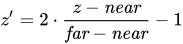
where is the old value of in camera space, and is sometimes called or .


The resulting values of are normalized between the values of -1 and 1, where the plane is at -1 and the plane is at 1. Values outside of this range correspond to points which are not in the viewing frustum, and shouldn't be rendered.

Fixed-point representation
[edit]Typically, these values are stored in the z-buffer of the hardware graphics accelerator in fixed point format. First they are normalized to a more common range which is [0, 1] by substituting the appropriate conversion into the previous formula:
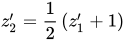

Simplifying:

Second, the above formula is multiplied by where d is the depth of the z-buffer (usually 16, 24 or 32 bits) and rounding the result to an integer:[5]


This formula can be inverted and derived in order to calculate the z-buffer resolution (the 'granularity' mentioned earlier). The inverse of the above :


where
The z-buffer resolution in terms of camera space would be the incremental value resulted from the smallest change in the integer stored in the z-buffer, which is +1 or -1. Therefore, this resolution can be calculated from the derivative of as a function of :

Expressing it back in camera space terms, by substituting by the above :
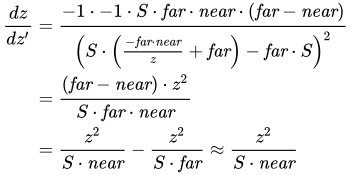
This shows that the values of are grouped much more densely near the plane, and much more sparsely farther away, resulting in better precision closer to the camera. The smaller is, the less precision there is far away—having the plane set too closely is a common cause of undesirable rendering artifacts in more distant objects.[6]

To implement a z-buffer, the values of are linearly interpolated across screen space between the vertices of the current polygon, and these intermediate values are generally stored in the z-buffer in fixed point format.
W-buffer
[edit]To implement a w-buffer,[7] the old values of in camera space, or , are stored in the buffer, generally in floating point format. However, these values cannot be linearly interpolated across screen space from the vertices—they usually have to be inverted, interpolated, and then inverted again. The resulting values of , as opposed to , are spaced evenly between and . There are implementations of the w-buffer that avoid the inversions altogether.
Whether a z-buffer or w-buffer results in a better image depends on the application.
Algorithmics
[edit]The following pseudocode demonstrates the process of z-buffering:
// First of all, initialize the depth of each pixel.
d(i, j) = infinite // Max length

// Initialize the color value for each pixel to the background color
c(i, j) = background color

// For each polygon, do the following steps :
for (each pixel in polygon's projection)
{
    // Find depth i.e, z of polygon
    //   at (x, y) corresponding to pixel (i, j)
    if (z < d(i, j))
    {
        d(i, j) = z;
        c(i, j) = color;
    }
}
See also
[edit]References
[edit]- ^ Akenine-Möller, Tomas; Haines, Eric; Hoffman, Naty (2018-08-06). Real-Time Rendering, Fourth Edition. CRC Press. ISBN 978-1-351-81615-1.
- ^ Straßer, Wolfgang (April 26, 1974). "Zukünftige Arbeiten". Schnelle Kurven- und Flächendarstellung auf grafischen Sichtgeräten [Fast curve and surface display on graphic display devices] (PDF) (in German). Berlin. 6-1.
{{cite book}}: CS1 maint: location missing publisher (link) - ^ How I implemented MegaTextures on real Nintendo 64 hardware, retrieved 2024-01-04
- ^ 3D Acceleration Comparison Ep11: Mechwarrior 2 - 3DFX / PowerVR / S3 Virge / ATI Rage / Matrox Mys, retrieved 2024-01-04
- ^ The OpenGL Organization. "Open GL / FAQ 2 - Depth Buffer Precision". Retrieved 2017-12-26.
- ^ Grégory Massal. "Depth buffer - the gritty details". Archived from the original on 15 October 2008. Retrieved 2008-08-03.
- ^ Steve Baker. "Learning to Love your Z-buffer". Retrieved 2018-01-03.
External links
[edit]Notes
[edit]- ^ See Wolfgang K. Giloi, J. L. Encarnação, W. Straßer. "The Giloi’s School of Computer Graphics". Computer Graphics 35 4:12–16.
Z-buffering
View on GrokipediaFundamentals
Definition and Purpose
Z-buffering, also known as depth buffering, is a fundamental technique in computer graphics for managing depth information during the rendering of 3D scenes. It employs a per-pixel buffer, typically the same resolution as the framebuffer, to store Z-coordinate values representing the distance from the viewpoint (camera) for each fragment generated during rasterization. This buffer allows the rendering system to resolve visibility by comparing incoming fragment depths against stored values, ensuring that only the closest surface contributes to the final image at each pixel. The method was originally proposed as an extension to the frame buffer to handle depth explicitly in image space.[4] The primary purpose of Z-buffering is to address the hidden surface removal problem, where multiple overlapping primitives must be correctly ordered by depth to produce a coherent image without manual intervention. By discarding fragments that lie behind the current depth value at a pixel, Z-buffering enables the rendering of complex scenes composed of intersecting or arbitrarily ordered polygons, eliminating the computational overhead of sorting primitives prior to processing—a common bottleneck in earlier algorithms. This approach facilitates efficient hidden surface elimination, as surfaces can be drawn in any order, making it particularly suitable for dynamic scenes.[4][5] Key benefits of Z-buffering include its natural handling of intersecting primitives through per-fragment depth comparisons, which avoids artifacts from polygon overlaps, and its compatibility with hardware-accelerated parallel processing in modern graphics pipelines. It integrates directly with rasterization workflows, where depth tests occur alongside color computation, supporting real-time applications without significant preprocessing. Additionally, the Z-buffer works in tandem with the color buffer: while the color buffer accumulates RGB values for visible pixels, the Z-buffer governs which fragments are accepted, ensuring accurate occlusion and final image composition.[4][5] In standard graphics APIs, Z-buffering is synonymous with the "depth buffer," a term used in OpenGL for the buffer that stores normalized depth values between 0 and 1, and in Direct3D for managing Z or W coordinates to resolve pixel occlusion.[6][7]Basic Principle
Z-buffering, also known as depth buffering, relies on a per-pixel depth comparison to resolve visibility during rasterization. At the start of each frame, the Z-buffer—a two-dimensional array matching the resolution of the framebuffer—is cleared and initialized to the maximum depth value, often 1.0 in normalized coordinates representing the far clipping plane or effectively infinity to ensure all subsequent fragments can potentially pass the depth test.[4][5] This initialization guarantees that the buffer begins in a state where no surfaces have been rendered, allowing the first fragment to any pixel to be visible by default. For each incoming fragment generated during primitive rasterization, the rendering pipeline computes its depth value in normalized device coordinates (NDC), where the viewpoint convention defines Z increasing away from the camera, with Z=0 at the near clipping plane and Z=1 at the far clipping plane.[8] The fragment's depth is then compared against the stored value in the Z-buffer at the target pixel coordinates. If the fragment's depth is less than (i.e., closer than) the buffer's value—using a standard less-than depth function—the Z-buffer is updated with this new depth, and the corresponding color is written to the color buffer; if not, the fragment is discarded without affecting the buffers.[4] This per-fragment operation enables automatic hidden surface removal by retaining only the nearest contribution to each pixel, independent of primitive drawing order. To illustrate, suppose two polygons overlap in screen space during rendering: a distant background polygon drawn first establishes initial depth and color values in the Z-buffer and framebuffer for the shared pixels. When fragments from a closer foreground polygon arrive, their shallower depths pass the test in the overlap region, overwriting the buffers and correctly occluding the background without any need for preprocessing like depth sorting.[4] This order-independent processing is a key strength of the algorithm, simplifying complex scene rendering. However, Z-buffering can exhibit Z-fighting, a visual artifact where coplanar or nearly coplanar surfaces flicker due to insufficient precision in distinguishing their depths, particularly over large depth ranges.[9]Mathematical Foundations
Depth Value Representation
In Z-buffering, depth values originate in eye space, where the Z coordinate represents the signed distance from the camera (viewer) position, typically negative along the viewing direction in right-handed coordinate systems.[10] After perspective projection and perspective division, these values are transformed into normalized device coordinates (NDC), where the Z component ranges from -1 (near plane) to 1 (far plane) in clip space before being mapped to [0, 1] for storage in the depth buffer.[11] This transformation ensures that depth values are normalized across the view frustum, facilitating per-pixel comparisons independent of the absolute scene scale.[12] The perspective projection introduces a non-linear distribution of depth values due to the homogeneous coordinate divide by W, which is proportional to the eye-space Z. This compression allocates higher precision to nearer depths and progressively less to farther ones, as the transformation effectively inverts the depth scale.[11] For a point at eye-space depth (negative), the NDC Z is given by: where and are the distances to the near and far clipping planes, respectively.[11] To derive this, consider the standard OpenGL perspective projection matrix, which maps eye-space Z to clip-space Z' and W' as and . Then, , substituting yields: This confirms the non-linear form, where approaches as increases, squeezing distant depths into a narrow range.[11] The resulting non-linear depth mapping contrasts with linear eye-space Z, exacerbating precision issues in fixed-resolution buffers: near objects receive ample resolution for accurate occlusion, but distant ones suffer from quantization errors, potentially causing z-fighting artifacts where surfaces at similar depths flicker or interpenetrate.[13] To mitigate this, the near-far plane ratio is minimized in practice, trading off view distance for uniform precision.[14] Depth buffers typically store these normalized values at 16 to 32 bits per pixel, balancing memory usage with sufficient precision for most rendering scenarios; 24-bit formats are common in hardware for integer representation, while 32-bit floating-point offers extended dynamic range.[15] Fixed-point quantization of these values can introduce minor discretization effects, as detailed in subsequent implementations.[15]Fixed-Point Implementation
In fixed-point implementations of Z-buffering, depth values are typically stored as integers within a limited bit depth, such as 16-bit or 24-bit formats, to map the normalized depth range [0,1] efficiently in hardware.[16] This representation quantizes the continuous depth coordinate into discrete steps, where the least significant bit (LSB) corresponds to the smallest resolvable depth increment in the normalized device coordinates (NDC).[17] For a buffer with b bits of precision, the depth resolution is given by Δz = 1 / 2b, representing the uniform step size across the [0,1] range.[17] This fixed-point approach was common in early graphics hardware due to its simplicity and lower computational cost compared to floating-point operations, enabling fast integer comparisons during depth testing.[18] The quantization inherent in fixed-point storage introduces errors that can lead to visual artifacts, particularly Z-fighting, where coplanar or nearly coplanar surfaces flicker because their depth differences fall below the resolvable Δz.[16] In perspective projections, the non-linear mapping from eye-space depth to NDC exacerbates this issue: precision is highest near the near plane (where geometry density is greater) and degrades rapidly toward the far plane due to the compressive nature of the projection.[17] For instance, in a 24-bit fixed-point depth buffer with a near plane at 1 m and far plane at 100 m, the minimum resolvable distance in eye space is approximately 60 nanometers near the camera but about 0.6 meters at the far plane, highlighting the uneven distribution of precision.[14] To mitigate these precision trade-offs, developers adjust the near and far clipping planes to allocate more resolution to the regions of interest, balancing overall depth range against local accuracy needs.[14] Another strategy is reverse Z-buffering, which remaps the depth range such that the near plane corresponds to 1 and the far plane to 0 in NDC; for fixed-point formats, this flips the precision distribution, potentially improving accuracy at the far plane at the expense of the near plane, though it is less transformative than in floating-point contexts.[16] Compared to floating-point depth buffers (e.g., FP16 or FP32), fixed-point implementations are more hardware-efficient for integer-based rasterizers but offer inferior precision handling, especially in scenes with wide depth ranges, as floating-point mantissas provide relative precision that adapts better to the projection's non-linearity.[16] Modern GPUs predominantly employ floating-point depth buffers to leverage this advantage, though fixed-point remnants persist in certain embedded or legacy systems for cost reasons.[16]W-Buffer Variant
The W-buffer serves as a perspective-correct alternative to the standard Z-buffer in depth testing, utilizing the reciprocal of the homogeneous W coordinate (denoted as 1/W) rather than the Z coordinate for storing and comparing depth values. This approach enables linear sampling of depth across the view frustum, addressing the non-linear distribution inherent in Z-buffer representations.[7][19] Mathematically, the W-buffer performs depth tests using , where is the homogeneous coordinate derived from the projection matrix, typically expressed as with and as elements from the matrix (often and in standard perspective projections where ). Thus, , providing a value that decreases monotonically with increasing depth ; closer fragments exhibit larger values, facilitating straightforward comparisons during rasterization. The depth test updates the buffer if the incoming fragment's , ensuring correct occlusion without additional perspective corrections in the buffer itself.[19] This linear depth distribution yields uniform precision throughout the frustum, mitigating precision loss for distant objects and reducing artifacts such as Z-fighting in scenes with large depth ranges or high perspective distortion. It proves particularly advantageous for applications requiring accurate depth comparisons over extended distances, like expansive outdoor environments. However, the W-buffer demands a per-fragment division to compute 1/W, increasing computational overhead compared to Z-buffering, and its adoption has been limited by sparse hardware support in favor of the more efficient Z-buffer.[7] Early implementations of the W-buffer appeared in specialized hardware, such as certain Silicon Graphics Incorporated (SGI) systems, where it supported high-fidelity rendering pipelines with integrated perspective-correct interpolation.[7]Core Algorithms
Standard Z-Buffer Process
The standard Z-buffer process integrates depth testing into the rasterization pipeline to resolve visibility for opaque surfaces in 3D scenes. For each geometric primitive, such as a triangle, the algorithm first rasterizes the primitive into fragments, which are potential pixels covered by the primitive. During rasterization, attributes including the depth value (Z) are interpolated across the fragments. The interpolated Z value for each fragment is then compared against the current value in the Z-buffer at the corresponding screen position to determine if the fragment is visible; if so, the Z-buffer and color buffer are updated accordingly.[20][5] The process begins by initializing the Z-buffer—a 2D array matching the screen resolution—with the maximum depth value (typically representing infinity or the farthest possible distance) for every pixel, and clearing the color buffer to a background color. Primitives are processed in arbitrary order, independent of depth. For each primitive, scan-line or edge-walking rasterization generates fragments within its projected 2D bounds on the screen. For each fragment at position (x, y) with computed depth z, a depth test checks if z is closer (smaller, assuming a standard right-handed coordinate system with the viewer at z=0) than the stored Z-buffer value at (x, y). If the test passes, the Z-buffer entry is updated to z, and the fragment's color is written to the color buffer. This per-fragment approach ensures that only the closest surface contributes to the final image per pixel.[20][21] The following pseudocode illustrates the core loop of the standard Z-buffer algorithm, assuming a simple depth test where closer depths have smaller values:Initialize Z-buffer to maximum depth (e.g., +∞) for all pixels (x, y)
Initialize color buffer to background color for all pixels (x, y)
For each primitive P:
Rasterize P to generate fragments
For each fragment F at position (x, y) with interpolated depth z and color c:
If z < Z-buffer[x, y]:
Z-buffer[x, y] = z
Color-buffer[x, y] = c
Initialize Z-buffer to maximum depth (e.g., +∞) for all pixels (x, y)
Initialize color buffer to background color for all pixels (x, y)

For each primitive P:
    Rasterize P to generate fragments
    For each fragment F at position (x, y) with interpolated depth z and color c:
        If z < Z-buffer[x, y]:
            Z-buffer[x, y] = z
            Color-buffer[x, y] = c
Depth Testing and Updates
In Z-buffering, depth testing involves comparing the depth value of an incoming fragment, denoted as , against the corresponding stored depth value in the buffer, , using a configurable comparison operator . The fragment passes the test if evaluates to true; otherwise, it is discarded from further processing.[5] This mechanism ensures that only fragments closer to the viewer (or satisfying the chosen criterion) contribute to the final image. The available comparison functions, standardized in graphics APIs, include:- GL_LESS (default): Passes if .
- GL_LEQUAL: Passes if .
- GL_EQUAL: Passes if .
- GL_GEQUAL: Passes if .
- GL_GREATER: Passes if .
- GL_NOTEQUAL: Passes if .
- GL_ALWAYS: Always passes.
- GL_NEVER: Never passes.
glDepthFunc, allowing flexibility for applications like shadow mapping (often using GREATER for receiver passes).[6]
If the depth test passes, the buffer update rules determine whether to modify the depth and color values. The new depth is written to the buffer only if the depth write mask is enabled (e.g., via glDepthMask(GL_TRUE) in OpenGL); similarly, the fragment's color is written to the framebuffer if the color write mask is enabled. Separate masks for depth and color allow independent control, enabling scenarios where depth is updated without altering color or vice versa. If the test fails, the fragment is discarded without any updates.[6]
The depth test integrates with the stencil buffer in the rendering pipeline, where the stencil test—comparing fragment stencil values against a reference—can mask regions before or alongside depth testing. This combination supports effects like portal rendering, where stencil values restrict drawing to specific areas while depth ensures visibility ordering. The stencil operations (e.g., keep, replace, increment) are applied based on test outcomes, but full stencil details are handled separately.[23]
Edge cases in depth testing include handling exactly equal depths between overlapping fragments, which can cause Z-fighting artifacts due to precision limitations. Using LEQUAL instead of LESS mitigates this by allowing updates when , prioritizing one fragment without introducing gaps. For polygonal primitives, depth values are interpolated across fragments using the plane equation of the polygon, often incorporating sloped interpolation to accurately represent perspective-correct depths along edges.[6]