


Community hub
Recent from talks
Contribute something
Nothing was collected or created yet.
Kickstart (Amiga)
View on Wikipedia | This article needs additional citations for verification. (July 2009) |


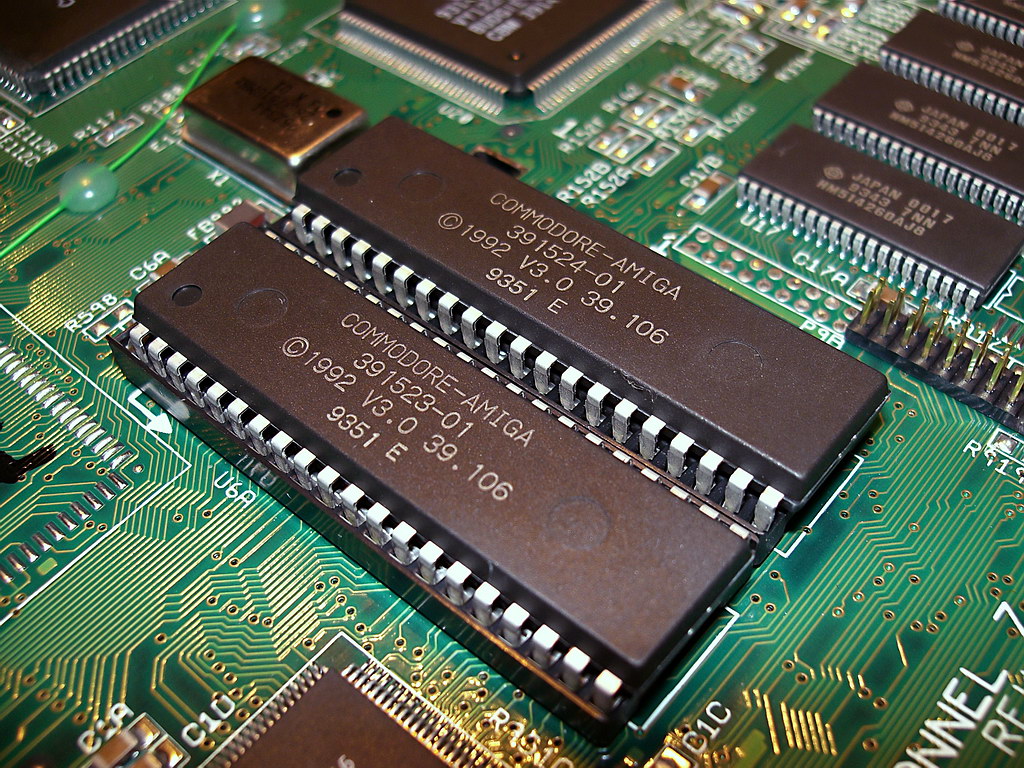
Kickstart is the bootstrap firmware of the Amiga computers developed by Commodore International. Its purpose is to initialize the Amiga hardware and core components of AmigaOS and then attempt to boot from a bootable volume, such as a floppy disk. Most Amiga models were shipped with the Kickstart firmware stored on ROM chips.
Versions
[edit]
Commodore's AmigaOS was formed of both the Kickstart firmware and a software component provided on disk (with the software portion often termed as Workbench). For most AmigaOS updates the Kickstart version number was matched to the Workbench version number. Confusingly, Commodore also used internal revision numbers for Kickstart chips. For example, there were several Kickstart revisions designated as version 2.0.[1]
Version summary
[edit]| Kickstart version | V-number | Retailed with Amiga models | Launch date | ROM capacity | Autoconfig present in ROM[2] | Early boot menu | Boot from PCMCIA and ATA | Autodetect memory |
|---|---|---|---|---|---|---|---|---|
| <0.4[3] | <V24[4] | Lorraine, first prototype[5] | 1983[6] | 64 KB[5] | No | No | No | No |
| 0.4[7] | V23 V24[4] | Amiga "Velvet"[7] | 1984[7] | 128 KB[7] | No | No | No | No |
| 0.6, 0.7, 0.9[8] | V26 V27 V29[2] | Amiga 1000 Beta | 1985 | 256 KB | No | No | No | No |
| 1.0[9][10] | v30[10] | Amiga 1000 | 1985 | 256 KB | No | No | No | No |
| 1.1[10][11] | V31 (NTSC)[10] V32 (PAL)[10][4] |
Amiga 1000 | 1985–1986 | 256 KB | No Auto Boot from Hard Disk | No | No | No |
| 1.2[10][12] | V33[4][10] | Amiga 500, Amiga 1000, Amiga 2000 | 1987 | 256 KB | No Auto Boot from Hard Disk | No | No | No |
| 1.3[10][13][14][15][16][17][18] | V34[4][10] | Amiga 500, Amiga 2000, Commodore CDTV, Amiga 3000 | 1988 | 256 KB | Yes | No | No | No |
| 1.4[19] | V35[4] | Amiga 3000 | 1990 | 512 KB | ||||
| 2.0–2.05[20][21][22][23] | V36-38[4] | Amiga 500+, Amiga 600, Amiga 2000, Amiga 3000, Commodore CDTV-CR | 1990 | 512 KB | Yes | Yes | 2.05+ | No |
| 3.0[24] | V39[4] | Amiga 1200, Amiga 4000 | 1992 | 512 KB | Yes | Yes | Yes | No |
| 3.1[25] | V40[4] | Amiga 1200, Amiga 4000T | 1993 | 512 KB | Yes | Yes | Yes | Yes |
| Amiga CD32 | 1993 | 1 MB | ||||||
| old 3.2 beta (1996)[26] | V43 | Amiga Walker, last prototype | 1996 | 1 MB | ||||
| 3.1.4[27] | V46 | update only | 2018 | 512 KB | ||||
| 3.2 (2020)[28] | V47 | update only | 2020 | 512 KB |
The first Amiga model, the A1000, required that Kickstart 1.x be loaded from floppy disk into a 256 KB section of RAM called the writable control store (WCS). Some A1000 software titles (notably Dragon's Lair) provided an alternative code-base in order to use the extra 256 KB for data. Later Amiga models had Kickstart embedded in a ROM chip, thus improving boot times. Many Amiga 1000 computers were modified to take these chips.
Kickstart was stored in 256 KB ROM chips for releases prior to AmigaOS 2.0. Later releases used 512 KB ROM chips containing additional and improved functionality. The Amiga CD32 featured a 1 MB ROM (Kickstart 3.1) with additional firmware and an integrated file system for CD-ROM.
Early A3000 models were, like the A1000, also shipped with Kickstart on floppy disk, and used a 1.4 BETA ROM as bootstrap. Either Kickstart 1.3 or 2.0 could be extracted to a partition specifically named WB_1.3 or WB_2.x, respectively, and put in DEVS:kickstart, an absolute system location from where the A3000 system will find it at bootstrap and copy its image into RAM. This early A3000 supported both ROM based Kickstarts and disk-based Kickstarts, although not simultaneously. An A3000 configured to use disk-based Kickstart images had the benefit of being able to boot various versions of AmigaOS without additional tools, simply by selecting the appropriate Kickstart image at boot time.
The Commodore CDTV featured additional firmware ROMs which are not technically part of the Amiga Kickstart. The CDTV's original firmware ROMs must be upgraded in order to install a Kickstart version later than 1.3.
AmigaOS 2.1 was a pure software update and did not require matching Kickstart ROM chips. Workbench 2.1 ran on all Kickstart ROMs of the 2.0x family. Later releases of AmigaOS (3.5 and 3.9) were also software only and did not include matching ROM upgrades instead requiring Kickstart 3.1, with ROM-file based Kickstart components replacing those in ROM. Kickstart modules of AmigaOS 4 are stored on the boot disk partition.
Up to Kickstart v2.0 (V36) only 512-byte blocks were supported.[29] Motorola 68040 uses write caches that requires the use of the functions CacheClearU() and CacheControl() to flush cache when program code has been modified. These functions are only available in Kickstart 2.0 or better.[30]
Function
[edit]
Upon startup or reset, the Kickstart performs a number of diagnostic and system checks and then initializes the Amiga chipset and some core OS components. It will then check for connected boot devices and attempt to boot from the one with the highest boot priority. If no boot device is present a screen will be displayed asking the user to insert a boot disk – typically a floppy disk. Insertion of such a bootable disk (other than workbench-like disk) will result in:
a) a command line interface ("CLI") prompt to operate with ROM-internal and disks commands (including programs, scripts) (if the disk is non-workbench, or empty), or
b) a (basic) point and click UI named "Workbench" if the disk contains at least "loadwb" in the "startup-sequence" script residing inside the "s"-folder on this disk.
c) the disk booting into a customized workbench or an application, keeping the OS "alive" in the background.
d) a game or other application directly starting up, taking over all the hardware resources of this computer by avoiding to establish core Exec multitasking, driver initialization etc.
The Kickstart contains many of the core components of the Amiga's operating system, such as:
- Exec – the Amiga's multi-tasking kernel
- Intuition – functionality for GUI, screens, windowing and handling of input/output devices
- Autoconfig – functionality to automatically initialize or boot from compliant expansion hardware
- Floppy disk device driver and file system to read and boot from floppy disk
- DOS library for file access and handling
- AmigaDOS – command-line interface (CLI) functionality and a number of core CLI commands
- Graphics library for basic drawing and raster graphics functions using the native Amiga chipset
- Audio device driver for the native Amiga sound hardware
- Device drivers for the Amiga keyboard and mouse/gameports
Kickstart 1.3 is the first version to support booting from a hard disk drive.[31]
From AmigaOS release 2.0 onwards Kickstart also contained device drivers to boot from devices on IDE controllers, support for PC Card ports and various other hardware built into Amiga models.
Diagnostic test
[edit]At power-on self-test will run from the ROM, this is a short program that can produce a color on the screen corresponding with a fault.
If everything works correctly, the following screen color sequence will be displayed on older Kickstarts:
- Dark grey – Hardware working and the registers are readable.[32]
- Light grey – ROM verified.[32]
- White – Initialization has succeeded and the Amiga is ready to boot.[32]
The following colors indicate a problem:
- Red – Bad result on Kickstart-ROM test (Checksum error). A small fault in ROM data will cause a checksum error.[33]
- Green – Bad result on lower part of chip RAM (256 KB). However, this does not always mean the RAM is at fault.[33]
- Blue – Custom chip problem (Denise, Paula, Agnus) (used by Kickstart 3.0 and higher)[33]
- Cyan – Rev 0.x Kickstarts - Kickstart error. [34]
- Yellow – CPU exception occurred, this is a CPU error detection by the processor itself and can be an illegal instruction executed or address bus error – Cause can be a bad CPU or a bad Zorro expansion card.[33] CPU exception happened before the "Guru Meditation" trapping software took over the trapping of exceptions.[32]
- Purple – Bad Paula on older Kickstart Amigas. [33]
- Light green – CIA problem, not a color produced by the self-test.[35]
- Light Grey – If it stops at grey the CIA may be defective.[35]
- White - If it stops at white, the RAM chips that were used may not work well on an A500 mainboard in combination with other RAM chips.
- Black/stripes/glitching – random code (ROMs swapped/ROM garbage) or CIA problem.[35]
- Black – No video output or CPU not running for some reason.[35]
However, if an Amiga gives a color code, it does not always mean that the error comes from a hardware fault: red can also happen if a ROM is mapped to fastmem or by ROM-patches from software. For yellow it can be unstable software in memory. Some Amigas may briefly show a color on screen at power-on which is the previous background color. Bad activity on the data bus may have an effect on other chips on the bus.
The keyboard LED uses blink codes that come from the keyboard controller chip where:
- One blink means the keyboard ROM has a checksum error.[35]
- Two blinks means keyboard RAM failure.[35]
- Three blinks means watchdog timer failure.[35]
- When the Caps Lock key is repeatedly pressed approx. 10 times, and the Caps Lock LED is not turning on and off each time it is pressed, the CPU is not reading out key presses and mostly indicate a CPU crash. The CIA-A serial register is used and a CIA interrupt can be used to pickup key presses from the keyboard buffer. If the Caps Lock LED sticks on or off, the CPU is probably not servicing CIA interrupt requests.[35]
Usage
[edit]In general, to run a specific Workbench version, it is generally required to run a Kickstart with a corresponding or greater version number.
It is not generally possible to boot directly into the Workbench windowing environment from Kickstart alone. Though much of the functionality required for Workbench is contained in Kickstart, as some disk-based components are needed to launch it.
From release 2.0 onwards it is possible to enter a boot menu by holding down both mouse buttons at power on or reset. This allows the user to choose a boot device, set parameters for backwards compatibility and examine Autoconfig hardware.
With third-party software, it is possible to use an alternate Kickstart to the version stored in the embedded ROM chip. Such software allows a Kickstart version to be loaded from file into RAM – for example Kickstart 1.3 may be loaded in order to run old software incompatible with Kickstart 2.0 or later. Several third-party vendors produced hardware Kickstart switchers (dual-boot systems) in the form of socket doublers in order to allow two ROM chips to plug into a single motherboard socket with some mechanism to switch between them. These became popular with users who had problems with later Kickstart versions causing incompatibility with earlier software titles.
An MMU-enabled Amiga is able to "shadow" Kickstart from the embedded ROM chip (or from file) into RAM and pass control to it at startup. This is often preferable as RAM access times are significantly faster than ROM, particularly on expanded systems. At subsequent resets the copy of Kickstart is reused, reducing boot time and allowing faster access and execution of Kickstart functionality. Similar shadowing functions were also developed for some devices without MMU hardware.
Compatibility issues with later versions of Kickstart
[edit]Most of the Amiga games library were written to run on Amiga 500's with Kickstart 1.2 or 1.3. Some games are incompatible with later versions of Kickstart, meaning they do not work properly or at all. Commodore claimed 50 and 60% of games were compatible while magazines of the time claimed 40 and 85% of such. To remedy this, a utility was released and included in the coverdisk of the March 1993 issue of CU Amiga called Relokick, which emulates a Kickstart 1.3 based Amiga. The article in the magazine states that "the utility does take up a bit of memory, so beware that some WB1.3 1Mb only software may still cause problems.".[36]
References
[edit]
- ^ "The Big Book of Amiga Hardware - Custom Chips: Kickstart".
- ^ a b "Kickstart Roms Explained". Classic Amiga Wiki.
- ^ "Version". www.Cloanto.com. Retrieved 25 January 2025.
- ^ a b c d e f g h i "Mysterious Ways - How to Code the Amiga - Important Kickstart Differences on Amiga". mways.co.uk. Archived from the original on 25 July 2014. Retrieved 2013-06-09.
- ^ a b "Amiga Lorraine". amigahistory.co.uk. 2007-06-10. Archived from the original on 2016-10-23. Retrieved 2013-06-09.
- ^ "The History of the Amiga". amigahistory.co.uk. 2007-06-10. Retrieved 2013-06-09.
- ^ a b c d "Amiga 1000 Developer 'Velvet'". Stefan Egger. 2015–2016. Archived from the original on July 9, 2017. Retrieved 2016-07-30.
- ^ "Workbench Nostalgia: The history of the AmigaOS Graphic User Interface (GUI): Beta 0.6, 0.7, 0.9".
- ^ "Workbench Nostalgia: The history of the AmigaOS Graphic User Interface (GUI): Release 1.0".
- ^ a b c d e f g h i Commodore-Amiga, Incorporated (1989). Amiga ROM Kernel Reference Manual: Includes & Autodocs (Revised & Updated). Addison- Wesley Publishing Company, Inc. p. 14. ISBN 0-201-18177-0.
- ^ "Workbench Nostalgia: The history of the AmigaOS Graphic User Interface (GUI): Release 1.1".
- ^ "Workbench Nostalgia: The history of the AmigaOS Graphic User Interface (GUI): Release 1.2".
- ^ "Workbench Nostalgia: The history of the AmigaOS Graphic User Interface (GUI): Release 1.3".
- ^ "Workbench Nostalgia: The history of the AmigaOS Graphic User Interface (GUI): Release 1.3.1".
- ^ "Workbench Nostalgia: The history of the AmigaOS Graphic User Interface (GUI): Release 1.3.2".
- ^ "Workbench Nostalgia: The history of the AmigaOS Graphic User Interface (GUI): Release 1.3.3".
- ^ "Workbench Nostalgia: The history of the AmigaOS Graphic User Interface (GUI): Release 1.3.4".
- ^ "Workbench Nostalgia: The history of the AmigaOS Graphic User Interface (GUI): Release 1.3/2024".
- ^ "Workbench Nostalgia: The history of the AmigaOS Graphic User Interface (GUI): Beta 1.4".
- ^ "Workbench Nostalgia: The history of the AmigaOS Graphic User Interface (GUI): Beta 2.0x".
- ^ "Workbench Nostalgia: The history of the AmigaOS Graphic User Interface (GUI): Release 2.0".
- ^ "Workbench Nostalgia: The history of the AmigaOS Graphic User Interface (GUI): Release 2.04".
- ^ "Workbench Nostalgia: The history of the AmigaOS Graphic User Interface (GUI): Release 2.05".
- ^ "Workbench Nostalgia: The history of the AmigaOS Graphic User Interface (GUI): Release 3.0".
- ^ "Workbench Nostalgia: The history of the AmigaOS Graphic User Interface (GUI): Release 3.1".
- ^ "Workbench Nostalgia: The history of the AmigaOS Graphic User Interface (GUI): Beta 3.2/4.0".
- ^ "Workbench Nostalgia: The history of the AmigaOS Graphic User Interface (GUI): 3.1.4.1".
- ^ "Workbench Nostalgia: The history of the AmigaOS Graphic User Interface (GUI): 3.2".
- ^ "32 / Expansion Board Drivers / RigidDiskBlock and Alternate Filesystems". amigadev.elowar.com. Retrieved 2013-06-09.
- ^ "Mysterious Ways - How to Code the Amiga - General Guidelines". mways.co.uk. Archived from the original on 2013-05-17. Retrieved 2013-06-13.
- ^ "Wordsync" Addendumto the SupraDrive Operator s Manual" (PDF). 090429 amiga.resource.cx
- ^ a b c d amigahistory.co.uk - What your Amiga is telling you
- ^ a b c d e "blinking power led/no screen on Amiga 500". abime.net. Archived from the original on 2012-04-03.
- ^ "🔨 -- Amiga Error Colours, Blinks and Guru Codes -- - Amiga - Lemon Amiga". www.lemonamiga.com. Retrieved 2025-11-22.
- ^ a b c d e f g h "A3000 Booting Problems". amiga.serveftp.net. Archived from the original on 2019-12-03. Retrieved 2011-11-03.
- ^ CU Amiga Magazine Issue 037. March 1993.
Kickstart (Amiga)
View on GrokipediaOverview
Definition and Purpose
Kickstart is the proprietary ROM-based firmware developed by Commodore International for Amiga computers, serving as the foundational bootstrap component of AmigaOS. It consists of the Kickstart ROM image, which encompasses the ROM kernel—a collection of essential libraries, devices, and resources such as exec.library for task management, graphics.library for display handling, and intuition.library for user interface support. This firmware provides the core system code necessary to initialize the Amiga's custom hardware, including the Motorola 68000 processor, Denise video chip, and Paula audio chip, before transitioning control to the full operating system.[1] The primary purpose of Kickstart is to establish a minimal bootstrap environment that detects and configures attached hardware, loads the operating system from disk, floppy, or other media, and manages basic input/output operations until the full AmigaOS takes over. During power-on or reset, it executes from a dedicated ROM address (typically starting at $F80000), performing hardware diagnostics, allocating memory regions like chip RAM, and invoking boot structures such as BootNode to locate and execute the startup sequence. This process ensures a seamless transition to multitasking capabilities without requiring external loaders for core initialization.[1][4] First introduced with the Amiga 1000 in 1985, Kickstart marked a significant advancement for personal computing by embedding substantial operating system elements directly into ROM, enabling faster and more reliable booting compared to systems reliant on extensive disk-based initialization. This ROM integration allowed Amiga computers to achieve near-instant hardware readiness, a feature that set them apart from many contemporaries in the 1980s that depended more heavily on slower media loading for basic system startup.[5][1] The name "Kickstart" evokes the idea of starting the system into operation, highlighting the firmware's role in rapidly activating the Amiga's advanced multimedia hardware.[6]Role in Amiga Booting
Upon power-on or reset, the Motorola 68000 processor in the Amiga begins execution at memory address $000000, which is mapped to the Kickstart ROM physically located at $F80000.[7] The ROM, typically 256 KB in early models and 512 KB in later versions, contains the bootstrap firmware that initializes the system.[8] Kickstart then performs hardware autodetection, identifying components such as the CPU type, chipset, and available memory through the Autoconfig protocol, which dynamically assigns resources to expansion boards without manual configuration.[9][10] Following hardware initialization, Kickstart integrates with AmigaOS by loading core resident libraries like Exec (the kernel) and Intuition (the graphical user interface) directly from ROM.[11] It subsequently scans for bootable media on devices such as floppy diskettes or hard drives, executing a boot block if present to run the startup-sequence script.[4] This process loads additional OS components and hands off control to the fully resident operating system, enabling the Workbench desktop or other applications.[4] Kickstart's operations are inherently dependent on the Amiga's custom chipsets for effective booting. Specifically, it initializes Agnus for memory control and blitter functions, Denise for video signal generation, and Paula for audio processing and floppy disk operations, ensuring these peripherals are ready before OS handover.[12] If no bootable OS is detected, Kickstart drops to a basic Command Line Interface (CLI), allowing users to manually mount volumes or execute commands from ROM-based tools.[13] In cases of boot failures due to hardware issues or software exceptions, Kickstart invokes the "Guru Meditation" error handler from Exec.library, displaying a diagnostic screen with error codes and task details for troubleshooting.[1] This mechanism, or a fallback monochrome diagnostic mode during self-tests, provides essential feedback when standard booting cannot proceed.[14]History and Development
Origins at Commodore
The development of Kickstart originated during the early 1980s at Amiga Inc., a company founded in 1982 as Hi-Toro by engineers including Jay Miner, who had previously designed key hardware for Atari systems.[15] Renamed Amiga Inc. in 1983 due to a trademark conflict, the team focused on creating a next-generation multimedia computer known internally as the Lorraine project, incorporating a Motorola 68000 processor and custom chips for advanced graphics and sound.[16] A primary aim was to embed core operating system primitives directly into ROM to drastically reduce boot times, transforming what could take several minutes on disk-based systems into mere seconds by enabling immediate hardware initialization and kernel loading without reliance on secondary storage.[17] This approach was conceived between 1982 and 1984 amid financial pressures, including a $500,000 bridge loan from Atari to sustain development, as the team pivoted from a game console concept to a full computer following the 1983 video game market crash.[16] Key design goals for Kickstart emphasized hardware abstraction to ensure software portability across future Amiga models, preemptive multitasking support for the Exec kernel right from system startup, and seamless integration with custom chips like Agnus (for graphics and memory management), Denise (for video output), and Paula (for audio).[18] Exec, the foundational kernel derived from the TRIPOS operating system licensed from MetaComCo, provided a compact API for process management, message passing, and device handling, abstracting low-level hardware interactions through libraries such as exec.library and handlers for consoles, files, and input/output devices.[18] This structure allowed for efficient allocation of chip RAM and fast RAM, enabling multimedia applications to leverage the Amiga's blitter for fast graphics operations and four-channel sound synthesis without direct hardware dependencies, while maintaining a flexible, open-ended system extensible by developers.[17] Early prototypes during 1983-1984 utilized EPROMs to test these ROM-based components iteratively, simulating the final firmware environment as the team refined OS primitives alongside hardware simulations.[19] Following Commodore International's acquisition of Amiga Inc. in August 1984 for approximately $27 million—which included repaying the Atari loan and absorbing the engineering team—Kickstart was finalized as the bootstrap firmware for the Amiga 1000's launch.[16] Under Commodore's oversight, the initial implementation allocated a 256 KB ROM space, divided between the core Kickstart loader (handling OS initialization and Exec startup) and diagnostic routines for hardware testing, though production constraints led to loading the bulk of Kickstart from floppy disk into RAM for the Amiga 1000.[15] This integration marked Commodore's commitment to positioning the Amiga as a multimedia powerhouse succeeding the Commodore 64, with Kickstart ensuring rapid access to the multitasking environment and custom chip features from power-on.[17] The Amiga 1000 was unveiled on July 23, 1985, at Lincoln Center in New York (with first shipments beginning in late 1985), in part due to challenges in finalizing the ROM contents amid ongoing software-hardware synchronization.[15] Prototypes prior to this relied heavily on erasable EPROMs for iterative Kickstart testing, allowing engineers like Miner to debug boot sequences and kernel integration without full mask ROM production, a process that accelerated development but contributed to the timeline extension as Commodore integrated Amiga's innovations into its manufacturing pipeline.[19]Evolution Through Amiga Models
The Kickstart firmware debuted with the Amiga 1000 in 1985, utilizing the Original Chip Set (OCS) and loading a 256 KB Kickstart 1.0 image from floppy disk due to the absence of onboard ROM chips, which limited initial boot times but allowed flexibility in updates.[20][21] This design tied Kickstart closely to the OCS hardware, initializing basic graphics, sound, and memory allocation for the Motorola 68000 processor at 7 MHz.[22] Subsequent models like the Amiga 500 and 2000, released in 1987 and also based on OCS, integrated 256 KB ROM chips with Kickstart 1.2, enabling faster ROM-based booting and better compatibility with expanding peripherals, though users often upgraded to Kickstart 1.3 in 1988 for improved stability and drive support.[20][23] The Enhanced Chip Set (ECS), introduced in 1990 with the Amiga 3000, brought modest upgrades such as increased chip RAM addressing up to 2 MB and higher-resolution modes like 640x480, necessitating 512 KB ROMs with Kickstart 2.04 for full hardware initialization and enhanced graphics handling.[20][24] By 1991, ECS appeared in consumer models like the Amiga 500 Plus and 600, where ROM upgrades to Kickstart 2.05 added IDE and PCMCIA device drivers, reflecting Commodore's strategy to extend OCS-era machines while transitioning to more capable chipsets.[23][25] A pivotal advancement occurred in 1992 with the Advanced Graphics Architecture (AGA) chipset in the Amiga 1200 and 4000, which supported 256 colors from a 24-bit palette and up to 2 MB chip RAM; these models shipped with 512 KB Kickstart 3.0 ROMs (often as two 256 KB chips) to leverage AGA's capabilities, including new datatypes for true color and animation storage.[20][26] Commodore's product strategy emphasized bundled upgrades, as seen in the 1991 CDTV multimedia player, which used ECS with Kickstart 1.3 plus an extended 256 KB ROM for CD-ROM booting and audio/video extensions, positioning Amiga as a home entertainment hub.[27] Similarly, the 1993 CD32 console, built on AGA hardware akin to the Amiga 1200, featured Kickstart 3.1 in a 1 MB configuration with CD32-specific extensions for its Akiko chip, enabling chunky-to-planar conversion for CD-based games and media.[27][28] During the 1990s, the shift to modular ROMs facilitated accelerator card integrations, allowing users to load Kickstart into fast RAM for compatibility with upgraded processors.[23] Commodore's bankruptcy in April 1994 curtailed official Kickstart development, freezing evolution at Kickstart 3.1 despite ongoing hardware like the Amiga 4000T tower.[29] Post-bankruptcy, third-party developer Phase 5 extended the ecosystem through PowerPC accelerator boards like the 1997 CyberStorm PPC for Amiga 3000/4000 models, which ran Kickstart 3.1 in emulated 68k mode alongside native PowerPC execution, sustaining Amiga compatibility into the early 2000s via enhanced OS support and peripherals.[30][31]Versions
Kickstart 1.x Series
The Kickstart 1.x series represented the initial firmware releases for the Amiga platform, providing the foundational bootstrap and operating system kernel components necessary for hardware initialization and basic software execution. Released starting in 1985 alongside the Amiga 1000, these versions utilized the Exec kernel for preemptive multitasking and included core libraries such as Intuition for graphical user interface handling. Kickstart 1.0, specifically, featured Exec version 30.xx and Intuition 1.0, and was distributed on floppy disk rather than ROM for the Amiga 1000, marking the system's debut with support for up to 512 KB of chip RAM.[32][20] Subsequent updates addressed early stability issues and expanded compatibility. Kickstart 1.1, released in December 1985, focused primarily on bug fixes, though it was limited to NTSC systems and remained floppy-based for the Amiga 1000. By 1986, Kickstart 1.2 introduced hardware support for the Amiga 500 and Amiga 2000 models, with enhancements to the Command Line Interface (CLI) for better scripting and command execution, while shifting to 256 KB ROM integration on newer machines. The series culminated in Kickstart 1.3 in 1988, the final 1.x iteration, which integrated more closely with Workbench 1.3 for improved desktop functionality and used 256 KB ROMs across supported models. Kickstart 1.3 was the first version to support booting from a hard disk drive.[33][34][35][36] Key features of the 1.x series included the Autoconfig system for automatic detection and configuration of expansion hardware, such as memory and peripherals, via a standardized board identification process in the expansion slots. Basic multitasking was enabled through the Exec kernel, allowing cooperative and preemptive task switching, while built-in fonts like Topaz supported text rendering in the CLI and early graphical applications. A simple CLI environment facilitated diskless booting scenarios by providing console access for manual commands when no bootable media was present. However, limitations persisted, such as the absence of native hard drive partitioning support—requiring third-party tools for multi-partition setups—and monochrome-only diagnostics during the boot sequence, which displayed error patterns in black and white without color coding.[37][6][34] ROM versions in the 1.x series could be identified using the CLI command "version," which outputs the Kickstart and library versions upon execution from the system shell. Alternatively, ROM checksums provided a hardware-level verification method; for instance, Kickstart 1.3 (revision 34.5) has a checksum of $15267DB3. These detection methods were essential for troubleshooting compatibility on early Amiga systems.[38][39]Kickstart 2.x and 3.x Series
The Kickstart 2.x series, debuting with version 2.0 in 1990 for the Amiga 3000, represented a major evolution from earlier iterations, incorporating 512 KB ROMs and Exec library version 36.xx alongside Intuition 2.0 for improved multitasking and graphical interfaces.[34] This release emphasized better memory management, including optimized handling of Fast RAM, which allowed for more efficient allocation in expanded systems.[20] Subsequent updates, such as 2.04 in 1991 for models like the Amiga 500+ and 2000, addressed compatibility issues with the Enhanced Chip Set (ECS) through Exec 37.175, enhancing graphics and sound stability while fixing memory-related bugs.[34] Kickstart 2.05, released in 1992 primarily for the Amiga 600, further refined these capabilities with Exec versions 37.299 to 37.350, introducing native IDE hard disk drive support and PCMCIA compatibility to streamline peripheral integration.[20] These versions collectively advanced OS integration by supporting multi-language interfaces, starting with foundational right-to-left text handling for scripts like Arabic and Hebrew via updated intuition libraries, and included tools for basic hard disk partitioning to facilitate user-configurable storage setups.[34] Transitioning to the 3.x series, Kickstart 3.0 arrived in 1992 alongside the Amiga 1200 and 4000, utilizing 512 KB ROMs with Exec 39.106 to enable support for the Advanced Graphics Architecture (AGA) chipset, which expanded color palettes and resolution options for more sophisticated visuals.[34] This version prioritized seamless hardware initialization for AGA chipset-equipped machines, building on 2.x memory optimizations while introducing a more robust boot process. Kickstart 3.1, released starting in 1993 (with the Amiga CD32) and fully in 1994, and compatible across a wide range of models, featured Exec versions from 40.56 to 40.70 in 512 KB ROMs (1 MB for CD32), with notable enhancements to the Command Line Interface (CLI) for better scripting and automation.[34] It added Relocatable Types for Graphics (RTG) support, enabling compatibility with third-party graphics cards for higher resolutions beyond native chipsets, and incorporated datatypes for handling multimedia files like ANIM and CDXL formats to improve file viewing and editing workflows.[20] The series also integrated an updated preferences editor for system customization and expanded HDDTools, such as HDToolBox, to support advanced partitioning schemes on larger drives.[40] Multi-language support was further refined, allowing broader internationalization in user interfaces and applications.[34] In 2018, Hyperion Entertainment released an official update to Kickstart 3.1 as version 3.1.4, maintaining 512 KB ROM compatibility while fixing over 20 ROM modules and numerous disk-based components for improved stability and large hard disk support exceeding 4 GB partitions.[41] This update modernized CLI commands with native pipes, softlinks, and long filename handling, without introducing Y2K-specific fixes as previously rumored in unofficial patches.[41] Subsequent developments continued with the AmigaOS 3.2 series, released by Hyperion Entertainment starting in May 2021. AmigaOS 3.2 (revision 47.xx) introduced enhanced USB 2.0 support, improved networking, and better compatibility for classic hardware, available as a full ROM and disk set for all 68k Amiga models. Updates followed: 3.2.1 in December 2021 with bug fixes and performance tweaks; 3.2.2 in March 2023 adding security enhancements and driver improvements; and 3.2.3 in April 2025, focusing on stability for larger storage and modern peripherals while maintaining backward compatibility. As of November 2025, AmigaOS 3.2.3 represents the latest official update for classic Amigas, with Exec version 47.496.[42][43] Versions in the 2.x and 3.x series can be identified using the "version" command in the CLI, which outputs details such as "Kickstart 3.1 (40.68), Workbench 3.1 (40.68)" to confirm the exact ROM revision and associated OS components.[38]Technical Functionality
ROM-Based Initialization
The Kickstart ROM initialization begins upon power-on or reset, with execution jumping to the boot ROM entry point at FC0000–F80000 (512 KB, from Kickstart 2.0) or $FC0000 (256 KB, Kickstart 1.x), depending on the ROM size and hardware configuration.[44][2] This entry point handles the initial low-level setup, including CPU initialization for the 68000 or 68020 processor by establishing the supervisor stack pointer and exception vectors, ensuring the processor operates in a stable state before proceeding.[1] The process then clears the chip RAM to zero out any residual data, preventing corruption during subsequent operations, while allocating an initial 64 KB block for system use, such as the ExecBase structure and temporary stacks.[2] Following memory preparation, the ROM scans for expansion hardware using the Autoconfig protocol, starting at address E80000 space to their final memory or I/O locations, with the ROM supporting both 16-bit and 32-bit cycles as needed for compatibility.[2] The Kickstart ROM itself includes relocatable code segments to accommodate variants sized at 512 KB (standard for Kickstart 2.0 and later) or custom 1 MB configurations, allowing flexible loading and overlay without hardware modifications on supported models.[1] Resource loading commences with the initialization of Exec.library from the ROM, loaded into memory at address $00000004 and establishing the foundation for task scheduling and multitasking via ROM-tags in the resident module list.[1] Subsequently, graphics.library and layers.library are loaded to configure the display, setting up modes such as 640x400 interlaced for PAL or NTSC systems by initializing bitplane pointers (e.g., at DFF0F6) and Copper lists for video timing synchronization during vertical blanking.[2] Basic error handling during initialization involves checksum verification of ROM data using functions like SumKickData; if critical failures occur—such as memory corruption or autoconfig timeouts—the process halts and drops into the built-in ROM monitor mode, displaying a hexadecimal dump of relevant memory for diagnostic purposes.[1]Device and Resource Management
Kickstart manages device interactions primarily through the Exec kernel's device list, a linked structure that enumerates available devices and handlers for system-wide access.[32] This list enables the mounting of filesystems such as the Fast File System (FFS), which serves as the default for floppy disks and hard disk drives, facilitating input/output operations post-initialization. For storage devices, Kickstart employs the trackdisk.device to handle low-level disk control, including motor management, raw track reading, and writing, ensuring reliable data transfer without user intervention.[45] Similarly, the console.device provides a text-based interface for output to Intuition windows, emulating an enhanced ANSI terminal for application display and user interaction.[46] Resource allocation in Kickstart occurs via the Exec system's library and resource mechanisms, where core components like dos.library are initialized to support file operations, directory traversal, and handler assignments.[18] This library integrates with the device list to register handlers for filesystems and peripherals, while font management is handled through diskfont.library, loading scalable and bitmap fonts into memory as needed for graphical interfaces.[32] The Autoconfig process, executed during early boot, dynamically assigns memory addresses and interrupts to expansion peripherals, such as genlock devices for video synchronization or MIDI ports for audio interfaces, preventing conflicts in the Zorro bus environment.[47] At runtime, Kickstart supports expansion through libraries like expansion.library, which configures Zorro II and III expansion cards by allocating address spaces and initializing board-specific resources for peripherals such as RAM expansions or graphics accelerators.[9] To optimize limited ROM capacity, Kickstart implements lazy loading for non-essential modules, deferring the loading of overlay components like additional device drivers or libraries from disk until explicitly required by the system or applications, thereby conserving initial memory footprint.[48]Diagnostics and Testing
Built-in Diagnostic Mode
The built-in diagnostic mode in Kickstart is accessed by holding both mouse buttons while powering on or rebooting the Amiga, which brings up the Early Startup Control Screen. This interface, introduced in Kickstart 2.0, provides an internal testing environment primarily focused on hardware initialization and expansion board verification, allowing users to inspect system configuration without proceeding to full boot. The screen offers options for boot configuration, display settings, and diagnostics, with the latter displaying details on installed expansion boards, including board number, manufacturer, product name, and status (working or defective). If a defective board is detected during startup, the system halts and presents this diagnostic view to facilitate identification of hardware issues.[49] During the ROM-based initialization sequence, automatic power-on self-tests (POST) check for basic hardware functionality, including RAM (both chip and fast memory), CPU registers, and custom chips such as Agnus for blitter operations, along with pattern tests to verify video RAM integrity; these tests use color changes on the screen to indicate pass/fail states across all Kickstart versions. For expansion boards, the diagnostics scan Zorro slots and report failures in real-time. In Kickstart 3.x versions, the interface expands support for ECS/AGA chipsets and includes more detailed status reporting.[50][14] Output is presented in a monochrome text mode, featuring a tabular format with hex values for register states and error indicators where applicable; earlier versions display a basic "Kickstart" initialization banner during entry. This setup aids in pinpointing configuration mismatches or faults, such as memory addressing errors or chipset incompatibilities.[49] Limitations of the mode include its non-interactive nature for repairs—no tools for fixing issues are provided, and it relies on visual inspection or external intervention for resolution. It was primarily designed for factory quality assurance and initial troubleshooting rather than ongoing user maintenance, with changes (e.g., cache disabling or boot overrides) applying only to the current session.[50]Error Detection Mechanisms
Kickstart incorporates runtime error detection primarily through the Exec library's alert system, which monitors for low-level exceptions and hardware faults during system operation. When an unhandled exception occurs, such as an address error or bus fault in the 680x0 processor, Exec triggers a "Dead-End Alert" that manifests as the iconic Guru Meditation screen. This screen displays the error in hexadecimal format as #DSGeCode.TASK, where D indicates non-recoverability (starting with 8 for fatal errors), S is the subsystem ID, G the general error code, e the specific error, and TASK the address of the offending task; for instance, an address error might appear as 80000003, often linked to coprocessor protocol violations when software attempts 68881/68882 instructions on unsupported hardware like a 68000 CPU.[51][52] The display also shows the software name, task ID, and program counter (PC) register value to aid debugging, halting the system to prevent further corruption.[1] Error logging complements the visual alert by capturing diagnostic data for post-crash analysis. Exec writes alert details, including the full 32-bit error code and task pointer, to the LastAlert structure in the ExecBase, a RAM-based buffer that stores the four longwords of the most recent alert for retrieval by developers.[1] For deeper traces, the built-in ROM-WACK debugger can output stack traces and register dumps via the serial port at 9600 baud, activated by connecting a terminal and sending a DEL character during the Guru display; this is particularly useful for capturing coprocessor-related faults, where codes like 80000003 signal absent or mismatched floating-point units unique to Amiga's hardware architecture.[1] Hardware-specific errors, such as Copper list overflows in the graphics coprocessor (e.g., 82010003 for list overload) or 680x0 bus errors during DMA operations (e.g., 80000002 for invalid access), are similarly logged to facilitate identification of issues like malformed display lists or contention in the Amiga's custom chip bus.[51] In Kickstart 3.x, error handling saw enhancements through SetPatch, a startup utility that applies ROM patches and introduces verbose reporting modes for improved diagnostics. SetPatch enables detailed console output during boot and error events, expanding on base Guru information with additional context like patch application status and extended stack details, reducing ambiguity in recovery scenarios.[53] For recoverable alerts (those starting with 0-3), the system preserves task context, allowing immediate access to a Command Line Interface (CLI) for manual intervention, such as killing the faulty task or freeing resources, thereby enabling partial recovery without full reboot.[51] This mechanism underscores Kickstart's design emphasis on developer-friendly fault isolation, distinguishing it from total system halts in earlier versions.[1]Usage and Installation
Installing or Upgrading ROMs
Installing or upgrading Kickstart ROMs on Amiga systems involves replacing the firmware chips on the motherboard, a process that requires careful handling of hardware components. For models like the Amiga 500 and Amiga 2000, the ROMs are housed in removable dual in-line package (DIP) sockets, allowing users to extract the existing 256 KB EPROMs, such as 27C020 chips, and insert new ones without soldering.[54] In contrast, higher-end models like the Amiga 4000 feature soldered ROMs, necessitating desoldering tools and professional expertise to avoid damaging the board.[55] Upgrade paths typically involve transitioning from earlier versions, such as Kickstart 1.3, to later ones like 3.1, using official ROM kits originally distributed by Commodore or subsequent licensees like Hyperion Entertainment. The Amiga 500 supports single-chip upgrades to Kickstart 3.1 via its DIP sockets, while the Amiga 4000 requires model-specific dual-chip sets for 32-bit compatibility and may involve additional hardware modifications for full functionality.[20] Verified ROM images for these upgrades can be obtained from established archives like Aminet, but users must ensure they possess the original hardware to comply with copyright laws.[56] Essential tools for the process include an EPROM programmer, such as the MiniPro TL866-II Plus, blank 27C020 or 27C400 EPROM chips, a compatible adapter for the programmer, and a UV-C eraser for reusing chips. The programming steps entail loading the ROM binary file into the programmer software, inserting the blank EPROM, and verifying the burn before installation; for 32-bit Amigas, two chips (high and low) must be prepared and inserted into designated sockets like U6A and U6B.[54] Following Commodore's 1994 bankruptcy, the intellectual property rights to Kickstart ROMs transferred to entities including Cloanto Corporation, which licenses their use; personal dumping and installation for owned Amiga hardware is generally permissible, but commercial distribution remains restricted.[56] Risks associated with installation include permanent damage to the EPROMs or motherboard from incorrect chip orientation, exposure to improper voltage levels (strictly 5V), or faulty power supply units that deliver unstable currents. To mitigate these, users should confirm proper seating of the chips, test voltages with a multimeter, and verify the upgrade by booting into diagnostic mode or using tools like the ROM update utility if available on the system.[54][55]Configuration Options
Kickstart configuration is achieved through software-based mechanisms that allow users to customize boot behavior, device handling, and system patches without altering the ROM itself. The primary tool for boot options is the startup-sequence script in the S: directory, which runs after Kickstart initializes the operating system and executes a series of CLI commands to set up the environment. For instance, users can insert delays in this script to ensure proper initialization of expansion hardware, such as by adding aWait 2 Seconds command before loading drivers.[49]
Environment variables, managed via the SetEnv CLI command, provide further control over system settings and are stored globally in the ENV: directory for persistence across shells. This command enables or configures specific devices and features; for example, SetEnv SCSI_DEVICE scsi.device activates SCSI support by assigning the appropriate handler, while variables like SetEnv Language "english" influence locale-specific behaviors.[57]
System patching for enhanced functionality or bug fixes is handled by tools like SetPatch, which must be invoked early in the startup-sequence to modify Kickstart ROM routines in memory. SetPatch addresses known issues in Kickstart versions, such as memory management flaws, and supports custom bootloaders through options like enabling AGA video modes on compatible hardware. For multi-ROM setups, third-party tools like MultiBoot extend this by allowing selection of different Kickstart images at boot time. In Kickstart 3.x series, the Prefs editor facilitates additional configuration, including Retargetable Graphics (RTG) modes for VGA monitor compatibility by adjusting screen resolutions and color depths via the ScreenMode preferences.[53]
Expansion hardware configuration relies on the Autoconfig protocol for automatic resource allocation, but overrides are possible through card-specific hardware jumpers that disable Autoconfig and assign fixed addresses to prevent conflicts in multi-card setups. Software overrides can also be applied via expansion.library functions or device-specific commands in the startup-sequence, such as disabling a monitor's genlock for the A2024 via Intuition settings. Multilingual support is configured through locale.library integration with Intuition, where SetEnv variables set language catalogs for user interface elements like menus and fonts.[47]
Troubleshooting tweaks include enabling verbose output in the boot process by modifying the startup-sequence to echo commands, and applying patches like StackAttack to monitor for memory leaks by enforcing stack size limits and reporting overflows during runtime.[9]
Compatibility and Legacy
Backward Compatibility Challenges
One major challenge in using newer Kickstart versions arose from changes to core system libraries, such as intuition.library, which evolved from version 33 in Kickstart 1.x to higher versions in Kickstart 2.x, potentially breaking applications that relied on specific library interfaces or undocumented behaviors for graphical user interfaces. For instance, Intuition 2.0 in Kickstart 2.0 introduced enhancements that rendered some 1.x-era GUIs incompatible without code updates, as developers were encouraged to specify lower version numbers for backward compatibility but many legacy applications did not. Similarly, hard disk partition tables formatted under Kickstart 1.3 using the Old File System (OFS) often became unreadable in Kickstart 3.0 without loading the Fast File System (FFS) handler, since 3.0 prioritized RDB-based structures introduced in 2.0 and lacked built-in support for certain pre-2.0 OFS configurations on SCSI devices. Hardware mismatches compounded these software issues, particularly when running Kickstart 3.x on older OCS or ECS chipset machines, where the ROM's assumptions about enhanced graphics modes led to visual glitches or crashes in applications expecting consistent chipset behavior. On the Amiga 1000, Kickstart 2.05 exhibited memory detection problems due to differing timing requirements in its OCS-based architecture, often resulting in incomplete chip RAM recognition limited to 512 KB, which disrupted booting or operation of memory-intensive software. To mitigate these challenges, users adopted hardware solutions like Kickstart switchers, which allowed seamless toggling between ROM versions such as 1.3 for legacy applications and 3.x for modern features, often integrated into accelerators or expansion cards. Post-1994, third-party developers created patched ROMs and emulation modes that simulated 1.3 behaviors within newer Kickstarts, enabling binary translation for incompatible binaries via tools like custom device handlers. The bankruptcy of Commodore International in April 1994 severely limited official support for addressing these compatibility issues, leaving game ports, demos, and third-party software adaptations reliant on community efforts amid the absence of manufacturer-backed updates or hardware revisions.Support in Emulation and Modern Systems
Emulation software for the Amiga relies heavily on Kickstart ROM images to accurately replicate the original system's boot process and hardware initialization. FS-UAE, a cross-platform emulator, requires users to provide original Kickstart ROM files for optimal compatibility across various Amiga models; for instance, the Amiga 500 typically useskick.rom version 1.3.[58] Similarly, WinUAE, a Windows-based emulator, supports Kickstart ROM loading through an integrated scanner that verifies files via checksums, ensuring authenticity for full system simulation. It also handles ADF files for floppy disk images and HDF files for hard disk emulation, allowing comprehensive recreation of software environments that depend on Kickstart's resource management.[59]
Modern hardware recreations preserve Kickstart functionality through FPGA-based systems that aim for cycle-accurate emulation of Amiga architecture. The MiSTer FPGA platform incorporates Kickstart ROMs, such as 512 KB or 1 MB images placed as KICK.ROM on an SD card, to boot OCS, ECS, and AGA chipsets with precise timing, supporting CPU cores like the 68000 for authentic performance.[60] Vampire V4 boards integrate Kickstart directly into their FPGA cores via flash memory, where users can load versions from 1.1 to 3.2 using tools like VampireFlash for permanent installation or VampireMap for temporary mapping from disk, enabling standalone Amiga-compatible operation.[61] In the 2020s, Hyperion Entertainment released Kickstart 3.2.3 as part of AmigaOS 3.2 updates in 2025, providing enhanced ROM support for classic 68k-based systems with improvements like reduced chip RAM reservations.[62]
The use of Kickstart ROMs in emulation and recreations operates under legal constraints that emphasize user ownership and licensed distribution. Individuals who own original Amiga hardware may legally dump their own Kickstart ROMs using tools like Transrom, while licensed sets are available through products such as Amiga Forever.[27] Community projects, including those on the English Amiga Board, facilitate verification by providing checksums; for example, the CRC32 hash for Kickstart 3.1 on an A1200 is 1483A091, helping users confirm ROM integrity against corrupted or modified files.[27] In the retro computing scene, enthusiasts continue to develop extensions, such as updated USB stacks in modern AmigaOS variants and 4K scaler compatibility via tools like AmigaVision with RetroTink hardware, ensuring Kickstart-based systems interface with contemporary peripherals.[63][64]