Hubbry Logo
PfSensePfSenseMain
Open search
PfSense
Community hub
PfSense
logo
8 pages, 0 posts
0 subscribers
Be the first to start a discussion here.
PfSense
PfSense
from Wikipedia

pfSense
Version of the FreeBSD operating system
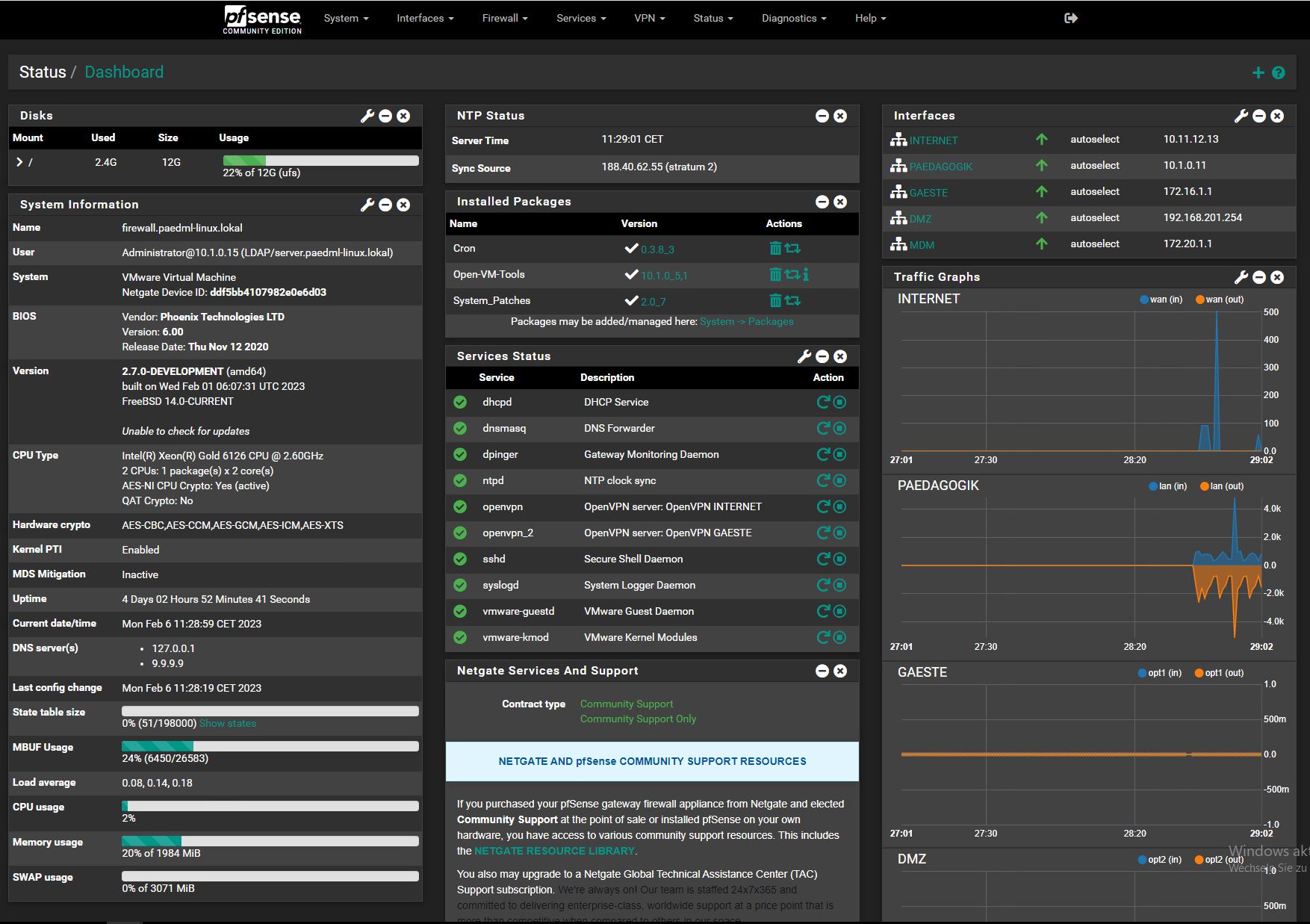
Dashboard of pfSense 2.7.0-DEVELOPMENT
The main dashboard of pfSense 2.7.0-DEVELOPMENT
DeveloperRubicon Communications, LLC (Netgate)
OS familyFreeBSD
Working stateCurrent
Source modelClosed source and open source
Released to
manufacturing
Oct 2006
Latest release
  • Community Edition: 2.8.0 (amd64) / May 28, 2025; 5 months ago (2025-05-28)[1]
  • Plus: 24.11 / November 25, 2024; 11 months ago (2024-11-25)[1]
Repository
Supported platforms32-bit (discontinued in 2.4.x); 64-bit Intel / AMD
Default
user interface
Web
LicenseApache License 2.0[2] (Applies to pfSense CE)
Preceded bym0n0wall
Official websitewww.pfsense.org Edit this at Wikidata
Support status
  • Supported by the community
  • Paid commercial support

pfSense is a firewall/router computer software distribution based on FreeBSD. The open source pfSense Community Edition (CE) and pfSense Plus is installed on a physical computer or a virtual machine to make a dedicated firewall/router for a network.[3] It can be configured and upgraded through a web-based interface, and requires no knowledge of the underlying FreeBSD system to manage.[4][5]

Overview

[edit]

The pfSense project began in 2004 as a fork of the m0n0wall project by Chris Buechler and Scott Ullrich. Its first release was in October 2006.[6] The name derives from the fact that the software uses the packet-filtering tool, PF.[7]

Notable functions of pfSense include traffic shaping, VPNs using IPsec or PPTP, captive portal, stateful firewall, network address translation, 802.1q support for VLANs, and dynamic DNS (DDNS).[8] pfSense can be installed on hardware with an x86-64 processor architecture. It can also be installed on embedded hardware using Compact Flash or SD cards, or as a virtual machine.[9]

Release cadence and support

[edit]

Since 2021,[1] pfSense Plus editions have followed an annual major version release cadence. The CE version of the software has followed an annual minor version release cadence. Based on their list of unsupported software,[10] pfSense only supports the current and previous version of both the CE and Plus editions.

OPNsense

[edit]

In January 2015, the OPNsense project was started by forking the version of pfSense at that time.[11]

In November 2017, a World Intellectual Property Organization panel found Netgate, the copyright holder of pfSense, utilized OPNsense' trademarks in bad faith to discredit OPNsense, and obligated Netgate to transfer ownership of a domain name to Deciso.[12][13]

WireGuard protocol support

[edit]

In February 2021, pfSense CE 2.5.0 and pfSense Plus 21.02 added support for a kernel WireGuard implementation. Support for WireGuard was temporarily removed in March 2021 after implementation issues were discovered by WireGuard founder Jason Donenfeld.[14][15][16] The July 2021 release of pfSense CE 2.5.2 version re-included WireGuard.[17]

See also

[edit]

References

[edit]

Further reading

[edit]
[edit]
Revisions and contributorsEdit on WikipediaRead on Wikipedia
from Grokipedia
pfSense is a distribution based on , designed primarily as a firewall and router with a web-based management interface that requires no underlying operating system expertise. Originating as a of the project in , pfSense was developed to extend capabilities beyond embedded devices toward more versatile PC and server hardware, enabling its use in diverse environments from home networks to large enterprises supporting thousands of devices. It is hosted and maintained by Communications, LLC (operating as Netgate), with ongoing development since its , resulting in millions of downloads and hundreds of thousands of active installations worldwide. Key features include stateful firewalling, protocols, virtual private networking (VPN) support, intrusion detection and prevention systems (IDS/IPS), and a modular package system for adding functionalities like load balancing and multi-WAN configurations without compromising core . Distributed under the Apache 2.0 license, pfSense's source code is publicly available on , allowing community contributions while ensuring compatibility with a wide range of hardware, including Netgate's dedicated security gateway appliances. Minimum requirements include a 64-bit CPU, at least 1 GB of RAM, and 8 GB of storage.

History

Origins and Early Development

The pfSense project began in 2004 as a fork of the m0n0wall embedded firewall project. It was founded by Chris Buechler and Scott Ullrich, who sought to overcome m0n0wall's constraints, including its reliance on the older ipf packet filter and focus on resource-limited embedded hardware with only 64 MB RAM support. The primary motivations were to incorporate the more advanced pf packet filter from , enable broader hardware compatibility beyond embedded systems, and add features like enhanced VPN support, , and proxy capabilities for greater flexibility. Initial development emphasized building a customizable, open-source firewall and router solution tailored for small to medium-sized networks, utilizing as the underlying operating system for its stability and performance. The first public release occurred in October 2006 as pfSense 1.0, which introduced a web-based to simplify management and configuration. This marked pfSense's emergence as a distinct platform, later evolving into commercial support through Netgate, a formed by the founders to provide hardware appliances and .

Release History and Versions

The pfSense project began releasing stable versions with the 1.x series in 2006, focusing on establishing core functionality and stability based on 6.x. The initial 1.0 release occurred on October 13, 2006, marking the first official version after development as a of . Subsequent minor updates, such as 1.2.3 in December 2009, refined firewall rules, NAT handling, and basic VPN support, with the series concluding after three years of iterative improvements to address early production needs. The transition to the 2.x series introduced significant architectural changes, starting with on October 28, 2011, which featured a complete overhaul of the web-based (GUI) for enhanced usability and . This major release shifted to 8.1-RELEASE as the base OS and included improved package management and dashboard customization. Later milestones included 2.3.0 in April 2016, which upgraded to 10 for better hardware compatibility and performance optimizations in routing and filtering. The 2.5.0 release in February 2021 brought 12.2 and native kernel-level VPN integration, enabling faster and more secure tunneling options. In 2023, the 2.7.x series (starting with 2.7.0 in July) emphasized security enhancements, including an upgrade to 3.0.12 to address end-of-life vulnerabilities in prior versions and deprecation of weak algorithms for improved cryptographic standards. The most recent major update, 2.8.0 in May 2025, advanced to 15-CURRENT and added support for hardware acceleration via Intel QuickAssist Technology (QAT) 4000 series devices, boosting throughput for encryption-heavy workloads. Minor updates, such as 2.8.1 in September 2025, primarily deliver bug fixes and security patches.
Major VersionRelease DateFreeBSD BaseKey Milestone
1.0Oct 13, 20066.2Initial stable release for core firewall stability
2.0Oct 28, 20118.1-RELEASEMajor GUI overhaul and package system improvements
2.3.0Apr 12, 201610.3Enhanced hardware support and performance tuning
2.5.0Feb 17, 202112.2WireGuard integration and OS modernization
2.7.0Jul 13, 202314.0-CURRENTSecurity upgrades including OpenSSL 3.0
2.8.0May 28, 202515.0-CURRENTHardware acceleration for crypto operations
The Community Edition (CE) follows a semi-annual cadence for major releases, with quarterly minor updates for maintenance, while end-of-life (EOL) support for each major version typically spans 2-3 years, after which patches cease. In contrast, pfSense Plus, introduced as a paid edition in early 2021 (first release 21.02), targets enterprise appliances with a faster cycle of about three major releases per year and extended support options. This edition diverged from the pure open-source CE model to prioritize features for Netgate hardware. Key events shaping development include Netgate assuming sponsorship of the project in 2012, which aligned releases more closely with enterprise requirements. In , disagreements over development direction led to a brief resulting in . These shifts influenced priorities toward robust security and hardware integration in subsequent versions.

Technical Overview

Underlying Architecture

pfSense is built on , a operating system renowned for its stability, robust security mechanisms, and extensive hardware compatibility, which supports deployments in embedded devices and virtualized environments. This foundation enables pfSense to leverage FreeBSD's mature kernel and networking stack, ensuring reliable performance under high network loads while maintaining a small footprint suitable for resource-constrained hardware. The architecture of pfSense is modular, with the core operating system managing kernel-level operations such as and system resource allocation, complemented by user-space tools dedicated to networking tasks. This structure emphasizes a single-purpose design tailored for and firewall functions, minimizing overhead and enhancing efficiency by avoiding general-purpose computing features. The web-based configuration interface, constructed using scripts and served by the lightweight Lighttpd , facilitates intuitive GUI management of system settings. Configuration data is stored in a centralized XML file, which isolates persistent settings from runtime processes, allowing for straightforward backups, restores, and synchronization across high-availability setups. In the packet processing pipeline, pfSense utilizes FreeBSD's capabilities, including support for jails to isolate optional services and reduce the overall by compartmentalizing potentially vulnerable components. This integration of the pf packet filter as the core firewall engine ensures stateful inspection and efficient traffic handling at the kernel level.

Core Components and Technologies

pfSense relies on the pf packet filter as its primary firewall engine, a stateful packet filtering system originally developed for and ported to in 2004. Integrated directly into the kernel, pf enables efficient processing of network traffic at the operating system level, supporting features such as (NAT), customizable filtering rules based on criteria like source/destination IP, ports, and protocols, and traffic normalization to scrub malformed packets and ensure consistent rule application. This kernel-level integration allows pfSense to handle high-throughput filtering with minimal overhead, generating rules dynamically from the graphical user interface (GUI) and storing them in temporary files for runtime execution via the pfctl utility. For essential network services, pfSense incorporates the server to dynamically allocate IPv4 addresses and related configuration details, such as gateways and DNS servers, from predefined pools to clients on local interfaces, though as of 2025, it is transitioning to the more modern DHCP backend for improved performance and feature parity. The DNS resolver utilizes Unbound, a validating, recursive, and caching DNS server that supports DNSSEC validation and for secure query forwarding, operating in resolver mode by default to query root servers directly or in forwarding mode to upstream resolvers. Additionally, the NTP daemon () provides time , allowing the firewall to act as a local NTP server for clients while querying upstream pools like ntp.org to maintain accurate system clocks, which is crucial for logging and certificate validation. Monitoring and logging capabilities in pfSense leverage several integrated technologies for real-time oversight and event tracking. SNMP (Simple Network Management Protocol) support, powered by the bsnmpd daemon with loadable modules for MIB II, PF firewall stats, and host resources, enables remote polling of metrics like CPU usage, memory, disk I/O, and network traffic via UDP port 161, along with configurable traps for events such as interface changes sent to designated servers. Syslog handles event logging, capturing system, firewall, and service activities in plain-text files under /var/log/ since pfSense Plus 21.02, with options for remote forwarding to external servers for long-term retention and filtering via the GUI for specific processes or time ranges. Real-time statistics are visualized through RRD (Round-Robin Database)-based graphs, which collect and store data on throughput, states, queues, and system utilization, accessible under the Monitoring status page without additional configuration. Security hardening in pfSense includes tools for threat detection and mitigation, such as the package for antivirus scanning of HTTP traffic when integrated with proxies like , providing signature-based detection through its daemon and freshclam updater. Automatic rule updates are facilitated via packages like Snort, which downloads Emerging Threats Open rulesets alongside official Snort VRT rules to enhance intrusion detection with timely signatures against emerging network threats, updated via hash verification and force options in the GUI. These components build upon the base system to deliver robust, modular functionality.

Features

Firewall and Routing Capabilities

pfSense provides robust firewall and routing capabilities built on the stateful packet filtering engine known as pf, which underpins its core networking functions. The system supports comprehensive rule-based traffic control, enabling administrators to define policies for inbound and outbound traffic across network interfaces. These rules are evaluated in a top-down manner, with the first matching rule determining the action—typically pass, block, or reject—while maintaining connection states to automatically permit return traffic without explicit rules. This stateful inspection ensures efficient handling of bidirectional flows, tracking details such as source and destination addresses, ports, and protocols in a dynamic state table whose size scales with available RAM, typically allocating about 10% for up to hundreds of thousands of entries. Stateful firewall rules in pfSense allow for granular inbound and outbound policies, applied per interface in the inbound direction by default. Administrators can configure rules to match specific criteria, including IP addresses, ports, protocols, and TCP flags, with options to limit states per connection or source for resource protection. Aliases simplify by grouping IP addresses, networks, or ports into reusable sets, facilitating efficient rule application for common sources or destinations like trusted hosts or blocked ranges. For multi-WAN environments, floating rules offer flexibility by applying across multiple interfaces or in both directions, supporting advanced scenarios such as tagging packets for subsequent processing or directing traffic in load-balanced setups. Routing features in pfSense include support for dynamic protocols like OSPF (versions 2 and 3) and BGP through the integrated FRR daemon, which dynamically populates the with learned routes for IPv4 and networks. Multi-WAN load balancing and are achieved via gateway groups, where equal-cost multi-path (ECMP) routing distributes traffic across available uplinks, automatically shifting to backups upon failure detection through monitor IPs. extends this by allowing firewall rules to assign specific gateways or groups to matching traffic, enabling selective path selection based on source, destination, or other criteria without altering the core . Network Address Translation (NAT) capabilities support various modes to manage address mapping between internal and external networks. 1:1 establishes bidirectional mappings between public and private IP addresses, allowing full inbound access to internal hosts as if they were directly exposed, with port forwards able to override specific ports. , a form of port address translation (PAT), redirects inbound traffic on designated external ports to internal hosts or services, commonly used to expose servers like web or without full exposure. Outbound NAT handles masquerading for internal traffic destined to the , automatically substituting source addresses with the WAN interface's IP, with manual rules available for hybrid or multi-WAN configurations to ensure proper return path handling. For intrusion detection, pfSense integrates with Snort or packages to enable signature-based threat blocking directly at the firewall level, where detected patterns trigger alerts or active prevention by dropping malicious packets before they reach protected networks. This setup operates in inline mode, inspecting traffic post-NAT and pre-rule evaluation, enhancing core firewall defenses against known exploits and anomalies.

VPN and Security Protocols

pfSense provides robust support for multiple VPN protocols, enabling secure site-to-site and remote access connections through its integrated implementation of industry-standard technologies. These protocols facilitate encrypted data transmission over public networks, with pfSense leveraging open-source backends for flexibility and performance. The software's simplifies configuration, allowing administrators to set up tunnels, manage , and integrate with existing infrastructure without extensive command-line intervention. IPsec is natively supported in pfSense for both site-to-site and remote access VPNs, utilizing the strongSwan backend to handle (IKE) versions 1 and 2. This implementation supports a range of algorithms, including AES for confidentiality and SHA for integrity hashing, ensuring compliance with modern standards. Administrators can configure policy-based or route-based tunnels via the GUI, with options for multiple Phase 2 definitions per tunnel to accommodate diverse network topologies and requirements. OpenVPN operates in server and client modes within pfSense, supporting site-to-site and remote access scenarios through certificate-based authentication using (PKI). It accommodates both TCP and UDP transports over SSL/TLS, with built-in support for via integrations like or LDAP, enhancing user access security. The protocol's flexibility allows for split-tunneling configurations and seamless integration with pfSense's certificate management system, making it suitable for environments requiring granular control over remote worker connections. WireGuard was introduced in pfSense Community Edition version 2.5.0, released in February 2021, providing a modern, lightweight Layer 3 VPN protocol for site-to-site and remote access use cases. It employs the elliptic curve for as part of its protocol framework, offering efficient cryptography with minimal overhead. Configuration occurs through the pfSense GUI, where users define peers, endpoints, and allowed IPs, with the protocol noted for superior speed compared to traditional implementations due to its streamlined codebase and reduced CPU utilization. Beyond core VPN protocols, pfSense incorporates additional security mechanisms to complement encrypted tunnels. SSL/TLS offloading is available for OpenVPN and other services, distributing cryptographic processing to reduce load on backend servers. The captive portal feature enforces authentication for guest networks, redirecting unauthenticated users to a login page before granting internet access, which helps isolate temporary visitors from internal resources. HAProxy, as a reverse proxy package, supports protocol enforcement by terminating SSL/TLS connections and applying rules to ensure secure traffic handling, such as validating HTTP headers or restricting access based on client certificates. Firewall rules can be applied to selectively permit or block VPN traffic, integrating these protocols with broader network policies.

Traffic Management and Packages

pfSense provides robust traffic management capabilities through its traffic shaping features, which enable administrators to control bandwidth allocation and prioritize network . The system utilizes ALTQ (Alternate Queuing) for queue-based shaping, supporting schedulers such as PRIQ, CBQ, and HFSC to manage outbound on WAN interfaces and inbound on LAN interfaces. Additionally, limiters offer an alternative approach using FreeBSD's dummynet(4) kernel facility to enforce hard bandwidth limits per IP, group, or network, while allowing within those limits via child queues. These tools integrate with core routing by applying shaping rules to firewall pass actions, ensuring shaped follows defined policies without altering base routing behavior. To simplify configuration, pfSense includes wizards in the traffic shaper interface that automate setup for common scenarios, such as prioritizing (VoIP) traffic to ensure low latency for calls or gaming traffic to minimize lag during online sessions. For VoIP prioritization, the wizard creates high-priority queues for protocols like SIP and RTP, allocating dedicated bandwidth while penalizing less critical traffic. Gaming setups similarly assign queues to UDP ports used by popular applications, using HFSC or PRIQ schedulers to guarantee responsive performance under high load. The extensible package system in pfSense, built on FreeBSD ports, allows users to install additional functionality via a graphical package manager without modifying the core software. This system compiles and manages binary packages from the official repository, currently offering over 60 extensions as of 2025, including tools for enhanced traffic control. Notable examples include pfBlockerNG, which blocks IP addresses based on geographic location or threat lists to mitigate unwanted traffic, and Squid, a caching proxy for optimizing web traffic (though deprecated in favor of newer alternatives due to security considerations). The ACME package further supports traffic management by automating certificate issuance from providers like Let's Encrypt, securing HTTPS-based services. Built-in reporting and analytics tools provide visibility into traffic patterns, aiding in management and troubleshooting. pfSense generates real-time and historical graphs for bandwidth usage, displaying throughput in bytes and packets per interface, along with traffic shaping queue utilization stored in Round-Robin Database (RRD) files. These graphs, accessible via the Status > Monitoring section, support dual-axis views for comparing metrics like CPU load against network activity. For alerts, the system supports notifications for events such as interface failures or high resource usage, configured through SMTP relays, and SNMP for external monitoring of traffic flows, queues, and system metrics like CPU and memory. Customization extends to package development, where users can create bespoke extensions using ports as a foundation, incorporating PHP-based web interfaces and XML configuration files. Developers submit contributions via pull requests to the pfSense FreeBSD-ports repository, enabling community-driven enhancements while maintaining compatibility with the core system.

Installation and Configuration

System Requirements and Deployment Options

pfSense software requires minimal hardware to operate in basic environments, consisting of a 64-bit amd64 () compatible CPU, at least 1 GB of RAM, an 8 GB or larger disk drive such as an SSD or HDD, and one or more network interface cards (NICs) suitable for the deployment scenario. For higher-throughput applications, such as those handling 100 Mbps to multi-gigabit , Netgate recommends a modern multi-core CPU clocked at 2 GHz or faster, with at least 4 GB of RAM to accommodate the operating system, services, and additional features like VPN or . The base operating system and core services alone consume approximately 175-256 MB of RAM, leaving the remainder for packet processing and enabled packages. Deployment options for pfSense span bare-metal installations on x86 hardware, platforms, cloud environments, and pre-configured Netgate appliances. Bare-metal setups on standard x86 servers or custom builds provide the highest performance for high-throughput networks, supporting multi-NIC configurations for advanced and firewalling. is widely supported, including /ESXi (requiring version 7.0 or later for 15-based releases), , and Proxmox VE, allowing pfSense to run as a with pass-through NICs for optimal I/O performance. In cloud infrastructures, pfSense Plus is available as pre-built Amazon Machine Images (AMIs) on AWS for VPN and firewall appliances, and as virtual appliances on , enabling scalable deployments with auto-scaling groups and high availability configurations. Netgate appliances, such as the 6100 or 8200 series, offer turnkey hardware optimized for pfSense, integrating supported Intel NICs and compact form factors for branch offices or . Storage configurations vary based on the deployment type and durability needs, with options for embedded or full installations. Embedded installs, using the nanoBSD image, are designed for read-only operation on compact flash (CF) cards or USB drives, minimizing write cycles to extend media lifespan in low-storage environments like appliances. Full installations on HDDs or SSDs support both UFS and filesystems, with enabling advanced features such as snapshots for backups, checks, and RAID-like across multiple disks for . configurations require additional RAM (at least 1 GB recommended beyond minimums) for efficient caching and deduplication. pfSense version 2.8.0, released in May 2025, is based on 15-CURRENT, enhancing compatibility with modern hardware including AES-NI instructions for hardware-accelerated cryptography in VPN and operations. This foundation supports multi-NIC setups natively, allowing flexible interface assignments for WAN, LAN, and additional zones without specialized hardware. Post-installation management occurs via a web-based GUI, accessible after initial .

Initial Setup and Basic Configuration

The initial setup of pfSense begins with preparing installation media, typically an ISO image downloaded from the official Netgate website, which can be burned to a USB drive or DVD for on compatible hardware. To start the process, insert the media and the system, selecting the boot device in the / settings if necessary; upon loading, the pfSense installer presents a console-based menu where the user accepts the license agreement by scrolling through it and pressing Enter. From the welcome menu, select "Install pfSense" to proceed to advanced options, including toggling access to community edition repositories, setting swap size (default 1 GB, enabled), and configuring console output (default EFI for modern systems). The installer then prompts for network configuration: assign the WAN interface by selecting it from detected devices (e.g., via ), configure it typically as DHCP client for automatic ISP addressing, or opt for static IP (entering in CIDR notation, gateway, and DNS servers) or PPPoE (providing username and ); tagging is optional here. For the LAN interface, select a device and set a static IP (default 192.168.1.1/24) or DHCP if needed, confirming connectivity before advancing. Partitioning follows, with as the default filesystem for its features like snapshots and compression, and GPT as the partition scheme for compatibility; alternatives include UFS for legacy systems or MBR for basic setups. Package selection occurs next, offering the current version for download and installation from Netgate servers, with no distinction between "base" and "full" in standard installs but options to include all components by default. Confirm the target disk to overwrite, and the installer proceeds, extracting files and configuring the boot environment; upon completion, remove the media and reboot to the console menu. Post-installation, the setup wizard launches automatically on first GUI access or via the console (option 16), guiding through essential configurations though it can be skipped or exited at any time. It begins with general settings: enter a (alphanumeric, starting with a letter), domain (default example.home. if none provided), DNS servers (defaults to the resolver service), and (default 2.pfsense.pool.ntp.org for NTP ). WAN interface assignment confirms or adjusts the earlier setup, defaulting to DHCP with options to block private (RFC 1918) and bogon networks for . LAN configuration sets the IP (default 192.168.1.0/24, recommended 172.16.0.0/12 range to avoid VPN overlaps) and enables DHCP server automatically with a pool from .100 to .199. Finally, set the admin password (must differ from username 'admin', no default in recent versions), apply changes, and optionally check for updates via > Update in the GUI. Basic configuration occurs primarily through the web GUI, accessed by connecting a client to the LAN port and navigating to (or the assigned IP) in a browser, logging in with username 'admin' and the set password; the interface enforces , redirecting HTTP attempts. To ensure LAN access, navigate to Firewall > Rules, select the LAN tab, and add a rule: set Action to Pass, Address Family to (or ), Protocol to Any, Source to LAN net, Destination to Any, enable if desired, and add a description before saving and applying changes—this permits outbound traffic from LAN hosts. For , enable remote under Status > System Logs > Settings by checking "Send log messages to remote syslog server," selecting source address (default Any), protocol ( or ), entering up to three server IPs or hostnames (default UDP port 514), choosing log contents (e.g., Firewall or System), and saving to forward entries unencrypted over UDP. Configuration backups and restores use XML exports for portability, performed via Diagnostics > Backup & Restore in the GUI. To backup, select options like full areas (default), include packages and RRD data, add extra files if needed, optionally encrypt with AES-256 and a password, then click Download Configuration as XML to save the file named config--backup_.xml. For restore, upload the XML file in the same menu, match the restore area if partial, enter the password if encrypted, and apply; post-restore, reinstall skipped packages and verify interfaces match the target hardware, especially for multi-site deployments where testing connectivity and rule application on a cloned config prevents mismatches.

Community and Support

Editions and Licensing

pfSense is available in two primary editions: the Community Edition (CE) and the Plus edition, each tailored to different user needs and governed by distinct licensing models. The pfSense Community Edition (CE) is a fully open-source distribution under the Apache 2.0 license, which permits free use, modification, and distribution for any purpose without restrictions on commercial application. This edition is community-driven, relying on voluntary contributions from developers and users worldwide to maintain and enhance its features. In contrast, pfSense Plus is a commercial edition introduced in 2021 as a subscription-based offering from Netgate, the primary steward of the pfSense project. It builds on the core pfSense foundation but includes enterprise-grade enhancements such as dedicated technical account manager (TAC) assistance. In October 2023, Netgate discontinued the free Home+Lab license for non-commercial use of pfSense Plus, requiring a paid TAC Lite subscription for access to updates and support; this change led to significant community backlash and increased interest in alternatives like . Subscriptions for pfSense Plus start at $129 per year per instance for basic TAC Lite support, with higher tiers up to $799 for enterprise-level services, and it is complimentary on Netgate-branded hardware. Licensing for pfSense CE emphasizes openness, allowing unlimited modifications, redistribution, and deployment without ongoing fees or hardware dependencies, fostering widespread adoption in custom environments. pfSense Plus, however, requires activation via software keys or Netgate appliances, with subscriptions enforcing access to updates and support; this model includes export restrictions under U.S. regulations for certain cryptographic features, limiting international deployment without compliance verification. The CE edition targets home users, small-to-medium businesses (SMBs), and hobbyists seeking a cost-free, flexible solution for basic networking needs. pfSense Plus is designed for enterprise and compliance-focused deployments, such as those requiring PCI-DSS adherence, where faster security patches and professional support justify the investment.

Resources and Ecosystem

The official pfSense is maintained on the Netgate Docs site, offering detailed guides for installation, configuration, , and advanced topics such as firewall rules, VPN setup, and system administration. It includes API references for the pfSense REST API, enabling programmatic management and automation of firewall functions. The also features wikis and searchable resources for common issues, with regular updates to reflect software changes and best practices. Security advisories are a core component, published on a dedicated page with details on vulnerabilities, affected versions, and mitigation steps; these are released as needed following vulnerability disclosures, ensuring users can apply patches promptly through the System Patches package or full updates. The advisories cover issues like command injection and cross-site scripting, drawing from FreeBSD security updates and pfSense-specific analysis. The pfSense community thrives through active online forums, including the Netgate Forum, which has facilitated discussions since the project's early days and as of 2025 hosts over 197,000 topics and 1,207,000 posts on topics ranging from hardware compatibility to package integrations. The Reddit subreddit r/PFSENSE, established in 2010, provides an additional platform for advice, troubleshooting, and sharing configurations among over 130,000 subscribers. While formal third-party meetups are less centralized, users often connect through these digital spaces for collaborative problem-solving and knowledge exchange. Support structures emphasize accessibility, with free community-driven help available via the Netgate Forum and documentation for all users, fostering and collective expertise. For enterprise needs, pfSense Plus subscribers access paid Technical Assistance Center (TAC) tiers, including 24/7 global support with a 4-hour target initial response SLA for Enterprise level, covering diagnostics, configuration guidance, and escalation to development teams. The partner ecosystem, through the Netgate Partner Program, supports integrations with monitoring tools like and Elastic for logging, as well as broader networking solutions from value-added resellers, enhancing deployment scalability. Development contributions are encouraged via the official repository for pfSense Community Edition, where the core codebase—based on —is hosted, allowing forks, pull requests, and issue reporting through the integrated tracker. Detailed contribution guidelines outline code style, testing requirements, and submission processes to maintain quality. Bug trackers on further centralize issue reporting and resolution, with public access for oversight. Netgate has conducted user surveys, such as the 2021 annual survey, to collect feedback on usage patterns and priorities, informing feature roadmaps and release planning.

Forks and Derivatives

OPNsense

OPNsense is an open-source firewall and routing platform that originated as a of pfSense, initiated in late 2014 and early 2015 by Deciso B.V., a Dutch networking company, from the pfSense 2.2 development codebase. The was driven by concerns over Netgate's increasing of pfSense, including restricted access to development tools, lack of transparency in project direction, potential license changes, and deteriorating code quality and security practices in the original project. Deciso, a long-time sponsor of pfSense, sought to create a more open and community-oriented alternative, leading to the first official release of OPNsense 15.1 in 2015. Like pfSense, OPNsense shares a base but has since diverged significantly, with less than 10% of the original pfSense legacy code remaining today. Key differences between and pfSense include OPNsense's commitment to more frequent updates, featuring fortnightly minor updates that include security patches to address vulnerabilities rapidly, in contrast to pfSense's slower release cycle . OPNsense adopts an -first design, where the serves as the core interface for both the GUI and external integrations, enabling modular development and easier automation compared to pfSense's more traditional structure. Additionally, OPNsense provided earlier support for VPN through a dedicated plugin as far back as 2021, predating its native integration in pfSense, allowing users quicker access to this efficient . As of 2025-2026, community comparisons and user experiences indicate that OPNsense is often preferred in homelab and enthusiast communities for its modern user interface, bi-annual major releases, rapid security patching (typically within minor updates), built-in integration of features such as WireGuard and Suricata IDS/IPS, and its fully open-source nature without tiered editions. In contrast, pfSense CE offers a larger and more mature community, an extensive plugin ecosystem, and support for mature and legacy features, though with less frequent major releases (often semi-annual or slower) and potential patch delays relative to pfSense Plus, alongside a more traditional interface . Performance on identical hardware is generally comparable, achieving near line-rate gigabit routing and similar throughput for VPN and IDS/IPS tasks. Many users migrate to OPNsense for quicker fixes, improved usability, and modern design, while pfSense remains suitable for those prioritizing stability, legacy support, specific packages, or enterprise integration. Unique features in OPNsense emphasize enhanced security and usability, such as Zenarmor, a next-generation firewall plugin that provides advanced threat detection and prevention capabilities beyond traditional packet filtering. The platform's user interface has been modernized for better navigation and responsiveness, while prioritizing user privacy by avoiding mandatory telemetry or data collection—any optional telemetry, such as for premium rulesets like ET Pro, requires explicit user consent and is anonymized. These elements reflect OPNsense's focus on transparency and security without commercial lock-in. OPNsense has gained significant adoption, particularly in due to its Dutch origins and emphasis on open-source principles, with a global community exceeding 300,000 participants as of 2025. It supports deployment on various hardware, including dedicated appliances from partners like Protectli, which offer compatible mini-PCs optimized for firewall use, appealing to both users and enterprises seeking customizable solutions.

Other Variants and Influences

Besides the prominent fork , other variants of open-source firewall projects draw parallels to pfSense in design and functionality, such as , which serves as a simpler, Linux-based alternative focused on ease of use for and small . Commercial offerings like Untangle NG Firewall provide unified threat management features in a user-friendly interface for small to medium businesses. Embedded adaptations enable pfSense deployment on low-power devices for lightweight routing and firewalling in IoT or edge environments. pfSense has influenced broader open-source networking through contributions to the underlying pf packet filter, including synchronization of enhancements from and improvements in multiprocessor support for better scalability. These efforts foster collaboration across BSD-based projects and enhance core firewall capabilities for downstream users. Community-driven configurations extend pfSense's reach to IoT scenarios, such as VLAN isolation for smart devices to improve and . Hardware integrations bolster pfSense's versatility, with original equipment manufacturers like Qotom and Protectli offering fanless mini-PC appliances pre-configured for pfSense installation, featuring multiple Ethernet ports and support for up to 10GbE speeds. Custom builds on these platforms allow users to tailor systems for specific throughput needs, often incorporating AES-NI for acceleration. Protectli's Vault series, for instance, supports up to 96GB RAM and NVMe storage, enabling robust performance in compact form factors. API extensions in pfSense have spurred automation tools, notably Ansible modules in the pfsensible.core collection, which enable declarative configuration of firewall rules, interfaces, and packages via XML editing and PHP integration. These modules support bulk operations and purging for synchronization, influencing infrastructure-as-code practices in network management. pfSense has significantly promoted open-source firewalls in and small-to-medium sectors by providing accessible, cost-effective solutions that rival systems. Its adoption in training programs, including courses on installation and configuration, equips students with practical networking skills. For SMBs, pfSense enables scalable deployments starting from low-cost hardware, enhancing threat management without licensing fees. As of 2025, it appears in networking textbooks such as "Mastering pfSense NGFW: The Complete Guide to Open-Source Appliances," which covers advanced configurations and real-world applications.

References

Add your contribution
Related Hubs
User Avatar
No comments yet.