Recent from talks
Contribute something
Nothing was collected or created yet.
Fdisk
View on Wikipedia| fdisk | |
|---|---|
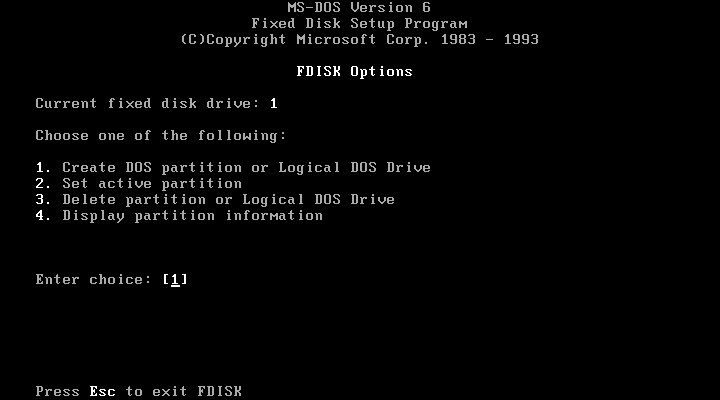
Screenshot of FDISK on MS-DOS | |
| Developers | Robert Baron, IBM, Microsoft, Digital Research, Datalight, Novell, Brian E. Reifsnyder |
| Initial release | 1983, 41–42 years ago |
| Operating system | MS-DOS, PC DOS, FlexOS, SISNE plus, OS/2, eComStation, ArcaOS, Windows, DR DOS, ROM-DOS, FreeDOS, PTS-DOS, *BSD,[1] SysV |
| Type | Command |
| License | MS-DOS, PC DOS, FlexOS, OS/2, Windows, DR DOS, ROM-DOS, PTS-DOS: Proprietary commercial software FreeDOS: GNU GPLv2 |
fdisk is a command-line utility for disk partitioning. It has been part of DOS, DR FlexOS, IBM OS/2, and early versions of Microsoft Windows, as well as certain ports of FreeBSD,[2] NetBSD,[3] OpenBSD,[4] DragonFly BSD[5] and macOS[6] for compatibility reasons. Windows 2000 and its successors have replaced fdisk with a more advanced tool called diskpart.
Implementations
[edit]DOS
[edit]IBM introduced the first version of fdisk (officially dubbed "Fixed Disk Setup Program") in March 1983, with the release of the IBM PC/XT computer (the first PC to store data on a hard disk) and the IBM PC DOS 2.0 operating system. fdisk version 1.0 can create one FAT12 partition, delete it, change the active partition, or display partition data. fdisk writes the master boot record, which supports up to four partitions. The other three were intended for other operating systems such as CP/M-86 and Xenix, which were expected to have their own partitioning utilities.
Microsoft first added fdisk to MS-DOS in version 3.2.[7] MS-DOS versions 2.0 through 3.10 included OEM-specific partitioning tools, which may have been named fdisk.
PC DOS 3.0, released in August 1984, added support for FAT16 partitions to handle larger hard disks more efficiently. PC DOS 3.30, released in April 1987, added support for extended partitions. (These partitions do not store data directly but can contain up to 23 logical drives.) In both cases, fdisk was modified to work with FAT16 and extended partitions. Support for FAT16B was first added to Compaq's fdisk in MS-DOS 3.31. FAT16B later became available with MS-DOS and PC DOS 4.0.
The undocumented /mbr switch in fdisk, which could repair the master boot record, soon became popular.
IBM PC DOS 7.10 shipped with the new fdisk32 utility.
ROM-DOS,[8] DR DOS 6.0[9] FlexOS,[10] PTS-DOS 2000 Pro,[11] and FreeDOS,[12] include an implementation of the fdisk command.
Windows
[edit]
Windows 95, Windows 98, and Windows ME shipped with a derivative of the MS-DOS fdisk. Windows 2000 and its successors, however, came with the more advanced[according to whom?] diskpart and the graphical Disk Management utilities.
Starting with Windows 95 OSR2, fdisk supports the FAT32 file system.[13]
The version of fdisk that ships with Windows 95 does not report the correct size of a hard disk that is larger than 64 GB. An updated fdisk is available from Microsoft to correct this issue.[14] In addition, fdisk cannot create partitions larger than 512 GB, even though FAT32 supports partitions as big as 2 TB. This limitation applies to all versions of fdisk supplied with Windows 95 OSR 2.1, Windows 98 and Windows ME.
IBM OS/2
[edit]Before version 4.0, OS/2 shipped with two partition table managers. These were the text mode fdisk[15] and the graphical fdiskpm.[16] The two have identical functionality, and can manipulate both FAT partitions and the more advanced HPFS partitions.
OS/2 4.5 and higher (including eComStation and ArcaOS) can use the JFS file system, as well as FAT and HPFS. They replaced fdisk with the Logical Volume Manager (LVM).
Mach and 386BSD
[edit]fdisk for Mach Operating System was written by Robert Baron. It was ported to 386BSD by Julian Elischer,[17] and the implementation is being used by FreeBSD,[2] NetBSD[3] and DragonFly BSD,[5] all as of 2019, as well as the early versions of OpenBSD between 1995 and 1997 before OpenBSD 2.2.[1]
Tobias Weingartner re-wrote fdisk in 1997 before OpenBSD 2.2,[4] which has subsequently been forked by Apple Computer, Inc in 2002, and is still used as the basis for fdisk on macOS as of 2019.[6]
For native partitions, BSD systems traditionally use BSD disklabel, and fdisk partitioning is supported only on certain architectures (for compatibility reasons) and only in addition to the BSD disklabel (which is mandatory).
Linux
[edit]In Linux, fdisk is a part of a standard package distributed by the Linux Kernel organization, util-linux. The original program was written by Andries E. Brouwer and A. V. Le Blanc and was later rewritten by Karel Zak and Davidlohr Bueso when they forked the util-linux package in 2006. An alternative, ncurses-based program, cfdisk, allows users to create partition layouts via a text-based user interface (TUI).[18]
See also
[edit]References
[edit]- ^ a b "fdisk(8) — PC slice table (MBR) maintenance program". System Manager's Manual. FreeBSD, NetBSD, OpenBSD, DragonFly BSD.
- ^ a b "fdisk — PC slice table maintenance utility". BSD Cross Reference. FreeBSD.
- "fdisk -- PC slice table maintenance utility". FreeBSD Manual Pages.
- ^ a b "fdisk — MS-DOS partition maintenance program". BSD Cross Reference. NetBSD.
- ^ a b "fdisk — partition table maintenance program". BSD Cross Reference. OpenBSD.
- "fdisk — partition table maintenance program". OpenBSD manual page server.
- ^ a b "fdisk — PC slice table (MBR) maintenance program". BSD Cross Reference. DragonFly BSD.
- "fdisk - PC slice table (MBR) maintenance program". DragonFly On-Line Manual Pages.
- ^ a b "fdisk.tproj/fdisk.8", macOS 10.14.1, Apple, archived from the original on 2019-04-11, retrieved 2019-04-11
- ^ Wolverton, Van (2003). Running MS-DOS Version 6.22 (20th Anniversary Edition), 6th Revised edition. Microsoft Press. ISBN 0-7356-1812-7.
- ^ "Datalight ROM-DOS User's Guide" (PDF). www.datalight.com.
- ^ DR DOS 6.0 User Guide Optimisation and Configuration Tips
- ^ http://www.bitsavers.org/pdf/digitalResearch/flexos/1073-2003_FlexOS_Users_Guide_V1.3_Nov86.pdf Archived 2019-09-25 at the Wayback Machine [bare URL PDF]
- ^ "PTS-DOS 2000 Pro User Manual" (PDF). Buggingen, Germany: Paragon Technology GmbH. 1999. Archived (PDF) from the original on 2018-05-12. Retrieved 2018-05-12.
- ^ "ibiblio.org FreeDOS Group -- FreeDOS Base". www.ibiblio.org. Retrieved 2020-06-03.
- ^ "How to Use the Fdisk and Format Tools to Partition or Repartition a Hard Disk". Support (6.0 ed.). Microsoft. 28 June 2012.
- ^ "Fdisk Does Not Recognize Full Size of Hard Disks Larger than 64 GB". Support (4.0 ed.). Microsoft. 24 August 2012.
- ^ "JaTomes Help - OS/2 Commands". Archived from the original on 2019-04-14. Retrieved 2019-06-20.
- ^ "Fdisk".
- ^ Sharma, Deepesh (2021-02-22). "How to Create, Resize and Delete Linux Partitions With Cfdisk". MUO. Retrieved 2023-05-15.
Further reading
[edit]- Wolverton, Van (1990). MS-DOS Commands: Microsoft Quick Reference, 4th Revised edition. Microsoft Press. ISBN 978-1556152894.
- Kathy Ivens; Brian Proffit (1993). OS/2 Inside & Out. Osborne McGraw-Hill. ISBN 978-0078818714.
- Tim O'Reilly; Troy Mott; Walter Glenn (1999). Windows 98 in a Nutshell: A Desktop Quick Reference. O'Reilly. ISBN 978-1565924864.
External links
[edit]Fdisk
View on Grokipedia-l option), add new ones (e.g., primary or logical), delete partitions, and modify attributes like sizes and types, though it does not handle filesystem formatting—that requires separate tools like mkfs.[2][1] Changes are held in memory until the user commits them with the w command, providing a safeguard against errors during disk operations.[2]
While a similar utility named FDISK exists in MS-DOS and early Windows versions for basic partitioning and master boot record management, the Unix/Linux fdisk differs significantly, offering advanced support for contemporary storage standards and device naming conventions like /dev/sda1.[3] Current maintenance of the Linux fdisk, part of util-linux version 2.41 (as of November 2025), is handled by developers including Karel Zak, ensuring compatibility with evolving hardware like SSDs and large-capacity drives.[1][4]
Overview
Purpose and Functionality
fdisk is a command-line utility designed for reporting and editing disk partition tables on block devices such as hard disk drives.[1] Implementations exist across various operating systems, with the Unix-like version (as in Linux) supporting multiple partition table formats including the Master Boot Record (MBR), GUID Partition Table (GPT), Sun, SGI, and BSD types, while DOS and Windows use an analogous tool called FDISK primarily for MBR.[1][3] This enables system administrators and users to view the layout of existing partitions on a disk device, facilitating efficient management of storage resources in Unix-like systems and similar environments. The core functionalities of fdisk revolve around creating, deleting, and modifying partitions without altering the underlying data. It supports the creation of primary partitions (up to four per disk in MBR), extended partitions to extend this limit through logical partitions, and the assignment of partition types to indicate intended file systems such as FAT, NTFS, or ext.[1] By interacting directly with the partition table located in the first sector(s) of the disk, fdisk defines critical parameters including partition boundaries (start and end sectors), sizes, and types, ensuring the operating system can recognize and access the divided storage areas.[1] Notably, fdisk operates solely on the partition table and does not perform formatting or install file systems, leaving those tasks to separate utilities like mkfs or format.[1] Key limitations of fdisk stem from the partitioning scheme employed; for the MBR scheme, it restricts disks to a maximum of four primary partitions unless extended partitions are used for additional logical ones, and early implementations relied on cylinder-head-sector (CHS) addressing that could lead to inaccuracies on larger drives.[1] While traditional versions of fdisk were limited to MBR, modern Unix-like implementations such as Linux fdisk (part of util-linux since version 2.26 as of 2015) support GPT, which overcomes MBR constraints for larger disks (beyond 2 TiB) and more partitions (typically up to 128).[1][5]Key Concepts
Disk partitioning involves dividing a physical storage disk into multiple logical sections known as partitions, allowing separate areas for different operating systems, file systems, or data storage purposes. This organization enables efficient management of disk space and supports multiboot configurations by isolating data and system files.[6] In the Master Boot Record (MBR) scheme, partitions are categorized as primary, extended, or logical. Primary partitions, limited to four per disk, are the main divisions and can be marked as bootable to load an operating system. An extended partition acts as a container to overcome the four-partition limit, housing logical partitions as subdivisions within it. Logical partitions provide additional flexibility for organizing data without directly counting toward the primary limit.[7] The MBR, located in the first sector of the disk, consists of boot code in the initial 446 bytes, followed by a 64-byte partition table and a 2-byte boot signature. The partition table holds up to four 16-byte entries, each describing a partition's boot status, starting and ending positions, type code, and size. For instance, the type code 0x07 indicates an NTFS file system partition.[7][8]| Offset | Size (bytes) | Field Description |
|---|---|---|
| 0x00 | 1 | Boot indicator (0x00 non-bootable, 0x80 bootable) |
| 0x01 | 1 | Starting head |
| 0x02 | 1 | Starting sector and cylinder (lower 6 bits sector, upper 2 bits high cylinder) |
| 0x03 | 1 | Starting cylinder (lower 8 bits) |
| 0x04 | 1 | Partition type code (e.g., 0x07 for NTFS) |
| 0x05 | 1 | Ending head |
| 0x06 | 1 | Ending sector and cylinder (lower 6 bits sector, upper 2 bits high cylinder) |
| 0x07 | 1 | Ending cylinder (lower 8 bits) |
| 0x08 | 4 | Starting sector (LBA, relative to disk start) |
| 0x0C | 4 | Number of sectors in partition |
History
Origins in DOS
Thefdisk utility was introduced in March 1983 alongside IBM PC DOS 2.0 (also known as PC DOS 2.0), marking the first disk partitioning tool designed for hard disks on IBM PC compatibles.[11][12] Developed jointly by Microsoft and IBM, it enabled users to prepare fixed disks for DOS file storage, coinciding with the IBM PC/XT model's launch as the first PC to include a hard drive as standard.[13][14] Initially, fdisk supported the FAT12 file system and provided basic operations for creating and deleting primary partitions, relying on Cylinder-Head-Sector (CHS) addressing to define partition boundaries within the 10 MB limit of early hard drives.[15][16]
In August 1984, PC DOS 3.0 updated fdisk to add support for the FAT16 file system, allowing partitions up to 32 MB on larger disks while maintaining backward compatibility with FAT12 volumes.[14] This enhancement addressed the growing capacity of hard drives, though early implementations had limitations in interoperability with later DOS versions for larger volumes. The command's syntax included options like FDISK /STATUS for displaying current partition information without entering the interactive menu.[17][18]
By 1987, enhancements in MS-DOS 3.31—particularly in the Compaq variant—introduced extended partitions to overcome the four-partition limit of the Master Boot Record (MBR) and the FAT16B variant, which supported partitions over 32 MB through larger cluster sizes.[19][20] These features, integrated into fdisk, allowed for more flexible disk organization on drives up to 504 MB.[21] As hard disk drives became ubiquitous in PCs during the mid-1980s, fdisk established itself as the standard tool for partitioning, enabling bootable hard disk setups that supplanted floppy-only booting.[11] It was included in all subsequent releases of MS-DOS, PC DOS, and DR-DOS, with later ports emerging for Unix-like systems.[14]
Adoption and Evolution in Unix-like Systems
The fdisk utility, originally developed for DOS environments, was adapted for Unix-like systems beginning with its implementation for the Mach operating system kernel, where it was written by Robert Baron to manage disk partitions in a Unix-compatible manner.[22] This version introduced a command-line interface suitable for Unix-style operations, emphasizing interactive editing of partition tables. Subsequently, Julian Elischer ported fdisk to 386BSD around the time of that system's 1992 release, enabling partition management on early PC-based BSD variants and laying groundwork for broader adoption in free Unix-like distributions.[22] These early ports focused on compatibility with Master Boot Record (MBR) schemes inherited from DOS, while adapting the tool to Unix conventions like non-interactive scripting and integration with kernel disk drivers. In Linux, fdisk was integrated into the util-linux package, with initial development contributions from Andries E. Brouwer and A. V. Le Blanc dating to 1992–1993, providing essential MBR-only partitioning support for the emerging kernel.[1] The tool evolved through community maintenance, addressing limitations such as the 2 TB addressable limit of MBR partitions by incorporating detection for alternative schemes. A significant milestone came in 2007 with util-linux version 2.13, where maintainer Karel Zak enhanced fdisk with GPT detection and improved probing via libblkid for more accurate disk geometry and filesystem identification, though full GPT editing support arrived later in version 2.23 (2014).[23] These updates improved portability across large-capacity drives but retained MBR focus for legacy compatibility. The OpenBSD project undertook a complete rewrite of fdisk in 1997 by Tobias Weingartner, prioritizing security hardening, code portability, and robustness against malformed inputs to align with the system's emphasis on proactive auditing. This version influenced subsequent adaptations in NetBSD and FreeBSD, which adopted similar interactive and non-interactive modes for MBR and extended partition handling. Apple incorporated a fork of this OpenBSD-derived fdisk into Darwin (the core of macOS) starting around 2002, retaining it for legacy MBR editing on Intel-based systems while prioritizing GUID Partition Table (GPT) for native volumes. Over time, fdisk's role in modern Unix-like systems has shifted toward compatibility maintenance, as the 2 TB MBR limitation prompted widespread adoption of GPT for larger disks; tools like parted or gdisk are now recommended for new setups, but fdisk persists for editing legacy MBR partitions and hybrid schemes.[24] This evolution reflects broader trends in Unix-like storage management, balancing backward compatibility with support for exabyte-scale addressing in GPT.[25]Usage
Command Syntax and Options
Thefdisk command is typically invoked using the syntax fdisk [options] [device], where device specifies the target disk, such as /dev/sda on Linux systems, and omitting certain options causes the program to enter interactive mode by default for partition manipulation.[1] If no device is provided, fdisk lists available devices or prompts for one.[1]
Several key options enable non-interactive usage without entering the full dialog: the -l or --list option displays the partition table for the specified device(s) and exits immediately, useful for querying disk layout; -s or --getsz outputs the size of a partition in 512-byte sectors (though this is deprecated in favor of blockdev); -u or --units[=unit] controls display units, defaulting to sectors but allowing cylinders for legacy compatibility; and -v or --version prints version details and exits.[1] These options are common across Unix-like implementations for basic querying tasks.[26]
Non-interactive scripting is supported by piping commands to fdisk via standard input, simulating interactive prompts to delete, create, or set partition types with parameters like start and end sectors; for instance, sequences such as echo -e "d\n1\nw" | fdisk /dev/sda can delete the first partition non-interactively.[2] This approach allows batch operations but requires precise knowledge of prompt responses, and for more robust scripting, the companion sfdisk tool extends these capabilities with explicit flags like --delete, --new, and --type.[27]
The utility performs error handling by issuing warnings for invalid inputs, such as attempts to create overlapping partitions or specify sectors beyond the disk's capacity, and it conducts consistency checks on partition tables in DOS compatibility mode to prevent corruption.[1] Options may vary slightly between implementations—for example, additional flags in BSD variants—but the core command-line syntax remains POSIX-like and standardized in Unix-like systems since the 1990s, ensuring broad portability. This non-interactive mode provides a bridge to full interactive operations for advanced partitioning.
Interactive Operations
When invoked without scripting options, fdisk enters an interactive, menu-driven mode that allows users to manage disk partitions through a series of prompts.[1] For example, runningfdisk /dev/sda on a Unix-like system launches the interface and displays a command prompt such as "Command (m for help):".[1] This mode is designed for manual operation, guiding users through tasks like creating or modifying partitions on the specified device.[26]
Core commands in the interactive interface include p to print the current partition table, n to add a new partition, d to delete an existing partition by number, t to change a partition's type (such as setting code 83 for a Linux filesystem), w to write the modified table to disk and exit, and q to quit without saving changes.[1] In Unix-like implementations, these are single-letter commands entered at the prompt, while DOS and Windows versions use a numbered menu for selections, such as option 1 to create a primary partition or option 4 to display information.[21] Resizing a partition typically involves deleting it with d (or the equivalent menu option) and recreating it with adjusted parameters using n.[1]
A common workflow for creating a primary partition begins by entering n at the prompt, followed by p to select primary, 1 for the first slot, accepting the default start sector by pressing Enter, and specifying the end with a size like +10G for 10 gigabytes.[26] The user can then verify the layout with p, optionally set the type using t (e.g., t then 1 then 83), and commit changes with w.[1] For scripting preferences, fdisk supports non-interactive mode via command-line options to automate these steps without entering the menu.[1]
Safety features in interactive mode buffer all modifications in memory until w is explicitly issued, preventing accidental overwrites; selecting q discards any unsaved changes.[1] Users are encouraged to use p repeatedly for verification before writing, as the tool issues warnings about potential data loss or existing signatures on the disk.[1]
Implementations
DOS and Compatible Systems
In MS-DOS and compatible systems, the fdisk utility operates as a menu-driven program invoked via the command line with an optional drive letter specifier, such asFDISK C:, to target a specific fixed disk.[21] Upon execution, it presents a primary menu with five numbered options: 1 for creating a DOS partition or logical drive, 2 for setting the active partition, 3 for deleting a partition or logical drive, 4 for displaying partition information, and 5 for selecting the current fixed disk drive when multiple drives are present.[28] Internally, fdisk numbers drives starting from 1 rather than using letters, reserving A: and B: for floppy drives and assigning C: to the primary partition on the first hard drive.[29] This implementation supports partitioning up to a 2 TB limit per disk, constrained by the 32-bit Logical Block Addressing (LBA) scheme in the Master Boot Record (MBR) format, which addresses a maximum of 2^32 sectors at 512 bytes each.[24][30]
Fdisk in DOS environments handles File Allocation Table (FAT) filesystem variants through predefined partition type codes, assigning hexadecimal identifiers such as 01 for FAT12, 04 or 06 for FAT16 (depending on size), and 0B or 0C for FAT32 with LBA support.[31] When creating a primary DOS partition, fdisk automatically configures the partition table entry to enable boot sector setup, marking it as active if selected and preparing it for subsequent formatting with tools like FORMAT.COM to write the appropriate FAT boot sector.[32] This process ensures compatibility with DOS's native filesystems, though it requires manual intervention for extended partitions containing logical drives.
Compatible systems like FreeDOS provide an open-source fdisk implementation that extends DOS functionality, including full support for FAT32 partitions added in its early development around 1998 to align with emerging large-drive needs.[33][34] Similarly, DR-DOS variants enhance fdisk with features such as improved multi-boot configuration options, allowing better handling of dual-OS setups through refined partition activation and boot sector management in its user guide-documented utilities.[35]
Key limitations include the absence of GUID Partition Table (GPT) support, as DOS fdisk exclusively uses the MBR scheme for compatibility with legacy BIOS environments.[36] Early versions prior to 1994 relied solely on Cylinder-Head-Sector (CHS) addressing, lacking LBA extensions that were introduced later to handle larger drives.[37] In MS-DOS 6.x releases, fdisk often misreports or ignores space beyond approximately 8 GB on larger drives due to BIOS translation limitations and incomplete INT13h extensions, capping visible capacity at around 8.4 GB unless patched.[38][39]
Despite these constraints, DOS fdisk remains in use within bootable DOS environments for maintaining legacy hardware, such as in embedded systems or retro computing setups requiring MBR partitioning without modern OS dependencies.[40][41] The last major update to the core fdisk utility occurred with Windows 98 in 1998, incorporating FAT32 awareness and large-drive fixes up to the 137 GB barrier via subsequent hotfixes.[42][43]
Linux
In Linux, the fdisk utility is distributed as part of the util-linux package, a collection of system tools maintained by the Linux kernel community since its inception in the early 1990s.[4] The current implementation, as of util-linux version 2.41.2 released in 2025, supports both Master Boot Record (MBR) and GUID Partition Table (GPT) partition tables, with MBR allowing up to four primary partitions and extended partitions containing logical ones, while GPT supports up to 128 partitions by default, while operating on block devices such as /dev/sda or /dev/sdb.[44][1] A significant rewrite occurred in 2006, when the util-linux project was forked as util-linux-ng by developers Karel Zak and Davidlohr Bueso, leading to improved modularity and the introduction of the libfdisk library for handling partition tables.[45] This library enables scripting capabilities, allowing fdisk to integrate with automated tools for non-interactive partitioning. Complementing fdisk, the sfdisk utility serves as a companion for batch operations, such as dumping or restoring partition tables in a scriptable format. Recent enhancements include color-coded output for warnings and table elements, introduced in util-linux 2.24 and refined in subsequent versions for better readability in terminals.[46][1] The 2006 rewrite laid the groundwork for better disk handling, with util-linux 2.26 (released in 2015) making sector-based sizing the default, replacing legacy cylinder-head-sector (CHS) calculations to improve accuracy on modern hardware. This change, building on sector size distinctions added in version 2.17, enables reliable support for large disks up to the MBR limit of 2 TB using 512-byte sectors or much larger with GPT. Key options include -c for compatibility modes (such as DOS CHS emulation via -c=dos), and the ability to display or specify sizes in bytes for precise control, alongside DOS-compatible mode to ensure interoperability with Windows systems by aligning partitions to traditional boundaries.[5][1][2] As of 2025, fdisk remains actively maintained within util-linux 2.41.2, with ongoing updates for stability and integration. It is suitable for both MBR and GPT partitioning, though specialized tools like gdisk offer advanced features for GPT setups. The tool is commonly embedded in installation environments, such as the Debian installer, where it facilitates initial disk setup through interactive prompts like 'n' for new partitions.[44][47]BSD and macOS Derivatives
The fdisk utility in BSD systems traces its origins to a port from the Mach Operating System to 386BSD in the early 1990s.[48][49] This implementation was adapted for use in FreeBSD and NetBSD, where it primarily handles editing of Master Boot Record (MBR) partition tables on disk devices.[48][49] In OpenBSD, fdisk maintains a minimalist design focused on essential partition table management, supporting both MBR and GUID Partition Table (GPT) formats while prioritizing secure operations such as bounds checking during edits.[50] Common features across BSD variants include the-f option to force geometry detection or load from a configuration file, and -u to update the existing slice table interactively without data loss.[48] In FreeBSD, fdisk interacts with the GEOM modular disk transformation framework, which can generate benign warnings during operations; these are suppressed using the -q flag to ensure clean output.[48] However, fdisk in FreeBSD lacks native GPT support and is recommended to be used alongside gpart(8) for modern GPT-based partitioning.[48][51]
The macOS implementation of fdisk, inherited from its BSD roots, is located at /usr/sbin/fdisk and extends support to the Apple Partition Map (APM) format via the -A flag, allowing manipulation of legacy partitioning schemes alongside MBR.[52] It remains available for compatibility with DOS and Windows bootloaders on hybrid setups, even as APFS has become the default file system since macOS 10.13, rendering traditional fdisk operations legacy for native macOS volumes.[52][53]
