


Community hub
Recent from talks
Contribute something
Nothing was collected or created yet.
Semi-log plot
View on Wikipedia

In science and engineering, a semi-log plot/graph or semi-logarithmic plot/graph has one axis on a logarithmic scale, the other on a linear scale. It is useful for data with exponential relationships, where one variable covers a large range of values.[1]
All equations of the form form straight lines when plotted semi-logarithmically, since taking logs of both sides gives


This is a line with slope and vertical intercept. The logarithmic scale is usually labeled in base 10; occasionally in base 2:



A log–linear (sometimes log–lin) plot has the logarithmic scale on the y-axis, and a linear scale on the x-axis; a linear–log (sometimes lin–log) is the opposite. The naming is output–input (y–x), the opposite order from (x, y).
On a semi-log plot the spacing of the scale on the y-axis (or x-axis) is proportional to the logarithm of the number, not the number itself. It is equivalent to converting the y values (or x values) to their log, and plotting the data on linear scales. A log–log plot uses the logarithmic scale for both axes, and hence is not a semi-log plot.
Equations
[edit]The equation of a line on a linear–log plot, where the abscissa axis is scaled logarithmically (with a logarithmic base of n), would be

The equation for a line on a log–linear plot, with an ordinate axis logarithmically scaled (with a logarithmic base of n), would be:


Finding the function from the semi–log plot
[edit]Linear–log plot
[edit]On a linear–log plot, pick some fixed point (x0, F0), where F0 is shorthand for F(x0), somewhere on the straight line in the above graph, and further some other arbitrary point (x1, F1) on the same graph. The slope formula of the plot is:
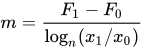
which leads to

or

which means that

In other words, F is proportional to the logarithm of x times the slope of the straight line of its lin–log graph, plus a constant. Specifically, a straight line on a lin–log plot containing points (F0, x0) and (F1, x1) will have the function:
![{\displaystyle F(x)=(F_{1}-F_{0}){\left[{\frac {\log _{n}(x/x_{0})}{\log _{n}(x_{1}/x_{0})}}\right]}+F_{0}=(F_{1}-F_{0})\log _{\frac {x_{1}}{x_{0}}}{\left({\frac {x}{x_{0}}}\right)}+F_{0}}](https://wikimedia.org/api/rest_v1/media/math/render/svg/da143562dac9e25d0e2a741861ef66bb7077d6f6)
log–linear plot
[edit]On a log–linear plot (logarithmic scale on the y-axis), pick some fixed point (x0, F0), where F0 is shorthand for F(x0), somewhere on the straight line in the above graph, and further some other arbitrary point (x1, F1) on the same graph. The slope formula of the plot is:
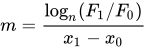
which leads to

Notice that nlogn(F1) = F1. Therefore, the logs can be inverted to find:
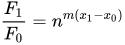
or

This can be generalized for any point, instead of just F1:

Real-world examples
[edit]Phase diagram of water
[edit]In physics and chemistry, a plot of logarithm of pressure against temperature can be used to illustrate the various phases of a substance, as in the following for water:

2009 "swine flu" progression
[edit]While ten is the most common base, there are times when other bases are more appropriate, as in this example:[further explanation needed]

Notice that while the horizontal (time) axis is linear, with the dates evenly spaced, the vertical (cases) axis is logarithmic, with the evenly spaced divisions being labelled with successive powers of two. The semi-log plot makes it easier to see when the infection has stopped spreading at its maximum rate, i.e. the straight line on this exponential plot, and starts to curve to indicate a slower rate. This might indicate that some form of mitigation action is working, e.g. social distancing.
Microbial growth
[edit]In biology and biological engineering, the change in numbers of microbes due to asexual reproduction and nutrient exhaustion is commonly illustrated by a semi-log plot. Time is usually the independent axis, with the logarithm of the number or mass of bacteria or other microbe as the dependent variable. This forms a plot with four distinct phases, as shown below.

See also
[edit]- Nomograph, more complicated graphs
- Nonlinear regression#Transformation, for converting a nonlinear form to a semi-log form amenable to non-iterative calculation
- Log–log plot
References
[edit]- ^ (1) Bourne, M. "Graphs on Logarithmic and Semi-Logarithmic Paper". Interactive Mathematics. www.intmath.com. Archived from the original on August 6, 2021. Retrieved October 26, 2021.
(2) Bourne, Murray (January 25, 2007). "Interesting semi-logarithmic graph – YouTube Traffic Rank". SquareCirclez: The IntMath blog. www.intmath.com. Archived from the original on February 26, 2021. Retrieved October 26, 2021.
Semi-log plot
View on GrokipediaFundamentals
Definition and Purpose
A semi-log plot, also known as a semi-logarithmic plot, is a graphical representation in which one axis employs a logarithmic scale while the other uses a linear scale, typically with the y-axis logarithmic and the x-axis linear to facilitate the straight-line depiction of exponential or power-law relationships.[3] This configuration, often referred to as a linear-log plot, contrasts with the log-linear variant where the x-axis is logarithmic and the y-axis linear.[1] The primary purpose of a semi-log plot is to linearize data that follows exponential growth or decay, transforming curved lines on a linear-linear scale into straight lines for easier identification of trends, model fitting, and extrapolation.[4] Unlike standard linear plots, which distort exponential functions into non-linear curves, semi-log plots reveal constant percentage changes as uniform slopes, such as in population growth or decay processes.[5] Key advantages include simplifying the analysis of datasets spanning multiple orders of magnitude, where linear scales would compress or obscure details; emphasizing relative rather than absolute changes; and enabling the detection of deviations from expected exponential behavior through observable curvature.[1] These features make semi-log plots invaluable in scientific visualization for highlighting proportional variations without manual logarithmic transformations.[2] Semi-log plots originated in the 19th century as part of advancements in logarithmic graphing techniques to linearize non-linear relationships. They saw widespread adoption in scientific plotting by the early 20th century.Types of Semi-log Plots
Semi-log plots are primarily divided into two variants depending on which axis uses the logarithmic scale: the linear-log plot and the log-linear plot. These types facilitate the visualization of data exhibiting exponential behaviors by compressing one axis to reveal linear relationships that might otherwise appear curved on linear scales.[6] In a linear-log plot, the x-axis is scaled linearly while the y-axis is logarithmic. This setup is ideal for data where the dependent variable grows or decays exponentially in relation to a linearly progressing independent variable. The y-axis features tick marks at logarithmic intervals, such as 1, 10, and 100, where the spacing between ticks represents equal multiplicative increments, emphasizing proportional changes in the y-values.[7][6] Conversely, a log-linear plot employs a logarithmic scale on the x-axis and a linear scale on the y-axis. It is suited for scenarios where the independent variable spans multiple orders of magnitude or involves exponential progression, allowing for a more uniform representation across vast ranges. The x-axis ticks are positioned at powers of 10, like 0.1, 1, 10, and 100, highlighting relative differences rather than absolute ones. The primary distinction between the two is their emphasis: linear-log plots focus on multiplicative transformations of the dependent variable to linearize exponential trends, whereas log-linear plots apply the transformation to the independent variable to reveal additive patterns post-logarithm.[8][6][8]Construction Methods
Creating a Linear-Log Plot
A linear-log plot, also known as a semi-log plot with a linear x-axis and logarithmic y-axis, is particularly useful for visualizing exponential growth or decay in the dependent variable.[1] Before plotting, data preparation is essential to ensure compatibility with the logarithmic y-scale, which requires all y-values to be positive. Negative values cannot be plotted on a logarithmic axis, as the logarithm of a negative number is undefined, and zeros must be handled carefully since log(0) is also undefined.[9] Common approaches include omitting zeros or replacing them with a small positive constant smaller than the smallest non-zero value (e.g., 0.001 if the smallest non-zero value is 0.01 and appropriate for the dataset's scale) to avoid distortion, or using a discontinuous axis if the software supports it.[9] Select the logarithmic base based on the data's context: base 10 is standard for decimal-based measurements spanning orders of magnitude, while base e (natural log) suits exponential models in physics or biology, and base 2 for binary or computational data; the choice primarily affects scaling without altering the plot's linearity for exponential fits.[10] For manual construction, obtain semi-log graph paper with a linear horizontal (x) scale and logarithmic vertical (y) scale, typically featuring multiple cycles (e.g., 2- or 3-cycle paper for y-values spanning 1 to 100 or 1 to 1,000). Mark x-values evenly along the linear axis as usual. For y-values, locate positions on the log scale by aligning with the appropriate tick marks representing powers of the base (e.g., 1, 10, 100 for base 10), where intervals between ticks like 1 to 10 are divided non-uniformly to reflect logarithmic spacing—plot each data point (x, y) directly without computing logarithms, as the paper handles the transformation.[11] Connect points with a straight line if the data follows an exponential model, such as y = k * a^x, to reveal the linear relationship.[6] Software tools simplify the process by automating the scaling. In Microsoft Excel, select the data range, insert a scatter plot via the Insert tab, then right-click the y-axis, choose Format Axis, and check the Logarithmic scale option under Axis Options to apply base 10 scaling by default; adjust the base if needed via Bounds settings.[12] For stacked column charts in Excel, which can be useful for visualizing categorical or stacked data with wide value ranges, select the chart, right-click the y-axis, choose Format Axis, and under Axis Options, check the Logarithmic scale option. Adjust the Minimum (e.g., to 1 or 10, adding a small value like 0.1 to zeros if needed) and Maximum (e.g., to 100,000) bounds for appropriate spacing. This approach expands small values for better visibility, but on a logarithmic scale, the stacked totals do not sum visually in a linear manner, which can distort additive relationships and make comparisons misleading.[12][13] For Python using Matplotlib, import the library, prepare x and y arrays, and useplt.semilogy(x, y) or plt.plot(x, y); plt.yscale('log') to set the y-axis to logarithmic scale, with the base configurable via plt.yscale('log', base=10) or similar.[14] In R, use the base plot(x, y, log="y") function to generate the plot with a logarithmic y-axis, where the default base is 10, and customize further with par for parameters like tick marks.
Common pitfalls include attempting to plot negative or zero y-values without preprocessing, which causes errors or misleading visuals in most tools.[9] Another issue is selecting an inappropriate log base that mismatches the data's magnitude, leading to cramped or stretched visuals—always preview the range for readability across decades.[15]
Creating a Log-Linear Plot
A log-linear plot, also known as a semi-log plot with a logarithmic x-axis and linear y-axis, is constructed manually using specialized semi-log graph paper where the horizontal axis features logarithmic divisions marked in powers of 10, while the vertical axis uses uniform linear spacing. To plot points, identify the x-value on the logarithmic ticks—major lines for powers like 1, 10, and 100, with minor lines for intermediates like 2 or 5—then move vertically to the corresponding linear y-value; for non-power-of-10 x-values, interpolate between ticks, noting that spacing compresses toward higher values due to the logarithmic nature, unlike the even spacing in linear-log constructions.[6] This manual approach highlights the x-axis's uneven distribution, which can make low x-values appear clustered compared to the expanded higher ranges.[6] In software, creating a log-linear plot involves selecting a scatter plot type and applying a logarithmic scale to the x-axis via formatting options, accommodating wide x-ranges that span orders of magnitude. For Microsoft Excel, insert a scatter chart from the data, right-click the x-axis, select Format Axis, and check the Logarithmic scale option under Axis Options to transform the x-axis while keeping the y-axis linear.[16] In Python's Matplotlib library, use the commandplt.xscale('log') after creating a plot with plt.scatter() or plt.plot(), which sets the x-axis to base-10 logarithmic scaling by default, effectively handling expansive datasets like those in scientific time series.[17] Similarly, in R, the base plot() function accepts the parameter log = "x" to apply logarithmic scaling to the x-axis, as documented in the graphics package, ensuring compatibility with broad value ranges without manual data adjustment.
Data for log-linear plots must consist of strictly positive x-values, as the logarithm is undefined for zero or negative numbers, preventing errors in scaling and ensuring accurate representation across the axis.[18] When x-values cluster near low magnitudes, such as early stages of exponential processes, adjust tick spacing or minor grid density in software to enhance readability, avoiding overcrowding that obscures patterns in the compressed region.[19]
Visualization in log-linear plots benefits from the logarithmic x-axis by rendering uneven spacing—common in data with accelerating rates, like time series of population growth or technology adoption—as perceptibly linear, facilitating the identification of proportional changes over irregular intervals.[20] This contrasts with linear-log plots, where y-axis compression affects vertical trends, emphasizing instead the horizontal axis's ability to normalize multiplicative x-variations for clearer trend analysis.[21]