


Community hub
Back-face culling
View on Wikipedia
In computer graphics, back-face culling determines whether a polygon that is part of a solid needs to be drawn.[1][2][3] Polygons that face away from the viewer do not need to be drawn, as they will be obscured by other polygons facing the viewer. This process makes rendering objects quicker and more efficient by reducing the number of polygons to be drawn.
For example, in a city street scene, there is generally no need to draw the polygons on the sides of the buildings facing away from the camera; they are completely occluded by the sides facing the camera. If multiple surfaces face towards the camera, then additional use of methods such as Z-buffering or the Painter's algorithm may be necessary to ensure the correct surface is rendered. Back-face culling is typically quite a cheap test, only requiring a dot product to be calculated, and so it is often used as a step in the graphical pipeline that reduces the number of surfaces that need to be considered.
In general, back-face culling can be assumed to produce no visible artifact in a rendered scene if it contains only closed and opaque geometry. In scenes containing transparent polygons, rear-facing polygons may become visible through the process of alpha composition. Back-face culling may also be applied to other problems. For example, in wire-frame rendering, back-face culling can be used to partially address the problem of hidden-line removal, but only for closed convex geometry. Back-face culling can also be applied to flat surfaces other than polygons, for example disks, which have a constant normal vector or extended to patches where the surface normal can be bounded.[4]
A related technique is clipping, which determines whether polygons are within the camera's field of view at all. As clipping is usually more expensive than back-face culling, back-face culling is often applied first.[2] Another similar technique is Z-culling, also known as occlusion culling, which attempts to skip the drawing of polygons that are covered from the viewpoint by other visible polygons.
In non-realistic renders, certain faces can be culled by whether or not they are visible, rather than facing away from the camera. "Inverted hull" or "front face culling" can be used to simulate outlines or toon shaders without post-processing effects.[5]
History
[edit]Back-face culling has been used since at least the 1970s.[6] It has been used in many video games, including the original 1984 BBC Micro version of the game Elite.[7] By the mid 1990s, many graphics systems could implement back-face culling in hardware.[4]
Implementation
[edit]One method of implementing back-face culling is by discarding all polygons where the dot product of their outward pointing surface normal, , and the line of sight vector, , is greater than or equal to zero:


In the case of rendering a polygon specified by a list of vertices, this might be calculated by

where P is the view point, V0 is the first vertex of a triangle and N could be calculated as a cross product of two vectors representing sides of the triangle adjacent to V0

Since cross product is anticommutative, defining the normal in terms of cross product means that the normal direction is dependent on the vertex order (winding):

Consequently, the vertex ordering is usually chosen such that front-facing triangles have clockwise winding, N defined as above is the normal directed outward from the object. In this setup, back-face may be regarded as a test of whether the points in the polygon appear in clockwise or counter-clockwise order when projected onto the screen. If the user has specified that front-facing polygons have a clockwise winding, but the polygon projected on the screen has a counter-clockwise winding then it has been rotated to face away from the camera and will not be drawn.
If the points are already in view space, P can be assumed to be (0, 0, 0), the origin, simplifying the above inequality:

It is also possible to use this method in projection space by representing the above inequality as a determinant of a matrix and applying the projection matrix to it.[8]
Another method exists based on reflection parity, which is more appropriate for two dimensions where the surface normal cannot be computed (also known as CCW check).
Let a unit triangle in two dimensions (homogeneous coordinates) be defined as
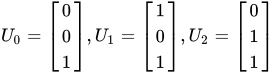
Then for some other triangle, also in two dimensions,
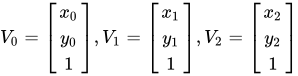
define a matrix that transforms the unit triangle:
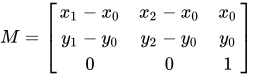
so that:


Discard the triangle if matrix M contained an odd number of reflections (facing the opposite way of the unit triangle)

The unit triangle is used as a reference and transformation M is used as a trace to tell if vertex order is different between two triangles. The only way vertex order can change in two dimensions is by reflection. Reflection is an example of involutory function (with respect to vertex order), therefore an even number of reflections will leave the triangle facing the same side, as if no reflections were applied at all. An odd number of reflections will leave the triangle facing the other side, as if exactly after one reflection. Transformations containing an odd number of reflections always have a negative scaling factor, likewise, the scaling factor is positive if there are no reflections or even a number of them. The scaling factor of a transformation is computed by determinant of its matrix.
References
[edit]- ^ Foley, James D.; van Dam, Andries; Feiner, Steven K.; Hughes, John (15 June 1990). Computer Graphics: Principles and Practice (2nd ed.). Addison-Wesley. ISBN 978-0-201-12110-0.
- ^ a b Watt, Alan; Watt, Mark (1992). Advanced Animation and Rendering Techniques. Addison-Wesley. ISBN 0-201-54412-1.
- ^ Jones, Huw (2001). Computer Graphics through Key Mathematics. Springer. ISBN 1-85233-422-3.
- ^ a b Kumar, Subodh; Manocha, Dinesh; Garrett, Bill; Lin, Min (1996). "Hierarchical back-face culling" (PDF). 7th Eurographics Workshop on Rendering: 231–240. Retrieved 2025-02-08.
- ^ Hoeven, van der, Jorick (2008). Non-Photorealism in Interactive Rendering Systems (PDF) (BA in Computer Science thesis). University of Oxford. Archived from the original (PDF) on 2021-11-02. Retrieved 2023-08-10.
- ^ Sutherland, Ivan E; Sproull, Robert F; Schumacker, Robert A (1974). "A Characterization of Ten Hidden-Surface Algorithms". ACM Computing Surveys. 6 (1). ACM: 1–55. doi:10.1145/356625.356626. Retrieved 2025-02-08.
- ^ Moxon, Mark (2020). "How Elite draws solid-looking 3D ships by only drawing visible faces". bbcelite.com. Retrieved 2025-02-08.
- ^ Eberly, David H. (2006). 3D Game Engine Design: A Practical Approach to Real-Time Computer Graphics. United States: Morgan Kaufmann Publishers. p. 69. ISBN 0122290631.
Back-face culling
View on GrokipediaglEnable(GL_CULL_FACE) and configured via glCullFace to target back-facing facets by default, with front-facing orientation defined by vertex winding order through glFrontFace.[3] The technique operates post-vertex transformation but pre-rasterization, potentially halving the number of primitives processed for convex objects, and has been enhanced in hardware implementations to perform even earlier for greater efficiency gains.[2] While effective for solid geometry, it assumes consistent polygon orientation and may require adjustments for transparent or non-manifold surfaces to avoid artifacts.
Advanced algorithms, such as normal mask-based culling, further optimize the process by preprocessing polygon normals into bitmasks, allowing back-face tests to be reduced to a single logical operation per polygon with minimal additional storage.[1] Overall, back-face culling remains a cornerstone of real-time rendering systems, contributing significantly to performance in applications like video games and simulations by minimizing unnecessary fragment processing.
Fundamentals
Definition and Purpose
Back-face culling is a fundamental optimization technique in 3D computer graphics that identifies and discards polygons facing away from the viewer prior to the rasterization stage, thereby preventing unnecessary processing of invisible surfaces.[4] This method operates early in the rendering pipeline to determine the orientation of each polygon relative to the viewing direction, ensuring that only potentially visible geometry proceeds to subsequent stages like shading and depth testing.[5] The core purpose of back-face culling is to enhance rendering efficiency by significantly reducing the computational overhead associated with processing hidden geometry. For closed meshes, such as those representing solid objects, back-face culling typically eliminates roughly 50% of the triangles in a scene, as approximately half face away from the viewer, thereby halving the average number of polygons that require rasterization and fragment processing.[6] This leads to decreased fill rate demands—fewer pixels generated and shaded—and lower bandwidth consumption in the graphics pipeline, as less data needs to be transferred to the framebuffer.[4] By avoiding these redundant operations, the technique enables smoother real-time performance, particularly in resource-constrained environments.[7] Back-face culling is most effective for opaque, convex, or closed geometry, where back-facing polygons are inherently occluded by front-facing ones and contribute nothing to the final image.[5] It finds primary application in real-time rendering scenarios, including video games and interactive simulations, where maintaining high frame rates is essential despite complex scenes.[5] In these contexts, the method integrates seamlessly with other visibility algorithms to minimize overdraw without compromising visual fidelity.[7]Geometric Prerequisites
In 3D computer graphics, polygons such as triangles and quadrilaterals form the basic rendering primitives used to approximate surfaces. These polygons are planar and defined by a sequence of vertices in 3D space, connected by edges to create faces within a larger polygonal mesh structure.[8] Triangles are particularly favored due to their convexity and simplicity in processing, allowing any complex polygon to be triangulated for consistent rendering across graphics pipelines.[9] Quadrilaterals, while common in modeling, are often subdivided into triangles during rendering to leverage hardware optimizations.[9] The viewing frustum defines the volumetric region in 3D space that is potentially visible to the camera, resembling a truncated pyramid with the camera's eye point at its apex. This frustum is delimited by the image plane (or projection plane) and extends outward, capturing the field of view bounded by the camera's orientation and aperture.[10] It incorporates near and far clipping planes, which establish the closest and farthest distances from the eye point where geometry is considered for rendering, preventing the processing of objects behind the camera or at infinite depth.[11] Within this frustum, only geometry intersecting the volume proceeds through the rendering pipeline for projection onto the 2D screen.[10] Meshes in 3D modeling are distinguished as closed or open based on their topological properties, with closed meshes forming manifold surfaces that enclose a solid volume without boundary edges. In manifold geometry, a closed mesh ensures every point on the surface has a neighborhood homeomorphic to a disk, typically with genus zero for simple solids, meaning it is topologically equivalent to a sphere.[12] For such solid objects, back-faces—those oriented inward—reside internally and are obscured from external viewpoints, contributing to the winding number that defines enclosed regions.[13] Open meshes, by contrast, possess boundaries and do not fully enclose volume, often used for non-solid representations like sheets or terrain.[13] In perspective projection, back-faces are those polygons whose normals point away from the eye point, signifying an orientation facing the object's interior rather than the viewer.[14] This geometric distinction arises from the projective transformation, where the eye point serves as the center of projection, and inward-facing normals indicate polygons not contributing to the external silhouette.[14]Mathematical Basis
Surface Normals and Viewing Direction
In computer graphics, the surface normal of a polygon represents a vector perpendicular to the plane defined by its vertices, serving as a key indicator of the surface's orientation relative to the viewer. For a triangular polygon with vertices , , and , the normal is calculated using the cross product of two edge vectors: . This operation yields a vector orthogonal to both edges, with its direction determined by the right-hand rule applied to the vertex ordering. The resulting normal is typically normalized to unit length, , to facilitate consistent comparisons in orientation tests.[15][16] The consistent orientation of surface normals is essential for distinguishing front-facing from back-facing polygons in rendering pipelines. For closed 3D models, such as meshes representing solid objects, normals are conventionally directed outward from the interior volume, ensuring that front faces point toward the exterior and back faces toward the interior. This outward convention aligns with the assumption of opaque surfaces, where internal faces are hidden from view. Any inconsistency in normal direction—arising from irregular vertex ordering or modeling errors—can lead to incorrect visibility determinations, potentially rendering internal surfaces or omitting visible ones. Proper computation and storage of per-face or per-vertex normals during mesh preprocessing thus maintains the integrity of the model's geometric representation.[15][1] The viewing direction, denoted as or , is the vector extending from the eye point (viewer position) to a representative point on the polygon's surface, capturing the relative orientation between the surface and the camera. In practice, this vector is often taken from the eye to the polygon centroid or a vertex, but for efficiency in uniform transformations, it is computed in a shared coordinate frame. In many systems, aligns with the direction from the eye toward the scene rather than the negation. This setup allows the normal and viewing direction to be aligned for orientation assessment.[16][15] Back-face culling operations are generally performed in view space, following the transformation of world coordinates to camera coordinates via the view matrix. In this space, the eye is positioned at the origin, and the viewing direction aligns with the negative z-axis in right-handed coordinate systems (e.g., OpenGL convention), simplifying vector computations by eliminating the need for per-polygon eye position offsets. The view transformation matrix, composed of rotation and translation components, orients the scene relative to the camera's position, look-at direction, and up vector, ensuring that normals and viewing directions are expressed in a consistent frame where z-coordinates indicate depth away from the viewer. This coordinate shift from world space—where objects have arbitrary positions—to view space enables efficient, per-polygon orientation checks without redundant matrix inversions.[15][16] These vector representations—surface normals and viewing directions—provide the foundational inputs for determining polygon visibility through methods like the dot product test.[15]Dot Product Test
The dot product test serves as the core algorithm for back-face culling, evaluating the orientation of a polygon's surface normal relative to the viewer's position to determine visibility. Given a surface normal (typically pointing outward from the polygon) and a view vector directed from the eye (viewer) to a point on the polygon, the test computes the scalar . If this value is positive, the polygon faces away from the viewer and is culled; a negative value indicates it faces toward the viewer and proceeds to rendering.[1][17] The geometric interpretation of the test relies on the properties of the dot product, , where is the angle between and . A positive result corresponds to , meaning the outward normal aligns more closely with the direction from the eye to the polygon, which occurs for back-facing polygons where the surface turns away from the viewer. Conversely, a negative result implies , with the normal opposing the view direction, signaling a front-facing polygon oriented toward the viewer. This angle-based decision efficiently discards approximately half of a closed object's polygons without additional visibility computations.[1][18] Variations in the threshold arise at , where and the polygon appears edge-on, perpendicular to the line of sight. Implementations may cull these cases (using ) to simplify silhouette rendering and avoid potential artifacts, or render them (using ) to ensure complete outlines, depending on the application's needs for precision versus performance. In contexts involving homogeneous coordinates, such as perspective projection, the test must account for non-linear distortions by performing it in eye space prior to transformation, preserving the planar assumption for accurate normal evaluation.[1][19] A simple pseudocode representation of the test, often embedded in programmable shaders, illustrates its efficiency:vec3 viewDir = vertexPosition - eyePosition; // V from eye to vertex (or face point)
float dotProduct = dot(normal, normalize(viewDir));
if (dotProduct > 0.0) {
discard; // Cull back-facing [polygon](/page/Polygon)
}
Implementation Techniques
Vertex Winding Order
Vertex winding order refers to the sequence in which the vertices of a polygon are specified, which determines the orientation of the face relative to the viewer for back-face culling purposes. In right-handed coordinate systems, such as the default configuration in OpenGL, front-facing polygons are defined by a counter-clockwise (CCW) ordering of vertices when projected onto the screen, while clockwise (CW) ordering designates back-faces.[20] This convention aligns with the right-hand rule, ensuring consistent face orientation across the rendering pipeline. The winding order directly influences the consistency of surface normals for front-faces, which are expected to point outward from the object's surface. For a triangle with vertices $ \mathbf{a} $, $ \mathbf{b} $, and $ \mathbf{c} $, the normal $ \mathbf{n} $ is computed as the cross product $ \mathbf{n} = (\mathbf{b} - \mathbf{a}) \times (\mathbf{c} - \mathbf{a}) $, normalized for use in shading and culling; reversing the vertex order flips the sign of this cross product, inverting the normal direction.[21] This ensures that all front-faces maintain outward-pointing normals, supporting reliable visibility determination. Graphics APIs provide mechanisms to specify and control the winding convention. In OpenGL, theglFrontFace(GL_CCW) function sets the default CCW ordering for front-faces, allowing developers to switch to GL_CW if needed for specific models or systems.[20] Similarly, in DirectX 9, the D3DRS_CULLMODE render state uses values like D3DCULL_CCW to cull clockwise-wound faces, treating CCW as front-facing by default.[22]
Inconsistent winding orders across a model can result in "flipped" faces, where some polygons are incorrectly culled or lit as back-faces despite being visible. Modeling tools like Blender address this by providing options to recalculate normals and flip face orientations during editing or export, enforcing consistent outward normals and corresponding winding to prevent such artifacts. This winding order serves as the basis for the dot product test in back-face culling, where the face's orientation relative to the viewing direction is evaluated.[20]
Pipeline Integration
Back-face culling is integrated into the graphics rendering pipeline during the primitive assembly stage, following vertex processing and transformation but preceding rasterization, where it discards primitives based on their orientation relative to the viewer.[23] This positioning allows for efficient early rejection of invisible geometry on modern GPUs, where the operation is hardware-accelerated as part of fixed-function rasterizer logic.[24] In the Direct3D 12 pipeline, it similarly occurs within the rasterizer stage after vertex shader execution.[25] In OpenGL and WebGL, back-face culling is enabled through the fixed-function pipeline usingglEnable(GL_CULL_FACE) to activate the feature, followed by glCullFace(GL_BACK) to specify that back-facing polygons should be culled, with the default winding order assuming counterclockwise orientation for front faces.[3] Vulkan configures culling via the VkPipelineRasterizationStateCreateInfo structure during graphics pipeline creation, setting cullMode to VK_CULL_MODE_BACK_BIT to discard back-facing triangles, or dynamically via vkCmdSetCullMode in command buffers. For Direct3D 12, the rasterizer state is defined in D3D12_RASTERIZER_DESC with CullMode set to D3D12_CULL_MODE_BACK, integrated into the pipeline state object (PSO) for hardware execution.[26]
In contemporary rendering contexts, back-face culling relies primarily on fixed-function hardware in GPUs for legacy and standard pipelines, but shader-based alternatives exist as fallbacks, such as computing face orientation in the vertex shader and using discard statements in the fragment shader to emulate culling when hardware support is unavailable or for custom logic.[27] The winding order, established during vertex buffer setup, influences this determination by defining front-facing primitives based on counterclockwise vertex traversal in the relevant space.
The culling test is performed after all geometric transformations, including the model-view-projection matrix, perspective division, and viewport transformation, in window coordinates. This ensures accurate assessment of the primitive's orientation relative to the viewer based on the projected vertex positions, maintaining consistency with the screen-space representation while leveraging hardware efficiency for the winding evaluation or equivalent dot product computation.[28]
Historical Development
Early Concepts
Back-face culling emerged in the late 1960s and early 1970s as a fundamental technique within the broader challenge of hidden surface removal in nascent 3D computer graphics research. Early rasterization efforts focused on efficiently rendering shaded polygons while avoiding the computation of invisible surfaces, and back-face culling provided a simple geometric test to discard polygons oriented away from the viewer. This approach complemented scan conversion methods, where polygon orientation determined visibility during filling, reducing unnecessary processing in software-based rendering pipelines. A key early contribution came from the 1972 work by M. E. Newell, R. G. Newell, and T. L. Sancha on a system for generating shaded pictures from polygon models. Their algorithm implicitly incorporated orientation checks during polygon scan conversion, culling back-facing polygons by examining the direction of surface normals relative to the viewpoint to ensure only front-facing surfaces contributed to the final image. This innovation addressed inefficiencies in prior wireframe and halftone techniques, enabling more realistic shaded outputs on limited hardware. By the mid-1970s, back-face culling was integrated into multiple hidden surface algorithms, as documented in a 1974 survey that highlighted its role in preprocessing to eliminate back faces across distributed, area-subdivision, and scan-line methods. The technique also served as an extension to the limitations of the painter's algorithm, introduced in the late 1960s for depth-sorted rendering. While the painter's method painted polygons from back to front to resolve overlaps, it required costly sorting of all surfaces and failed on intersecting polygons without splitting, leading to high computational overhead. Back-face culling offered a lightweight preprocessing step that halved the polygon count for closed convex objects before sorting, improving efficiency without altering the core visibility resolution. By the 1980s, back-face culling saw practical adoption in resource-constrained applications like flight simulators and computer-aided design (CAD) systems, where real-time performance was essential for interactive 3D visualization. In flight simulation, systems from developers such as Evans & Sutherland incorporated it as a basic visibility optimization alongside more advanced partitioning techniques to handle complex scenes. Similarly, early CAD software leveraged back-face culling for efficient wireframe and shaded model display. A notable example is the 1984 BBC Micro game Elite, which used a simple dot-product-based back-face cull to optimize wireframe ship rendering, drawing only visible edges to create solid-like 3D appearances on 8-bit hardware.[29]Transition to Hardware
The transition from software-based back-face culling to hardware acceleration marked a significant evolution in 3D graphics rendering during the mid-1990s. Early consumer GPUs, such as the 3dfx Voodoo released in November 1996, integrated back-face culling into their fixed-function pipelines via the Glide API, which supported configurable culling modes based on polygon signed area to discard invisible triangles before rasterization.[30] This hardware support reduced computational overhead on the CPU, enabling smoother real-time rendering in games like Quake. API standardization further solidified hardware culling in 1997. Microsoft released DirectX 5.0 in July 1997, formalizing back-face culling controls within Direct3D through render states that allowed developers to enable or disable culling based on face orientation.[31] Concurrently, the OpenGL 1.1 specification, published in 1997, provided equivalent functionality via functions likeglEnable(GL_CULL_FACE) and glCullFace, ensuring consistent hardware-accelerated culling across platforms.[32]
In the 2000s, the advent of programmable shaders expanded culling options beyond fixed-function pipelines. With the introduction of HLSL in DirectX 9 (2002) and GLSL in OpenGL 2.0 (2004), developers could implement custom culling logic, such as using the discard statement in fragment shaders to conditionally eliminate back-facing fragments for advanced effects like two-sided rendering.[33] By 2000, back-face culling had become a standard feature in nearly all consumer GPUs, dramatically lowering CPU involvement and boosting overall pipeline efficiency.[34]
The 2010s brought even greater low-level control with modern APIs. Vulkan 1.0 (2016) exposed rasterization state details, including VkCullModeFlagBits for precise culling configuration in pipeline creation. Similarly, DirectX 12 (introduced in 2015) allowed fine-grained rasterizer state management via D3D12_RASTERIZER_DESC, enabling developers to optimize culling for multi-threaded, low-overhead rendering scenarios.[25]
Applications and Limitations
Performance Benefits
Back-face culling enhances rendering efficiency by discarding approximately 50% of primitives in closed 3D models, as these represent the back-facing surfaces invisible to the viewer, thereby reducing the overall polygon count processed by the graphics pipeline.[35] This early elimination lowers the number of vertex shader invocations, as culled primitives bypass subsequent shading stages, and decreases rasterization load by avoiding unnecessary fragment generation and memory bandwidth consumption for hidden geometry. In benchmarks, back-face culling has demonstrated frame rate improvements ranging from 30% to over 100% in dense scenes, depending on model complexity and hardware. For instance, in a character animation scene with 49,000 triangles at 1024×1024 resolution, enabling back-face culling reduced per-frame rendering time from 15.72 ms (approximately 64 FPS) to 6.67 ms (approximately 150 FPS), yielding a 57% speedup.[36] Hierarchical variants can further boost overall frame rates by 30–70% compared to basic hardware culling in models with tens of thousands of polygons.[37] The technique incurs minimal overhead, typically involving a single dot product computation per primitive to compare the surface normal against the viewing direction.[1] Back-face culling is particularly valuable for scalability in resource-constrained environments like mobile GPUs, where fill rate limitations often bottleneck performance; by halving processed primitives, it optimizes bandwidth and power usage in embedded systems.[38] In virtual reality applications, which demand sustained high frame rates (e.g., 90 FPS per eye) to prevent motion sickness, this culling mitigates overdraw in complex scenes, enabling smoother rendering on power-limited hardware. For example, in dense scenes with hundreds of thousands of triangles forming closed objects, it can cull roughly half the primitives early in the pipeline, substantially conserving memory bandwidth and compute resources before rasterization.Common Artifacts and Workarounds
Another frequent issue occurs with transparent or double-sided materials, like foliage or leaves, where culling back faces hides necessary interior surfaces, resulting in incomplete rendering of semi-transparent elements that require visibility from both sides.[4] Back-face culling also exhibits limitations on non-manifold or concave meshes, as it assumes a consistent, closed, and orientable surface topology; in concave polyhedra, internal faces facing the viewer may not be properly hidden, and non-manifold edges or vertices can lead to erroneous orientation determinations.[19] Additionally, the technique does not address intersecting polygons, where overlapping geometry from separate objects or self-intersections violates the manifold assumption, potentially rendering hidden surfaces or causing depth artifacts without supplementary methods like depth sorting. To mitigate these issues, culling is often disabled for alpha-blended objects usingglDisable(GL_CULL_FACE) or equivalent API calls, ensuring both faces render for transparency while accepting the performance trade-off.[4] For double-sided rendering without full disablement, a two-pass approach renders the object once with back-face culling enabled and again with front-face culling (glCullFace(GL_FRONT)), allowing selective visibility for materials like foliage. In shaders, manual normal flipping can be applied conditionally using gl_FrontFacing to adjust lighting on back faces if culling is partially enabled, though this does not prevent culling itself and is typically combined with the above techniques.[4]
A specific challenge in WebGL arises with imported models that have flipped winding orders, often from tools like Blender exporting counterclockwise vertices while negative scaling in the pipeline inverts orientation, leading to reversed culling; developers must verify and correct winding via glFrontFace(GL_CW) or preprocess meshes to match the default counterclockwise convention.[39]