Hubbry Logo
Computer operatorComputer operatorMain
Open search
Computer operator
Community hub
Computer operator
logo
8 pages, 0 posts
0 subscribers
Be the first to start a discussion here.
Contribute something
Computer operator
Computer operator
from Wikipedia

Computer operator at work with mainframe computers. (1992)

A computer operator is a role in IT which oversees the running of computer systems, ensuring that the machines, and computers are running properly.[1] The job of a computer operator as defined by the United States Bureau of Labor Statistics is to "monitor and control ... and respond to ... enter commands ... set controls on computer and peripheral devices. This Excludes Data Entry."[2]

Overview

[edit]

The position has evolved from its beginnings in the punched card era. A Bureau of Labor Statistics report published in 2018 showed that, in the public sector, a major employer of those categorized as Computer Operator was United States Postal Service. In the private sector, companies involved in data processing, hosting, or related services employed computer operators at an even higher rate. The states with the highest employment for computer operators, as of 2018, are: New York, Texas, California, New Jersey, and Florida.[1]

Job role description

[edit]

The former role of a computer operator was to work with mainframe computers which required a great deal of management day-to-day including manually running batch jobs; however, now they often work with a variety of different systems and applications. The computer operator normally works in a server room or a data center, but can also work remotely so that they can operate systems across multiple sites. Most of their duties are taught on the job,[citation needed] as their job description will vary according to the systems they help to manage.

Responsibilities of a computer operator may include:

  • Monitor and control electronic computer and peripheral electronic data processing equipment to process business, scientific, engineering, and other data according to operating instructions.
  • Monitor and respond to operating and error messages.
  • May enter commands at a computer terminal and set controls on computer and peripheral devices.
  • Excludes "Computer Occupations" (15-1100) and "Data Entry Keyers" (43-9021).

The role also includes maintaining records and logging events, listing each backup that is run, each machine malfunction and program abnormal termination. Operators assist system administrators and programmers in testing and debugging of new systems and programs prior to their becoming production environments.

Modern-day computing has led to a greater proliferation of personal computers, with a rapid change from older mainframe systems to newer self-managing systems. This is reflected in the operator's role. Tasks may include managing the backup systems, cycling tapes or other media, filling and maintaining printers. Overall the operator fills in as a lower level system administrator or operations analyst. Most operations departments work 24x7.

A computer operator also has knowledge of disaster recovery and business continuity procedures. Formerly, this would have meant sending physical data tapes offsite, but now the data is more than likely transmitted over computer networks.

Specializations

[edit]

Console operator

[edit]

A console operator interacts with a front panel or a multi-user system's consoles and terminals

  • entering system commands via a keyboard[a]
  • entering commands for a subsystem, e.g., HASP, via a keyboard[a]
  • replying to requests for information[b]
  • taking actions such as mounting computer tapes that were "pulled" by a tape librarian
  • supervising a tape operator, especially when there is a non-specific mount request.[c]
  • May be limited to a specific role and only have the authority to issue commands needed for that role.

These individuals would be trained to use specialized equipment related to their duties.

Beyond the IBM System/360 era

[edit]

One example of specific hardware used by a console operator is the IBM System/370 Model 158 system console, which includes a keyboard, a CRT display and a light pen[3] Another example is the IBM 3066 Model 2 system console, similar to the console on the 360/85[d] with feature 5450, which includes a keyboard, a CRT display, a microfiche Document Viewer, an Indicator Viewer[e] As with the 360/85 and 370/165, this replaces "most switch, pushbutton, and indicator functions"[f]

A console printer (up to 85 characters per second) to provide hard copy was optional when the console was in display mode, and required when it was in printer-keyboard mode.[citation needed]

Peripherals operator

[edit]

A peripherals operator uses dedicated peripheral equipment connected to computer(s) such as printers, scanners, or storage devices for data transfer to and/or from computers.[4]

Tape operator

[edit]
An IBM 1401 mainframe computer at Kiel municipality, 1965. Background: Computer operator replacing a tape.

Historically, tape operators were in charge of swapping out reels of paper tape, reels of magnetic tape or magnetic tape cartridges that stored computer data or instructions.

Card reader operator

[edit]
Since the rows were named 12, 11, 0, 1, 2, ... 9 the bottom of the card was called the Nine-edge, and the top was called the Twelve-edge.

Depending on the type of card reader, either the "9-edge" or the "12-edge" was towards the card reader operator inserting the cards - but the deck of cards was always placed face down.

The United States Army's wordings were:

  • Load cards in hopper face down, 12 edge out, column 1 to the left (1977)[5]
  • Place cards in hopper face down with 12 edge to operator (1981)[6]
    12 edge / face down : IBM orientation.
  • nine-edge (also face down) : some other card readers.

Printer operator

[edit]

In addition to filing or delivering computer printouts,[7] a printer operator at times loads standard or, as directed by a console operator or a remote console, specialized forms.

Tab operator

[edit]
A 407 at U.S. Army's Redstone Arsenal in 1961.

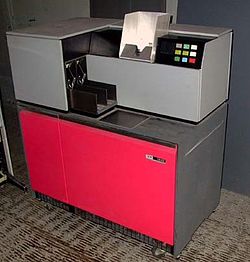
The tab operator (short for tabulating) would be responsible for preparing and operating tabulating machines to produce statistical results.[8] Hardware such as the IBM 08x sorter series[citation needed] were called tabulating equipment. The 1980 census specifically counted Tab operators ("Tabulating-machine operator").[9]

Tape librarian

[edit]

A tape librarian is responsible for the management, storage, and reporting involving data storage tapes. The tape librarian would develop and/or maintain an organization system for the storage and retrieval of tapes,[10] and assist in disaster recovery. Additionally, the librarian would ensure the integrity of the tapes, and submit recommendations for replacement when needed.[11] Some examples of equipment a tape librarian may work with are the IBM 3850.

[edit]

See also

[edit]

Notes

[edit]

References

[edit]
Revisions and contributorsEdit on WikipediaRead on Wikipedia
from Grokipedia
A computer operator is a professional who monitors and controls electronic computers and peripheral equipment to process , scientific, , or other in accordance with operating instructions, including tasks such as loading media like tapes or disks, entering commands, and resolving processing errors to maintain system efficiency. This role requires knowledge of computer system functions, the ability to interpret console messages, and skills in diagnosing issues like equipment failures or invalid inputs. The profession originated in the alongside the rise of commercial electronic computers, where operators managed manual workflows in centers, such as loading job tapes, monitoring console lights, and distributing printouts from mainframe systems like the IBM 7094. By the and , computer operators formed a significant workforce—peaking at over 117,000 in the U.S. in 1970—overseeing control consoles, handling punched cards, and ensuring hardware uptime in environments dominated by . Their labor-intensive duties influenced the development of early operating systems in the late 1950s, as groups like SHARE sought to automate scheduling and resource allocation to reduce reliance on human intervention. In contemporary settings, particularly within U.S. federal classifications like the GS-0332 series, computer operators focus on operating digital systems in complex environments, including multiprogramming setups where they adjust job priorities, restart systems, and direct junior staff during shifts, though the role demands independent judgment rather than supervisory authority. However, the occupation has declined sharply due to automation, desktop computing, and outsourcing; U.S. Bureau of Labor Statistics projections from 2012 to 2022 anticipated a 17% employment drop, and the role was reclassified in 2018 into the broader "Computer Occupations, All Other" (SOC 15-1299) category due to diminishing numbers, with actual employment continuing to decrease thereafter. As of May 2023, the broader category encompasses about 422,000 jobs, but dedicated computer operator roles remain limited. Today, remaining positions often emphasize monitoring networked systems and peripheral devices in specialized sectors like government or legacy mainframe operations, with skills in operating systems such as MVS/JES2.

Historical Development

Origins in Early Computing

The role of the computer operator has roots in the 1940s with the operation of early large-scale computers but formalized as a profession in the alongside commercial electronic systems. Operators were essential to machines like the unveiled in 1945, which required manual intervention for computations and marked a shift from mechanical tabulators to programmable electronic devices. Early operators' responsibilities centered on preparing inputs, configuring hardware, and ensuring continuous operation amid frequent failures. For the , which relied on 18,000 s, operators physically rewired the system by plugging and unplugging thousands of cables to reconfigure function tables and accumulators, flipped over 6,000 switches to load programs and initial values, and monitored performance to replace failing components, a task demanding constant vigilance as tubes burned out every few hours. This manual labor extended to auxiliary tasks like handling punch-card peripherals for data entry, though ENIAC's core programming avoided cards in favor of direct hardware setup. The operator role evolved directly from the "human computers"—predominantly women performing manual calculations on desk calculators during projects, such as ballistics trajectory computations at the University of Pennsylvania's Moore School of Electrical Engineering. Over 200 such calculators were employed there, and a core group of six women, known as the programmers, transitioned to operating the machine after receiving specialized training from its designers, and , who instructed them in its wiring and switch-setting protocols to support artillery firing table production. This training formalized their expertise, bridging wartime manual computation with machine-assisted processing. By 1951, the introduction of the at the U.S. Census Bureau represented the first formal deployment of operators in a , commercial context, where they loaded magnetic tapes and punch cards to process data, automating repetitive tabulations that had previously overwhelmed manual teams. These operators, overseen by bureau officials, handled the machine's input-output cycles for the 1950 population and subsequent economic surveys, performing wiring adjustments and tube maintenance akin to ENIAC duties while adapting to tape-based storage that reduced some manual reconfiguration. This era solidified the operator as a critical , ensuring the reliability of vacuum-tube systems in institutional settings like .

Mainframe Era

The Mainframe Era, spanning the to the , marked the standardization and expansion of the computer operator role as large-scale systems like IBM's System/360 became central to commercial . Announced in 1964, the System/360 family introduced a unified architecture for , where operators scheduled and managed jobs using (JCL) to define execution steps, , and sequential processing of workloads. This shift from earlier experimental machines adapted foundational manual skills—such as basic input handling—to scalable, business-oriented environments, enabling efficient handling of high-volume tasks like and inventory management. Operators' daily routines revolved around supporting batch operations in controlled computer rooms, including mounting magnetic tapes for input, loading decks of punched cards to initiate jobs, and monitoring console lights and displays for status. They responded to interruptions by resolving errors, such as hardware faults in tape drives or paper jams in printers, often requiring manual intervention to restart tasks or recover from failures to minimize . These activities ensured smooth execution of sequential jobs, with operators coordinating physical media handling and issuing console commands to oversee progress. Key specializations began to emerge as mainframe complexity grew, with console operators focusing on monitoring CPU utilization through system indicators and commands to optimize performance and detect bottlenecks. Peripherals operators handled devices, managing tape mounts, disk operations, and printer setups to support data flow in batch environments. These roles were essential for maintaining operational efficiency in increasingly interconnected systems. The widespread adoption of mainframes in businesses accelerated after the mid-1960s, transforming operators into critical personnel for 24/7 centers that supported enterprise-scale computing. Employment for computer operators peaked at over 117,000 in the U.S. in 1970, reflecting the era's demand for skilled labor in growing industries like and , though broader categories including peripheral equipment operators saw continued growth into the .

Transition to Microcomputers

The introduction of the Personal Computer in 1981 marked a pivotal shift in corporate , enabling end-users to perform basic tasks such as word processing and calculations directly on desktops, thereby bypassing the need for centralized mainframe operators to mediate access. This decentralization reduced the reliance on specialized personnel for routine and job submission, as companies began purchasing PCs in bulk to empower individual workers. Similarly, the Apple Macintosh, launched in 1984, further accelerated this trend by popularizing graphical user interfaces (GUIs) that simplified interactions, allowing non-experts to operate systems without command-line consoles or operator assistance. As personal computers proliferated, computer operators' duties evolved toward managing distributed environments, including minicomputers like the DEC VAX series, which dominated enterprise computing in the and required oversight for multi-user operations and early networking. Operators increasingly handled network configuration and maintenance for client-server architectures, transitioning from on mainframes—such as loading tapes and monitoring print jobs—to supporting interconnected PC clusters that demanded real-time troubleshooting. These routines from the mainframe era, once centralized under operator control, began to automate or decentralize as end-users gained direct access via GUIs and local area networks. Key events underscored the contraction of the operator role during this period. By the late , punch-card usage had sharply declined, becoming largely obsolete by the mid- as magnetic tapes, disks, and direct terminal replaced them, eliminating a core operator task of preparing and loading . The rise of GUIs, exemplified by the Macintosh, further diminished console dependency, as users could intuitively navigate systems without operator intervention for job queuing or error resolution. In the job market, this led to significant shifts, including widespread layoffs in mainframe operations; for instance, downsized by 60,000 employees in 1993 amid declining mainframe demand driven by the PC surge, affecting many operators in large corporations. Many operators adapted by retraining in , such as UNIX systems for minicomputers and , often evolving into system administrators who oversaw PC-based infrastructures and client-server setups. This pivot capitalized on their foundational skills in monitoring and maintenance, repositioning them to manage the growing complexity of environments in the late 1980s and .

Core Responsibilities

System Monitoring and Operation

Computer operators are responsible for real-time monitoring of computer systems to ensure continuous and efficient operation, which includes regularly checking system logs for errors, tracking CPU and memory usage to prevent overloads, and issuing alerts for anomalies such as hardware overheating or software crashes. This ongoing vigilance helps maintain system stability by identifying issues before they escalate into major disruptions, with operators documenting operating times, detected problems, and initial responses in logs for audit and improvement purposes. In troubleshooting, computer operators initiate basic interventions like restarting stalled , executing diagnostic scripts to isolate faults, and coordinating with programmers or teams when job occur due to software bugs or resource conflicts. These actions follow documented procedures to minimize , ensuring quick recovery without compromising . For instance, if a is detected, operators may rerun jobs or escalate to specialists while keeping the system operational for other tasks. Operators utilize a range of tools for effective monitoring, evolving from traditional operating system consoles in early setups to contemporary dashboards and software like or that provide real-time visualizations of system health. Key performance indicators include aiming for 99.9% uptime, which translates to no more than about 8.76 hours of annual downtime, and monitoring response times to ensure they meet operational thresholds for user and application performance. These metrics establish the scale of reliability expected in production environments, where even brief interruptions can impact business continuity. Safety protocols form a critical part of system operation, particularly in handling power failures through procedures for orderly shutdowns that prevent data corruption and facilitate rapid recovery upon power restoration. Operators must also ensure compliance with standards for information security management, such as NIST SP 800-53, which mandates controls including secure shutdowns to protect sensitive data during emergencies and routine operations. This involves verifying uninterruptible power supplies, testing failover mechanisms, and logging all shutdown events to align with risk management requirements.

Data Handling and Maintenance

Computer operators manage the input and output flows by physically loading and unloading storage media, such as magnetic tapes, disks, and cartridges, into peripheral devices to ensure seamless transfer and . This hands-on is essential for initiating batch jobs, archiving datasets, and distributing reports, particularly in environments relying on legacy or hybrid storage systems. To maintain storage integrity, operators routinely verify accuracy through calculations, comparing hashes like or SHA-256 between source files and copies to detect corruption during media handling or transfers. Routine backups form a core aspect of data handling, with operators scheduling and executing full backups that capture entire datasets periodically, alongside incremental backups that record only changes since the last backup to optimize storage and time efficiency. These strategies minimize data loss risks while adhering to operational schedules, often involving off-site storage for disaster recovery preparedness. In historical contexts, such as the 1960s mainframe era, operators managed 7-track tape reels with capacities around 10 MB per 2400-foot unit at 800 bits per inch, constraining backup volumes to essential datasets. Today, this role extends to handling terabyte-scale volumes in data centers, where operators oversee automated yet manually verified backup processes across networked storage arrays. Maintenance routines include regular cleaning of hardware components, such as tape drives and disk readers, to prevent dust accumulation that could impair read/write operations and data reliability. Operators also perform firmware updates on storage peripherals when vendor-recommended, ensuring compatibility and patches are applied without disrupting ongoing data flows. Archiving obsolete data follows strict retention policies, such as the 7-year hold mandated by the Sarbanes-Oxley Act () for financial records, where operators catalog and relocate files to long-term media while securely disposing of expired content. In error management, operators recover from by leveraging configurations, such as RAID 5 for parity-based , to rebuild affected arrays from surviving disks. For severe incidents, they initiate tape restores, mounting backup media to extract and reintegrate lost files into active systems, often testing recoveries in controlled environments to validate completeness. All incidents are meticulously documented in operational logs, detailing the error type, recovery steps, and outcomes to support auditing and future prevention. System monitoring serves as the primary oversight layer, alerting operators to data-related anomalies like failures during these processes.

Specializations

Console Operators

Console operators serve as the central point of control for systems, focusing on real-time monitoring and intervention through interfaces. Their primary duties involve interpreting messages displayed on the system console, which alert to conditions such as errors, resource usage, or operational status, and entering commands via keyboard to initiate actions like starting or stopping tasks. On platforms like IBM z/OS, they also manage multi-user sessions, allocating resources and ensuring smooth interaction among concurrent processes. The role reached its peak during the era in the 1960s, when mainframes demanded constant oversight due to their complexity and the lack of advanced . Operators relied on physical consoles, often modified typewriters, to systems, load programs, and respond to interrupts, with round-the-clock monitoring requiring shift-based staffing to maintain 24/7 availability. By the 1990s, the introduction of System/390 and enhancements in operating systems like enabled virtual consoles, allowing multiple remote or software-emulated interfaces for distributed control without physical proximity to the hardware. Key tools for console operators include job entry subsystems such as JES2, which handle job submission, scheduling, and output control under , enabling operators to issue commands for prioritization or cancellation. They routinely respond to system interrupts, including I/O waits that signal delays in data transfer and abends—abnormal terminations of programs due to errors like invalid instructions or resource shortages—often requiring immediate commands to diagnose, restart, or isolate issues. Peripherals operators support this by preparing physical inputs that feed into console-managed workflows. In production environments, console operators face high-stakes risks, where delayed or incorrect responses to alerts can lead to outages or issues; for instance, they may need to halt executing jobs abruptly to avert cascading failures or potential from unchecked abends. Such decisions demand precise adherence to procedures to safeguard critical operations in mission-critical settings like banking or systems.

Peripherals Operators

Peripherals operators played a critical role in the mainframe era by managing physical (I/O) devices, ensuring reliable data transfer between external media and the . These specialists focused on hands-on interactions with hardware like card readers, line printers, and tape drives, which were essential for in early environments. Unlike more centralized roles, their work emphasized mechanical setup, monitoring, and to prevent bottlenecks in data workflows. Key device types included card readers, such as the 2540 introduced in 1965, which read punched cards at speeds up to 1,000 cards per minute to input programs and data efficiently. Line printers, exemplified by the 1403 from 1959, operated at up to 1,100 lines per minute using a rotating chain of characters hammered against inked ribbon, enabling rapid production of reports and listings on continuous fanfold paper. Tape drives, such as the 2400 series debuted in 1964, provided sequential storage and retrieval via magnetic reels, supporting backups and inter-system data transfers at rates that, while slower than modern standards, met the demands of high-capacity batch jobs. Operators' core tasks involved mounting magnetic tape reels onto drives to load or unload data, aligning print heads on line printers for accurate character imprinting, queuing print jobs via physical controls, and resolving common mechanical issues like paper jams in printers or card misfeeds in readers. Troubleshooting required manual intervention, such as clearing debris from feeds or recalibrating tensions, to minimize downtime in 24/7 operations. Console operators occasionally directed job streams to these peripherals for execution, but peripherals staff handled the device-specific execution. Sub-roles emerged to specialize further: tape operators managed labeling of reels with identifiers for tracking, verifying media integrity through visual and test reads to detect errors or degradation, and preparing volumes for mounting. Printer operators oversaw post-print , including collating multi-part forms from fanfold output, continuous sheets into individual pages, and maintaining stocks of and ribbons to sustain uninterrupted runs. The role declined sharply with the rise of digital interfaces and personal computers in the , as direct-attached devices and user-managed I/O reduced the need for dedicated hardware specialists; U.S. projections from 2012 to 2022 anticipated a 17% drop for computer operators (SOC 43-9011), a category encompassing peripheral roles, due to and distributed systems (the occupation was reclassified in 2018 to 15-1299 Computer Occupations, All Other, which projects 7% or higher growth from 2024-2034 overall, though traditional operator positions continue to contract). Nonetheless, elements persist in modern high-volume printing for applications like bank statements, where operators or automated systems handle large-scale output for financial institutions using specialized or continuous-feed printers.

Data Librarians

Data librarians serve as custodians of physical and digital storage media in operations, focusing on organized preservation, retrieval, and protection to support data accessibility and integrity. This role emerged in the 1950s alongside early systems, such as the 726 drive released in 1952, which necessitated dedicated personnel to manage growing volumes of tape reels for backups and archives in mainframe environments. A primary responsibility involves inventory , including the cataloging and tracking of tapes, disks, and cartridges through systems like IBM's DFSMS Removable Media Manager (DFSMSrmm), which automates volume tracking, retention enforcement, and audits. Offsite storage is routinely arranged for disaster recovery, with duplicate media transported to secure vaults to enable restoration in case of primary site failures. Access protocols govern media handling, requiring data librarians to retrieve items on demand while enforcing check-in and check-out logs to log all movements and prevent misplacement; expired data is purged per retention policies, often via automated features in tape tools like CA 1. Peripherals operators occasionally provide newly processed media for intake. Security protocols are rigorously applied to mitigate risks, encompassing the oversight of keys to protect data at rest, role-based access controls limiting handling to cleared staff, and periodic audits ensuring adherence to standards. In regulated industries such as healthcare, these measures support HIPAA compliance by mandating for tapes storing , alongside controls to avert breaches from lost or stolen media. The profession has transitioned from manual 1950s tape libraries to modern virtual tape libraries (VTLs), disk-based emulations capable of storing petabytes of data while preserving tape-compatible workflows for enhanced efficiency and scalability.

Skills and Qualifications

Technical Skills

Computer operators must possess comprehensive knowledge of hardware components to ensure reliable system performance and uptime. This includes a thorough understanding of central processing units (CPUs), which serve as the core processors in mainframes and servers, handling instruction execution, resource allocation, and workload management. Operators also need familiarity with storage arrays, such as Storage Area Networks (SANs) that provide high-speed, block-level data access for enterprise applications, and systems that enable file-level sharing over networks. Additionally, basic networking proficiency is required, encompassing Ethernet switches that connect devices within local area networks (LANs) to facilitate data transmission and resolve connectivity bottlenecks. Proficiency in software tools forms the backbone of operational efficiency for computer operators. They must master operating system (OS) commands across platforms, including Windows for server management, for Unix-like environments via tools like shell, and for mainframe operations to initiate tasks, monitor processes, and control subsystems. Scheduling software, such as Control-M, is essential for automating job workflows, dependency management, and in data centers, reducing manual intervention. Scripting capabilities in languages like Bash for automation or Python for cross-platform task scripting enable operators to develop custom routines for repetitive operations, such as log parsing or system backups. Diagnostic abilities are critical for identifying and resolving system issues promptly. Operators interpret codes from logs and alerts to diagnose hardware failures, software bugs, or configuration errors, often using platform-specific utilities. In mainframe settings, IBM's System Display and Search Facility (SDSF) provides real-time job monitoring, output review, and JCL error correction, displaying queues, return codes, and system messages for efficient troubleshooting. For networking diagnostics, tools like ping test host reachability via ICMP echoes, while maps packet paths to pinpoint latency or routing failures. As roles evolve with technology, computer operators are increasingly expected to develop emerging skills in and domains. Basic knowledge includes monitoring (AWS) EC2 instances for metrics like CPU utilization, disk I/O, and instance health using tools such as Amazon CloudWatch. Cybersecurity awareness focuses on operational vigilance, such as recognizing indicators in emails or alerts—like urgent requests for credentials or suspicious links—that could lead to unauthorized system access. These proficiencies are typically honed through targeted professional training to adapt to hybrid environments.

Professional Training and Certifications

Entry-level positions as a computer operator typically require a or equivalent, supplemented by vocational training in computer operations or . Many employers prefer candidates with an in IT, , or a related field to provide foundational knowledge in hardware, software, and basic system management. This educational background equips individuals with the essential understanding needed to monitor and maintain computing environments effectively. On-the-job training is a critical component for aspiring computer operators, often beginning with apprenticeships or shadow shifts in data centers to gain practical experience in real-world operations. Programs like the Datacenter Academy offer structured pathways that include hands-on learning in datacenter operations, helping trainees transition into operational roles. Vendor-specific courses, such as IBM's training for Z system operators, focus on mainframe environments and include self-paced modules and instructor-led sessions to build expertise in system monitoring and job control. Key certifications validate the skills of computer operators and enhance employability by demonstrating proficiency in core areas like hardware troubleshooting and service management. The A+ certification covers essential IT support topics, including operating systems and networking, making it a standard entry-level credential for roles involving system uptime and reliability. ITIL Foundation certification provides knowledge of IT service management practices, which helps operators ensure consistent service delivery and minimize downtime in operational settings. For mainframe-focused positions, the Systems Operator Level I Certificate confirms understanding of hardware and software components critical to maintaining . These credentials underscore expertise in achieving and sustaining system uptime, a key metric for operational success. Career progression for computer operators often advances from entry-level roles to supervisory positions through accumulated experience and continuous learning. Operators can move into supervisory roles by overseeing teams and optimizing workflows, with ongoing education via online platforms like supporting this growth. For instance, the IT Support Professional Certificate on offers modules in system administration and , enabling operators to build advanced skills for leadership tracks. This training hones technical skills essential for higher responsibilities in IT operations.

Modern Evolution

Role in Data Centers

In Tier 3 and Tier 4 data centers, computer operators function within highly redundant environments designed for maximal uptime, featuring uninterruptible power supplies (UPS), backup generators, and advanced cooling systems to support continuous operations. These classifications, established by the Uptime Institute, ensure 99.982% availability for Tier 3 facilities with concurrent maintainability and 99.995% for Tier 4 with full , allowing maintenance without service interruption. Operators are primarily based in Network Operations Centers (NOCs) for infrastructure monitoring or Security Operations Centers (SOCs) for threat detection, coordinating from centralized control rooms to oversee physical and virtual assets. Key tasks involve managing hybrid cloud configurations that blend on-premises hardware with public cloud services, such as , to enable dynamic workload distribution and resource optimization. Monitoring duties utilize tools like for real-time checks on servers, networks, and applications, and for aggregating logs, detecting anomalies, and generating alerts across distributed systems. Operators also execute processes, initiating switches from on-premises to cloud resources during outages to preserve and service levels, often following predefined disaster recovery protocols. These roles handle operations at exabyte-scale data volumes, with global daily data generation reaching approximately 403 exabytes in 2025, necessitating scalable storage and capabilities in hyperscale facilities. To support 24/7 demands, positions increasingly adopt shift-based scheduling, with about 24% of data center jobs offering hybrid arrangements and 12% fully remote access via secure VPN connections for off-site oversight. At hyperscalers like (AWS) and , operators emphasize , including GDPR adherence for handling across borders, alongside efforts such as energy-efficient cooling and power usage optimization to reduce environmental impact. In AWS environments, they maintain network scalability and hybrid connectivity while enforcing security standards for regulated sectors. Google's operations teams similarly prioritize efficient resource management to support global infrastructure reliability.

Impact of Automation

The advent of automation tools has significantly transformed the role of computer operators by automating routine tasks such as system monitoring, , and error resolution. Self-healing systems, like those powered by Automation Platform, enable infrastructure to automatically detect and remediate issues without human intervention, shifting operators from manual oversight to higher-level orchestration. Similarly, AI-driven platforms, such as IBM Watson AIOps, use to analyze logs and metrics in real-time, identifying deviations from normal behavior and suggesting proactive fixes, thereby reducing the need for constant manual surveillance. This automation has led to a marked evolution in job responsibilities, with traditional computer operators transitioning from hands-on execution to supervising automated bots and integrating with practices. The traditional computer operator occupation (formerly SOC 43-9011, reclassified in 2018 into broader categories like SOC 15-1299 Computer Occupations, All Other) has declined sharply, from approximately 194,000 in 2000 to 51,500 in 2016, with estimates around 40,000 by 2026; however, the absorbing category employed 437,000 in 2023 and is projected to grow as roles evolve. This shift has created niches in , where operators now focus on scripting pipelines and ensuring seamless integration between development and operations, fostering efficiency in dynamic environments. Challenges arising from this transformation include significant skill gaps in AI literacy among IT professionals, with surveys indicating that while 81% of workers believe they can utilize AI, only 12% possess the necessary competencies for effective in operations. Ethical concerns, particularly job displacement, have intensified, as exacerbates in routine-heavy roles without adequate reskilling programs, raising questions about equitable workforce transitions and . Looking to 2030, projections suggest roles will emphasize orchestration and strategic over execution, with operators mentoring teams on multi-cloud management and ethical AI deployment to mitigate these issues. A notable is the migration to via , which has eliminated much of the routine monitoring traditionally handled by operators. In implementations like those at , Lambda's automatically scales functions and handles infrastructure, allowing teams to focus on application logic rather than server health checks or patching, resulting in simplified incident response and reduced operational overhead. This approach underscores how serverless models can diminish headcount needs for monitoring while enhancing agility in IT operations.

References

Add your contribution
Related Hubs
Contribute something
User Avatar
No comments yet.