Hubbry Logo
Digital camera modesDigital camera modesMain
Open search
Digital camera modes
Community hub
Digital camera modes
logo
8 pages, 0 posts
0 subscribers
Be the first to start a discussion here.
Digital camera modes
from Wikipedia
Not found
Revisions and contributorsEdit on WikipediaRead on Wikipedia
from Grokipedia
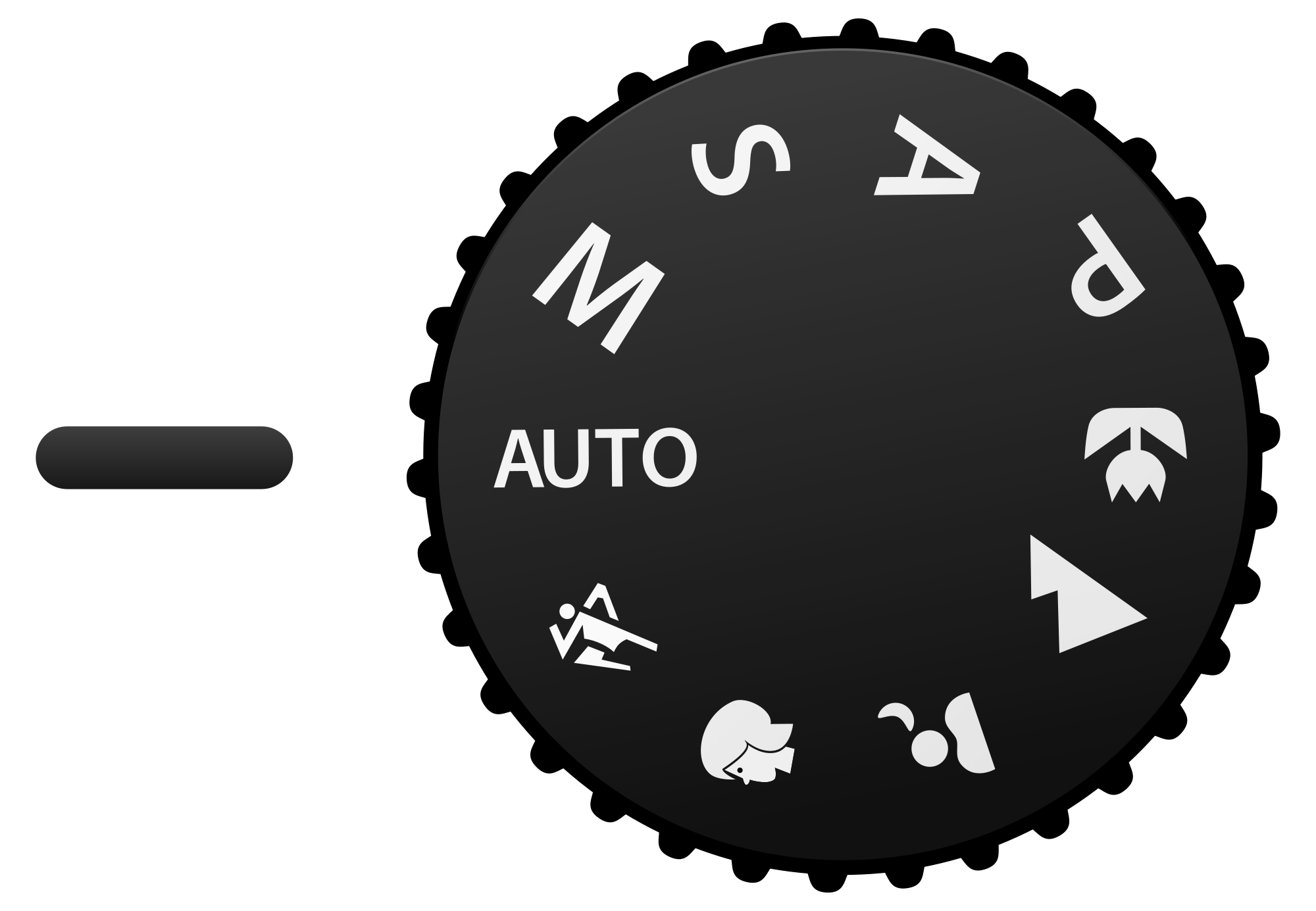
Digital camera modes are pre-programmed settings on digital cameras that automate or partially automate the control of key exposure parameters—, , and ISO sensitivity—to optimize image capture for specific scenarios, ranging from fully operation for beginners to full manual control for advanced users. These modes are typically accessed via a on DSLR and mirrorless cameras or through menus on compact point-and-shoot models, enabling photographers to balance creative intent with technical precision in varying lighting and subject conditions. The foundational modes, often abbreviated as PSAM, form the core of exposure control in most digital cameras. Program (P) mode allows the camera to automatically select both and based on metering, while the user can adjust ISO, , and sometimes shift the program for creative tweaks, such as prioritizing faster shutter speeds for action. (Av or A) mode lets the photographer set the to control —such as a wide f/2.8 for in portraits—while the camera adjusts to maintain proper exposure. Conversely, Shutter Priority (Tv or S) mode enables the user to choose the —for instance, 1/1000s to freeze motion in — with the camera automatically selecting the . Manual (M) mode provides complete user control over and , ideal for precise exposure in challenging low-light or high-contrast situations, often paired with manual ISO adjustments. Beyond these, Auto mode fully automates all settings, including flash and white balance, making it suitable for quick snapshots without user input. Scene modes, such as , , Macro, , and Night Portrait, apply optimized presets for common subjects: for example, Landscape mode uses a small like f/8 for extensive , while Sports mode employs fast shutter speeds and higher ISO to capture motion. These modes often incorporate additional features like automatic ISO ranging from base values up to 800–6400, depending on the camera model, to ensure usability across diverse environments.

Primary Exposure Modes

Manual Mode

Manual mode, denoted by the "M" on the camera's , allows the photographer to fully control the primary exposure parameters—aperture, , and ISO sensitivity—without any automatic adjustments by the camera. In this mode, the user selects the desired value to control , the to manage motion blur, and the ISO to adjust light sensitivity, ensuring the correct balance for proper exposure. Exposure in manual mode is determined manually through the exposure triangle, which interrelates (measured in f-stops), (in seconds or fractions), and ISO (sensitivity rating). Photographers rely on the camera's built-in for initial readings, external light meters for precision, or digital tools like displayed on the LCD screen to evaluate tonal distribution and avoid clipping in highlights or shadows. These aids help achieve accurate exposure by adjusting the settings until the meter indicates balance or the histogram shows optimal spread. The primary advantages of manual mode lie in its provision of precise creative control, particularly in challenging or consistent lighting scenarios where automated modes may vary unpredictably. For instance, it enables long shutter speeds (e.g., 30 seconds or more) combined with low ISO for , capturing star trails or the without camera interference, often requiring overexposure by one to two stops for . Similarly, selecting a wide like f/2.8 with a moderate allows for shallow in portraits, isolating the subject while maintaining sharp focus. This mode ensures consistent settings across a series of shots, ideal for controlled environments like studio work. Common pitfalls in manual mode include underexposure or overexposure due to misjudging light levels, especially in low-light conditions where slow shutter speeds risk camera shake without a , or high ISO introduces . These errors underscore the importance of , as novices may overlook the interplay of settings, leading to suboptimal results that automated modes might correct instinctively. Historically, manual mode originated in film-era single-lens reflex (SLR) cameras, where photographers set exposure parameters mechanically or with basic metering, as seen in models like the series from the 1950s onward. It transitioned seamlessly to digital cameras with the advent of digital SLRs (DSLRs) in the late 1990s, such as the released in 1999, which retained full manual exposure control alongside new digital features. The adaptation to digital enhanced usability through real-time exposure previews on LCD screens or electronic viewfinders (EVFs), simulating the final image brightness and aiding on-the-fly adjustments unavailable in .

Aperture Priority Mode

Aperture Priority Mode, often labeled as "A" on cameras or "Av" on Canon models, is a semi-automatic exposure mode in digital cameras where the photographer manually selects the aperture value (f-stop) and ISO sensitivity, while the camera automatically determines the appropriate to achieve correct exposure based on built-in light metering. This mode allows users to prioritize control over without needing to calculate shutter speeds manually. In practice, photographers choose a wide such as f/2.8 for to create a shallow that blurs the background and isolates the subject, or a narrower like f/11 for to ensure sharpness across a greater range from foreground to background. The camera's metering system evaluates scene brightness and computes the accordingly, often using evaluative, center-weighted, or spot metering patterns depending on the camera model. To handle tricky lighting conditions where the camera's metering might underexpose highlights or overexpose shadows, users can apply , typically in increments of 1/3 EV, which instructs the camera to adjust the brighter or darker than the metered value. For instance, in high-contrast scenes like backlit subjects, a negative compensation of -0.7 EV can prevent blown-out skies. A common risk in this mode is the camera selecting an excessively slow in low-light situations, resulting in motion blur from camera shake or subject movement; this can be mitigated by increasing the ISO sensitivity to a higher value, such as from 100 to 800, or using Auto ISO with a minimum shutter speed threshold to enforce faster speeds. Technically, the camera's metering system calculates the required by targeting a specific (EV) for the scene, using the formula: EV=log2(shutter speed)+log2(aperture2)\text{EV} = \log_2 (\text{shutter speed}) + \log_2 (\text{aperture}^2) where "shutter speed" refers to the reciprocal (e.g., 125 for 1/125 second) and is the (N). This logarithmic relationship ensures balanced exposure, but the photographer remains focused on creative selections for artistic effects rather than precise numerical computations.

Shutter Priority Mode

Shutter Priority Mode is a semi-automatic exposure setting in digital cameras that allows the photographer to manually select the while the camera automatically adjusts the to ensure correct exposure based on the metered . Typically labeled as "S" on Nikon cameras or "Tv" (for Time Value) on Canon models, this mode also permits manual control over ISO sensitivity to fine-tune exposure without altering the chosen . This mode excels in scenarios requiring precise control over motion rendering. For capturing fast action in sports or wildlife photography, users can set high shutter speeds, such as 1/1000 second, to freeze subject movement and produce sharp images. In contrast, slower speeds like 1/30 second enable creative effects such as motion blur in panning shots, where the subject remains relatively sharp against a streaked background, conveying a sense of speed. Challenges arise when the camera's adjustments conflict with desired ; for example, in low-light conditions with a fast , the camera may select a wide-open to admit more light, resulting in shallow that isolates the subject but blurs the background excessively. Conversely, in bright light with slower shutters, a narrow might create overly or introduce softness at small f-stops. Photographers can address these by manually increasing ISO to prompt a narrower or decreasing it for wider ones, thereby balancing exposure and creative intent. Image stabilization features, such as Nikon's Vibration Reduction or Canon's , enhance Shutter Priority Mode by compensating for camera shake, permitting handheld use of slower shutter speeds—down to 1/4 second in some cases—without blur, which broadens applications in low-light or creative . In extreme conditions, such as very slow shutters in dim environments, digital sensors avoid film's reciprocity failure but face increased when the aperture maxes out and ISO rises to maintain exposure, potentially degrading image quality at sensitivities above ISO 800 depending on the .

Program Mode

Program mode, often labeled as "P" on a camera's , is a semi-automatic exposure setting in which the camera uses its built-in light metering system to automatically select both the and values that achieve proper exposure based on the current lighting conditions and the user-set ISO sensitivity. This mode provides a balanced starting point for exposure without requiring the to manually calculate settings, while still allowing overrides for other parameters like ISO, , and white balance. One key feature distinguishing program mode is program shift, which enables the user to adjust the balance between and after the camera's initial selection, while preserving the overall (EV). For instance, if the camera initially sets f/5.6 at 1/125 second, rotating the control dial might shift it to f/4 at 1/180 second, favoring a wider for shallower without needing to switch modes or recompute exposure. This flexibility benefits beginners by offering quick adaptation to changing light—such as transitioning from indoor to outdoor scenes—while providing subtle creative control to prioritize either sharper backgrounds or frozen motion, all without the full manual adjustments required in more advanced modes. Despite these advantages, program mode offers less precise control than aperture or shutter priority modes, as the camera dictates the initial pairing and limits shifts to available combinations, making it less suitable for scenarios demanding specific depth-of-field or motion-blur effects. Originating in the late with film SLRs like the , which introduced programmed exposure as the first microprocessor-controlled full-auto mode in a 35mm camera, program mode has evolved in digital cameras to incorporate enhancements such as auto ISO, where the sensor sensitivity automatically adjusts within user-defined limits to maintain optimal shutter speeds and avoid underexposure in low light.

Automatic and Scene Modes

Full Automatic Mode

Full Automatic Mode, often labeled as "Auto" or represented by a green square icon on the camera's , enables the device to independently determine all key exposure parameters—including , , and ISO sensitivity—while also typically handling and flash activation based on real-time scene analysis. This mode prioritizes simplicity, allowing users to frame the shot and press the shutter without manual adjustments, making it ideal for point-and-shoot operation in digital cameras from compact models to DSLRs and mirrorless systems. The mode functions through advanced evaluative metering, which segments the image frame into multiple zones to evaluate light intensity, color saturation, subject contrast, distance to objects, and potential motion, feeding this data into proprietary algorithms that select settings for balanced exposure. For instance, in bright outdoor scenes, the camera might opt for a faster to freeze motion, while in low light, it could widen the or raise ISO to maintain sharpness, often incorporating scene recognition to prioritize main subjects like people or landscapes. These algorithms draw from the camera's and data to simulate optimal results, ensuring the exposure triangle is adjusted dynamically before each shot. For casual photographers, Full Automatic Mode excels in delivering quick, reliable results during everyday scenarios, such as family events or travel snapshots, by automating decisions that might otherwise lead to underexposed or blurry images in variable lighting. This automation reduces the and , enabling users to capture moments without technical interruptions and often producing well-exposed photos that require minimal post-processing. Despite its conveniences, the mode sacrifices creative control, as photographers cannot fine-tune elements like or motion blur, sometimes resulting in "happy accident" outcomes such as overly sharpened landscapes due to in-camera processing or harsh flash in portraits. It may also default to conservative settings that prioritize detail over artistic intent, limiting its use for specialized photography. Since the 2010s, enhancements in Full Automatic Mode have incorporated AI-driven subject recognition, evolving from basic in compact cameras to advanced algorithms that identify and prioritize elements like human faces, pets, birds, or , thereby refining focus tracking and exposure adjustments for more accurate results in dynamic scenes. By 2025, these systems have expanded to detect additional subjects like and trains, with improved tracking accuracy through advanced . This integration, seen in models from Canon, , and Nikon, leverages trained on vast datasets to boost hit rates for moving subjects without user input.

Preset Scene Modes

Preset scene modes, also known as SCENE or SCN modes, are predefined camera settings designed to automatically optimize exposure parameters, focus, balance, and other functions for specific shooting scenarios, allowing users to select an or option that tailors the camera's behavior to common photographic situations. These modes preload biases into the camera's algorithms, such as prioritizing a wide for subject isolation in portraits or a fast for motion freezing in action shots, while also adjusting metering patterns and image processing for enhanced results in those contexts. Unlike full automatic mode, which applies a neutral, general-purpose across all settings based on broad scene analysis, preset scene modes introduce scenario-specific heuristics that override default behaviors to better suit anticipated conditions, such as enabling or continuous only when relevant. Common preset scene modes include a variety tailored to everyday photography needs, often represented by icons on the camera's mode dial or menu. For instance:
  • Portrait mode employs a wide aperture to create shallow depth of field, blurring backgrounds while keeping the subject sharp, and activates skin-tone enhancement or face detection for natural results.
  • Landscape mode uses a narrow aperture for extensive depth of field from foreground to infinity, with infinity focus and vibrant color saturation to capture scenic vistas like mountains or seascapes.
  • Sports or action mode sets a high shutter speed to freeze motion, enables continuous autofocus tracking, and boosts ISO for low-light performance during fast-paced events.
  • Macro or close-up mode optimizes for short subject distances, adjusting focus and aperture for detailed shots of small objects like flowers or insects.
  • Sunset mode applies warm white balance shifts to preserve rich reds and oranges, often slowing the shutter for dramatic sky rendering.
  • Night portrait mode, influenced by smartphone photography trends, combines slow shutter speeds with flash for balanced subject and background exposure in low light, incorporating noise reduction algorithms.
  • Fireworks mode enforces long exposures (typically 4 seconds or more) with a small aperture to capture streaking lights without camera shake compensation.
The effectiveness of preset scene modes stems from their reliance on established photographic heuristics, which have been refined in the digital era through sensor data analysis for real-time adjustments like automatic noise reduction in low-light presets or dynamic range optimization in landscapes. These modes provide quick, reliable outcomes for novice users or time-sensitive situations, often yielding better results than full auto by preemptively addressing scene-specific challenges, such as overexposure in bright snowy environments via dedicated beach/snow presets. As of 2025, preset scene modes remain common in entry-level and compact digital cameras but are less prevalent in professional models, which favor AI-enhanced automatic modes for similar optimizations. Despite their utility, preset scene modes face criticisms for oversimplifying complex scenarios, potentially leading to unnatural or suboptimal images due to rigid algorithmic biases that fail to adapt to nuanced conditions, such as varying within a "sports" event. They limit user control over key parameters like flash intensity or , which can result in predictable but uninspired outputs and hinder learning of manual techniques. Additionally, in edge cases like a sunset scene, modes may misjudge priorities, causing issues like unintended overexposure or disabled features that better semi-automatic modes could handle.

Focus and Capture Modes

Autofocus Modes

Autofocus modes in digital cameras enable automatic adjustment of the lens to achieve sharp focus on selected subjects, with configurations tailored to subject movement and shooting scenarios. These modes primarily include Single AF, Continuous AF, and Hybrid AF, each leveraging sensor-based detection to lock or track focus. Single AF, also known as One-Shot AF in Canon systems or AF-S in Nikon and , is designed for stationary subjects; it initiates focus upon half-pressing the and locks the focus distance until the shutter is fully pressed or the button is released, preventing unintended shifts during composition. Continuous , referred to as AI Servo in Canon or AF-C in Nikon and , suits moving subjects by continuously adjusting focus as long as the shutter button is half-pressed, enabling predictive tracking based on subject motion. This mode is essential for action photography, where it updates focus in real-time to maintain sharpness on erratic or fast-moving targets. Hybrid AF modes, such as AI Focus in Canon, AF-A in Nikon, or AFF in , combine elements of Single and Continuous AF; they start in Single AF for static subjects but automatically switch to continuous tracking if motion is detected, making them versatile for unpredictable scenarios like or video recording. Autofocus area modes determine the region of the frame where the camera prioritizes focus, ranging from precise single-point selection to broader coverage options. Single-point allows manual selection of one focus point for exact control, ideal for composed shots with defined subjects. Zone groups multiple points into a selectable cluster, balancing precision and coverage for subjects within a defined area, while wide-area employs the entire frame for automatic subject selection, often in dynamic scenes. Advanced implementations incorporate face and eye detection, which use algorithms to identify and prioritize human or animal eyes for sharper portraits; these rely on hybrid systems combining phase detection—employing dedicated on- pixels to measure light phase differences for speed—and contrast detection—analyzing contrast variations for accuracy—achieving seamless operation across the frame. The back-button focus technique decouples activation from the shutter release, assigning it to a dedicated rear like AF-ON, which provides greater control for action or recomposition without refocusing. This method locks focus independently, allowing photographers to hold focus while recomposing or waiting for the decisive moment, and it gained widespread adoption in the 2000s with DSLR models from Canon and Nikon as a customizable option for professional workflows. Performance in autofocus modes is influenced by environmental factors, with low-light conditions addressed by AF assist beams—typically infrared or LED illuminators from the camera or attached flash—that project patterns to aid contrast detection down to -6 EV or lower in modern systems. In 2025 mirrorless cameras, such as the Mark II, accuracy reaches near 100% frame coverage through on-sensor phase detection arrays, enabling reliable locking even at edges. AI-enhanced eye AF has advanced significantly, incorporating for real-time detection of animal eyes (e.g., birds and pets in and Canon systems) and vehicles (e.g., cars and motorcycles in Canon EOS R series), improving tracking precision in specialized genres like and motorsports.

Drive Modes

Drive modes in digital cameras control the timing and sequence of image capture, allowing photographers to select between single-frame shots, rapid sequences, or delayed triggers based on the shooting scenario. mode captures one image each time the is fully pressed, serving as the default for most static subjects where precise composition is prioritized. Continuous or burst mode, in contrast, records multiple images in quick succession while the shutter is held down, typically at rates of 5 to 20 frames per second (fps) in professional cameras, enabling the capture of fleeting action. Self-timer mode introduces a programmable delay, commonly 2 to 10 seconds, after the shutter is pressed, facilitating hands-free operation without additional accessories. The performance of burst mode is constrained by the camera's internal buffer, a temporary high-speed that holds before it is written to the storage card, alongside factors such as readout speed and write velocity. When the buffer fills—often after 50 to 150 RAW frames in high-end models—the shooting rate slows or halts until space clears, limiting the effective burst depth; for instance, the Nikon Z9 can sustain over 1,000 uncompressed RAW frames at 20 fps due to its large buffer and fast card support, while the Sony A1 achieves 155 RAW frames at 30 fps. In bodies available as of 2025, advancements in processor efficiency and card compatibility allow for 100+ RAW shots in bursts, though slower cards can reduce this capacity significantly. Burst modes are particularly valuable in dynamic environments, such as where rapid subject movement demands a sequence to select the optimal frame, or imaging to freeze unpredictable behaviors like animal leaps or flights. Self-timer modes, meanwhile, support group portraits by allowing the photographer to join the frame or stabilize the camera on a , minimizing vibrations from manual shutter release. These modes often integrate with continuous for better tracking during sequences, though drive mode itself governs only the capture timing. Variations on core drive modes include , which employs an electronic shutter to eliminate mechanical noise, ideal for discreet shooting in sensitive settings like events or without disturbing subjects. Many cameras also feature built-in intervalometers since the , automating timed exposures at intervals of seconds to hours for creating time-lapse sequences directly in-camera, as seen in models like the and Nikon Z series. Recent advancements in mirrorless cameras have leveraged electronic shutters to surpass mechanical limitations, achieving burst rates exceeding 30 fps—such as the Canon EOS R6 Mark II's 40 fps—by enabling faster sensor readouts without physical components, thus expanding options for high-speed capture in professional workflows.

Illumination and Accessory Modes

Flash Modes

Flash modes in digital cameras control the activation, timing, intensity, and synchronization of supplemental lighting from built-in or external flash units to enhance exposure in low-light conditions or to fill shadows. These modes allow photographers to adapt flash output to specific scenarios, balancing it with ambient light for natural-looking results. Common variants include auto flash, fill flash, red-eye reduction, slow sync, and rear-curtain sync, each tailored to automate or manually adjust flash behavior based on scene analysis or user input. Auto flash mode enables the camera to meter the scene and automatically fire the flash when ambient light is insufficient, typically using through-the-lens (TTL) metering to determine power output. This mode is ideal for point-and-shoot situations, as it integrates with the camera's exposure system to avoid underexposure without manual intervention. In contrast, fill flash, also known as forced flash, activates the flash in every shot regardless of conditions, primarily to illuminate shadowed areas and reduce contrast in bright environments like daylight portraits. Red-eye reduction mode addresses the common issue of reflective red pupils in flash portraits by emitting one or more pre-flashes to constrict the subject's pupils before the main exposure, minimizing the glow from blood vessels. This pre-flash sequence is triggered automatically when faces are detected, though it may slightly delay the capture and is most effective for close-range portraits. These modes often reference the camera's metering system for overall exposure integration, ensuring flash contributes appropriately to the total light balance. Slow sync mode, also called slow shutter sync, allows the camera to use slower shutter speeds alongside the flash to capture more ambient , creating a balanced exposure in dim environments like indoor events or night scenes, while preventing a dark background. Rear-curtain sync, or second-curtain sync, fires the flash at the end of the exposure rather than the beginning, which is useful for motion as it produces natural-looking motion blur trails behind moving subjects with the flash illuminating their position at the end. TTL metering represents an advanced automatic approach where the camera measures light reflected back through the lens during a pre-flash, dynamically adjusting flash power in real-time for precise exposure. Developed as an evolution from film-era systems, digital TTL variants like Nikon's i-TTL incorporate matrix metering patterns to account for scene complexity, supporting ratios from full power down to fractions like 1/128. Manual flash mode, however, allows users to preset the output level—commonly in increments from 1/1 (full) to 1/128 (minimal)—bypassing automation for consistent results in controlled setups, such as studio lighting where environmental variables are fixed. High-speed sync (HSS) mode overcomes the limitations of standard flash synchronization speeds, typically around 1/200 second, by pulsing the flash continuously rather than in a single burst, allowing use with faster shutter speeds up to 1/8000 second. This enables wide apertures for shallow in bright daylight without overexposure, as the flash effectively behaves like a continuous source during the exposure slit travel across the . HSS reduces flash power efficiency compared to normal sync but is essential for outdoor action or portraiture with motion blur control. Wireless and commander modes facilitate off-camera flash setups by using the camera's built-in flash or a dedicated controller to optically or radio-trigger remote units, enabling multi-flash configurations for creative patterns. In commander mode, the on-camera unit acts as a master to adjust remote slave flashes' power and sync via channels or groups, supporting distances up to 10 meters indoors. This is particularly useful in digital systems where TTL communication ensures balanced exposure across units, as seen in Nikon's Creative Lighting System. In digital cameras, bounce techniques direct flash toward reflective surfaces like ceilings to soften and diffuse light, reducing harsh shadows on sensors by spreading illumination over a larger effective source area. Diffusers, such as attachments or built-in panels, further scatter light rays, minimizing specular highlights and creating even coverage suitable for close-range subjects. Additionally, LED-based video lights serve as continuous analogs to traditional strobes in hybrid modes, providing adjustable output for both and video without times, though with lower peak intensity than flashes.

Metering and White Balance Modes

Metering modes in digital cameras determine how the sensor evaluates light within a scene to calculate proper exposure, typically by measuring reflected light and computing the exposure value (EV) needed for balanced brightness. These modes support the camera's exposure system by providing data that influences aperture, shutter speed, and ISO settings, ensuring the image avoids over- or underexposure. Common modes include evaluative (also known as multi-segment or matrix metering), which divides the frame into multiple zones—often hundreds—and analyzes the entire scene using algorithms to weigh highlights, shadows, and midtones for an overall balanced reading, making it suitable for most general photography scenarios. Center-weighted metering prioritizes the central portion of the frame (typically 60-80% of the metering weight), gradually decreasing sensitivity toward the edges, which is ideal for portraits or compositions where the subject is centrally placed against varied backgrounds. Spot metering focuses on a very small area, usually 1-5% of the frame at the center or linked to the active focus point, allowing precise exposure readings for high-contrast subjects like backlit figures or theatrical lighting. Partial metering, a variant used in Canon cameras, covers a slightly larger area than spot (around 6-10% of the frame) to provide targeted readings while reducing the risk of influence from surrounding bright or dark regions. White balance (WB) modes adjust the camera's to render neutral whites accurately under different lighting conditions, compensating for the color cast of light sources measured on the scale, where lower values indicate warmer (reddish) tones and higher values cooler (bluish) ones. Auto WB employs algorithms to estimate the scene's illuminant by analyzing image data, often achieving good results in mixed lighting but sometimes struggling with unusual color temperatures between 3000K and 7000K. Preset WB options include Daylight (approximately 5200-5500K for natural ), Tungsten (around 3200K for incandescent bulbs producing warm orange hues), and Fluorescent (typically 4000-5000K to correct greenish casts from artificial tubes), allowing users to select based on known lighting types for consistent color reproduction. Custom WB enables manual calibration by photographing a neutral under the current light, which the camera uses to set a precise balance, offering superior accuracy for critical applications like product . In RAW file formats, WB adjustments remain flexible during post-processing since the sensor captures unprocessed color data, permitting non-destructive corrections without quality loss. Recent advancements integrate AI into metering for improved handling of high-contrast scenes, where traditional modes might clip highlights or shadows; for instance, smart scene recognition in modern cameras analyzes in real-time to adjust exposure priorities, preserving details in challenging environments like sunsets or . Computational white balance has also evolved, with algorithms like skin-color-reflective auto WB (SCR-AWB) leveraging to estimate illuminant for more accurate skin tone rendering in portraits, and camera-agnostic mapping functions that adapt neutral predictions across devices for consistent preferences. These developments, seen in 2025 models, enhance reliability in varied without manual intervention, though they often work in tandem with flash modes for low-light scenarios.

Specialized and Emerging Modes

Macro and Close-Up Modes

Macro and close-up modes in digital cameras are specialized automatic or semi-automatic settings designed to facilitate extreme close-range by enabling the lens to focus at a minimum distance as short as 1-10 cm from the subject, often prioritizing small-scale details in subjects like flowers or . These modes typically activate dedicated autofocus areas optimized for macro subjects, such as central or spot AF patterns, to improve precision in shallow depth-of-field scenarios. True macro capability is defined by achieving at least 1:1 , where the subject's on the matches its actual size, though many consumer camera modes approximate this through lens adjustments or digital enhancements. In these modes, the camera biases toward smaller apertures, typically f/8 to f/16, to increase and capture more of the subject in focus, while automatically selecting slower shutter speeds (e.g., 1/60 to 1/125 second) balanced by in-body or lens stabilization to mitigate handheld shake. Higher ISO values, such as 400-1600, are often employed in low-light close-ups to maintain faster shutters without underexposure, though this can introduce in dim conditions like shaded foliage. Unlike general automatic modes, these settings prioritize subject detail over broad exposure flexibility, sometimes locking zoom or enabling super-macro sub-modes for even closer focusing. Integration with accessories is a key feature, as macro modes often support dedicated macro lenses (e.g., 100mm f/2.8 primes) or extension tubes/adapters that reduce the minimum focus distance further, simulating higher without specialized optics. compatibility is common, with modes triggering even illumination around the lens to counteract falloff at close distances, as seen in systems like Canon's Macro Ring Lite MR-14EX II. Digital crop modes, available in some compact and mirrorless cameras, further enhance this by electronically cropping the (e.g., to simulate 1.5x ) while maintaining focus lock, effectively boosting apparent scale without physical lens changes. Challenges in macro and close-up modes include the inherently shallow depth of field, which can limit sharpness to millimeters at 1:1 ratios, and rapid lighting falloff that darkens edges of the frame. To address these, techniques like —capturing multiple images at varying focal planes and combining them for extended depth—have been integrated in-camera since the , starting with models like the in 2015, allowing handheld stacks of 8-15 frames processed automatically. These modes excel in niches beyond basic presets, such as detailed insect or floral reproduction, and emerging compact cameras incorporate built-in ring-light options for portable, shadow-free close-ups.

Video and Computational Modes

Video modes in digital cameras enable high-resolution recording, typically supporting 4K at frame rates from 24 to 120 fps and 8K at up to 60 fps as of 2025, allowing for detailed cinematic footage with options for slow-motion effects. Log profiles, such as Canon's C-Log3, Sony's S-Log, and 's V-Log, capture footage with flat contrast and wide for professional in . In-body image stabilization () integrates with these modes to reduce shake during handheld video, providing up to 8 stops of correction in advanced mirrorless systems. Computational modes leverage algorithms to enhance imaging beyond traditional , including HDR through multi-exposure merging for balanced highlights and shadows, via from sequential captures, and Night Sight using frame stacking to improve low-light performance. AI-driven modes employ background segmentation to isolate subjects and apply computational , simulating shallow without requiring large apertures. These modes rely on rapid sensor bursts—often 8-15 frames—and onboard processing to align and fuse data, enabling real-time previews and reduced noise. Since 2020, advancements have integrated real-time AI into mirrorless and smartphone-hybrid cameras, supporting features like advanced subject detection and scene optimization. As of 2025, prototypes such as the Caira camera introduce generative AI for in-camera editing capabilities. Smartphone computational techniques, such as hybrid zoom blending multiple lenses algorithmically, have influenced DSLR and mirrorless designs by prioritizing software-driven enhancements over hardware alone.

References

Add your contribution
Related Hubs
User Avatar
No comments yet.