Hubbry Logo
Mode dialMode dialMain
Open search
Mode dial
Community hub
Mode dial
logo
8 pages, 0 posts
0 subscribers
Be the first to start a discussion here.
Mode dial
Mode dial
from Wikipedia
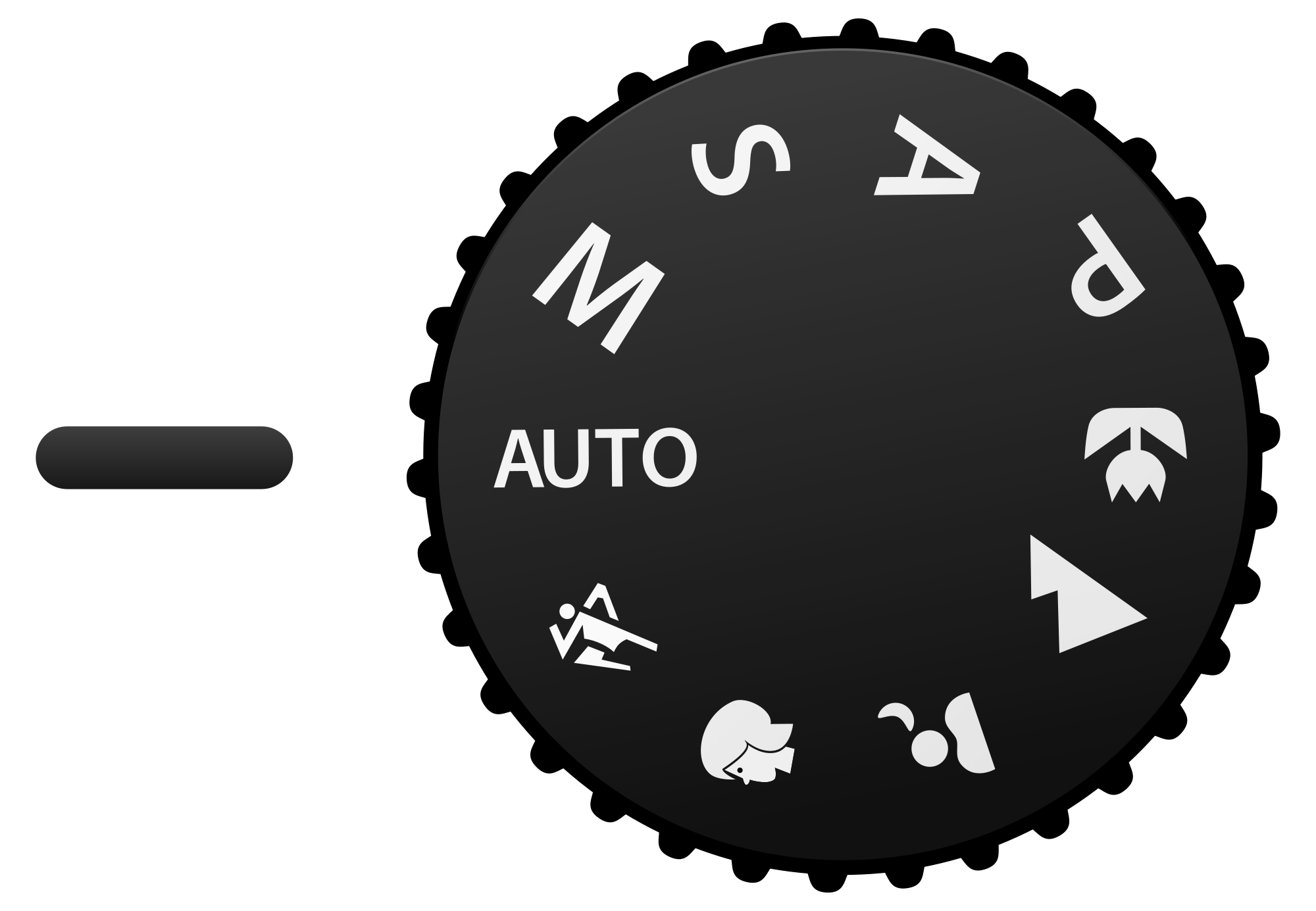
Generic mode dial for digital cameras showing several common modes. Actual dials may have more or fewer.
Some dials have more modes.
A Kodak dSLR with the mode dial located near the flash/viewfinder hump.
Sony Cyber-shot DSC-RX100 II, with two distinct automatic modes: "intelligent auto" (green "i📷") and "superior auto" (golden "i📷+")[1]

A mode dial or camera dial is a dial used on digital cameras to change the camera's mode. Most digital cameras, including dSLR and mirrorless cameras, support modes, selectable either by a rotary dial or from a menu. On point-and-shoot cameras which support modes a range of scene types is offered. On dSLR and mirrorless cameras, mode dials usually offer access to manual settings. The more compact point-and-shoot cameras, and cameras offering a great many modes, do not have mode dials, using menus instead. Some interchangeable lenses themselves offer control over things such as aperture, reducing the need for mode support in the camera body.

Location of the dial

[edit]

On most dSLRs and mirrorless cameras, the mode dial is located at the top of the camera, to one side of the flash/viewfinder hump. On point-and-shoot cameras, particularly those with a thin body, the dial is found on the back of the camera, and it is often coupled with a menu-navigation button. Some thin cameras use a slide switch rather than a dial.

Modes

[edit]

Various camera types and specific cameras have different modes. The simpler dial in the top illustration has:

  • Manual modes: Manual (M), Program (P), Shutter priority (S), Aperture priority (A).
  • Automatic modes: Auto, Action, Portrait, Night portrait, Landscape, Macro.

Most dSLRs and mirrorless cameras have a few manual settings and a small sample of automatic modes. On point-and-shoot cameras, all manual control may be condensed into one mode (e.g. ASP, for Aperture priority, Shutter priority, Program) or may be completely absent. Many compact cameras show a large array of scene modes. Digital cameras usually have a movie mode to capture videos.

Detailed information found by users on the modes supported by digital cameras are to be found in the ongoing list of digital camera modes.

Manual modes

[edit]

Manual modes include:[2][3]

  • P: Program mode offers the photographer partial control over shutter speed and aperture.
  • A or Av: Aperture priority AKA "Aperture value" allows the photographer to control the aperture, while the shutter speed and ISO sensitivity are calculated by the camera.
  • S or Tv: Shutter priority AKA "Time value" allows the photographer to control the shutter speed, while the aperture and ISO sensitivity are calculated by the camera.
  • Sv: Sensitivity value allows the photographer to control the ISO sensitivity, while aperture and shutter speed are calculated by the camera (this is a Pentax DSLR feature)
  • M: Manual mode allows the photographer to control shutter speed, aperture and ISO independently.
  • U: User mode (like program with preset). On cameras supporting user modes, such as the Nikon Z50II, there are multiple values with numbers, such as U1, U2, and U3.

Automatic scene modes

[edit]

In automatic modes the camera determines all aspects of exposure, choosing exposure parameters according to the application within the constraints of correct exposure, including exposure, aperture, focussing, light metering, white balance, and equivalent sensitivity. For example, in portrait mode the camera would use a wider aperture to render the background out of focus, and would seek out and focus on a human face rather than other image content. In the same light conditions a smaller aperture would be used for a landscape, and recognition of faces would not be enabled for focusing.

Some cameras have tens of modes, showing the majority only in the menu rather than on the dial. Many cameras do not document exactly what their many modes do; for full mastery of the camera one must experiment with them.

In general:

  • Action or sport mode increases ISO and uses a fast shutter speed to capture action.
  • Landscape mode uses a small aperture to gain depth of field.
  • Portrait mode widens the aperture to throw the background out of focus. The camera may recognise and focus on a human face.
  • Night portrait mode uses an exposure long enough to capture background detail, with fill-in flash to illuminate a nearby subject.

Other scene modes found on many cameras include Fireworks, Snow, Natural light/Night snapshot, Macro/Close-up, and Movie mode. On cameras not aimed at amateur photographers, automatic scene modes may however be absent entirely.

See also

[edit]

References

[edit]
Revisions and contributorsEdit on WikipediaRead on Wikipedia
from Grokipedia
The mode dial is a rotary control mechanism typically positioned on the top panel of still cameras, including single-lens reflex (SLR) cameras, digital SLR (DSLR), and mirrorless models from major manufacturers such as Canon, Nikon, and , originally introduced on SLRs in the late . It is designed to allow users to quickly select shooting modes that dictate how the camera automatically or manually adjusts key exposure parameters like , , and ISO sensitivity. This dial often divides modes into categories like Basic Zone (automatic settings for beginners) and Creative Zone (semi-automatic and manual options for advanced control), enabling seamless transitions between point-and-shoot simplicity and precise creative adjustments. Common modes include:
  • Auto: The camera fully automates exposure settings for effortless shooting.
  • Program (P): Automatic exposure with user flexibility to shift and combinations.
  • (A or Av): User sets for depth-of-field control, while the camera adjusts .
  • Shutter Priority (S or Tv): User selects for motion freeze or blur, with automatic adjustment.
  • Manual (M): Full user control over , (including and time modes for long exposures; some models support extended timed exposures up to 900 seconds), and ISO.
Many cameras also incorporate scene-specific modes (e.g., , ) and customizable user presets (U1-U3 on Nikon) for recalling saved configurations, often secured with a lock release to prevent accidental changes. By facilitating rapid mode switching, the mode dial empowers photographers—from novices to professionals—to adapt exposure strategies to diverse scenarios, such as low-light portraits or fast-action sports, enhancing creative flexibility without delving into menus.

Overview

Definition and Purpose

The mode dial is a rotating control mechanism typically located on digital single-lens reflex (DSLR), mirrorless, and certain compact cameras, enabling users to select various shooting modes that dictate the camera's management of key exposure parameters, including , , and ISO sensitivity. This dial features icons or letters representing different operational states, allowing seamless transitions between automated and manual configurations without delving into complex menus. Its primary purpose is to offer rapid access to preset or customizable exposure combinations, empowering photographers to respond efficiently to diverse conditions, subject movements, and creative intentions. By centralizing mode selection, the dial streamlines the shooting process, particularly in fast-paced scenarios where time-sensitive adjustments are essential. For novice users, it simplifies camera operation through intuitive presets that automate settings for optimal results, while advanced photographers benefit from modes that provide granular control over exposure variables to achieve precise artistic outcomes. This dual accessibility reduces operational complexity and enhances productivity across skill levels.

Common Symbols and Indicators

The mode dial on digital cameras typically features standardized letters and icons to denote exposure and shooting modes, enabling users to quickly identify and select settings without consulting the manual. Common symbols include "P" for Program AE mode, where the camera automatically balances aperture and shutter speed while allowing user adjustments; "A" or "Av" for Aperture Priority, emphasizing control over depth of field; "S" or "Tv" for Shutter Priority, focusing on motion capture via shutter speed selection; "M" for full Manual control of both aperture and shutter; and a green rectangle or "Auto" icon for fully automatic operation, where the camera handles all parameters. Scene mode icons provide intuitive visual cues for specialized shooting scenarios, often shared across manufacturers despite minor variations. These include a silhouette of a person's head for mode, which softens backgrounds; a mountain outline for mode, enhancing sharpness and color saturation; a running figure for Sports or Action mode, prioritizing fast shutter speeds; and a crescent moon or starry sky for Night Portrait or Night Landscape modes, balancing low-light exposure with flash. Other frequent icons are a flower for or Macro, a group of people for Party/Indoor, and a plate of food for Food mode, each optimizing settings for the depicted subject. Additional indicators on the dial include for mode, allowing extended exposures beyond standard shutter limits by holding the shutter open; for or Video mode, switching to recording functionality; and for a lock mechanism that prevents accidental rotation and mode changes. Some dials also feature numbered slots like "U1," "U2," or "C1" for user-customizable presets, marked with simple numeric labels. Labeling variations exist between manufacturers to reflect branding and conventions: Canon often uses "Av" for Aperture Priority and "Tv" for Shutter Priority, while Nikon employs "A" and "S" respectively, with both using "P," "M," and the green Auto icon consistently. Digital displays on modern cameras may supplement these physical markings by showing mode names or icons on the LCD or viewfinder for added clarity. These symbols and indicators facilitate rapid mode selection in dynamic environments, such as low-light events or fast-action , reducing the need for textual references and minimizing errors during operation. By leveraging universally recognizable visuals, they promote for photographers of varying experience levels.

Physical Characteristics

Typical Location

The mode dial is typically positioned on the top-right plate of the camera body, adjacent to the , facilitating easy access with the right thumb for right-handed users during standard shooting grips. This placement allows for quick rotation to select modes with minimal adjustment to the user's hand position, often incorporating a raised profile or textured surface to provide tactile feedback and prevent accidental shifts. On digital single-lens reflex (DSLR) and mirrorless cameras, the mode dial is prominently featured on the top plate for straightforward visibility and operation. In contrast, compact point-and-shoot cameras may employ a smaller version integrated into a multi-function or positioned on the rear panel to suit their more streamlined form factor. This ergonomic design supports one-handed operation, enabling photographers to change modes without removing their eye from the , a feature refined through extensive testing for diverse hand sizes. Professional models, such as the , often feature larger dials, while consumer variants prioritize compactness over such additions. Over time, the mode dial's placement has evolved from side-mounted or vertically oriented configurations in early single-lens reflex designs to the current top-mounted standard, improving overall balance and accessibility in modern cameras.

Design Variations

Mode dials in cameras are commonly constructed from durable materials, providing a and cost-effective option for entry-level and models, while professional-grade cameras often integrate the dial into a for enhanced weather-sealing and robustness against environmental factors. Rubberized grips are frequently added to the dial's surface to improve handling and prevent slippage during use, particularly in humid or wet conditions. The size and shape of mode dials vary significantly by camera type; full-frame DSLRs and mirrorless cameras typically feature larger circular dials accommodating 6 to 12 positions with knurled or textured edges for precise rotation, whereas compact cameras employ smaller, more streamlined designs, sometimes integrated with a multi-function to save without sacrificing . Flat-edged dials are common in consumer models for smoother turning, while knurled variants prevail in professional bodies to ensure tactile feedback under gloves or rapid adjustments. Locking mechanisms are a standard feature in higher-end cameras to prevent inadvertent mode changes during transport or shooting; these often include a central button that must be depressed to rotate the dial, as seen in Nikon's design where a lock release is pressed prior to adjustment. Canon implements a similar central lock-release button on models like the EOS series, enhancing reliability in demanding scenarios, while Sony's mirrorless cameras incorporate a comparable lock button directly on the dial for quick engagement. Digital integrations have evolved in post-2010 mirrorless cameras, with some models offering customizable electronic modes assignable to dial positions for user-defined settings, as in Sony's Alpha series where custom holds allow temporary overrides. Entry-level and smartphone companion apps increasingly replace physical dials with virtual interfaces on touchscreens, reducing hardware complexity while maintaining functionality through software menus. Manufacturer-specific features distinguish designs further; In contrast, Sony's approach prioritizes electronic customization, enabling users to reassign dial slots to specific exposure or creative via settings.

Exposure Modes

Automatic Exposure Mode

In automatic exposure mode, the camera assumes complete control over the exposure parameters, evaluating the scene through its built-in metering system to automatically set the , , ISO sensitivity, and often white balance, allowing the user to focus solely on composing the shot and selecting the focus point. This mode relies on evaluative metering, also known as matrix metering, which divides the frame into multiple zones for analysis and prioritizes key elements such as faces or central subjects to determine optimal exposure, ensuring balanced results in most standard conditions. Since the early , advancements in cameras from manufacturers like Canon and Nikon have incorporated scene recognition technologies, with post-2010 models increasingly using AI-driven algorithms for subject detection to refine metering and exposure adjustments based on detected elements like people, animals, or landscapes. The mode is typically indicated by a green "Auto" label or a square icon on the camera's mode dial, serving as the default position for many entry-level and cameras to encourage immediate for beginners. It is particularly suited for everyday snapshots, , and scenarios with variable or unpredictable lighting, where rapid capture is prioritized over precise creative control, such as family events or street scenes. However, it limits user influence on effects like motion blur or , as the camera selects settings based on its programmed priorities rather than artistic intent. The primary advantages of automatic exposure mode include its speed and simplicity, enabling novice photographers to produce well-exposed images without technical knowledge, while the metering system's multi-zone evaluation often yields reliable results in straightforward . Drawbacks arise in complex scenes, such as backlit portraits or high-contrast environments, where the camera's algorithms may misinterpret the subject and produce underexposed or overexposed results, underscoring the mode's suitability for casual rather than applications.

Semi-Automatic Exposure Modes

Semi-automatic exposure modes on a camera's mode dial allow photographers to prioritize one element of the exposure triangle—aperture, shutter speed, or a balanced program—while the camera automatically adjusts the remaining parameters to achieve proper exposure. These modes strike a balance between creative control and automation, enabling users to focus on specific artistic effects like or without manually calculating all variables. Unlike fully automatic modes, they provide targeted input from the user, often with ISO set to auto or a fixed value to further refine results. In Aperture Priority (A or Av) mode, the photographer selects the desired f-stop to control , and the camera automatically sets the and ISO (if enabled) to ensure optimal exposure based on the metered . A wide (low , such as f/2.8) creates a shallow for isolating subjects, as in portraits where the background blurs softly, while a narrow (high , like f/11) maximizes sharpness across the frame, ideal for landscapes or . This mode prioritizes the 's role in the exposure triangle, as the lens opening directly influences intake and focus range, with the camera compensating via faster or slower s to maintain balance. If the selected pushes the beyond safe limits (e.g., too slow for handheld shooting), many cameras display flashing indicators in the to alert the user. Shutter Priority (S or Tv) mode lets the user choose the to manage motion, with the camera adjusting and ISO accordingly for correct exposure. Fast s (e.g., 1/1000 second or higher) freeze action, making it suitable for sports or where subjects move quickly, while slower speeds (e.g., 1/30 second) can intentionally blur motion for creative effects like panning shots of vehicles. Here, shutter speed takes precedence in the exposure triangle, dictating the duration of light exposure on the , and the camera selects an appropriate to compensate—potentially shifting to wider openings in low light. As with , limit warnings appear if the reaches its extremes, such as maximum openness risking shallow or minimum causing underexposure. Photographers should monitor for unintended slow shutters in dim conditions to avoid camera shake. Program Shift, available within Program (P) mode, functions as a flexible extension of semi-automatic control by allowing the user to adjust the camera's initial -shutter speed pairing while preserving the overall . After the camera meters and sets a baseline combination, turning the control dial shifts the balance—for instance, opting for a wider and slower shutter for more background blur—without altering ISO or requiring a full mode change. This mode maintains the exposure triangle's equilibrium through reciprocal adjustments, offering a transitional tool between full auto and priority modes, though the shift typically resets upon recomposing or powering off. It encourages experimentation in varying light without overcommitting to one parameter. In practice, Aperture Priority excels in controlled scenarios like studio portraits or scenic vistas where depth of field is paramount, but users should enable image stabilization or a tripod if low light forces slow shutters below 1/60 second to prevent blur. Shutter Priority suits dynamic environments such as events or nature, yet in dim settings, it may lead to underexposure if the maximum aperture is insufficient, prompting a switch to higher ISO or manual mode. Both modes interact with the exposure triangle by user-prioritizing one vertex (aperture or shutter) while automating the others, often with exposure compensation (±EV) available to fine-tune brightness; flashing indicators signal when adjustments hit hardware limits, guiding photographers to adapt creatively.

Manual Exposure Mode

In manual exposure mode, the photographer independently sets the aperture, shutter speed, and ISO sensitivity, granting full control over the exposure triangle without any automatic adjustments by the camera. The camera aids the user through a built-in light meter, typically displayed as an exposure level scale in the viewfinder or on the LCD, which indicates whether the settings result in overexposure, underexposure, or balanced exposure based on the selected metering mode. This mode is denoted by the "M" symbol on the camera's mode dial, and it often incorporates a "B" or "Bulb" setting for extended exposures longer than the camera's maximum shutter speed, where the shutter remains open as long as the release button is held or via a remote trigger. Manual mode is particularly suited for scenarios requiring precise control, such as studio photography where consistent lighting allows for repeatable settings across multiple shots, to capture faint celestial objects with long exposures, or deliberate over- or under-exposure for creative effects like silhouettes or high-key images. Effective use demands a solid grasp of principles, as the photographer must interpret the meter's feedback to adjust settings manually for the desired tonal outcome. To assist in setting parameters, cameras in manual mode support various metering patterns, including center-weighted metering that prioritizes the central portion of the frame, spot metering for precise readings from a small area (often 1-5% of the ), and evaluative metering that analyzes the entire scene for an overall assessment. Digital cameras further enhance this with real-time previews on the LCD or electronic , graphically displaying the distribution of tonal values to help avoid clipped highlights or shadows before capture. While manual mode offers unparalleled creative flexibility, it presents challenges such as the potential for incorrect exposures if the lacks experience in reading the meter or predicting lighting changes, necessitating practice to achieve reliable results. Conversely, its advantages shine in environments with stable illumination, like controlled studios, or in video recording where automatic modes might cause unwanted exposure shifts due to minor light variations, ensuring steady footage throughout.

Specialized Modes

Scene Recognition Modes

Scene recognition modes, also known as scene or special scene (SCN) modes, are pre-programmed settings on a camera's mode dial that automatically adjust parameters such as exposure, focus, white balance, and color processing to optimize image quality for specific shooting scenarios. These modes simplify for users by applying tailored combinations of , , ISO sensitivity, and behaviors, often overriding general automatic exposure to better suit the subject or environment. For instance, mode typically employs a wide to create a shallow that blurs the background while enhancing skin tones through adjusted color saturation and contrast. Similarly, landscape mode uses a small for greater and boosts overall saturation to emphasize vibrant colors in natural scenery. Selection of scene recognition modes is facilitated by dedicated icons on the camera's mode dial or a sub-dial, allowing users to rotate to the SCN position and choose from available presets via a secondary control. Many modern cameras feature advanced scene recognition that automatically detects and adjusts settings based on the scene, with recent models incorporating AI for improved accuracy in identifying elements like motion, lighting, and subject types. This has led to more sophisticated scene analysis capabilities. Common examples include night portrait mode, which combines a slow with flash to balance foreground subjects against dark backgrounds while reducing ; sports mode, which prioritizes fast s and continuous to freeze action and track moving subjects; and mode, which warms color tones and sharpens focus for culinary shots to enhance appetizing appearances. These modes override standard auto settings by applying scene-specific algorithms that interpret the captured frame more aggressively, such as detecting backlighting or low light to adjust accordingly. Despite their convenience, scene recognition modes offer less flexibility than manual or semi-automatic controls, as users cannot fine-tune individual parameters like or ISO. They may also yield unnatural results in complex or mixed scenes, where the camera's analysis misinterprets conditions, leading to over-saturated colors or incorrect focus prioritization. The technological foundation of these modes relies on image sensor data processed through embedded algorithms that evaluate brightness, contrast, color histograms, and motion vectors to classify scenes. Originating as basic presets in compact digital cameras of the 1990s, they have advanced with improvements in , incorporating for more accurate real-time analysis in contemporary models.

Creative and Effect Modes

Creative and effect modes on camera mode dials enable photographers to apply artistic filters and simulations directly in-camera, transforming standard captures into stylized images without post-processing software. These modes go beyond basic exposure adjustments by incorporating digital processing techniques that emulate vintage aesthetics, enhance , or create surreal effects, often resulting in outputs optimized for immediate sharing or creative experimentation. Common types include (HDR) merging, which combines multiple exposures to preserve details in both highlights and shadows for high-contrast scenes; panorama stitching, which seamlessly blends sequential shots into wide-angle compositions; and monochrome processing, which converts images to black-and-white for dramatic tonal emphasis. Fujifilm's film simulation modes, such as Velvia, replicate the saturated colors and fine grain of classic reversal films, providing an analog-inspired look straight from the sensor. These modes alter image processing through effects like the filter, which introduces and color shifts to mimic low-fidelity plastic lenses; the , simulating tilt-shift optics to make scenes appear as detailed models; and overlays, where successive images are superimposed to create ethereal composites. In practice, the camera overlays a live preview on the LCD, allowing real-time adjustments before capture. Access to these features typically involves selecting a dedicated position on the mode dial, such as Canon's Creative Filters , or navigating sub-menus via the main command dial, with effects previewed on the rear LCD for composition refinement. Photographers use these modes for content and artistic expression, where quick, stylized results enhance visual storytelling without needing RAW files for later edits—these effects are baked into JPEGs during capture, limiting flexibility compared to software-based adjustments. In the , modern compact cameras integrate AI-enhanced effects, such as automatic skin smoothing in portrait modes to refine facial textures and simulated for shallow depth-of-field illusions, streamlining creative workflows in devices like Sony's ZV-series or Canon's PowerShot line.

Historical Development

Early Implementations

The mode dial originated in the and as simple mechanical switches and dials on single-lens reflex (SLR) cameras, primarily for selecting s and basic metering functions in analog film . The , introduced in 1964 by Asahi Optical (now Ricoh Imaging), featured a dedicated dial with positions ranging from 1 second to 1/1000 second, linked mechanically to the camera's , alongside an aperture ring on the lens and a separate on/off switch for its innovative through-the-lens (TTL) metering system. This design represented an early shift from fully manual controls to integrated metering, though exposure remained manual, requiring photographers to adjust settings to match the meter's needle. Early implementations were predominantly mechanical, with dials gear-linked directly to shutter mechanisms for precise control, while the integration of built-in light meters in the late enabled the first semi-automatic modes. A key advancement came in 1971 with the ES (Electro Spotmatic), the first SLR to offer electronic aperture-priority automation; its shutter speed dial included an "A" position that allowed the camera's electronic shutter to automatically select speeds from 1/1000 second to 8 seconds based on the manually set and TTL metering. The , also released in 1971, relied on a mechanical shutter speed dial (1 second to 1/2000 second) for manual exposure in its base configuration, but its modular system—with interchangeable finders and power accessories—served as a precursor to programmed automation by supporting stopped-down metering and later add-ons for semi-automatic operation. The , introduced in 1972, further influenced compact designs with its integrated dial and metering, promoting portability in professional SLRs. The 1980s marked the transition to fully electronic dials coinciding with autofocus and advanced automation. The Minolta Maxxum 7000, launched in 1985 as the world's first 35mm autofocus SLR, used electronic controls—including a command dial for shutter speeds and buttons to cycle through program, aperture-priority, shutter-priority, and manual modes—powered by a microprocessor for real-time adjustments via TTL metering. A pivotal milestone was the Canon A-1 in 1978, which introduced the first dedicated rotating mode dial on an SLR, with distinct positions for program (P), shutter-priority (Tv), aperture-priority (Av), and manual (M) exposure, allowing seamless switching among four modes while the lens aperture ring was set to "A" for automation. These developments were limited to 4-6 positions focused on manual and semi-automatic exposure, without scene-specific or creative effects, emphasizing core photographic control over simplicity. By the 1990s, mode dials saw widespread adoption in compact point-and-shoot cameras, standardizing layouts through the dominance of Japanese manufacturers like Canon, Nikon, , and , who controlled over 80% of the global SLR market. For instance, Canon's Autoboy series in the mid-1990s incorporated a "Best Shot Dial" with multiple auto-exposure positions, bridging professional SLRs and consumer models while retaining mechanical reliability in film-based systems.

Modern Adaptations

In the post-1990s digital era, mode dials evolved to integrate with onboard processors, enabling real-time feedback on exposure adjustments through LCD displays and electronic viewfinders, which allowed photographers to preview changes instantly without film-based . This shift marked a departure from purely mechanical designs, as seen in early digital SLRs like the D2000 in 1998, where dials controlled processor-driven settings for and . The advent of mirrorless cameras further refined mode dials by incorporating customizable positions, permitting users to save and recall personalized configurations for specific shooting scenarios. For instance, Sony's NEX-5R in , which lacked a traditional mode dial with PASM modes accessed via , introduced a fully programmable control dial allowing assignment of functions like ISO or white balance for streamlined access. This customization enhanced adaptability in dynamic environments, building on the compact form factors of mirrorless systems. Advancements in the introduced touch-sensitive elements to mode dials and related controls, such as Canon's Multifunction Touch Bar on the EOS R series starting in 2018, which enabled swipe-based adjustments for settings like ISO while maintaining tactile familiarity. Wireless syncing capabilities also emerged in hybrid photo-video cameras, exemplified by Canon's Multi-Camera Control app released in 2023, which allows of settings across multiple compatible cameras including the EOS R5 C via for coordinated shoots. In smartphones, AI-driven interfaces emulate traditional dials through automatic scene rotation and mode selection; the iPhone 16's Camera Control button in 2024 emulates a mode dial with haptic-linked AR previews, streamlining hybrid capture in computational pipelines. Manufacturer-specific innovations have optimized mode dial functionality for efficiency. Nikon's i menu, introduced in models like the Z6 in 2018, links directly to the mode dial via the i button, enabling quick dial-based navigation and adjustment of key parameters such as without delving into submenus. Fujifilm's X-Pro2 in 2016 featured a dial-within-a-dial mechanism for ISO, where pulling up the dial reveals an inner ring for rapid sensitivity changes, reducing the need for button combinations. Conversely, while some entry-level digital cameras prioritize compactness, models like the in 2023 include a physical mode dial alongside controls for mode selection. As of 2025, future trends point toward haptic feedback integration in mode dials to simulate mechanical clicks on touch surfaces, as demonstrated in Blackmagic's Camera app update in 2023, which adds vibration cues for precise virtual dial adjustments on devices. Level indicators and composition aids are common in modern EVFs, such as in the , providing visual alignment assistance including horizon leveling. However, miniaturization challenges persist in full-frame compact cameras, where shrinking dials for models like the Leica Q3 risks ergonomic issues, such as imprecise grip and accidental shifts, complicating integration in pocketable designs. In 2025, expanded customizable dial options in the X100VI, allowing user-defined presets for enhanced workflow efficiency. These adaptations have significantly impacted workflows, particularly in , where dedicated photo/video switches on mode dials—such as on the GH6 since 2022—allow seamless transitions between stills and 4K recording without reconfiguration. In , mode dials now interface with AI processors to automate enhancements.

References

Add your contribution
Related Hubs
User Avatar
No comments yet.