Hubbry Logo
Document cameraDocument cameraMain
Open search
Document camera
Community hub
Document camera
logo
8 pages, 0 posts
0 subscribers
Be the first to start a discussion here.
Document camera
Document camera
from Wikipedia
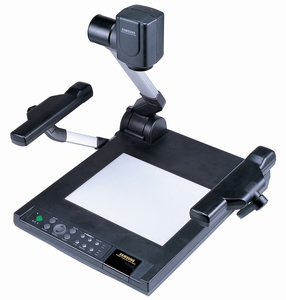
Samsung SDP-6500DX Document Camera[1]

A document camera, also known as a visual presenter, visualizer, digital overhead, docu-cam, or simply a doc-cam, is a high-resolution image capturing device used to display objects in real-time to a large audience, such as in a classroom or lecture hall. It can also function as an alternative to a traditional image scanner for digitizing documents for archival or digital storage.

The camera is typically mounted on an adjustable arm, allowing it to be positioned over a document or an object. It connects to a projector or a similar video display system, enabling the presenter to display text, images, or objects to the audience. Larger objects can be placed in front of the camera, which can then be rotated as needed.

Use cases

[edit]

Document cameras are used in various settings, including:

Document cameras have replaced overhead projectors in many applications.[2] A document camera can enlarge small print and project a printed page. Unlike many overhead projectors, which typically require dimmed lighting, document cameras can often be used effectively in well-lit rooms.[3] Most document cameras can also send a video signal to a computer.

History

[edit]
Video Lupe 1974, manufactured by Wolf Audio Visuals - document camera prototype model
A Video Lupe AV installation (1975) prototype document camera
Elmo releases its first Visualizer EV-308

Early prototypes of document cameras consisted of simple video cameras mounted on copy stands.[4][5] They began to be assembled and equipped with additional lighting for consistent image quality beginning in at least the 1970s, allowing effective use in dimly lit environments.[6]

Document cameras were developed to address the need for direct projection of original documents, plans, drawings, and objects without prior preparation. The first document camera, known as a visualizer, was reportedly developed by WolfVision and Elmo and introduced at the Photokina trade fair in 1988.[7][8] Progressive scan cameras were introduced toward the end of the 1990s. Most modern visualizers are capable of outputting at least 30 frames per second.

Technology

[edit]

The design of a document camera incorporates several different technologies. Image quality depends on primary components: the optics, camera, lighting, and the motherboard and associated firmware. Manufacturers produce various designs for the finished product.[9] Some document cameras offer HDMI output, audio/video recording, and Wi-Fi connectivity.

Optics

[edit]

Optics vary based on the device's cost and complexity. The iris, or aperture, controls the amount of light that passes through the camera lens onto the image sensor. The lens focuses on a point of the object, projecting it onto the sensor. The area in front of and behind the point of focus is called the depth of field and affects how much of the image appears in focus. Depth of field depends on the aperture size; a smaller aperture typically results in a greater depth of field.

Camera

[edit]

Progressive scan cameras use either CCD or CMOS sensors. Progressive scanning generally offers higher resolution compared to the interlaced method. A progressive scan camera captures scan lines sequentially, whereas an interlaced camera uses alternating sets of lines.

Image sensors typically provide monochrome images. With a 1-chip camera, color information is obtained through the use of color filters over each pixel. The Bayer filter is commonly used, arranging red, green, and blue filters in a pattern where green pixels are twice as numerous as blue or red pixels. Different algorithms are then used to interpolate the missing color information and produce a color image.

A 3CCD camera module is another method for producing color images. A prism splits white light into its red, green, and blue components, and a separate sensor is used for each color. This technology can achieve color accuracy at higher resolutions, but is more costly due to the use of three CCD sensors.

Modern camera systems used in document cameras can provide high-resolution color images at 30 frames per second. In a 3-chip camera, the measured resolution can be up to 1,500 lines. The image can be adapted to fit common display aspect ratios of 4:3, 16:9, and 16:10.

Lighting system

[edit]

Uniform lighting is important for accurate color rendition in document cameras.

  • Sufficient lighting can allow the document camera to produce clear images regardless of ambient light conditions.
  • Lighting systems can enable the use of smaller apertures, which may increase the depth of field.
  • An increase in the quality of the light source can allow more light to reach the camera sensor, potentially resulting in less noticeable noise and reducing image degradation. [citation needed]

Some document camera models integrate additional functionality into the light system, such as a synchronized light field or laser markers that indicate the size and position of the imaging area, adjusting simultaneously as the lens zoom.

Motherboard and firmware

[edit]

The motherboard plays a role in image processing and influences the quality of the final image. Higher resolutions and higher refresh rates generate larger amounts of data that must be processed in real time, therefore requiring faster processing.

Document cameras may be equipped with automated systems designed to enhance ease of use and improve functionality and image quality. For instance, permanent auto-focus detection automatically adjusts focus settings whenever a new object is displayed, reducing the need for manual adjustments. Other examples of automated features include automatic iris adjustment, auto exposure, white balance, and automatic gain control.

Motherboards often include a variety of connections to ensure flexibility of use. In addition to HDMI, DVI, and VGA ports for connecting to displays (projectors, monitors, and video conferencing systems), several interfaces are provided to facilitate connection to a computer or interactive whiteboard. These interfaces are most commonly USB, network (LAN), and serial. An external PC or laptop may also be connected to the document camera to allow switching between a PowerPoint presentation and a live demonstration. Some models can also handle external storage devices, playing files directly from a USB flash drive or saving images taken during the presentation onto it.

Some document camera manufacturers also provide regular firmware upgrades.[6]

Document camera types

[edit]

Document cameras are generally divided into three groups based on form factor:

  • Portable: Smaller and lightweight models.
  • Desktop: Larger, sturdier, and more stable units.
  • Visualizers: Ceiling-mounted above a tabletop or podium.

Portable and desktop models

[edit]

Portable and desktop models provide a working environment similar to an overhead projector. They offer flexibility regarding the variety of objects that can be displayed to an audience. Portable devices can be used in multiple locations without requiring prior installation.

Ceiling models

[edit]
Ceiling visualizer in use in a typical telepresence installation

Ceiling-mounted visualizers are a variation of traditional desktop models and allow for larger objects to be displayed. Since the equipment is installed in the ceiling, there is no desktop equipment to obstruct the views of the speaker or audience. Ceiling models are often used to support videoconferencing or telepresence systems.

Document camera scanners

[edit]
Document camera

Document cameras have been used as replacements for image scanners.[10] Capturing images with document cameras differs from using flatbed and automatic document feeder (ADF) scanners as there are no moving parts required for the scan. In conventional scanners, either the illumination/reflector rod inside the scanner must move over the document (flatbed) or the document must pass over the rod (feeder scanners) to produce a scan of a whole image. Document cameras capture the entire document or object in one step, often instantly. Typically, documents are placed on a flat surface underneath the camera's capture area. This method of capturing the whole surface at once can reduce the time required for the scanning workflow. After capture, images are usually processed through software that may enhance the image and perform tasks such as automatic rotation, cropping, and straightening.[11]

Documents or objects being scanned are not required to make contact with the document camera, increasing flexibility in the types of documents that can be scanned. Objects that have previously been difficult to scan on conventional scanners can potentially be scanned with a document camera. This includes documents such as stapled documents, documents in folders, or bent or crumpled items, which may jam in a feed scanner.

Reduced reaction time during scanning can also offer benefits in context-scanning applications. While ADF scanners are generally more efficient for large batches of standard documents, document cameras can be integrated directly into a workflow or process, for example, at a bank teller station. The document is scanned directly in the context of the customer interaction where it is to be placed or used. Reaction time can be an advantage in these situations. Document cameras usually require a small amount of space and are often portable.[12]

However, when scanning large batches of unstapled documents, ADF scanners may be more efficient compared to document cameras. Document cameras may face challenges with certain environmental conditions, such as poor lighting, which can decrease the quality of scanned documents.

See also

[edit]

References

[edit]
Revisions and contributorsEdit on WikipediaRead on Wikipedia
from Grokipedia
A document camera, also known as a visualizer or digital presenter, is an electronic imaging device that captures and projects real-time images of two-dimensional documents, three-dimensional objects, or other physical materials onto a screen, monitor, or , typically using a downward-facing camera mounted on an adjustable arm or stand. Document cameras were invented to address the limitations of traditional presentation tools like overhead projectors and flip charts, with early prototypes developed in the 1970s by Josef Wolf, founder of Wolf Audio Visuals (later WolfVision), including the 1974 "Video Lupe" that combined a with a working surface for displaying materials. The first commercial models emerged in 1988 at the trade show, introduced independently by WolfVision and with products like the EV-308 visual presenter, marking the shift toward for enhanced clarity and flexibility in presentations. Common types include tabletop models with articulated arms for flexibility in positioning objects and ceiling-mounted variants for fixed installations in classrooms or conference rooms, often featuring auto-focus, zoom capabilities up to 12x or more, built-in LED lighting, and integration with software for annotations or recording. These devices support high-resolution outputs, such as 4K imaging in modern units, enabling detailed views without the need for physical handling or transparency sheets required by older technologies. Primarily used in educational settings to display textbooks, worksheets, experiments, or manipulatives for interactive , document cameras also find applications in professional environments like courtrooms for presenting , boardrooms for meetings, and scientific labs for demonstrations, and broadcast studios for live visuals. Their versatility extends to remote and hybrid scenarios, where they function as webcams for video conferencing, fostering collaboration by sharing close-up, color-accurate images in real time.

Overview

Definition and purpose

A document camera is a real-time imaging device that captures documents, objects, or three-dimensional items placed under its lens and projects them onto screens or monitors via video output. It functions as a digital alternative to traditional projection tools, employing a camera positioned above a working surface to capture and display content dynamically. Often equipped with adjustable lighting to minimize shadows, the device enables clear visualization of materials without requiring or preparation of slides. The primary purposes of a document camera include facilitating visual presentations, demonstrations, and annotations by projecting live images in real time, eliminating the need for physical transparencies or slides as used with overhead projectors. This capability supports interactive content sharing, allowing users to highlight details or manipulate items on the fly for immediate display. Unlike static media, it promotes flexibility in showcasing varied materials directly from their physical form. Key benefits inherent to its design encompass real-time through optical zoom capabilities, which enlarge intricate details for enhanced visibility; precise color accuracy enabled by uniform LED illumination that reduces distortions; and the ability to capture non-flat objects, such as open books or specimens, without flattening them. These features ensure high-fidelity reproduction of content, surpassing limitations of earlier analog systems. Document cameras evolved from overhead projectors to digital video-based systems in the late , marking a shift toward more adaptable and electronically integrated presentation technology.

Basic components and operation

A document camera typically consists of several core physical components designed for flexibility and ease of use in capturing and displaying visual content. The base platform serves as the stable foundation, often a flat surface where documents, objects, or materials are placed for imaging, and it may house additional features like control interfaces or power supplies. An adjustable arm or neck, which can be rigid, gooseneck, or telescopic, connects the base to the camera head, allowing users to position the lens at varying heights and angles over the subject. The camera head, mounted at the top of the arm, includes the lens for capturing images and often integrates built-in , such as adjustable LED lamps, to illuminate the subject and reduce shadows. Output ports on the base or camera head, including and USB, facilitate connections to external devices. In standard operation, users begin by positioning the item or document on the base platform directly under the camera head, ensuring it is flat and centered within the field of view. The arm is then adjusted to the appropriate height, and the camera is powered on via a control panel or button, which may include options for auto-focus and zoom. Controls on the panel or remote allow for fine-tuning focus—either automatic or manual—and zoom levels, up to 16x digital or optical, to magnify details while the camera captures a live video feed in real-time. This feed is then output to a connected display, such as a , monitor, or computer screen, enabling immediate projection for presentations or demonstrations. Standard connectivity options have evolved from analog interfaces like to modern digital standards, supporting seamless integration with various systems. Most contemporary models feature outputs for direct transmission to projectors or TVs, ensuring low-latency display of the live feed. USB ports allow the device to function as a for video conferencing applications, such as Zoom or , by connecting to a computer and appearing as a standard without additional drivers in many cases. Some units also include RGB or VGA for legacy compatibility, though and USB remain the primary transitions for plug-and-play operation. Common troubleshooting addresses issues that may arise during use, focusing on quick resolutions to maintain . For focus drift, where the blurs over time, users can press the auto-focus to recalibrate or manually adjust the focus ring if available, ensuring the subject is within the camera's focus range. glare or uneven illumination can be mitigated by activating the built-in LED lights, adjusting room brightness to avoid direct overhead sources, or repositioning the subject to minimize reflections. If no appears, verify all cable connections—such as or USB—are secure and the display input source is correctly selected, then power cycle the device by turning it off and on.

History

Invention and early development

The invention of the document camera emerged as a response to the limitations of earlier visual aids in and presentations, particularly overhead and opaque projectors that dominated mid-20th-century classrooms. Overhead projectors, introduced widely in the 1960s following developments in transparency technology by , became ubiquitous by the 1980s, with over 95% of American classrooms equipped by 1985 to display acetates for lectures and demonstrations. Opaque projectors, dating back to the early and used to project printed materials or small objects without transparencies, served as key tools for showing documents and books but were cumbersome and restricted to static images. By the late 1980s, these analog devices began declining due to the rise of digital technologies like computers and video displays, prompting innovations to enable live, versatile projection of documents. A pivotal early development occurred in with Josef Wolf, who founded Wolf Audio Visuals in 1966 and began experimenting with video-based presentation tools. In 1974, Wolf created the "Video Lupe," an initial prototype document camera that combined a modified , desk lamps, and a working surface to capture and project documents in real time, produced in limited quantities for testing. Building on this, in 1978, Wolf collaborated with to develop a specialized connectable to microscopes for medical applications, such as live color recording of eye surgeries viewable by teams or replayed on monitors; this system marked an adaptation toward general document capture by integrating high-quality optics with video output. Parallel innovations arose in through Co., Ltd., founded in 1921 and shifting toward video technology in the 1980s after pioneering CCD cameras in 1984. and WolfVision independently pursued document cameras in the mid-1980s to supplant opaque projectors, culminating in the debut of their first commercial models at the 1988 trade fair: WolfVision's Visualizer System and 's EV-308 visual presenter. These devices allowed real-time projection of opaque materials onto screens via video connections, addressing the need for dynamic visual aids in and professional settings without requiring transparencies. Early document cameras faced significant hurdles, including bulky analog designs that required separate video monitors or projectors, making them impractical for portable use. High production costs, often exceeding those of traditional projectors, limited adoption to specialized institutions, while imaging relied on nascent CCD sensors with resolutions around 0.3 megapixels, yielding low-detail images compared to modern standards. These constraints stemmed from the era's video technology, which prioritized functionality over compactness and clarity.

Commercialization and modern evolution

The commercialization of document cameras began in 1988 with the simultaneous introduction of the first commercial models by WolfVision and , marking a pivotal shift from prototypes to market-ready products designed primarily for educational and applications. WolfVision's Visualizer System, launched at the trade fair, featured a serial production design optimized for visual presentations, while Elmo's EV-308 model leveraged early CCD technology to deliver high-quality overhead projections superior to traditional overhead projectors. These initial devices targeted educators for demonstrating materials in classrooms and legal professionals for displaying in courtrooms, where clear, real-time magnification was essential. By the late 1990s and early 2000s, adoption began to accelerate in U.S. schools, driven by the need for interactive teaching tools that enhanced student engagement without relying on opaque projectors. Throughout the , document cameras transitioned to fully digital CCD-based systems, improving image fidelity and enabling compatibility with emerging video standards, as exemplified by 's advancements building on its 1984 CCD innovations. The saw deeper integration with personal computers and presentation software, allowing users to capture, edit, and share images via USB connections and platforms like PowerPoint, which broadened their utility in professional settings. By the , upgrades to high-definition (HD) and 4K resolutions became standard, with models from AVer and offering enhanced clarity for large-screen displays and video recording capabilities. Influential companies such as , WolfVision, AVer, and dominated the market, securing key for innovations like flexible arms for adjustable positioning—such as U.S. Patent 7,929,050 held by —and integrated LED lighting systems for uniform illumination without glare. In the , modern evolution has incorporated AI-driven features, such as and auto-rotation for seamless mode switching. The global market has grown to over $500 million by 2025, fueled by the rise of hybrid learning environments post-COVID-19, which increased demand for remote-compatible devices integrated with interactive whiteboards and video conferencing tools. This expansion reflects a broader adaptation to digital collaboration, with sales projected to continue rising at a CAGR of approximately 7-8% through the decade.

Applications and Use Cases

Education and teaching

Document cameras play a pivotal role in educational settings by enabling teachers to project physical materials, such as textbooks, worksheets, and three-dimensional objects, onto screens for live display, facilitating interactive lessons and demonstrations. They also support guided reading sessions through real-time annotations on shared documents and allow for the recording of lessons, which can be distributed to absent students or used for . This functionality enhances facilitation by bridging traditional methods with visual aids, making abstract concepts more tangible for students. In teaching, document cameras accommodate diverse , particularly visual and kinesthetic ones, by allowing students to observe processes up close without passing materials around, thus maintaining flow and safety. They enable real-time feedback on student work, such as reviewing handwritten assignments or experiments during class discussions, which promotes immediate correction and deeper understanding. Furthermore, integration with smart classroom technologies supports hybrid and remote learning environments, where live feeds can be streamed to online participants, ensuring equitable access to visual content. Specific applications include science classes for live dissections or chemical reactions, where the camera captures detailed views of specimens or setups projected for group analysis; mathematics lessons for demonstrating problem-solving on paper, highlighting steps and errors collaboratively; and art instruction for showcasing techniques like sketching or sculpting in real time. By 2025, emerging trends incorporate AI-assisted features, such as automatic image correction and for lesson capture, enabling automated transcription and to enhance in multilingual classrooms. These advancements reflect the device's evolution toward more inclusive . Document cameras have seen widespread adoption in K-12 and higher education, driven by their role in interactive ; the global market for smart classroom document cameras, valued at approximately $380 million in 2023, is projected to reach $720 million by 2032, underscoring their integration into U.S. public schools' technology ecosystems, where over 90% utilize advanced classroom technologies.

Professional and business settings

In professional and business environments, document cameras facilitate conference room demonstrations of products and documents by capturing high-resolution images in real time, allowing presenters to on intricate details for better audience comprehension. They are also essential in courtrooms for presenting legal , such as physical documents or objects, enabling judges and juries to view materials with accurate color reproduction and clarity without prior . Additionally, in training sessions, these devices support hands-on visuals by displaying tools, diagrams, or processes on large screens, ensuring all participants can follow demonstrations synchronously. Key advantages include seamless integration with video conferencing tools like Zoom, where document cameras serve as plug-and-play webcams to share live content directly in meetings. This supports real-time collaboration by streaming visuals to shared screens for both in-room and remote attendees, enhancing interaction without switching devices. By enabling digital projection and archiving of snapshots, they reduce the need for multiple copies of materials, promoting efficiency in workflows. Examples of use include sales pitches where prototypes are displayed with dynamic close-ups to highlight features during client meetings. In board meetings, executives can annotate reports live on screen for immediate feedback and discussion. Training applications often involve showcasing equipment operation, as seen in corporate safety sessions where real-time visuals tie into networked displays for group learning. As of 2025, the rise of hybrid work models has boosted demand for document cameras, with the global 4K segment projected to grow significantly due to its role in providing high-resolution details for remote presentations and virtual collaborations.

Specialized and emerging applications

In healthcare settings, document cameras facilitate by displaying enlarged views of medical illustrations, such as skin conditions or anatomical diagrams, helping patients better understand their diagnoses and treatment plans. They also support surgical demonstrations during training sessions, allowing educators to project real-time views of procedures or medical devices for hands-on learning, including remote participation. In museums and art contexts, document cameras enable high-resolution imaging of artifacts for documentation and registration purposes, capturing fine details like textures and inscriptions to support collection management and preservation efforts. For manufacturing, these devices aid quality inspections by projecting close-up images of components during assembly and assurance processes, improving accuracy in defect detection and compliance checks. Unique applications include courtroom proceedings, where document cameras enhance evidence presentation by allowing attorneys to display and annotate physical exhibits in real time for juries and judges. In forensics, they assist digital investigators by recording detailed photographs of examined devices, such as mobile phones, to maintain chain-of-custody documentation. For crafts like , artists use them to capture progressive images of stitches and designs, facilitating tutorials and process sharing in workshops or online content creation. Growth in has seen document cameras employed for product demonstrations, providing streams of items like jewelry or textiles to showcase details during live sales sessions. Emerging applications as of 2025 incorporate AI enhancements, such as real-time transcription and features in document cameras, enabling in therapy sessions where practitioners can share visual aids securely with remote clients. Integration with AR/VR technologies allows for virtual dissections in medical training, overlaying interactive 3D models onto live camera feeds of specimens. In environmental monitoring, portable models support by capturing non-intrusive, high-resolution footage of small habitats or specimens for . A key challenge in sensitive fields like involves privacy concerns, as document cameras must comply with regulations such as HIPAA to avoid capturing in areas like patient rooms, requiring careful placement and consent protocols.

Optical system

The optical system of a document camera centers on the lens assembly, which captures and focuses from documents or objects onto the imaging sensor. These systems typically employ either fixed lenses or varifocal lenses capable of optical zoom, with the latter allowing adjustable ratios commonly ranging from 10x to 12x in standard models. For instance, the DC-21 features a varifocal lens with 12x optical zoom, while some portable models like the IPEVO V4K ULTRA use a fixed of 3.46 mm for consistent wide-field capture. Aperture settings in these lenses, often ranging from f/2.2 to f/3.4, regulate light intake and influence , ensuring sufficient sharpness across flat documents while accommodating varying ambient conditions. Focus mechanisms, such as auto-focus with one-touch activation, enable precise adjustment for objects at different distances, maintaining clarity in the captured plane. This setup supports effective control, where narrower apertures increase the range of in-focus areas for larger documents. The facilitate wide-angle views to encompass A3-sized (approximately 11.7 x 16.5 inches) or larger areas without mechanical repositioning, as seen in models covering up to 12 x 16 inches at standard resolutions. Lenses are designed to minimize barrel at the edges of these wide fields, preserving geometric accuracy for textual or diagrammatic content. Macro capabilities extend to distances as near as 0.39 inches (1 cm), allowing detailed visualization of small objects like specimens or fine print. Compared to digital zoom, which merely crops the sensor's output and can degrade resolution, optical zoom physically adjusts the lens elements to maintain fidelity across magnification levels. Recent models emphasize high-transmittance lenses with low profiles, such as those under f/2.2 apertures, to enhance edge sharpness and overall clarity. The focused optical is then passed to the camera for digital conversion.

Imaging sensor and camera

The imaging sensor in a document camera captures the light projected by the optical system and converts it into a digital electrical signal for processing and display. Early document cameras, introduced in the late 1990s and early 2000s, predominantly used (CCD) sensors, which provided superior image fidelity and low noise but required higher power and slower readout times due to charge transfer mechanisms. By the mid-2010s, complementary metal-oxide-semiconductor (CMOS) sensors had largely supplanted CCDs in document cameras, driven by CMOS advantages in power efficiency, on-chip integration of analog-to-digital converters, and faster frame capture, which suit the portable, real-time nature of these devices. Modern document cameras typically employ CMOS sensors sized between 1/3-inch and 1/2.8-inch, offering a compact form factor while capturing adequate light for imaging of documents or objects; for example, the Lumens PS753 uses a 1/2.8-inch 8-megapixel sensor to achieve high-definition output. These s enable resolutions that have progressed from VGA (640x480 pixels) in initial digital models to 4K UHD (3840x2160 pixels, exceeding 8 megapixels) in current units, allowing crisp reproduction of text and intricate details. Frame rates of 30 to 60 frames per second are standard, ensuring fluid video for live presentations without perceptible motion artifacts. Key camera mechanics include capabilities, which use contrast detection or phase-detection methods to automatically sharpen images at distances from 10 cm to infinity, with manual override for fixed setups. , often electronic rather than optical, compensates for vibrations in handheld or arm-mounted models to maintain steady capture. Outputs are primarily processed signals in compressed formats like or for immediate video streaming and compatibility with projectors or computers, whereas unprocessed —retaining full sensor bit depth—is uncommon in document cameras, as their emphasis lies on real-time usability over extensive post-capture .

Lighting and illumination

Document cameras incorporate built-in lighting systems to ensure clear visibility of documents and objects, providing controlled illumination that enhances image capture under various conditions. These systems typically feature adjustable LED rings or bars emitting natural white light at approximately 5000K, which mimics daylight for accurate color representation. In older models, gooseneck lamps with fluorescent bulbs were common, offering flexible positioning but with higher energy use and shorter lifespan compared to modern designs. The primary functionality of these lighting systems is to deliver even illumination across the capture area, minimizing shadows and hotspots that could obscure details. Adjustable intensity, often ranging from 0-100% or in discrete levels, allows users to tailor for glossy or reflective surfaces, preventing overexposure while maintaining detail. This adjustability contributes to overall image by optimizing contrast and clarity before the light reaches the imaging sensor. Advancements in lighting technology for document cameras began in the 2000s with the adoption of energy-efficient LEDs, which replaced incandescent and fluorescent options for lower heat output and longer operational life. To address common issues like glare on shiny materials, many systems employ diffusers that soften light , ensuring uniform coverage without harsh reflections. Typical power draw for these LED-based illuminators ranges from 5-10W, supporting efficient operation in portable and stationary models.

Control electronics and software

The control electronics in document cameras consist of a compact integrated with processors responsible for real-time image processing, device initialization, and output management. Many contemporary models employ ARM-based chips to support efficient operation in portable and standalone units, particularly those running embedded Android systems for enhanced multitasking and connectivity. embedded in these systems handles boot-up sequences, basic hardware controls like zoom and focus adjustments, and low-level integration, ensuring stable performance during capture and transmission. Interfaces form the backbone of connectivity, with ports enabling high-speed data transfer to computers for plug-and-play operation, while outputs facilitate direct linkage to projectors and displays for feeds. Remote controls, often infrared-based, and touch panels on higher-end models like WolfVision's VZ-8neo provide intuitive user interaction without relying on external devices. In 2025 models, wireless interfaces such as and have become standard for cordless setups, supporting integration with , Android, and network environments, as exemplified by IPEVO's VZ-X camera. Companion software enhances functionality through dedicated applications that enable annotation tools for drawing over live images, video recording for lesson capture, and (OCR) for converting displayed text into editable digital formats. These apps, such as AVer's standalone visualizer software, offer modes and export options compatible with major operating systems via plug-in drivers for Windows, macOS, and Chrome OS. Firmware updates, delivered periodically by manufacturers like ELMO and , address bugs, improve stability, and introduce compatibility enhancements without requiring hardware changes. For networked applications, security protocols in wireless models incorporate standard for data streams to mitigate interception risks during transmission.

Types and Models

Portable models

Portable document cameras are engineered for mobility, featuring lightweight construction typically under 1 kg, such as the IPEVO V4K at 581 g, with foldable arms that allow compact storage and easy deployment in various settings. Many models incorporate battery power for untethered operation, like the MA-1, which provides up to three hours of runtime, enabling use without constant connection to a power source. USB connectivity is standard, facilitating plug-and-play integration with laptops or computers for seamless and streaming. These devices emphasize high-resolution imaging, ranging from to 4K, to deliver clear visuals of documents or objects; for instance, the IPEVO V4K uses an 8-megapixel sensor for resolutions up to 3264 x 2448 pixels at 30 frames per second, while the OKIOCAM S4K offers similar 8MP capabilities with autofocus and a built-in microphone for audio integration during portable presentations. Additional features include adjustable LED lighting and 180-degree image rotation to accommodate diverse viewing angles without repositioning the unit. The primary advantages of portable models lie in their ease of transport, making them suitable for fieldwork, traveling between rooms, or dynamic educational environments where quick setup is essential. In 2025, trends highlight the rise of wireless streaming capabilities, allowing real-time sharing via or to projectors and devices, as seen in models like the DC-30, enhancing flexibility in hybrid learning and remote collaboration setups. However, their compact bases can limit stability when capturing heavier or larger objects, potentially requiring manual support to prevent tipping during use.

Desktop and stationary models

Desktop and stationary models of document cameras are engineered for fixed setups in high-usage settings like classrooms and offices, providing reliable performance without the need for frequent relocation. These units typically incorporate expansive bases supporting A3+ document sizes (approximately 430 × 319 mm or larger shooting areas), sturdy arms—often flexible yet rigid for stability—and AC power supplies (DC 12V adapters) to ensure continuous operation during extended sessions. For instance, the Elmo L-12 series features a robust platform capable of capturing full A3 formats with its adjustable arm design. Optical zoom levels in these models frequently surpass 16x, enabling precise of fine details such as text or small objects while maintaining image clarity. The Elmo L-12F, for example, delivers an effective 24x optical zoom (12x optical plus 2x sensor crop) combined with 12x digital zoom for a total of 288x , ideal for detailed demonstrations in educational or professional contexts. Key features encompass integrated speakers and s for audio integration during presentations, alongside multiple connectivity options including , USB, and VGA inputs/outputs for seamless linkage to displays, projectors, and computers. Representative models like the L-12W include built-in speakers and microphone alongside passthrough, while the AVer F50+ offers similar audio capabilities with USB Type-C and Type-A ports. These elements support multifaceted use, from live streaming to recording. The durability of desktop models suits intensive daily applications in classrooms and offices, with reinforced construction and extended warranties—such as AVer's 5-year coverage—ensuring longevity under regular handling. Advanced annotation tools, accessible via companion software like Image Mate or AVerTouch, permit real-time markup on live feeds, fostering interactive and collaboration without additional hardware. By 2025, hybrid variants of these stationary systems emphasize compatibility with remote and in-person learning, featuring foldable arms and integrated bases for compact docking and storage to streamline setup in versatile environments—differing from portable models' focus on lightweight mobility.

Ceiling-mounted systems

Ceiling-mounted document cameras are overhead systems fixed to ceilings or walls, directing the lens downward to capture a broad view of surfaces below without obstructing the workspace. These models are particularly suited for environments requiring hands-free operation, such as lecture halls and conference rooms, where the camera's elevated position allows for seamless integration into the room's . Installation involves securing the camera unit to the via suspension mounts or recessed fixtures, often using (PoE) for simplified wiring that combines power and data transmission. The downward-facing orientation provides a fixed vantage point over desks or presentation areas, with cabling routed through ceiling conduits to connect to displays, computers, or networks. Remote control is typically achieved via networked interfaces, apps, or integrated software, enabling adjustments without physical access to the unit. Key features include wide-angle lenses for full-desk coverage, auto-focus mechanisms to maintain clarity across varying depths, and high-resolution sensors—such as or 4K in models like the Lumens CL510, which offers 30x optical zoom and 30 frames per second for smooth imaging. These systems often incorporate adjustable LED illumination to ensure even lighting over large areas. Representative examples are the WolfVision VZ-C6, which features an adjustable illuminated field for precise object placement and enhanced due to its elevated position, and the Lumens CL series, designed for networked remote operation in educational settings. By 2025, many models integrate AI capabilities, such as movement tracking and automatic , to dynamically follow presenters or documents without manual intervention. The primary benefits stem from their unobtrusive , which frees up surface for materials and supports interactive by providing a clear, overhead perspective visible to audiences via projectors or video feeds. This setup is ideal for hybrid learning environments, facilitating real-time sharing in video conferences while minimizing distractions from on-desk equipment. The greater camera-to-object distance also improves focus uniformity for larger items, like diagrams or 3D models. However, ceiling-mounted systems entail higher upfront costs due to professional installation requirements, including structural assessments and potential electrical modifications, and they lack the portability of table-based models. may necessitate specialized access, increasing long-term operational expenses in some settings.

Scanner-integrated models

Scanner-integrated models represent hybrid devices that merge document camera functionality with dedicated scanning mechanisms, typically featuring an overhead camera paired with software-driven scanning for both live imaging and high-fidelity digitization. These systems often incorporate overhead scanning arms or mounts that position the camera above flatbed-like surfaces or directly over bound materials, enabling non-contact capture without the need for traditional flatbed glass. For instance, the CZUR ET series employs a pivoting overhead camera design that supports both real-time video feed and sequential page scanning, while the IRIScan Desk series integrates a compact overhead unit with automated detection for seamless transitions between live viewing and static scans. Key features include integrated OCR software for text extraction in over 180 languages, allowing users to convert scanned images into editable documents, and optical resolutions reaching up to 600 DPI for detailed archival quality. The CZUR ET16 Plus, for example, utilizes a 16-megapixel with patented curve-flattening to automatically correct distortions in bound books, supporting auto-page turning detection via foot pedals or software triggers. Similarly, the IRIScan Desk 7 Pro offers AI-enhanced tools like finger removal and auto-cropping, paired with an 18-megapixel camera delivering up to 21 MB files, emphasizing portability for on-the-go scanning. These models draw on basic imaging and lighting components from document camera to ensure even illumination and sharp focus during both modes. In practice, these hybrids excel at digitizing archives, books, and fragile documents while maintaining live-view capabilities for educational or collaborative settings, such as projecting a page during a before scanning it. By 2025, advancements like AI-powered curve flattening have become standard, using algorithms to reconstruct flat images from curved surfaces in real time, as seen in updated CZUR ET Max models with laser-assisted processing for sub-second scan times. Unlike pure document cameras, which prioritize dynamic live capture for presentations, scanner-integrated variants shift emphasis toward static, high-resolution archiving, often producing searchable PDFs or multipage files optimized for long-term storage rather than immediate video streaming.

References

Add your contribution
Related Hubs
User Avatar
No comments yet.