


Community hub
Recent from talks
Contribute something
Nothing was collected or created yet.
Digital camera modes
View on Wikipedia

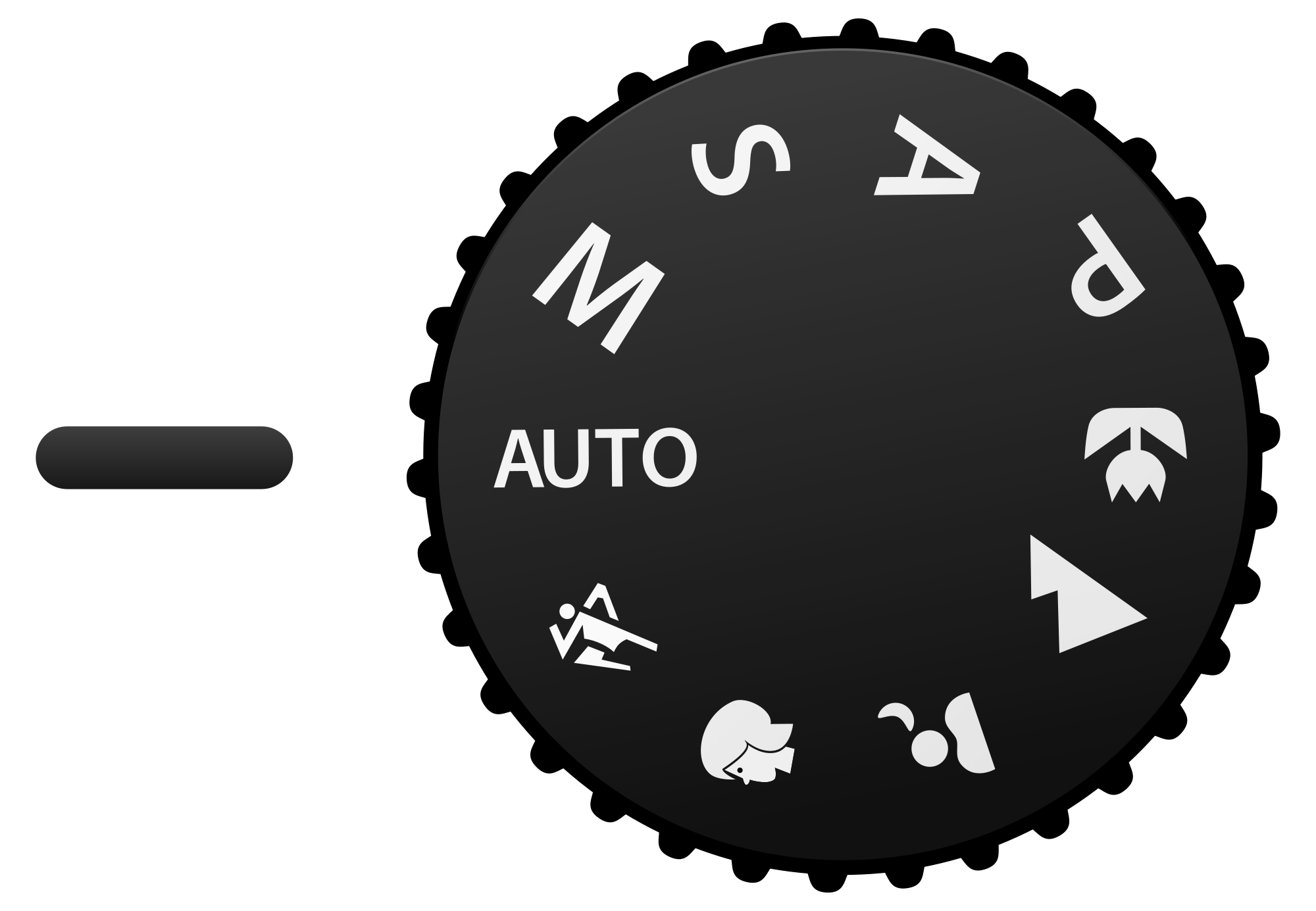
Most digital cameras support the ability to choose among a number of configurations, or modes for use in various situations. Professional DSLR cameras provide several manual modes; consumer point-and-shoot cameras emphasize automatic modes; amateur prosumer cameras often have a wide variety of both manual and automatic modes.
Manual-enabled modes
[edit]Manual-enabled modes give the photographer control over the various parameters of exposure. There are three exposure parameters – aperture, time (shutter speed), and sensitivity (ISO), and in different modes, these are each set automatically or manually; this gives 23 = 8 possible modes. For a given exposure, this is an underdetermined system, as there are three inputs but only one output. Accordingly, there are many combinations that result in the same exposure – for example, decreasing the aperture by one stop but increasing the exposure time or sensitivity to compensate, and there are various possible algorithms to automatically choose between these.
Most often, ISO is considered separately, being either set manually or set to Auto ISO, and then only aperture and shutter speed need be determined – either determines the other.
The four main modes, sometimes abbreviated "PASM", are:
- P: Program mode has the camera calculate both shutter speed and aperture (given a manually or automatically selected ISO). Higher-end cameras offer partial manual control to shift away from the automatically calculated values (increasing aperture and decreasing shutter time or conversely). The difference between Program mode and Full Auto mode is that in program mode, only the exposure is automatic, while other camera settings (e.g. shooting mode, exposure compensation, flash) can be set manually; in Full Auto mode, everything is automatic.
- A or Av: Aperture priority or Aperture value enables manual control of the aperture, and shutter speed is calculated by the camera for proper exposure (given an ISO sensitivity).
- S or Tv: Shutter priority or Time value enables manual control of the shutter speed, and aperture is calculated by the camera for proper exposure (given an ISO sensitivity).
- M: Manual mode both shutter speed and aperture are independently set manually (with ISO sensitivity also set manually), where proper image exposure requires accurate manual adjustment.
Together with setting ISO manually or automatically, this (PASM) yields the 4×2 = 8 possible combinations of manual/auto.
Exposure is further controlled in each of the above modes with an independent setting for:
- Ev: Exposure value enables an increase/decrease in image exposure compensation to make the resulting image brighter/darker, typically selectable in steps of whole or partial exposure "stops" (discrete widening/tightening of the aperture). Many cameras offer "exposure bracketing" where sequential images will be exposed at the different compensations selected, so as to increase the probability of a perfectly exposed image.
Less commonly seen modes include:
- Sv: Sensitivity priority or ISO priority controls the Sensitivity value (ISO speed), with both shutter and aperture calculated by camera, similar to Program mode. This mode is found on some Pentax cameras; on many cameras (such as Canon and Nikon) this is not a separate mode, but instead is accomplished by using Program mode and manually selecting an ISO.
- TAv: Some Pentax cameras such as Pentax K-50 has this mode for rapidly changing lights by using the widest aperture and the lowest ISO of continuously changing ISO between 1,000 and 3,200.[1][2] The range of continuously changing ISO is dependent on the camera manufacture. Other manufacturers may provide this functionality through an automatic selection of ISO speed in manual mode.
- DEP:[3] DEP (DEPth of field) mode, on some Canon cameras, set the aperture to yield the desired depth of field: one point at the nearest object that one wants to be in focus, half-presses the shutter, then points at the farthest object that one wants to be in focus, half-presses the shutter, at which point the camera sets both focus and aperture so that both objects are in focus. One then reframes the scene and fully depresses the shutter to take the photo. Unlike other modes, this also sets focus and requires two separate metering/focus stages.
- A-DEP:[3] Canon also offers A-DEP (Automatic DEPth of field) mode on some cameras, which sets the depth of field and focus in a single shot. However, this requires lining up both the nearest and further objects on autofocus points at the same time, which may be difficult.
In cases where there is camera discretion (e.g., Auto ISO), different cameras allow different configurations of how decisions are made. For example, as of 2008[update], Nikon cameras allow one to set the maximum and minimum ISO sensitivities, and slowest shutter speed that will be used in automatic modes,[4] while Canon cameras will select within the fixed range of ISO 400–ISO 800 in Auto ISO mode. In Nikon cameras, the Auto ISO mode first adjusts the shutter speed, keeping ISO at its minimum desired value, then, when shutter speed reaches the user-defined limit, the ISO is increased, up to the maximum value.[5]
All of the above functions are independent of lens focus and stabilizing methods.
Automatic modes
[edit]In automatic modes the camera determines all aspects of exposure, choosing exposure parameters according to the application within the constraints of correct exposure, including exposure, aperture, focusing, light metering, white balance, and equivalent sensitivity. For example, in portrait mode, the camera would use a wider aperture to render the background out of focus and would seek out and focus on a human face rather than other image content. In the same light conditions, a smaller aperture would be used for a landscape, and recognition of faces would not be enabled for focusing.
Some cameras have tens of modes. Many cameras do not document exactly what their many modes do; for full mastery of the camera, one must experiment with them.
In general:
- Action or sports modes increase ISO and use a faster shutter speed to capture the action.
- Landscape modes use a small aperture to gain depth of field. Flash may be deactivated.
- Text mode increases in-camera sharpening to allow to photograph texts.
- Portrait mode widens the aperture to throw the background out of focus (see Bokeh). The camera may recognize and focus on a human face.
- Night portrait modes use an exposure long enough to capture background detail, with fill-in flash to illuminate a nearby subject.
- Fireworks modes, for use on a tripod, use an extended exposure (around four seconds) which results in showing several fireworks as well as their paths.
- Water modes, depending on what the mode is designed to do, will either widen the aperture and increase the shutter speed for an action shot or shrink the aperture and slow down the shutter speed to show the motion of the water.
- Snow modes compensate for the misinformation the white snow gives the light meter and increases exposure in order to properly photograph subjects.
- Natural light or night snapshot modes attempt to raise the ISO and use a very wide aperture in order to take a photograph using the limited natural light, rather than a flash. In Fujifilm cameras, a variation of this mode takes two pictures: one with flash and other without it.
- High-sensitivity modes use the highest ISO available, albeit at lower resolutions in order to cope with noise.
- Macro or close-up modes tend to direct the camera's focus to be nearer the camera. They may shrink the aperture and restrict the camera to wide-angle in an attempt to broaden the depth-of-field (to include closer objects) – this last mode of operation is often known as Super Macro.
- Movie mode allows a still camera to take moving pictures.
- 'Scene' or Smart Shutter (SCN) mode (on Canons) which uses face detection to take a picture either when a subject smiles, winks, or when a new subject enters the scene.
- Sunset modes enhance warm colors, such as those that can be found on sunsets.
- Dusk/Dawn mode, found on Nikon compacts, enhance the blue colors of twilights and dawns, as well as raise the ISO to compensate for the low levels of the light present then.
- Beach modes enhance blue colors such as those of the sea and sky as well as prevent underexposure because of strong sunlight.
- Starry sky mode, on Panasonic compact and bridge cameras, gives a long shutter speed (up to 60 seconds) to capture star trails as well as other subjects that require very long exposures.
- Foliage mode, present on Canon cameras, enhances green colors of vegetation.
 |
Secondary modes
[edit]Aside from the main modes which control exposure, there are usually other, secondary settings common to digital cameras.
Drive mode
[edit]"Single" mode will take a single picture each time the shutter button is depressed. "Continuous" or "burst" mode will take multiple photographs in quick succession as long as the shutter button is held down, and is typically used to capture fast-moving subjects such as in sports photography.
Other drive modes commonly available include self-timer, which takes a picture several seconds after the shutter button is pressed; automatic exposure bracketing, used to take multiple photos each with different exposure settings; and remote shutter mode for use with a remote control accessory to trigger the camera at a distance. Some cameras also have an intervalometer mode for time-lapse photography, possibly with the option to automatically create a video from the pictures taken.
Autofocus
[edit]Autofocus (AF) can either activate until a lock is found (single, AF-S) or be continuously active (continuous, AF-C, servo). Single-mode is especially favored for stationary subjects, when focus, once found, should stay fixed, while the continuous mode is used for moving subjects. Some AF systems also include anticipation of the position of moving subjects – Canon calls this AI servo (for artificial intelligence) – or can automatically switch between single and continuous depending on whether the subject is moving – Canon calls this "AI focus".
A separate but often related distinction is between focus priority and release priority – whether the camera will take a picture when the subject is out of focus or not. In focus priority, the camera will only take a picture when the subject is in focus (as detected by the AF system), while in release priority, the camera will take a picture whenever the shutter is pressed.[6] Release priority is particularly used of fast-moving subjects, which may not be perfectly in focus, or by experienced photographers, who wish to override the camera's judgment of whether the scene is in focus.
These are usually combined: for stationary subjects, AF is set to single (lock when found) and release is set to focus priority, while for moving subjects, AF is set to continuous and release is set to release priority. Manual focus is generally in release priority – AF is neither detected nor set.
Note that these "priority" modes should not be confused with the same word in exposure modes.
Focus priority can also be used for the trap focus trick: to take a picture only when a subject hits a focus point, by using AF to detect focus but not set it.
Back button focus
[edit]In most digital cameras, by default autofocus is only activated (AF-on) when the shutter button is pressed halfway down, which helps to preserve battery life. However, some photographers find that having AF-on and the shutter release on the same button makes it harder to establish the correct focus point, or hold it once the desired point is established. By using a separate shutter and focus button, focus can be locked at the same time as shooting without changing exposure, allowing the photographer to focus on the subject through the viewfinder.[7]
One technique to make this easier to control is called back button focus: separating focus from the shutter control button by reassigning the AF-on function to a button on the back of the camera body.[8] Some models of a camera may have a dedicated AF-ON button, and menu options to disable the focus via shutter button half-press. When photographing at golden hour and fighting off sun flare, the back button focus can become an essential tool to use.[9]
Back button focus gives the benefit of being able to work with the three main possible focusing modes: manual focus, single focus, and continuous focus. It is a technique favored by many wildlife photographers due to the unpredictability of animal subjects.[10]
Flash
[edit]Flash modes allow the user to choose between common settings such as: Fill flash, to always use flash; Auto flash, which will use flash in low-lit areas; Red-eye reduction, which may flash once before the actual photo in order to shrink the subject's pupils and reduce red-eye; or, Flash off, which will never use flash.
Flash can have its own exposure compensation–how brightly it flashes–which allows one to independently adjust the exposure of the foreground (lit by flash) and background (out of flash range).
Other modes
[edit]- Although also sometimes used as a scenery mode, macro modes are often not used with the scene mode and rather only change the focus area and nothing else.
- Some cameras provide options for fine-tuning settings such as sharpness and saturation, which may be referred to as "Styles" or "Films".
- Some cameras offer color-altering settings to do things such as make the photograph black-and-white or sepia, swap specific colors, or isolate colors.
See also
[edit]References
[edit]- ^ Miles Green. "Scenarios with TAv, Av, Tv and Manual mode in changing light". Retrieved January 28, 2014.
- ^ Jim Keenan. "Pentax K-50 Review". Retrieved January 28, 2014.
- ^ a b DEP – Canon's Little-Understood Depth-of-Field Exposure Mode and How to Use it Effectively, Luminous Landscape
- ^ Nikon D3 and D300: Nikon's Latest DSLRs, and a Biased Evaluation of The Differences Between the Nikon and Canon Brands Archived 2015-02-14 at the Wayback Machine, The Luminous Landscape, January 2008
- ^ "ISO Control from Nikon". Archived from the original on 2011-11-17. Retrieved 2012-01-06.
- ^ Release Priority vs. Focus Priority
- ^ Belinda Crossman (2019). "Back Button Focus: How to Focus Like a Pro". CameraPro. Retrieved 2019-08-07.
- ^ Betsy Davis (2018). "Back Button Focus Explained – What Is It & Why You Need It!". Cole's Classroom. Retrieved 2018-05-29.
- ^ Teressa Smith (2019). "How to Focus with Sun Flare Using Back Button Focus". David Molnar. Retrieved 2019-11-07.
- ^ Nicholls, Will (2020-01-14). "Back Button Focus: When and Why to Use It". Nature TTL. Retrieved 2020-01-22.
Digital camera modes
View on GrokipediaPrimary Exposure Modes
Manual Mode
Manual mode, denoted by the "M" on the camera's mode dial, allows the photographer to fully control the primary exposure parameters—aperture, shutter speed, and ISO sensitivity—without any automatic adjustments by the camera. In this mode, the user selects the desired aperture value to control depth of field, the shutter speed to manage motion blur, and the ISO to adjust light sensitivity, ensuring the correct balance for proper exposure.[3][4][5] Exposure in manual mode is determined manually through the exposure triangle, which interrelates aperture (measured in f-stops), shutter speed (in seconds or fractions), and ISO (sensitivity rating). Photographers rely on the camera's built-in light meter for initial readings, external light meters for precision, or digital tools like histograms displayed on the LCD screen to evaluate tonal distribution and avoid clipping in highlights or shadows. These aids help achieve accurate exposure by adjusting the settings until the meter indicates balance or the histogram shows optimal spread.[5][6] The primary advantages of manual mode lie in its provision of precise creative control, particularly in challenging or consistent lighting scenarios where automated modes may vary unpredictably. For instance, it enables long shutter speeds (e.g., 30 seconds or more) combined with low ISO for astrophotography, capturing star trails or the Milky Way without camera interference, often requiring overexposure by one to two stops for dark skies. Similarly, selecting a wide aperture like f/2.8 with a moderate shutter speed allows for shallow depth of field in portraits, isolating the subject while maintaining sharp focus. This mode ensures consistent settings across a series of shots, ideal for controlled environments like studio work.[7][5] Common pitfalls in manual mode include underexposure or overexposure due to misjudging light levels, especially in low-light conditions where slow shutter speeds risk camera shake without a tripod, or high ISO introduces noise. These errors underscore the importance of experience, as novices may overlook the interplay of settings, leading to suboptimal results that automated modes might correct instinctively.[8] Historically, manual mode originated in film-era single-lens reflex (SLR) cameras, where photographers set exposure parameters mechanically or with basic metering, as seen in models like the Nikon F series from the 1950s onward. It transitioned seamlessly to digital cameras with the advent of digital SLRs (DSLRs) in the late 1990s, such as the Nikon D1 released in 1999, which retained full manual exposure control alongside new digital features. The adaptation to digital enhanced usability through real-time exposure previews on LCD screens or electronic viewfinders (EVFs), simulating the final image brightness and aiding on-the-fly adjustments unavailable in film.[9][10]Aperture Priority Mode
Aperture Priority Mode, often labeled as "A" on Nikon cameras or "Av" on Canon models, is a semi-automatic exposure mode in digital cameras where the photographer manually selects the aperture value (f-stop) and ISO sensitivity, while the camera automatically determines the appropriate shutter speed to achieve correct exposure based on built-in light metering.[11][12] This mode allows users to prioritize control over depth of field without needing to calculate shutter speeds manually.[13] In practice, photographers choose a wide aperture such as f/2.8 for portrait photography to create a shallow depth of field that blurs the background and isolates the subject, or a narrower aperture like f/11 for landscape photography to ensure sharpness across a greater range from foreground to background.[14][13] The camera's metering system evaluates scene brightness and computes the shutter speed accordingly, often using evaluative, center-weighted, or spot metering patterns depending on the camera model.[13] To handle tricky lighting conditions where the camera's metering might underexpose highlights or overexpose shadows, users can apply exposure compensation, typically in increments of 1/3 EV, which instructs the camera to adjust the shutter speed brighter or darker than the metered value.[13] For instance, in high-contrast scenes like backlit subjects, a negative compensation of -0.7 EV can prevent blown-out skies.[13] A common risk in this mode is the camera selecting an excessively slow shutter speed in low-light situations, resulting in motion blur from camera shake or subject movement; this can be mitigated by increasing the ISO sensitivity to a higher value, such as from 100 to 800, or using Auto ISO with a minimum shutter speed threshold to enforce faster speeds.[13] Technically, the camera's metering system calculates the required shutter speed by targeting a specific Exposure Value (EV) for the scene, using the formula: where "shutter speed" refers to the reciprocal (e.g., 125 for 1/125 second) and aperture is the f-number (N). This logarithmic relationship ensures balanced exposure, but the photographer remains focused on creative aperture selections for artistic depth of field effects rather than precise numerical computations.[15]Shutter Priority Mode
Shutter Priority Mode is a semi-automatic exposure setting in digital cameras that allows the photographer to manually select the shutter speed while the camera automatically adjusts the aperture to ensure correct exposure based on the metered light. Typically labeled as "S" on Nikon cameras or "Tv" (for Time Value) on Canon models, this mode also permits manual control over ISO sensitivity to fine-tune exposure without altering the chosen shutter speed.[16][17][18] This mode excels in scenarios requiring precise control over motion rendering. For capturing fast action in sports or wildlife photography, users can set high shutter speeds, such as 1/1000 second, to freeze subject movement and produce sharp images. In contrast, slower speeds like 1/30 second enable creative effects such as motion blur in panning shots, where the subject remains relatively sharp against a streaked background, conveying a sense of speed.[16][17][18] Challenges arise when the camera's aperture adjustments conflict with desired depth of field; for example, in low-light conditions with a fast shutter speed, the camera may select a wide-open aperture to admit more light, resulting in shallow depth of field that isolates the subject but blurs the background excessively. Conversely, in bright light with slower shutters, a narrow aperture might create overly deep focus or introduce diffraction softness at small f-stops. Photographers can address these by manually increasing ISO to prompt a narrower aperture or decreasing it for wider ones, thereby balancing exposure and creative intent.[19][20] Image stabilization features, such as Nikon's Vibration Reduction or Canon's Image Stabilization, enhance Shutter Priority Mode by compensating for camera shake, permitting handheld use of slower shutter speeds—down to 1/4 second in some cases—without blur, which broadens applications in low-light or creative motion capture. In extreme conditions, such as very slow shutters in dim environments, digital sensors avoid film's reciprocity failure but face increased noise when the aperture maxes out and ISO rises to maintain exposure, potentially degrading image quality at sensitivities above ISO 800 depending on the sensor.[16][18][21]Program Mode
Program mode, often labeled as "P" on a camera's mode dial, is a semi-automatic exposure setting in which the camera uses its built-in light metering system to automatically select both the aperture and shutter speed values that achieve proper exposure based on the current lighting conditions and the user-set ISO sensitivity.[2] This mode provides a balanced starting point for exposure without requiring the photographer to manually calculate settings, while still allowing overrides for other parameters like ISO, exposure compensation, and white balance.[22] One key feature distinguishing program mode is program shift, which enables the user to adjust the balance between aperture and shutter speed after the camera's initial selection, while preserving the overall exposure value (EV). For instance, if the camera initially sets f/5.6 at 1/125 second, rotating the control dial might shift it to f/4 at 1/180 second, favoring a wider aperture for shallower depth of field without needing to switch modes or recompute exposure.[23] This flexibility benefits beginners by offering quick adaptation to changing light—such as transitioning from indoor to outdoor scenes—while providing subtle creative control to prioritize either sharper backgrounds or frozen motion, all without the full manual adjustments required in more advanced modes.[24] Despite these advantages, program mode offers less precise control than aperture or shutter priority modes, as the camera dictates the initial pairing and limits shifts to available combinations, making it less suitable for scenarios demanding specific depth-of-field or motion-blur effects.[25] Originating in the late 1970s with film SLRs like the Canon A-1, which introduced programmed exposure as the first microprocessor-controlled full-auto mode in a 35mm camera, program mode has evolved in digital cameras to incorporate enhancements such as auto ISO, where the sensor sensitivity automatically adjusts within user-defined limits to maintain optimal shutter speeds and avoid underexposure in low light.[26][27]Automatic and Scene Modes
Full Automatic Mode
Full Automatic Mode, often labeled as "Auto" or represented by a green square icon on the camera's mode dial, enables the device to independently determine all key exposure parameters—including aperture, shutter speed, and ISO sensitivity—while also typically handling autofocus and flash activation based on real-time scene analysis. This mode prioritizes simplicity, allowing users to frame the shot and press the shutter without manual adjustments, making it ideal for point-and-shoot operation in digital cameras from compact models to DSLRs and mirrorless systems.[28][29] The mode functions through advanced evaluative metering, which segments the image frame into multiple zones to evaluate light intensity, color saturation, subject contrast, distance to objects, and potential motion, feeding this data into proprietary algorithms that select settings for balanced exposure. For instance, in bright outdoor scenes, the camera might opt for a faster shutter speed to freeze motion, while in low light, it could widen the aperture or raise ISO to maintain sharpness, often incorporating scene recognition to prioritize main subjects like people or landscapes. These algorithms draw from the camera's light meter and image sensor data to simulate optimal results, ensuring the exposure triangle is adjusted dynamically before each shot.[30][31][32] For casual photographers, Full Automatic Mode excels in delivering quick, reliable results during everyday scenarios, such as family events or travel snapshots, by automating decisions that might otherwise lead to underexposed or blurry images in variable lighting. This automation reduces the learning curve and cognitive load, enabling users to capture moments without technical interruptions and often producing well-exposed photos that require minimal post-processing.[33][34] Despite its conveniences, the mode sacrifices creative control, as photographers cannot fine-tune elements like depth of field or motion blur, sometimes resulting in "happy accident" outcomes such as overly sharpened landscapes due to in-camera processing or harsh flash in portraits. It may also default to conservative settings that prioritize detail over artistic intent, limiting its use for specialized photography.[33][35] Since the 2010s, enhancements in Full Automatic Mode have incorporated AI-driven subject recognition, evolving from basic face detection in compact cameras to advanced algorithms that identify and prioritize elements like human faces, pets, birds, or vehicles, thereby refining focus tracking and exposure adjustments for more accurate results in dynamic scenes. By 2025, these systems have expanded to detect additional subjects like aircraft and trains, with improved tracking accuracy through advanced machine learning. This integration, seen in models from Canon, Sony, and Nikon, leverages machine learning trained on vast datasets to boost hit rates for moving subjects without user input.[36][37][38][39][40]Preset Scene Modes
Preset scene modes, also known as SCENE or SCN modes, are predefined camera settings designed to automatically optimize exposure parameters, focus, white balance, and other functions for specific shooting scenarios, allowing users to select an icon or option that tailors the camera's behavior to common photographic situations.[41] These modes preload biases into the camera's algorithms, such as prioritizing a wide aperture for subject isolation in portraits or a fast shutter speed for motion freezing in action shots, while also adjusting metering patterns and image processing for enhanced results in those contexts.[42] Unlike full automatic mode, which applies a neutral, general-purpose automation across all settings based on broad scene analysis, preset scene modes introduce scenario-specific heuristics that override default behaviors to better suit anticipated conditions, such as enabling face detection or continuous autofocus only when relevant.[2][41] Common preset scene modes include a variety tailored to everyday photography needs, often represented by icons on the camera's mode dial or menu. For instance:- Portrait mode employs a wide aperture to create shallow depth of field, blurring backgrounds while keeping the subject sharp, and activates skin-tone enhancement or face detection for natural results.[43][42]
- Landscape mode uses a narrow aperture for extensive depth of field from foreground to infinity, with infinity focus and vibrant color saturation to capture scenic vistas like mountains or seascapes.[43][2]
- Sports or action mode sets a high shutter speed to freeze motion, enables continuous autofocus tracking, and boosts ISO for low-light performance during fast-paced events.[43][42]
- Macro or close-up mode optimizes for short subject distances, adjusting focus and aperture for detailed shots of small objects like flowers or insects.[41][2]
- Sunset mode applies warm white balance shifts to preserve rich reds and oranges, often slowing the shutter for dramatic sky rendering.[43][42]
- Night portrait mode, influenced by smartphone photography trends, combines slow shutter speeds with flash for balanced subject and background exposure in low light, incorporating noise reduction algorithms.[42]
- Fireworks mode enforces long exposures (typically 4 seconds or more) with a small aperture to capture streaking lights without camera shake compensation.[41]