


Community hub
Recent from talks
Contribute something
Nothing was collected or created yet.
Normal mapping
View on Wikipedia | This article needs additional citations for verification. (June 2024) |

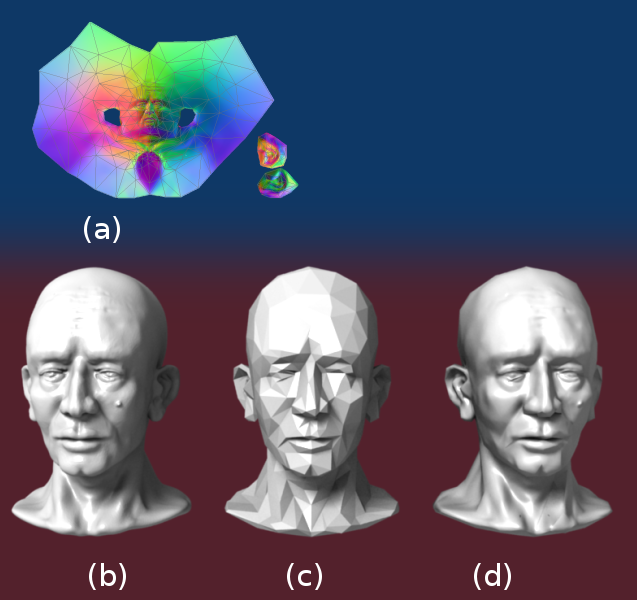
In 3D computer graphics, normal mapping, or Dot3 bump mapping, is a texture mapping technique used for faking the lighting of bumps and dents – an implementation of bump mapping. It is used to add details without using more polygons.[1] A common use of this technique is to greatly enhance the appearance and details of a low polygon model by generating a normal map from a high polygon model or height map.
Normal maps are commonly stored as regular RGB images where the RGB components correspond to the X, Y, and Z coordinates, respectively, of the surface normal.
History
[edit]In 1978 Jim Blinn described how the normals of a surface could be perturbed to make geometrically flat faces have a detailed appearance.[2] The idea of taking geometric details from a high polygon model was introduced in "Fitting Smooth Surfaces to Dense Polygon Meshes" by Krishnamurthy and Levoy, Proc. SIGGRAPH 1996,[3] where this approach was used for creating displacement maps over nurbs. In 1998, two papers were presented with key ideas for transferring details with normal maps from high to low polygon meshes: "Appearance Preserving Simplification", by Cohen et al. SIGGRAPH 1998,[4] and "A general method for preserving attribute values on simplified meshes" by Cignoni et al. IEEE Visualization '98.[5] The former introduced the idea of storing surface normals directly in a texture, rather than displacements, though it required the low-detail model to be generated by a particular constrained simplification algorithm. The latter presented a simpler approach that decouples the high and low polygonal mesh and allows the recreation of any attributes of the high-detail model (color, texture coordinates, displacements, etc.) in a way that is not dependent on how the low-detail model was created. The combination of storing normals in a texture, with the more general creation process is still used by most currently available tools.
Spaces
[edit]The orientation of coordinate axes differs depending on the space in which the normal map was encoded. A straightforward implementation encodes normals in object space so that the red, green, and blue components correspond directly with the X, Y, and Z coordinates. In object space, the coordinate system is constant.
However, object-space normal maps cannot be easily reused on multiple models, as the orientation of the surfaces differs. Since color texture maps can be reused freely, and normal maps tend to correspond with a particular texture map, it is desirable for artists that normal maps have the same property.

Normal map reuse is made possible by encoding maps in tangent space. The tangent space is a vector space, which is tangent to the model's surface. The coordinate system varies smoothly (based on the derivatives of position with respect to texture coordinates) across the surface.


Tangent space normal maps can be identified by their dominant purple color, corresponding to a vector facing directly out from the surface. See Calculation.
Calculating tangent spaces
[edit]![[icon]](https://en.wikipedia.org/wiki/File:Wiki_letter_w_cropped.svg) | This section needs expansion with: more math. You can help by adding missing information. (October 2011) |
 | This section may be too technical for most readers to understand. (January 2022) |
Surface normals are used in computer graphics primarily for the purposes of lighting, through mimicking a phenomenon called specular reflection. Since the visible image of an object is the light bouncing off of its surface, the light information obtained from each point of the surface can instead be computed on its tangent space at that point.

For each tangent space of a surface in 3-dimensional space, there are two vectors which are perpendicular to every vector of the tangent space. These vectors are called normal vectors, and choosing between these two vectors provides a description on how the surface is oriented at that point, as the light information depends on the angle of incidence between the ray and the normal vector , and the light will only be visible if . In such a case, the reflection of the ray with direction along the normal vector is given by


where the projection of the ray onto the normal is .

Intuitively, this just means that you can only see the outward face of an object if you're looking from the outside, and only see the inward face if you're looking from the inside. Note that the light information is local, and so the surface does not necessarily need to be orientable as a whole. This is why even though spaces such as the Möbius strip and the Klein bottle are non-orientable, it is still possible to visualize them.

Normals can be specified with a variety of coordinate systems. In computer graphics, it is useful to compute normals relative to the tangent plane of the surface. This is useful because surfaces in applications undergo a variety of transforms, such as in the process of being rendered, or in skeletal animations, and so it is important for the normal vector information to be preserved under these transformations. Examples of such transforms include transformation, rotation, shearing and scaling, perspective projection,[6] or the skeletal animations on a finely detailed character.
For the purposes of computer graphics, the most common representation of a surface is a triangulation, and as a result, the tangent plane at a point can be obtained through interpolating between the planes that contain the triangles that each intersect that point. Similarly, for parametric surfaces with tangent spaces, the parametrizations will yield partial derivatives, and these derivatives can be used as a basis of the tangent spaces at every point.
In order to find the perturbation in the normal the tangent space must be correctly calculated.[7] Most often the normal is perturbed in a fragment shader after applying the model and view matrices[citation needed]. Typically the geometry provides a normal and tangent. The tangent is part of the tangent plane and can be transformed simply with the linear part of the matrix (the upper 3x3). However, the normal needs to be transformed by the inverse transpose. Most applications will want bitangent to match the transformed geometry (and associated UVs). So instead of enforcing the bitangent to be perpendicular to the tangent, it is generally preferable to transform the bitangent just like the tangent. Let be tangent, be bitangent, be normal, be the linear part of the 3x3 model matrix, and be the linear part of the 3x3 view matrix.


Calculation
[edit]
To calculate the Lambertian (diffuse) lighting of a surface, the unit vector from the shading point to the light source is dotted with the unit vector normal to that surface, and the result is the intensity of the light on that surface. Imagine a polygonal model of a sphere - you can only approximate the shape of the surface. By using a 3-channel bitmap textured across the model, more detailed normal vector information can be encoded. Each channel in the bitmap corresponds to a spatial dimension (X, Y and Z). These spatial dimensions are relative to a constant coordinate system for object-space normal maps, or to a smoothly varying coordinate system (based on the derivatives of position with respect to texture coordinates) in the case of tangent-space normal maps. This adds much more detail to the surface of a model, especially in conjunction with advanced lighting techniques.
Unit Normal vectors corresponding to the u,v texture coordinate are mapped onto normal maps. Only vectors pointing towards the viewer (z: 0 to -1 for Left Handed Orientation) are present, since the vectors on geometries pointing away from the viewer are never shown. The mapping is as follows:
  X: -1 to +1 :  Red:     0 to 255
  Y: -1 to +1 :  Green:   0 to 255
  Z:  0 to -1 :  Blue:  128 to 255
                  light green    light yellow
  dark cyan       light blue     light red
  dark blue       dark magenta
- A normal pointing directly towards the viewer (0,0,-1) is mapped to (128,128,255). Hence the parts of object directly facing the viewer are light blue. The most common color in a normal map.
- A normal pointing to top right corner of the texture (1,1,0) is mapped to (255,255,128). Hence the top-right corner of an object is usually light yellow. The brightest part of a color map.
- A normal pointing to right of the texture (1,0,0) is mapped to (255,128,128). Hence the right edge of an object is usually light red.
- A normal pointing to top of the texture (0,1,0) is mapped to (128,255,128). Hence the top edge of an object is usually light green.
- A normal pointing to left of the texture (-1,0,0) is mapped to (0,128,128). Hence the left edge of an object is usually dark cyan.
- A normal pointing to bottom of the texture (0,-1,0) is mapped to (128,0,128). Hence the bottom edge of an object is usually dark magenta.
- A normal pointing to bottom left corner of the texture (-1,-1,0) is mapped to (0,0,128). Hence the bottom-left corner of an object is usually dark blue. The darkest part of a color map.
Since a normal will be used in the dot product calculation for the diffuse lighting computation, we can see that the {0, 0, –1} would be remapped to the {128, 128, 255} values, giving that kind of sky blue color seen in normal maps (blue (z) coordinate is perspective (deepness) coordinate and RG-xy flat coordinates on screen). {0.3, 0.4, –0.866} would be remapped to the ({0.3, 0.4, –0.866}/2+{0.5, 0.5, 0.5})*255={0.15+0.5, 0.2+0.5, -0.433+0.5}*255={0.65, 0.7, 0.067}*255={166, 179, 17} values (). The sign of the z-coordinate (blue channel) must be flipped to match the normal map's normal vector with that of the eye (the viewpoint or camera) or the light vector. Since negative z values mean that the vertex is in front of the camera (rather than behind the camera) this convention guarantees that the surface shines with maximum strength precisely when the light vector and normal vector are coincident.[8]

Normal mapping in video games
[edit]Interactive normal map rendering was originally only possible on PixelFlow, a parallel rendering machine built at the University of North Carolina at Chapel Hill.[citation needed] It was later possible to perform normal mapping on high-end SGI workstations using multi-pass rendering and framebuffer operations[9] or on low end PC hardware with some tricks using paletted textures. However, with the advent of shaders in personal computers and game consoles, normal mapping became widespread in the early 2000s, with some of the first games to implement it being Evolva (2000), Giants: Citizen Kabuto, and Virtua Fighter 4 (2001).[10][11] Normal mapping's popularity for real-time rendering is due to its good quality to processing requirements ratio versus other methods of producing similar effects. Much of this efficiency is made possible by distance-indexed detail scaling, a technique which selectively decreases the detail of the normal map of a given texture (cf. mipmapping), meaning that more distant surfaces require less complex lighting simulation. Many authoring pipelines use high resolution models baked into low/medium resolution in-game models augmented with normal maps.
Basic normal mapping can be implemented in any hardware that supports palettized textures. The first game console to have specialized normal mapping hardware was the Sega Dreamcast. However, Microsoft's Xbox was the first console to widely use the effect in retail games. Out of the sixth generation consoles[citation needed], only the PlayStation 2's GPU lacks built-in normal mapping support, though it can be simulated using the PlayStation 2 hardware's vector units. Games for the Xbox 360 and the PlayStation 3 rely heavily on normal mapping and were the first game console generation to make use of parallax mapping. The Nintendo 3DS has been shown to support normal mapping, as demonstrated by Resident Evil: Revelations and Metal Gear Solid 3: Snake Eater.
See also
[edit]References
[edit]- ^ "LearnOpenGL - Normal Mapping". learnopengl.com. Retrieved 2024-05-21.
- ^ Blinn. Simulation of Wrinkled Surfaces, Siggraph 1978
- ^ Krishnamurthy and Levoy, Fitting Smooth Surfaces to Dense Polygon Meshes, SIGGRAPH 1996
- ^ Cohen et al., Appearance-Preserving Simplification, SIGGRAPH 1998 (PDF)
- ^ Cignoni et al., A general method for preserving attribute values on simplified meshes, IEEE Visualization 1998 (PDF)
- ^ Akenine-Möller, Tomas; Haines, Eric; Hoffman, Naty; Pesce, Angelo; Iwanicki, Michał; Hillaire, Sébastien (2018). Real-Time Rendering 4th Edition (4 ed.). Boca Raton, FL, USA: A K Peters/CRC Press. p. 57. ISBN 978-1-13862-700-0. Retrieved 2 August 2024.
- ^ Mikkelsen, Simulation of Wrinkled Surfaces Revisited, 2008 (PDF)
- ^ "LearnOpenGL - Normal Mapping". learnopengl.com. Retrieved 2021-10-19.
- ^ Heidrich and Seidel, Realistic, Hardware-accelerated Shading and Lighting Archived 2005-01-29 at the Wayback Machine, SIGGRAPH 1999 (PDF)
- ^ "Virtua Fighter 4". Sega Retro. 2023-11-30. Retrieved 2024-03-03.
- ^ "Tecnologías gráficas en los juegos". Meristation (in Spanish). 2012-04-18. Retrieved 2024-03-03.
External links
[edit]
- Normal Map Tutorial Per-pixel logic behind Dot3 Normal Mapping
- NormalMap-Online Free Generator inside Browser
- Normal Mapping on sunandblackcat.com
- Blender Normal Mapping
- Normal Mapping with paletted textures using old OpenGL extensions.
- Normal Map Photography Creating normal maps manually by layering digital photographs
- Normal Mapping Explained
- Simple Normal Mapper Open Source normal map generator
Normal mapping
View on GrokipediaOverview
Definition and Purpose
Normal mapping is a technique in 3D computer graphics that simulates intricate surface details on models by storing precomputed normal vectors—directions perpendicular to the surface—in a specialized texture called a normal map, which perturbs the interpolated surface normals during the shading process to alter lighting computations without modifying the underlying geometry.[4] These normal vectors are typically encoded in the RGB channels of the texture, where red, green, and blue components represent the x, y, and z coordinates, respectively, often normalized to fit the [0,1] range for storage.[5] The primary purpose of normal mapping is to enhance the perceived geometric complexity of low-polygon 3D models, enabling the simulation of fine details such as bumps, scratches, wrinkles, or other microstructures that affect how light interacts with the surface, thereby approximating the lighting and shadowing behavior of much higher-resolution geometry while maintaining computational efficiency suitable for real-time rendering applications like video games.[5] This approach allows artists and developers to achieve visually rich scenes without the performance overhead of additional polygons, focusing detail where it is most noticeable—on the surface normals that influence shading rather than the model's silhouette.[4] In its basic workflow, a normal vector is sampled from the normal map based on the model's texture coordinates (UV mapping) at each fragment or pixel during rendering; this sampled vector is then transformed from its stored space (often tangent space relative to the surface) to a common space like model or view space to align with the light and view directions; finally, the perturbed normal is plugged into a lighting equation, such as the Lambertian model for diffuse reflection or the Phong model for specular highlights, to compute the final color contribution.[5][4][6] For instance, applying a normal map textured with brick patterns to a flat plane can create the illusion of protruding bricks, where incident light casts realistic shadows in the mortar grooves and highlights on the raised surfaces, all derived from the modified normals rather than actual displacement.[4]Advantages Over Traditional Methods
Normal mapping offers significant performance benefits in real-time rendering by reducing the required polygon count compared to traditional geometric methods like subdivision or tessellation, allowing complex scenes to run efficiently on consumer hardware without excessive vertex processing.[7][8] This technique simulates fine surface details through texture-based normal perturbations, enabling the illusion of infinite detail on low-resolution meshes while keeping computational costs low, as it relies on per-pixel shading rather than increasing geometry.[7] In contrast to bump mapping, which approximates surface perturbations using scalar height values and can lead to less accurate lighting, normal mapping encodes full 3D normal vectors in RGB channels for more precise shading interactions with light sources.[7] However, normal mapping has notable limitations: it does not modify the underlying geometry, so silhouettes remain unchanged and self-shadowing is not inherently supported, unlike true displacement methods that alter vertex positions.[8][9] Additionally, it can produce artifacts such as inconsistent shading or "swimming" effects at grazing angles due to filtering challenges, and it requires precomputed normal maps, limiting dynamic adaptability.[10]| Technique | Detail Representation | Computational Cost | Geometry Impact | Key Advantages | Key Limitations |
|---|---|---|---|---|---|
| Normal Mapping | RGB-encoded normals for shading | Low (per-pixel texture lookup) | None (illusion only) | High performance; detailed lighting without polygon increase | No silhouette change; no self-shadowing; grazing angle artifacts |
| Bump Mapping | Grayscale height for normal perturbation | Low (similar to normal) | None | Simple implementation; fast | Less accurate normals; limited to basic bumps |
| Displacement Mapping | Vertex displacement from height | High (tessellation required) | Alters mesh | True geometry; correct silhouettes and shadows | Expensive; increases vertex count and GPU load |
Background Concepts
Surface Normals in 3D Graphics
In 3D computer graphics, a surface normal is defined as a unit vector perpendicular to a surface at a specific point, representing the orientation of that surface relative to incident light and the viewer.[11] This vector plays a crucial role in lighting calculations, where it determines the amount of diffuse and specular reflection by quantifying the angle between the surface and light rays.[12] For instance, in the Phong illumination model, the normal influences both the diffuse component, based on the cosine of the angle between the normal and light direction, and the specular component, involving the reflection vector.[6] For polygonal surfaces, such as triangles in a mesh, the face normal is computed using the cross product of two edge vectors originating from one vertex.[12] Given vertices , , and , the normal is derived as: This ensures is a unit vector pointing outward from the surface, assuming a counterclockwise vertex ordering.[12] Vertex normals, used for smoother shading, are often averaged from adjacent face normals to approximate underlying curvature.[13] To achieve realistic shading on curved or approximated surfaces, normals are interpolated across polygon faces during rasterization.[14] In Gouraud shading, lighting intensities are computed at vertices and linearly interpolated across the polygon interior, which can miss specular highlights but is computationally efficient.[13] Conversely, Phong shading interpolates the normals themselves between vertices before applying the lighting model at each fragment, preserving sharp highlights and better simulating smooth surfaces at the cost of higher computation.[14] Within the graphics pipeline, surface normals are integral to per-fragment lighting, particularly through the dot product with the normalized light direction vector , yielding the incident light intensity as .[15] This clamped cosine term models Lambertian diffuse reflection, where indicates the light is behind the surface, preventing negative contributions.[16] Such computations enable realistic illumination effects essential for rendering convincing 3D scenes.[12]Texture Coordinates and UV Mapping
Texture coordinates, often denoted as UV coordinates, provide a 2D parameterization of a 3D model's surface, where each vertex is assigned a pair of values (u, v) typically ranging from 0 to 1, effectively unwrapping the 3D geometry onto a 2D plane for texture application.[17] This mapping allows textures, including normal maps, to be projected onto the surface by associating points in texture space with corresponding locations on the model.[18] UV coordinates can be generated through various methods depending on the model type and application needs. For parametric surfaces like cylinders or spheres, UVs are often created procedurally during the modeling process, using mathematical parameterizations that align the coordinates with the surface's natural geometry.[17] Manual unwrapping involves artist-driven tools in software such as Maya or Blender to cut and flatten the mesh, optimizing layout to reduce irregularities.[18] Automatic generation, exemplified by lightmap UVs in engines like Unity, employs algorithms to produce secondary UV sets (e.g., Mesh.uv2) that prioritize minimal overlap, wide margins between UV islands, and low distortion in angles and scales relative to the original geometry.[19] Challenges in UV mapping include seams and distortion, which can lead to visible artifacts or uneven texture application. Seams arise at the edges where the 3D surface is cut during unwrapping, potentially causing discontinuities if adjacent UV islands do not align perfectly in the texture.[17] Distortion occurs when the 2D projection stretches or compresses areas disproportionately to the 3D surface, such as in polar regions of spherical mappings.[18] Mitigation strategies involve adding padding (wide margins) around UV islands to prevent bleeding during texture filtering or mipmapping, and selecting projection methods like cylindrical unwrapping that better preserve uniformity for elongated surfaces.[19][17] In the context of normal mapping, UV coordinates play a crucial role by determining the precise location in the 2D normal map texture from which to sample the RGB-encoded normal vectors for each surface fragment.[20] This sampling, typically performed using interpolated UVs within a fragment shader (e.g., via texture lookup functions), ensures that the perturbed normals align correctly with the underlying geometry, enhancing surface detail without additional polygons.[20]Technical Details
Coordinate Spaces Involved
In 3D computer graphics, normal mapping involves several coordinate spaces to handle the transformation and application of surface normals accurately for lighting calculations. Object space, also known as model space, is local to the individual mesh and defines positions and normals relative to the object's origin. World space provides a global coordinate system where all objects in the scene are positioned, allowing for consistent interactions like lighting from fixed sources. View space, or camera space, is relative to the observer's viewpoint, often used in the rendering pipeline for perspective transformations. Tangent space, however, is a per-surface coordinate system aligned with the geometry at each fragment, enabling efficient storage and perturbation of normals without recomputing the entire mesh.[21][22][23] Multiple coordinate spaces are necessary because normals must transform non-uniformly to maintain perpendicularity to the surface under deformations or scaling; this requires the inverse transpose of the model transformation matrix, unlike positions which use the standard model matrix. In contrast to object-space normals, which are fixed to the mesh and expensive to update for animations, tangent-space normals allow for seamless mapping across deformed surfaces by remaining relative to the local geometry.[20][21][22] Tangent space is defined by a local orthonormal basis consisting of the tangent vector (T), bitangent vector (B), and surface normal (N), forming the TBN matrix. Normal maps store perturbation vectors in this tangent space, where the RGB channels represent offsets along the T (X, red), B (Y, green), and N (Z, blue) axes, typically with the blue channel dominant to simulate small surface variations. This representation compresses data efficiently since perturbations are relative to the surface rather than absolute directions.[20][21][22] The transformation pipeline for normal mapping begins in texture space, where UV coordinates sample the normal map to retrieve the tangent-space normal. This normal is then transformed via the TBN matrix to world space, where it aligns with global lighting vectors for per-fragment shading computations. This process ensures that the perturbed normal accurately reflects local surface details in the scene's absolute orientation.[20][21][23]Tangent Space Computation
In normal mapping, the tangent space at each vertex is defined by an orthonormal basis consisting of the surface normal , the tangent vector , and the bitangent vector , collectively forming the tangent-bitangent-normal (TBN) matrix used to transform normals from texture space to object space.[24] The computation begins with deriving and from the partial derivatives of the vertex position with respect to the texture coordinates and , approximated discretely using edge vectors in the mesh.[24] For a given triangle with vertices and corresponding UV coordinates , the edge vectors and UV deltas are defined as , , , , , and . These satisfy the linear system which is solved for the unnormalized and by inverting the 2x2 UV matrix, provided it is non-singular (i.e., the texture coordinates are not degenerate).[24] This process is repeated for all triangles adjacent to a vertex, with the resulting and vectors averaged across those faces to obtain a smoothed per-vertex basis, ensuring continuity where texture seams are absent.[24] To ensure orthonormality, the averaged is orthogonalized against using Gram-Schmidt: , followed by normalization. The bitangent is then computed as , where accounts for handedness to match the coordinate system (left-handed or right-handed), often determined by the sign of the scalar triple product or the determinant of the TBN matrix.[24] This handedness factor is typically stored in the w-component of the tangent vector to avoid passing an additional attribute. In rendering pipelines, the per-vertex TBN basis is interpolated across the surface during rasterization, allowing per-pixel reconstruction in the fragment shader for accurate normal perturbation.Normal Map Generation and Application
Normal maps are generated by transferring surface details from a high-polygon (high-poly) model to a low-polygon (low-poly) model through a process known as baking. This enables the simulation of fine geometry on simpler meshes without increasing vertex counts. The primary method involves ray tracing, where rays are projected orthogonally from each texel on the low-poly model's surface toward the high-poly model; the intersection point determines the local surface orientation, and the difference between this orientation and the low-poly normal forms the tangent-space perturbation stored in the map.[25] An alternative approach uses difference vectors, computing the vector offset between corresponding vertices or points on the high- and low-poly models to derive the normal perturbation directly.[26] Specialized tools automate this process: xNormal employs ray tracing to cast rays from the low-poly mesh and capture high-poly details, supporting formats like OBJ for input.[27] Similarly, Substance Painter uses integrated Substance Bakers to generate tangent-space normal maps via ray-based projection, with adjustable parameters like ray distance to control offset and avoid self-intersections.[28] Once generated, normal maps are stored as RGB textures where the channels encode the X, Y, and Z components of the surface normal vector in tangent space. Each component, ranging from -1 to 1, is linearly remapped to the [0,1] interval for storage (i.e., ), resulting in a characteristic purple-blue appearance for flat surfaces due to the neutral tangent normal (0, 0, 1) mapping to RGB (0.5, 0.5, 1.0). In the common Z-up convention, the blue channel defaults to 1.0 for unperturbed areas, emphasizing outward-facing normals. For efficient storage in real-time applications, compression formats like DXT5 (BC3) are applied, often with channel swizzling—placing the X component in the alpha channel—to leverage higher-fidelity alpha compression and minimize artifacts in correlated channels like red and green.[22] In the rendering pipeline, normal maps are applied during the fragment shading stage to perturb interpolated vertex normals per pixel. UV coordinates sample the map, unpack the RGB values to a tangent-space vector via , and transform it to world space using the tangent-bitangent-normal (TBN) matrix, which orients the perturbation relative to the surface. The resulting vector often replaces the geometry normal (or blends with it), is renormalized to unit length, and feeds into lighting equations, such as the Lambertian diffuse term. This integration occurs after vertex shading passes the TBN matrix to the fragment shader but before specular or ambient computations.[7] The following GLSL pseudocode illustrates a basic implementation in the fragment shader:vec3 tangentNormal = texture(normalMap, uv).xyz * 2.0 - 1.0;
vec3 worldNormal = normalize(TBN * tangentNormal);
float diffuse = max(dot(worldNormal, normalize(lightDir)), 0.0);
vec3 tangentNormal = texture(normalMap, uv).xyz * 2.0 - 1.0;
vec3 worldNormal = normalize(TBN * tangentNormal);
float diffuse = max(dot(worldNormal, normalize(lightDir)), 0.0);
TBN is the 3x3 matrix from vertex attributes, uv are texture coordinates, and lightDir is the world-space light direction; the diffuse factor scales the base color for illumination.[20]
Despite these techniques, artifacts can occur during application. Mirroring seams appear at UV edges where islands are flipped, as tangent directions reverse inconsistently across the seam, causing lighting discontinuities; fixes include separating mirrored UVs by a small padding (2-4 pixels) during layout or enforcing consistent tangent basis computation between baking and rendering tools.[29] MIP-mapping issues stem from bilinear filtering averaging non-linear normal vectors, leading to shortened vectors and darkened silhouettes at distance; mitigation involves custom MIP generation using derivative-based filters (e.g., Sobel operators on height-derived normals) to preserve vector lengths and directions across levels.[30]
Historical Development
Origins in the 1970s and 1980s
The foundational concepts for normal mapping emerged in the late 1970s through pioneering work in computer graphics aimed at simulating fine surface details via perturbations to surface normals, a technique initially termed bump mapping. This innovation addressed the challenge of rendering realistic textures and irregularities on low-polygon models, avoiding the high computational cost of explicit geometric subdivision. Early experiments focused on modulating normal vectors to alter shading without changing the underlying surface geometry, setting the stage for more advanced mapping methods.[31] A key milestone was James F. Blinn's 1978 SIGGRAPH paper, "Simulation of Wrinkled Surfaces," which formalized bump mapping as a method to perturb surface normals using a procedural texturing function. Blinn described how to compute a modified normal vector by adding a small displacement derived from the partial derivatives of a height field or texture function, applied before illumination calculations. This approach enabled the simulation of high-frequency details like fabric weaves or skin pores, with examples including a wrinkled torus and embossed lettering, demonstrating significant efficiency gains. The technique relied on analytic normal fields rather than discrete maps, emphasizing conceptual perturbation over storage.[32] In the early 1980s, these perturbation ideas influenced reflection models that explicitly incorporated normal distributions to model material roughness. Robert L. Cook and Kenneth E. Torrance's 1981 SIGGRAPH paper, "A Reflectance Model for Computer Graphics," introduced a microfacet-based approach where specular highlights arise from oriented facets with varying normals, using a distribution function to represent microsurface orientations.[33] This model extended normal modulation to physically grounded bidirectional reflectance, providing a foundation for later extensions allowing anisotropic effects like brushed metal by tilting the effective normal distribution, and provided a bridge from Blinn's shading perturbations to comprehensive surface simulation in rendering pipelines. These foundational ideas evolved in the 1990s into normal mapping techniques that stored precomputed normal perturbations in discrete texture maps. A seminal contribution was the 1996 SIGGRAPH paper by Venkat Krishnamurthy and Marc Levoy, which described an algorithm for fitting smooth surfaces to dense polygon meshes of arbitrary topology and deriving normal maps from the normals of the original high-resolution meshes to simulate fine details on the fitted low-resolution surfaces.[2]Adoption in Real-Time Rendering
Further advancements toward real-time implementation came in 1999 with the SIGGRAPH paper "Realistic, Hardware-Accelerated Shading and Lighting" by Wolfgang Heidrich and Hans-Peter Seidel, which detailed tangent-space normal mapping techniques for efficient hardware acceleration using multi-texturing and early programmable shading to achieve realistic effects like Blinn-Phong lighting.[3] The adoption of normal mapping in real-time rendering accelerated in the early 2000s, driven by advancements in graphics hardware that supported multi-texturing and programmable shading. NVIDIA's GeForce 3 GPU, released in 2001, introduced four texture units and basic vertex and pixel programmability, enabling efficient implementation of tangent-space normal mapping through DOT3 bump mapping operations without full shader support.[34][35] This hardware breakthrough allowed developers to fetch and perturb normals per pixel in real time, marking a shift from software-based approximations to hardware-accelerated techniques. Key milestones in the mid-2000s solidified normal mapping as a standard in interactive applications. id Software's Doom 3, released in 2004 and powered by the id Tech 4 engine, was an early major adopter, extensively using normal maps alongside dynamic per-pixel lighting to enhance surface detail on low-polygon models.[36] Similarly, Valve's Half-Life 2, also launched in 2004, integrated normal mapping via its Source engine, employing a radiosity normal mapping technique to combine precomputed global illumination with per-pixel bump effects for efficient, high-fidelity shading.[37] Concurrently, the release of DirectX 9 in 2002 and OpenGL 2.0 in 2004 provided robust shader frameworks—pixel shader model 2.0 and GLSL, respectively—that facilitated tangent-space normal computations in vertex and fragment stages, broadening accessibility across platforms.[38][20] Post-2010 developments integrated normal mapping into physically based rendering (PBR) workflows, enhancing realism in modern engines. Unreal Engine 5, building on PBR foundations introduced in Unreal Engine 4 around 2014, employs normal maps as a core component of material systems, where they contribute to microfacet-based specular reflections and diffuse scattering under energy-conserving lighting models.[39] For resource-constrained environments like mobile rendering, compressed formats such as BC5 (also known as ATI2 or 3Dc) became prevalent, storing X and Y normal components in two 8-bit-per-pixel channels with hardware decompression, reducing memory bandwidth by up to 75% compared to uncompressed RGBA textures while preserving detail.[40][41] This era also witnessed an industry-wide transition from offline rendering paradigms—exemplified by Pixar's RenderMan, which historically prioritized ray-traced accuracy over speed—to real-time systems capable of approximating similar fidelity.[42] Post-2010 APIs like Vulkan (introduced in 2016) further streamlined this shift by exposing low-level GPU control for shader-based normal mapping, allowing efficient pipeline integration with compute shaders for tasks like tangent basis computation and supporting cross-platform real-time applications without the overhead of higher-level abstractions.Applications and Extensions
Use in Video Games
Normal mapping plays a crucial role in video game development by enabling high-fidelity surface details on low-polygon models, thereby optimizing performance on resource-constrained hardware such as the PlayStation 3. In Uncharted 2: Among Thieves (2009), developers utilized normal maps to capture intricate details from high-resolution sculpt meshes, applying them to low-poly game meshes for character skin and fabrics. This approach allowed for visually rich assets with only 246 joints per main character, reducing vertex counts and memory usage while maintaining smooth gameplay at 30 FPS on PS3 hardware.[43] Integration into major game engines streamlines the use of normal maps within development workflows. In Unity, normal maps are imported by placing the texture asset in the project folder and setting the Texture Type to "Normal Map" in the import settings, which automatically processes the RGB channels for tangent-space normals and enables compatibility with the Standard Shader for PBR materials. Similarly, in Unreal Engine, textures are imported via the Content Browser, with compression settings adjusted to "Normalmap (DXT5 or BC5)" in the Texture Editor to ensure proper handling of the green channel for bitangent information, facilitating seamless application in materials. Level-of-detail (LOD) systems in both engines further enhance efficiency by switching between mesh variants at runtime; for instance, Unity's LOD Group component can assign higher-resolution normal maps to close-range LODs and lower-resolution or disabled variants for distant ones, balancing detail and draw calls.[44] Optimizations specific to real-time rendering in games include pre-baking the tangent-bitangent-normal (TBN) matrix into vertex attributes stored in vertex buffers, avoiding per-fragment computations and reducing shader overhead. This technique, common in modern pipelines, transforms normal map samples directly in tangent space, improving throughput on GPUs. For mobile platforms, 3-component normal maps (RGB encoding XYZ directions) are often compressed using formats like BC5, which dedicates channels efficiently to red and green while deriving blue, minimizing memory footprint and bandwidth—critical for maintaining 60 FPS on devices with limited VRAM.[45] In practice, normal mapping has been pivotal in landmark titles for enhancing visual depth. The Witcher 3: Wild Hunt (2015) rendered its immersive open world at 1080p on consoles with dynamic lighting, benefiting from normal mapping in environmental rendering. More recently, in the 2020s, Cyberpunk 2077 (2020) integrates normal mapping within its physically based rendering (PBR) materials, where tangent-space normals refine shading under ray-traced global illumination and reflections, achieving photorealistic surfaces on high-end PCs at 4K resolutions with 50-90 FPS using DLSS as of 2020. These examples illustrate normal mapping's evolution from console-era efficiency to hybrid rendering paradigms.[46]Implementations in Other Media
In film and visual effects (VFX) production, normal mapping is widely utilized in offline rendering workflows to enhance the fidelity of complex assets, such as creature skin and organic surfaces, without requiring excessive geometric subdivision. Tools like Autodesk Maya integrated with the Arnold renderer support normal mapping by perturbing interpolated surface normals using RGB textures, enabling photorealistic shading in high-budget productions where computational constraints are less stringent than in real-time applications. This approach allows artists to bake intricate details from high-poly sculpts into tangent-space normal maps, which are then applied during ray-traced rendering to simulate micro-surface variations efficiently.[47] Architectural visualization leverages normal mapping in real-time engines like Unreal Engine to create immersive walkthroughs of building interiors and exteriors, where it adds realistic surface texture to materials such as brick, wood, and plaster. In these pipelines, normal maps are frequently combined with parallax occlusion mapping (POM) to simulate depth on flat geometry, enhancing the illusion of three-dimensionality for elements like wall panels or flooring without increasing polygon counts, which is crucial for smooth navigation in interactive presentations. Twinmotion, a Unreal Engine-based tool tailored for architectural workflows, incorporates normal mapping within its material systems to boost depth and realism in scene renders.[48][49] In virtual reality (VR) and augmented reality (AR) applications, normal mapping is used for surface detailing on mobile and standalone devices, such as those in the Meta Quest ecosystem, to deliver immersive environments under strict performance budgets. However, Meta's rendering guidelines recommend parallax mapping over normal mapping, as the latter can appear flat due to lack of binocular disparity in stereoscopic viewing and is better suited for providing lighting-based depth cues when supplemented by parallax techniques to mitigate artifacts from head movement.[50] Detail maps, often using parallax for repeated textures like foliage or terrain in VR scenes, help maintain visual consistency across varying distances while adhering to hardware limits on texture resolution and shader complexity. Beyond traditional texturing, normal mapping integrates with displacement mapping in non-real-time pipelines to balance geometric deformation for macro-scale features—like wrinkles on skin or cracks in stone—with fine-scale normal perturbations for micro-details, a common practice in VFX and film rendering where tessellation can handle the added complexity. Recent advancements include AI-generated normal maps using diffusion models; for example, Stable Diffusion variants augmented with ControlNet (introduced in 2023) allow conditioning on input images or sketches to produce plausible normal maps, streamlining asset creation in creative workflows.[51][52]References
- https://doomwiki.org/wiki/Id_Tech_4