


Community hub
Recent from talks
Contribute something
Nothing was collected or created yet.
Adobe RGB color space
View on Wikipedia
| Adobe RGB | |
|---|---|
| Adobe RGB (1998) color space | |
 The CIE 1931 xy chromaticity diagram showing the primaries of the Adobe RGB (1998) color space. The Illuminant D65 white point is shown in the center. | |
| Abbreviation | opRGB |
| Native name |
|
| Status | Published |
| Year started | 1997 |
| First published | 1998 |
| Latest version | 2007 November 7, 2007[1] |
| Organization | |
| Committee | |
| Authors | Adobe Systems, Inc. |
| Base standards | sRGB |
| Domain | Color space, color model |
| Website | |
The Adobe RGB (1998) color space or opRGB is a color space developed by Adobe Inc. in 1998. It was designed to encompass most of the colors achievable on CMYK color printers, but by using RGB primary colors on a device such as a computer display. The Adobe RGB (1998) color space encompasses roughly 30% of the visible colors specified by the CIELAB color space – improving upon the gamut of the sRGB color space, primarily in cyan-green hues. It was subsequently standardized by the IEC as IEC 61966-2-5:1999 with a name opRGB (optional RGB color space) and is used in HDMI.[1]
Historical background
[edit]Beginning in 1997, Adobe Systems was looking into creating ICC profiles that its consumers could use in conjunction with Photoshop's new color management features. Since not many applications at the time had any ICC color management, most operating systems did not ship with useful profiles.
Lead developer of Photoshop, Thomas Knoll decided to build an ICC profile around specifications he found in the documentation for the SMPTE 240M standard, the precursor to Rec. 709 (but not in primaries: 240M also defined EOTF and thus was display referred, sRGB was created by connecting BT.470 PAL and SMPTE C). SMPTE 240M's gamut is wider than that of the BT.709 gamut and the same as SMPTE ST 170 also known as SMPTE C. However, with the release of Photoshop 5.0 nearing, Adobe made the decision to include the profile within the software.
Although users loved the wider range of reproducible colors, those familiar with the SMPTE 240M specifications contacted Adobe, informing the company that it had copied the values that described idealized primaries, not actual standard ones (in a special annex to the standard).[failed verification] The real values were much closer to sRGB's, which avid Photoshop consumers did not enjoy as a working environment. To make matters worse, an engineer (Thomas Knoll) had made an error when copying the red primary chromaticity coordinates, resulting in an even more inaccurate representation of the SMPTE standard.[3] On the other hand red and blue primaries are the same as in PAL and green is the same as in NTSC 1953 (blue is the same as in BT.709 and sRGB).
Adobe tried numerous tactics to correct the profile, such as correcting the red primary and changing the white point to match that of the CIE Standard Illuminant D50 (though that will also change the primaries and is thus pointless), yet all of the adjustments made CMYK conversion worse than before. In the end, Adobe decided to keep the "incorrect" profile, but changed the name to Adobe RGB (1998) in order to avoid a trademark search or infringement.[4]
Specifications
[edit]Reference viewing conditions
[edit]| Parameter | Value |
|---|---|
| White Point Luminance Level | 160.00 cd/m2 |
| Black Point Luminance Level | 0.5557 cd/m2 (0.34731% of white point luminance) |
| Contrast Ratio | 287.9 |
| Ambient Illuminance Level | 32 lx |
| Reference Display Surround Level | 32.00 cd/m2 (20% of white point luminance) |
| Viewing Surround | 2 cd/m2 |
In Adobe RGB (1998), colors are specified as [R,G,B] triplets, where each of the R, G, and B components have values ranging between 0 and 1. When displayed on a monitor, the exact chromaticities of the reference white point [1,1,1], the reference black point [0,0,0], and the primaries ([1,0,0], [0,1,0], and [0,0,1]) are specified. To meet the color appearance requirements of the color space, the luminance of the monitor must be 160.00 cd/m2 at the white point, and 0.5557 cd/m2 at the black point, which implies a contrast ratio of 287.9. Moreover, the black point shall have the same chromaticity as the white point, yet with a luminance equal to 0.34731% of the white point luminance.[5] The ambient illumination level at the monitor faceplate when the monitor is turned off must be 32 lx.
As with sRGB, the RGB component values in Adobe RGB (1998) are not proportional to the luminances. Rather, a gamma of approximately 2.2 is assumed, without the linear segment near zero that is present in sRGB. The precise gamma value is 563/256, or 2.19921875. In coverage of the CIE 1931 color space the Adobe RGB (1998) color space covers 52.1%.[6]
The chromaticities of the primary colors and the white point, both of which correspond to the CIE Standard Illuminant D65, are as follows:[5]
| x | y | |
|---|---|---|
| Red | 0.6400 | 0.3300 |
| Green | 0.2100 | 0.7100 |
| Blue | 0.1500 | 0.0600 |
| White | 0.3127 | 0.3290 |
The corresponding absolute XYZ tristimulus values for the reference display white and black points are as follows:[5]
| X | Y | Z | |
|---|---|---|---|
| White | 152.07 | 160.00 | 174.25 |
| Black | 0.5282 | 0.5557 | 0.6052 |
Normalized XYZ tristimulus values can be obtained from absolute luminance XaYaZa tristimulus values as follows:[5]
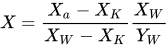
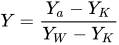
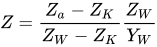
where XKYKZK and XWYWZW are reference display black and white points in the table above.
The conversion between normalized XYZ to and from Adobe RGB tristimulus values can be done as follows:[5]


As was later defined in the IEC standard opYCC uses BT.601 matrix for conversion to YCbCr, that can be full range matrix and limited range matrix. Display can signal YCC quantization range support and sink can send either one.
ICC PCS color image encoding
[edit]An image in the ICC Profile Connection Space (PCS) is encoded in 24-bit Adobe RGB (1998) color image encoding. Through the application of the 3x3 matrix below (derived from the inversion of the color space chromaticity coordinates and a chromatic adaptation to CIE Standard Illuminant D50 using the Bradford transformation matrix), the input image's normalized XYZ tristimulus values are transformed into RGB tristimulus values. The component values would be clipped to the range [0, 1].[5]

The RGB tristimulus values are then converted to Adobe RGB R'G'B' component values through the use of the following component transfer functions:


The resulting component values would be then represented in floating point or integer encodings. If it is necessary to encode values from the PCS back to the input device space, the following matrix can be implemented:

Comparison to sRGB
[edit]Gamut
[edit]
sRGB is an RGB color space proposed by HP and Microsoft in 1996 to approximate the color gamut of the (then) most common computer display devices (CRTs). Since sRGB serves as a "best guess" metric for how another person's monitor produces color, it has become the standard color space for displaying images on the Internet. sRGB's color gamut encompasses just 35% of the visible colors specified by CIE, whereas Adobe RGB (1998) encompasses slightly more than 50% of all visible colors. Adobe RGB (1998) extends into richer cyans and greens than does sRGB – for all levels of luminance. The two gamuts are often compared in mid-tone values (~50% luminance), but clear differences are evident in shadows (~25% luminance) and highlights (~75% luminance) as well. In fact, Adobe RGB (1998) expands its advantages to areas of intense orange, yellow, and magenta regions.[7]
Although there is a significant difference between gamut ranges in the CIE xy chromaticity diagram, if the coordinates were to be transformed to fit on the CIE u′v′ chromaticity diagram, which illustrates the eye's perceived variance in hue more closely, the difference in the green region is far less exaggerated. Also, although Adobe RGB (1998) can theoretically represent a wider gamut of colors, the color space requires special software and a complex workflow in order to utilize its full range. Otherwise, the produced colors would be squeezed into a smaller range (making them appear duller) in order to match sRGB's more widely used gamut.
Bit depth distribution
[edit]Although the Adobe RGB (1998) working space clearly provides more colors to utilize, another factor to consider when choosing between color spaces is how each space influences the distribution of the image's bit depth. Color spaces with larger gamuts "stretch" the bits over a broader region of colors, whereas smaller gamuts concentrate these bits within a narrow region.
A similar, yet not as dramatic concentration of bit depth occurs with Adobe RGB (1998) versus sRGB, except in three dimensions rather than one. The Adobe RGB (1998) color space occupies roughly 40% more volume than the sRGB color space, which concludes that one would only be exploiting 70% of the available bit depth if the colors in Adobe RGB (1998) are unnecessary.[7] On the contrary, one may have plenty of "spare" bits if using a 16-bit image, thus negating any reduction due to the choice of working space.
See also
[edit]References
[edit]- ^ a b c d "IEC 61966-2-5:2007 | IEC Webstore". webstore.iec.ch. Retrieved 8 February 2021.
- ^ a b ISO; Adobe Systems, Inc. (May 2011). "ISO - ISO 12640-4:2011 - Graphic technology — Prepress digital data exchange — Part 4: Wide gamut display-referred standard colour image data [Adobe RGB (1998)/SCID]". ISO. Retrieved 18 April 2021.
- ^ "2011 Color and Imaging Conference, Part VI: Special Session | Real-Time Rendering". www.realtimerendering.com. Archived from the original on 27 August 2025. Retrieved 16 October 2025.
- ^ "2011 Color and Imaging Conference, Part VI: Special Session". Real-Time Rendering. 21 December 2011.
- ^ a b c d e f Adobe RGB (1998) Color Image Encoding (PDF) (Technical report). Adobe Systems Incorporated. 13 May 2005.
- ^ Yamashita, Takayuki; Masuda, Hiroyasu; Masaoka, Kenichiro; Ohmura, Kohei; Emotot, Masaki; Nishida, Yukihiro; Sugawara, Masayuki (November–December 2012). ""Super Hi-Vision" as Next-Generation Television and Its Video Parameters" (PDF). Information Display. 28 (11 & 12). Society for Information Display: 12–17. doi:10.1002/j.2637-496X.2012.tb00565.x. S2CID 86626642. Archived from the original (PDF) on 20 April 2015. Retrieved 1 December 2013.
- ^ a b "sRGB vs. Adobe RGB 1998". Cambridge in Colour.
External links
[edit]- Adobe Magazine discussion of Photoshop 5.0's new RGB working spaces
- Adobe RGB (1998) Color Image Encoding
- Color Management in Practice – Advantages of the Adobe RGB Color Space
- ICC Adobe RGB (1998) Encoding Characteristics
- IEC 61966-2-5:2007: optional RGB color space - opRGB
- Adobe Color - https://color.adobe.com
| CAM | |
|---|---|
| CIE | |
| RGB | |
| Y′UV | |
| Other | |
| Color systems and standards | |
For the vision capacities of organisms or machines, see  Color vision. Color vision. | |
Adobe RGB color space
View on GrokipediaIntroduction
Definition and Purpose
The Adobe RGB (1998) color space, also known as opRGB, is an additive RGB color space developed by Adobe Systems in 1998 to serve as a working environment for digital image processing.[1] It models the color output of an RGB display device and is defined as an output-referred encoding for exchanging digital images, particularly in professional workflows.[2] The primary purpose of Adobe RGB is to provide a broader color gamut than standard RGB spaces, enabling it to encompass most colors achievable with CMYK printers used in print production.[1] This makes it especially suitable for professional imaging applications targeted at print media, where accurate reproduction of a wide range of hues is essential for bridging digital editing and physical output.[3] Unlike narrower spaces like sRGB, Adobe RGB emphasizes improved representation of cyans, greens, and highly saturated colors, which are often critical in photographic and graphic design work for print.[4] Adobe RGB covers approximately 50% of the CIE 1931 color space, corresponding to about 50% of visible colors, thereby offering greater fidelity to the human visual spectrum in professional contexts.[4] It has been standardized internationally as IEC 61966-2-5:2007, which defines it as an optional RGB color space for encoding and communication in multimedia systems.[5] Additionally, ISO 12640-4:2011 incorporates Adobe RGB (1998) as the encoding for a set of standard wide-gamut display-referred color images used in prepress digital data exchange.[6]Key Features
Adobe RGB (1998) distinguishes itself through its expanded color gamut, which surpasses that of sRGB, particularly in the green and cyan regions, allowing for greater color fidelity in professional photography and high-end printing applications where reproducing vibrant natural tones is essential.[2] This wider gamut enables the representation of colors closer to those achievable in traditional offset printing presses, making it a preferred choice for workflows involving CMYK conversions.[1] The color space adopts the D65 illuminant as its white point, ensuring alignment with standardized daylight viewing conditions commonly used in professional imaging environments.[2] This choice promotes consistent color perception across displays and print media calibrated to similar illuminants. Typically encoded with 8 bits per channel for red, green, and blue components, Adobe RGB supports approximately 16.7 million distinct colors in standard implementations, though modern digital workflows often extend to higher bit depths such as 10, 12, or 16 bits per channel to minimize banding in gradients and enhance precision during editing.[2] For perceptual uniformity on displays and in print, Adobe RGB employs a gamma approximation of 2.2, which maps linear light values to nonlinear encoded values in a manner that approximates human visual response.[1] Under reference viewing conditions with a white point luminance of 160 cd/m², the space achieves a contrast ratio of approximately 288:1, providing robust dynamic range for image reproduction.[1] Its design draws brief historical basis from the SMPTE 240M standard, adapting high-definition television primaries for digital imaging needs.[2]History and Development
Origins and Creation
The development of the Adobe RGB color space was initiated in 1997 by Thomas Knoll, co-creator of Adobe Photoshop, at Adobe Systems to overcome the limitations of existing RGB color spaces in supporting professional print workflows, where early standards like sRGB often led to insufficient color reproduction for desktop publishing applications.[7] Knoll aimed to provide a working space that minimized color clipping during conversions to CMYK for printing, enabling photographers and designers to capture and edit a broader range of colors without loss when preparing images for high-quality output.[7] Drawing from the SMPTE 240M standard originally developed for high-definition television, Adobe adapted the primaries to better align with the gamuts of typical printing presses, intentionally widening the color range—particularly in greens and cyans—to enhance compatibility with print media while maintaining suitability for digital editing.[2] This adaptation stemmed from an interpretation of SMPTE 240M's idealized primaries, which inadvertently created a gamut wider than the standard's actual video-oriented one but advantageous for print.[7] This adaptation involved selecting idealized chromaticity values from SMPTE 240M documentation, which provided a foundation wider than sRGB but tailored for the demands of professional graphics production rather than broadcast video.[7] Initially released in Photoshop 5.0 in 1998 under the name SMPTE-240M, the space was soon renamed Adobe RGB to avoid potential trademark issues with the SMPTE standard. Upon discovering a transcription error in the red primary coordinates from the SMPTE 240M documentation, Adobe chose to retain the wider gamut values and specified it as Adobe RGB (1998) in 1998.[2][7] These choices ensured the space's viability as a robust editing environment, with the final primaries chosen to optimize performance in color management tasks. This profile was subsequently formalized in 2007 through the IEC 61966-2-5 standard, which defined it as opRGB for broader multimedia applications.[8]Standardization and Evolution
The Adobe RGB (1998) color space achieved formal recognition through its inclusion in international standards focused on digital imaging and prepress workflows. In 2011, the International Organization for Standardization (ISO) incorporated it into ISO 12640-4, which specifies a set of standard wide-gamut display-referred color images encoded as 16-bit Adobe RGB (1998) digital data to ensure consistency in prepress digital data exchange across the print industry.[6] Adobe Systems provided a detailed specification for Adobe RGB in 2005, precisely defining its parameters—including the original 1998 primaries—to promote vendor interoperability and accurate color encoding in digital exchange.[2] These primaries, with red at chromaticity coordinates x=0.6400, y=0.3300, have been retained without alteration in all subsequent documentation, owing to the space's entrenched adoption in professional tools like Photoshop, where it was first embedded via ICC profiles in version 5.0.2.[2] Post-1998 developments centered on seamless integration into Adobe's broader Color Management System, enabling consistent handling across applications such as Photoshop and Illustrator without altering core definitions.[2] By 2025, no major revisions to the specification have occurred, reflecting its stability amid evolving wide-gamut display technologies that continue to support it for enhanced color fidelity in professional environments.[9]Technical Specifications
Color Primaries and White Point
The Adobe RGB (1998) color space defines its color primaries using CIE 1931 xy chromaticity coordinates to establish a wide-gamut RGB model suitable for professional imaging workflows. The red primary is set at (0.6400, 0.3300), the green primary at (0.2100, 0.7100), and the blue primary at (0.1500, 0.0600).[1] These coordinates position the primaries near the spectral locus of the CIE 1931 color space, with the green primary closely aligning to the locus for enhanced green coverage, while the red primary is placed slightly inside the locus as a compromise to ensure compatibility with typical CMYK printer gamuts and avoid overly saturated colors that could not be reproduced in print.[1][10] The reference white point adopts the CIE standard illuminant D65, with chromaticity coordinates of (0.3127, 0.3290) and a normalized luminance of Y = 1.0000, providing a daylight-balanced reference for consistent color reproduction across devices.[1] This configuration results in a gamut that covers approximately 52.1% of the CIE 1931 color space, offering broader coverage than standard RGB spaces while remaining practical for display and print applications.[10] The transformation from linear RGB values (scaled 0 to 1) to CIE XYZ tristimulus values is given by the following matrix:\begin{bmatrix}
X \\
Y \\
Z
\end{bmatrix}
=
\begin{bmatrix}
0.5766709 & 0.1855540 & 0.1881852 \\
0.2973769 & 0.6273491 & 0.0752741 \\
0.0270343 & 0.0706872 & 0.9911085
\end{bmatrix}
\begin{bmatrix}
R \\
G \\
B
\end{bmatrix}
\begin{bmatrix}
X \\
Y \\
Z
\end{bmatrix}
=
\begin{bmatrix}
0.5766709 & 0.1855540 & 0.1881852 \\
0.2973769 & 0.6273491 & 0.0752741 \\
0.0270343 & 0.0706872 & 0.9911085
\end{bmatrix}
\begin{bmatrix}
R \\
G \\
B
\end{bmatrix}
\begin{bmatrix}
R \\
G \\
B
\end{bmatrix}
=
\begin{bmatrix}
2.0413690 & -0.5649464 & -0.3446944 \\
-0.9692660 & 1.8760108 & 0.0415560 \\
0.0134474 & -0.1183897 & 1.0154096
\end{bmatrix}
\begin{bmatrix}
X \\
Y \\
Z
\end{bmatrix}
\begin{bmatrix}
R \\
G \\
B
\end{bmatrix}
=
\begin{bmatrix}
2.0413690 & -0.5649464 & -0.3446944 \\
-0.9692660 & 1.8760108 & 0.0415560 \\
0.0134474 & -0.1183897 & 1.0154096
\end{bmatrix}
\begin{bmatrix}
X \\
Y \\
Z
\end{bmatrix}