


Community hub
Recent from talks
Contribute something
Nothing was collected or created yet.
Alpha compositing
View on Wikipedia
In computer graphics, alpha compositing or alpha blending is the process of combining one image with a background to create the appearance of partial or full transparency.[1] It is often useful to render picture elements (pixels) in separate passes or layers and then combine the resulting 2D images into a single, final image called the composite. Compositing is used extensively in film when combining computer-rendered image elements with live footage. Alpha blending is also used in 2D computer graphics to put rasterized foreground elements over a background.
In order to combine the picture elements of the images correctly, it is necessary to keep an associated matte for each element in addition to its color. This matte layer contains the coverage information—the shape of the geometry being drawn—making it possible to distinguish between parts of the image where something was drawn and parts that are empty.
Although the most basic operation of combining two images is to put one over the other, there are many operations, or blend modes, that are used.
History
[edit]The concept of an alpha channel was introduced by Alvy Ray Smith and Ed Catmull in the late 1970s at the New York Institute of Technology Computer Graphics Lab. Bruce A. Wallace derived the same straight over operator based on a physical reflectance/transmittance model in 1981.[2] A 1984 paper by Thomas Porter and Tom Duff introduced premultiplied alpha using a geometrical approach.[3]
The use of the term alpha is explained by Smith as follows: "We called it that because of the classic linear interpolation formula that uses the Greek letter (alpha) to control the amount of interpolation between, in this case, two images A and B".[4] That is, when compositing image A atop image B, the value of in the formula is taken directly from A's alpha channel.


Description
[edit]In a 2D image a color combination is stored for each picture element (pixel), often a combination of red, green and blue (RGB). When alpha compositing is in use, each pixel has an additional numeric value stored in its alpha channel, with a value ranging from 0 to 1. A value of 0 means that the pixel is fully transparent and the color in the pixel beneath will show through. A value of 1 means that the pixel is fully opaque.
With the existence of an alpha channel, it is possible to express compositing image operations using a compositing algebra. For example, given two images A and B, the most common compositing operation is to combine the images so that A appears in the foreground and B appears in the background. This can be expressed as A over B. In addition to over, Porter and Duff[3] defined the compositing operators in, held out by (the phrase refers to holdout matting and is usually abbreviated out), atop, and xor (and the reverse operators rover, rin, rout, and ratop) from a consideration of choices in blending the colors of two pixels when their coverage is, conceptually, overlaid orthogonally:

As an example, the over operator can be accomplished by applying the following formula to each pixel:[2]
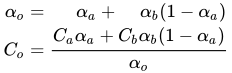
Here , and stand for the color components of the pixels in the result of the "over", image A, and image B respectively, applied to each color channel (red/green/blue) individually, whereas , and are the alpha values of the respective pixels.


The over operator is, in effect, the normal painting operation (see Painter's algorithm). The in and out operators are the alpha compositing equivalent of clipping. The two use only the alpha channel of the second image and ignore the color components. In addition, plus defines additive blending.[3]
Straight versus premultiplied
[edit]If an alpha channel is used in an image, there are two common representations that are available: straight (unassociated) alpha and premultiplied (associated) alpha.
- With straight alpha, the RGB components represent the color of the object or pixel, disregarding its opacity. This is the method implied by the over operator in the previous section.
- With premultiplied alpha, the RGB components represent the emission of the object or pixel, and the alpha represents the occlusion. The over operator then becomes:[3]


Comparison
[edit]The most significant advantage of premultiplied alpha is that it allows for correct blending, interpolation, and filtering. Ordinary interpolation without premultiplied alpha leads to RGB information leaking out of fully transparent (A=0) regions, even though this RGB information is ideally invisible. When interpolating or filtering images with abrupt borders between transparent and opaque regions, this can result in borders of colors that were not visible in the original image. Errors also occur in areas of semitransparency because the RGB components are not correctly weighted, giving incorrectly high weighting to the color of the more transparent (lower alpha) pixels.[5]
Premultiplied alpha may also be used to allow regions of regular alpha blending (e.g. smoke) and regions with additive blending mode (e.g. flame and glitter effects) to be encoded within the same image.[6][7] This is represented by an RGBA triplet that express emission with no occlusion, such as (0.4, 0.3, 0.2, 0.0).
Another advantage of premultiplied alpha is performance; in certain situations, it can reduce the number of multiplication operations (e.g. if the image is used many times during later compositing). The Porter–Duff operations have a simple form only in premultiplied alpha.[3] Some rendering pipelines expose a "straight alpha" API surface, but converts them into premultiplied alpha for performance.[8]
One disadvantage of premultiplied alpha is that it can reduce the available relative precision in the RGB values when using integer or fixed-point representation for the color components. This may cause a noticeable loss of quality if the color information is later brightened or if the alpha channel is removed. In practice, this is not usually noticeable because during typical composition operations, such as OVER, the influence of the low-precision color information in low-alpha areas on the final output image (after composition) is correspondingly reduced. This loss of precision also makes premultiplied images easier to compress using certain compression schemes, as they do not record the color variations hidden inside transparent regions, and can allocate fewer bits to encode low-alpha areas. The same “limitations” of lower quantisation bit depths such as 8 bit per channel are also present in imagery without alpha, and this argument is problematic as a result.
Examples
[edit]Assuming that the pixel color is expressed using straight (non-premultiplied) RGBA tuples, a pixel value of (0, 0.7, 0, 0.5) implies a pixel that has 70% of the maximum green intensity and 50% opacity. If the color were fully green, its RGBA would be (0, 1, 0, 0.5). However, if this pixel uses premultiplied alpha, all of the RGB values (0, 0.7, 0) are multiplied, or scaled for occlusion, by the alpha value 0.5, which is appended to yield (0, 0.35, 0, 0.5). In this case, the 0.35 value for the G channel actually indicates 70% green emission intensity (with 50% occlusion). A pure green emission would be encoded as (0, 0.5, 0, 0.5). Knowing whether a file uses straight or premultiplied alpha is essential to correctly process or composite it, as a different calculation is required.
Emission with no occlusion cannot be represented in straight alpha. No conversion is available in this case.
Image formats supporting alpha channels
[edit]The most popular image formats that support the alpha channel are PNG and TIFF. GIF supports alpha channels, but is considered to be inefficient when it comes to file size. Support for alpha channels is present in some video codecs, such as Animation and Apple ProRes 4444 of the QuickTime format, or in the Techsmith multi-format codec.
The file format BMP generally does not support this channel; however, in different formats such as 32-bit (888–8) or 16-bit (444–4) it is possible to save the alpha channel, although not all systems or programs are able to read it: it is exploited mainly in some video games[9] or particular applications;[10] specific programs have also been created for the creation of these BMPs.
| File/Codec format[11] | Maximum Depth | Type | Browser support | Media type | Notes |
|---|---|---|---|---|---|
| Apple ProRes 4444 | 16-bit | None | Video (.mov) | ProRes is the successor of the Apple Intermediate Codec[12] | |
| HEVC / h.265 | 10-bit | Limited to Safari | Video (.hevc) | Intended successor to H.264[13][14][15] | |
| WebM (codec video VP8, VP9, or AV1) | 12-bit | All modern browsers | Video (.webm) | While VP8/VP9 is widely supported with modern browsers, AV1 still has limited support.[16] Only Chromium-based browsers will display alpha layers. | |
| OpenEXR | 32-bit | None | Image (.exr) | Has largest HDR spread. | |
| PNG | 16-bit | straight | All modern browsers | Image (.png) | |
| APNG | 24-bit | straight | Moderate support | Image (.apng) | Supports animation.[17] |
| TIFF | 32-bit | both | None | Image (.tiff) | |
| GIF | 8-bit | All modern browsers | Image (.gif) | Browsers generally do not support GIF alpha layers. | |
| SVG | 32-bit | straight | All modern browsers | Image (.svg) | Based on CSS color.[18] |
| JPEG XL | 32-bit | both | Moderate support | Image (.jxl) | Allows lossy and HDR.[19] |
Gamma correction
[edit]

into account gamma correction
The RGB values of typical digital images do not directly correspond to the physical light intensities, but are rather compressed by a gamma correction function:
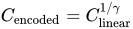
This transformation better utilizes the limited number of bits in the encoded image by choosing that better matches the non-linear human perception of luminance.

Accordingly, computer programs that deal with such images must decode the RGB values into a linear space (by undoing the gamma-compression), blend the linear light intensities, and re-apply the gamma compression to the result:[20][21][failed verification]
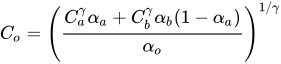
When combined with premultiplied alpha, pre-multiplication is done in linear space, prior to gamma compression.[22] This results in the following formula:

Note that the alpha channel may or may not undergo gamma-correction, even when the color channels do.
Other transparency methods
[edit]Although used for similar purposes, transparent colors and image masks do not permit the smooth blending of the superimposed image pixels with those of the background (only whole image pixels or whole background pixels allowed).
A similar effect can be achieved with a 1-bit alpha channel, as found in the 16-bit RGBA high color mode of the Truevision TGA image file format and related TARGA and AT-Vista/NU-Vista display adapters' high color graphic mode. This mode devotes 5 bits for every primary RGB color (15-bit RGB) plus a remaining bit as the "alpha channel".
Dithering can be used to simulate partial occlusion where only 1-bit alpha is available.
For some applications, a single alpha channel is not sufficient: a stained-glass window, for instance, requires a separate transparency channel for each RGB channel to model the red, green and blue transparency separately. More alpha channels can be added for accurate spectral color filtration applications.
Some order-independent transparency methods replace the over operator with a commutative approximation.[23]
See also
[edit]References
[edit]- ^ "Definition of alpha blending". PCMAG. Retrieved 2021-08-07.
- ^ a b Wallace, Bruce A. (1981). "Merging and transformation of raster images for cartoon animation". Proceedings of the 8th annual conference on Computer graphics and interactive techniques - SIGGRAPH '81. Vol. 15. New York City, New York: ACM Press. pp. 253–262. CiteSeerX 10.1.1.141.7875. doi:10.1145/800224.806813. ISBN 0-89791-045-1. S2CID 1147910.
- ^ a b c d e Porter, Thomas; Duff, Tom (July 1984). "Compositing digital images" (PDF). Proceedings of the 11th annual conference on Computer graphics and interactive techniques - SIGGRAPH '84. Vol. 18. New York City, New York: ACM Press. pp. 253–259. doi:10.1145/800031.808606. ISBN 9780897911382. S2CID 18663039. Archived (PDF) from the original on 2011-04-29. Retrieved 2019-03-11.
- ^ Alvy Ray Smith (1995-08-15). "Alpha and the History of Digital Compositing" (PDF). alvyray.com. p. 6. Archived from the original (PDF) on 2021-10-25.
- ^ "Alpha Blending: To Pre or Not To Pre". NVIDIA Developer. 31 January 2013.
However, something interesting happens when we generate the next mipmap level...
- ^ "TomF's Tech Blog - It's only pretending to be a wiki". TomF's Tech Blog - It's only pretending to be a wiki. Archived from the original on 12 December 2017. Retrieved 8 May 2018.
- ^ Trebilco, Damian. "To close to draw call (presentation on Pre-multiplied alpha)". GitHub.
By switching to pre-multiplied blend mode for all particle effects, and entire scene can be done with one draw call (assuming atlasing/2D array for the textures)... Another neat trick with pre-multiplied alpha is that if you have overlapping textures that are in known positions, you can pre-process them all down to one texture.
- ^ "Premultiplied alpha". Win2D for WinUI3. Retrieved 30 June 2023.
Win2D uses straight alpha in its API surface, but premultiplied alpha for internal rendering operations.
- ^ "Creating Textures". www.echos.ch. Retrieved 2023-05-25.
- ^ "Extended Formats". 2016-03-04. Archived from the original on 2016-03-04. Retrieved 2023-05-25.
- ^ Lambrecht, Jordan (2022-12-31). "List of Video/Image Formats Supporting Alpha Channels". Pixel Bakery Design Studio. Retrieved 2023-05-25.
- ^ "Final Cut Pro 6 - Broad Format Support". apple.com. Archived from the original on 2011-06-08. Retrieved 2024-08-13.
- ^ Jie Dong (2010-06-19). "The First JCT-VC Meeting, Dresden, DE". H265.net. Archived from the original on June 25, 2010. Retrieved 2024-08-13.
- ^ Jie Dong (2008-07-01). "Current Status of H.265 (as at July 2008)". H265.net. Archived from the original on July 12, 2008. Retrieved 2024-08-13.
- ^ Yu Liu (2009-04-15). "The Preliminary Requirements for NGVC". H265.net. Archived from the original on May 13, 2009. Retrieved 2024-08-13.
- ^ "AV1 video format | Can I use... Support tables for HTML5, CSS3, etc". caniuse.com. Retrieved 2023-05-25.
- ^ "Digital Audio Broadcasting (DAB); MOT SlideShow; User Application (pdf) Specification" (PDF). ETSI. Retrieved 13 August 2024.
- ^ "SVG specification, "Color"". World Wide Web Consortium. 14 January 2003. Archived from the original on 7 September 2009. Retrieved 13 August 2024.
- ^ @chromium.org, de... (2022-08-24). "JPEG XL decoding support (image/jxl) in blink (tracking bug)". bugs.chromium.org. Retrieved 2024-08-13.
- ^ Minute Physics (March 20, 2015). "Computer Color is Broken". YouTube. Archived from the original on 2021-11-22.
- ^ Novak, John (September 21, 2016). "What every coder should know about gamma".
- ^ "Gamma Correction vs. Premultiplied Pixels – Søren Sandmann Pedersen". ssp.impulsetrain.com.
- ^ McGuire, Morgan; Bavoil, Louis (2013). "Weighted Blended Order-Independent Transparency". Journal of Computer Graphics Techniques. 2 (2): 122–141.
External links
[edit]Alpha compositing
View on GrokipediaFundamentals
Alpha Channel
The alpha channel is a per-pixel value in digital images that represents the degree of opacity, or conversely transparency, for each pixel, with values typically normalized between 0 (fully transparent) and 1 (fully opaque). In integer representations, such as 8-bit encoding, this corresponds to a range of 0 to 255 levels.[2][5] It is stored as the fourth channel in the RGBA color model, accompanying the red, green, and blue (RGB) channels to form a complete pixel specification that includes both color and transparency information.[6] This integration allows images to carry inherent shape and opacity data without relying on external masks.[2] The term "alpha channel" originated in the 1970s from early video compositing techniques developed at New York Institute of Technology, where Alvy Ray Smith and Ed Catmull coined it to denote the weighting factor α in linear interpolation formulas for blending images, such as αA + (1-α)B.[2] Fundamentally, the alpha channel exhibits grayscale characteristics, with black representing full transparency and white full opacity, and intermediate shades indicating partial translucency; it operates independently of the RGB color channels to define the spatial coverage or matte of image elements.[7][2][8] In contemporary professional graphics workflows, alpha channels often utilize extended precision, such as 16-bit half-floating-point formats in standards like OpenEXR, with 10-bit mantissa precision providing finer gradations than 8-bit integer formats (256 levels) and reduced banding in high-dynamic-range compositing.[9]Purpose and Applications
Alpha compositing primarily enables the layering of semi-transparent graphical elements onto backgrounds without introducing unwanted artifacts, such as halos or incorrect color fringing, by accounting for partial pixel coverage and opacity in 2D graphics, user interface design, and visual effects production.[10] This technique relies on an alpha channel to define transparency per pixel, allowing for realistic overlays where foreground and background colors blend proportionally based on opacity values, which is crucial for maintaining visual fidelity in composite images.[4] In film and visual effects, alpha compositing facilitates the integration of live-action footage with computer-generated elements, such as using chroma keying on green screens to generate alpha mattes that isolate actors for seamless background replacement.[4] For web graphics, it supports transparent image formats like PNG, enabling elements such as logos or icons to overlay page content without opaque backgrounds, as standardized in CSS and SVG through properties likemix-blend-mode for dynamic blending.[3] In video games, alpha compositing is widely applied to particle effects, blending semi-transparent sprites for phenomena like fire, smoke, or explosions into scenes while minimizing overdraw for performance.[11] Modern extensions in augmented reality (AR) and virtual reality (VR) leverage it for real-time blending of virtual objects with live camera feeds, enhancing immersion in applications like Unity-based environments.[12]
The technique offers key benefits, including efficient hardware acceleration through GPU shaders that handle blending operations in parallel, reducing computational overhead compared to CPU-based methods.[12] Additionally, alpha compositing scales effectively across vector-based workflows, such as scalable SVG graphics, and raster formats, maintaining quality from low-resolution UI elements to high-definition renders.[3]
Recent developments since 2020 have integrated alpha compositing with machine learning for advanced image segmentation and AI-generated content, where deep neural networks predict precise alpha mattes to composite synthetic elements onto real images without manual trimaps. For instance, diffusion-based models refine coarse alpha estimates into high-quality mattes for tasks like portrait isolation or environmental effect integration in generative pipelines.[13]
Historical Development
Early Innovations
The concept of the alpha channel emerged in the late 1970s as a solution to challenges in rendering and compositing digital images, particularly for handling partial transparency and anti-aliasing in hidden-surface algorithms. In late 1977 or early 1978, Ed Catmull and Alvy Ray Smith developed the integral alpha channel while working at the New York Institute of Technology's Computer Graphics Laboratory. This innovation integrated a fourth channel—termed "alpha" by Smith to denote coverage or transparency—alongside red, green, and blue (RGBA) in pixel representations, enabling efficient compositing without full re-rendering of scenes. The approach was first documented in Catmull's 1978 paper on a hidden-surface algorithm with anti-aliasing, where alpha facilitated subpixel coverage for smoother edges.[2][14] Early adoption faced significant hardware constraints, as framebuffers capable of supporting 32-bit RGBA pixels were prohibitively expensive—costing around $260,000 in 1975 dollars—and scarce, with only a handful available worldwide. Prior to integral alpha, transparency in digital graphics relied on ad-hoc methods, such as separate matte passes or manual optical compositing in film workflows, which lacked per-pixel precision and required labor-intensive reprocessing. These limitations stemmed from the dominance of 24-bit RGB framebuffers, forcing developers to approximate transparency through binary masks or multiple rendering layers, often resulting in artifacts like jagged edges or inconsistent blending. Smith's reflections highlight how the alpha channel addressed these issues by treating transparency as an inherent pixel property, paving the way for more seamless video compositing.[2][15] A key precursor to formalized alpha compositing appeared in 1981 with Bruce A. Wallace's work on merging and transforming raster images for cartoon animation. Wallace derived a physical model for blending images based on reflectance and transmittance properties, introducing alpha as a coverage factor to interpolate between foreground and background signals accurately. This formulation, applied to video-like raster data, effectively described the "over" operation for partial overlaps, demonstrating practical utility in animation pipelines without dedicated hardware channels. His SIGGRAPH paper emphasized alpha's role in preserving image quality during transformations, influencing subsequent digital effects tools. By the early 1980s, alpha channels entered production environments through systems like the Pixar Image Computer, developed in the early 1980s at Lucasfilm (where Catmull and Smith relocated in 1979), with a prototype demonstrated at SIGGRAPH in 1984 and commercially released in 1986. This hardware incorporated four parallel 12-bit channels for RGB and alpha from the outset, supporting per-pixel transparency in imaging tasks such as visual effects compositing. Lucasfilm's framebuffers were designed as RGBA exclusively, enabling early digital workflows for film and video that integrated alpha for matte generation and layering, marking a shift from analog optical printers to programmable digital solutions.[2][16]Porter-Duff Model
The Porter-Duff model was introduced by Thomas Porter and Tom Duff in their seminal 1984 paper "Compositing Digital Images," presented at SIGGRAPH and published in Computer Graphics. In this work, the authors formalized compositing as a series of set operations performed on rectangular image regions, enabling the systematic combination of digital images with partial transparency.[10] The core concept treats each image as a set of pixels, where every pixel is defined by a color (typically RGB) and a coverage value provided by the alpha channel, representing the fraction of the pixel area occupied by the image's content. Compositing occurs through binary operators applied to the source image (S) and destination image (D) mattes, which are the alpha representations delineating covered versus uncovered areas. This geometric interpretation allows for intuitive handling of overlaps, exclusions, and unions between image regions.[10] The model defines twelve canonical binary operators, each corresponding to a logical combination of source and destination coverage: clear (no coverage), S (source only), D (destination only), S over D, D over S, S in D, D in S, S out D, D out S, S atop D, D atop S, S xor D (exclusive or), and S plus D (union). These are compactly notated using the symbol ◦, as in S ◦ D for source over destination, facilitating both theoretical analysis and practical implementation.[10] This framework quickly became an industry standard for alpha compositing, influencing the development of key graphics tools and APIs; for instance, it underpins layer compositing in Adobe Photoshop (layers introduced in version 3.0 in 1994, building on alpha channel support from version 1.0 in 1990) and serves as the basis for blending functions in OpenGL. Its emphasis on premultiplied alpha and set-based operations revolutionized digital image manipulation, forming the foundation for nearly all modern compositing systems.[2][17]Compositing Operations
Over Operator
The over operator is the most fundamental compositing operation in alpha compositing, which combines a foreground image (source A) with a background image (destination B) by placing A in front of B, blending their contributions proportionally based on their alpha values to simulate occlusion.[10] This operation arises from the Porter-Duff model of compositing as digital images using set-theoretic region operations, where "over" corresponds to the union of the source and destination regions.[10] The resulting alpha coverage for the composite, denoted , is given by the formula where is the source alpha and is the destination alpha, both in the range [0, 1]. This expression represents the total coverage of the union, accounting for the source fully covering its area while the destination contributes only where the source is transparent. Assuming premultiplied colors, where and represent the source and destination colors scaled by their respective alphas, the composite color is computed directly as the sum of contributions: [10] This premultiplied approach avoids division and handles fully transparent pixels naturally as zero contributions. This formula assumes a linear color space, where alpha values represent fractional coverage of the pixel area, and colors are blended additively without gamma correction applied during the operation itself.[10] Partial transparency is handled by treating alpha as the proportion of the pixel covered by the opaque source material, enabling proportional blending that preserves the relative contributions.[10] The practical derivation begins at the conceptual level with set theory: consider the source and destination as sets of subpixel regions, where the over operation computes the union of these sets. The source region covers a fraction of the pixel, and the destination covers , but the overlapping portion (where source is opaque) excludes the destination. Thus, the total covered area is the source area plus the destination area outside the source: . For premultiplied colors, the result is the direct sum of contributions from each region's coverage: the source contributes , and the destination contributes . At the pixel level, this translates directly to the formulas above, assuming uniform color within each coverage fraction and independence across color channels.[10] Edge cases illustrate the operator's behavior: when the source is fully opaque (), and , so the result is entirely the source; conversely, when the source is fully transparent (), and , preserving the destination unchanged.[10]Other Operators
Beyond the standard over operator, the Porter-Duff model defines several specialized compositing operators that enable precise control over how source and destination images interact, particularly for masking, clipping, and exclusion effects. These operators treat alpha channels as coverage maps, dividing the image plane into regions of source-only, destination-only, and overlap, then selecting or blending based on set-theoretic combinations.[18] The in operator (source in destination) restricts the source image to the shape defined by the destination's alpha channel, effectively clipping the source to the destination's opaque regions. This is useful for confining foreground elements within a predefined boundary, such as embedding text within an irregular shape. Mathematically, assuming premultiplied colors where and represent the source and destination colors scaled by their alphas and , the output is given by: In non-overlapping source regions, the result is transparent, while the destination is discarded.[18] Symbolically, it selects the intersection region (A ∩ B) with source color, discarding A - B and retaining nothing from B. The out operator (source out of destination) extracts the source image from outside the destination's shape, creating punch-out or knockout effects where the destination carves holes in the source. This is ideal for revealing underlying layers through subtracted areas, like creating vignettes or irregular frames. The formulas are: The destination is entirely discarded, and the output is transparent where the source overlaps the destination.[18] In set terms, it yields A - B, with no contribution from the intersection or B alone. The atop operator (source atop destination) places the source content only within the destination's shape while preserving the destination's color outside the source, functioning as a masking operation that replaces the destination's interior with the source. This is commonly used for cookie-cutter effects or integrating elements seamlessly into a base layer's silhouette. The expressions simplify to: The overall coverage matches the destination, but colors blend source in the overlap and destination elsewhere.[18] Regionally, it combines (A ∩ B with source color) union (B - A with destination color). The xor operator (exclusive or) reveals non-overlapping portions of both source and destination, excluding their intersection to produce mutual exclusion effects. This is valuable for toggling visibility between layers without overlap blending, such as alternating reveals in animations or UI elements. The formulas are: No contribution comes from the overlap, resulting in transparency there.[18] Set-wise, it outputs (A - B) union (B - A). These operators find niche applications in image editing software for advanced matte operations. For instance, in GIMP, compositing modes implement equivalents of in, out, atop, and xor to handle layer masking and selection without color blending, allowing precise control over transparency in non-destructive workflows. Similarly, Adobe After Effects employs track mattes that leverage these principles for luma- or alpha-based clipping and exclusion in video compositing, enabling effects like traveling mattes for dynamic reveals.[19] Brief symbolic diagrams often illustrate them as Venn diagrams: in covers the overlap with source; out shades source excluding overlap; atop fills destination with source in overlap; xor highlights symmetric differences.Alpha Representation Methods
Straight Alpha
Straight alpha, also known as unassociated alpha, is a representation in which the RGB color components store the true, unscaled scene colors normalized to a 0-1 range, while the separate alpha channel provides an independent opacity multiplier for blending.[2] For example, a pixel with values (0.8, 0.2, 0.4, 0.5) indicates a color of 80% red, 20% green, and 40% blue, visible at 50% opacity without any scaling applied to the RGB values.[2] This approach offers advantages in editing workflows, as the color values remain unaltered by transparency adjustments, preserving the original scene hues for intuitive modifications.[20] It is commonly used in image acquisition from cameras and scanners, where RGB data captures unmultiplied colors and alpha is added later for compositing purposes.[20] Straight alpha is typically stored in file formats supporting independent channels with full precision, such as uncompressed TIFF, where RGB and alpha are maintained as separate components, often at 8 bits per channel or higher to avoid quantization errors.[21] In compositing pipelines, RGB values are multiplied by the alpha channel only at the blending stage—such as in the over operator—to generate the final output, after which the result may be converted and stored in premultiplied form for subsequent operations.[2]Premultiplied Alpha
Premultiplied alpha, also known as associated alpha, represents a pixel's color components (R, G, B) as values already scaled by the alpha value (A), where A denotes the opacity or coverage fraction ranging from 0 (fully transparent) to 1 (fully opaque).[18] In this format, the stored quadruple (r, g, b, a) corresponds to an effective color of (r/a, g/a, b/a) at opacity a, assuming a > 0.[18] For example, a pixel stored as (0.4, 0.1, 0.2, 0.5) implies an effective color of (0.8, 0.2, 0.4) at 50% opacity, since each color channel is the product of the true color and the alpha value.[22] This representation was introduced by Thomas Porter and Tom Duff in their 1984 paper on compositing digital images, specifically to facilitate efficient matting and blending operations in image synthesis systems.[18] It has since become a standard in video compositing workflows and 3D rendering pipelines, such as those in OpenGL, where hardware-accelerated blending relies on premultiplied values for optimal performance.[18] To convert from straight (unassociated) alpha, where color channels are independent of alpha, the premultiplied channels are computed as: with the alpha channel unchanged.[3] Recovery of straight alpha requires division: provided ; otherwise, the color is undefined or treated as black.[18][3] A key advantage of premultiplied alpha is its computational efficiency in blending operations, as it eliminates the need for per-channel multiplications and divisions during compositing. For the over operator, which places the source image atop the destination, the output color and alpha simplify to direct addition without scaling the source color: where and are the premultiplied source and destination colors, respectively.[18] This form enables faster execution in GPU shaders and fixed-function blending units, such as OpenGL'sglBlendFunc(GL_ONE, GL_ONE_MINUS_SRC_ALPHA), avoiding division operations and potential clamping of intermediate values exceeding the [0,1] range.[23]
Regarding precision, premultiplication reduces the effective dynamic range for color channels, particularly at low alpha values, as the scaled values occupy fewer distinct levels in fixed-point representations like 8-bit per channel. For instance, in an 8-bit RGBA format, premultiplication can map multiple input colors to the same output, effectively wasting about 2 bits of precision and reducing unique color-alpha combinations to roughly 25% of the total possible.[22] This trade-off is largely mitigated in modern pipelines using higher bit depths, such as 16-bit floating-point formats, which preserve sufficient precision for most applications without significant loss.[22][18]
Comparison and Examples
Straight alpha preserves the original color values of pixels independently of their opacity, making it ideal for editing and manipulation where color fidelity is crucial, such as in image authoring tools.[24] In contrast, premultiplied alpha multiplies the RGB components by the alpha value during storage, which excels in rendering pipelines involving repeated blending operations, as it supports efficient and associative compositing for multiple layers.[25] A practical example illustrates the equivalence in final output despite differing storage. Consider blending a semi-transparent red circle (RGB = 1,0,0; α = 0.5 in straight alpha, or premultiplied RGB = 0.5,0,0; α = 0.5) over a white background (RGB = 1,1,1; α = 1). Using the over operator, the result for both is an intermediate pink (RGB ≈ 1, 0.5, 0.5; α = 1), demonstrating identical visual outcomes when properly interpreted, though the premultiplied version stores scaled colors to facilitate efficient hardware blending.[22] Converting between representations introduces pitfalls, particularly when recovering straight alpha from premultiplied data, which requires dividing RGB values by alpha; this operation is undefined (division by zero) for fully transparent pixels where α = 0, potentially leading to artifacts or requiring special handling like clamping to zero RGB.[22] Tools such as Adobe After Effects provide options like "Interpret Footage" to specify and switch alpha types during import, mitigating mismatches, while applications like Substance Designer offer dedicated nodes for straight-to-premultiplied conversion.[24][26] Best practices recommend using straight alpha for source images and vector formats, where editing flexibility is prioritized—SVG, for example, employs straight alpha in its color specifications like rgba() to maintain unassociated color data.[27] Premultiplied alpha is preferred for final rendering and compositing workflows to avoid interpolation errors during effects like blurring.[24] In modern contexts, GPU APIs such as WebGL favor premultiplied alpha for performance, as it aligns with hardware-accelerated bilinear filtering and blending modes, reducing shader computations and preventing fringing artifacts in texture sampling.[28]Technical Challenges
Gamma Correction
Gamma encoding is a non-linear transformation applied to color values in common image formats like sRGB, where the encoded color component relates to the linear light intensity by with . This encoding optimizes storage and display for human perception but requires reversal before compositing operations, as alpha blending assumes linear light intensities to accurately model physical light accumulation. Performing blends directly on encoded values leads to visually incorrect results, such as washed-out appearances in bright areas or excessively dark tones in shadows.[29] To adapt the over operator for gamma-encoded inputs using premultiplied alpha, the premultiplied encoded colors are first linearized: and , where and are the encoded premultiplied values. The premultiplied linear output color is computed as with the output alpha . The result is then re-encoded for display: . Notably, the alpha channel itself remains linear and is not gamma-corrected, as it represents coverage or opacity proportionally.[30] Incorrect blending in non-linear space distorts the perceptual uniformity of transparency, often producing halo artifacts—such as dark fringes or color shifts—around semi-transparent edges due to improper intensity weighting. These issues arise because gamma-encoded values do not add linearly, leading to biased accumulation of light contributions.[29] Solutions include software controls for explicit linearization, such as Adobe Photoshop's "Blend RGB Colors Using Gamma 1.0" option, which switches layer blending to linear RGB space for more accurate composites under normal and similar modes. On the hardware side, modern GPUs support linear blending through sRGB texture formats and framebuffer attachments (e.g., via OpenGL'sGL_SRGB or DirectX equivalents), which automatically decode inputs to linear space before blending and encode outputs afterward.[31][32]
A practical example is compositing a semi-transparent gradient overlay onto a colorful background image: without gamma correction, the blend appears desaturated and low-contrast, with mid-tones losing vibrancy; in contrast, linear-space processing preserves the gradient's intended smoothness and the underlying image's dynamic range, yielding a more natural integration.[33]
File Format Support
Alpha compositing relies on file formats that can store alpha channels to preserve transparency information during image and video handling. Raster image formats like PNG natively support alpha channels with straight alpha encoding, allowing up to 16 bits per channel for RGB and alpha, which enables high-fidelity transparency for web and general graphics applications with universal browser support across Chrome, Firefox, Safari, and Edge. TIFF, commonly used in professional workflows such as photography and printing, accommodates 32-bit depth (8 bits per channel for RGBA) and supports both straight and premultiplied alpha, facilitating advanced compositing in tools like Adobe Photoshop. Vector formats integrate alpha for scalable transparency without pixel loss. SVG employs straight alpha through opacity attributes, achieving an effective 32-bit depth equivalent via floating-point values, making it ideal for web graphics and animations that require resolution independence. PDF, starting from version 1.4, embeds alpha channels within transparency groups to handle layered compositing, supporting professional document creation and print workflows with broad software compatibility.[34] Video formats extend alpha support for motion graphics and effects. QuickTime with HEVC (H.265) provides 8- to 10-bit alpha channels, enabling efficient encoding for professional video editing in applications like Final Cut Pro, with strong macOS and iOS integration.[35] WebM using VP9 codec offers 12-bit alpha depth, suitable for web-based transparent videos, with improved browser support in Chrome and Firefox by 2025, though Safari adoption remains partial. AVIF, an emerging format since 2023 based on AV1, delivers 10- to 12-bit alpha for compact web images and videos, achieving full support in all major browsers by 2025 for enhanced efficiency in responsive designs.[36]| Format | Max Depth (per channel) | Alpha Type | Common Uses | Browser/OS Support (2025) |
|---|---|---|---|---|
| PNG | 16-bit | Straight | Web graphics, icons | Universal (all major browsers, all OS) |
| TIFF | 32-bit (8-bit RGBA) | Straight & Premultiplied | Professional editing, archiving | N/A (desktop apps: Windows, macOS, Linux) |
| SVG | 32-bit effective | Straight | Scalable web/UI elements | Universal (all major browsers, all OS) |
| Varies (up to 32-bit) | Embedded (straight) | Documents, print compositing | Universal (Adobe Reader, all OS) | |
| QuickTime/HEVC | 10-bit | Varies | Video editing, motion graphics | macOS/iOS full; Windows partial |
| WebM/VP9 | 12-bit | Varies | Web videos, animations | Chrome/Firefox full; Safari partial |
| AVIF | 12-bit | Straight | Web images/videos | Full (all major browsers, all OS) |