Hubbry Logo
IntranetIntranetMain
Open search
Intranet
Community hub
Intranet
logo
8 pages, 0 posts
0 subscribers
Be the first to start a discussion here.
Intranet
Intranet
from Wikipedia
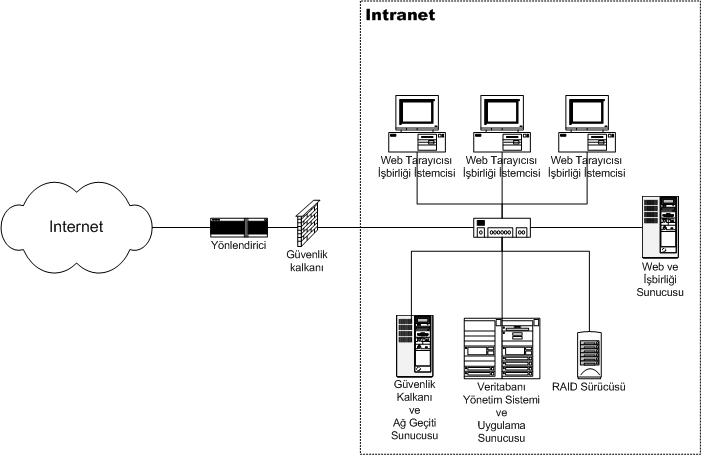
Schematic depicting an intranet (in Turkish)

An intranet is a computer network for sharing information, easier communication, collaboration tools, operational systems, and other computing services within an organization, usually to the exclusion of access by outsiders.[1] The term is used in contrast to public networks, such as the Internet, but uses the same technology based on the Internet protocol suite.[2]

An organization-wide intranet can constitute an important focal point of internal communication and collaboration, and provide a single starting point to access internal and external resources. In its simplest form, an intranet is established with the technologies for local area networks (LANs) and wide area networks (WANs).[3][4][5] Many modern intranets have search engines, user profiles, blogs, mobile apps with notifications, and events planning within their infrastructure.

An intranet is sometimes contrasted to an extranet. While an intranet is generally restricted to employees of the organization, extranets may also be accessed by customers, suppliers, or other approved parties.[6] Extranets extend a private network onto the Internet with special provisions for authentication, authorization and accounting (AAA protocol).

Uses

[edit]

Intranets are increasingly being used to deliver tools, such as for collaboration (to facilitate working in groups and teleconferencing) or corporate directories, sales and customer relationship management, or project management. Intranets are also used as corporate culture-change platforms. For example, a large number of employees using an intranet forum application to host a discussion about key issues could come up with new ideas related to management, productivity, quality, and other corporate issues. In large intranets, website traffic is often similar to public website traffic and can be better understood by using web metrics software to track overall activity. User surveys also improve intranet website effectiveness.

Larger businesses allow users within their intranet to access public internet through firewall servers. They have the ability to screen incoming and outgoing messages, keeping security intact. When part of an intranet is made accessible to customers and others outside the business, it becomes part of an extranet. Businesses can send private messages through the public network using special encryption/decryption and other security safeguards to connect one part of their intranet to another.

Intranet user-experience, editorial, and technology teams work together to produce in-house sites. Most commonly, intranets are managed by the communications, HR or CIO departments of large organizations, or some combination of these.

Because of the scope and variety of content and the number of system interfaces, the intranets of many organizations are much more complex than their respective public websites. Intranets and the use of intranets are growing rapidly. According to the Intranet Design Annual 2007 from Nielsen Norman Group, the number of pages on participants' intranets averaged 200,000 over the years 2001 to 2003 and has grown to an average of 6 million pages over 2005–2007.[7]

Benefits

[edit]

Intranets can help users locate and view information faster and use applications relevant to their roles and responsibilities. With a web browser interface, users can access data held in any database the organization wants to make available at any time and — subject to security provisions — from anywhere within company workstations, increasing employees' ability to perform their jobs faster, more accurately, and with confidence that they have the right information. It also helps improve services provided to users.

Using hypermedia and Web technology, Web publishing allows for the maintenance of and easy access to cumbersome corporate knowledge, such as employee manuals, benefits documents, company policies, business standards, news feeds, and even training, all of which can be accessed throughout a company using common Internet standards (Acrobat files, Flash files, CGI applications). Because each business unit can update the online copy of a document, the most recent version is usually available to employees using the intranet. Intranets are also used as a platform for developing and deploying applications to support business operations and decisions across the internetworked enterprise.

Information is easily accessible to all authorised users, enabling collaboration. Being able to communicate in real-time through integrated third-party tools, such as an instant messenger, promotes the sharing of ideas and removes blockages to communication to help boost a business's productivity.[citation needed]

Intranets can serve as powerful tools for communicating (such as through chat, email and/or blogs) within a given organization about vertically strategic initiatives that have a global reach throughout said organization. The type of information that can easily be conveyed is the purpose of the initiative and what it is aiming to achieve, who is driving it, results achieved to date, and whom to speak to for more information. By providing this information on the intranet, staff can keep up-to-date with the strategic focus of their organization. For example, when Nestlé had a number of food processing plants in Scandinavia, their central support system had to deal with a number of queries every day.[8] When Nestlé decided to invest in an intranet, they quickly realized the savings. Gerry McGovern says that the savings from the reduction in query calls was substantially greater than the investment in the intranet.

Users can view information and data via a web browser rather than maintaining physical documents such as procedure manuals, internal phone list and requisition forms. This can potentially save the business money on printing, duplicating documents, and the environment, as well as document maintenance overhead. For example, the HRM company PeopleSoft "derived significant cost savings by shifting HR processes to the intranet".[8] McGovern goes on to say the manual cost of enrolling in benefits was found to be US$109.48 per enrollment. "Shifting this process to the intranet reduced the cost per enrollment to $21.79; a saving of 80 percent". Another company that saved money on expense reports was Cisco. "In 1996, Cisco processed 54,000 reports and the amount of dollars processed was USD19 million".[8]

Many companies dictate computer specifications which, in turn, may allow Intranet developers to write applications that only have to work on one browser such that there are no cross-browser compatibility issues. Being able to specifically address one's "viewer" is a great advantage. Since intranets are user-specific (requiring database/network authentication prior to access), users know exactly who they are interfacing with and can personalize their intranet based on role (job title, department) or individual ("Congratulations Jane, on your 3rd year with our company!").

Since "involvement in decision making" is one of the main drivers of employee engagement,[9] offering tools (like forums or surveys) that foster peer-to-peer collaboration and employee participation can make employees feel more valued and involved.

Planning and creation

[edit]

Most organizations devote considerable resources into the planning and implementation of their intranet as it is of strategic importance to the organization's success. Some of the planning would include topics such as determining the purpose and goals of the intranet,[10][11] identifying persons or departments responsible for implementation and management and devising functional plans, page layouts and designs.

The appropriate staff would also ensure that implementation schedules and phase-out of existing systems were organized, while defining and implementing security of the intranet and ensuring it lies within legal boundaries and other constraints. In order to produce a high-value end product, systems planners should determine the level of interactivity (e.g. wikis, on-line forms) desired.

Planners may also consider whether the input of new data and updating of existing data is to be centrally controlled or devolve. These decisions sit alongside to the hardware and software considerations (like content management systems), participation issues (like good taste, harassment, confidentiality), and features to be supported.[12]

Intranets are often static sites; they are a shared drive, serving up centrally stored documents alongside internal articles or communications (often one-way communication). By leveraging firms which specialise in 'social' intranets, organisations are beginning to think of how their intranets can become a 'communication hub' for their entire team. The actual implementation would include steps such as securing senior management support and funding,[13] conducting a business requirement analysis and identifying users' information needs.

From the technical perspective, there would need to be a coordinated installation of the web server and user access network, the required user/client applications and the creation of document framework (or template) for the content to be hosted.[14]

The end-user should be involved in testing and promoting use of the company intranet, possibly through a parallel adoption methodology or pilot programme. In the long term, the company should carry out ongoing measurement and evaluation, including through benchmarking against other company services.[15][16]

Maintenance

[edit]

Some aspects are non-static.

Staying current

[edit]

An intranet structure needs key personnel committed to maintaining the intranet and keeping content current. For feedback on the intranet, social networking can be done through a forum for users to indicate what they want and what they do not like.

Privacy protection

[edit]

The European Union's General Data Protection Regulation went into effect May 2018. Since then, the protection of the privacy of employees, customers and other stakeholders (e.g. consultants) has become more and more a significant concern for most companies (at least, all those having an interest in markets and countries where regulations are in place to protect the privacy).

Enterprise private network

[edit]

An enterprise private network is a computer network built by a business to interconnect its various company sites (such as production sites, offices and shops) in order to share computer resources.

Beginning with the digitalisation of telecommunication networks, started in the 1970s in the US by AT&T,[17] and propelled by the growth in computer systems availability and demands, enterprise networks have been built for decades without the need to append the term private to them. The networks were operated over telecommunications networks and, as for voice communications, a certain amount of security and secrecy was expected and delivered.

But with the Internet in the 1990s came a new type of network, virtual private networks, built over this public infrastructure, using encryption to protect the data traffic from eaves-dropping. So the enterprise networks are now commonly referred to as enterprise private networks in order to clarify that these are private networks, in contrast to public networks.

See also

[edit]

References

[edit]
Revisions and contributorsEdit on WikipediaRead on Wikipedia
from Grokipedia
An intranet is a private computer network, typically based on Internet technology such as TCP/IP protocols, that an organization uses for internal purposes including communication, collaboration, and information sharing, while being protected from external access by firewalls and restricted to authorized users only. The concept of the intranet emerged in the early 1990s, rooted in Internet technologies, with the term itself coined in 1994 by Steve Telleen to describe networks using TCP/IP for intra-organizational purposes. Intranets gained widespread adoption in the mid-1990s as web browsers and HTTP protocols became available, allowing organizations to repurpose public Internet tools for private, secure environments that facilitated document management, email, and centralized data access without the need for custom software development. By the late 1990s, intranets had evolved into essential platforms for employee portals, often integrating features like search functions, discussion forums, and workflow tools to streamline operations. Key benefits of intranets include increased employee productivity through efficient and , centralized for better coordination, and heightened operational efficiency leading to higher returns on investment. They also enhance internal communication, boosting employee morale and supporting competitive advantages. In modern implementations, intranets often incorporate advanced features such as mobile accessibility, integration with enterprise software like , and AI-driven search to further improve and .

Introduction

Definition

An intranet is a private network contained within an enterprise, designed to securely share company information, applications, and computing resources among authorized employees using standard internet protocols such as TCP/IP and HTTP. This internal system leverages web-based technologies to enable access via familiar web browsers, functioning similarly to public internet sites but confined to organizational boundaries. Key characteristics of an intranet include restricted access, typically enforced through firewalls to prevent external intrusions and mechanisms to verify user identities, ensuring only designated personnel can interact with its resources. Unlike the open , an intranet maintains a strictly internal focus, with no public accessibility, thereby prioritizing and controlled within the . Intranets evolved from traditional local area networks (LANs) by integrating web technologies to enhance information sharing and connectivity beyond basic file transfers. Essential prerequisites include foundational protocols like TCP/IP for data transmission and HTTP for web interactions, which allow seamless deployment without requiring specialized client software.

History

The concept of the intranet emerged in the early 1990s, paralleling the rapid growth of the , as organizations sought internal networks to share information securely using web technologies. The term "intranet" was coined in 1994 by Steven Telleen at , reflecting the adaptation of protocols for private, company-wide use. One of the earliest documented implementations was ' SunWeb in 1994, designed as an internal web system to improve employee access to resources, with principles emphasizing and . Widespread adoption accelerated in 1995 following the release of the browser, which democratized web browsing and enabled easier deployment of internal web pages across enterprises. By the mid-1990s, intranets had become a standard tool for facilitating communication in geographically dispersed organizations, often replacing fragmented document-sharing systems. In the late 1990s, integration with further solidified their role; for instance, Lotus Notes (later Domino) was enhanced with web connectivity around 1998-2000, allowing seamless blending of , databases, and web-based intranet portals. The marked a shift toward features, transforming static intranets into interactive platforms with tools like wikis for collaborative editing and blogs for knowledge sharing, enhancing and . Post-2010, cloud integration gained prominence, exemplified by the evolution of from on-premises versions to cloud-hosted models in Office 365 (launched 2011), which supported scalable, remote-accessible intranets with improved collaboration. From 2020 onward, the accelerated intranet evolution to support remote and hybrid work, with a surge in hybrid deployments combining on-premises and public flexibility for global accessibility. By 2025, AI-driven personalization—such as intelligent content recommendations and chatbots—has become integral, addressing the need for tailored experiences in distributed teams while boosting productivity in post-pandemic environments.

Technical Foundations

Key Components

An intranet's hardware foundation consists of specialized servers, networking devices, and end-user equipment that enable secure, internal and connectivity. Web servers host intranet content and applications, application servers manage and user interactions, and database servers store and retrieve organizational such as employee records or documents. These servers vary in scale based on the intranet's size and demands, often requiring robust hardware like multi-core processors and sufficient storage to handle internal traffic. Networking devices, including routers and switches, facilitate the flow of within the local network, ensuring efficient communication between intranet resources while isolating them from external . End-user devices, such as desktop PCs, laptops, and mobile devices, provide access points for employees to interact with intranet services via browsers or dedicated apps. Software components form the operational layer of an intranet, powering content delivery, management, and collaboration. Web servers like and Microsoft Internet Information Services (IIS) handle requests for intranet pages and resources using standard web technologies. Content management systems (CMS), such as or adapted for internal use, allow administrators to create, organize, and update intranet content with features like and search functionality. Collaboration tools, including email systems (e.g., Microsoft Exchange) and file-sharing platforms (e.g., ), enable real-time communication, document sharing, and team workflows within the intranet environment. Protocols and standards ensure reliable and secure data exchange across the intranet. Hypertext Transfer Protocol (HTTP) and its secure variant () serve as the primary communication protocols for transmitting web-based content and user interactions. Lightweight Directory Access Protocol (LDAP) is widely used for user authentication and directory services, allowing centralized management of access credentials. (DNS) provides internal name resolution, mapping intranet hostnames to IP addresses without relying on external infrastructure. These protocols operate over TCP/IP, the foundational suite for intranet networking. Integration aspects enhance an intranet's ability to incorporate diverse systems, particularly through that bridges legacy applications with modern components. Middleware software acts as an intermediary layer, facilitating data exchange and protocol translation between older, proprietary systems and newer intranet services. In contemporary setups, API gateways manage external and internal calls, enforcing security and routing, while architectures allow modular deployment of intranet features, enabling scalable integration without overhauling existing infrastructure. This approach addresses gaps in traditional intranets by supporting hybrid environments.

Network Architecture

The network architecture of an intranet is fundamentally designed to facilitate secure, efficient communication within an organization, leveraging standard enterprise networking principles to connect users, devices, and resources. At its core, intranets employ a client-server model, where end-user devices (clients) request services or data from centralized servers that host applications, databases, and content. This model ensures centralized management of resources while allowing distributed access across the network. In larger deployments, this is often structured hierarchically to enhance scalability and performance, dividing the network into distinct layers: the access layer for connecting end devices, the distribution layer for aggregating traffic and applying policies, and the core layer for high-speed backbone routing between segments. This three-layer hierarchical model, widely adopted in enterprise environments, promotes modularity and fault isolation, with the access layer handling local connectivity via switches, the distribution layer managing inter-VLAN routing and security controls, and the core layer providing low-latency, high-throughput paths for critical data flows. Security is integrated into the intranet's architecture through multiple layers to protect internal traffic and enable controlled access. Firewalls are deployed at network boundaries and between segments to inspect and filter traffic based on predefined rules, preventing unauthorized access to sensitive resources. For remote access, virtual private networks (VPNs) create encrypted tunnels over public networks, allowing off-site users to securely connect to the intranet as if they were on the local network. is achieved via virtual local area networks (VLANs), which logically divide the physical infrastructure into isolated broadcast domains, such as separating departments like from HR to limit lateral movement in case of breaches. This approach reduces the by enforcing traffic isolation at the switch level without requiring separate physical cabling. Scalability in intranet is addressed through mechanisms that accommodate growing user bases and volumes, particularly in modern hybrid environments. Load balancers distribute incoming traffic across multiple servers to prevent overloads and ensure , dynamically routing requests based on server health and capacity. Hybrid models extend on-premises intranets by integrating private infrastructure with public services, such as connecting local networks to (AWS) Virtual Private Clouds (VPCs) via dedicated links like AWS Direct Connect, enabling seamless extension of the intranet into the for burst capacity or specialized workloads. This post-2015 evolution allows organizations to scale resources elastically while maintaining through VPC and transit gateways. Data flow within an intranet follows a request-response pattern in the client-server paradigm, beginning with a user device sending a request through the access layer to a distribution switch, which routes it to the appropriate backend server in the core layer for processing. Responses then traverse back through the same path, with content delivery optimized by caching at intermediate layers to minimize latency. Bandwidth considerations are critical, as intranets typically operate over local area networks (LANs) with gigabit or higher speeds to support and collaborative applications, but (WAN) extensions for branch offices require careful provisioning—e.g., 100 Mbps minimum for standard traffic—to avoid bottlenecks, with QoS policies prioritizing voice or video over bulk data transfers.

Applications and Uses

Business Applications

Intranets serve as central hubs in corporate environments for managing employee directories, enabling quick searches for contact , organizational charts, and professional profiles to foster connectivity among distributed teams. Internal communication portals within intranets deliver company-wide announcements, feeds, and discussion forums, streamlining and reducing reliance on scattered threads. Document management systems integrated into intranets allow secure storage, , and collaborative editing of files, ensuring consistent access to policies, reports, and operational guidelines across the organization. HR self-service features provide employees with direct access to details, benefits enrollment, and personal record updates, minimizing administrative burdens on HR departments. Advanced applications extend intranets beyond basic functions, incorporating project collaboration tools that integrate with platforms like Slack to enable real-time task updates, file sharing, and team coordination without switching applications. Knowledge bases hosted on intranets curate training materials, FAQs, and best practices, supporting ongoing employee development and in dynamic business settings. In , intranets facilitate tracking by centralizing data, enabling real-time visibility into stock levels and processes to optimize production workflows. For instance, a global manufacturing firm implemented a SharePoint-based intranet to enhance document management and operational reporting, addressing communication gaps in multi-site environments. In the sector, intranets support compliance reporting through secure portals for regulatory updates, trails, and dissemination, helping institutions maintain adherence to standards like GDPR and . A provider utilized an intranet to standardize training and operations, ensuring compliance across teams. Post-2020, intranets have adapted to by providing virtual access to HR resources and spaces, aiding hybrid teams in maintaining during the shift to distributed models. Success metrics for business intranets often highlight improved access speed, with users retrieving documents faster than traditional methods, and reduced overload, cutting internal correspondence volume through centralized portals.

Non-Business Applications

Intrants extend beyond corporate environments to support institutions, educational organizations, and non-profits by facilitating secure internal communication, resource sharing, and coordination among diverse stakeholders. In these contexts, intranets serve as centralized platforms for accessing sensitive , streamlining administrative processes, and enabling without the primary goal of . In educational settings, intranets function as campus networks that provide student portals for essential services such as course registration, personal records, and access, enhancing accessibility for learners across distributed locations. For instance, Rutgers University's my.rutgers.edu intranet allows students to manage academic information, online registration, and university resources securely within a protected internal network. Similarly, Lehman College's Lehman Connect serves as a intranet integrating connectivity, , and local tools to support student engagement and administrative functions. These platforms also enable access by unifying electronic resources and information systems; Rutgers libraries, for example, leverage intranet-based to deliver networked electronic content and support unified access for users. Administrative coordination benefits from such systems, as seen at the University of Miami's intranet, which facilitates updates to websites, event coverage, and internal communications among staff. Government and healthcare sectors utilize intranets to disseminate policies securely and manage citizen or services while adhering to stringent standards. In government applications, intranets like the U.S. Office of Personnel Management's internal site () provide a platform for unclassified and policy updates among employees, supporting efficient dissemination without public exposure. The U.S. Department of State's OpenNet operates as an for unclassified data, including policy-related communications, restricted to authorized users to ensure controlled internal . In healthcare, intranets enable secure of records; the Indian Health Service's Resource and Patient Management System (RPMS) Network facilitates (PHI) access and treatment-related disclosures across facilities, complying with federal regulations. mechanisms, such as digital certificates in clinical intranets, further protect sensitive medical data during . Non-profit organizations and academic institutions employ intranets for volunteer coordination and collaboration, fostering community involvement and interdisciplinary work. In non-profits, intranets enhance internal communication by providing dedicated spaces for volunteer , including scheduling and , which improves without relying on external profit motives. Academic research benefits from intranet platforms designed for multi-disciplinary ; Purdue University's engineering intranet redesign supports communication among research communities, enabling shared access to project tools and . The University of Wisconsin School of Medicine and Public Health's SMPH Collaborate intranet connects investigators and learners by sharing research discoveries and building community networks internally. Emerging trends highlight intranets' role in hybrid remote learning and IoT integration for , adapting to post-2020 demands in non-business sectors. Following the , educational intranets have supported hybrid models by integrating with learning management systems for remote access to courses and resources; the Naval Postgraduate School's intranet facilitated training on and for distance learning and teleworking during transitions to hybrid formats. In , IoT integration with intranets allows real-time monitoring of ; Maryland's higher education institutions use IoT networks within intranets to manage campus facilities, optimizing energy use and maintenance through connected devices. Government examples include the City of Tukwila's smart building initiatives, where IoT-enabled intranets diagnose mechanical issues to reduce operational costs in public facilities. Similarly, Alaska's employs IoT integration in intranets for airport monitoring and .

Benefits and Advantages

Efficiency and Productivity Gains

Intranets streamline internal communication by acting as centralized repositories for company policies, announcements, and resources, thereby minimizing the time employees spend navigating disparate channels like or shared drives. Research indicates that knowledge workers spend nearly 20 percent of their workweek searching for internal or tracking down colleagues who can help with specific tasks, a figure that drops substantially with effective intranet implementations through features like advanced search and personalized dashboards. For instance, organizations using intranets report up to 35 percent reductions in information-seeking time, allowing teams to focus more on core tasks. Collaboration within organizations sees marked improvements via intranets that support real-time document editing, integrated project management tools, and automated workflows, fostering seamless interaction among distributed teams. Empirical studies highlight that intranets enhance information sharing and internal relationship building. These platforms reduce silos by enabling version-controlled file collaboration and instant feedback loops, which accelerate decision-making and project completion rates. Intranets contribute to cost reductions by diminishing reliance on physical documents and expediting processes like employee , where centralized resources can shorten periods by an average of 20 percent. This leads to lower and consumption, as well as decreased administrative overhead from manual information distribution. ROI analyses of intranet investments typically show periods of 1 to 2 years, driven by these efficiencies and broader uplifts, with conservative estimates yielding returns of 23 to 88 percent. In the context of hybrid and prevalent in the , intranets address connectivity gaps by providing consistent access to collaborative tools and updates, helping organizations achieve the gains of 12 to 20 percent observed in flexible work models. By serving as a virtual hub for remote teams, they mitigate isolation and ensure equitable , enhancing output without requiring physical presence.

Security and Compliance Benefits

Intranets enhance organizational security through robust mechanisms, such as role-based permissions that restrict user access to sensitive information based on their job functions, thereby minimizing unauthorized exposure. protocols like SSL/TLS secure data in transit within the intranet environment, protecting against interception by potential adversaries. Additionally, audit logs systematically record user activities, providing verifiable trails essential for compliance with regulations such as GDPR and HIPAA, which mandate detailed monitoring of data access and modifications. By operating within a , intranets significantly reduce external exposure compared to internet-facing systems, limiting the to internal connections and thereby mitigating risks from widespread cyber threats like distributed denial-of-service attacks. Internal threat detection is bolstered through centralized monitoring tools that identify anomalous behaviors, such as unusual data access patterns, enabling proactive responses to potential breaches. Intranets facilitate compliance by enabling centralized enforcement, where standardized rules for handling and user conduct are uniformly applied across the , ensuring adherence to legal standards. features track changes to legal documents, maintaining immutable records of revisions that support audit requirements and prevent disputes over document authenticity. Intranets allow for integrated updates to policies governing like AI tool usage, such as automated tracking of to support requirements for transparency and . Common vulnerabilities in intranets include insider threats, where authorized users may intentionally or unintentionally compromise data, affecting over 74% of organizations according to security analyses. Intranet-specific mitigations involve regular risk assessments that evaluate access privileges and implement to counter these threats, alongside IP allowlisting to further isolate the network from unauthorized internal escalations.

Planning and Implementation

Initial Planning

The initial planning phase for an intranet serves as the foundational step to align the with organizational objectives, ensuring it meets user needs while mitigating potential pitfalls. This preparatory stage involves a structured to identify core functionalities, user expectations, and resource requirements before any development begins. Effective reduces the likelihood of costly revisions later. Requirements gathering is a critical component of initial , focusing on understanding user and stakeholder needs through targeted methods such as interviews and surveys. Stakeholder interviews, typically conducted with department heads, IT staff, and end-users, help uncover specific pain points and priorities, such as the need for centralized document access or tools. For instance, interviews can reveal preferences for mobile-friendly interfaces among remote workers. Complementing this, user needs analysis often employs anonymous surveys distributed across departments to gauge content priorities, like emphasizing HR resources or company news feeds, ensuring broad representation and quantitative data to validate qualitative insights. These approaches, when combined, provide a comprehensive view of requirements. Scope definition follows requirements gathering, establishing clear boundaries for the to prevent and allocate resources efficiently. This includes budgeting, where costs are estimated based on software licensing, hardware, and personnel. Timeline setting involves creating a phased roadmap, with milestones for assessment, , and testing to maintain momentum. Scalability forecasting is essential, projecting future user growth and feature expansions—such as integrating AI-driven search—to ensure the intranet can handle increased loads without performance degradation, often using tools like models. These elements form a scope statement that outlines deliverables, exclusions, and success metrics, aligning all parties on expectations. Risk evaluation during initial planning identifies potential challenges to inform strategies and contingency plans. Common risks include technical incompatibilities, such as integrating the intranet with legacy systems like outdated software, which can lead to data silos or compatibility issues. Other concerns encompass user adoption barriers, budget overruns from unforeseen customizations, and hurdles in data handling. A formal matrix, ranking issues by likelihood and impact, is recommended to prioritize actions, such as conducting compatibility audits early. Best practices in initial emphasize flexible methodologies to adapt to evolving organizational needs, contrasting traditional approaches with modern agile and integrations. The method, with its linear phases of , design, implementation, and testing, suits stable environments but risks delays if requirements change. In contrast, agile methodologies promote iterative through sprints, allowing continuous feedback from stakeholders to refine requirements incrementally, which is particularly effective for intranets involving dynamic content and user interfaces. Integrating principles, such as automated testing and , further enhances planning by bridging development and operations, reducing deployment risks and supporting in cloud-based intranets. Organizations adopting agile often achieve higher on-time delivery rates for such projects.

Development and Deployment

The development and deployment of an intranet system follows the design phase by translating conceptual plans into a functional platform, emphasizing practical execution to ensure and . In the design phase, UI/UX prototyping plays a central role, where teams create interactive mockups to visualize user interfaces and test flows before full . This involves tools like wireframing software to build low-fidelity prototypes that simulate key features such as dashboards and search functions, allowing for early feedback from stakeholders to refine layouts for intuitive access. Effective prototyping includes iterative user testing of these mockups to identify pain points and ensure the final design aligns with employee workflows. Content migration strategies are equally critical during this phase, focusing on transferring existing digital assets from legacy systems to the new intranet without disrupting operations. Best practices recommend conducting a thorough content audit to categorize materials—such as documents, policies, and —into reusable, outdated, or redundant items, prioritizing high-value content for migration. A phased approach, often guided by worksheets or templates, maps source content to target structures, using automated tools for bulk transfers while manually reviewing sensitive data to maintain accuracy and compliance. ThoughtFarmer outlines this process in four stages: content inventory, , mapping, and migration with tracking, which minimizes and supports seamless integration. The build process begins with software installation, typically involving the setup of a core platform like in a environment, where administrators configure servers or cloud instances to host the intranet. This step requires verifying hardware prerequisites, such as sufficient storage and network bandwidth, and installing necessary components like web servers and databases without additional coding for basic setups. Customization follows, where developers tailor the platform by integrating custom applications, such as employee directories or tools, using no-code web parts or APIs to extend functionality. For instance, recommends leveraging pre-built templates and dynamic web parts in to create responsive pages, enabling features like news feeds and collaborative spaces while adhering to rules for site provisioning. Testing is integral to this phase, encompassing unit tests on individual components—like validating a custom app's logic in isolation—and integration tests to ensure modules, such as search and authentication, interact reliably across the system. helps detect issues early, confirming the intranet's stability before broader use. Deployment adopts a structured rollout to mitigate risks, starting with a pilot phase involving select user groups to test real-world performance and gather iterative feedback. This phased approach divides the organization into waves—beginning with a small cohort of under 5,000 —allowing IT teams to monitor usage, resolve bugs, and optimize features like load times before expanding organization-wide. Microsoft advises incorporating pause points between waves for contingency planning, using tools such as the Portal Launch Scheduler to timeline the process over several days or weeks. programs accompany deployment, featuring hands-on sessions, video tutorials, and quick-reference guides to familiarize users with , content contribution, and protocols, ensuring high rates from the outset. In modern setups, tools like Docker facilitate efficient deployment by packaging custom applications into portable environments, streamlining scaling and updates for non-core components, though full platforms like may require hybrid approaches due to compatibility constraints. Common pitfalls in development and deployment often stem from over-customization, where excessive tailoring of features—such as integrations beyond standard needs—leads to inflated costs, prolonged timelines, and ongoing maintenance burdens that strain resources. Droptica highlights that this approach can result in a too complex for end-users, reducing engagement and complicating future upgrades, as custom code may conflict with platform updates. To avoid this, teams should prioritize out-of-the-box functionalities and limit customizations to essential enhancements validated through prototyping, fostering a balance between flexibility and .

Maintenance and Management

Routine Maintenance

Routine maintenance of an intranet involves ongoing tasks to ensure reliability, performance, and , typically encompassing software updates, data backups, hardware oversight, and system optimization. These activities help prevent and support continuous operation in enterprise environments, where intranets often serve as central hubs for internal communication and . Administrators schedule these tasks regularly, such as daily checks or monthly reviews, to address potential issues proactively. Software patching and updates form a core component of routine upkeep, involving the application of cumulative updates to platforms like to fix vulnerabilities and enhance functionality. For instance, recommends installing cumulative updates for SharePoint Server on a monthly basis to maintain stability and compatibility with evolving user needs. These updates should be tested in a staging environment before deployment to avoid disruptions, ensuring the intranet remains current without compromising accessibility. Hardware monitoring complements this by tracking server metrics such as CPU usage and disk space through tools like , which provides real-time alerts for anomalies that could affect intranet performance. Data backups are essential for safeguarding intranet content, with best practices emphasizing regular schedules and verification to enable quick recovery. In environments, farm-level backups are typically scheduled regularly, such as daily or weekly depending on data volume and organizational policy, while granular backups of sites and lists can be automated using built-in tools to capture changes incrementally. Testing restores periodically verifies backup integrity, reducing recovery time objectives and minimizing risks. ties into this by forecasting storage needs based on growth trends, allowing administrators to scale resources proactively. Performance optimization relies on monitoring tools to maintain efficient intranet operation, including usage and response time tracking. SharePoint's built-in monitoring features, such as timer jobs and health reports, enable administrators to schedule diagnostics that identify bottlenecks, with alerts configured for thresholds like high latency. Tools like extend this capability across the , monitoring network traffic and server loads to ensure the intranet handles peak usage without degradation. Regular optimization, such as database maintenance jobs run weekly, keeps query performance optimal and supports as user numbers increase. User support integrates resources directly into the intranet for seamless issue resolution and feedback collection. This often involves feedback mechanisms, such as forms or channels, allowing employees to submit input and track responses via intranet portals, which streamlines IT responses and improves satisfaction. Feedback loops, implemented through surveys or usage logs, gather input on , informing iterative improvements like content updates or interface tweaks. Adapting to evolving needs includes enhancing mobile responsiveness to accommodate trends, ensuring intranet content displays effectively on devices via responsive design principles. highlights that intranets with fluid grids and flexible images maintain across screen sizes, enabling access to resources without dedicated apps. Periodic audits, conducted bi-annually, assess compatibility with new technologies like progressive web apps, keeping the intranet aligned with modern employee expectations.

Privacy and Security Practices

Organizations establish comprehensive policy frameworks to safeguard intranets, encompassing regular access audits that evaluate user permissions against roles and revoke unnecessary privileges to prevent unauthorized exposure. These frameworks also mandate encryption standards, such as (TLS) for data in transit and (AES) for data at rest, ensuring sensitive internal communications remain protected from interception. Incident response plans form a critical component, outlining sequential steps including preparation through team training, detection via monitoring tools, containment to isolate affected systems, eradication of threats, recovery to restore operations, and post-incident review for . Privacy measures prioritize protecting user within intranets through techniques like , which involves methods such as masking (obscuring portions of identifiers like addresses), (grouping into ranges, e.g., age brackets instead of exact years), and (replacing personal identifiers with artificial ones reversible only via a secure key). These approaches allow for safe internal sharing of or reports without risking individual identification. Consent mechanisms further enhance by requiring explicit, informed user approval—often via opt-in prompts or granular permissions—before is shared across intranet modules like collaborative tools or knowledge bases. Compliance monitoring in intranets entails routine vulnerability scans using automated tools to detect weaknesses in software, configurations, and network components, typically performed quarterly or after significant updates to prioritize remediation of high-risk issues. on phishing recognition is integrated into these efforts, featuring simulated attacks and modules on identifying deceptive emails or links, with progress tracked to foster a vigilant . Addressing 2025-specific threats, such as AI-generated deepfakes in , requires updated protocols like multi-factor verification for video calls or executive directives and awareness sessions on detection to counter impersonation risks. Legal considerations for intranets focus on breach handling procedures that include immediate isolation of compromised systems, forensic to determine scope, and stakeholder notifications within mandated timelines to minimize liability. International laws present varying requirements; for instance, the EU's (GDPR) demands breach reporting to authorities within 72 hours and emphasizes minimization and user rights, while the US's (CCPA) allows a 30-day cure period for violations and focuses on rights for sales, necessitating tailored compliance strategies for multinational organizations.

Comparison to Internet and Extranet

The intranet differs fundamentally from the in its scope and accessibility. The is a vast, publicly accessible connecting billions of devices worldwide, enabling and without restrictions on entry. In contrast, an intranet is a confined to a single , accessible only to authorized internal users such as employees, to facilitate secure internal communication, document sharing, and collaboration tools without exposure to the . This controlled environment ensures that sensitive company data remains protected from external threats, unlike the 's open nature, which relies on public protocols and can be vulnerable to widespread cyber risks. Compared to an , an intranet is strictly internal, serving only the organization's own personnel, whereas an extranet extends the intranet's functionality to select external parties, such as business partners, suppliers, or clients, through secure portals. Extranets maintain the and features of intranets but incorporate additional mechanisms, like VPNs or role-based access controls, to allow controlled collaboration beyond organizational boundaries. For instance, a firm might use an intranet for employee workflows and an extranet for sharing inventory data with suppliers. Hybrid models emerge when intranets evolve into extranets to support (B2B) collaboration, blending internal efficiency with external partnerships. In these setups, core intranet resources remain private, while specific modules are selectively exposed to trusted outsiders, often via encrypted connections, to streamline joint projects like . Such hybrids enhance without compromising the intranet's foundational isolation. In the cloud era, these distinctions adapt to modern infrastructures, with intranets often implemented as private clouds for dedicated, on-premises-like control over data and applications, contrasting the internet's role as a backbone for public software-as-a-service (SaaS) offerings accessible to anyone. Extranets, meanwhile, frequently leverage hybrid cloud models, combining private intranet components with public services to securely integrate external users, addressing needs while mitigating risks through isolated environments. This evolution clarifies boundaries in distributed systems, where intranets prioritize organizational sovereignty over the internet's universal openness.

Enterprise Private Networks

Enterprise private networks (EPNs) provide the underlying infrastructure that enables secure, dedicated connectivity for enterprise-wide intranets across multiple sites and geographies. While simple intranets may operate within local area networks (LANs), EPNs incorporate wide area networks (WANs) to link branch offices, data centers, and remote locations, enabling seamless internal communication and resource sharing on a global scale. This broader scope often leverages software-defined wide area networking () technologies, which virtualize and optimize traffic over diverse transport links such as MPLS, broadband internet, and LTE, allowing dynamic path selection for improved performance and cost efficiency. Key features of EPNs emphasize reliability and operational continuity, including mechanisms that ensure near-100% uptime through redundancy, clustering, and load balancing across multiple network paths. Disaster recovery capabilities within EPNs involve predefined strategies for rapid data replication, backup restoration, and site to mitigate outages from hardware failures or natural disasters, often achieving recovery time objectives (RTOs) of minutes to hours. Integration with (ERP) systems is a core aspect, where EPNs facilitate secure, low-latency data exchange between ERP platforms and other applications, such as tools, via encrypted tunnels and gateways to support real-time decision-making. Prominent examples include global corporations in finance and manufacturing that deploy multiprotocol label switching (MPLS) for private backbones, providing guaranteed bandwidth and quality of service (QoS) for mission-critical applications across international sites; for instance, major providers like Verizon and Lumen enable such setups for enterprises requiring predictable latency. In the 2020s, many organizations have shifted toward Secure Access Service Edge (SASE) models, which converge SD-WAN with cloud-delivered security functions like zero-trust network access (ZTNA) and firewall-as-a-service (FWaaS), reducing reliance on traditional MPLS by leveraging global cloud points of presence for scalable, edge-based connectivity. Implementing EPNs involves navigating significant challenges, particularly the trade-offs between cost and security, where high-assurance private circuits like MPLS incur substantial expenses compared to hybrid public-private models, yet offer superior isolation from external threats. Organizations must balance these by evaluating protection levels against investment, often prioritizing segmented VPNs or SASE to achieve robust and compliance without prohibitive costs.

References

Add your contribution
Related Hubs
User Avatar
No comments yet.