Recent from talks
Nothing was collected or created yet.
KWallet
View on Wikipedia| KDE Wallet Manager | |
|---|---|
| Developer | KDE |
| Stable release | 5.247.0[1] |
| Repository | github |
| Written in | Mainly C++ (Qt), some C |
| Operating system | Cross-platform |
| Type | |
| License | Various LGPL[a] |
| Website | apps |
KDE Wallet Manager (KWallet) is free and open-source password management software written in C++ for UNIX-style operating systems. KDE Wallet Manager runs on a Linux-based OS and Its main feature is storing encrypted passwords in KDE Wallets.[2] The main feature of KDE wallet manager (KWallet) is to collect user's credentials such as passwords or IDs and encrypt them through Blowfish symmetric block cipher algorithm or GNU Privacy Guard encryption.
Installation
[edit]KDE Wallet Manager (KWallet) requires a Linux-based OS and the KDE Software Compilation desktop environment such as Kubuntu.[3]
Browser extensions
[edit]KDE Wallet manager (KWallet) can be integrated with various web browsers including Chrome, Opera, and Edge.
To use KDE Wallet manager (KWallet) integration on Google Chrome or any other Chromium based browsers, user needs to run the browser with argument --password-store=kwallet5 or --password-store=detect .[4]
Historically, there was a standalone add-on available for Firefox. This addon allows users to store passwords internally through KDE Wallet manager (KWallet) instead of the default Firefox password manager.
Since the release of Firefox v57 and the migration from XUL based extension to WebExtensions, there has been no attempt to make a new add-on to support the new Firefox.
Konqueror and Falkon, the official web browser of the K Desktop Environment (KDE) features KDE Wallet manager (KWallet) to store sensitive passwords encrypted.
API
[edit]KDE Wallet Manager’s APIs trigger authentication events when the application makes a request through Desktop Communications protocol (DCOP), which is KDE’s primary interprocess communication (IPC) mechanism, which causes a password dialog box to be displayed for the application. This causes the password dialog box to be launched by the KDE daemon process. Users can choose either to cancel the dialog box which will terminate the application or to fill the password box in. If the password box is filled, the Wallet will automatically open. KDE Wallet Manager’s Desktop communications protocol (DCOP) can only be accessed locally because it is an interprocess communication (IPC) protocol that is processed over UNIX local sockets.[5]
GUI
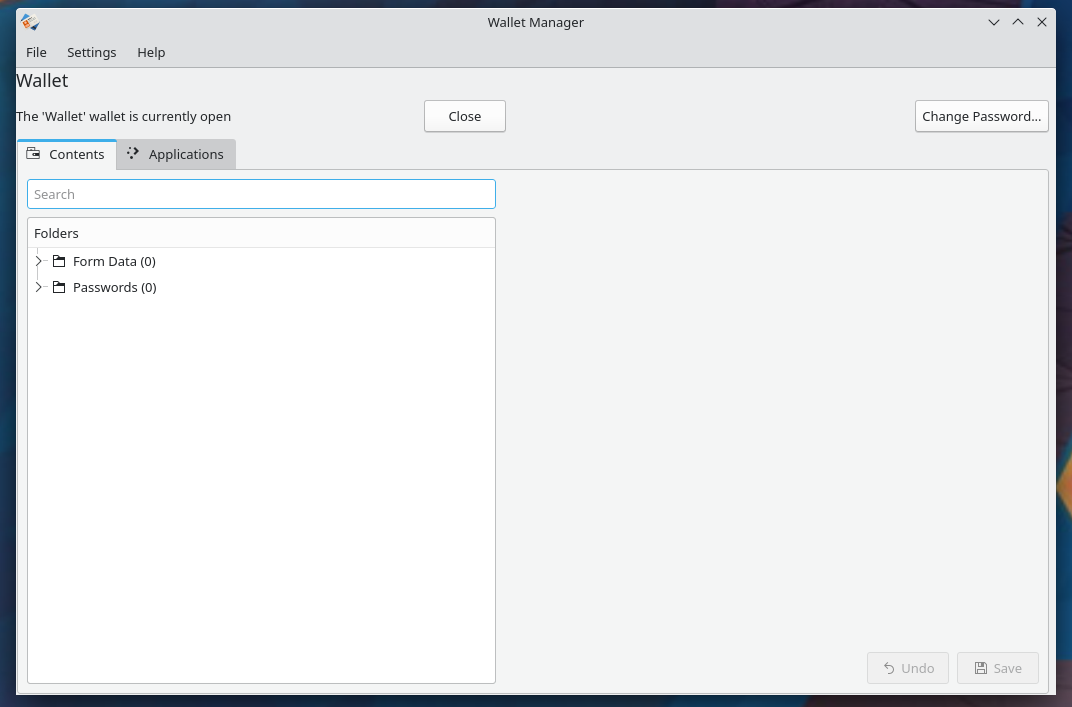
[edit]On KDE Wallet Manager’s GUI, users can manage every wallet and password assigned to them.
KDE Wallet Manager allows users to save or delete Wallets and users can identify which wallet applications should look in when attempting to access a stored password.[5]
These are the lists of actions that users can take on the GUI of KDE Wallet manager (KWallet):
- Create new Wallet
- Change the default Wallet
- Lock the Wallet
- Store passwords to a Wallet
- Unlock the password of the Wallet
- Update the information on a Wallet
- View stored passwords in the Wallet[5]
Wallets
[edit]The Wallet is a term for password storage used in KDE Wallet Manager software. Wallets can be created manually by the user or It is offered by dialogue when the user enters in a password on any KDE desktop environment or website. Once created, Wallet can store various passwords and It is controlled by one master password. This way users do not have to remember various passwords, instead, they can just manage them by memorizing one master password for the wallet. The default Wallet is named “kdewallet” and users can create more of their own if needed.
Managing wallets
[edit]Users can manage wallets on their own KDE Wallet Manager window. Packaging or combining wallets can be done by dragging and dropping. If the user wants to export information to other locations such as flash drives, the window allows for the user to choose whether to export data encrypted or not. Providing the master password, the user can similarly import the data encrypted.
Setting preference of wallets is also possible, user can set certain wallets to be the default wallet. The close wallet setting enables the user to close the wallet after:
- Close when unused for
- Close when the screensaver starts
- Close when the application stops using it
Encryption of the password
[edit]The data stored by the KDE Wallet manager can be encrypted in two major ways. The GNU Privacy Guard (GnuPG or GPG) algorithm is used if GnuPG Made Easy library is installed on the user’s Linux-based OS. If not, Blowfish symmetric block cipher algorithm is used.[6]
Blowfish symmetric block cipher algorithm
[edit]KDE Wallet manager encrypts the data stored in the wallet using the Blowfish symmetric block cipher algorithm in CBC mode. To protect the user’s information, blowfish encrypted data is authenticated with the SHA-1 hashing algorithm.
KDE Wallet manager’s blowfish encryption provides faster encryption compared to Khufu, RC5, DES, IDEA, and Trip-DES. Blowfish encrypts at a rate of 18 clock cycles per byte in 32-bit microprocessors.
KDE Wallet manager’s Blowfish algorithm can be executed in memory within 5k, and a simple structure is easy to implement and easy to determine the strength of the algorithm. The algorithm is variable in key length, which can be long as 448 bites and it allows basic word addition and bit XOR operations.[7]
GNU Privacy Guard encryption
[edit]Users can create a GNU Privacy Guard (GnuPG or GPG) based wallet to store extra-sensitive passwords. This requires users to install GnuPG Made Easy library. If the library is installed and once the software found GNU Privacy Guard (GnuPG or GPG), users will be asked to choose a key to use for a new wallet.[6] User stil can encrypt passwords with Blowfish symmetric block cipher algorithm since GNU Privacy Guard encrtpytion library includes DSA/Blowfish symmetric block cipher algorithm.[8]
Security of KDE Wallet manager
[edit]Using KDE Wallet manager (KWallet) may ease the management of the passwords but It does not provide greater security conditions to user's system. Instead of getting user's other passwords, attackers may get the master password for user's wallets through user's PC.
Since the directory of encrypted files of KDE wallet manager (KWallet) are located in predictable files, It might be vulnerable to viruses or worms those are programmed to aim password management system itself.[5]
Known vulnerabilities
[edit]- The SHA-1 hash function that is used in KDE Wallet manager (KWallet) is cryptographically broken. Google and CWI Amsterdam have proved that two identical SHA-1 digest displays two different PDF content. Various companies, including Microsoft, has discontinued SHA-1 supports; however, KDE Wallet manager (KWallet) uses SHA512 in versions higher than 4.13 or with Pluggable authentication module or it uses SHA-1 hash function.
- "kwallet-pam in KDE KWallet before 5.12.6 allows local users to obtain ownership of arbitrary files via a symlink attack." [citation needed]
- "fishProtocol::establishConnection in fish/fish.cpp in KDE kio-extras through 20.04.0 makes a cacheAuthentication call even if the user had not set the keepPassword option. This may lead to unintended KWallet storage of a password." [citation needed]
- "kwalletd in KWallet before KDE Applications 14.12.0 uses Blowfish with ECB mode instead of CBC mode when encrypting the password store, which makes it easier for attackers to guess passwords via a codebook attack." [citation needed]
- "SHA-1 is not collision resistant, which makes it easier for context-dependent attackers to conduct spoofing attacks, as demonstrated by attacks on the use of SHA-1 in TLS 1.2. NOTE: this CVE exists to provide a common identifier for referencing this SHA-1 issue; the existence of an identifier is not, by itself, a technology recommendation."[9]
- "An issue was discovered in password-store.sh in pass in Simple Password Store 1.7.x before 1.7.2. The signature verification routine parses the output of GnuPG with an incomplete regular expression, which allows remote attackers to spoof file signatures on configuration files and extension scripts. Modifying the configuration file allows the attacker to inject additional encryption keys under their control, thereby disclosing passwords to the attacker. Modifying the extension scripts allows the attacker arbitrary code execution."[10]
- "GnuPG 2.2.21 and 2.2.22 (and Gpg4win 3.1.12) has an array overflow, leading to a crash or possibly unspecified other impact, when a victim imports an attacker's OpenPGP key, and this key has AEAD preferences. The overflow is caused by a g10/key-check.c error. NOTE: GnuPG 2.3.x is unaffected. GnuPG 2.2.23 is a fixed version."[11]
- "A flaw was found in the way certificate signatures could be forged using collisions found in the SHA-1 algorithm. An attacker could use this weakness to create forged certificate signatures. This issue affects GnuPG versions before 2.2.18."[12]
- "GnuPG 1.x before 1.4.16 generates RSA keys using sequences of introductions with certain patterns that introduce a side channel, which allows physically proximate attackers to extract RSA keys via a chosen-ciphertext attack and acoustic cryptanalysis during decryption. NOTE: applications are not typically expected to protect themselves from acoustic side-channel attacks, since this is arguably the responsibility of the physical device. Accordingly, issues of this type would not normally receive a CVE identifier. However, for this issue, the developer has specified a security policy in which GnuPG should offer side-channel resistance, and developer-specified security-policy violations are within the scope of CVE."[13]
- "Integer underflow in the ksba_oid_to_str function in Libksba before 1.3.2, as used in GnuPG, allows remote attackers to cause a denial of service (crash) via a crafted OID in a (1) S/MIME message or (2) ECC based OpenPGP data, which triggers a buffer overflow."[14]
- "Use-after-free vulnerability in kbx/keybox-blob.c in GPGSM in GnuPG 2.x through 2.0.16 allows remote attackers to cause a denial of service (crash) and possibly execute arbitrary code via a certificate with a large number of Subject Alternate Names, which is not properly handled in a realloc operation when importing the certificate or verifying its signature."[15]
- "mainproc.c in GnuPG before 2.2.8 mishandles the original filename during decryption and verification actions, which allows remote attackers to spoof the output that GnuPG sends on file descriptor 2 to other programs that use the "—status-fd 2" option. For example, the OpenPGP data might represent an original filename that contains line feed characters in conjunction with GOODSIG or VALIDSIG status codes."[16]
- "The integrity check feature in OpenPGP, when handling a message that was encrypted using cipher feedback (CFB) mode, allows remote attackers to recover part of the plaintext via a chosen-ciphertext attack when the first 2 bytes of a message block are known, and an oracle or other mechanism is available to determine whether an integrity check failed."[17]
- "Heap-based buffer overflow in the ask_outfile_name function in openfile.c for GnuPG (gpg) 1.4 and 2.0, when running interactively, might allow attackers to execute arbitrary code via messages with "C-escape" expansions, which cause the make_printable_string function to return a longer string than expected while constructing a prompt."[18]
- "GnuPG 1.4.6 and earlier and GPGME before 1.1.4, when run from the command line, does not visually distinguish signed and unsigned portions of OpenPGP messages with multiple components, which might allow remote attackers to forge the contents of a message without detection."[19]
- "mainproc.c in GnuPG before 2.2.8 mishandles the original filename during decryption and verification actions, which allows remote attackers to spoof the output that GnuPG sends on file descriptor 2 to other programs that use the "—status-fd 2" option. For example, the OpenPGP data might represent an original filename that contains line feed characters in conjunction with GOODSIG or VALIDSIG status codes."[20]
- "The mixing functions in the random number generator in Libgcrypt before 1.5.6, 1.6.x before 1.6.6, and 1.7.x before 1.7.3 and GnuPG before 1.4.21 make it easier for attackers to obtain the values of 160 bits by leveraging knowledge of the previous 4640 bits."[21]
- "kbx/keybox-search.c in GnuPG before 1.4.19, 2.0.x before 2.0.27, and 2.1.x before 2.1.2 does not properly handle bitwise left-shifts, which allows remote attackers to cause a denial of service (invalid read operation) via a crafted keyring file, related to sign extensions and "memcpy with overlapping ranges."[22]
Notes
[edit]- ^ LGPL-2.0-only, LGPL-2.0-or-later, LGPL-2.1-or-later, and LGPL-3.0-or-later.
References
[edit]- ^ "v5.247.0". Retrieved 9 January 2024.
- ^ Zhang, Jie; Luo, Xin; Akkaladevi, Somasheker; Ziegelmayer, Jennifer (2009). "Improving multiple-password recall: an empirical study". European Journal of Information Systems. 18 (2): 165–176. doi:10.1057/ejis.2009.9. ISSN 0960-085X. S2CID 7244341.
- ^ Gray, Joshua; Franqueira, Virginia N. L.; Yu, Yijun (2016). "Forensically-Sound Analysis of Security Risks of Using Local Password Managers". 2016 IEEE 24th International Requirements Engineering Conference Workshops (REW) (PDF). Beijing, China: IEEE. pp. 114–121. doi:10.1109/REW.2016.034. ISBN 978-1-5090-3694-3. S2CID 15971740.
- ^ Toman, Zinah Hussein; Toman, Sarah Hussein; Hazar, Manar Joundy (2019). "An In-Depth Comparison Of Software Frameworks For Developing Desktop Applications Using Web Technologies". Journal of Southwest Jiaotong University. 54 (4) 1. doi:10.35741/issn.0258-2724.54.4.1. ISSN 0258-2724. S2CID 209057621.
- ^ a b c d Mulligan, J.; Elbirt, A. J. (2005). "Desktop Security and Usability Trade-Offs: An Evaluation of Password Management Systems". Information Systems Security. 14 (2): 10–19. doi:10.1201/1086/45241.14.2.20050501/88289.3. ISSN 1065-898X. S2CID 21253225.
- ^ a b Dudášová, Ludmila; Vaculík, Martin; Procházka, Jakub (2021-12-29). "Psychologický kapitál v pracovní, klinické a školní psychologii: přehledová studie". Ceskoslovenska Psychologie. 65 (6): 558–574. doi:10.51561/cspsych.65.6.558. ISSN 0009-062X. S2CID 245578091.
- ^ Mousa, A. (2005). "Data encryption performance based on Blowfish". 47th International Symposium ELMAR, 2005. IEEE. pp. 131–134. doi:10.1109/elmar.2005.193660. ISBN 953-7044-04-1. ISSN 1334-2630. S2CID 21814142.
- ^ Aghili, Hamed (2018-07-26), "Improving Security Using Blow Fish Algorithm on Deduplication Cloud Storage", Fundamental Research in Electrical Engineering, Lecture Notes in Electrical Engineering, vol. 480, Singapore: Springer Singapore, pp. 723–731, doi:10.1007/978-981-10-8672-4_54, ISBN 978-981-10-8671-7, S2CID 69654258, retrieved 2022-05-27
- ^ "NVD - CVE-2005-4900". nvd.nist.gov. Retrieved 2022-05-27.
This article incorporates text from this source, which is in the public domain.
- ^ "NVD - CVE-2018-12356". nvd.nist.gov. Retrieved 2022-05-27.
This article incorporates text from this source, which is in the public domain.
- ^ "NVD - CVE-2020-25125". nvd.nist.gov. Retrieved 2022-05-27.
This article incorporates text from this source, which is in the public domain.
- ^ "NVD - CVE-2019-14855". nvd.nist.gov. Retrieved 2022-05-27.
This article incorporates text from this source, which is in the public domain.
- ^ "NVD - CVE-2013-4576". nvd.nist.gov. Retrieved 2022-05-27.
This article incorporates text from this source, which is in the public domain.
- ^ "NVD - CVE-2014-9087". nvd.nist.gov. Retrieved 2022-05-27.
This article incorporates text from this source, which is in the public domain.
- ^ "NVD - CVE-2010-2547". nvd.nist.gov. Retrieved 2022-05-27.
This article incorporates text from this source, which is in the public domain.
- ^ "NVD - CVE-2018-12020". nvd.nist.gov. Retrieved 2022-05-27.
This article incorporates text from this source, which is in the public domain.
- ^ "NVD - CVE-2005-0366". nvd.nist.gov. Retrieved 2022-05-27.
This article incorporates text from this source, which is in the public domain.
- ^ "NVD - CVE-2006-6169". nvd.nist.gov. Retrieved 2022-05-27.
This article incorporates text from this source, which is in the public domain.
- ^ "NVD - CVE-2007-1263". nvd.nist.gov. Retrieved 2022-05-27.
This article incorporates text from this source, which is in the public domain.
- ^ "NVD - CVE-2018-12020". nvd.nist.gov. Retrieved 2022-05-27.
This article incorporates text from this source, which is in the public domain.
- ^ "NVD - CVE-2016-6313". nvd.nist.gov. Retrieved 2022-05-27.
This article incorporates text from this source, which is in the public domain.
- ^ "NVD - CVE-2015-1607". nvd.nist.gov. Retrieved 2022-05-27.
This article incorporates text from this source, which is in the public domain.
KWallet
View on Grokipedia~/.local/share/kwalletd as .kwl files encrypted with algorithms like Blowfish.[2][3]
The framework consists of three main components: the core KWallet interface for password storage, the kwalletd daemon that exposes the KWallet API and proxies requests to Secret Service providers, and ksecretd, which implements the standardized org.freedesktop.secrets DBus API for broader compatibility with applications since KDE Frameworks 5.97.0.[1][2] KWalletManager serves as the primary graphical tool for users to create, access, and manage these wallets, integrating seamlessly with KDE Plasma to handle credential prompts and automate storage for integrated software like web browsers, email clients, and network tools.[4][2] It supports features such as automatic unlocking upon login via PAM integration (using the kwallet-pam module when the wallet password matches the user login password) and migration to third-party Secret Service backends for enhanced flexibility.[1][3][2]
As an open-source solution written primarily in C++, KWallet emphasizes security by keeping sensitive data off unencrypted disks and requiring user authentication for access, though it can be configured to disable certain components like ksecretd if needed.[1][2] It acts as the KDE counterpart to GNOME Keyring but remains incompatible with it, focusing on the KDE ecosystem while adhering to the Freedesktop Secret Service standard for interoperability where possible.[3] Actively maintained by the KDE community with contributions from numerous developers, the latest stable release of KWalletManager as of November 2025 is version 25.08.3, ensuring ongoing support for modern Plasma versions and security updates.[4][1]
Overview and History
Introduction
KWallet is a free and open-source password management framework developed by the KDE community for Unix-like operating systems, with a primary focus on Linux desktop environments.[1][4] It provides a secure system for storing sensitive credentials, such as passwords, usernames, and form data, organized into encrypted wallets that users protect with a single master password.[5] This design enables efficient management of multiple secrets while minimizing the need to remember individual passwords for various applications.[5] In KWallet, wallets function as secure containers for grouping related secrets, allowing users to create multiple wallets for better organization—for instance, separating local application passwords from network credentials.[5] The default wallet, named "kdewallet," is specifically tailored for use by KDE applications and can be automatically unlocked at login on supported distributions via the kwallet-pam integration.[5] For encryption, KWallet employs the Blowfish algorithm with a 160-bit key and SHA-1 hashing by default, or GPG encryption using passphrase-protected keys for enhanced security when a GPG keypair is available.[5][6] Applications access KWallet's stored data through its API, which triggers an unlock prompt if the relevant wallet is locked, ensuring controlled retrieval of credentials.[1] As of November 2025, KWallet is fully integrated into KDE Plasma 6.x as part of the KDE Frameworks, with ongoing development emphasizing a transition to the Freedesktop Secret Service API to serve as a compatibility layer and improve interoperability with other desktop environments.[7][8]Development and Releases
KWallet originated in 2003 as part of KDE's initiative to provide a centralized, secure storage system for passwords and sensitive data, aiming to standardize and replace scattered password handling across KDE applications.[9] The project has been primarily maintained by the KDE development team, with significant contributions from volunteers in the open-source community.[10] Major releases aligned with KDE's broader version cycles, incorporating enhancements for security and integration. In the KDE 4 series, starting with the 2008 initial release, KWallet gained a GnuPG backend in version 4.12 (2013), enabling asymmetric encryption for stored credentials using user GPG keys.[11] KDE Frameworks 5.97 in August 2022 introduced support for the standard Secret Service DBus API for better interoperability with desktop applications.[1][12] Plasma 5.20 and later versions from 2020 onward enhanced Wayland compatibility, ensuring reliable operation in Wayland sessions through updated daemon handling and session management.[13] With Plasma 6.0's release in February 2024, KWallet incorporated updates from KDE Gear 24.02, focusing on modern Qt6 support; this was followed by bug fixes in Plasma 6.2.5, released on December 31, 2024.[14][15] In 2025, KDE developers initiated discussions on migrating from KWallet to the cross-desktop Secret Service standard, as outlined in an April blog post by Marco Martin, including the development of compatibility client applications; however, no full deprecation of KWallet has occurred as of November 2025.[7] KWallet is licensed under the GNU General Public License version 2 or later, with its source code hosted in the KDE Git repository at invent.kde.org/frameworks/kwallet.[16][17]Features and Integration
Core Functionality
KWallet organizes secrets into logical groupings called wallets, where each wallet serves a specific purpose, such as the default "kdewallet" for storing Plasma desktop settings and general application credentials, or dedicated wallets like "Chrome" for browser-related data.[2][18] These wallets support various entry types, including simple text-based passwords, key-value maps for structured data, and binary blobs for application-specific content, enabling flexible storage of diverse secrets.[19] Applications access and manage these secrets through the KWallet API, which communicates with the kwalletd daemon service to handle storage and retrieval requests securely over D-Bus.[1] For user convenience, the kwallet-pam module integrates with the Pluggable Authentication Modules (PAM) system during login, automatically unlocking the default wallet if its password matches the user's login credentials, thus enabling seamless access without additional prompts after authentication.[2] This PAM-based autounlock extends to cross-application usage, allowing diverse KDE components and third-party apps to query shared secrets, such as network credentials or authentication tokens, without redundant password entry.[20] Core features enhance usability within the KDE ecosystem, including auto-fill functionality for web forms and login credentials in applications like Konqueror, which retrieves stored data to populate fields automatically.[21] Wallets support export and import operations in the encrypted .kwl file format via KWalletManager, facilitating secure transfer or recovery of secrets between systems.[22] Additionally, kwalletmanager5 provides backup capabilities by allowing users to generate encrypted archives of entire wallets or specific entries, ensuring data preservation against loss. Integration with Plasma desktop components is native and extensive, exemplified by NetworkManager's use of KWallet to persistently store WiFi passwords and connection secrets, enabling automatic reconnection to known networks.[23] Similarly, KMail leverages KWallet for managing email account passwords and related form data, streamlining authentication for mail transport protocols like POP3 or IMAP. During the KDE Plasma 6 series, particularly from version 6.3 (February 2025) onward, KWallet includes an enhanced compatibility mode for the Freedesktop.org Secret Service API, which can proxy requests to alternative providers like GNOME Keyring, permitting hybrid usage and gradual transitions without full data migration.[7][2]Browser and Application Integration
KWallet provides integration with various web browsers to securely store and retrieve passwords, leveraging its DBus-based interface for password management. Chromium-based browsers such as Google Chrome, Microsoft Edge, and Opera support KWallet through command-line flags that specify it as the password store backend. Users can launch these browsers with the--password-store=kwallet5 or --password-store=kwallet6 flag (the latter for Plasma 6 environments) to enable direct access to KWallet for form data and credentials, or use --password-store=detect for automatic detection of available backends.[2] These flags ensure that passwords saved in the browser are encrypted and stored within KWallet's secure containers, with persistent configuration achievable by adding them to the browser's desktop file or shortcut properties.[2]
KDE's native browsers, Falkon and Konqueror, offer seamless integration with KWallet without additional setup, as they are built on Qt and KDE Frameworks. Falkon includes a built-in password manager that can store credentials directly in KWallet's encrypted databases, supporting both encrypted and non-encrypted backends for flexibility.[24] Similarly, Konqueror utilizes KWallet for handling web form passwords and authentication, providing native prompts for unlocking the wallet when needed. For Mozilla Firefox, official extension support ended after version 57 in 2017 due to changes in the browser's extension architecture, but legacy extensions like the KDE Wallet Password Integration addon remain available for older profiles or via manual installation.[25] Advanced users can achieve integration post-v57 through manual DBus bridging, where Firefox's password storage is scripted to interact with KWallet's service via custom tools or environment configurations, though this requires technical setup and is not officially supported.[26]
Beyond browsers, KWallet integrates with third-party applications through the Secret Service DBus interface, a standard API introduced in KDE Frameworks 5.97 for cross-desktop compatibility.[2] This allows non-KDE applications, such as GNOME software running on Plasma, to access KWallet as a keyring provider via the org.freedesktop.secrets service, enabled by creating a DBus service file at ~/.local/share/dbus-1/services/org.freedesktop.secrets.service pointing to kwalletd6.[2] A compatibility layer in KWallet facilitates this bridging, ensuring that applications expecting GNOME Keyring functionality can store and retrieve secrets without modification.[7]
Setup for broader application integration involves environment variables and PAM modules for automation. For custom or command-line applications, variables like SSH_ASKPASS=/usr/bin/ksshaskpass and GIT_ASKPASS=/usr/bin/ksshaskpass direct tools such as SSH and Git to use KWallet-compatible prompts for passphrase entry.[2] Autounlocking on login in the SDDM display manager is configured via the kwallet-pam package (using pam_kwallet6.so in Plasma 6), adding lines like auth optional pam_kwallet6.so and session optional pam_kwallet6.so auto_start to PAM configuration files such as /etc/pam.d/sddm.[2] The KDEWALLET_INTERFACE environment variable can further customize the DBus interface for specific applications, allowing selection between legacy KWallet and Secret Service modes.[7]
As of KDE Plasma 6.5 (October 2025), the transition to the Secret Service API continues, with tools like a dedicated Secret Service client application enhancing support for multiple providers.[7][27] This evolution maintains backward compatibility while promoting standardized secret management across Linux desktops.[7]
Installation and Setup
System Requirements and Installation
KWallet requires a Linux kernel-based operating system, with full compatibility ensured on distributions supporting the KDE Plasma desktop environment version 5.0 or later; for optimal performance in 2025, KDE Plasma 6.x is recommended.[2][4] Key dependencies include Qt 5 or Qt 6, KDE Frameworks 5 or 6, and optionally GnuPG for GPG-based encryption mode, which enhances integration with tools like KGPG.[17][28] These prerequisites ensure seamless operation within the KDE ecosystem, handling password storage via the Frameworks wallet subsystem.[4] Installation is straightforward using native package managers on major Linux distributions. On Debian-based systems like Ubuntu, users can install viasudo apt install kwalletmanager, which pulls in the necessary kwallet libraries and manager tools. For Arch Linux and derivatives, the command sudo pacman -S kwallet provides the core subsystem, with kwalletmanager available optionally for graphical management.[2] KWallet is pre-integrated in KDE-focused spins such as Kubuntu and Fedora KDE, requiring no additional steps beyond the base desktop installation.[29][2]
For containerized deployment, KWalletManager is available as a Flatpak package through Flathub with the identifier org.kde.kwalletmanager5, installable via flatpak install flathub org.kde.kwalletmanager5.[30] This method works across distributions, including non-KDE environments like GNOME, where manual enablement can be achieved by ensuring the kwallet D-Bus service is active for secret service compatibility.[2] Advanced users may build from source using CMake, cloning the repository from KDE's GitLab at https://invent.kde.org/frameworks/kwallet and following standard KDE build instructions with dependencies like extra-cmake-modules.[17]
Post-installation, KWallet creates a default wallet automatically upon first use by KDE applications, prompting for a master password. In KDE Plasma 6 environments as of 2025, enabling automatic unlocking on login necessitates the kwallet-pam module, configured via PAM for integration with display managers like SDDM.[2][31] Further configuration, such as wallet creation details, is handled separately after installation.[4]
Initial Configuration
Upon first login to a KDE Plasma session after installing KWallet, the system prompts the user to create the default wallet named "kdewallet" when an application requests access to stored credentials.[2] This initial setup requires setting a master password to encrypt the wallet, with options to use classic Blowfish encryption (the default for compatibility) or GPG encryption for enhanced protection via a user-generated keypair.[2][32] Basic preferences for KWallet are configured through System Settings > KDE Wallet, where users can enable automatic unlocking tied to the login password (requiring PAM integration), set a timeout for automatic locking after inactivity, and activate the Secret Service API to support non-KDE applications.[2][33] The Secret Service support, available since KDE Frameworks 5.97, allows broader compatibility by exposing KWallet as a standards-compliant keyring.[2] As of April 2025, KWallet underwent architectural changes in KDE Plasma 6: the services were split, with the old KWallet service now acting as a pure Secret Service provider using the legacy backend, and a new compatibility wrapper translating calls from the traditional KWallet API to the Secret Service API. This facilitates a gradual transition for applications to the cross-desktop Secret Service standard via libraries like QtKeychain. For users wishing to migrate to a third-party Secret Service provider (e.g., KeepassXC), an experimental option is available by setting[Migration] MigrateTo3rdParty=true and [KSecretD] Enabled=false in kwalletrc, provided a compatible DBus-activatable provider is configured. Existing secrets remain accessible without immediate changes.[7]
For seamless synchronization with user login, PAM integration is achieved by installing the kwallet-pam package and editing configuration files such as /etc/pam.d/sddm or /etc/pam.d/login to include the pam_kwallet5.so module, ensuring the KWallet password matches the user login password.[2][34]
Migration tools in KWalletManager facilitate importing from older KWallet versions (e.g., KDE4) via a built-in assistant that copies data from ~/.kde/share/apps/kwalletd to the modern location at ~/.local/share/kwalletd.[35] For GNOME Keyring, direct import is not natively supported, but users can manually export secrets from GNOME applications and re-enter them into KWallet, or use KWalletManager's export function to back up data as a CSV file for portability.[36][37]
User Interface and Management
Graphical Interface
The KWalletManager application serves as the primary graphical user interface (GUI) for interacting with KWallet, allowing users to visually manage encrypted password storage on KDE Plasma systems. Built using the Qt framework, it presents a multi-pane window that facilitates intuitive navigation and operations on wallet contents. The interface opens to a main view displaying available wallets in a left-hand list, where each wallet's status—such as locked or unlocked—is indicated by visual icons, including a padlock symbol for locked states. Selecting a wallet expands its structure in the central area, revealing folders and entries without immediately exposing sensitive data.[38] Core components include a wallet list view for selecting and switching between multiple wallets, an entry browser that displays secrets organized by folders or applications, and a dedicated search bar for filtering contents by keywords, folder names, or associated applications. The contents tab features a tree-like structure for browsing folders—such as default ones for passwords and form data—alongside a details pane that hides values by default; users can toggle visibility using the "Show Values" button to reveal or obscure entries securely. The applications tab lists connected programs, enabling users to monitor and control access permissions. These elements support drag-and-drop functionality for moving folders and entries between wallets, enhancing workflow efficiency.[38][2] Common operations are accessible via toolbar buttons and context menus, including unlock and lock actions that prompt for the master password to access or secure a wallet, as well as add, edit, and delete functions for creating new entries (such as key-value pairs or passwords) or removing existing ones. Users can change the master password through the wallet's properties dialog, which also allows setting access rules for specific applications. For advanced management like backups, the interface provides export and import functions to handle encrypted wallet files.[38][2] As a Qt-based application, KWalletManager supports high-DPI displays through Qt's scaling capabilities and operates seamlessly under Wayland compositors in KDE Plasma, ensuring crisp rendering on modern hardware without additional configuration. It includes keyboard shortcuts for key actions, such as Ctrl+N for new entries and Ctrl+O for opening wallets, aligning with standard Qt conventions to aid accessibility for keyboard-only navigation. The latest version, 25.08.3, was released on November 6, 2025.[4][39]Wallet Management Tools
KWallet provides several administrative tools for creating, deleting, and managing wallets, primarily through the graphical KWallet Manager (kwalletmanager5) and command-line utilities. To create a new wallet, users launch kwalletmanager5 and select the option to create a wallet, specifying a name and encryption settings, while deletion is performed by selecting an existing wallet and choosing the delete action, which permanently removes the wallet file after confirmation.[38] Permissions for application access are configured within kwalletmanager5 under the wallet's Applications tab, where users can authorize specific applications to read or write to the wallet without repeated prompts, enhancing control over sensitive data access.[40] Backup and restore operations rely on the encrypted .kwl wallet files stored in ~/.local/share/kwalletd by default. Users export a wallet by unlocking it in kwalletmanager5 and saving a copy of the .kwl file, which remains encrypted and portable for secure transfer. Restoration involves using the File > Import Wallet menu in kwalletmanager5 to load the .kwl file, entering the master password to merge or replace contents, while for bulk migration scenarios, community scripts like kwallet-dump can extract entries from older .kwl files for scripted import into new wallets.[2][22] Monitoring wallet activity and integrity is facilitated through system logs and query tools. Logs for the kwalletd daemon, which handles wallet operations in the background, can be viewed using journalctl -u kwalletd to track errors, access attempts, or service events. For non-graphical querying, the kwallet-query command-line tool allows inspection of wallet entries without launching the GUI, such as listing contents in a specific folder with options like kwallet-query -f FolderName -l kdewallet.[41][42] Support for multiple wallets enables compartmentalization, such as designating separate wallets for work and personal use, with applications assigned to specific ones via access policies in kwalletmanager5 to prevent cross-contamination of secrets. Best practices include regularly reviewing authorized applications and using distinct master passwords for each wallet to minimize risk. As part of ongoing efforts in 2025 to integrate KWallet as a Secret Service provider, experimental support for dynamic wallet switching through the DBus interface is in development, potentially allowing applications to request access to specific collections (wallets) on-the-fly.[2][7]Security and Encryption
Encryption Mechanisms
KWallet employs two primary encryption modes to secure stored credentials: a symmetric Blowfish-based approach and an asymmetric GPG-based method, allowing users to select the preferred mechanism during wallet creation or configuration.[5] In the Blowfish mode, data is protected using the Blowfish symmetric block cipher in Cipher Block Chaining (CBC) mode, with a key of up to 448 bits (56 bytes) derived from the master password. The key derivation process functions as a password-based key derivation function (PBKDF) utilizing iterated SHA-1 hashing without salt, where the password is divided into 16-character blocks, each hashed 2000 times with SHA-1, and the results concatenated and truncated to 56 bytes for the Blowfish key. This can be expressed as: Data integrity is ensured via SHA-1 authentication prior to decryption. A 2013 security analysis highlighted vulnerabilities in this setup, including the lack of salt, reliance on the deprecated SHA-1, and potential effective ECB behavior due to implementation quirks in CBC usage, though subsequent KDE versions have addressed some implementation issues. As of 2025, the key derivation function has not been updated to include salt or modern hashing, preserving vulnerabilities to precomputed attacks.[43][6][2] The GPG mode leverages asymmetric encryption through the GNU Privacy Guard (GnuPG) framework, requiring the gpgme library for integration and a user-generated keypair for enhanced protection. This approach uses strong, passphrase-protected GPG keys to encrypt wallet contents, providing superior security compared to Blowfish by employing modern algorithms like RSA or ECC for key exchange and AES for bulk encryption, as configured in the user's GPG setup.[5][44] Wallets in both modes are stored as encrypted binary files (typically with .kwl extension) in the directory~/.local/share/kwalletd/, where each file represents an encrypted blob containing serialized data via Qt's QDataStream format; the header includes metadata such as the wallet's creation date and format version for compatibility.[2][43]
Users can switch between modes via the KWalletManager preferences, with GPG recommended in 2025 due to identified weaknesses in Blowfish, including its smaller effective key strength against brute-force attacks and the deprecation of SHA-1 in key derivation.[32][43]
Security Architecture
KWallet's security architecture emphasizes confinement to the user session and layered protections to safeguard stored credentials against unauthorized access. The system daemon, kwalletd5, operates exclusively within the D-Bus session bus of the logged-in user, ensuring that wallet operations are isolated from system-wide processes or other user sessions. This design inherently blocks root access to wallets, as the daemon lacks privileges to interact beyond the originating user's context.[1][2] Access controls are further reinforced through application-specific policies managed via the KWalletManager tool, which presents a tree view of requesting applications and allows users to approve or deny access on a per-app basis. When an application seeks wallet access, KWallet prompts the user for confirmation unless a prior policy grants permission, thereby preventing unauthorized retrieval of secrets even from trusted software running in the same session. These policies apply wallet-wide, granting approved applications read access to all contained entries without finer-grained controls.[40] Key management in KWallet prioritizes ephemerality and session-bound handling, with the master password retained solely in volatile memory during an active unlocked state to minimize exposure risks. The architecture includes an auto-lock mechanism that re-secures the wallet after configurable periods of inactivity or when no applications are actively using it, forcing re-authentication for subsequent access. This approach aligns with broader KDE security principles by reducing the window of vulnerability during idle periods.[22][45] Audit capabilities provide visibility into potential threats, as KWallet logs access attempts and alerts users to repeated failures, indicating possible malicious activity or misconfiguration. Integration with systemd enhances session management through the kwallet-pam module, which ties wallet unlocking to the authentication process during login, ensuring synchronization with the system's user session lifecycle.[46][2][47] Hardware-backed security remains an evolving aspect, with experimental support for Trusted Platform Modules (TPM) and secure elements discussed in KDE developer forums since 2024 to enable protected key storage and passwordless unlocking.[48] KWallet also incorporates GPG integration for advanced cryptographic operations, enabling wallets to be encrypted using user-generated GPG keypairs instead of solely symmetric methods, which supports public-key workflows while maintaining compatibility with the core architecture.[22]Vulnerabilities and Best Practices
Known Security Issues
KWallet has faced several documented security vulnerabilities over its history, primarily related to encryption weaknesses and local privilege escalation risks. In versions prior to KDE Applications 14.12.0, kwalletd employed the Blowfish cipher in ECB mode for encrypting the password store, which facilitated codebook attacks by attackers attempting to guess contents through pattern analysis in ciphertext blocks.[49] This issue was mitigated in KDE Applications 14.12.0 by switching to CBC mode, enhancing resistance to such attacks.[49] Pre-2018 implementations of KWallet relied on SHA-1 for key derivation from user passwords, splitting the password into 16-character blocks and applying SHA-1 2000 times per block without salting, resulting in a weak 56-bit effective key strength for Blowfish encryption and potential vulnerability to brute-force or collision attacks.[43] These weaknesses exposed authentication bypass risks in older versions, particularly when combined with the lack of salt and short key lengths.[6] As of November 2025, KWallet continues to use SHA-1 for key derivation, and users are advised to employ strong master passwords to mitigate associated risks.[5] A significant local privilege escalation vulnerability affected kwallet-pam in KDE KWallet versions before 5.12.6, where a symlink attack allowed unprivileged users to gain ownership of arbitrary files during PAM integration, potentially enabling unauthorized access to sensitive data.[50] This was resolved in version 5.12.6 through improved file handling and permission checks.[50] In KDE kio-extras up to version 20.04.0, the fish protocol implementation in fish/fish.cpp invoked cacheAuthentication without verifying the keepPassword option, leading to unintended storage of credentials in KWallet and increasing exposure risks for remote file access sessions.[51] The flaw was patched in subsequent releases by adding proper option validation.[51] As of November 2025, no major CVEs have been reported for KWallet in 2024 or 2025, though integration challenges persist. For instance, kwallet-pam in early Plasma 6.1 releases (June 2024) exhibited startup issues related to libgcrypt compatibility that prevented automatic wallet unlocking, potentially leading to repeated authentication prompts and indirect security annoyances, which were addressed in updates by July 2024.[52] Ongoing migration efforts from KWallet to the Secret Service API, initiated in early 2025, introduce transition risks such as temporary data exposure if migration procedures fail to lock or transfer secrets properly, as noted in KDE developer discussions.[53] Additionally, Chromium-based browser integrations with KWallet have prompted user reports of persistent authentication popups, though no verified spoofing vulnerabilities were confirmed; a December 2024 patch in KDE Frameworks improved popup handling to reduce false prompts without introducing new risks.[54]Mitigation and Best Practices
To enhance the security of KWallet, users should prioritize strong password hygiene for the master password that protects the wallet. Select a unique, lengthy passphrase—at least 20 characters combining uppercase, lowercase, numbers, and symbols—to resist brute-force attacks, and avoid reusing it across other services.[2] For added protection, separate sensitive data into multiple wallets, such as one for local application credentials and another for network-related secrets like Wi-Fi or SSH keys, minimizing the impact of any single compromise.[29] Avoid empty or weak master passwords, as they expose stored secrets to unauthorized access if the system is breached.[2] To implement two-factor authentication, integrate KWallet with Pluggable Authentication Modules (PAM) and hardware tokens, such as TPM or FIDO2 keys, ensuring the wallet password aligns with the login credentials for seamless unlocking while requiring a second factor for initial access.[48] This setup leverages PAM modules like pam_u2f for hardware verification during login, indirectly securing wallet access without manual re-entry.[55] In configuration, disable automatic unlocking on multi-user or shared systems to prevent unintended access; edit the PAM configuration (e.g., in /etc/pam.d/sddm) to remove kwallet-pam integration or set distinct passwords, and enable the "Prompt when an application accesses a wallet" option in KWallet Manager's Access Control settings.[2] Regularly back up wallets by copying the encrypted .kwl files from ~/.local/share/kwalletd to a secure, off-system location, then verify integrity by unlocking the restored wallet in KWallet Manager and inspecting entries for completeness.[2] For ongoing monitoring, configure auditd to log access attempts to the kwalletd directory by adding rules in /etc/audit/rules.d/audit.rules (e.g., -w /home/username/.local/share/kwalletd -p wa -k kwallet-access), then review logs with ausearch for suspicious activity.[56] Always update to the latest KDE Plasma release, as it incorporates security patches for KWallet vulnerabilities, such as those addressed in KDE Security Advisories.[57] With the 2025 transition to the Freedesktop Secret Service API, KWallet now functions primarily as a compatibility provider; users should test the migration by enabling the experimental feature in ~/.config/kwalletrc (MigrateTo3rdParty=true) in a non-production wallet to ensure data portability to providers like KeepassXC before disabling the legacy KWallet backend.[7]API and Extensibility
Programming Interfaces
KWallet provides developers with interfaces primarily through the D-Bus protocol and C++ classes for seamless integration into KDE applications and beyond. The core D-Bus interface, org.kde.KWallet, is exposed by the kwalletd daemon at the object path /modules/kwalletd, enabling inter-process communication for wallet operations.[58] Key methods in this interface includeopenWallet(QString walletName, uint wId, int openType), which initiates access to a wallet either synchronously or asynchronously, returning a handle for further interactions; writePassword(QString folder, QString key, QString password), which stores a password value in a specified folder and key; and corresponding readPassword(QString folder, QString key) for retrieval, which returns the stored value or an error if not found. Additional methods support folder management, such as createFolder(QString folderName, int permissions) and deleteFolder(QString folderName), as well as closeWallet() to release resources. These methods handle binary data via QByteArray for general entries, with error signals emitted for conditions like locked wallets or invalid credentials. The methods often require an application identifier (appid) parameter to track usage by specific applications.[59]
For C++ development in KDE applications, the KWallet::Wallet class offers a convenient abstraction over the D-Bus calls, simplifying wallet handling. Developers link against the KF6::Wallet library using CMake's find_package(KF6 REQUIRED COMPONENTS Wallet) and target_link_libraries(target KF6::Wallet). The class supports opening wallets with static Wallet* openWallet(const QString& name, WId parent, [OpenType](/page/OpenType) type), where type can be Synchronous or Asynchronous, followed by operations like writePassword(const QString& folder, const QString& key, const QString& value) or readPassword(const QString& folder, const QString& key, QString* value). If the wallet is locked, these methods return error codes such as Wallet::Locked, prompting developers to implement retry logic or user notifications. A basic example demonstrates usage:
#include <KWallet/Wallet>
KWallet::Wallet* wallet = KWallet::Wallet::openWallet(KWallet::Wallet::LocalWallet(), 0, KWallet::Wallet::Synchronous);
if (wallet && wallet->isOpen()) {
int result = wallet->writePassword("ApplicationFolder", "userCredential", "secureValue");
if (result == 0) {
qDebug() << "Password stored successfully.";
}
delete wallet;
}
#include <KWallet/Wallet>
KWallet::Wallet* wallet = KWallet::Wallet::openWallet(KWallet::Wallet::LocalWallet(), 0, KWallet::Wallet::Synchronous);
if (wallet && wallet->isOpen()) {
int result = wallet->writePassword("ApplicationFolder", "userCredential", "secureValue");
if (result == 0) {
qDebug() << "Password stored successfully.";
}
delete wallet;
}
dbus-python library to invoke the org.kde.KWallet methods directly, providing a scriptable entry point without native bindings. For instance, a script might connect to the bus, call openWallet, and store entries using DBus proxies. Legacy support existed through PyKDE's KWallet.Wallet class, but modern usage favors DBus or cross-platform libraries like QtKeychain for compatibility. Error handling mirrors the C++ API, with exceptions raised for locked states, allowing graceful fallbacks like prompting the user via KDE dialogs.[61]
As of Plasma 6.2 (October 2024), KWallet has improved adherence to the Freedesktop Secret Service DBus specification (org.freedesktop.secrets), enabling use as a backend for standards-compliant tools like Seahorse or Python's SecretStorage module. The legacy org.kde.KWallet interface persists as a thin wrapper translating calls to the Secret Service API, ensuring backward compatibility while supporting migration to alternative providers. This dual-interface design broadens developer options without disrupting existing KDE integrations.[7][62]
Developer Usage Examples
Developers can integrate KWallet into applications using its C++ API for secure credential storage, particularly in KDE-based environments. The API allows for opening wallets, writing and reading entries, and managing folders asynchronously to avoid blocking the user interface.[19] A basic C++ example demonstrates opening the default wallet and writing a username-password pair. First, include the necessary headers and link against KDE libraries via CMake. The code snippet below opens the "kdewallet" asynchronously, checks if successful, and writes an entry to a custom folder:#include <KWallet/Wallet>
#include <QApplication>
#include <QDebug>
int main(int argc, char **argv) {
QApplication app(argc, argv);
WId winId = 0; // Replace with actual window ID if needed
KWallet::Wallet *wallet = KWallet::Wallet::openWallet(KWallet::Wallet::LocalWallet(), winId, KWallet::Wallet::Synchronous);
if (wallet && wallet->isOpen()) {
if (!wallet->hasFolder("MyAppFolder")) {
wallet->createFolder("MyAppFolder");
}
wallet->setFolder("MyAppFolder");
wallet->writePassword("", "user", "password");
qDebug() << "Entry written successfully.";
wallet->deleteLater();
} else {
qDebug() << "Failed to open wallet.";
}
return app.exec();
}
#include <KWallet/Wallet>
#include <QApplication>
#include <QDebug>
int main(int argc, char **argv) {
QApplication app(argc, argv);
WId winId = 0; // Replace with actual window ID if needed
KWallet::Wallet *wallet = KWallet::Wallet::openWallet(KWallet::Wallet::LocalWallet(), winId, KWallet::Wallet::Synchronous);
if (wallet && wallet->isOpen()) {
if (!wallet->hasFolder("MyAppFolder")) {
wallet->createFolder("MyAppFolder");
}
wallet->setFolder("MyAppFolder");
wallet->writePassword("", "user", "password");
qDebug() << "Entry written successfully.";
wallet->deleteLater();
} else {
qDebug() << "Failed to open wallet.";
}
return app.exec();
}
KWallet::Wallet::openWallet with the local wallet type, followed by writePassword for simple string storage. Asynchronous mode can be enabled by passing KWallet::Wallet::Asynchronous as the last parameter to handle wallet unlocking via Qt signals.[19]
For Python developers, KWallet is accessible via its D-Bus interface using the dbus-python library, enabling cross-language integration without KDE-specific dependencies. Connect to the session bus, obtain a proxy to the org.kde.KWallet service at /modules/kwalletd, and invoke methods like writePassword with error handling for wallet states. The following script opens the wallet asynchronously and stores a password:
import dbus
from dbus.mainloop.glib import DBusGMainLoop
import [gobject](/page/GObject)
DBusGMainLoop(set_as_default=True)
bus = [dbus](/page/D-Bus).SessionBus()
try:
proxy = bus.get_object('org.kde.KWallet', '/modules/kwalletd')
interface = [dbus](/page/D-Bus).Interface(proxy, 'org.kde.KWallet')
handle = interface.openAsync('kdewallet', 0, 'MyApp', False)
if handle > 0:
status = interface.writePassword(handle, 'MyAppFolder', 'user', 'password', 'MyApp')
if status == 0:
print("Password written successfully.")
else:
print(f"Write failed with status: {status}")
else:
print("Failed to open wallet.")
except dbus.DBusException as e:
print(f"D-Bus error: {e}")
[gobject](/page/GObject).MainLoop().run()
import dbus
from dbus.mainloop.glib import DBusGMainLoop
import [gobject](/page/GObject)
DBusGMainLoop(set_as_default=True)
bus = [dbus](/page/D-Bus).SessionBus()
try:
proxy = bus.get_object('org.kde.KWallet', '/modules/kwalletd')
interface = [dbus](/page/D-Bus).Interface(proxy, 'org.kde.KWallet')
handle = interface.openAsync('kdewallet', 0, 'MyApp', False)
if handle > 0:
status = interface.writePassword(handle, 'MyAppFolder', 'user', 'password', 'MyApp')
if status == 0:
print("Password written successfully.")
else:
print(f"Write failed with status: {status}")
else:
print("Failed to open wallet.")
except dbus.DBusException as e:
print(f"D-Bus error: {e}")
[gobject](/page/GObject).MainLoop().run()
openAsync (returning a handle), then uses writePassword with folder, key, value, and app ID parameters; errors are caught via D-Bus exceptions for robustness.[63]
Common scenarios include storing API keys in custom folders for application-specific isolation and querying existing entries with user prompts as fallbacks. For instance, before writing an API key, check entryList for the key in a "APIKeys" folder; if absent, prompt the user and use writePassword. This organizes credentials hierarchically while providing graceful degradation if the wallet is locked.[63]
In testing, developers can mock the KWallet interface using Qt's mock objects or D-Bus test proxies to simulate wallet operations without a real backend, ensuring unit tests remain isolated. For integration tests, connect to Qt signals like walletOpened for asynchronous unlock verification, confirming entries are accessible post-unlock.[19]
As of 2025, KWallet supports a Secret Service proxy for broader compatibility, allowing developers to use the standard org.freedesktop.secrets D-Bus API instead of the legacy interface. An updated example involves creating items via CreateItem on the collection proxy, such as storing a password in a KDE-compatible service:
import dbus
from secretstorage import dbussession, collection
dbus_session = dbussession.DBusSession()
collection = collection.get_default_collection(dbus_session)
if collection.is_locked():
collection.unlock()
item = collection.create_item("MyApp", {"user": "username"}, "password", replace=True)
print("Item created via Secret Service proxy.")
import dbus
from secretstorage import dbussession, collection
dbus_session = dbussession.DBusSession()
collection = collection.get_default_collection(dbus_session)
if collection.is_locked():
collection.unlock()
item = collection.create_item("MyApp", {"user": "username"}, "password", replace=True)
print("Item created via Secret Service proxy.")
secretstorage for the org.freedesktop.secrets.CreateItem method, proxying through KWallet's backend for seamless KDE integration.[7]