


Community hub
Recent from talks
Contribute something
Nothing was collected or created yet.
NetworkManager
View on Wikipedia| NetworkManager | |
|---|---|
 | |
 NetworkManager is a system daemon, with various graphical front-ends available | |
| Original author | Red Hat |
| Initial release | November 19, 2004 |
| Stable release | 1.54.1  / 12 September 2025
 |
| Repository | |
| Written in | C with GObject |
| Operating system | Linux[1] |
| Type |
|
| License | GNU LGPL v2.1 or later, portions GNU GPL v2 or later[2] |
| Website | networkmanager |
NetworkManager is a daemon that sits on top of libudev and other Linux kernel interfaces (and a couple of other daemons) and provides a high-level interface for the configuration of the network interfaces.
Rationale
[edit]NetworkManager is a software utility that aims to simplify the use of computer networks on Linux distributions.[1]
How it works
[edit]
To connect computers with each other, various communications protocols have been developed, e.g. IEEE 802.3 (Ethernet), IEEE 802.11 ("wireless"), IEEE 802.15.1 (Bluetooth), PPPoE, PPPoA, and many many more. Each participating computer must have the suitable hardware, e.g. network card or wireless network card and this hardware must be configured accordingly to be able to establish a connection.
In case of a monolithic kernel all the device drivers are part of it. The hardware is accessed (and also configured) through its device driver by the configuration utility to configure the hardware, and programs like the web browser/SSH/NTP-client/etc. to send and receive network packets.
Configuration of network interfaces without NetworkManager
[edit]On Linux and all Unix-like operating systems, the utilities ifconfig and the newer ip (from the iproute2-bundle) are used to configure IEEE 802.3 and IEEE 802.11 hardware. These utilities configure the kernel directly and the configuration is applied immediately. After boot-up, the user is required to configure them again.
To apply the same static configuration after each boot-up, the PID1-programs are used: System V init executes shell scripts and binary programs, systemd parses its own conf-files (and executes programs). The boot-up configuration for network interfaces is stored in /etc/network/interfaces for Debian Linux distributions and its derivatives or ifcfg files in /etc/sysconfig/network-scripts/ for Fedora and its derivatives, and DNS-servers in /etc/resolv.conf. /etc/network/interfaces or /etc/sysconfig/network-scripts/ifcfg-* can define a static IP-address or dhclient to be used, and all kinds of VPN can be configured here as well.
In case the configuration has to be changed, DHCP-protocol goes a long way to do so automatically, without the user even noticing.
Configuration of network interfaces with NetworkManager
[edit]- NetworkManager is accessible via D-Bus.
- Configuration is stored in
/etc/NetworkManager/NetworkManager.conf
But as we've transitioned from physically large servers to more portable hosts that may be plugged and unplugged (or moved from WiFi hotspot to WiFi hotspot) at the user's discretion, dynamic configurations (i.e., not stored in a static configuration file but taken from outside the host, and potentially changing after boot) have become a more prevalent configuration. Bootp was an early protocol used for this, and to this day its descendant DHCP is still very common. Many Unix-like systems include a program called dhclient to handle this dynamic configuration. Given a relatively static or simple dynamic configuration, static configuration modified by dhclient works well. However, as networks and their topologies get more complex, a central manager for all the network configuration information becomes more essential.[citation needed]
Software architecture
[edit]NetworkManager has two components:
- the NetworkManager daemon, the actual software which manages connections and reports network changes
- the graphical or command-line interface
Graphical front-ends and command line interfaces
[edit]-
 nm-applet 0.9.5 in Ubuntu 12.04's systray, showing all available APs.
 -
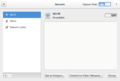 Graphical front-end for GNOME Shell 3.10.


- nm‑applet
- nm‑applet is a GTK 3-based GUI for NetworkManager which runs in the system tray. The applet is maintained by the GNOME project, and can be used with any desktop environment which implements the fd.o System Tray Protocol[3] (this excludes the GNOME Shell, which has its own built-in implementation).
- plasma‑nm
- KDE Plasma 6 has its own applet for configuring connections through NetworkManager, plasma‑nm. The applet is not included in Plasma 6 by default.
- nmcli
- nmcli is NetworkManager's built-in command-line interface added in 2010.[4] nmcli allows easy display of NetworkManager's current status, manage connections and devices, monitor connections.
- nmtui
- nmtui is the built-in text-based user interface for NetworkManager. It is basic when compared to nmcli, as it only allows users to add, edit, activate and deactivate connections; set the hostname of the system; and enable and disable radios.[5] It does not allow for the setup of wired connections, WPA-Enterprise, or VPNs; preconfigured connections can be used.[6]
- cnetworkmanager
- cnetworkmanager is a Python-based CLI for NetworkManager, written by Martin Vidner. The project's last commit was in August 2010; its final version (0.21.1) was released in August 2009.[7]
Mobile broadband support
[edit]NetworkManager is used in conjunction with ModemManager[8] and Paul's PPP Package[9] for WWAN/mobile broadband support.
Antti Kaijanmäki announced the development of a mobile broadband configuration assistant for NetworkManager in April 2008;[10] the required changes were made to NetworkManager in 0.7.1.[11]
History
[edit]Red Hat initiated the NetworkManager project in 2004 with the goal of enabling Linux users to deal more easily with modern networking needs, particularly wireless networking. NetworkManager takes an opportunistic approach to network selection, attempting to use the best available connection as outages occur, or as the user roams between wireless networks. It prefers Ethernet connections over “known” wireless networks, which are preferred over wireless networks with SSIDs to which the user has never connected. The user is prompted for WEP or WPA keys as needed.
The NetworkManager project was among the first major Linux desktop components to utilize D-Bus and HAL extensively. Since June 2009, however, NetworkManager no longer depends on HAL, and since 0.9.10 (ca. 2014), neither does it require the D-Bus daemon to be running for root operation.[12]
See also
[edit]
- Linux on the desktop
- BlueZ
- GNOME Keyring Manager
- usbserial
- Wicd – network manager written in Python
- wpa_supplicant
- wvdial
- netifd – tiny daemon with the ability to listen on netlink events; does not require D-Bus, does not depend on GLib, targets embedded devices
- ConnMan – daemon for managing Internet connections within embedded devices
References
[edit]- ^ a b "README.md". freedesktop.org. 2025-03-25. Retrieved 2025-07-04.
- ^ "CONTRIBUTING.md · main · NetworkManager / NetworkManager · GitLab". 23 May 2024.
- ^ "nm-applet(1)". GNOME GitLab. 2019-02-15. Retrieved 2025-07-04.
- ^ "Initial pieces of nmcli, gitweb". cgit.freedesktop.org. Retrieved 2015-05-28.
- ^ Parra, Javier Sánchez; Mancera, Fernando Fernández (2023-06-14). "tui: Enable/disable Wi-Fi and WWAN radios | NetworkManager commit b3b83234". freedesktop.org. Retrieved 2025-07-04.
- ^ "Red Hat Enterprise Linux 7 | Networking Guide | 3.2. Configuring IP Networking with nmtui". Red Hat Documentation. Archived from the original on 2025-04-22. Retrieved 2025-07-04.
- ^ Vidner, Martin (2010-08-20). "cnetworkmanager.git/summary". repo.or.cz. Archived from the original on 2022-08-31. Retrieved 2025-07-04.
- ^ "ModemManager". ModemManager. Archived from the original on 2025-06-28. Retrieved 2025-07-04.
- ^ "ppp". Samba. Retrieved 2025-07-04.
- ^ Kaijanmäki, Antti (2008-04-10). "ANNOUNCE: Mobile Broadband Configuration Assistant". GNOME Mail Services Archives. Retrieved 2025-07-04.
- ^ Williams, Dan (2009-06-22). "Mobile Broadband Assistant makes it Easy". Dan Williams' blog | GNOME Blogs. Archived from the original on 2025-06-17. Retrieved 2025-07-04.
- ^ "We'll Build A Dream House Of Net". Blogs.gnome.org. 20 June 2014. Retrieved 2015-05-28.
External links
[edit]- NetworkManager Homepage
- Service Provider Database
- NetworkManager in freedesktop.org
- NetworkManager status on the freebsd-gnome mailing list
- Original NetworkManager page at redhat.com via WaybackMachine
- Announcement of the first public release of NetworkManager
- How to use a WiFi interface with NetworkManager
- NetworkManager on the Arch Wiki
| Core Applications | |||||||||||||||||
|---|---|---|---|---|---|---|---|---|---|---|---|---|---|---|---|---|---|
| Extras |
| ||||||||||||||||
| Components |
| ||||||||||||||||
| Community | |||||||||||||||||
| People | |||||||||||||||||


| Software compilation |  | ||||||||||||||||||
|---|---|---|---|---|---|---|---|---|---|---|---|---|---|---|---|---|---|---|---|
| Applications by KDE |
| ||||||||||||||||||
| Platform |
| ||||||||||||||||||
| Community | |||||||||||||||||||
| People |
| ||||||||||||||||||
NetworkManager
View on GrokipediaIntroduction
Overview
NetworkManager is a free and open-source service designed for Linux operating systems that automates the management of network connections, including Ethernet, Wi-Fi, mobile broadband, and VPNs such as Cisco-compatible, OpenVPN, and PPTP.[9] It serves as the standard network configuration tool suite, integrating with desktop environments like GNOME and KDE, as well as server tools for a wide range of setups from laptops to embedded devices.[1] The primary goal of NetworkManager is to simplify and automate network setup and switching in dynamic environments, ensuring seamless connectivity for desktops, laptops, and servers without manual intervention.[2] By acting as a dynamic network control daemon, it maintains active network devices and establishes temporary connections as needed, supporting security protocols like WPA/WPA2/WPA3, 802.1x, and MACsec.[4][9] Key benefits include user-friendly management of multiple connections, automatic reconnection upon signal loss or device changes, and reliable hardware detection through pluggable backends for services like wpa_supplicant and pppd.[9] Developed by Red Hat, NetworkManager was initially released in 2004 as part of Fedora Core 3 to address the growing needs of modern networking, particularly for wireless setups.[10][11]Rationale
NetworkManager was developed in response to the increasing adoption of wireless networking in the early 2000s, when traditional Linux networking tools struggled with the demands of dynamic, mobile environments. Prior to its introduction, configuring networks relied on manual tools such as ifup and ifdown scripts, the ifconfig command, and static files like /etc/network/interfaces, which were designed primarily for fixed, server-like setups. These approaches required administrators or users to explicitly define and activate interfaces, often leading to errors and inefficiencies when dealing with changing hardware or networks, such as switching between Wi-Fi access points during roaming on laptops.[2][12] The core motivation for NetworkManager was to provide a centralized, policy-based system that automates network management without constant user intervention, addressing the limitations of legacy tools in handling hardware detection, DHCP lease acquisition, and secure protocols like WPA for wireless connections. By integrating with kernel subsystems like udev for consistent device naming and event-driven configuration, it enables seamless adaptation to mobility scenarios, such as plugging into new wired networks or roaming between wireless ones, which static configurations could not support effectively. This shift was particularly vital as wireless hardware became ubiquitous in desktops and laptops, rendering manual setups impractical for everyday use.[13][2] Originally initiated by Red Hat and first released in November 2004, NetworkManager targeted primarily desktop and mobile Linux users seeking plug-and-play simplicity, though its extensible architecture also suits server environments requiring automated connection profiles. It relieves users from the burden of manually configuring each new network, instead using profiles to prioritize and switch connections based on policies, thereby enhancing usability in dynamic settings like home offices or travel.[2][3]Architecture
Core Components
NetworkManager employs a modular architecture centered around its main daemon, which operates as a system service to oversee network configuration and connectivity. The daemon, typically launched by init systems such as systemd, continuously monitors hardware changes and device states using the Linux kernel's netlink interface in conjunction with udev for event notifications, enabling automatic detection of network interfaces like Ethernet and wireless adapters.[14] It maintains an internal state machine to track connection profiles, device availability, and activation status, ensuring seamless transitions between managed networks while prioritizing user-defined policies for connectivity.[9] At the heart of this modularity are backend plugins that handle device-specific operations, allowing NetworkManager to interface with diverse hardware without monolithic code. For Ethernet devices, the daemon interacts directly with kernel modules to manage link states and IP configurations, while for Wi-Fi, it delegates authentication and association tasks to external services like wpa_supplicant via dedicated plugins.[14] These plugins, configurable through the main configuration file at/etc/NetworkManager/NetworkManager.conf under the [main] section's plugins key, extend support to other device types such as mobile broadband or VPN interfaces, promoting extensibility and vendor-agnostic operation.[12]
Inter-process communication is facilitated primarily through the D-Bus interface, which exposes a structured object model for external applications and services to query and control NetworkManager's operations. This model includes objects representing devices (e.g., org.freedesktop.NetworkManager.Device), connections (e.g., org.freedesktop.NetworkManager.Connection), and settings (e.g., org.freedesktop.NetworkManager.Settings), enabling front-end tools and system services to retrieve real-time status, activate profiles, or modify configurations dynamically.[14] The daemon persists connection profiles in directories like /etc/NetworkManager/system-connections/ for system-wide use, ensuring consistent behavior across reboots while integrating with init systems for reliable startup and dependency resolution.[9] This design decouples the core logic from user interfaces and specialized backends, fostering a robust and scalable network management framework.[12]
Configuration System
NetworkManager's configuration system manages network settings through a combination of persistent profiles, runtime modifications, and backend plugins, providing an abstraction layer over traditional Linux network configuration methods. The system prioritizes dynamic and automated configurations while allowing integration with legacy formats, enabling seamless management of interfaces across diverse environments. The default backend for storing connection profiles is the keyfile plugin, which uses a simple .ini-style format in files with the .nmconnection extension, typically located in /etc/NetworkManager/system-connections/. These files are organized into sections such as [connection] for profile metadata like id, uuid, and type; [ipv4] for IP settings including method=auto or static addresses; and [802-11-wireless] for Wi-Fi specifics like ssid and security options. This format supports all connection types and is always enabled, ensuring broad compatibility while ignoring insecure files for security reasons.[15][15] In embedded Linux systems with read-only root filesystems, persistent storage of connection profiles can be achieved by using a symlink or bind mount to link /data/etc/NetworkManager/system-connections to /etc/NetworkManager/system-connections. This setup allows commands like nmcli connection add or device wifi connect to automatically save configurations to the persistent /data/ location. Symlinks may encounter issues with SELinux in enforcing mode, where bind mounts are often preferred for better compatibility, potentially requiring SELinux context adjustments via restorecon.[16][17] To support legacy systems, NetworkManager employs backend plugins that read and write configurations in distribution-specific formats. The ifcfg-rh plugin, used on Red Hat and Fedora distributions, handles /etc/sysconfig/network-scripts/ifcfg-* files, translating them to internal profiles while allowing NetworkManager to abstract and prioritize dynamic DHCP over static setups defined therein. Similarly, the ifupdown plugin on Debian and Ubuntu systems reads from /etc/network/interfaces, managing only interfaces not explicitly configured there by default to avoid conflicts with the traditional ifupdown tool. Without NetworkManager, these legacy files directly control interfaces via scripts like ifup/ifdown, but with it enabled, the daemon takes precedence, applying profiles dynamically and reducing manual intervention.[18][19][19] Dispatcher scripts extend the configuration system by executing custom actions after network events, such as connection establishment or teardown. Placed in /etc/NetworkManager/dispatcher.d/, these executable scripts (owned by root and run in alphabetical order) receive the interface name and action (e.g., up, down) as arguments, along with environment variables like CONNECTION_UUID and IP4_ADDRESS. They are ideal for post-connection tasks, such as updating firewall rules via iptables or notifying services of IP changes, and run asynchronously without blocking the main daemon. Subdirectories like pre-up.d/ allow phased execution, enhancing flexibility for system-specific integrations.[20][20] Configuration can occur at runtime through the D-Bus API, enabling in-memory changes to active profiles without persistence, or via saved profiles for reboot survival. Runtime modifications, applied using tools like nmcli or direct API calls, store temporary profiles in /run/NetworkManager/system-connections/, which are discarded on restart, contrasting with persistent ones in /etc/NetworkManager/system-connections/. To persist changes, explicit saving is required, often copying profiles to the persistent directory. Conflicts with external tools, such as dhclient, are mitigated by NetworkManager's default internal DHCP client; when using external clients like dhclient (configured via /etc/NetworkManager/conf.d/dhcp-client.conf), only one manages an interface to prevent duplicate lease requests or IP overlaps, with NetworkManager killing conflicting processes if needed.[21][21][22]Core Functionality
Interface Management
NetworkManager manages the lifecycle of network devices, transitioning them through distinct states to ensure reliable connectivity. Devices initially enter an unmanaged state (NM_DEVICE_STATE_UNMANAGED, value 10), where NetworkManager recognizes the interface but does not control it, often due to explicit user settings, external management, or system boot phases.[23] Upon becoming managed—triggered by events like device availability or policy changes—the state shifts to unavailable (20) if the device is present but not ready (e.g., hardware powered off), then to disconnected (30) when idle and ready for use.[23] For wireless interfaces, NetworkManager performs scanning for available networks during the preparation phase, querying access points via kernel APIs to identify viable connections without manual intervention.[24] The activation workflow for a device follows a structured sequence of states to establish a functional connection. It begins in the prepare state (40), where NetworkManager initializes hardware and applies basic settings. Authentication occurs in the config state (50), handling protocols such as WPA for secure wireless links by interfacing with supplicants like wpa_supplicant to negotiate credentials.[24] If additional secrets are required, the process pauses in need auth (60) to prompt for input. IP address assignment follows in IP config (70), using DHCP for dynamic allocation or static configuration from profiles to obtain addresses, routes, and DNS.[24] The IP check state (80) verifies connectivity, followed by the secondaries state (90), where NetworkManager waits for or activates secondary connections such as IPv6 configurations or VPNs, before activation (100), where traffic routing is enabled over the interface, establishing full network access.[24] When handling multiple interfaces, NetworkManager prioritizes connections based on profile settings, with higher priority values (default 0) favoring certain links during autoconnect.[25] It supports bonding to aggregate interfaces into a single logical device, enabling modes like active-backup for automatic failover if a primary link fails, or balance-rr for load distribution, all configured transparently without user input during runtime.[26] Failover in bonded setups detects link loss and switches slaves seamlessly to maintain connectivity.[26] NetworkManager integrates with the Linux kernel through RTNetlink (a netlink socket family) to monitor real-time events, such as interface link up or down, enabling rapid state updates and reconfiguration without polling.[27] This bidirectional communication allows NetworkManager to react to kernel notifications, like carrier changes, by adjusting device states accordingly.[27] For error handling, failed activations transition the device to the failed state (120), with NetworkManager attempting auto-retries configurable per connection (default -1, deferring to global value of 4 attempts) or globally via autoconnect-retries-default.[28] Authentication errors, such as invalid WPA keys, retry up to 3 times before failure.[25] All events, including failures, are logged through systemd-journald when the journal backend is enabled (default syslog otherwise), accessible via journalctl -u NetworkManager, with levels from INFO to TRACE for diagnostics.[28] To troubleshoot interface activation issues, such as those encountered with VLAN configurations in RHEL 9, administrators can examine detailed logs using commands likesudo journalctl -u NetworkManager -xe for error-specific output or sudo journalctl -u NetworkManager --since "10 minutes ago" for recent activity. Common error messages in such scenarios include "No suitable device", "device not available", or "Failed to determine virtual interface name", which may indicate problems with virtual interface detection or availability.[29][30]
Connection Handling
NetworkManager manages network connections through persistent profiles known as connection objects, each uniquely identified by a UUID, which ensures stable referencing across sessions and devices. These profiles encapsulate configuration settings tailored to specific network types, such as the SSID for wireless networks, pre-shared keys (PSK) or other authentication credentials like WEP keys for security, and MTU values to control packet fragmentation. Additionally, each profile includes an auto-connect flag that determines whether NetworkManager should automatically activate the connection when suitable hardware is available, along with an auto-connect priority to resolve conflicts among multiple eligible profiles.[31][32][33] Profile management in NetworkManager occurs primarily through its D-Bus API, enabling applications and administrators to add new connections by supplying a settings dictionary to the AddConnection method on the Settings interface, edit existing ones via the Update method on the profile's object path after retrieving it with GetConnectionByUuid, and delete them using the Delete method. Selection priority favors profiles with higher autoconnect-priority values (ranging from -999 to 999, default 0), falling back to the most recently used based on timestamp if priorities tie; user-preferred profiles, explicitly configured with details like SSID or BSSID, take precedence over auto-detected ones derived from scans.[34] For seamless operation, NetworkManager handles roaming and reconnection by monitoring available networks and device states. In wireless scenarios, it tracks previously seen BSSIDs to facilitate quick reassociation and supports roaming to stronger access points when the current signal degrades, though this is driver-dependent and can be disabled by locking to a specific BSSID. For Ethernet, unplugging a cable triggers immediate reconnection attempts to other available profiles, prioritizing those with matching interface names or auto-connect enabled, ensuring minimal downtime during network changes.[31] Connection handling distinguishes between system-wide and user-specific profiles to enforce security. System connections, stored in /etc/NetworkManager/system-connections/ with root-only permissions, are available to all users and persist across logins, while user connections are session-bound and accessible only to the owning user. Privileged actions, such as modifying system profiles or activating connections, require authorization via Polkit, which evaluates user credentials against defined policies to prevent unauthorized changes.[35][36] Profiles support export and import for backup and migration, typically by serializing settings into keyfile format (.nmconnection files) that can be copied between systems, with adjustments for hardware-specific details like MAC addresses to ensure compatibility.[35]Advanced Features
Wireless and Mobile Support
NetworkManager provides robust support for wireless local area network (WLAN) connections through integration with backend daemons responsible for 802.11 authentication and encryption. It primarily utilizes wpa_supplicant as the default backend for handling Wi-Fi authentication, including WPA and WPA2 protocols, while also supporting iwd (iNet Wireless Daemon) as an experimental alternative for improved performance and simplicity in resource usage.[37] This configuration is specified in thewifi.backend key within the [device] section of NetworkManager's configuration file, allowing administrators to switch between the two for compatibility with various hardware drivers.[37]
For advanced Wi-Fi scenarios, NetworkManager enables connection to hidden networks by setting the hidden property to TRUE in the 802-11-wireless connection profile, which triggers probe-scanning mechanisms to discover non-broadcasting service set identifiers (SSIDs) despite potential reliability issues in infrastructure mode.[31] Ad-hoc networking is also supported by configuring the mode property to "adhoc," requiring explicit specification of the channel and band to ensure compatibility with peer devices, though encryption in ad-hoc mode is limited to WEP due to backend constraints.[31]
NetworkManager manages Wi-Fi scanning and association by periodically querying available access points (APs) via the backend daemon, generating lists of SSIDs along with associated basic service set identifiers (BSSIDs) and signal quality metrics such as received signal strength indicator (RSSI) values.[38] These scans facilitate automatic association with preferred networks; for instance, when multiple known hotspots are available, NetworkManager prioritizes based on configured connection priorities and signal strength before attempting auto-connection to profiles flagged with autoconnect=yes.[31][39] The seen-bssids property tracks previously detected APs for read-only reference, aiding in roaming decisions without manual intervention.[31]
On the mobile broadband front, NetworkManager handles wireless wide area network (WWAN) connections by delegating control to the ModemManager daemon, which manages devices supporting GSM, UMTS, and LTE protocols for cellular data access.[40] This integration allows NetworkManager to configure and activate WWAN profiles using the gsm setting type, including specification of the access point name (APN) for GPRS/EDGE sessions and LTE-specific initial EPS bearer APNs.[41] SIM PIN management is supported through the pin property, which unlocks locked SIM cards, with flags controlling whether the PIN is stored securely or prompted at connection time.[41] Auto-configuration of APNs can be enabled via a provider database lookup, simplifying setup for common carriers.[41]
Mobile broadband support was introduced in NetworkManager version 0.7, released in 2008, which added out-of-the-box compatibility for numerous cellular modems via enhanced PPP integration and multi-device handling, marking a shift toward comprehensive wireless mobility.[42] This version laid the groundwork for reliable UMTS/HSDPA and EVDO connections. Advanced features like full 5G standalone (SA) connectivity are supported through ModemManager versions 1.14 and later (introduced in 2020), as NetworkManager depends on the daemon for NR (New Radio) bands and extensions like MBIM v3.0. As of November 2025, this provides comprehensive 5G capabilities in environments with recent ModemManager and compatible hardware.[43][40]
VPN and Security
NetworkManager provides robust support for virtual private network (VPN) connections through a plugin architecture that enables integration with various VPN protocols. Key plugins include NetworkManager-vpnc for Cisco-compatible IPsec VPNs, NetworkManager-openvpn for OpenVPN-based tunnels, and NetworkManager-strongswan for IKEv2/IPsec connections supporting EAP, pre-shared keys (PSK), and certificate authentication.[44][45][46][47] These plugins implement a D-Bus service for establishing connections and an editor dialog for configuration, allowing users to define VPN settings such as server addresses, authentication credentials, and encryption parameters. VPN configurations are managed via NetworkManager's connection profiles, which store settings persistently and support automatic activation based on network conditions or user triggers.[44] Additionally, NetworkManager offers native support for WireGuard VPNs starting from version 1.16.0, eliminating the need for a separate plugin and enabling seamless configuration through the same connection profile system. This integration simplifies WireGuard setup by handling interface creation, peer routing, and key management directly within NetworkManager's framework.[44][48] For authentication, NetworkManager supports advanced methods including WPA-EAP for Wi-Fi enterprise networks, which facilitates secure access using Extensible Authentication Protocol variants like PEAP, TTLS, and TLS with certificates or tokens. These credentials can be securely stored and retrieved via integration with GNOME Keyring, where secret agents such as nm-applet or gnome-shell handle encryption and access control to prevent unauthorized exposure.[49] NetworkManager integrates with firewall systems to enforce connection-specific rules, hooking into firewalld for dynamic zone assignments or directly using iptables/nftables backends for masquerading and filtering in shared connections. This ensures that traffic from new interfaces or VPN tunnels adheres to predefined security policies without manual intervention.[50][28] To enhance security, NetworkManager includes features like MAC address randomization for Wi-Fi connections, introduced in version 1.10, which generates a randomized hardware address during association to mitigate tracking by rogue access points and improve user privacy. This is configurable via thewifi.mac-address-randomization option in connection profiles or global settings, defaulting to disabled but recommended for public networks. Furthermore, audit logging can be enabled in the [logging] section of NetworkManager.conf to record security-relevant events, with the audit option directing records to the system's auditd daemon alongside internal logs for comprehensive monitoring.[51][28]
User Interfaces and Tools
Command-Line Interface
The primary command-line interface for NetworkManager is nmcli, a versatile tool designed for controlling the service and reporting network status, particularly suited for headless environments and automation tasks. Introduced in 2010 to provide a non-graphical alternative for managing connections and devices, nmcli enables users to create, edit, activate, and monitor network configurations without relying on desktop environments.[52][38] nmcli organizes its functionality through a hierarchical structure of subcommands, includinggeneral for overall status and permissions, networking for enabling or checking connectivity, radio for managing wireless hardware switches, connection for handling profiles (e.g., nmcli con up id <name> to activate a connection or nmcli con show to list them), device for device operations (e.g., nmcli dev wifi list to scan available Wi-Fi networks or nmcli dev status for device overview), agent for secret handling and PolicyKit interactions, and monitor for real-time activity observation. These subcommands support tab-completion and options like --terse for machine-readable output, facilitating integration into scripts. For instance, the command nmcli dev wifi connect <SSID> password <pass> establishes a Wi-Fi connection programmatically. In embedded Linux systems with read-only root filesystems, a symlink or bind mount linking /data/etc/NetworkManager/system-connections to /etc/NetworkManager/system-connections allows commands like nmcli connection add or nmcli dev wifi connect to automatically save profiles to the persistent /data/ location.[38][53][54][55]
For troubleshooting operations performed with nmcli, such as connection activation failures, users can inspect NetworkManager logs using the journalctl command-line tool. Examples include sudo journalctl -u NetworkManager -xe for detailed error logs or sudo journalctl -u NetworkManager --since "10 minutes ago" for recent entries. Relevant errors to monitor may include "No suitable device", "device not available", or "Failed to determine virtual interface name", often related to device management or virtual interfaces like VLANs.[29][30][56]
Complementing nmcli, nmtui offers a text-based user interface (TUI) for simpler, interactive configuration of basic network settings, such as editing connections or toggling activations, using cursor navigation in a terminal. Launched via the nmtui command, it requires the NetworkManager-tui package and is ideal for quick adjustments without memorizing nmcli syntax, though it lacks support for advanced features like VPNs.[57]
nmcli's output can be parsed easily in scripting environments for automation, such as Bash scripts that dynamically manage connections based on events or conditions, or integration with tools like Ansible for orchestrating network setups across multiple systems. For example, a Bash script might use nmcli -t -f NAME,TYPE dev to extract device details and conditionally activate profiles, enabling reliable automation in server deployments. NetworkManager's dispatcher scripts further enhance this by triggering custom actions on events like connection changes, often invoking nmcli commands.[38][58]
Permissions for nmcli operations are managed via PolicyKit (polkit), allowing non-root users to handle personal connections (e.g., user-specific Wi-Fi profiles) without elevated privileges in an active session, while system-wide changes typically require sudo for root access. The command nmcli general permissions displays the current user's authorized actions, ensuring secure control without full administrative rights for routine tasks.[60][38]
Graphical Interfaces
NetworkManager provides graphical user interfaces primarily through desktop environment-specific applets and editors that allow users to manage connections visually without command-line interaction. These interfaces leverage D-Bus for communication with the NetworkManager daemon, enabling seamless integration into system trays or panels for monitoring and control.[61] In the GNOME desktop environment, NetworkManager is integrated directly into the GNOME Shell's top bar system menu (accessible via the network icon), providing quick access to network status, available connections, and notifications for events like disconnections or new networks. It supports visual scanning of wireless networks, prompting users for passwords via secure dialogs, and toggling VPN connections through the menu interface. Detailed configuration is available via the Settings application under the Network panel, which uses the nm-connection-editor tool, a GTK-based application for adding, editing, or removing connection profiles, including advanced settings for wired, wireless, and mobile broadband. This integration relies on the libnm library for bindings to NetworkManager's API, facilitating real-time updates and user interactions. For environments requiring a traditional system tray applet, nm-applet can be used.[62][63][64][65] For KDE Plasma, the plasma-nm applet serves a similar role, embedding into the system tray to provide icons for connection status, quick connect/disconnect options, and notifications. It enables visual network scanning, password entry prompts, and VPN management via a context menu, with secrets stored securely using KWallet for password protection. The applet is written in QML and depends on the NetworkManager Qt bindings (networkmanager-qt) to interface with the daemon, ensuring compatibility with Plasma's workflow.[66][67] Other desktop environments, such as MATE and XFCE, typically utilize the cross-desktop nm-connection-editor for profile editing and management, often in conjunction with nm-applet for tray functionality. This tool offers a unified graphical experience for configuring connections, including visual selection of networks, secure password input, and VPN setup, without requiring environment-specific applets. These graphical components evolved significantly with NetworkManager 0.8 in 2010, which removed the dependency on the deprecated Hardware Abstraction Layer (HAL) in favor of udev for device detection, simplifying GUI-daemon interactions and improving reliability.[65][68]History and Development
Origins and Early Releases
NetworkManager was initiated in 2004 by Red Hat engineer Dan Williams as a component for the Fedora Core 2 distribution, with an initial emphasis on automating wireless network detection and connection to address the growing prevalence of Wi-Fi-enabled laptops. The project aimed to provide a user-friendly alternative to manual network configuration, integrating with the HAL (Hardware Abstraction Layer) and D-Bus for hardware events and inter-process communication. The first public release, version 0.3.1, arrived in October 2004, introducing basic automatic establishment of wired and wireless connections, wireless key management for WEP encryption, and a high-level D-Bus API for desktop environment integration.[69][70][71] From 2004 to 2007, versions 0.1 through 0.6 laid the groundwork for core functionality, adding Wi-Fi scanning and association capabilities, DHCP client integration for dynamic IP and hostname assignment, and support for external tools like wpa_supplicant for authentication. Version 0.5 in 2006 brought WPA and WPA2 security, including Enterprise modes, while 0.6 expanded to dynamic WEP keys, ISDN, and dial-up modems, enhancing portability across distributions such as Debian, Gentoo, and Slackware. During this era, the project was upstreamed to the freedesktop.org infrastructure, enabling broader community involvement and version control via Git. Adoption accelerated with its inclusion as the default networking tool in Ubuntu 7.04 (Feisty Fawn) in April 2007, where it simplified wireless and wired setup but initially struggled with seamless integration.[72][73] Early development encountered challenges, particularly conflicts with legacy static network configurations defined in files like /etc/network/interfaces, which could lead to unmanaged devices or failed activations when NetworkManager's dynamic policies overrode them. These issues prompted iterative improvements in static IP handling and compatibility modes to coexist with traditional tools.[74] A pivotal evolution occurred in version 0.7, released in December 2008, which integrated PPP support for mobile broadband, allowing automatic detection and configuration of cellular modems (including GPRS, UMTS, HSDPA, and EVDO) without additional plugins. This expanded NetworkManager's scope beyond local networks to wide-area connectivity. Version 0.8, launched in April 2010, eliminated the HAL dependency in favor of direct udev interaction for hardware enumeration, streamlining boot-time detection and reducing overhead; it also incorporated dnsmasq for local DNS caching and enhanced VPN plugin handling.[75][76][68] The release of version 1.0 in December 2014 represented a major stabilization milestone after over a decade of refinement, introducing a modern GObject-based client library (libnm) for stable API/ABI guarantees and adding native support for network teaming to aggregate multiple interfaces for higher throughput and redundancy. This version solidified NetworkManager's role as a robust, distribution-agnostic solution while addressing long-standing feedback on reliability and extensibility.[77][78][72]Recent Versions and Milestones
NetworkManager has seen steady evolution since version 1.2, with releases focusing on enhanced protocol support, privacy features, and integration with modern Linux ecosystems. Version 1.2, released in April 2016, introduced significant IPv6 improvements, including better auto-configuration stability and compatibility, alongside tighter integration with systemd for service management and dependency handling. These changes addressed previous limitations in IPv6 handling during network transitions and improved overall reliability in environments using systemd as the init system.[79][80] Subsequent releases built on this foundation, emphasizing wireless security and virtualization. In October 2017, version 1.10 added support for Wi-Fi Protected Management Frames (PMF, or 802.11w) to protect against certain attacks, Wi-Fi Protected Setup (WPS) authentication, and basic Open vSwitch integration for software-defined networking setups. Privacy enhancements, such as MAC address randomization for Wi-Fi connections, had been introduced earlier in 1.2 but were refined in later point releases to balance usability and tracking prevention. By version 1.16 in March 2019, NetworkManager gained native support for WireGuard VPN tunnels, enabling seamless configuration without external plugins, along with Wi-Fi Peer-to-Peer (P2P, or Wi-Fi Direct) for direct device connections and initial WPA3 authentication.[81][82][48] From 2020 onward, development shifted toward cloud and mobile optimizations. Version 1.22, released in March 2020, introduced the experimentalnm-cloud-setup tool for automatic configuration in cloud environments like AWS EC2, support for Wi-Fi mesh networks, and customizable IPv6 Router Advertisement timeouts to improve responsiveness in dynamic networks. In August 2022, version 1.40 brought Multipath TCP (MPTCP) support for aggregated connections, offline nmcli commands for profile management without the daemon, and structured DHCP lease files for better interoperability. Enhanced mobile broadband handling, including 5G, relies on integration with ModemManager, with improvements in versions 1.40 and later enabling better carrier aggregation and signal management for 5G modems. SELinux-related fixes, such as those addressing audit2allow denials for dispatcher scripts, appeared in various point releases around this period to ensure compatibility in secured environments.[83][84][85]
More recent milestones reflect adaptations to emerging hardware and stability needs. Version 1.46 in February 2024 added support for 6 GHz Wi-Fi bands (Wi-Fi 6E), the stable-ssid MAC randomization mode tied to specific networks for consistent privacy, and Ethtool Energy Efficient Ethernet (EEE) management to reduce power consumption on wired links. By August 2025, version 1.54 introduced per-device IPv4 forwarding configuration, IPv6 prefix delegation with subnet ID support, and WireGuard IPv6 endpoint firewall rules using nftables or iptables, alongside NBFT parsing for early boot networking in UEFI environments. The point release 1.54.1 in September 2025 followed with global DNS overwrite capabilities to override connection-specific resolvers, DHCP client ID support in initrd generators, and minor bug fixes enhancing overall stability.[86][87][88][89]
NetworkManager's development is hosted under the GNOME project at freedesktop.org, with ongoing contributions from the community and companies like Red Hat, ensuring active maintenance and compatibility with evolving kernel features. As of 2025, it remains the default network management solution in major distributions, including Fedora (since its inception in 2004) and Ubuntu (since version 7.04 in 2007), powering both desktop and server environments where the nmcli command-line tool facilitates headless administration.[1][62]References
- https://www.[linkedin](/page/LinkedIn).com/advice/0/how-do-you-automate-network-configuration-fcdff