Hubbry Logo
MousepadMousepadMain
Open search
Mousepad
Community hub
Mousepad
logo
8 pages, 0 posts
0 subscribers
Be the first to start a discussion here.
Mousepad
Mousepad
from Wikipedia
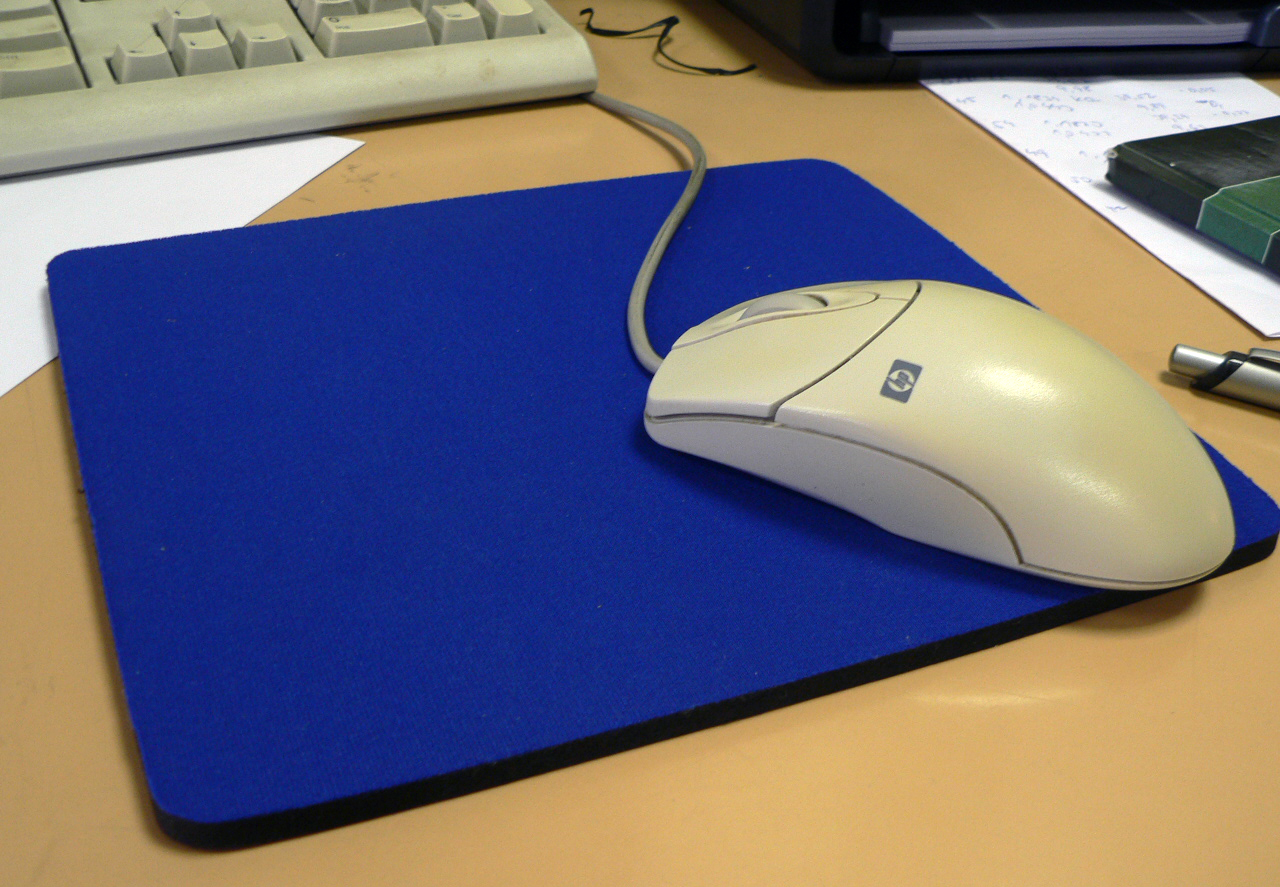
A mouse and mousepad

A mousepad or mousemat is a surface for placing and moving a computer mouse. A mousepad enhances the usability of the mouse compared to using a mouse directly on a table by providing a surface to allow it to measure movement accurately and without jitter. Some mousepads increase ergonomics by providing a padded wrist rest.

History

[edit]
Mousetray screenshot from Engelbart's video

During a 1967 presentation by Douglas Engelbart marking the public debut of a mouse,[1] Engelbart used a control console designed by Matt P. Brown of Herman Miller that included a keyboard and an inset portion used as a support area for the mouse.[1][2] According to Kelley[3] and also stated by Alex Pang,[4] Kelley designed the first mousepad a year later, in 1969.

Details of a mousepad designed by Armando M. Fernandez were published in the Xerox Disclosure Journal in 1979 with the description:[5]

CRT Cursor Control Mechanism Pad
To assist the operation of a cathode ray tube pointer 10 wherein a metal ball is rolled on a hard surface, the disclosed pad may be utilized. A resilient, rubber-like material 12 is bonded or otherwise attached to a hard base material 14 which keeps the rubber-like material flat. The base has four rubber-like pads 16 on the opposite side from the resilient material to refrain the pad from sliding on the surface of a table, for instance.

— Xerox Disclosure Journal, Volume 4, Number 6, November/December 1979

By 1982, most users of the Xerox ball mouse were using special pads to increase the friction of the ball in the mouse.[6]

The first commercial manufacturer of mousepads was Moustrak, founded by Bob McDermand. The company began gaining traction when Apple decided to distribute its mousepads, featuring the Apple logo, to computer stores in the United States. Moustrak signed licensing deals with Disney, Paramount, and LucasFilm, and advertised in magazines including MacWorld. However, by the end of the 1980s, lower cost mousepads turned the product into a commodity.[7][8]

The Oxford English Dictionary tracks the term mouse pad to the August 24, 1983, publication of InfoWorld, and the predominantly British term mousemat to October 17, 1989, in the publication 3D.[9]

Benefits

[edit]
The mousepad for early Mouse Systems optical mouses

The three most important benefits of the introduction of the mousepad were higher speed, more precision, and comfort for the user. A secondary benefit was keeping the desk or table surface from being scratched and worn by continuous hand and mouse rubbing motion. Another benefit was reduction of the collection of debris under the mouse, which resulted in reduced jitter of the pointer on the display. Also, it is important to clean mousepads.

The mousepads can be cleaned by special detergents, liquid soap, hand wash or dry cleaning. Not all mousepads are machine washable.

When optical mice, which use image sensors to detect movement, were first introduced into the market, they required special mousepads with optical patterns printed on them. Modern optical mice can function to an acceptable degree of accuracy on plain paper and other surfaces. However, some optical mouse users (especially gamers, designers, and other heavy users) may prefer a mousepad for comfort, speed and accuracy, and to prevent wear to the desk or table surface.

Types

[edit]
A mousepad with a padded wrist rest

A variety of mousepads exist with many different textured surfaces to fit various types of mouse technologies.

After the steel mouse ball was given a silicone rubber surface, the popular fabric-surface mousepad was found to be the most appropriate. It helped keep the rubberized roller-ball surface cleaner and gave better tracking, speed, and accuracy than just a desk surface. Such surfaces collected dirt which was then deposited onto the internal rollers that picked off ball movement. Dirty rollers caused erratic pointer movement on the screen.

Early types of optical mice have the problem of not working well on transparent or reflective surfaces such as glass or highly polished wood. These surfaces, which often include desk and table surfaces, cause jitter and loss of tracking on the display pointer as the mouse moves over these reflective spots. The use of mousepads with precision surfaces eliminates the spot-jitter effects of older and/or low-quality optical mice. Newer generations of mouse pads incorporate a wireless charging system into the pad, allowing a wireless mouse to be used without the need to replace or recharge batteries.[10]

3D mousepad

[edit]

A 3D mousepad is a type of mousepad with a wrist rest that is modelled to resemble breasts, buttocks, or other anatomy. They are typically printed with an image of a character from an anime, manga, or video game series. 3D mousepads are sometimes subcategorized as oppai mousepads and oshiri mousepads, as derived from the Japanese slang terms oppai (おっぱい) and oshiri (おしり) for breasts and buttocks, respectively.

3D mousepads are a novelty item that have been described as a form of fan service. They typically feature a printed image of a character from an anime, manga, or video game series positioned such that the padded silicone gel wrist rest of the mousepad resembles a protruding chest or buttocks. They have been produced both officially as licensed merchandise, and unofficially as a form of fan labor to be sold at enthusiast events such as anime conventions.

Some of the earliest 3D mousepads were modeled off of characters from the erotic manga series G-Taste and the pachinko game Super Blackjack [ja], which were shown at the trade fair CeBIT in Hanover, Germany in 2004 and sold as official merchandise at the Tokyo Character Show [ja] that same year.

3D mousepads have been produced for both female and male characters, with oppai mousepads for males typically emphasizing the character's pectoral muscles. 3D mousepads that depict non-sexual subjects, such as bird eggs or dogs, have also been produced as a humorous response to sexualized mousepads.

Materials

[edit]

Modern mousepads are typically made of lesser density rucomposites (open cell styrene, butadiene rubber or open cell SBR) with fabric bonded to the upper surface. However, many other types of material have been used, including fabric, plastics, recycled rubber tires, neoprene, silicone rubber, leather, glass, cork, wood, aluminum, stone and stainless steel.

Maintenance

[edit]

A contaminated computer setup can affect user performance, workflow, and hygiene. Research indicates that gaming and office equipment, including mouse pads, can accumulate more bacteria than a toilet seat. Studies have found that the average desk contains 400 times more bacteria than a toilet seat, with computer surfaces averaging approximately 20,961 germs per square inch.[11]

Furthermore, the accumulation of dirt and oils on a mouse pad can impact sensor accuracy, reduce responsiveness, and contribute to material degradation over time. Regular maintenance is essential to preserving both functionality and hygiene, and cleaning a mouse pad properly can help ensure optimal performance.

See also

[edit]

References

[edit]
[edit]
Revisions and contributorsEdit on WikipediaRead on Wikipedia
from Grokipedia
A mousepad, also known as a mouse mat, is a flat, portable mat designed to provide an optimal surface for the movement of the , enhancing its tracking accuracy and usability compared to bare desks or other irregular surfaces. It typically consists of a smooth top layer over a non-slip base, preventing slippage and protecting underlying furniture from scratches caused by the mouse's feet or . Originally developed to support early mechanical mice with rubber , mousepads have evolved to accommodate modern optical and sensors, ensuring consistent performance across various mouse types. The concept of the mousepad emerged alongside the invention of the by in 1964, but it was popularized in the early 1980s by inventor Bob McDermand through his company Moustrak, which introduced the iconic rounded rectangle design using fabric over a rubber base. McDermand's pads gained widespread adoption when companies like Apple distributed branded versions as promotional items, solidifying their role as essential computer accessories. Over time, production shifted toward mass manufacturing, with cheaper imports from dominating the market by the late 1990s, though high-quality variants persisted for specialized uses. Mousepads vary widely in design to suit different needs, including soft cloth pads made from fabric over or rubber for better control and comfort, ideal for precision tasks like gaming or , and hard pads constructed from , , or metal for faster, low-friction gliding suited to quick movements. Additional types include ergonomic models with wrist rests to reduce strain, extended desk mats for setups, and illuminated RGB versions for aesthetic appeal in gaming environments. In January 2026, popularity rankings of desk mats (large extended mousepad-like surfaces often covering significant portions of desks) highlighted models such as Plus Co.'s "ななめカット デスクマット DM-010FS" (using recycled PVC, with full-surface mouse compatibility and strong scratch/dirt prevention), MOTTERU's "デスクマット MOT-DESKMAT-IV" (featuring water/heat resistance and non-slip backing), transparent PVC types from Shinsho Belca (e.g., PM60-40-1E, DM60-100-1E), and PU leather models from Pallo; trends emphasize durability, broad mouse compatibility, and custom sizing options. Benefits encompass improved accuracy, durability against wear, and moisture resistance in modern variants, making them indispensable for both professional and casual computing.

History

Invention and Early Development

The invention of the computer mouse in the early 1960s by at Stanford Research Institute (SRI) highlighted the need for a reliable tracking surface to ensure accurate movement detection. Engelbart's prototype, a wooden device with two perpendicular metal wheels that rolled against a surface to track x-y coordinates, was initially tested on standard tabletops during development from onward. However, these early mechanical ball mice faced challenges on irregular desk surfaces, where inconsistencies in texture led to erratic tracking and the wheels accumulating dirt and debris, which could impair functionality over time. During Engelbart's landmark "" on December 9, 1968, at the Fall Joint Computer Conference in , the was publicly demonstrated as part of the oN-Line System (NLS), but the presentation revealed limitations of using improvised surfaces like desks or paper, which caused slipping and unreliable performance. To address this, SRI collaborated with , a furniture firm focused on office , leading to the creation of the first dedicated mousepad. Jack Kelley, a designer at , developed this prototype mousepad in 1968 as part of a custom console integrated into a modified Eames Shell Chair, providing a consistent, non-slip area for the mouse. The pad consisted of a swatch of , a synthetic vinyl material, affixed to the console's surface to prevent the mouse wheels from sliding on hard plastics and to maintain tracking precision during the demo. This one-off ergonomic setup, including the swing-out tray for the mouse, keyboard, and keyset, represented a key pre-commercial prototype that emphasized in early computing environments. Herman Miller's contributions extended to broader office prototypes in the late 1960s and early 1970s, such as elements of the Action Office system, which incorporated similar principles to support interactive computer use.

Commercialization and Evolution

The commercialization of mousepads began in the early when Bob McDermand founded MousTrak, the first company dedicated to mass-producing these accessories. In 1983, MousTrak launched its initial product, featuring a smooth fabric surface bonded to a rubber backing, which provided consistent tracking for mechanical ball mice and quickly gained popularity among early users. This design addressed the common issue of erratic mouse performance on varied desk surfaces, leading to widespread recognition of mousepads as essential computing peripherals. By the late 1980s, the influence of major peripheral manufacturers like accelerated the adoption of mousepads in both office and home environments. , which had entered the mouse market in 1982, began offering compatible mousepads as bundled accessories or standalone products, contributing to their integration into standard computing setups as personal computers proliferated. This period marked a shift from niche innovation to commodity status, with MousTrak securing licensing deals for branded designs from entertainment giants like and Paramount, further embedding mousepads in through promotional items. The 1990s brought technological evolution with the introduction of optical mice, such as Logitech's Cordless MouseMan Optical in 2001, which used LED s to track movement without a rolling ball. While these advancements reduced dependency on pads by allowing use on more surfaces, inconsistencies like reflections or textures on desks still necessitated mousepads for optimal precision and longevity of the . This era sustained demand, particularly as computing became more ubiquitous in professional and consumer spaces. In the , mousepads experienced a resurgence tied to the gaming industry, where larger formats emerged to support low-sensitivity aiming in titles. Adaptations for mice also gained traction, as pads minimized battery drain by providing uniform surfaces that reduced unnecessary adjustments on uneven desks. A pivotal milestone was ' 2001 launch of the Icemat, the first glass-based gaming mousepad, which offered dust resistance and a hard, consistent glide to enhance accuracy in competitive play. Post-2010 trends shifted toward extended desk mats, oversized pads that cover keyboard and areas for immersive gaming setups and . These larger formats, often exceeding 30 inches in width, catered to the growing ecosystem and customizable PC environments, maintaining mousepads' relevance amid advancing sensor technologies. As of January 2026, popularity rankings of desk mats highlighted continued evolution in these large-format designs, with popular models featuring materials such as recycled PVC, transparent PVC, and PU leather; key attributes included full-surface mouse compatibility, protective functions against scratches and dirt, water and heat resistance, non-slip backings, and custom sizing options, underscoring trends in durability, mouse compatibility, and adaptability.

Purpose and Benefits

Technical Advantages

Mousepads provide a , textured surface that was essential for ball mice used predominantly before the , preventing the internal ball from slipping on smooth or inconsistent desk materials like or polished , which would otherwise fail to register movement due to insufficient . This design ensured reliable rolling and accurate input translation without the need for frequent cleaning of that could accumulate on bare surfaces. For optical and mice, mousepads offer a consistent, non-reflective surface that optimizes light-based tracking by minimizing distortions from desk irregularities, such as patterns or glossy finishes, which can cause misreads and erratic cursor jumps. This results in smoother movement and reduced input lag, as the even texture allows sensors to capture clear, repeatable images of the surface for precise position calculation. On textured desks, these interferences can lead to tracking errors, but a dedicated mousepad eliminates such issues, enhancing overall accuracy. Mousepads also protect the glides on the bottom of modern mice from premature wear caused by abrasive surfaces, extending their lifespan by reducing friction and preventing scratches or embedding of particles. Using a mouse directly on hard or rough desks accelerates degradation of these feet, potentially leading to inconsistent and the need for earlier replacements. These surfaces are particularly compatible with high-performance sensors like those in the PixArt PMW series, enabling optimal dots-per-inch (DPI) sensitivity and minimizing acceleration artifacts—unwanted speed variations during rapid movements—by providing a stable base for consistent light reflection and image processing. In gaming setups, mousepads support improved polling rates up to 1000 Hz or higher, achieving sub-1 ms tracking consistency that translates to more responsive and predictable compared to variable desk performance.

Ergonomic and Health Benefits

Mousepads equipped with wrist rests promote neutral wrist alignment during prolonged computer use, elevating the wrist slightly above level to reduce on the and lower the risk of . According to guidelines from the Canadian Centre for Occupational Health and Safety (CCOHS), such supports should be soft and rounded to minimize direct contact stress while allowing hands to hover above them during active mousing or typing. The U.S. (OSHA) further recommends wrist rests to maintain straight wrist postures, thereby decreasing muscle activity in the and hand. Cushioned padding integrated into mousepads absorbs pressure at key contact points on the and , alleviating strain during extended sessions. OSHA guidelines emphasize that padded supports reduce overall muscle exertion compared to hard, unpadded desk surfaces, contributing to greater user comfort and lower risk of musculoskeletal discomfort. Research published in Applied Ergonomics indicates that forearm supports, including cushioned variants, can decrease shoulder flexion torque by up to 90% and lower applied forces on the upper extremity, indirectly benefiting . Extended mousepad formats provide ample surface area for full arm movements rather than isolated wrist motions, enhancing and reducing the incidence of repetitive strain injuries (RSI). A in the Cochrane Database of Systematic Reviews found that arm supports and neutral posture aids, such as larger pads, may prevent work-related musculoskeletal disorders in the neck and s by minimizing awkward reaching. Anti-slip bases on mousepads ensure the surface remains stationary on the desk, preventing disruptive shifts that could compromise stable posture during intensive tasks like office work or gaming. This feature supports consistent ergonomic positioning by avoiding the need for frequent readjustments, as noted in ergonomic design recommendations from . In professional environments, mousepads with these features align with international standards such as ISO 9241-410, which outlines ergonomic criteria for physical input devices to mitigate RSI risks through optimized workstation setups.

Types

Cloth Mousepads

Cloth mousepads utilize woven fabric surfaces, typically constructed from or , to deliver moderate that supports precise low-speed movements and effective stopping power. This balanced glide makes them particularly suitable for first-person shooter (FPS) gaming, where quick starts and stops are essential for accurate aiming and control. These mousepads are available in a range of sizes, from standard dimensions of approximately 9x7 inches for compact setups to extended variants measuring up to 36x12 inches that cover large desk areas. Stitched edges are a common feature, designed to enhance durability by preventing fabric fraying over time. Cloth mousepads gained prominence in the with early commercial products like those from MousTrak, and they continue to be popular today due to their affordability—basic models often retail for under $10. Variants cater to specific preferences, such as speed-optimized weaves in the QcK series for smoother, faster glides in dynamic gameplay, or control-focused designs like the Zowie G-SR for enhanced precision in tactical scenarios. A key drawback of cloth mousepads is their tendency to accumulate and , which can degrade surface consistency and reduce glide quality over time, limiting their to typically 1-2 years under heavy daily use. Unlike hard mousepads, which emphasize high-speed , cloth surfaces prioritize this control-oriented texture for general and gaming versatility.

Hard Mousepads

Hard mousepads feature rigid, non-fabric surfaces optimized for low-friction mouse tracking, typically consisting of smooth plastic or tops laminated onto a stable rigid base such as rubber or metal. These designs enable rapid, precise swipes essential for fast-paced in MOBA and genres, where minimal resistance allows for quick cursor movements and responsive aiming. Developed alongside optical mice in the late 1990s, hard mousepads addressed the need for consistent, smooth tracking surfaces that enhanced sensor performance over textured alternatives. Notable examples include the Razer Sphex, an ultra-thin model prized for its durability and seamless integration with gaming setups, as well as aluminum-core variants that provide superior structural integrity against daily wear. Thickness generally ranges from 2 to 5 mm, promoting a low-profile feel that minimizes height variations during use. Hybrid variants incorporate hard tops with soft rubber bases or stitched edges, blending speed with subtle cushioning for versatile control in mixed gameplay styles. In clean environments, hard mousepads excel due to their non-porous construction, which resists liquid spills far better than absorbent cloth surfaces and requires only a simple wipe for maintenance. They demonstrate extended longevity, often lasting 3-5 years with minimal surface degradation under regular gaming conditions. Holding a notable share of the gaming market, these pads are particularly favored in for their unwavering glide consistency, free from the texture inconsistencies that can arise in fabric-based options.

Specialty Mousepads

Specialty mousepads encompass a range of niche designs tailored for specific user preferences, such as enhanced aesthetics, precision tracking, or prolonged comfort, distinguishing them from standard flat cloth or hard surfaces. These variants often incorporate unique features like raised elements or alternative substrates to cater to targeted audiences, including , professionals, and enthusiasts seeking customization. One prominent category includes 3D mousepads featuring molded characters or raised designs, particularly those inspired by culture originating in during the late 1990s. Early examples drew from erotic series like , serialized from 1996 to 2000, where or gel-based protrusions mimicked character anatomies to provide wrist support while adding thematic visual appeal for collectors. These pads, often called "oppai" mousepads due to their breast-shaped elevations, gained initial popularity in Japanese subcultures before spreading globally in the through online marketplaces. Glass mousepads represent another specialized segment, engineered for superior precision in gaming and professional applications since the early 2000s, with advanced models emerging in the . Constructed from with micro-etched surfaces, these pads offer ultra-smooth gliding and exceptional sensor tracking for both and optical mice, minimizing friction while maintaining control. Brands like have popularized models such as the Moonstone Ace, which utilize impact- and scratch-resistant to ensure durability against daily wear. This design excels in environments where sub-millimeter accuracy is critical, though the rigid surface requires careful handling to avoid slippage on non-anti-slip bases. Ergonomic specialty mousepads prioritize user health with integrated features like gel-filled wrist rests or contoured edges, aimed at office workers to mitigate repetitive strain injuries (RSI). These models support the natural curve, distributing pressure to reduce fatigue during extended sessions, as seen in products from that combine soft gel padding with non-slip bases for stable positioning. Curved designs further promote neutral hand alignment, helping prevent conditions like by elevating and cushioning the without restricting mouse movement. Such pads are particularly valued in prolonged computing tasks, where they outperform flat alternatives in comfort metrics. Extended desk mats, often oversized to encompass both keyboards and mice, have surged in popularity among streaming and setups in the , providing a seamless, unified surface for multitasking. These large-format pads, measuring 800x300mm or larger, up to 900 by 400 mm or more, cover keyboard and mouse areas to allow fluid transitions between input devices while protecting desks from scratches. As of January 2026, rankings of mouse-compatible desk mats by my-best.com highlight popular models such as Plus Co.'s "ななめカット デスクマット DM-010FS" (using 40% recycled PVC with full-surface mouse compatibility and high scratch/dirt prevention); MOTTERU's "デスクマット MOT-DESKMAT-IV" (featuring water/heat resistance and non-slip suede backing); Belca's transparent PVC types (e.g., PM60-40-1E and DM60-100-1E); and Pallo's PU leather types (customizable by cutting). These rankings reflect trends toward durable, mouse-compatible, and custom-sized large desk mats suitable for extended use. Examples from brands like Autonomous.ai offer full peripherals accommodation in vibrant, customizable designs. Many feature RGB lighting that syncs with the computer for immersive effects, waterproof surfaces for durability and easy maintenance, and anti-slip bases for stability during use. Favored by Twitch streamers for their expansive coverage, aesthetic integration, and professional appearance, they enhance workflow efficiency in dynamic environments. Niche markets within specialty mousepads include eco-friendly options crafted from sustainable materials like substrates, which offer natural and biodegradability for environmentally conscious users, as available through various specialty retailers. Additionally, RGB-lit pads cater to gamers seeking immersive setups, featuring programmable LED edges for visual synchronization with peripherals, as highlighted in reviews of models from Razer and Corsair. Another emerging niche includes mousepads with integrated wireless charging, allowing compatible mice to charge without removing them from the surface; this feature has gained traction in the , with the market valued at USD 150 million in 2023 and projected to reach USD 500 million by 2032. These variants, while innovative, remain a smaller segment driven by customization trends rather than mainstream adoption.

Materials

Surface Materials

The surface materials of mousepads primarily consist of cloth fabrics for traditional pads and rigid plastics or for hard variants, each designed to optimize mouse sensor tracking and glide dynamics. Cloth surfaces are typically made from , a synthetic fabric that provides a balanced interaction with optical and mice through its woven structure. The density of the weave in these fabrics influences key properties such as levels and ; tighter weaves, often described as dense or micro-fabric, enhance control by increasing stopping power while maintaining smooth movement, whereas looser constructions favor speed over precision. Hard surface materials, such as polycarbonate or acrylic plastics, offer low-friction glides suitable for high-speed applications, with many featuring coatings like polytetrafluoroethylene (PTFE) to minimize static buildup and ensure consistent sensor performance. These plastics provide a durable, non-porous top layer that resists wear from repeated mouse movements. Emerging since the early 2010s, tempered glass has gained popularity as a premium hard surface option, featuring micro-etched patterns to improve grip for optical sensors without excessive drag; these glasses often feature a surface rated at 7H or higher on the pencil hardness scale, contributing to their scratch resistance and longevity. A key trade-off in surface materials lies in their porosity and maintenance needs: porous cloth fabrics, while breathable and forgiving for precise control, can absorb skin oils and debris over time, leading to gradual slowdowns in mouse responsiveness that require periodic cleaning to restore performance. In contrast, non-porous hard surfaces like plastics and clean easily with minimal effort, preventing oil accumulation, though they may initially feel "sticky" during break-in as the mouse feet adapt to the uniform texture. Most cloth fabrics are sourced from cost-effective synthetic blends, with bulk production costs often under $2 per unit, enabling widespread accessibility; , however, commands premium pricing due to its specialized manufacturing, typically 3-5 times higher than standard cloth options.

Substrate and Backing Materials

The substrate and backing materials of mousepads provide essential stability, cushioning, and , forming the foundational layers beneath the surface fabric or . These components ensure the pad remains secure on desks and maintains structural integrity during prolonged use, with common materials including rubbers, foams, gels, and rigid cores tailored to different pad types. However, traditional PVC substrates have faced criticism for potential release of toxins and poor recyclability, prompting shifts toward alternatives like EVA. Rubber backings, often made from natural rubber or synthetic neoprene, deliver a non-slip grip on desk surfaces to prevent sliding during mouse movements. Neoprene, a closed-cell synthetic rubber, is prized for its resilience, flexibility, and moisture resistance, typically applied in thicknesses of 1 to 3 mm for optimal balance between portability and grip. For instance, high-density rubber foam backings at 3 mm thick maintain flatness and anti-slip performance even on uneven surfaces. In ergonomic mousepads, or substrates offer shock absorption by compressing under pressure to distribute force and reduce impact. variants contour to the for adaptive support, while fillings provide a cooler, more yielding cushion that returns to shape after compression. These materials enhance the pad's internal structure without altering the top surface layering. Hard mousepads incorporate rigid cores, such as aluminum or medium-density (MDF), to ensure exceptional flatness across large areas up to 40 inches, ideal for extended gaming setups. Aluminum cores, often aircraft-grade alloys, provide a lightweight yet sturdy base that resists warping, while MDF offers cost-effective rigidity for broader surfaces. Some modern mousepads use recyclable EVA as a substrate material, promoting by reducing reliance on PVC, which is more energy-intensive and prone to releasing toxins. EVA , derived from , is recyclable into products like insulation, though challenges in collection persist; bio-based variants further minimize environmental impact compared to traditional PVC. Bonding techniques, such as adhesives or heat-lamination, secure these layers against during prolonged use. Hot-melt adhesives create permanent bonds in premium pads, while heat-lamination fuses materials under controlled pressure for enhanced shear resistance and .

Care and Maintenance

Cleaning Methods

Cleaning methods for mousepads vary by surface type to maintain , remove oils and , and preserve tracking performance without damaging the material. Regular upkeep prevents buildup that can affect mouse accuracy and extends the pad's usability. Tailored approaches ensure while avoiding common pitfalls like warping or degradation. For cloth mousepads, begin with gentle removal of surface using a soft-bristled or to dislodge particles from textured weaves without embedding them deeper. Follow with a wipe-down using a mild dish soap solution diluted in warm , applying it via a damp cloth in circular motions to lift oils and stains; for , perform this routine every 2-4 weeks to sustain optimal glide. Rinse thoroughly with clean to eliminate residue, then air-dry flat for 24-36 hours to prevent mold from trapped moisture. Spot-clean spills immediately by dabbing with an absorbent cloth to avoid penetration into the fabric, which could impair tracking accuracy. Hard surface mousepads require less intensive care due to their non-porous nature. Use a 70% spray on a cloth to effectively remove oils and fingerprints, wiping gently to avoid scratches; this method allows quick drying in under 5 minutes as the alcohol evaporates rapidly. For general , a dry cloth suffices, followed by spot-cleaning any spills promptly with the same alcohol solution to maintain smooth operation. Avoid tools that could mar the coating. Across both types, avoid machine washing, as it can warp the rubber base and delaminate layers, compromising structure and performance. Do not use on fabric surfaces, as it degrades the weave and reduces , per manufacturer guidelines. Regular care with these techniques can significantly extend pad life by preventing premature wear from accumulated grime.

Storage and Longevity

Proper storage of mousepads when not in use helps maintain their shape and functionality, preventing issues like warping or cracking in the rubber base. For optimal preservation, store mousepads flat or vertically in a cool, dry environment away from direct sunlight, heat sources, and moisture to avoid deformation or material breakdown. Avoid high temperatures, as they can accelerate rubber degradation and cause cracking over time. Larger pads may be loosely rolled with the surface facing outward and secured with soft ties, but flat storage is preferred for smaller ones to minimize creasing. The longevity of a mousepad varies by type and usage intensity, with cloth surfaces typically lasting 1-3 years under daily moderate use, while hard pads endure 3-5 years due to their durable construction. Factors such as extended daily hours—particularly 8 or more—can significantly shorten lifespan through accelerated surface wear, making regular assessment essential for heavy users like gamers or professionals. Proper maintenance, including occasional cleaning as a preventive measure, further extends by reducing grime buildup that hastens deterioration. Degradation signs include frayed or curling edges, which indicate structural breakdown and disrupt smooth mouse movement, as well as inconsistent tracking where the cursor exhibits micro-stutters or uneven glide. Rough, shiny patches on the surface or persistent odors from embedded also signal the need for replacement, prioritizing performance over age alone. Obvious damage like rips or peeling further compromises the pad's integrity, warranting immediate substitution to ensure reliable input. For , use protective sleeves or padded cases to shield mousepads from compression and impacts, preserving surface flatness and preventing bends during . Roll large pads loosely if needed, but avoid tight folding to maintain even texture, and opt for dedicated mats with non-slip backing for on-the-go setups. Sustainability efforts include programs from brands like Razer, where users can return old peripherals, including mousepads, to RazerStore locations for free-of-charge processing through partnered facilities. Participants may receive incentives such as a $10 per item toward new purchases, encouraging responsible disposal and reducing .

References

Add your contribution
Related Hubs
User Avatar
No comments yet.