


Community hub
Recent from talks
Contribute something
Nothing was collected or created yet.
Ubuntu Software Center
View on Wikipedia
| Ubuntu Software Center | |
|---|---|
 | |
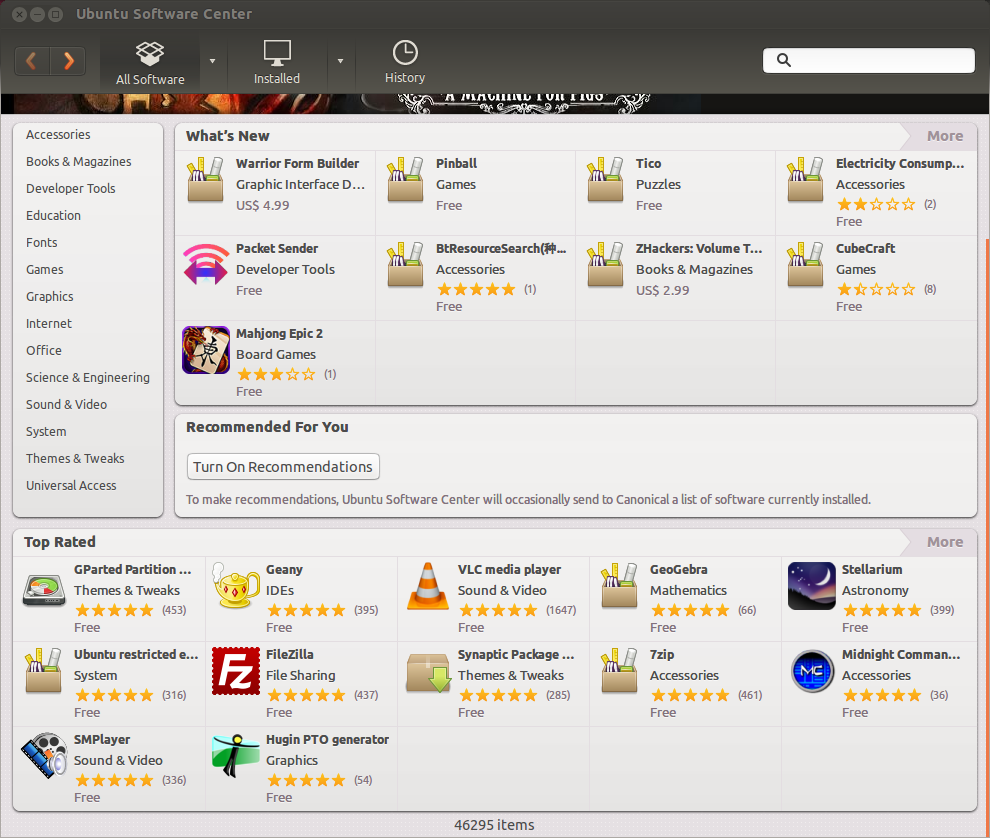
 Ubuntu Software Center 13.10 on Ubuntu 13.10. The application is called the "Ubuntu Software Centre" outside of the U.S. | |
| Original author | Canonical Ltd. / Ubuntu Foundation |
| Developer | Canonical Ltd. |
| Initial release | 29 October 2009 |
| Final release | 16.04
/ 20 April 2016 |
| Repository | |
| Written in | Python |
| Platform | Ubuntu Desktop Edition 9.10 and later Ubuntu Touch 1.0 and higher |
| Type | Digital distribution (Apps, Books) Package manager |
| License | GPLv3, LGPLv3 |
| Website | apps launchpad |

Ubuntu Software Center, or simply Software Center, is a discontinued high-level graphical front end for the APT/dpkg package management system. It is free software written in Python, PyGTK/PyGObject based on GTK.
The program was created for adding and managing repositories, as well as Ubuntu Personal Package Archives (PPA) and on Ubuntu, the Ubuntu Software Center also allowed users to purchase commercial applications.[1]
Development was ended in 2015 and in Ubuntu 16.04 LTS. It was replaced with GNOME Software.[2][3]
Development history
[edit]In early 2009 Ubuntu developers noted that package management within Ubuntu could be improved and consolidated. Recent releases of Ubuntu, such as Ubuntu 9.04 (Jaunty Jackalope) included five applications for package management which consumed space and other resources, as well as provide confusion to users. Applications could be downloaded using the basic Add/Remove Applications or with the Synaptic Package Manager. The Software Updater provided updating for installed packages and Computer Janitor cleaned up packages that were no longer needed. The Software Sources application allowed user selection of the package download location.[4]
Ubuntu developers set as a goal:
"... there should be one obvious mechanism for installing, removing, and updating software in Ubuntu, with a self-evident name and an interface anyone can use. There should be a coordinated system for developers and enthusiasts to improve the usefulness of descriptions and other metadata for software packages. The software updates interface should be honed to maximize the voluntary installation of updates across the millions of computers on which Ubuntu is installed. And projects and vendors whose software is packaged for Ubuntu should be encouraged to provide links to their software's presence in the Software Store, instead of command-line installation instructions."[4]
Canonical introduced the Software Center gradually, starting with Ubuntu 9.10 (Karmic Koala) with complete functionality expected by Ubuntu 11.10, in October 2011. By May 2011, the plan had mostly been completed:[4]
- October 2009 — version 1.0.2 shipped with Ubuntu 9.10 (Karmic Koala)
- Introduced a new simple interface for locating, installing, and removing software, with better security based on PolicyKit instead of gksudo.[4]
- April 2010 — version 2.0.2 shipped with Ubuntu 10.04 (Lucid Lynx) LTS
- The Software Center added lists of non-application packages in a simplified manner and also provide subcategories for applications and Personal Package Archives.[4]
- October 2010 — version 3.0.4 shipped with Ubuntu 10.10 (Maverick Meerkat)
- Allowed users to purchase software and showed a history of past installations, removals and purchases, including undoing specific changes.[4][5]
- April 2011 — version 4.0 shipped with Ubuntu 11.04 (Natty Narwhal)
- Added user rating and reviewing software, and the ability to see ratings and reviews of other participating Ubuntu users.[4][6]
- October 2011 — Ubuntu 11.10 (Oneiric Ocelot)
- Software Center's fifth version was rewritten in GTK3, improving design (better integration with system theme, promoting banner added, nicer listing of apps), start-up time was improved too. Software Center was partially prepared for touch control by including larger icons. Software Center also brought Unity Launcher integration, sorting by ratings and system requirements for applications.[7] Some GDebi technology was also integrated to improve speed when handling .deb files.[8]
- 19 December 2011
- An online edition of the Ubuntu Software Center was released, the Ubuntu Apps Directory. The Web store shows the same content as the Software Center application, with a download button that opens the application if running Ubuntu or a link to download the Ubuntu operating system installer if running a different operating system.[9]
- April 2012 — Ubuntu 12.04 (Precise Pangolin)
- Ubuntu Software Center gained new monochrome elements.[10] Canonical created a Web-based developer platform to help programmers to create applications for Ubuntu.[11] Software Center included a new category: "Books and magazines", ability to show video presentations of paid applications and multiple screenshots per one app.[12] And also added progress bar support for Software Centre.[13]
In August 2015 Chris Hoffman of PC World criticized the application, indicating that Canonical was not maintaining it properly while work on the replacement application was being pursued. In particular, he noted that paid applications were not being supported properly and that Canonical had not informed developers of this. The application still works for installing and managing free software applications.[14]
In November 2015 Canonical announced that development would end and the application would be replaced by GNOME Software in Ubuntu 16.04 LTS.[2][3]
See also
[edit]
References
[edit]- ^ "Canonical Store". Shop.canonical.com. Retrieved 7 August 2013.
- ^ a b Sam Tran (4 November 2015). "Ubuntu Software Centre To Be Replaced in 16.04 LTS". OMG! Ubuntu!.
- ^ a b Silviu Stahie (5 November 2015). "Ubuntu 16.04 LTS to Drop Ubuntu Software Center for GNOME Software". Softpedia.
- ^ a b c d e f g "Software Center". Canonical Ltd. April 2011.
- ^ Akshat (October 2010). "Ubuntu Software Center ratings and reviews to come by Christmas". OMG Ubuntu.
- ^ "Publishing history of "software-center" package in Ubuntu". Canonical Ltd. May 2011.
- ^ Joey Sneddon (13 May 2011). "Software centre changes planned for Oneiric". Archived from the original on 29 March 2012.
- ^ "Technical Overview".
- ^ Sneddon, Joey (19 December 2011). "Ubuntu Apps Directory".
- ^ "Precise's Ubuntu Software Center gains monochrome elements". Archived from the original on 21 June 2012. Retrieved 17 June 2012.
- ^ "Ubuntu App Developer". Retrieved 17 June 2012.
- ^ "Video playback inside Ubuntu Software Center has landed in Ubuntu 12.04". Archived from the original on 26 May 2012. Retrieved 17 June 2012.
- ^ "Precise's Ubuntu Software Center gained progressbar support". Archived from the original on 30 March 2012. Retrieved 17 June 2012.
- ^ Chris Hoffman (22 August 2015). "Canonical is letting the Ubuntu Software Center wither and die". PC World.
External links
[edit]


| General |  | ||||||||
|---|---|---|---|---|---|---|---|---|---|
| People | |||||||||
| Derivatives |
| ||||||||
| Software |
| ||||||||
| Technology and user interface |
| ||||||||
| Hardware | |||||||||
| Support |
| ||||||||
| Fonts | |||||||||
| Media | |||||||||
| Related topics | |||||||||


Ubuntu Software Center
View on Grokipediasoftware-center package for legacy users in recent Ubuntu versions.[4] The tool's legacy influenced subsequent Ubuntu software interfaces, including the modern App Center introduced in Ubuntu 23.10, which builds on similar principles but prioritizes snap packages.[5]
Overview
Purpose and Functionality
The Ubuntu Software Center serves as a graphical user interface (GUI) for managing software packages on Ubuntu Linux distributions, providing users with an intuitive way to discover, install, update, and remove applications without relying on command-line tools. It acts as a central hub that aggregates software from official Ubuntu repositories, third-party Personal Package Archives (PPAs), and Canonical's paid offerings, simplifying the process for both novice and experienced users. Introduced in Ubuntu 9.10 (Karmic Koala), it replaced earlier tools like Add/Remove Applications and complemented package managers such as APT, emphasizing ease of use in line with Ubuntu's goal of accessibility.[2][6] At its core, the Ubuntu Software Center enables browsing of thousands of applications through categorized sections such as "All Software," "Installed," "Updates," and "History," with a prominent search bar for quick lookups. Users can view detailed application information, including descriptions, screenshots, dependencies, and user ratings, before deciding to install or purchase. Installation handles automatic dependency resolution by fetching required packages from enabled repositories, queuing multiple operations for batch processing, and requiring administrative privileges via sudo authentication. Removal similarly uninstalls software while preserving user data where possible, and the tool displays progress for ongoing tasks.[6][2] Additional functionalities enhance user engagement and ecosystem integration, such as support for paid applications through Canonical's payment service, allowing purchases and subsequent reinstallation across devices linked to a Ubuntu One account. It also facilitates the management of add-ons, recommendations, and software sources, including easy addition of PPAs for accessing cutting-edge or specialized packages. Ratings and reviews from the community provide social proof, while the open-source nature of the tool—hosted on Launchpad—encourages contributions from developers. These features collectively make the Ubuntu Software Center a comprehensive solution for software lifecycle management in a Debian-based environment.[6][2]Platforms and Compatibility
The Ubuntu Software Center was designed specifically for the Ubuntu Linux distribution, functioning as a graphical front-end to the APT/dpkg package management system on Debian-based systems. It was included by default in Ubuntu desktop editions from version 9.10 (Karmic Koala) onward, providing a unified interface for software installation, updates, and removal tailored to Ubuntu's ecosystem.[2][6] In terms of hardware compatibility, the Software Center supported all architectures officially backed by Ubuntu during its active period, including i386 (32-bit x86), amd64 (64-bit x86), armel, armhf, powerpc, and ppc64el, as it relied on the underlying APT system to handle architecture-specific packages. If a selected application was unavailable for the user's system architecture, the interface would display a clear notification, such as "Sorry, [Application] is not available for this type of computer ([Architecture])." This ensured seamless operation across diverse hardware platforms, from standard x86 desktops and laptops to ARM-based devices where Ubuntu desktop was deployed.[6][7] The application was optimized for Ubuntu's primary desktop environments, including GNOME (from Ubuntu 9.10 to 12.04) and Unity (from 11.04 to 15.10), integrating directly with the desktop shell for launching via menus, search, or APT URLs. While primarily developed for Ubuntu, it was also installable and functional on compatible Ubuntu derivatives that utilized APT repositories, such as certain builds of Linux Mint, provided the necessary dependencies were met. However, its core compatibility remained tied to Ubuntu's release cycle and repository structure, limiting cross-distribution portability without modifications.[4][6] Following its discontinuation as the default tool in Ubuntu 16.04 LTS, where it was superseded by GNOME Software for better integration with modern desktop standards, legacy support persisted in older releases like 14.04 and 16.04 through official repositories, maintaining backward compatibility for users on those versions and architectures.[4]Development History
Initial Development
The Ubuntu Software Center was initially developed by Michael Vogt, a Canonical engineer and Debian contributor known for creating Synaptic, the first major graphical frontend for the APT package manager.[8] Vogt led the project as part of Canonical's efforts to streamline software management in Ubuntu, aiming to consolidate fragmented tools such as Add/Remove Applications and Synaptic into a single, user-friendly interface. This development addressed the need for a centralized "one-stop shop" for discovering, installing, purchasing, and removing software, enhancing accessibility for non-technical users while supporting APT's backend.[6][9] The project originated in the lead-up to Ubuntu 9.10 (Karmic Koala), with its first stable release integrated into that version on October 29, 2009.[2] It replaced the basic Add/Remove tool in the GNOME Applications menu, introducing features like categorized software browsing, search functionality, and integration with Ubuntu's repositories to simplify package handling. Early development focused on Python-based implementation with GTK for the interface, hosted on Launchpad for collaborative contributions from developers, designers, and testers.[9][1] The tool was licensed under the GNU GPL v3, emphasizing open-source principles.[1] Initial goals emphasized improving the overall software ecosystem by reducing redundancy among graphical package managers and fostering application discoverability, setting the stage for future enhancements like ratings and commercial software support. Development was distributed, with Canonical's team handling core implementation, and it quickly became a cornerstone of Ubuntu's desktop experience from version 9.10 onward.[6][8]Major Releases and Updates
The Ubuntu Software Center was first introduced in version 1.0.2 with the release of Ubuntu 9.10 (Karmic Koala) on October 29, 2009, replacing the older Add/Remove applications tool with a more intuitive graphical interface that supported searching, browsing categories, and installing software from repositories.[6] This initial version, developed primarily by Michael Vogt, focused on simplifying package management for novice users while integrating with the APT system, marking a significant shift toward a consumer-friendly app store model in Ubuntu.[9] Version 2.0 arrived with Ubuntu 10.04 LTS (Lucid Lynx) on April 29, 2010, expanding functionality to display non-application packages such as fonts, themes, and codecs, alongside improved visibility for Personal Package Archives (PPAs) and third-party repositories.[10] Built using Python, GTK, and Aptdaemon, this release emphasized broader repository integration and user interface refinements to handle diverse package types more effectively, addressing feedback from the initial rollout.[4] Subsequent updates in version 3.0.4, shipped with Ubuntu 10.10 (Maverick Meerkat) on October 10, 2010, introduced support for in-app software purchases and integration of APT URLs for seamless installation from external links, enhancing the center's role as a unified storefront.[6] These features aimed to compete with commercial app stores by enabling paid content while maintaining open-source principles, with the package hosted on Launchpad for ongoing development.[1] Version 4.0, included in Ubuntu 11.04 (Natty Narwhal) on April 28, 2011, added user ratings and reviews for installed applications, fostering community-driven feedback and discovery within the interface.[6] This update refined the single-pane department view and interactive elements, such as post-installation launch prompts, to improve user engagement and package evaluation. The 5.0 series debuted in Ubuntu 11.10 (Oneiric Ocelot) in October 2011, with refinements continuing into Ubuntu 12.04 LTS (Precise Pangolin) via version 5.2.10, which enhanced search algorithms, dependency handling, and update notifications for a more robust experience. Later iterations, such as 5.6 in Ubuntu 13.04 (Raring Ringtail) and version 13.10 in Ubuntu 13.10 (Saucy Salamander), incorporated minor UI tweaks and bug fixes but saw diminishing major feature additions as development focus shifted.[4][6] By 2015, Canonical discontinued support for paid applications in the Software Center, leading to its gradual phase-out without new developer notifications, as reported in industry analyses.[11] The tool was fully replaced in Ubuntu 16.04 LTS (Xenial Xerus), released on April 21, 2016, by GNOME Software, which offered better integration with the GNOME desktop and Flatpak/Snap support, ending active updates for the original Software Center.[12] Legacy versions remained available in older Ubuntu releases until their end-of-life, preserving access for users on supported systems like 14.04 LTS.[4]Features
Core Package Management
The Ubuntu Software Center (USC) serves as a graphical frontend for core package management in Ubuntu, leveraging the Advanced Package Tool (APT) to handle the installation, removal, and updating of software packages from Debian repositories. It abstracts the complexities of command-line operations, allowing users to interact with the APT ecosystem through an intuitive interface while ensuring dependency resolution and conflict handling are managed automatically in the background. This integration is facilitated by Aptdaemon, a system daemon that provides a D-Bus interface for transaction-based package operations, enabling USC to perform privileged actions without requiring direct terminal access.[6][1] At its core, package installation in USC involves searching repositories for available software, either by keyword or category, followed by selecting and queuing items for installation. Upon confirmation with administrative privileges (typically via password entry), Aptdaemon initiates the APT transactions to download and install the packages, including any required dependencies such as libraries or supporting files. USC supports installing from multiple sources, including official Ubuntu repositories (Main, Universe, Restricted, Multiverse), Personal Package Archives (PPAs), and standalone .deb files, with warnings issued for potential repository conflicts. This process ensures atomic transactions, where partial failures are rolled back to maintain system integrity. For example, installing a complex application like a web browser would automatically pull in dependencies like rendering engines without user intervention.[6][2][13] Package removal is similarly streamlined, accessible via the "Installed" view where users can select applications and choose options like "Remove" or "Remove Including Settings" to purge configuration files. Aptdaemon handles the underlying APT commands, such asapt-get remove or apt-get purge, while resolving reverse dependencies to avoid breaking other software. Residual files from uninstalled packages can be viewed and cleaned up through dedicated screens, promoting efficient disk space management. This feature extends to bulk operations, allowing multiple removals to be queued and executed in a single transaction.[6][1]
For updates, USC includes a dedicated "Updates" section that scans enabled repositories for available upgrades, displaying them with details like version changes and security implications. Users can apply updates individually or via an "Update All" button, with Aptdaemon coordinating the APT refresh (apt-get update) and upgrade (apt-get upgrade) processes. This integration supports channels like backports and proposed updates, though it relies on the broader Software Sources configuration for repository prioritization. Automatic dependency updates are enforced, ensuring compatibility across the system.[6][2]
Repository management within USC is tied to the APT sources list, accessible through integrated settings that allow enabling/disabling components like Canonical Partners or adding PPAs directly. Changes propagate to APT's cache, refreshed via USC's backend to reflect new package availability. This setup supports offline caching for repository metadata, enabling package searches without constant internet access, while maintaining security through signed repository verification. Overall, these core functionalities position USC as a user-centric layer atop APT, emphasizing ease of use without compromising the robustness of Debian package management.[6][1][13]
User Interface and Additional Tools
The Ubuntu Software Center features a graphical user interface designed for ease of use, providing a centralized platform for discovering, installing, and managing software packages on Ubuntu systems. The interface includes a main window with a top navigation bar containing back and forward buttons, a search field, and tabs for sections such as "All Software," "Installed," "History," and "Progress." This layout allows users to navigate between views seamlessly, with the primary content pane displaying categorized software lists, detailed application views, or progress indicators for ongoing operations.[6][2] Search functionality is integrated into the navigation bar, enabling users to enter keywords to find applications, with results displayed sorted by relevance, user ratings, or alphabetical order; if no matches are found, suggestions like alternative search terms are provided. The left sidebar organizes content into categories such as "Games," "Internet," "Graphics," and subcategories like "Web Browsers" or "Puzzles," allowing filtering in either tile or list view formats. Software details pages offer screenshots, descriptions, and options to view add-ons or related items, enhancing user decision-making before installation.[6][2] Installation and removal processes are streamlined through prominent buttons on application pages or list views; selecting "Install" prompts for user authentication via password, queues the operation, and tracks it in the "Progress" tab, which includes pause and cancel options for multiple tasks. The interface supports handling standalone .deb packages via a "Open Package" menu item (Ctrl+O) and integrates with apt: URLs for direct launches from web links. Removal is similarly handled in the "Installed" section, with queued operations to manage dependencies efficiently.[6][2] Additional tools within the interface include repository management accessible via the "Edit > Software Sources" menu, which allows enabling or disabling sources like Canonical Partners or Personal Package Archives (PPAs) without leaving the application. Users can access ratings, reviews, and recommendations for applications, fostering community-driven feedback, and reinstall previously purchased software through "File > Reinstall Previous Purchases" or an external subscriptions portal. The interface also supports purchasing from Independent Software Vendors (ISVs) and integrates with D-Bus for interactions like updating the Unity Launcher, providing a cohesive experience with Ubuntu's desktop environment.[6][2]Technical Architecture
Underlying Technologies
The Ubuntu Software Center is primarily implemented in Python, leveraging the language's flexibility for scripting and integration with system components. This choice aligns with Ubuntu's broader ecosystem of Python-based tools for desktop applications, enabling efficient handling of package metadata and user interactions. The frontend graphical user interface is built using the GTK toolkit, with bindings provided by PyGTK in earlier versions and transitioning to PyGObject for improved compatibility with modern GNOME environments. This architecture ensures a native look and feel on Ubuntu desktops while supporting responsive layouts for software browsing and installation workflows.[14][1] At its core, the application relies on Aptdaemon as the primary backend for package management operations. Aptdaemon serves as a secure DBus interface that allows non-privileged processes, such as the Software Center, to query, install, update, and remove packages via the underlying APT (Advanced Package Tool) system without direct root access. This abstraction layer enhances security by enforcing PolicyKit-based privilege escalation for sensitive actions, while providing real-time progress feedback during transactions. For instance, dependency resolution and conflict handling are delegated to APT's robust algorithms, ensuring reliable software deployment from Debian repositories, PPAs, and local .deb files.[6] An experimental alternative backend based on PackageKit was introduced during Google Summer of Code 2011, offering cross-distribution compatibility for package operations. However, it faced performance limitations, such as slower queries for installed packages and lack of support for proprietary channels like paid applications, making Aptdaemon the default for production use. Additional integrations include Ubuntu Single Sign-On (SSO) for user authentication and purchase handling through Canonical's payment services, as well as app-install-data packages for software categorization and metadata enrichment. These components collectively enable features like personalized recommendations and seamless syncing via Ubuntu One, though the latter was deprecated in later Ubuntu versions.[15]Integration with Package Systems
The Ubuntu Software Center serves as a graphical front-end for the Advanced Packaging Tool (APT) and Debian Package (dpkg) systems, enabling users to manage Debian packages (.deb files) through an intuitive interface while leveraging the underlying command-line capabilities of these tools. It interacts directly with APT to handle core operations such as installing, updating, and removing software packages from configured repositories, translating user selections into APT commands executed in the background. For instance, when a user initiates an installation, the Software Center authenticates the request and invokes APT to resolve dependencies and download packages, ensuring seamless integration without requiring manual terminal input.[2] Integration with APT extends to repository management, where the Software Center allows users to add, enable, or disable sources like official Ubuntu repositories, Canonical Partners, and Personal Package Archives (PPAs) via a dedicated "Software Sources" dialog. Upon adding a new repository—such as by entering adeb [https](/page/HTTPS)://... line—the tool automatically runs sudo apt-get update to refresh the package index, making newly available software discoverable in its catalog. This process mirrors APT's repository handling but abstracts it into a point-and-click experience, supporting both stable and third-party sources while maintaining security through APT's GPG key verification for signed repositories. PPAs, in particular, are integrated by prompting users to add Launchpad-based archives, which APT then treats as standard sources for installing community-maintained packages.[2]
For package configuration and error resolution, the Software Center relies on dpkg as the low-level installer, calling commands like sudo dpkg --configure -a to fix interrupted installations or sudo apt-get install -f to resolve broken dependencies automatically. This backend synergy ensures that graphical operations align with the Debian packaging ecosystem's robustness, queuing multiple actions (e.g., batch installations or removals) for sequential processing via APT to avoid conflicts. Additionally, the tool supports hybrid management by allowing users to filter software by origin—such as "Provided by Ubuntu" for official packages—directly interfacing with APT's metadata to categorize and display available applications based on repository priorities and availability.[2]
Beyond standard Debian packages, the Software Center's APT integration facilitates access to paid or subscription-based software through Ubuntu's Single Sign-On system, where reinstallations trigger APT downloads from authenticated sources like Canonical's subscription services. This extends APT's flexibility to commercial ecosystems while preserving the open-source core, though it requires user credentials for proprietary content. Overall, this integration positions the Software Center as a user-friendly abstraction layer over APT and dpkg, democratizing package management for non-technical users without compromising the systems' command-line precision.[2]