


Community hub
Recent from talks
Contribute something
Nothing was collected or created yet.
| VRML | |
|---|---|
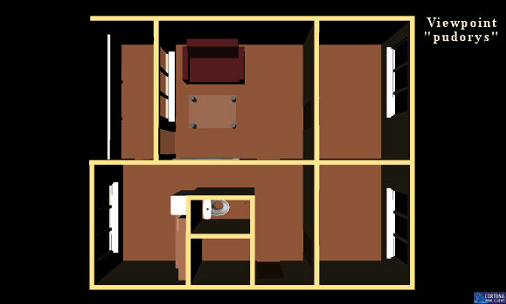
 Apartment ground plan in VRML | |
| Filename extension |
|
| Internet media type |
|
| Latest release | 2.0 |
| Type of format | 3D computer graphics |
| Extended from | Labyrinth |
| Standard | ISO/IEC 14772-1:1997 |
| Website | www |
VRML (Virtual Reality Modeling Language, pronounced vermal or by its initials, originally—before 1995—known as the Virtual Reality Markup Language) is a standard file format for representing 3-dimensional (3D) interactive vector graphics, designed particularly with the World Wide Web in mind. It has been superseded by X3D.[1]
WRL file format
[edit]VRML is a text file format where, e.g., vertices and edges for a 3D polygon can be specified along with the surface color, UV-mapped textures, shininess, transparency, and so on.[2][3] URLs can be associated with graphical components so that a web browser might fetch a webpage or a new VRML file from the Internet when the user clicks on the specific graphical component. Animations, sounds, lighting, and other aspects of the virtual world can interact with the user or may be triggered by external events such as timers. A special Script Node allows the addition of program code (e.g., written in Java or ECMAScript) to a VRML file.
VRML files are commonly called "worlds" and have the .wrl extension (for example, island.wrl). VRML files are in plain text and generally compress well using gzip, useful for transferring over the Internet more quickly (some gzip compressed files use the .wrz extension). Many 3D modeling programs can save objects and scenes in VRML format.
Standardization
[edit]The Web3D Consortium has been formed to further the collective development of the format. VRML (and its successor, X3D), have been accepted as international standards by the International Organization for Standardization (ISO) and the International Electrotechnical Commission (IEC).
The first version of VRML was specified in November 1994. This version was specified from, and very closely resembled, the API and file format of the Open Inventor software component, originally developed by SGI. Version 2.0 development was guided by the ad hoc VRML Architecture Group (VAG).[4] A working draft was published in August 1996.[5] Formal collaboration between the VAG and SC24 of ISO/IEC began in 1996[6] and VRML 2.0 was submitted to ISO for adoption as an international standard. The current and functionally complete version is VRML97 (ISO/IEC 14772-1:1997). VRML has now been superseded by X3D (ISO/IEC 19775-1).
Emergence, popularity, and rival technical upgrade
[edit]The term VRML was coined by Dave Raggett in a paper called "Extending WWW to support Platform Independent Virtual Reality"[7] submitted to the First World Wide Web Conference[8] in 1994, and first discussed at the WWW94 VRML BOF established by Tim Berners-Lee, where Mark Pesce presented the Labyrinth demo he developed with Tony Parisi[9] and Peter Kennard.[10] VRML was introduced to a wider audience in the SIGGRAPH Course, VRML: Using 3D to Surf the Web[11] in August 1995. In October 1995, at Internet World, Template Graphics Software (TGS) demonstrated a 3D/VRML plug-in for the beta release of Netscape 2.0 by Netscape Communications.[12]
In 1997, a new version of the format was finalized, as VRML97 (also known as VRML2 or VRML 2.0), and became an ISO/IEC standard. VRML97 was used on the Internet on some personal homepages and sites such as "CyberTown", which offered 3D chat using Blaxxun Software, as well as Sony's SAPARi program, which was pre-installed on Vaio computers from 1997 to 2001.[13] The format was championed by SGI's Cosmo Software; when SGI restructured in 1998, the division was sold to the VREAM Division of Platinum Technology, which was then taken over by Computer Associates, which did not develop or distribute the software. To fill the void a variety of proprietary Web 3D formats emerged over the next few years, including Microsoft Chrome and Adobe Atmosphere, neither of which is supported today. VRML's capabilities remained largely the same while realtime 3D graphics kept improving. The VRML Consortium changed its name to the Web3D Consortium, and began work on the successor to VRML—X3D.[14]
SGI ran a web site at vrml.sgi.com on which was hosted a string of regular short performances of a character called "Floops" who was a VRML character in a VRML world. Floops was a creation of a company called Protozoa.[15][16]
H-Anim is a standard for animated Humanoids, which is based on VRML, and later X3D. The initial version 1.0 of the H-Anim standard was scheduled for submission at the end of March 1998.[17]
VRML has never seen much serious widespread use.[18] One reason for this may have been the lack of available bandwidth.[19] At the time of VRML's popularity, a majority of users, both business and personal, were using slow dial-up Internet access.
VRML experimentation was primarily in education and research where an open specification is most valued.[20] It has now been re-engineered as X3D. The MPEG-4 Interactive Profile (ISO/IEC 14496) was based on VRML[21] (now on X3D), and X3D is largely backward-compatible with it. VRML is also widely used as a file format for interchange of 3D models, particularly from CAD systems.[22]
A free cross-platform runtime implementation of VRML is available in OpenVRML. Its libraries can be used to add both VRML and X3D support to applications, and a GTK+ plugin is available to render VRML/X3D worlds in web browsers.
In the 2000s, many companies like Bitmanagement improved the quality level of virtual effects in VRML to the quality level of DirectX 9.0c, but at the expense of using proprietary solutions. All main features like game modeling are already complete. They include multi-pass render with low level setting for Z-buffer, BlendOp, AlphaOp, Stencil,[23] Multi-texture,[24] Shader with HLSL and GLSL support,[25] realtime Render To Texture, Multi Render Target (MRT) and PostProcessing.[26] Many demos shows that VRML already supports lightmap, normalmap, SSAO, CSM and Realtime Environment Reflection along with other virtual effects.[27]
Example
[edit]This example shows the same scene as X3D § Example.
#VRML V2.0 utf8

Shape {
  geometry IndexedFaceSet {
    coordIndex [ 0, 1, 2 ]
    coord Coordinate {
      point [ 0, 0, 0, 1, 0, 0, 0.5, 1, 0 ]
    }
  }
}
Early criticism
[edit]In a March 1998 ACM essay, "Playfulness in 3D Spaces -- Why Quake is better than VRML, and what it means for software design", Clay Shirky sharply criticised VRML as a "technology in search of a problem", whereas "Quake does something well instead of many things poorly...The VRML community has failed to come up with anything this compelling -- not despite the community's best intentions, but because of them. Every time VRML practitioners approach the problem of how to represent space on the screen, they have no focused reason to make any particular trade-off of detail versus rendering speed, or making objects versus making spaces, because VRML isn't for anything except itself. Many times, having a particular, near-term need to solve brings a project's virtues into sharp focus, and gives it enough clarity to live on its own."[28]
Alternatives
[edit]See also
[edit]- Active Worlds virtual reality – multi-user 3D chat platform
- A-Frame (virtual reality framework) - Entity Component System VR platform base on threejs and WebXR
- Additive Manufacturing File Format
- Blaxxun virtual reality – multi-user 3D chat platform
- Flux – freely downloadable VRML/X3D editor/browser, now discontinued
- List of vector graphics markup languages
- MeshLab – open source mesh processing system that can export VRML/X3D
- OZ Virtual
- Seamless3d – free Open Source 3D modeling software for Microsoft Windows
- STL – STereoLithography or Standard Tessellation Language, common to CAD software and 3D printing.
- Virtual Environment Software
- Virtual tour
- Web3D
- WebGL
- WebVR
- WebXR - Successor to WebVR
References
[edit]- ^ Paul Festa and John Borland (May 19, 2005). "Is a 3D web more than just empty promises?". CNET News.com.
- ^ "Version 1.0 Specification". Web3d.org. Retrieved 2010-02-23.
- ^ "VRML Version 1.0 Specification". Retrieved 2018-11-27.
- ^ Ando, Hideyuki; Kubota, Akihiro; Kiriyama, Takashi (July 1998). "Study on the collaborative design process over the Internet: a case study on VRML 2.0 specification design". Design Studies. 19 (3): 289–308. doi:10.1016/S0142-694X(98)00007-6. Retrieved 24 March 2020.
- ^ "VRML Version 2.0 Specification". 1996-08-04. Retrieved 2018-11-27.
- ^ Carson, George; Puk, Richard; Carey, Rikk (March–April 1999). "Developing the VRML 97 international standard". IEEE Computer Graphics and Applications. 19 (2): 52–58. doi:10.1109/38.749123.
- ^ Dave Raggett (1994). "Extending WWW to support Platform Independent Virtual Reality". Retrieved April 2, 2012.
- ^ "First World Wide Web Conference". 4.web.cern.ch. Retrieved 2010-02-23.
- ^ Media Machines Management
- ^ "Peter Kennard's page". Livingwork.com. Retrieved 2010-02-23.
- ^ Hardenbergh, Jan; Bell, Gavin; Pesce, Mark (August 1995). Course 12 - VRML: Using 3D to Surf the Web. ACM SIGGRAPH.
- ^ First 3D/VRML Plug-in for Netscape 2.0 shown by TGS; TGS extends leadership in Internet 3D products and technology. AllBusiness.com. 30 Oct 1995. Last accessed 26 Dec 2011.
- ^ Tsunetake Noma (February 7, 2014). "17th anniversary of the launch of "Sapari" service and the sale of VAIO business" (in Japanese). Retrieved January 4, 2021.
- ^ "A Commentary on GeoVRML". Archived from the original on 2021-02-04. Retrieved 2011-08-23.
- ^ "Floops general narrative". Biota.org. Archived from the original on 2009-12-02. Retrieved 2010-02-23.
- ^ "Floops in his first episode". Retrieved 2010-02-23.
- ^ VRML Consortium Charter for Humanoid Animation Working Group
- ^ David Sabine. "What is (was) VRML?". David Sabine. Archived from the original on 2021-02-03. Retrieved 2019-07-20.
- ^ "Introduction to VRML". Archived from the original on 2020-05-02. Retrieved 2019-07-20.
- ^ Web-Based Control and Robotics Education, page 30
- ^ "3D Online: Browser Plugins and More". Archived from the original on 2020-09-29. Retrieved 2019-07-20.
- ^ "XML Matters". Ibm.com. Retrieved 2010-02-23.
- ^ DrawGroup & DrawOp
- ^ "Multitexturing". Archived from the original on 2010-07-12. Retrieved 2010-06-14.
- ^ "Programmable shaders component". Archived from the original on 2010-07-12. Retrieved 2010-06-14.
- ^ Scene postprocessing support
- ^ VRML X3D and Realtime Web3D
- ^ Shirky, Clay (March 1998). "Playfulness in 3-D Spaces - Why Quake is better than VRML". Clay Shirky's Writings About the Internet. Archived from the original on 2019-04-09. Retrieved 2022-04-01.
External links
[edit]
- Code samples
- VRML examples from the VRML Sourcebook (to get the example VRML code, click on a chapter, then on a figure)
- Documentation
- VRML Archives at the Wayback Machine (archived March 4, 2014)
- The Annotated VRML 97 Reference at the Wayback Machine (archived March 4, 2016)
- VRML ISO/IEC 14772 standard document
| International | |
|---|---|
| National | |
| Other | |


History
Origins and Early Development
VRML emerged in 1994 as a collaborative effort led by Mark Pesce of Labyrinth Group, alongside Anthony Parisi of Intervista Software and Gavin Bell of Silicon Graphics, to develop a file format for delivering 3D content over the burgeoning World Wide Web. Initiated as a Silicon Graphics project, it sought to extend the web's capabilities beyond static text and images by enabling the representation and navigation of three-dimensional virtual environments. The concept was sparked by the rapid expansion of internet access and the recognition that HTML's two-dimensional structure limited immersive user experiences, prompting a need for standardized 3D modeling tied to web hyperlinks.[1][7][8] The origins trace directly to the First International Conference on the World Wide Web, held May 25–27, 1994, at CERN in Geneva, Switzerland, where Tim Berners-Lee and Dave Raggett organized a Birds-of-a-Feather session on virtual reality interfaces for the web. During this event, Pesce and Parisi demonstrated the first prototype of a 3D web browser, captivating attendees and igniting community interest. This led to the immediate launch of the www-vrml mailing list, moderated by Pesce and hosted by Wired Magazine, which quickly amassed thousands of subscribers and facilitated collaborative specification drafting. The demonstration highlighted VRML's potential to transform web browsing into an interactive spatial experience, aligning with the conference's theme of advancing web technologies.[1][8][9] By May 1995, the first specification, VRML 1.0, was released on May 26, building directly on Silicon Graphics' Open Inventor ASCII file format, which provided a mature foundation for describing polygonal 3D scenes with lighting, materials, and realism effects. This version emphasized static scenes navigable via hyperlinks, without support for dynamic behaviors or animations, to ensure compatibility with early web infrastructure. Early adoption was bolstered by tools such as WebSpace, the inaugural VRML browser developed by Silicon Graphics in partnership with Template Graphics Software and released shortly after the specification. This laid the foundation for broader community-driven refinements toward formal standardization.[1][8][10]Standardization Efforts
The standardization efforts for VRML were formalized through the establishment of dedicated organizations and collaborative processes to ensure interoperability and industry-wide adoption. The VRML Architecture Group (VAG) was founded in August 1995 as an initial technical body to oversee early specification development, evolving from community discussions on mailing lists. This group was succeeded by the VRML Consortium, formed in December 1996 by 35 major technology companies and developers to govern VRML's evolution and promote open standards for web-based 3D graphics. The consortium, later renamed the Web3D Consortium in 1998, facilitated international collaboration through regular meetings, such as the February 1996 VAG session in San Francisco for refining proposal selection processes and the July 1996 ISO JTC1/SC24 meeting in Kyoto to advance draft submissions.[2][11][12][13][14] A pivotal milestone was the release of the VRML 1.0 specification in May 1995, led by Silicon Graphics under the guidance of Gavin Bell, which adapted the company's Open Inventor file format to create a platform-independent textual representation of 3D scenes. This version focused on static hierarchical scene graphs, enabling basic geometry, lighting, and texturing without support for animation or user interaction, serving as a foundational blueprint for web integration. Tony Parisi, a co-creator of VRML alongside Mark Pesce, contributed significantly to these early efforts by advocating for community-driven refinements during VAG discussions.[8][15][16] Building on this, the VRML Consortium introduced VRML 2.0 in August 1996, expanding the format's capabilities to include dynamic elements such as animation, sensors for user input, and scripting interfaces using a Java-like syntax that integrated with Java and JavaScript for behaviors and event handling. The development involved iterative drafts, including a working draft in early 1996 and a final specification reviewed by the consortium's technical committees. This version addressed limitations of VRML 1.0 by enabling interactive, time-based 3D environments suitable for the evolving web.[17][18] The culmination of these efforts came with the internationalization of VRML 2.0 as VRML 97 through ISO/IEC 14772-1:1997, published in December 1997 following cooperative work between the VRML Consortium and ISO's JTC1/SC24 subcommittee. This standard, which incorporated minor clarifications and ensured cross-platform compatibility, was ratified after a series of committee drafts, including a July 1996 submission and an April 1997 disposition of comments report. The ISO endorsement solidified VRML's role as a robust, vendor-neutral format for 3D web content.[19][20][21]Rise, Peak, and Decline
VRML experienced rapid growth following its formalization as an ISO standard in 1997, reaching its peak popularity between 1997 and 2000 as browser plugins enabled widespread integration of 3D content on the web.[22] Major companies including Netscape, Silicon Graphics, and Microsoft supported VRML through plugins such as Cosmo Player and WorldView, allowing users to view interactive 3D models directly in browsers like Netscape Navigator and Internet Explorer.[23] By the late 1990s, adoption surged, with Intervista Software distributing over 10 million copies of its WorldView plugin bundled with Internet Explorer, facilitating access for a broad audience.[16] During this period, VRML found applications in web-based demonstrations, educational tools, and early virtual worlds, enabling immersive experiences like 3D fly-throughs of products and collaborative online environments.[16] Notable examples included Intel's interactive Pentium chip visualization and Nickelodeon's 3D web content, which showcased VRML's potential for marketing and entertainment.[16] Projects like CyberTown, launched in 1995, demonstrated multi-user virtual communities where participants could customize homes and interact in persistent 3D spaces, highlighting VRML's role in pioneering web-based social experiences.[24] VRML's decline began in the late 1990s amid the browser wars between Netscape and Microsoft, which fragmented plugin support and led to user fatigue with installation requirements.[16] The rise of alternatives like Flash and Java offered simpler paths for hybrid 2D/3D web content, while hardware limitations—such as dial-up connections and underpowered PCs—hindered VRML's performance for complex scenes.[24] Proposed enhancements for VRML 3.0, including advanced behaviors and extensibility, were ultimately incorporated into X3D, ratified in 2001 as VRML's successor under the Web3D Consortium.[25] Despite its broader fade from mainstream web use, VRML maintained legacy applications in niche domains like computer-aided design (CAD) and scientific visualization throughout the 2000s, where its structured 3D format supported specialized modeling needs.[25]Technical Overview
File Format Specifications
The VRML file format, typically using the .wrl extension, is a plain-text ASCII-based representation encoded in UTF-8, allowing human-readable descriptions of 3D scenes. This format enables straightforward editing with text editors and transmission over networks, as it avoids proprietary binary structures in the core specification. Files consist of a header followed by the scene description, adhering to a context-free grammar that defines valid syntax for nodes and fields.[26] The file begins with a mandatory header line:#VRML V2.0 [utf8](/page/UTF-8), which identifies the version and encoding, terminated by a newline or carriage return. Comments are introduced by the # symbol and extend until the end of the line, ignored by parsers except within quoted strings; this facilitates documentation without affecting the scene graph. Node definitions are delimited by curly braces { }, with node bodies enclosed to specify fields and child nodes, while square brackets [ ] group multiple values in fields, and whitespace (spaces, tabs, commas, or newlines) separates tokens.[26][27]
At its core, the format encodes a hierarchical scene graph as a directed acyclic graph of nodes, where each node represents an object or transformation in the virtual world. Root-level nodes form the top of the hierarchy, with child nodes nested within fields like children in grouping nodes such as Transform (which applies position, rotation, and scale) or Group (a general container). Geometry nodes, such as Cone (defining a conical primitive with height and radius fields) or Sphere (a spherical primitive with a radius field), populate the leaves of this graph to render shapes. This structure supports modular scene composition, where nodes reference others via identifiers defined with DEF and reused with USE.[26][28]
Data types in VRML are prefixed with SF for single-value fields (e.g., SFVec3f for a 3D vector of three single-precision floats, written as 1.0 2.0 3.0) or MF for multiple-value fields (e.g., MFNode for an array of nodes, using brackets like [ Node1 { ... } Node2 { ... } ]). These types ensure type-safe field assignments, with initial values provided for event outputs. The format incorporates an event-driven model for interactivity, where fields can route events via ROUTE statements connecting an output (eventOut, e.g., from a sensor) to an input (eventIn, e.g., toField on a node), enabling dynamic scene updates without altering the static structure.[29]
Although the primary VRML 97 specification (ISO/IEC 14772-1:1997) defines only UTF-8 text encoding, rarely used binary encoding extensions were proposed in addenda to support smaller file sizes and faster parsing through compact node and geometry representations. These extensions, such as compressed binary formats, allowed conversion from text VRML but saw limited adoption, with most implementations sticking to the text standard.[30]
Core Features and Nodes
VRML's core features revolve around a scene graph composed of nodes that define 3D geometry, appearance, grouping, interactivity, animation, scripting, lighting, and basic collision detection, enabling the creation of interactive virtual worlds. These nodes form a hierarchical structure where each node type serves a specific functional role, allowing authors to build complex scenes through composition and event-driven behavior. The specification outlines over 50 node types, categorized by their primary purpose, with support for extensions via prototypes.[31] Geometry nodes provide the foundational primitives and meshes for 3D shapes. For instance, the IndexedFaceSet node defines polygonal meshes by specifying vertex coordinates, texture coordinates, and face indices, supporting arbitrary complex surfaces suitable for models like terrain or objects. Other geometry nodes include primitives such as Box for rectangular solids, Cone and Cylinder for basic extruded shapes, Sphere for rounded objects, and ElevationGrid for height-field terrains, which offer efficient representations without full indexing. These nodes emphasize flexibility in defining static 3D forms, with options for normals and colors to enhance rendering.[32] Appearance nodes control the visual properties applied to geometry, focusing on surface characteristics. The Material node sets attributes like diffuse color, emissive color, specular color, shininess, and transparency to simulate realistic shading under lighting. Texture mapping is handled by nodes such as ImageTexture, which applies static 2D images (e.g., JPEG or PNG) to surfaces, and MovieTexture for dynamic video textures that can also drive audio playback. The Appearance node groups these elements, allowing layered effects like multi-texturing through the TextureTransform for scaling and offsetting. These features enable detailed, photorealistic or stylized visuals without altering the underlying geometry.[32] Grouping nodes organize and optimize the scene graph for efficiency and structure. The Group node simply aggregates children hierarchically, while Transform applies translations, rotations, scales, and centers to its subtree, defining local coordinate systems. For performance, the LOD (Level of Detail) node switches between multiple representations of geometry based on viewer distance, using ranges to load simpler models when far away, thus reducing rendering load in large scenes. Specialized grouping like Billboard orients children to always face the viewer, and Switch selectively renders one child based on an index, useful for variants or conditional content. These nodes facilitate modular scene construction and runtime optimization.[32] Interactivity is achieved through sensors that detect user input or environmental changes, combined with routes for event propagation. Sensor nodes, such as the ProximitySensor, generate events when the viewer enters or exits a specified 3D bounding volume, providing position and orientation data to trigger actions. The TouchSensor detects pointing device interactions with geometry, outputting details like contact points and timestamps, while PlaneSensor and CylinderSensor translate or rotate based on drag motions in a plane or around an axis. Routes connect these event outputs directly to input fields of other nodes, enabling dynamic responses like object movement without scripting, forming a declarative event model for user-driven behaviors.[32] Animation support relies on time-based nodes and interpolators to create smooth transitions. The TimeSensor node acts as a clock, emitting cycle and fraction events at specified intervals, loop counts, or start/stop times to drive animations. Interpolator nodes then use keyframe data: PositionInterpolator blends between 3D positions for path-based motion, OrientationInterpolator for rotations using quaternions, ColorInterpolator for hue shifts, and CoordinateInterpolator for deforming meshes by interpolating vertex sets. These nodes integrate with routes from TimeSensor outputs, allowing reusable, event-triggered animations that enhance scene liveliness without external computation.[32] Scripting extends interactivity beyond built-in nodes via the Script node, which embeds custom code in languages like JavaScript (ECScript) or Java to handle events, perform calculations, or modify the scene graph dynamically. Scripts access node fields through eventIn and eventOut interfaces, supporting complex logic such as procedural generation or AI behaviors. Complementing this, the External Authoring Interface (EAI), defined in ISO/IEC 14772-2, allows external applications (e.g., Java applets in HTML) to query, modify, or route events in a VRML scene via an API, enabling integration with web content while maintaining the browser's event model.[32] Lighting models simulate illumination through light source nodes that affect material shading. The DirectionalLight node provides infinite parallel rays from a direction, ideal for sunlight with uniform intensity across the scene. PointLight emits omnidirectional light from a position, with attenuation based on distance and a cutoff radius for realistic falloff. SpotLight focuses a conical beam with adjustable cut-off angle and concentration for targeted effects. These nodes include fields for color, intensity, and on/off states, influencing the global or local rendering of geometry and appearances.[32] Basic collision detection is handled by the Collision node, which groups children and monitors intersections with the viewer during navigation. When enabled via its collide field, it detects the nearest contact with descendant geometry (or proxy shapes for efficiency) and generates events for position changes or proxy movements, allowing scenes to respond to impacts like bouncing or stopping. This integrates with navigation types in NavigationInfo nodes to prevent clipping, providing essential spatial awareness without advanced physics simulation.[32]Basic Usage Example
A basic usage example of VRML demonstrates how to create a simple animated 3D scene: a red cube that continuously rotates around its vertical axis under directional lighting. This example utilizes core nodes such as Transform for positioning, Shape for defining the geometry, Box for the cube primitive, Material for appearance, DirectionalLight for illumination, TimeSensor for driving the animation cycle, and OrientationInterpolator for smooth rotation transitions, connected via Route statements to propagate events.[33][34] The following is a complete VRML 2.0 file (.wrl) for this scene. Annotations are included as comments within the code for clarity:#VRML V2.0 utf8
# Simple rotating cube scene with lighting and animation.
WorldInfo {
title "Basic Rotating Cube Example"
info "Rotates a red cube around Y-axis over 4 seconds, looping continuously."
}
# Navigation setup for viewer interaction.
NavigationInfo {
type "EXAMINE WALK"
speed 1.5
}
# Directional light to illuminate the scene from above.
DirectionalLight {
direction 0 0 -1 # Light shining downward along negative Z.
intensity 1.0
ambientIntensity 0.2
}
# Group containing the animated cube.
Group {
children [
# Transform node for the cube's position and rotation.
Transform DEF="CUBE_TRANSFORM" {
translation 0 0 0 # Cube centered at origin.
children [
# Shape node defining the cube geometry and appearance.
Shape {
appearance Material {
diffuseColor 1 0 0 # Red color for the cube.
specularColor 0.5 0.5 0.5 # Some shininess.
}
geometry Box { # Default size: 2x2x2 units.
}
}
]
}
# TimeSensor node to generate time events for animation loop.
TimeSensor DEF="CLOCK" {
cycleInterval 4 # Animation cycle: 4 seconds per full rotation.
loop TRUE # Repeat indefinitely.
}
# OrientationInterpolator to compute rotation quaternions over time.
OrientationInterpolator DEF="ROTATION_INTERP" {
keys [ 0.0, 0.25, 0.5, 0.75, 1.0 ] # Time fractions for interpolation points.
keyValue [
0 1 0 0, # Start: no rotation (axis Y, angle 0 radians).
0 1 0 1.5708, # Quarter turn (pi/2 radians).
0 1 0 3.1416, # Half turn (pi radians).
0 1 0 4.7124, # Three-quarter turn (3pi/2 radians).
0 1 0 6.2832 # Full turn (2pi radians).
]
}
]
}
# Routes to connect animation components.
ROUTE CLOCK.fraction_changed TO ROTATION_INTERP.set_fraction
# Time fraction drives the interpolator.
ROUTE ROTATION_INTERP.value_changed TO CUBE_TRANSFORM.set_rotation
# Interpolated rotation updates the Transform.
#VRML V2.0 utf8
# Simple rotating cube scene with lighting and animation.

WorldInfo {
  title "Basic Rotating Cube Example"
  info "Rotates a red cube around Y-axis over 4 seconds, looping continuously."
}

# Navigation setup for viewer interaction.
NavigationInfo {
  type "EXAMINE WALK"
  speed 1.5
}

# Directional light to illuminate the scene from above.
DirectionalLight {
  direction 0 0 -1  # Light shining downward along negative Z.
  intensity 1.0
  ambientIntensity 0.2
}

# Group containing the animated cube.
Group {
  children [
    # Transform node for the cube's position and rotation.
    Transform DEF="CUBE_TRANSFORM" {
      translation 0 0 0  # Cube centered at origin.
      children [
        # Shape node defining the cube geometry and appearance.
        Shape {
          appearance Material {
            diffuseColor 1 0 0  # Red color for the cube.
            specularColor 0.5 0.5 0.5  # Some shininess.
          }
          geometry Box {  # Default size: 2x2x2 units.
          }
        }
      ]
    }

    # TimeSensor node to generate time events for animation loop.
    TimeSensor DEF="CLOCK" {
      cycleInterval 4  # Animation cycle: 4 seconds per full rotation.
      loop TRUE  # Repeat indefinitely.
    }

    # OrientationInterpolator to compute rotation quaternions over time.
    OrientationInterpolator DEF="ROTATION_INTERP" {
      keys [ 0.0, 0.25, 0.5, 0.75, 1.0 ]  # Time fractions for interpolation points.
      keyValue [
        0 1 0 0,      # Start: no rotation (axis Y, angle 0 radians).
        0 1 0 1.5708, # Quarter turn (pi/2 radians).
        0 1 0 3.1416, # Half turn (pi radians).
        0 1 0 4.7124, # Three-quarter turn (3pi/2 radians).
        0 1 0 6.2832  # Full turn (2pi radians).
      ]
    }
  ]
}

# Routes to connect animation components.
ROUTE CLOCK.fraction_changed TO ROTATION_INTERP.set_fraction
# Time fraction drives the interpolator.

ROUTE ROTATION_INTERP.value_changed TO CUBE_TRANSFORM.set_rotation
# Interpolated rotation updates the Transform.
freewrl example.wrl, providing an interactive 3D window where the cube rotates automatically upon loading. Ensure the viewer supports VRML 2.0 (ISO/IEC 14772-1:1997) for full compatibility.
A common extension to this basic example involves adding user interaction with a TouchSensor node wrapped around the Shape, which can trigger or modify the animation—for instance, starting the rotation only when the user clicks the cube by routing the TouchSensor's touchTime to the TimeSensor's startTime. This enhances interactivity without requiring scripting, aligning with VRML's event-driven model.[35]